
Flutter 框架跨平台鸿蒙开发 - AR室内设计预览应用
摘要: AR室内设计预览是一款可视化工具应用,帮助用户在装修前预览家具摆放、墙面设计效果,避免决策失误。核心功能包括房间设置(类型、尺寸)、家具摆放(添加、调整)、墙面设计(风格、颜色)及方案管理(保存、对比)。应用采用深蓝色调UI,提供直观的俯视图预览和3D效果展示,支持多方案对比与成本统计,助力用户高效规划室内设计。
·
欢迎加入开源鸿蒙跨平台社区:
https://openharmonycrossplatform.csdn.net
一、应用概述
运行效果图
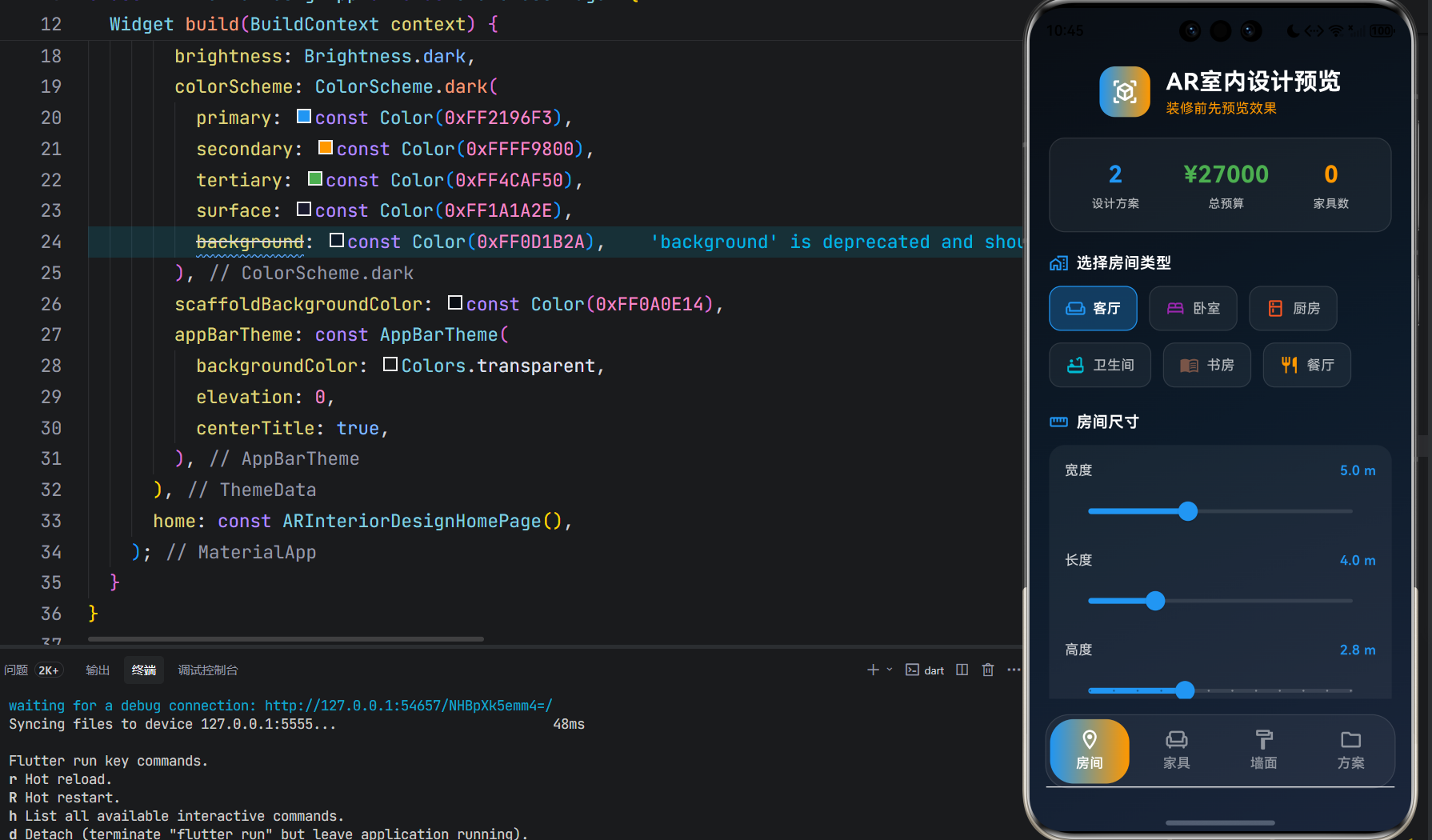

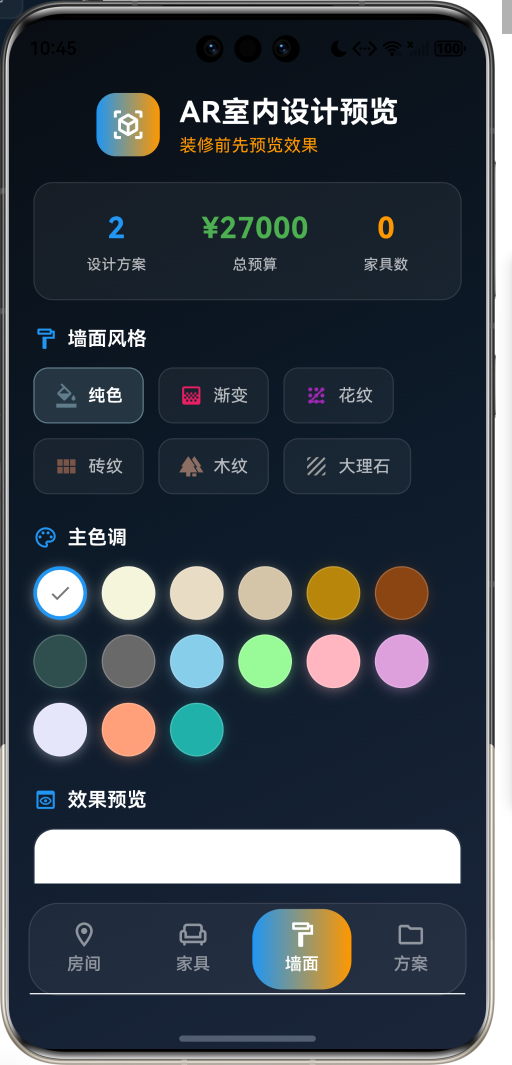

AR室内设计预览是一款创意工具类应用,让用户在装修前能够预览效果,看看家具怎么摆放、墙纸什么颜色好看,避免装修后后悔。通过虚拟的方式,用户可以在实际购买和装修之前,直观地看到各种设计方案的最终效果。
核心价值
| 维度 | 描述 |
|---|---|
| 可视化预览 | 将抽象的设计想法转化为直观的视觉效果 |
| 成本控制 | 在购买前预估成本,避免不必要的开支 |
| 决策辅助 | 多方案对比,帮助做出最佳装修决策 |
| 风险规避 | 提前发现问题,避免装修后的遗憾 |
二、功能架构
三、数据模型设计
3.1 房间配置模型
class RoomConfig {
  final RoomType type;        // 房间类型
  final double width;         // 宽度(米)
  final double length;        // 长度(米)
  final double height;        // 高度(米)
  final WallConfig? wallConfig; // 墙面配置
}
3.2 房间类型枚举
| 类型 | 标签 | 图标 | 颜色值 |
|---|---|---|---|
| livingRoom | 客厅 | weekend_outlined | #2196F3 |
| bedroom | 卧室 | bed_outlined | #9C27B0 |
| kitchen | 厨房 | kitchen_outlined | #FF5722 |
| bathroom | 卫生间 | bathtub_outlined | #00BCD4 |
| study | 书房 | menu_book_outlined | #795548 |
| diningRoom | 餐厅 | restaurant_outlined | #FF9800 |
3.3 家具分类枚举
| 类型 | 标签 | 图标 | 颜色值 |
|---|---|---|---|
| sofa | 沙发 | weekend | #8D6E63 |
| bed | 床 | bed | #7986CB |
| table | 桌子 | table_restaurant | #A1887F |
| chair | 椅子 | chair | #BCAAA4 |
| cabinet | 柜子 | dns | #90A4AE |
| lamp | 灯具 | light | #FFF176 |
| plant | 植物 | local_florist | #81C784 |
| carpet | 地毯 | grid_on | #CE93D8 |
| curtain | 窗帘 | curtains | #80DEEA |
| decoration | 装饰 | star | #FFD54F |
3.4 墙面风格枚举
| 风格 | 标签 | 图标 | 颜色值 |
|---|---|---|---|
| solid | 纯色 | format_color_fill | #607D8B |
| gradient | 渐变 | gradient | #E91E63 |
| pattern | 花纹 | pattern | #9C27B0 |
| brick | 砖纹 | view_module | #795548 |
| wood | 木纹 | forest | #8D6E63 |
| marble | 大理石 | texture | #9E9E9E |
3.5 设计状态枚举
| 状态 | 标签 | 图标 | 颜色值 |
|---|---|---|---|
| draft | 草稿 | edit_note | #9E9E9E |
| saved | 已保存 | bookmark | #2196F3 |
| completed | 已完成 | check_circle | #4CAF50 |
| shared | 已分享 | share | #FF9800 |
3.6 家具物品模型
class FurnitureItem {
  final String id;              // 物品ID
  final String name;            // 名称
  final FurnitureCategory category; // 分类
  final String? brand;          // 品牌
  final double width;           // 宽度(米)
  final double height;          // 高度(米)
  final double depth;           // 深度(米)
  final Color color;            // 颜色
  final double price;           // 价格
  final String? imageUrl;       // 图片URL
}
3.7 已放置家具模型
class PlacedFurniture {
  final String id;              // 放置ID
  final FurnitureItem furniture; // 家具信息
  final Offset position;        // 位置坐标
  final double rotation;        // 旋转角度
  final double scale;           // 缩放比例
}
3.8 设计方案模型
class DesignProject {
  final String id;              // 方案ID
  final String name;            // 方案名称
  final RoomConfig roomConfig;  // 房间配置
  final List<PlacedFurniture> furniture; // 已放置家具
  final DateTime createdAt;     // 创建时间
  final DateTime updatedAt;     // 更新时间
  final DesignStatus status;    // 状态
  final double? estimatedCost;  // 预估成本
  final String? thumbnail;      // 缩略图
}
四、界面设计
4.1 整体布局
应用采用底部标签导航结构,包含四个主要页面:
4.2 配色方案
应用采用深蓝色调主题,营造专业、现代的设计氛围:
| 元素 | 颜色值 | 用途 |
|---|---|---|
| Primary | #2196F3 | 主色调,科技蓝 |
| Secondary | #FF9800 | 辅助色,活力橙 |
| Tertiary | #4CAF50 | 点缀色,自然绿 |
| Background | #0A0E14 | 背景色,深邃黑 |
| Surface | #1A1A2E | 卡片背景 |
4.3 核心组件
房间预览组件
使用CustomPainter绘制房间的俯视图预览:
- 房间边界轮廓
- 尺寸标注显示
- 房间类型颜色标识
家具布局预览组件
在房间俯视图中展示已放置的家具:
- 家具位置标记
- 家具尺寸比例
- 不同分类的颜色区分
墙面预览组件
展示墙面设计效果:
- 纯色填充
- 渐变效果
- 花纹图案
- 砖纹效果
- 木纹效果
- 大理石效果
五、核心功能实现
5.1 房间设置流程
5.2 家具添加流程
5.3 墙面设计流程
5.4 方案保存流程
六、状态管理
6.1 主页状态
class _ARInteriorDesignHomePageState extends State<ARInteriorDesignHomePage>
    with SingleTickerProviderStateMixin {
  late TabController _tabController;
  RoomConfig _currentRoom = RoomConfig(...);
  final List<PlacedFurniture> _placedFurniture = [];
  final List<DesignProject> _projects = [];
  final List<FurnitureItem> _furnitureCatalog = [];
  int _totalProjects = 0;
  double _totalCost = 0;
}
6.2 数据更新方法
void _updateRoomConfig(RoomConfig config) {
  setState(() {
    _currentRoom = config;
  });
}

void _addFurniture(FurnitureItem item) {
  setState(() {
    _placedFurniture.add(PlacedFurniture(
      id: DateTime.now().millisecondsSinceEpoch.toString(),
      furniture: item,
      position: Offset(_currentRoom.width / 2, _currentRoom.length / 2),
    ));
  });
}

void _updateStatistics() {
  _totalProjects = _projects.length;
  _totalCost = _projects.fold(0, (sum, p) => sum + (p.estimatedCost ?? 0));
}
七、技术实现细节
7.1 依赖配置
dependencies:
  flutter:
    sdk: flutter
  cupertino_icons: ^1.0.2

environment:
  sdk: '>=3.0.0 <4.0.0'
7.2 主题配置
ThemeData(
  useMaterial3: true,
  brightness: Brightness.dark,
  colorScheme: ColorScheme.dark(
    primary: const Color(0xFF2196F3),
    secondary: const Color(0xFFFF9800),
    tertiary: const Color(0xFF4CAF50),
    surface: const Color(0xFF1A1A2E),
    background: const Color(0xFF0D1B2A),
  ),
)
7.3 自定义绘制
房间预览绘制
class RoomPreviewPainter extends CustomPainter {
void paint(Canvas canvas, Size size) {
// 绘制房间轮廓
final path = Path()
..moveTo(centerX - w, centerY - l * 0.3)
..lineTo(centerX + w, centerY - l * 0.3)
..lineTo(centerX + w, centerY + l * 0.7)
..lineTo(centerX - w, centerY + l * 0.7)
..close();
canvas.drawPath(path, paint);
canvas.drawPath(path, strokePaint);
}
}
墙面效果绘制
class WallPreviewPainter extends CustomPainter {
void paint(Canvas canvas, Size size) {
switch (style) {
case WallStyle.solid:
// 纯色填充
break;
case WallStyle.gradient:
// 渐变效果
break;
case WallStyle.brick:
// 砖纹效果
break;
// ... 其他风格
}
}
}
九、扩展功能规划
9.1 短期规划
| 功能 | 描述 | 优先级 |
|---|---|---|
| AR相机集成 | 使用设备摄像头实现真实AR预览 | 高 |
| 家具拖拽 | 支持手势拖拽调整家具位置 | 高 |
| 3D模型展示 | 家具3D模型渲染展示 | 高 |
| 数据持久化 | 本地存储设计方案数据 | 中 |
9.2 中期规划
| 功能 | 描述 | 优先级 |
|---|---|---|
| 家具商城 | 集成在线家具购买功能 | 中 |
| 设计师推荐 | 专业设计师方案推荐 | 中 |
| VR预览 | 支持VR设备沉浸式预览 | 低 |
| 智能推荐 | AI智能家具搭配推荐 | 低 |
9.3 长期规划
| 功能 | 描述 | 优先级 |
|---|---|---|
| 协作设计 | 多人协作设计房间 | 低 |
| 施工对接 | 对接装修施工服务 | 低 |
| 效果图导出 | 导出高质量效果图 | 低 |
十、项目结构
lib/
├── main_ar_interior_design.dart    # 应用入口
│   ├── ARInteriorDesignApp         # 应用配置
│   ├── ARInteriorDesignHomePage    # 主页面
│   ├── _RoomSetupTab               # 房间设置页
│   ├── _FurnitureTab               # 家具摆放页
│   ├── _WallDesignTab              # 墙面设计页
│   ├── _MyProjectsTab              # 方案管理页
│   ├── RoomPreviewPainter          # 房间预览绘制
│   ├── FurnitureLayoutPainter      # 家具布局绘制
│   └── WallPreviewPainter          # 墙面效果绘制
│
├── models/
│   ├── room_config.dart            # 房间配置模型
│   ├── furniture_item.dart         # 家具物品模型
│   ├── placed_furniture.dart       # 已放置家具模型
│   ├── wall_config.dart            # 墙面配置模型
│   └── design_project.dart         # 设计方案模型
│
├── enums/
│   ├── room_type.dart              # 房间类型枚举
│   ├── furniture_category.dart     # 家具分类枚举
│   ├── wall_style.dart             # 墙面风格枚举
│   └── design_status.dart          # 设计状态枚举
│
└── utils/
    └── layout_utils.dart           # 布局工具类
十一、开发说明
11.1 运行方式
# 获取依赖
flutter pub get

# 运行应用
flutter run -d <device_id>

# 指定入口文件运行
flutter run -d <device_id> -t lib/main_ar_interior_design.dart
11.2 注意事项
- 尺寸单位:房间和家具尺寸使用米作为单位
- 坐标系:布局预览使用俯视图坐标系
- 数据存储:当前版本使用内存存储,重启后数据丢失
- AR功能:真实AR预览需要设备支持ARCore/ARKit
装修前先预览效果,避免装修后悔
AR Interior Design Preview - Visualize Before You Renovate

作为“人工智能6S店”的官方数字引擎,为AI开发者与企业提供一个覆盖软硬件全栈、一站式门户。
更多推荐


 9
9 0
0- 0


 已为社区贡献10条内容

所有评论(0)