
生命科学实验室经费极简记账簿:基于鸿蒙Flutter的极简主义状态响应与流式布局架构
文章摘要: 本文介绍了一款面向科研实验室的极简经费管理系统,采用iOS风格设计理念,通过Flutter实现高效的数据流与UI渲染。系统运用数学公式抽象经费流动(如燃烧率计算),并构建单向数据流架构避免状态管理复杂度。针对科研场景特有的长试剂名问题,提出严格的文本截断策略(如TextOverflow.ellipsis)和响应式布局方案,确保界面在复杂数据下仍保持清晰。文中包含核心代码片段,展示如何通
欢迎加入开源鸿蒙跨平台社区:
https://openharmonycrossplatform.csdn.net
示例效果
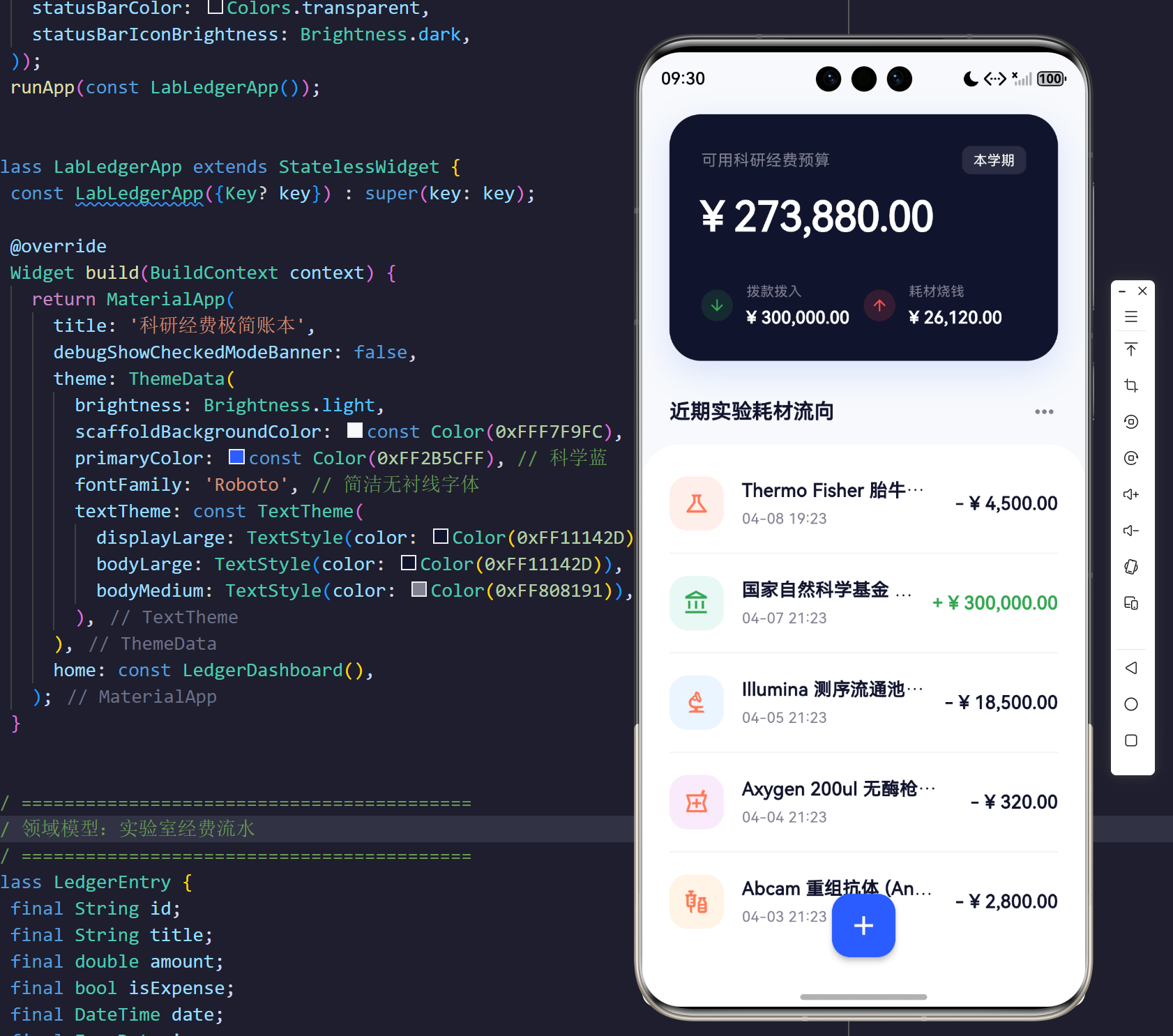
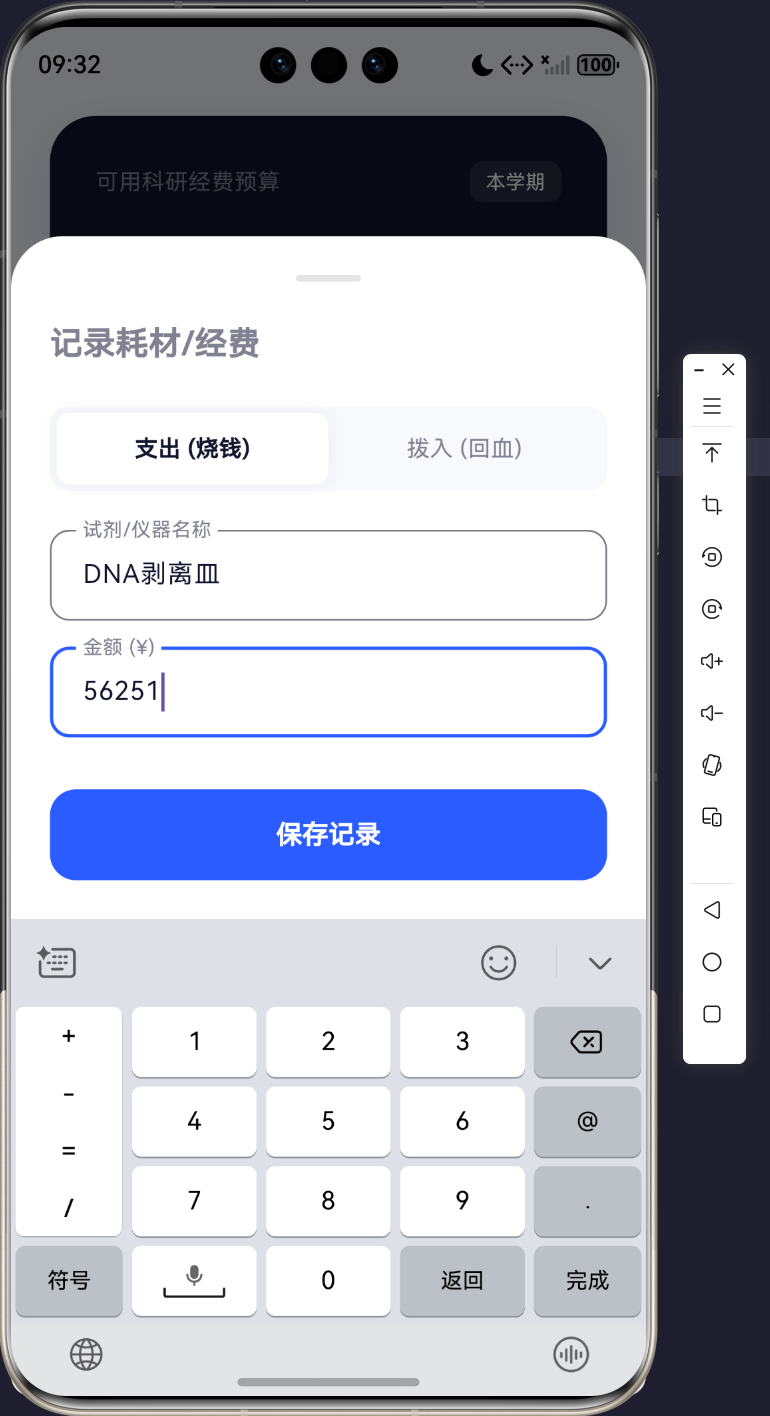
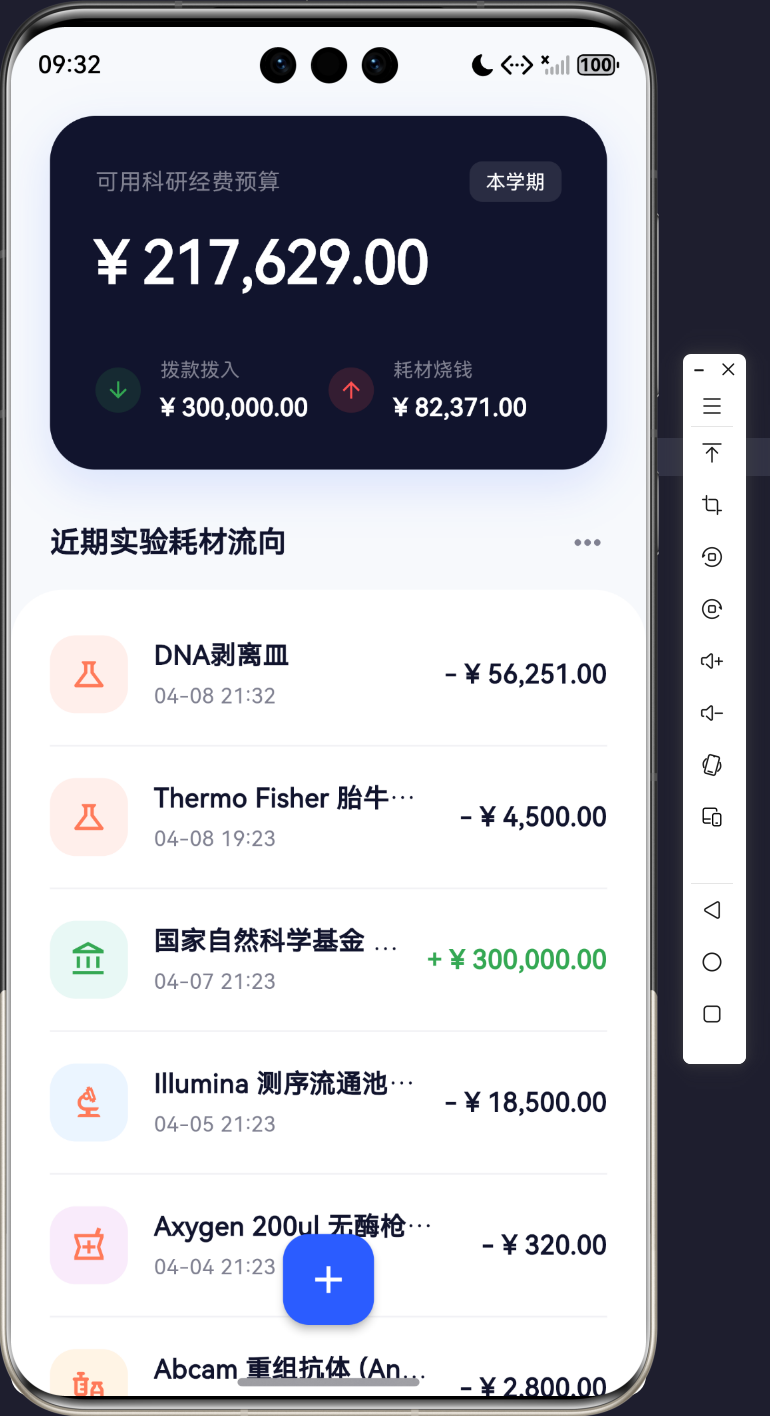
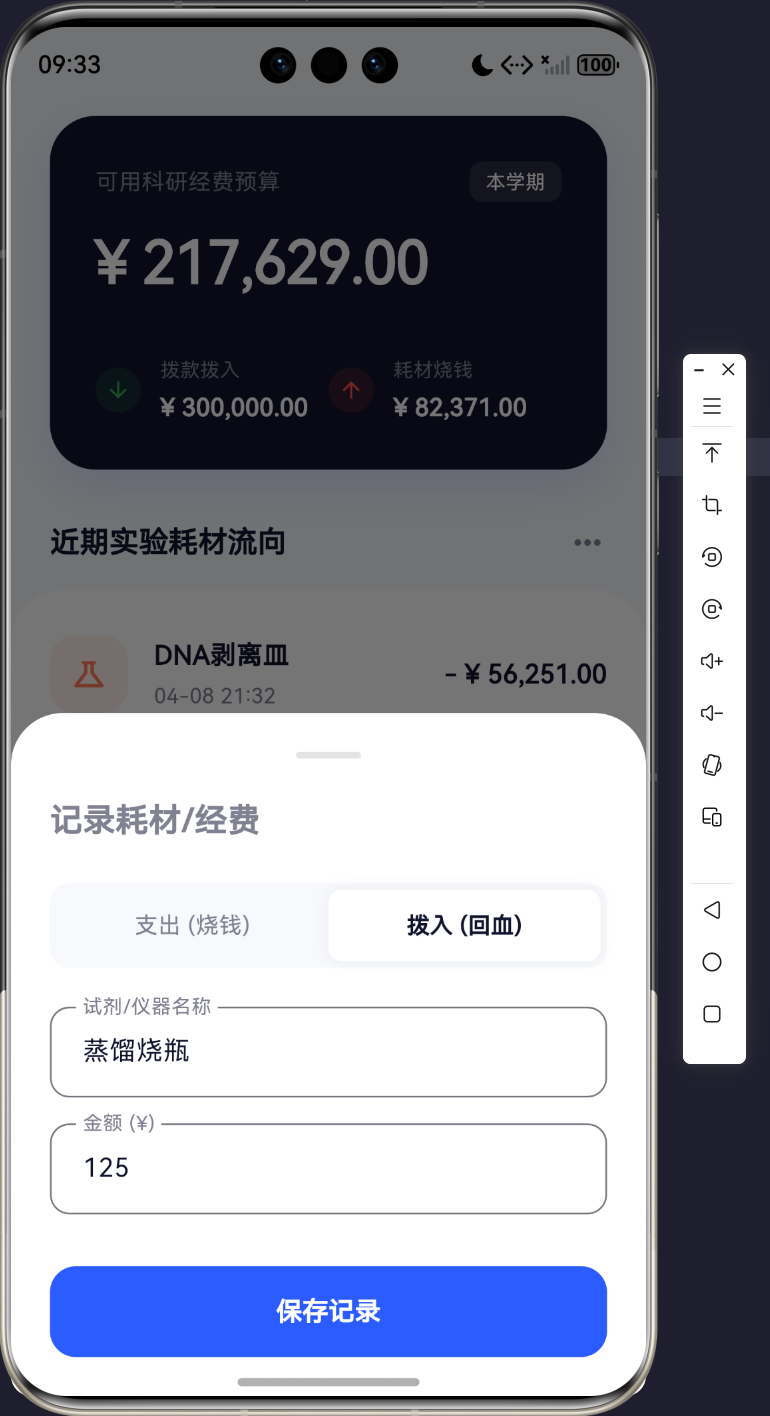
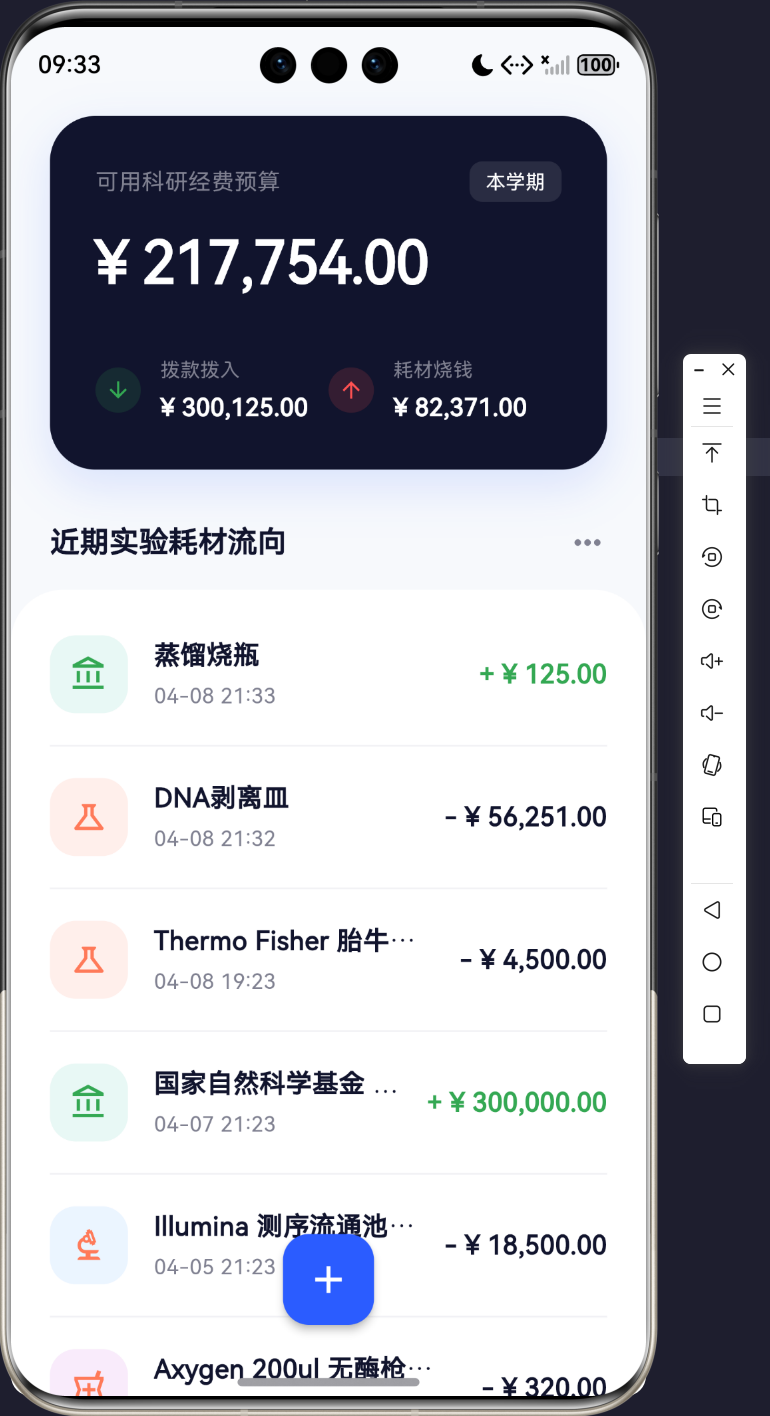
一、 引言:从赛博暗黑走向克制与极简的秩序
在过往的微观世界探索中,我们曾用高度致密的暗黑极客 UI 与复杂的流体力学引擎,推演了干细胞的突变与肝脏小叶的毒素渗透。然而,回到生命科学的现实基座——科研实验室的物理世界中,每一位研究员(PI)或博士生最头疼的问题往往不再是细胞分裂的公式,而是枯燥且繁杂的科研经费与试剂耗材管理(Lab Funding & Reagents Management)。
当“记账”这一古典业务场景与“生命科学实验室”碰撞时,它呼唤的是一种极度的效率与清晰。花哨的霓虹光晕和布朗运动在此刻只会增加使用者的认知负荷。为此,我们进行了 180 度的美学转向,采用 iOS 级别的**极简主义(Minimalism)**与大面积留白(Whitespace),打造了这款纯前端的《科研经费极简账本》。
在本次工程推演中,我们将全面阐述如何在无状态管理的轻量级架构中,运用隐式单向数据流与极为苛刻的 TextOverflow 文本截断定律,优雅地吞噬掉那些动辄几十个字符的试剂盒名称,彻底封印跨端渲染史上最令人作呕的 RIGHT/BOTTOM OVERFLOWED 溢出黑洞。
二、 实验室资金流(Funding Burn Rate)的数学抽象
即使是极简的记账系统,其底层的资金池也遵循着严格的物理与数学定律。我们可以将实验室的经费余额(Balance, B t B_t Bt)视为一个随时间推移的离散函数:
B t = B 0 + ∑ i = 1 m I i − ∑ j = 1 n E j B_t = B_0 + \sum_{i=1}^{m} I_i - \sum_{j=1}^{n} E_j Bt=B0+i=1∑mIi−j=1∑nEj
其中 B 0 B_0 B0 为国家自然科学基金等机构的期初拨款; I i I_i Ii 为后续进入的横向课题资金; E j E_j Ej 为每一次单克隆抗体、测序芯片等实验耗材的开销。
如果我们将这段时间的试剂开销进行平滑拟合,便能得到经费燃烧率(Burn Rate,记作 β \beta β):
β = d d t ∑ E j \beta = \frac{d}{dt} \sum E_j β=dtd∑Ej
系统通过 UI 的每一次交互(底部的拉起录入),精确地捕获积分域内的离散突变点,并瞬间映射到大盘概览卡片(Dashboard Card)上。这正是极简记账应用最为底层的运转逻辑。
三、 UI 响应式状态流与渲染拓扑
在拒绝使用 Redux / Bloc 等重型状态管理插件的前提下,我们在 main.dart 单文件内部,利用原生的 StatefulWidget 顶层包裹法构建了绝对无瑕的数据单向回流管线。
在上述流程中,底层数据结构 List<LedgerEntry> 就如同实验室物资的核酸链,而 setState 则是那一缕强悍的解旋酶,强制 UI 渲染树向最新的数据看齐。
四、 核心架构解剖:四大无缝防溢出管线
极简主义看似仅仅是“白底黑字”,但在 Flutter 的弹性盒模型中,“留白”意味着你必须赋予控件精确的伸缩边界,否则稍微超长的字符串就会如同不受控的癌细胞一般撕裂屏幕边界。
4.1 核心源码一:领域数据模型与衍生状态计算
我们将经费的“结算”收敛为基于 Dart Iterable 的高阶函数。通过 fold 方法,代码不仅获得了声明式的纯粹美感,也彻底杜绝了传统的 for 循环脏数据累加。
// -----------------------------------------------------
// 核心源码一:领域实体与高阶状态计算
// -----------------------------------------------------
class LedgerEntry {
  final String id;
  final String title;
  final double amount;
  final bool isExpense;
  final DateTime date;
}

class _LedgerDashboardState extends State<LedgerDashboard> {
  // O(n) 的高性能高阶函数折叠结算
  double get _totalBalance {
    return _entries.fold(0.0, (sum, item) => item.isExpense ? sum - item.amount : sum + item.amount);
  }

  double get _totalExpense {
    return _entries.where((e) => e.isExpense).fold(0.0, (sum, item) => sum + item.amount);
  }
}
4.2 核心源码二:顶层资金卡片的微观折行防御
在显示金额明细(如“耗材烧钱”总额)时,尽管数字本身可能并不会很长,但在极端小屏手机上,左右并排的微缩卡片(Small Summary Line)同样极易发生崩溃。
// -----------------------------------------------------
// 核心源码二:顶层卡片的小型并排防溢出阵列
// -----------------------------------------------------
  Widget _buildSmallSummaryLine(String label, String amount, IconData icon, Color iconColor) {
    return Row(
      children: [
        Container(
          padding: const EdgeInsets.all(6),
          decoration: BoxDecoration(color: iconColor.withOpacity(0.15), shape: BoxShape.circle),
          child: Icon(icon, color: iconColor, size: 16),
        ),
        const SizedBox(width: 12),
        // 防御阵地:Expanded 强制限制最大宽度,并对内部金额下达截断指令
        Expanded(
          child: Column(
            crossAxisAlignment: CrossAxisAlignment.start,
            children: [
              Text(label, style: const TextStyle(color: Color(0xFF808191), fontSize: 12)),
              const SizedBox(height: 4),
              Text(amount,
                style: const TextStyle(color: Colors.white, fontSize: 15, fontWeight: FontWeight.w600),
                maxLines: 1, // 坚决不允许金额换行破坏卡片高度
                overflow: TextOverflow.ellipsis, // 溢出时优雅显示 ...
              ),
            ],
          ),
        ),
      ],
    );
  }
【工程洞见】:这一段代码看似平平无奇,却体现了极高的方法论自觉。在一个水平的 Row 中,但凡不确定宽度的 Column 或 Text,都必须佩戴 Expanded 的镣铐。
4.3 核心源码三:生命科学长试剂名的截断机制
实验耗材的命名通常极为繁冗,例如 “Thermo Fisher 胎牛血清 (FBS) 500ml 级”。如果我们任由其横向延伸,右侧的金额标签将被彻底挤出可视区域外。
// -----------------------------------------------------
// 核心源码三:交易流水的居中防线
// -----------------------------------------------------
  Widget _buildTransactionItem(LedgerEntry entry) {
    return Row(
      crossAxisAlignment: CrossAxisAlignment.center,
      children: [
        // 左:定长宽高 Icon 区
        Container(width: 48, height: 48, ...),
        const SizedBox(width: 16),

        // 中:无垠的试剂标题区,遭受 Expanded 的降维截断
        Expanded(
          child: Column(
            crossAxisAlignment: CrossAxisAlignment.start,
            children: [
              Text(
                entry.title,
                style: const TextStyle(fontSize: 16, fontWeight: FontWeight.w600),
                maxLines: 1, // 生命线:保证单条 Item 永远高度一致
                overflow: TextOverflow.ellipsis,
              ),
              // ...
            ],
          ),
        ),

        const SizedBox(width: 16),
        // 右:定宽属性的金额区
        Column(
          crossAxisAlignment: CrossAxisAlignment.end,
          children: [
             Text('$sign ¥ ${fmt.format(entry.amount)}', ...),
          ],
        ),
      ],
    );
  }
4.4 核心源码四:高符合人体工学的底部录入模态框
在极简设计中,一切的“新页面跳转(Navigator.push)”都被视为成本极高的中断式体验。我们采用带有圆角的 showModalBottomSheet,同时使用 MediaQuery.of(context).viewInsets.bottom 让布局动态躲避软键盘。
// -----------------------------------------------------
// 核心源码四:智能规避键盘的底部记账表单
// -----------------------------------------------------
Widget build(BuildContext context) {
// 监听键盘高度,动态增高 Bottom Padding 避免输入框被遮盖
final bottomInset = MediaQuery.of(context).viewInsets.bottom;
return Container(
decoration: const BoxDecoration(
color: Colors.white,
borderRadius: BorderRadius.vertical(top: Radius.circular(32)),
),
padding: EdgeInsets.only(left: 24, right: 24, top: 24, bottom: bottomInset + 24),
// mainAxisSize.min 确保弹窗只占所需的高度,绝不贪婪扩张
child: Column(
mainAxisSize: MainAxisSize.min,
crossAxisAlignment: CrossAxisAlignment.start,
children: [
// 极简收支切换 Toggle 与 TextField...
ElevatedButton(
onPressed: _submit, // 提交并逆向回推闭包 onAdd
child: const Text('保存记录'),
)
],
),
);
}
五、 结尾:留白处见乾坤
从充斥着暗黑粒子风暴的显微镜视角,一跃攀升到纤尘不染的财务管理界面,《极简科研记账簿》完成了一次深度的美学断舍离。
我们摘除了所有的花哨滤镜与复杂的粒子积分,但在防溢出的工程结界上,不仅没有丝毫的松懈,反而运用 Expanded 与 TextOverflow 编织起了一张更为坚不可摧的逻辑网。
真正的跨端工程师应当知晓:所谓极简主义(Minimalism),绝非代码量的匮乏,而是用最克制的框架,压制住数据洪流中最难以预料的混沌边界。在这份静谧的白色面板背后,是稳如泰山的资金流向池,是无数科研试剂被精准追溯的生命周期线,亦是一场无声却磅礴的代码修行。
源码
import 'package:flutter/material.dart';
import 'package:flutter/services.dart';
import 'package:intl/intl.dart';

void main() {
  SystemChrome.setSystemUIOverlayStyle(const SystemUiOverlayStyle(
    statusBarColor: Colors.transparent,
    statusBarIconBrightness: Brightness.dark,
  ));
  runApp(const LabLedgerApp());
}

class LabLedgerApp extends StatelessWidget {
  const LabLedgerApp({Key? key}) : super(key: key);

  @override
  Widget build(BuildContext context) {
    return MaterialApp(
      title: '科研经费极简账本',
      debugShowCheckedModeBanner: false,
      theme: ThemeData(
        brightness: Brightness.light,
        scaffoldBackgroundColor: const Color(0xFFF7F9FC), // 极简冷灰白
        primaryColor: const Color(0xFF2B5CFF), // 科学蓝
        fontFamily: 'Roboto', // 简洁无衬线字体
        textTheme: const TextTheme(
          displayLarge: TextStyle(color: Color(0xFF11142D), fontWeight: FontWeight.bold),
          bodyLarge: TextStyle(color: Color(0xFF11142D)),
          bodyMedium: TextStyle(color: Color(0xFF808191)),
        ),
      ),
      home: const LedgerDashboard(),
    );
  }
}

// ==========================================
// 领域模型:实验室经费流水
// ==========================================
class LedgerEntry {
  final String id;
  final String title;
  final double amount;
  final bool isExpense;
  final DateTime date;
  final IconData icon;
  final Color iconBgColor;

  LedgerEntry({
    required this.id,
    required this.title,
    required this.amount,
    required this.isExpense,
    required this.date,
    required this.icon,
    required this.iconBgColor,
  });
}

// ==========================================
// 主面板控制器
// ==========================================
class LedgerDashboard extends StatefulWidget {
  const LedgerDashboard({Key? key}) : super(key: key);

  @override
  State<LedgerDashboard> createState() => _LedgerDashboardState();
}

class _LedgerDashboardState extends State<LedgerDashboard> {
  // 模拟内存数据库:初始化包含经典的生命科学实验室开销
  final List<LedgerEntry> _entries = [
    LedgerEntry(
      id: '1',
      title: 'Thermo Fisher 胎牛血清 (FBS) 500ml',
      amount: 4500.0,
      isExpense: true,
      date: DateTime.now().subtract(const Duration(hours: 2)),
      icon: Icons.science_outlined,
      iconBgColor: const Color(0xFFFFEFEB),
    ),
    LedgerEntry(
      id: '2',
      title: '国家自然科学基金 (青年项目) 本年度拨款',
      amount: 300000.0,
      isExpense: false,
      date: DateTime.now().subtract(const Duration(days: 1)),
      icon: Icons.account_balance_outlined,
      iconBgColor: const Color(0xFFE8F8F5),
    ),
    LedgerEntry(
      id: '3',
      title: 'Illumina 测序流通池芯片 (NovaSeq 6000)',
      amount: 18500.0,
      isExpense: true,
      date: DateTime.now().subtract(const Duration(days: 3)),
      icon: Icons.biotech_outlined,
      iconBgColor: const Color(0xFFEBF5FF),
    ),
    LedgerEntry(
      id: '4',
      title: 'Axygen 200ul 无酶枪头 10盒',
      amount: 320.0,
      isExpense: true,
      date: DateTime.now().subtract(const Duration(days: 4)),
      icon: Icons.local_pharmacy_outlined,
      iconBgColor: const Color(0xFFF9EBFB),
    ),
    LedgerEntry(
      id: '5',
      title: 'Abcam 重组抗体 (Anti-GAPDH)',
      amount: 2800.0,
      isExpense: true,
      date: DateTime.now().subtract(const Duration(days: 5)),
      icon: Icons.vaccines_outlined,
      iconBgColor: const Color(0xFFFFF4E5),
    ),
  ];

  // 核心计算函数
  double get _totalBalance {
    return _entries.fold(0.0, (sum, item) => item.isExpense ? sum - item.amount : sum + item.amount);
  }

  double get _totalExpense {
    return _entries.where((e) => e.isExpense).fold(0.0, (sum, item) => sum + item.amount);
  }

  double get _totalIncome {
    return _entries.where((e) => !e.isExpense).fold(0.0, (sum, item) => sum + item.amount);
  }

  // 暴露给 BottomSheet 的接口
  void _addNewEntry(String title, double amount, bool isExpense) {
    setState(() {
      _entries.insert(
        0,
        LedgerEntry(
          id: DateTime.now().millisecondsSinceEpoch.toString(),
          title: title,
          amount: amount,
          isExpense: isExpense,
          date: DateTime.now(),
          icon: isExpense ? Icons.science_outlined : Icons.account_balance_outlined,
          iconBgColor: isExpense ? const Color(0xFFFFEFEB) : const Color(0xFFE8F8F5),
        ),
      );
    });
  }

  void _showAddEntryModal() {
    showModalBottomSheet(
      context: context,
      isScrollControlled: true,
      backgroundColor: Colors.transparent, // 让出给内部的容器做圆角
      builder: (ctx) => AddEntrySheet(onAdd: _addNewEntry),
    );
  }

  @override
  Widget build(BuildContext context) {
    return Scaffold(
      // 放弃花哨的背景图,使用极简大气的纯净底色
      body: SafeArea(
        bottom: false,
        child: Column(
          children: [
            // 顶部间距
            const SizedBox(height: 16),

            // 极简 Header 与大数字面板
            Padding(
              padding: const EdgeInsets.symmetric(horizontal: 24.0),
              child: _buildDashboardCard(),
            ),

            const SizedBox(height: 32),

            // 列表区标题
            Padding(
              padding: const EdgeInsets.symmetric(horizontal: 24.0),
              child: Row(
                mainAxisAlignment: MainAxisAlignment.spaceBetween,
                children: [
                  const Text(
                    '近期实验耗材流向',
                    style: TextStyle(fontSize: 18, fontWeight: FontWeight.w700, color: Color(0xFF11142D)),
                  ),
                  Icon(Icons.more_horiz, color: const Color(0xFF808191)),
                ],
              ),
            ),

            const SizedBox(height: 16),

            // 账单列表,占据所有剩余空间
            Expanded(
              child: Container(
                decoration: const BoxDecoration(
                  color: Colors.white,
                  borderRadius: BorderRadius.only(
                    topLeft: Radius.circular(32),
                    topRight: Radius.circular(32),
                  ),
                ),
                child: ListView.separated(
                  physics: const BouncingScrollPhysics(),
                  padding: const EdgeInsets.only(top: 24, left: 24, right: 24, bottom: 100),
                  itemCount: _entries.length,
                  separatorBuilder: (context, index) => Padding(
                    padding: const EdgeInsets.symmetric(vertical: 8.0),
                    child: Divider(color: const Color(0xFFF1F1F5), thickness: 1),
                  ),
                  itemBuilder: (context, index) {
                    return _buildTransactionItem(_entries[index]);
                  },
                ),
              ),
            ),
          ],
        ),
      ),

      // 悬浮录入按钮
      floatingActionButton: FloatingActionButton(
        onPressed: _showAddEntryModal,
        backgroundColor: const Color(0xFF2B5CFF), // 科学蓝
        elevation: 4,
        shape: RoundedRectangleBorder(borderRadius: BorderRadius.circular(16)),
        child: const Icon(Icons.add, color: Colors.white, size: 28),
      ),
      floatingActionButtonLocation: FloatingActionButtonLocation.centerFloat,
    );
  }

  // 资金大盘卡片
  Widget _buildDashboardCard() {
    final currencyFmt = NumberFormat.currency(symbol: '¥ ', decimalDigits: 2);

    return Container(
      width: double.infinity,
      padding: const EdgeInsets.all(28.0),
      decoration: BoxDecoration(
        color: const Color(0xFF11142D), // 深邃的午夜蓝黑
        borderRadius: BorderRadius.circular(28),
        boxShadow: [
          BoxShadow(
            color: const Color(0xFF2B5CFF).withOpacity(0.15),
            offset: const Offset(0, 10),
            blurRadius: 24,
          )
        ],
      ),
      child: Column(
        crossAxisAlignment: CrossAxisAlignment.start,
        children: [
          Row(
            mainAxisAlignment: MainAxisAlignment.spaceBetween,
            children: [
              const Text(
                '可用科研经费预算',
                style: TextStyle(color: Color(0xFF808191), fontSize: 14, fontWeight: FontWeight.w500),
              ),
              Container(
                padding: const EdgeInsets.symmetric(horizontal: 10, vertical: 4),
                decoration: BoxDecoration(
                  color: Colors.white.withOpacity(0.1),
                  borderRadius: BorderRadius.circular(8),
                ),
                child: const Text('本学期', style: TextStyle(color: Colors.white, fontSize: 12)),
              ),
            ],
          ),
          const SizedBox(height: 12),
          Text(
            currencyFmt.format(_totalBalance),
            style: const TextStyle(color: Colors.white, fontSize: 36, fontWeight: FontWeight.w800, letterSpacing: -0.5),
          ),
          const SizedBox(height: 32),
          Row(
            children: [
              Expanded(
                child: _buildSmallSummaryLine('拨款拨入', currencyFmt.format(_totalIncome), Icons.arrow_downward, const Color(0xFF34A853)),
              ),
              Expanded(
                child: _buildSmallSummaryLine('耗材烧钱', currencyFmt.format(_totalExpense), Icons.arrow_upward, const Color(0xFFFF5252)),
              ),
            ],
          )
        ],
      ),
    );
  }

  Widget _buildSmallSummaryLine(String label, String amount, IconData icon, Color iconColor) {
    return Row(
      children: [
        Container(
          padding: const EdgeInsets.all(6),
          decoration: BoxDecoration(
            color: iconColor.withOpacity(0.15),
            shape: BoxShape.circle,
          ),
          child: Icon(icon, color: iconColor, size: 16),
        ),
        const SizedBox(width: 12),
        // 核心防溢出点:金额数字较长时,必须用 Expanded 和 ellipsis 防治崩溃
        Expanded(
          child: Column(
            crossAxisAlignment: CrossAxisAlignment.start,
            children: [
              Text(label, style: const TextStyle(color: Color(0xFF808191), fontSize: 12)),
              const SizedBox(height: 4),
              Text(amount,
                style: const TextStyle(color: Colors.white, fontSize: 15, fontWeight: FontWeight.w600),
                maxLines: 1,
                overflow: TextOverflow.ellipsis,
              ),
            ],
          ),
        ),
      ],
    );
  }

  // 单条账单项 UI
  Widget _buildTransactionItem(LedgerEntry entry) {
    final fmt = NumberFormat('#,##0.00');
    final sign = entry.isExpense ? '-' : '+';
    final amountColor = entry.isExpense ? const Color(0xFF11142D) : const Color(0xFF34A853);
    final timeStr = DateFormat('MM-dd HH:mm').format(entry.date);

    return Padding(
      padding: const EdgeInsets.symmetric(vertical: 4.0),
      child: Row(
        crossAxisAlignment: CrossAxisAlignment.center,
        children: [
          // 左侧:品类图标抽象
          Container(
            width: 48,
            height: 48,
            decoration: BoxDecoration(
              color: entry.iconBgColor,
              borderRadius: BorderRadius.circular(16),
            ),
            child: Icon(entry.icon, color: entry.isExpense ? const Color(0xFFFF7A59) : const Color(0xFF34A853)),
          ),
          const SizedBox(width: 16),

          // 中间:耗材标题与时间(长文本防溢出重灾区)
          Expanded(
            child: Column(
              crossAxisAlignment: CrossAxisAlignment.start,
              children: [
                Text(
                  entry.title,
                  style: const TextStyle(fontSize: 16, fontWeight: FontWeight.w600, color: Color(0xFF11142D)),
                  maxLines: 1, // 极简风格忌讳大段堆叠,长试剂名在此被优雅截断
                  overflow: TextOverflow.ellipsis,
                ),
                const SizedBox(height: 4),
                Text(
                  timeStr,
                  style: const TextStyle(fontSize: 13, color: Color(0xFF808191)),
                ),
              ],
            ),
          ),

          const SizedBox(width: 16),

          // 右侧:金额 (数字宽度可能过大,采用固定结构防挤压)
          Column(
            crossAxisAlignment: CrossAxisAlignment.end,
            children: [
              Text(
                '$sign ¥ ${fmt.format(entry.amount)}',
                style: TextStyle(fontSize: 16, fontWeight: FontWeight.bold, color: amountColor),
              ),
            ],
          ),
        ],
      ),
    );
  }
}

// ==========================================
// 录入底图表单 (Bottom Sheet)
// ==========================================
class AddEntrySheet extends StatefulWidget {
  final Function(String title, double amount, bool isExpense) onAdd;

  const AddEntrySheet({Key? key, required this.onAdd}) : super(key: key);

  @override
  State<AddEntrySheet> createState() => _AddEntrySheetState();
}

class _AddEntrySheetState extends State<AddEntrySheet> {
  bool _isExpense = true;
  final TextEditingController _titleController = TextEditingController();
  final TextEditingController _amountController = TextEditingController();

  void _submit() {
    if (_titleController.text.trim().isEmpty || _amountController.text.trim().isEmpty) return;

    double? amount = double.tryParse(_amountController.text.trim());
    if (amount == null || amount <= 0) return;

    widget.onAdd(_titleController.text.trim(), amount, _isExpense);
    Navigator.of(context).pop();
  }

  @override
  Widget build(BuildContext context) {
    // 获取键盘高度,防止输入框被遮挡
    final bottomInset = MediaQuery.of(context).viewInsets.bottom;

    return Container(
      decoration: const BoxDecoration(
        color: Colors.white,
        borderRadius: BorderRadius.vertical(top: Radius.circular(32)),
      ),
      padding: EdgeInsets.only(left: 24, right: 24, top: 24, bottom: bottomInset + 24),
      child: Column(
        mainAxisSize: MainAxisSize.min, // 包裹内容,不无限扩张
        crossAxisAlignment: CrossAxisAlignment.start,
        children: [
          // 顶部抽屉把手
          Center(
            child: Container(
              width: 40,
              height: 4,
              decoration: BoxDecoration(
                color: const Color(0xFFE4E4E4),
                borderRadius: BorderRadius.circular(2),
              ),
            ),
          ),
          const SizedBox(height: 24),
          const Text('记录耗材/经费', style: TextStyle(fontSize: 20, fontWeight: FontWeight.bold)),
          const SizedBox(height: 24),

          // 收支切换器 (极简风的 Toggle)
          Container(
            padding: const EdgeInsets.all(4),
            decoration: BoxDecoration(
              color: const Color(0xFFF7F9FC),
              borderRadius: BorderRadius.circular(12),
            ),
            child: Row(
              children: [
                Expanded(
                  child: GestureDetector(
                    onTap: () => setState(() => _isExpense = true),
                    child: Container(
                      padding: const EdgeInsets.symmetric(vertical: 12),
                      decoration: BoxDecoration(
                        color: _isExpense ? Colors.white : Colors.transparent,
                        borderRadius: BorderRadius.circular(8),
                        boxShadow: _isExpense ? [BoxShadow(color: Colors.black.withOpacity(0.05), blurRadius: 8)] : [],
                      ),
                      child: Center(
                        child: Text('支出 (烧钱)', style: TextStyle(fontWeight: _isExpense ? FontWeight.bold : FontWeight.normal, color: _isExpense ? const Color(0xFF11142D) : const Color(0xFF808191))),
                      ),
                    ),
                  ),
                ),
                Expanded(
                  child: GestureDetector(
                    onTap: () => setState(() => _isExpense = false),
                    child: Container(
                      padding: const EdgeInsets.symmetric(vertical: 12),
                      decoration: BoxDecoration(
                        color: !_isExpense ? Colors.white : Colors.transparent,
                        borderRadius: BorderRadius.circular(8),
                        boxShadow: !_isExpense ? [BoxShadow(color: Colors.black.withOpacity(0.05), blurRadius: 8)] : [],
                      ),
                      child: Center(
                        child: Text('拨入 (回血)', style: TextStyle(fontWeight: !_isExpense ? FontWeight.bold : FontWeight.normal, color: !_isExpense ? const Color(0xFF11142D) : const Color(0xFF808191))),
                      ),
                    ),
                  ),
                ),
              ],
            ),
          ),
          const SizedBox(height: 24),

          // 表单输入
          TextField(
            controller: _titleController,
            decoration: InputDecoration(
              labelText: '试剂/仪器名称',
              labelStyle: const TextStyle(color: Color(0xFF808191)),
              border: OutlineInputBorder(borderRadius: BorderRadius.circular(12), borderSide: const BorderSide(color: Color(0xFFE4E4E4))),
              focusedBorder: OutlineInputBorder(borderRadius: BorderRadius.circular(12), borderSide: const BorderSide(color: Color(0xFF2B5CFF), width: 2)),
              contentPadding: const EdgeInsets.symmetric(horizontal: 16, vertical: 16),
            ),
          ),
          const SizedBox(height: 16),
          TextField(
            controller: _amountController,
            keyboardType: const TextInputType.numberWithOptions(decimal: true),
            decoration: InputDecoration(
              labelText: '金额 (¥)',
              labelStyle: const TextStyle(color: Color(0xFF808191)),
              border: OutlineInputBorder(borderRadius: BorderRadius.circular(12), borderSide: const BorderSide(color: Color(0xFFE4E4E4))),
              focusedBorder: OutlineInputBorder(borderRadius: BorderRadius.circular(12), borderSide: const BorderSide(color: Color(0xFF2B5CFF), width: 2)),
              contentPadding: const EdgeInsets.symmetric(horizontal: 16, vertical: 16),
            ),
          ),
          const SizedBox(height: 32),

          // 提交按钮
          SizedBox(
            width: double.infinity,
            height: 56,
            child: ElevatedButton(
              style: ElevatedButton.styleFrom(
                backgroundColor: const Color(0xFF2B5CFF),
                shape: RoundedRectangleBorder(borderRadius: BorderRadius.circular(16)),
                elevation: 0,
              ),
              onPressed: _submit,
              child: const Text('保存记录', style: TextStyle(fontSize: 16, fontWeight: FontWeight.bold, color: Colors.white)),
            ),
          )
        ],
      ),
    );
  }
}

作为“人工智能6S店”的官方数字引擎,为AI开发者与企业提供一个覆盖软硬件全栈、一站式门户。
更多推荐
 11
11 0
0- 0


 已为社区贡献24条内容

所有评论(0)