
Flutter for OpenHarmony三方库适配实战:privacy_window 隐私窗口
隐私窗口是移动应用安全的重要功能,用于防止敏感页面被截屏、录屏。在金融支付、密码输入、身份验证等场景中,隐私窗口可以有效保护用户信息安全。在 Flutter for OpenHarmony 应用开发中,是一个专门为鸿蒙平台设计的隐私窗口插件,提供了系统级的截屏/录屏防护能力。privacy_window 是一个专门为 OpenHarmony 平台设计的隐私窗口插件,提供了系统级的截屏/录屏防护能力
欢迎加入开源鸿蒙跨平台社区:https://openharmonycrossplatform.csdn.net
本文基于flutter3.27.5开发
一、privacy_window 库概述
隐私窗口是移动应用安全的重要功能,用于防止敏感页面被截屏、录屏。在金融支付、密码输入、身份验证等场景中,隐私窗口可以有效保护用户信息安全。在 Flutter for OpenHarmony 应用开发中,privacy_window 是一个专门为鸿蒙平台设计的隐私窗口插件,提供了系统级的截屏/录屏防护能力。
privacy_window 库特点
privacy_window 库基于 OpenHarmony 原生 API 实现,提供了以下核心特性:
系统级防护:调用 OpenHarmony 系统 API setWindowPrivacyMode,从系统层面阻止截屏和录屏。
简单易用:仅提供两个核心方法 setPrivacyWindow() 和 unSetPrivacyWindow(),开箱即用。
轻量级:插件代码简洁,无额外依赖,集成成本低。
即时生效:调用后立即生效,无需重启应用。
支持平台对比
| 平台 | 支持情况 | 底层实现 |
|---|---|---|
| Android | ✅ 类似功能 | Window.setFlags(FLAG_SECURE) |
| iOS | ❌ 不支持 | 无系统级截屏防护 |
| OpenHarmony | ✅ 完全支持 | Window.setWindowPrivacyMode |
功能支持对比
| 功能 | Android | iOS | OpenHarmony |
|---|---|---|---|
| 阻止截屏 | ✅ | ❌ | ✅ |
| 阻止录屏 | ✅ | ❌ | ✅ |
| 应用切换器隐藏 | ✅ | ✅ | ✅ |
| 权限要求 | 无 | 无 | PRIVACY_WINDOW |
使用场景:支付页面、密码输入页面、身份证展示页面、银行卡信息页面、私密聊天页面等。
二、安装与配置
2.1 添加依赖
在项目的 pubspec.yaml 文件中添加 privacy_window 依赖:
dependencies:
  privacy_window:
    git:
      url: https://github.com/ldkfreetoplay/privacy_window
然后执行以下命令获取依赖:
flutter pub get
2.2 权限配置
privacy_window 在 OpenHarmony 平台上需要配置 ohos.permission.PRIVACY_WINDOW 权限。
2.3.1 添加权限声明
在 ohos/entry/src/main/module.json5 文件的 requestPermissions 数组中添加:
{
  "module": {
    "name": "entry",
    "type": "entry",
    "requestPermissions": [
      {
        "name": "ohos.permission.PRIVACY_WINDOW"
      }
    ]
  }
}
注意:
ohos.permission.PRIVACY_WINDOW是系统权限,普通应用可以直接使用,无需用户授权。
三、API 详解
3.1 PrivacyWindow 类
PrivacyWindow 是插件的主类,提供隐私窗口的开启和关闭方法。
class PrivacyWindow {
  setPrivacyWindow() { ... }
  unSetPrivacyWindow() { ... }
}
3.2 setPrivacyWindow 方法
开启隐私窗口模式,启用后窗口内容将被系统保护。
void setPrivacyWindow()
功能说明:
- 调用后,当前窗口进入隐私模式
- 截屏时将得到黑屏或空白画面
- 录屏时将得到黑屏或空白画面
- 应用切换器中显示空白内容
使用示例:
import 'package:privacy_window/privacy_window.dart';

void enablePrivacyMode() {
  PrivacyWindow().setPrivacyWindow();
}
3.3 unSetPrivacyWindow 方法
关闭隐私窗口模式,恢复正常窗口状态。
void unSetPrivacyWindow()
功能说明:
- 调用后,当前窗口退出隐私模式
- 恢复正常的截屏和录屏功能
- 应用切换器中正常显示内容
使用示例:
import 'package:privacy_window/privacy_window.dart';

void disablePrivacyMode() {
  PrivacyWindow().unSetPrivacyWindow();
}
3.4 平台检测
插件内部会自动检测平台,仅在 OpenHarmony 平台上执行操作:
class PrivacyWindow {
  setPrivacyWindow() {
    if (Platform.operatingSystem == 'ohos') {
      PrivacyWindowPlatform.instance.setPrivacyWindow();
    }
  }

  unSetPrivacyWindow() {
    if (Platform.operatingSystem == 'ohos') {
      PrivacyWindowPlatform.instance.unSetPrivacyWindow();
    }
  }
}
说明:在其他平台上调用这些方法不会产生任何效果,因此可以安全地在跨平台代码中使用。
四、底层实现原理
4.1 Flutter 端实现
Flutter 端通过 MethodChannel 与原生层通信:
class MethodChannelPrivacyWindow extends PrivacyWindowPlatform {
final methodChannel = const MethodChannel('f_privacy_window');
setPrivacyWindow() async {
await methodChannel.invokeMethod('setPrivacyWindow');
}
unSetPrivacyWindow() async {
await methodChannel.invokeMethod('unSetPrivacyWindow');
}
}
4.2 OpenHarmony 原生实现
原生层使用 OpenHarmony 的 @ohos.window 模块实现隐私窗口功能:
import window from '@ohos.window';

export default class PrivacyWindowPlugin implements FlutterPlugin, MethodCallHandler {
  private channel: MethodChannel | null = null;

  onMethodCall(call: MethodCall, result: MethodResult): void {
    if (call.method == "setPrivacyWindow") {
      this.setPrivateWindow(result);
    } else if (call.method == "unSetPrivacyWindow") {
      this.unSetPrivateWindow(result);
    } else {
      result.notImplemented()
    }
  }

  private async getMainWindow(): Promise<window.Window> {
    let context = getContext(this) as common.UIAbilityContext;
    return new Promise((resolve, reject) => {
      window.getLastWindow(context, (err, data) => {
        if (data != null) {
          resolve(data);
        } else {
          reject(err);
        }
      });
    });
  }

  private setWindowPrivacyMode(isPrivacyMode: boolean): void {
    this.getMainWindow().then(windowClass => {
      windowClass.setWindowPrivacyMode(isPrivacyMode, (err) => {
        if(err.code) {
          console.error('Failed to set the window to privacy mode');
        }
      });
    })
  }

  setPrivateWindow(result: MethodResult): void {
    this.setWindowPrivacyMode(true);
    result.success(0);
  }

  unSetPrivateWindow(result: MethodResult): void {
    this.setWindowPrivacyMode(false);
    result.success(0);
  }
}
4.3 核心 API:setWindowPrivacyMode
OpenHarmony 提供的 setWindowPrivacyMode API 是实现隐私窗口的关键:
setWindowPrivacyMode(isPrivacyMode: boolean, callback: AsyncCallback<void>): void
参数说明:
isPrivacyMode:true 表示开启隐私模式,false 表示关闭callback:回调函数,返回操作结果
功能说明:
- 设置窗口是否为隐私模式
- 隐私模式下,窗口内容不会被截屏、录屏
- 应用切换器中显示空白内容
五、最佳实践
5.1 在敏感页面自动开启
建议在进入敏感页面时自动开启隐私保护:
class PaymentPage extends StatefulWidget {
State<PaymentPage> createState() => _PaymentPageState();
}
class _PaymentPageState extends State<PaymentPage> {
final _privacyWindow = PrivacyWindow();
void initState() {
super.initState();
_privacyWindow.setPrivacyWindow();
}
void dispose() {
_privacyWindow.unSetPrivacyWindow();
super.dispose();
}
Widget build(BuildContext context) {
return Scaffold(
appBar: AppBar(title: Text('支付页面')),
body: Center(child: Text('敏感支付内容')),
);
}
}
5.2 使用 RouteObserver 自动管理
对于多个敏感页面,可以使用 RouteObserver 统一管理:
final RouteObserver<PageRoute> privacyRouteObserver = RouteObserver<PageRoute>();
class PrivacyRouteObserver extends RouteObserver<PageRoute> {
final _privacyWindow = PrivacyWindow();
void didPush(Route route, Route? previousRoute) {
super.didPush(route, previousRoute);
if (route.settings.name == '/payment' ||
route.settings.name == '/password') {
_privacyWindow.setPrivacyWindow();
}
}
void didPop(Route route, Route? previousRoute) {
super.didPop(route, previousRoute);
if (route.settings.name == '/payment' ||
route.settings.name == '/password') {
_privacyWindow.unSetPrivacyWindow();
}
}
}
5.3 结合 secure_application 使用
privacy_window 可以与 secure_application 插件配合使用,实现更全面的隐私保护:
privacy_window:防止截屏/录屏secure_application:应用切换时显示模糊遮罩 + 生物识别解锁
六、注意事项
6.1 权限配置
确保在 module.json5 中正确配置权限:
{
  "requestPermissions": [
    {
      "name": "ohos.permission.PRIVACY_WINDOW"
    }
  ]
}
6.2 生命周期管理
建议在页面生命周期中管理隐私模式:
initState或didPush:开启隐私模式dispose或didPop:关闭隐私模式
6.3 平台兼容性
插件仅在 OpenHarmony 平台生效,其他平台调用不会产生效果。如需跨平台支持,可以结合平台检测:
import 'dart:io';

void setPrivacyIfSupported() {
  if (Platform.operatingSystem == 'ohos') {
    PrivacyWindow().setPrivacyWindow();
  } else if (Platform.isAndroid) {
    // Android 平台可以使用 secure_application 或其他方案
  }
}
6.4 调试模式限制
在调试模式下,某些截屏工具可能绑过隐私保护。建议在正式环境测试验证。
七、完整代码示例(开启隐私保护没办法截图)
以下是一个完整的可运行示例,展示了 privacy_window 库的核心功能: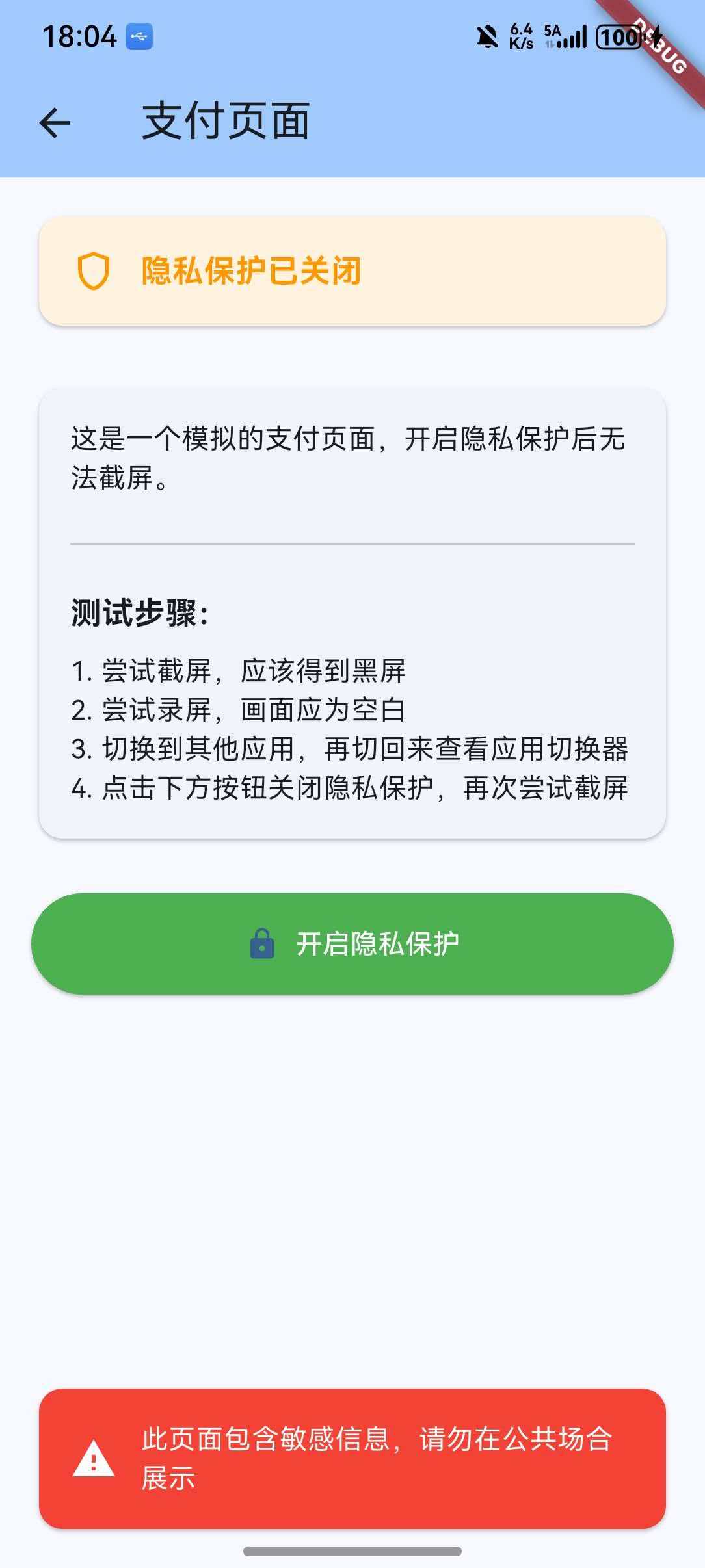
main.dart
import 'package:flutter/material.dart';
import 'package:privacy_window/privacy_window.dart';
void main() {
runApp(const MyApp());
}
class MyApp extends StatelessWidget {
const MyApp({super.key});
Widget build(BuildContext context) {
return MaterialApp(
title: 'Privacy Window Demo',
theme: ThemeData(
colorScheme: ColorScheme.fromSeed(seedColor: Colors.blue),
useMaterial3: true,
),
home: HomePage(),
);
}
}
class HomePage extends StatelessWidget {
HomePage({super.key});
Widget build(BuildContext context) {
return Scaffold(
appBar: AppBar(
title: const Text('隐私窗口示例'),
backgroundColor: Theme.of(context).colorScheme.inversePrimary,
),
body: Padding(
padding: const EdgeInsets.all(16),
child: Column(
crossAxisAlignment: CrossAxisAlignment.stretch,
children: [
const Card(
child: Padding(
padding: EdgeInsets.all(16),
child: Column(
crossAxisAlignment: CrossAxisAlignment.start,
children: [
Text(
'功能说明',
style: TextStyle(
fontSize: 18,
fontWeight: FontWeight.bold,
),
),
SizedBox(height: 8),
Text(
'• 开启隐私模式后,截屏将得到黑屏\n'
'• 录屏时画面将为空白\n'
'• 应用切换器中显示空白内容\n'
'• 适用于支付、密码等敏感页面',
style: TextStyle(fontSize: 14),
),
],
),
),
),
const SizedBox(height: 24),
ElevatedButton.icon(
onPressed: () {
Navigator.push(
context,
MaterialPageRoute(
builder: (context) => const PrivacyPage(
title: '支付页面',
description: '这是一个模拟的支付页面,开启隐私保护后无法截屏。',
),
),
);
},
icon: const Icon(Icons.payment),
label: const Text('进入支付页面(自动开启隐私保护)'),
style: ElevatedButton.styleFrom(
padding: const EdgeInsets.symmetric(vertical: 16),
),
),
const SizedBox(height: 16),
ElevatedButton.icon(
onPressed: () {
Navigator.push(
context,
MaterialPageRoute(
builder: (context) => const PrivacyPage(
title: '密码输入页面',
description: '这是一个模拟的密码输入页面,开启隐私保护后无法截屏。',
),
),
);
},
icon: const Icon(Icons.lock),
label: const Text('进入密码页面(自动开启隐私保护)'),
style: ElevatedButton.styleFrom(
padding: const EdgeInsets.symmetric(vertical: 16),
),
),
const SizedBox(height: 16),
ElevatedButton.icon(
onPressed: () {
Navigator.push(
context,
MaterialPageRoute(
builder: (context) => const PrivacyPage(
title: '身份证展示页面',
description: '这是一个模拟的身份证展示页面,开启隐私保护后无法截屏。',
),
),
);
},
icon: const Icon(Icons.badge),
label: const Text('进入身份证页面(自动开启隐私保护)'),
style: ElevatedButton.styleFrom(
padding: const EdgeInsets.symmetric(vertical: 16),
),
),
],
),
),
);
}
}
class PrivacyPage extends StatefulWidget {
final String title;
final String description;
const PrivacyPage({
super.key,
required this.title,
required this.description,
});
State<PrivacyPage> createState() => _PrivacyPageState();
}
class _PrivacyPageState extends State<PrivacyPage> {
final _privacyWindow = PrivacyWindow();
bool _isPrivacyEnabled = true;
void initState() {
super.initState();
_privacyWindow.setPrivacyWindow();
}
void dispose() {
_privacyWindow.unSetPrivacyWindow();
super.dispose();
}
Widget build(BuildContext context) {
return Scaffold(
appBar: AppBar(
title: Text(widget.title),
backgroundColor: Theme.of(context).colorScheme.inversePrimary,
),
body: Padding(
padding: const EdgeInsets.all(16),
child: Column(
crossAxisAlignment: CrossAxisAlignment.stretch,
children: [
Card(
color: _isPrivacyEnabled
? Colors.green.shade50
: Colors.orange.shade50,
child: Padding(
padding: const EdgeInsets.all(16),
child: Row(
children: [
Icon(
_isPrivacyEnabled
? Icons.shield
: Icons.shield_outlined,
color: _isPrivacyEnabled
? Colors.green
: Colors.orange,
),
const SizedBox(width: 12),
Expanded(
child: Text(
_isPrivacyEnabled
? '隐私保护已开启'
: '隐私保护已关闭',
style: TextStyle(
fontSize: 16,
fontWeight: FontWeight.bold,
color: _isPrivacyEnabled
? Colors.green
: Colors.orange,
),
),
),
],
),
),
),
const SizedBox(height: 24),
Card(
child: Padding(
padding: const EdgeInsets.all(16),
child: Column(
crossAxisAlignment: CrossAxisAlignment.start,
children: [
Text(
widget.description,
style: const TextStyle(fontSize: 14),
),
const SizedBox(height: 16),
const Divider(),
const SizedBox(height: 16),
const Text(
'测试步骤:',
style: TextStyle(
fontSize: 16,
fontWeight: FontWeight.bold,
),
),
const SizedBox(height: 8),
const Text(
'1. 尝试截屏,应该得到黑屏\n'
'2. 尝试录屏,画面应为空白\n'
'3. 切换到其他应用,再切回来查看应用切换器\n'
'4. 点击下方按钮关闭隐私保护,再次尝试截屏',
style: TextStyle(fontSize: 14),
),
],
),
),
),
const SizedBox(height: 24),
ElevatedButton.icon(
onPressed: () {
setState(() {
_isPrivacyEnabled = !_isPrivacyEnabled;
if (_isPrivacyEnabled) {
_privacyWindow.setPrivacyWindow();
} else {
_privacyWindow.unSetPrivacyWindow();
}
});
},
icon: Icon(
_isPrivacyEnabled ? Icons.lock_open : Icons.lock,
),
label: Text(
_isPrivacyEnabled ? '关闭隐私保护' : '开启隐私保护',
),
style: ElevatedButton.styleFrom(
padding: const EdgeInsets.symmetric(vertical: 16),
backgroundColor: _isPrivacyEnabled
? Colors.orange
: Colors.green,
foregroundColor: Colors.white,
),
),
const Spacer(),
const Card(
color: Colors.red,
child: Padding(
padding: EdgeInsets.all(16),
child: Row(
children: [
Icon(Icons.warning, color: Colors.white),
SizedBox(width: 12),
Expanded(
child: Text(
'此页面包含敏感信息,请勿在公共场合展示',
style: TextStyle(color: Colors.white),
),
),
],
),
),
),
],
),
),
);
}
}
运行此示例后,您将看到一个完整的隐私窗口演示界面,可以测试截屏、录屏防护功能。
八、总结
privacy_window 是一个专门为 OpenHarmony 平台设计的隐私窗口插件,提供了系统级的截屏/录屏防护能力。
优点
- 系统级防护:从系统层面阻止截屏和录屏
- 简单易用:仅两个方法,开箱即用
- 轻量级:无额外依赖,集成成本低
- 即时生效:调用后立即生效
适用场景
- 支付页面
- 密码输入页面
- 身份证/银行卡展示页面
- 私密聊天页面
- 敏感信息展示页面
最佳实践
- 在敏感页面进入时开启隐私保护
- 在页面退出时关闭隐私保护
- 结合 secure_application 实现更全面的隐私保护
九、参考资料

作为“人工智能6S店”的官方数字引擎,为AI开发者与企业提供一个覆盖软硬件全栈、一站式门户。
更多推荐

 13
13 0
0- 0


 已为社区贡献3条内容

所有评论(0)