
Flutter 框架跨平台鸿蒙开发 - 情绪温度计应用
情绪温度计是一款基于Flutter开发的心理健康应用,通过温度计可视化(0-100°)量化用户情绪状态。核心功能包括情绪记录、温度计展示、情绪曲线和历史统计,支持5种情绪类型(愉悦、开心、平静、焦虑、低落)的快速记录。应用采用Material Design 3设计规范,包含温度计绘制器、情绪曲线绘制器等自定义组件,架构分为表现层、数据层和业务逻辑层。项目开源并适配鸿蒙OS/Web平台,帮助用户直观
·
欢迎加入开源鸿蒙跨平台社区:
https://openharmonycrossplatform.csdn.net
一、项目概述
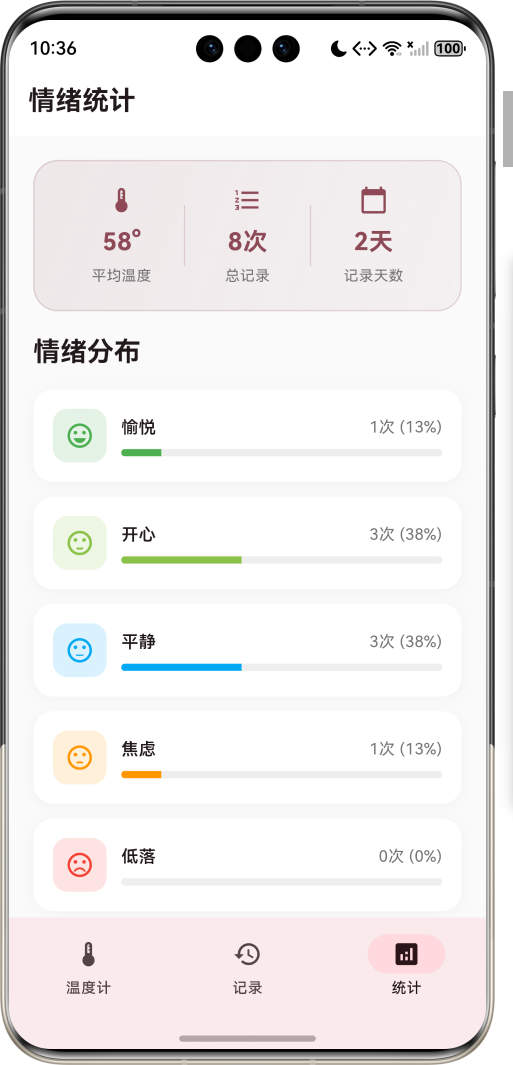
运行效果图
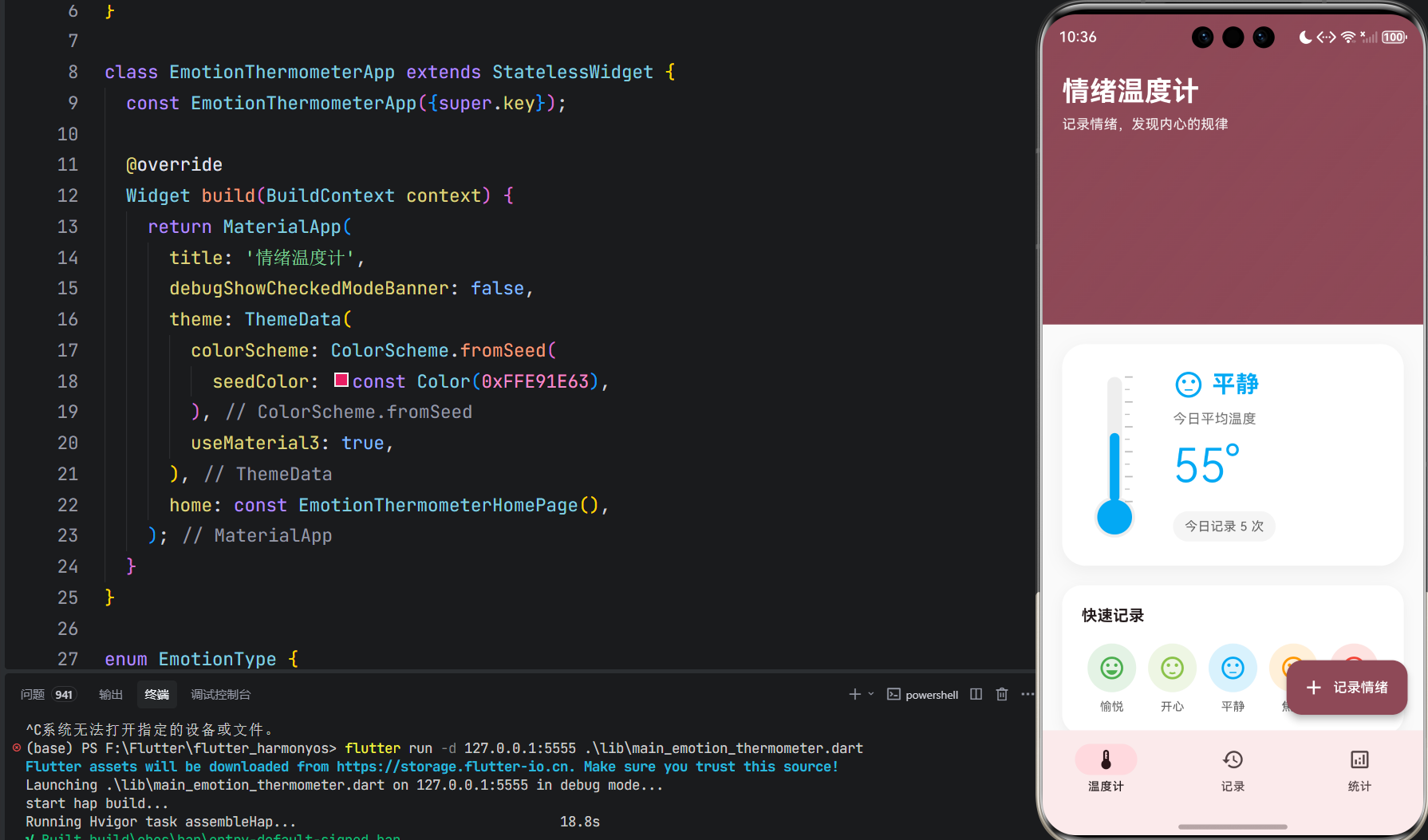
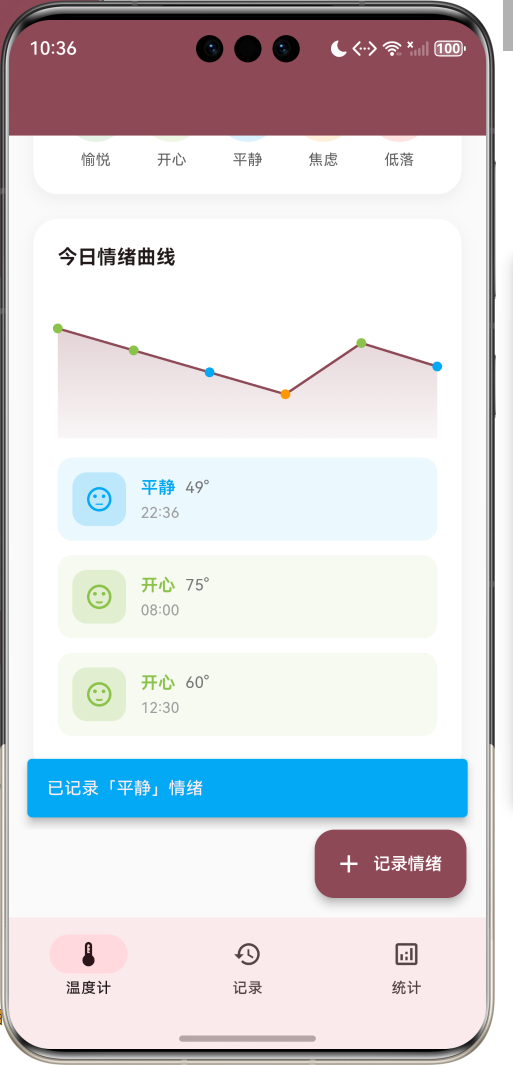
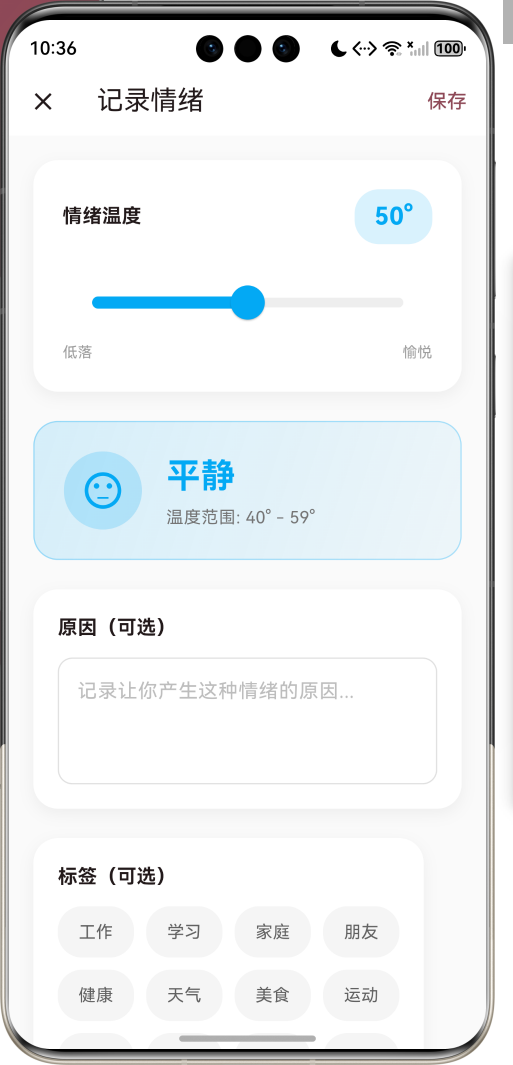
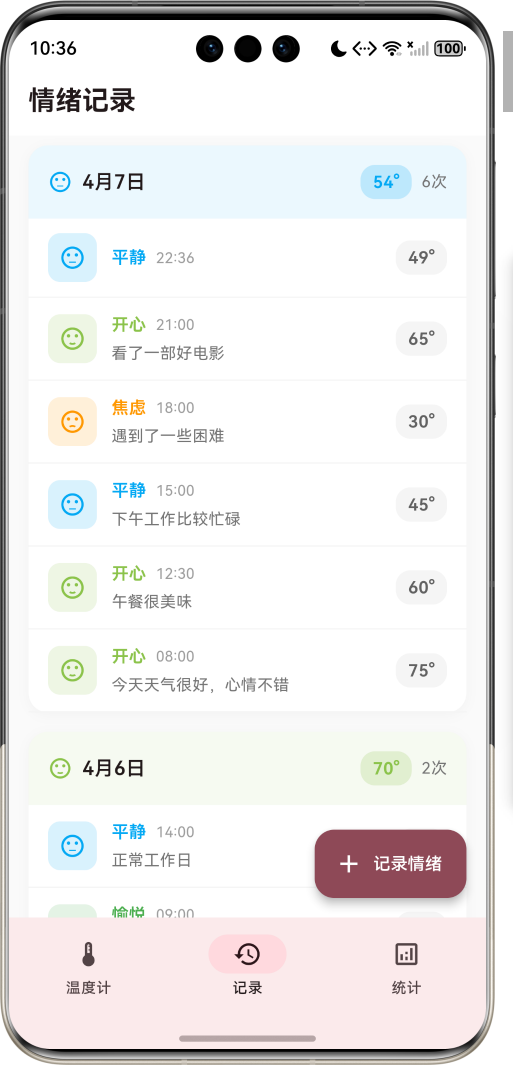
1.1 应用简介
情绪温度计是一款专注于情绪追踪与管理的心理健康应用。通过将抽象的情绪状态量化为"温度"指标,帮助用户直观地记录、追踪和分析自己的情绪变化。应用采用温度计的可视化形式,将情绪从"低落"到"愉悦"映射为0-100的温度范围,让情绪管理变得具体可感。
应用以粉红色为主色调,象征温暖与关怀。通过每日记录、情绪曲线、统计分析等功能,帮助用户发现情绪规律,更好地了解自己,从而实现情绪的自我调节与管理。
1.2 核心功能
| 功能模块 | 功能描述 | 实现方式 |
|---|---|---|
| 情绪记录 | 记录当前情绪温度 | 滑块选择器 |
| 快速记录 | 一键记录五种情绪 | 情绪按钮 |
| 温度计可视化 | 温度计形式展示情绪 | CustomPainter |
| 情绪曲线 | 今日情绪变化曲线 | 折线图 |
| 历史记录 | 查看过往情绪记录 | 分组列表 |
| 情绪统计 | 分析情绪分布规律 | 条形统计图 |
| 情绪洞察 | 提供个性化建议 | 智能分析 |
1.3 情绪类型
| 序号 | 情绪类型 | 图标 | 颜色 | 温度范围 |
|---|---|---|---|---|
| 1 | 愉悦 | sentiment_very_satisfied | #4CAF50 | 80-100° |
| 2 | 开心 | sentiment_satisfied | #8BC34A | 60-79° |
| 3 | 平静 | sentiment_neutral | #03A9F4 | 40-59° |
| 4 | 焦虑 | sentiment_dissatisfied | #FF9800 | 20-39° |
| 5 | 低落 | sentiment_very_dissatisfied | #F44336 | 0-19° |
1.4 技术栈
| 技术领域 | 技术选型 | 版本要求 |
|---|---|---|
| 开发框架 | Flutter | >= 3.0.0 |
| 编程语言 | Dart | >= 2.17.0 |
| 设计规范 | Material Design 3 | - |
| 状态管理 | setState | - |
| 目标平台 | 鸿蒙OS / Web | API 21+ |
1.5 项目结构
lib/
└── main_emotion_thermometer.dart
    ├── EmotionThermometerApp     # 应用入口
    ├── EmotionType               # 情绪类型枚举
    ├── EmotionRecord             # 情绪记录模型
    ├── EmotionThermometerHomePage # 主页面
    ├── AddRecordPage             # 添加记录页面
    ├── ThermometerPainter        # 温度计绘制器
    └── EmotionCurvePainter       # 情绪曲线绘制器
二、系统架构
2.1 整体架构图
2.2 类图设计
2.3 页面导航流程
2.4 数据流向图
三、核心模块设计
3.1 数据模型设计
情绪记录模型 (EmotionRecord)
class EmotionRecord {
  final String id;              // 唯一标识
  final DateTime recordedAt;    // 记录时间
  final int temperature;        // 情绪温度 (0-100)
  final EmotionType emotionType;// 情绪类型
  final String? reason;         // 情绪原因
  final List<String> tags;      // 标签列表

  // 计算属性
  String get timeString;        // 格式化时间
  String get dateString;        // 格式化日期
}
情绪类型枚举 (EmotionType)
enum EmotionType {
  joyful('愉悦', Icons.sentiment_very_satisfied, Color(0xFF4CAF50), 80, 100),
  happy('开心', Icons.sentiment_satisfied, Color(0xFF8BC34A), 60, 79),
  calm('平静', Icons.sentiment_neutral, Color(0xFF03A9F4), 40, 59),
  anxious('焦虑', Icons.sentiment_dissatisfied, Color(0xFFFF9800), 20, 39),
  sad('低落', Icons.sentiment_very_dissatisfied, Color(0xFFF44336), 0, 19);

  final String label;       // 情绪名称
  final IconData icon;      // 情绪图标
  final Color color;        // 情绪颜色
  final int minTemp;        // 温度下限
  final int maxTemp;        // 温度上限

  // 根据温度获取情绪类型
  static EmotionType fromTemperature(int temp);
}
3.2 页面结构设计
主页面布局
添加记录页面布局
3.3 自定义绘制器设计
温度计绘制器 (ThermometerPainter)
class ThermometerPainter extends CustomPainter {
final double temperature; // 当前温度
final Color color; // 填充颜色
void paint(Canvas canvas, Size size) {
// 1. 绘制温度计外框(灰色背景)
// 2. 绘制底部圆形球体
// 3. 绘制填充颜色(根据温度计算高度)
// 4. 绘制刻度线
}
}
情绪曲线绘制器 (EmotionCurvePainter)
class EmotionCurvePainter extends CustomPainter {
final List<EmotionRecord> records; // 记录列表
final Color color; // 曲线颜色
void paint(Canvas canvas, Size size) {
// 1. 按时间排序记录
// 2. 计算每个点的位置
// 3. 绘制填充区域
// 4. 绘制曲线
// 5. 绘制数据点
}
}
四、UI设计规范
4.1 配色方案
应用以粉红色为主色调,象征温暖与关怀:
| 颜色类型 | 色值 | 用途 |
|---|---|---|
| 主色 | #E91E63 (Pink) | 导航、强调元素 |
| 愉悦色 | #4CAF50 (Green) | 愉悦情绪 |
| 开心色 | #8BC34A (Light Green) | 开心情绪 |
| 平静色 | #03A9F4 (Cyan) | 平静情绪 |
| 焦虑色 | #FF9800 (Orange) | 焦虑情绪 |
| 低落色 | #F44336 (Red) | 低落情绪 |
4.2 字体规范
| 元素 | 字号 | 字重 | 颜色 |
|---|---|---|---|
| 温度显示 | 48px | Light | 情绪颜色 |
| 情绪名称 | 28px | Bold | 情绪颜色 |
| 页面标题 | 20px | Medium | #000000 |
| 记录时间 | 12px | Regular | #757575 |
| 统计数字 | 20px | Bold | 主色 |
| 辅助文字 | 14px | Regular | #757575 |
4.3 组件规范
温度计卡片
┌─────────────────────────────────────────┐
│  ┌────┐                                │
│  │    │  😊 开心                       │
│  │    │  今日平均温度                   │
│  │    │  65°                           │
│  │    │  ┌──────────────┐              │
│  └────┘  │ 今日记录 5 次 │              │
│          └──────────────┘              │
└─────────────────────────────────────────┘
快速记录按钮
┌─────────────────────────────────────────┐
│  快速记录                               │
│                                         │
│  😊      😃      😐      😟      😢    │
│ 愉悦    开心    平静    焦虑    低落    │
└─────────────────────────────────────────┘
情绪分布条
┌─────────────────────────────────────────┐
│  😊 开心         5次 (25%)              │
│  ████████████░░░░░░░░░░░░░░░░░░░░░░░░░░ │
└─────────────────────────────────────────┘
五、核心功能实现
5.1 温度滑块实现
SliderTheme(
  data: SliderThemeData(
    activeTrackColor: _selectedEmotion.color,
    inactiveTrackColor: Colors.grey.shade200,
    thumbColor: _selectedEmotion.color,
    overlayColor: _selectedEmotion.color.withValues(alpha: 0.2),
    trackHeight: 8,
    thumbShape: const RoundSliderThumbShape(enabledThumbRadius: 14),
  ),
  child: Slider(
    value: _temperature.toDouble(),
    min: 0,
    max: 100,
    divisions: 100,
    onChanged: (value) => _updateTemperature(value.round()),
  ),
)
5.2 情绪类型计算
static EmotionType fromTemperature(int temp) {
  for (final type in EmotionType.values) {
    if (temp >= type.minTemp && temp <= type.maxTemp) {
      return type;
    }
  }
  return EmotionType.calm;
}
5.3 温度计绘制
void paint(Canvas canvas, Size size) {
final bulbRadius = size.width * 0.35;
final tubeWidth = size.width * 0.25;
final tubeHeight = size.height - bulbRadius * 2 - 10;
// 绘制外框
paint.color = Colors.grey.shade200;
canvas.drawRRect(/* 温度计管 */, paint);
canvas.drawCircle(/* 底部球 */, paint);
// 绘制填充
paint.color = color;
canvas.drawCircle(/* 底部球填充 */, paint);
final fillHeight = (temperature / 100) * tubeHeight;
canvas.drawRRect(/* 温度填充 */, paint);
// 绘制刻度
for (int i = 0; i <= 10; i++) {
canvas.drawLine(/* 刻度线 */, paint);
}
}
5.4 情绪曲线绘制
void paint(Canvas canvas, Size size) {
final sortedRecords = List<EmotionRecord>.from(records)
..sort((a, b) => a.recordedAt.compareTo(b.recordedAt));
final path = Path();
final fillPath = Path();
for (int i = 0; i < sortedRecords.length; i++) {
final record = sortedRecords[i];
final x = (i / (sortedRecords.length - 1)) * size.width;
final y = size.height - (record.temperature / 100) * size.height;
if (i == 0) {
path.moveTo(x, y);
fillPath.moveTo(x, size.height);
fillPath.lineTo(x, y);
} else {
path.lineTo(x, y);
fillPath.lineTo(x, y);
}
}
// 绘制填充和曲线
canvas.drawPath(fillPath, fillPaint);
canvas.drawPath(path, paint);
}
六、扩展功能设计
6.1 数据持久化
当前版本数据存储在内存中,可扩展为本地持久化:
| 方案 | 实现方式 | 优势 |
|---|---|---|
| SharedPreferences | 键值对存储 | 简单易用 |
| Hive | 轻量级NoSQL | 高性能 |
| SQLite | 关系型数据库 | 支持复杂查询 |
6.2 功能扩展
| 功能 | 实现方案 | 价值 |
|---|---|---|
| 数据导出 | pdf/excel导出 | 生成情绪报告 |
| 提醒功能 | flutter_local_notifications | 定时记录提醒 |
| 图表增强 | fl_chart | 更丰富的图表 |
| 云同步 | Firebase | 跨设备同步 |
| AI分析 | 机器学习 | 情绪预测 |
6.3 数据分析扩展
| 分析维度 | 实现方案 | 价值 |
|---|---|---|
| 周期分析 | 按周/月统计 | 发现长期规律 |
| 关联分析 | 标签关联 | 发现情绪触发因素 |
| 趋势预测 | 时间序列分析 | 预测情绪变化 |
| 对比分析 | 同比/环比 | 追踪改善进度 |
七、技术要点
7.1 性能优化
| 优化项 | 实现方式 | 效果 |
|---|---|---|
| 列表渲染 | SliverList | 按需构建 |
| 页面切换 | IndexedStack | 保持状态 |
| 自定义绘制 | CustomPainter | 高效渲染 |
| 状态管理 | setState | 响应式更新 |
7.2 边界条件处理
| 场景 | 处理方式 | 效果 |
|---|---|---|
| 空记录列表 | 显示空状态提示 | 提升用户体验 |
| 温度边界 | clamp(0, 100) | 防止越界 |
| 情绪分类 | 默认返回平静 | 兜底处理 |
| 日期分组 | Map分组 | 高效查询 |
7.3 代码规范
| 规范 | 实现方式 | 效果 |
|---|---|---|
| 命名规范 | 驼峰命名法 | 代码可读性高 |
| 代码组织 | 模块化设计 | 易于维护 |
| 注释规范 | 文档注释 | 便于理解 |
| 错误处理 | 空值检查 | 增强稳定性 |
八、总结与展望
8.1 项目总结
情绪温度计应用以创新的"温度"概念,将抽象的情绪状态量化为具体可感的数值。通过温度计的可视化形式、情绪曲线、统计分析等功能,帮助用户直观地追踪和了解自己的情绪变化。应用的设计理念简洁明了,技术实现稳定可靠,为用户提供了一个实用的情绪管理工具。
8.2 核心价值
| 维度 | 价值体现 |
|---|---|
| 用户价值 | 帮助用户了解和管理情绪 |
| 技术价值 | Flutter自定义绘制实践 |
| 设计价值 | 情绪可视化设计参考 |
| 社会价值 | 促进心理健康意识 |
8.3 未来规划
8.4 开发信息
| 项目 | 信息 |
|---|---|
| 开发框架 | Flutter 3.x |
| 设计规范 | Material Design 3 |
| 主要文件 | main_emotion_thermometer.dart |
| 运行端口 | 8125 |
| 创建日期 | 2026-04-07 |
| 应用名称 | 情绪温度计 |
| 目标平台 | 鸿蒙OS / Web |

作为“人工智能6S店”的官方数字引擎,为AI开发者与企业提供一个覆盖软硬件全栈、一站式门户。
更多推荐
 8
8 0
0- 0


 已为社区贡献6条内容

所有评论(0)