
Flutter 框架跨平台鸿蒙开发 - 时间感知器
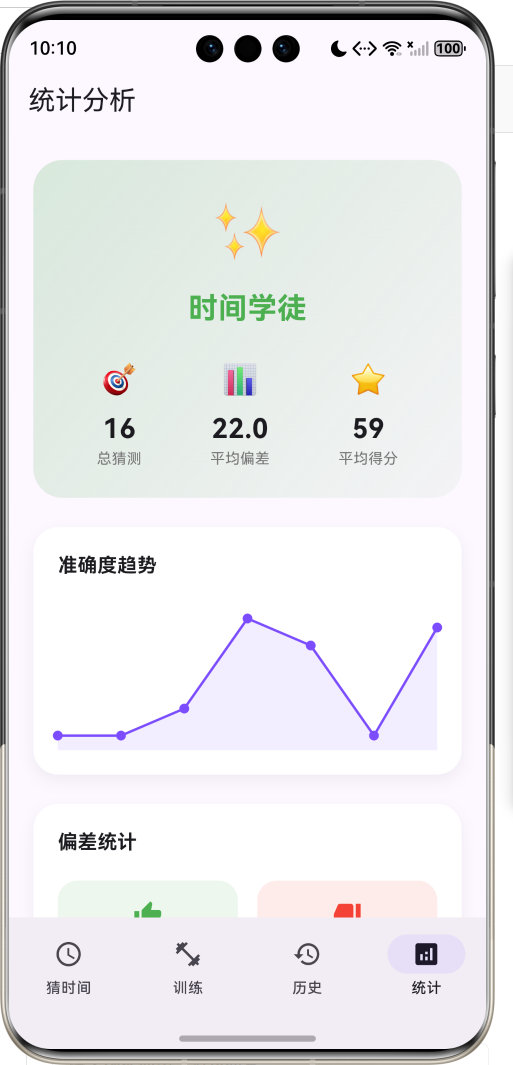
运行效果图时间感知器是一款独特的时间感知训练工具,旨在帮助用户培养"不看表就能感知时间"的能力。在现代社会,我们过度依赖时钟和手机来获取时间信息,逐渐丧失了对时间流逝的自然感知能力。这款应用通过游戏化的猜测机制,让用户重新找回对时间的敏感度。应用以深邃的紫色为主色调,营造出神秘而专注的氛围。用户通过滚轮选择器猜测当前时间,系统会即时计算偏差并给予评分和等级评定。随着持续练习,用户的时间感知能力会逐
时间感知器应用
欢迎加入开源鸿蒙跨平台社区:
https://openharmonycrossplatform.csdn.net
一、项目概述
运行效果图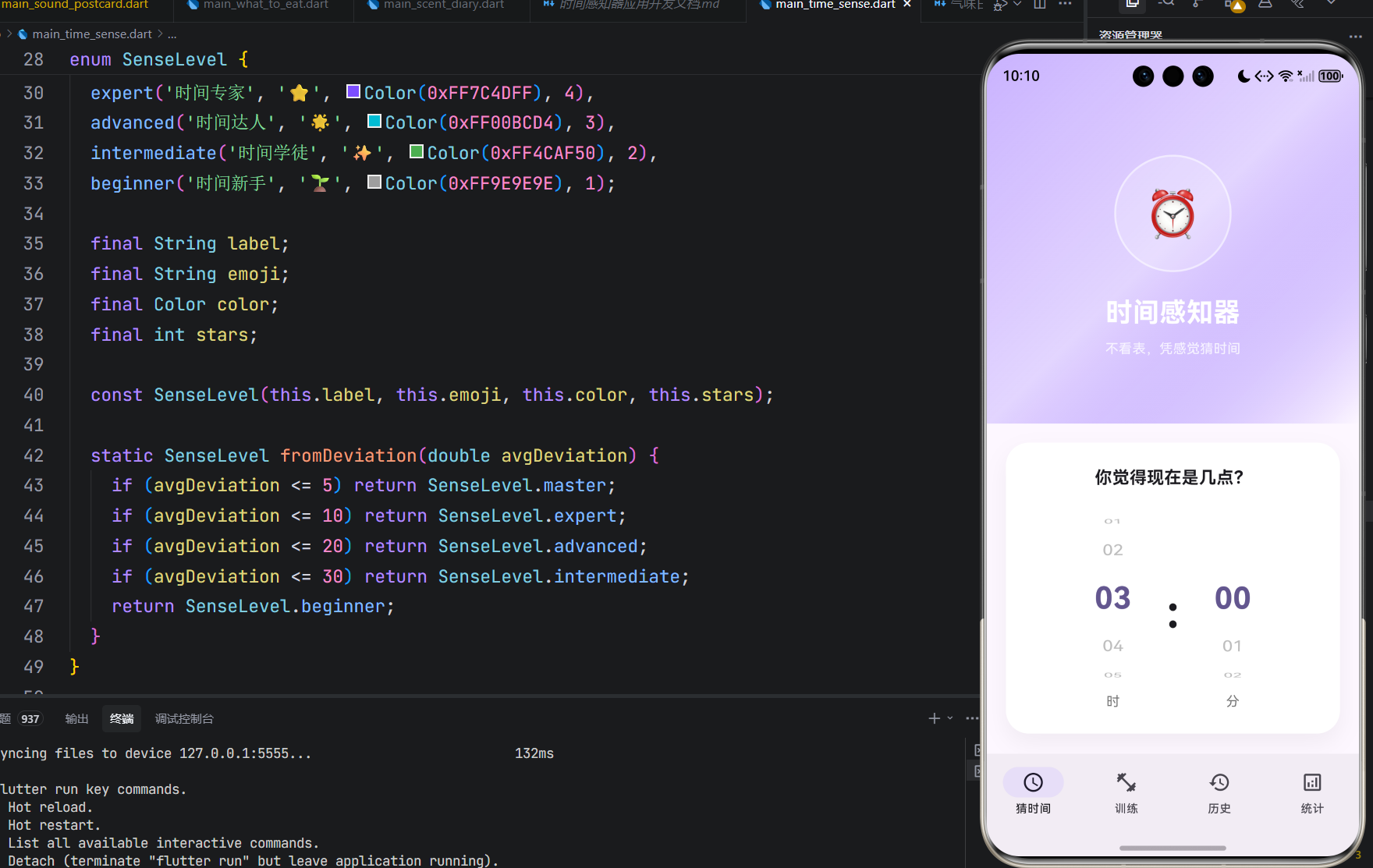
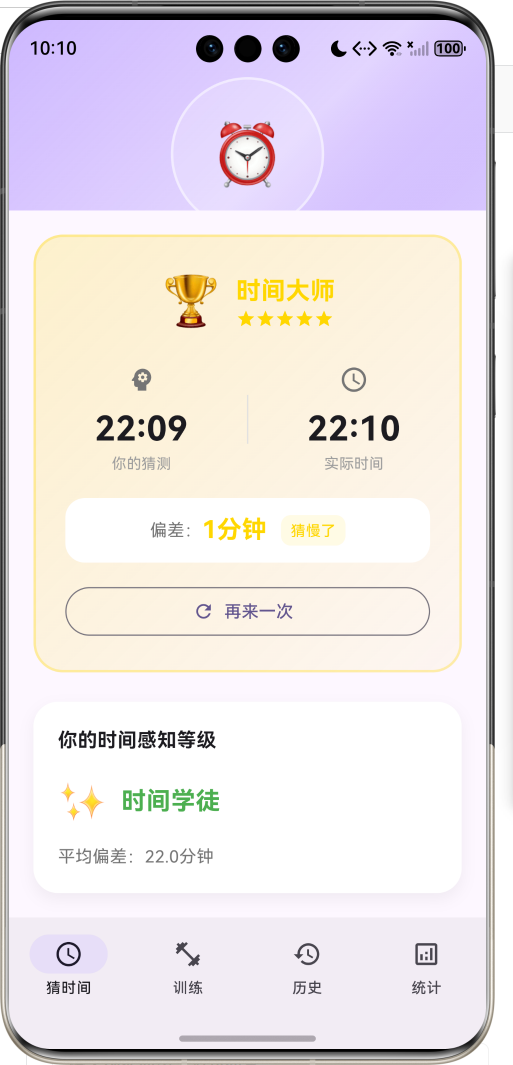
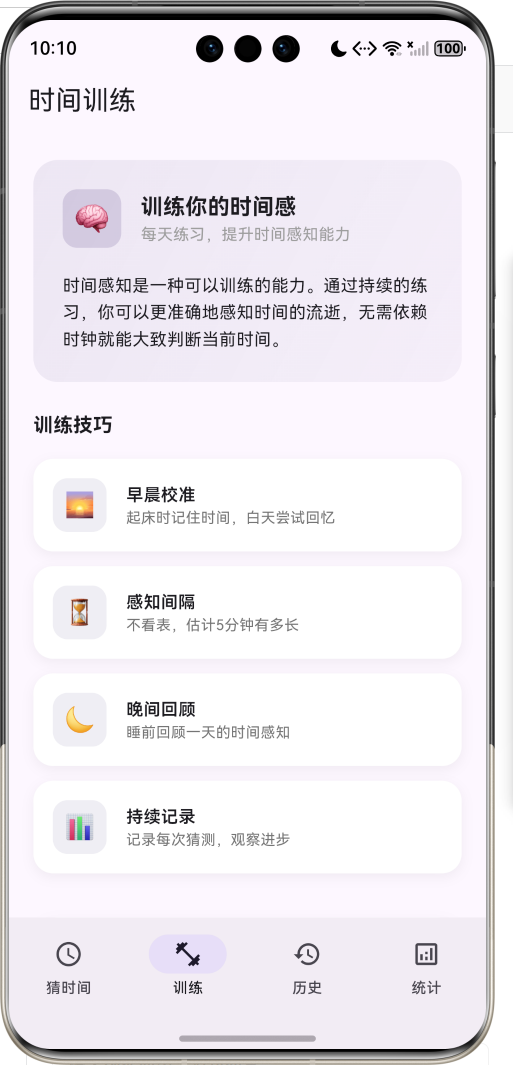
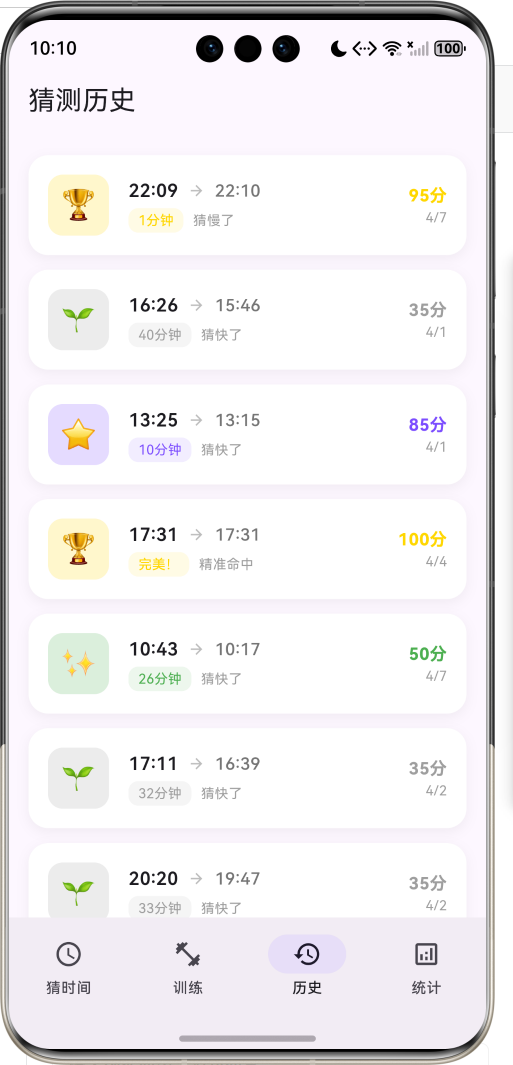
1.1 应用简介
时间感知器是一款独特的时间感知训练工具,旨在帮助用户培养"不看表就能感知时间"的能力。在现代社会,我们过度依赖时钟和手机来获取时间信息,逐渐丧失了对时间流逝的自然感知能力。这款应用通过游戏化的猜测机制,让用户重新找回对时间的敏感度。
应用以深邃的紫色为主色调,营造出神秘而专注的氛围。用户通过滚轮选择器猜测当前时间,系统会即时计算偏差并给予评分和等级评定。随着持续练习,用户的时间感知能力会逐步提升,从"时间新手"成长为"时间大师"。
1.2 核心功能
| 功能模块 | 功能描述 | 实现方式 |
|---|---|---|
| 时间猜测 | 不看表猜测当前时间 | 滚轮选择器 |
| 评分系统 | 根据偏差计算得分 | 算法评分 |
| 等级评定 | 五级时间感知等级 | 枚举映射 |
| 训练指导 | 时间感训练技巧 | 图文卡片 |
| 历史记录 | 猜测历史回顾 | 时间线列表 |
| 统计分析 | 准确度趋势图表 | 自定义绘制 |
1.3 等级体系
| 序号 | 等级名称 | 图标 | 颜色 | 平均偏差要求 |
|---|---|---|---|---|
| 1 | 时间大师 | 🏆 | #FFD700 | ≤5分钟 |
| 2 | 时间专家 | ⭐ | #7C4DFF | ≤10分钟 |
| 3 | 时间达人 | 🌟 | #00BCD4 | ≤20分钟 |
| 4 | 时间学徒 | ✨ | #4CAF50 | ≤30分钟 |
| 5 | 时间新手 | 🌱 | #9E9E9E | >30分钟 |
1.4 技术栈
| 技术领域 | 技术选型 | 版本要求 |
|---|---|---|
| 开发框架 | Flutter | >= 3.0.0 |
| 编程语言 | Dart | >= 2.17.0 |
| 设计规范 | Material Design 3 | - |
| 状态管理 | setState | - |
| 动画系统 | AnimationController | - |
| 目标平台 | 鸿蒙OS / Web | API 21+ |
1.5 项目结构
lib/
└── main_time_sense.dart
    ├── TimeSenseApp               # 应用入口
    ├── SenseLevel                 # 感知等级枚举
    ├── TimeGuess                  # 猜测记录模型
    ├── TimeSenseHomePage          # 主页面(底部导航)
    ├── _buildGuessPage            # 猜测页面
    ├── _buildTrainingPage         # 训练页面
    ├── _buildHistoryPage          # 历史页面
    ├── _buildStatsPage            # 统计页面
    └── TrendChartPainter          # 趋势图表绘制器
二、系统架构
2.1 整体架构图
2.2 类图设计
2.3 页面导航流程
2.4 猜测流程时序图
三、核心模块设计
3.1 数据模型设计
3.1.1 感知等级枚举 (SenseLevel)
enum SenseLevel {
  master('时间大师', '🏆', Color(0xFFFFD700), 5),
  expert('时间专家', '⭐', Color(0xFF7C4DFF), 4),
  advanced('时间达人', '🌟', Color(0xFF00BCD4), 3),
  intermediate('时间学徒', '✨', Color(0xFF4CAF50), 2),
  beginner('时间新手', '🌱', Color(0xFF9E9E9E), 1);

  final String label;
  final String emoji;
  final Color color;
  final int stars;

  const SenseLevel(this.label, this.emoji, this.color, this.stars);

  static SenseLevel fromDeviation(double avgDeviation) {
    if (avgDeviation <= 5) return SenseLevel.master;
    if (avgDeviation <= 10) return SenseLevel.expert;
    if (avgDeviation <= 20) return SenseLevel.advanced;
    if (avgDeviation <= 30) return SenseLevel.intermediate;
    return SenseLevel.beginner;
  }
}
3.1.2 猜测记录模型 (TimeGuess)
class TimeGuess {
  final String id;              // 唯一标识
  final DateTime guessedTime;   // 猜测的时间
  final DateTime actualTime;    // 实际时间
  final int deviationMinutes;   // 偏差分钟数
  final int score;              // 得分(0-100)
  final SenseLevel level;       // 评定等级

  String get deviationText {
    if (deviationMinutes == 0) return '完美!';
    return '${deviationMinutes}分钟';
  }

  String get directionText {
    if (deviationMinutes == 0) return '精准命中';
    // 判断猜快了还是猜慢了
  }
}
3.1.3 评分算法
int _calculateScore(int deviationMinutes) {
  if (deviationMinutes == 0) return 100;
  if (deviationMinutes <= 5) return 95;
  if (deviationMinutes <= 10) return 85;
  if (deviationMinutes <= 15) return 75;
  if (deviationMinutes <= 20) return 65;
  if (deviationMinutes <= 30) return 50;
  if (deviationMinutes <= 45) return 35;
  return 20;
}
3.1.4 等级分布
3.2 页面结构设计
3.2.1 主页面布局
3.2.2 猜测页面结构
3.2.3 结果展示结构
3.3 动画系统设计
四、UI设计规范
4.1 配色方案
应用采用深邃的紫色为主色调,营造神秘专注的氛围:
| 颜色类型 | 色值 | 用途 |
|---|---|---|
| 主色 | #7C4DFF | 导航、按钮、强调元素 |
| 渐变起始 | #7C4DFF (40%透明) | 头部渐变 |
| 渐变结束 | #7C4DFF (20%透明) | 头部渐变 |
| 大师色 | #FFD700 | 金色 |
| 专家色 | #7C4DFF | 紫色 |
| 达人色 | #00BCD4 | 青色 |
| 学徒色 | #4CAF50 | 绿色 |
| 新手色 | #9E9E9E | 灰色 |
4.2 字体规范
| 元素 | 字号 | 字重 | 颜色 |
|---|---|---|---|
| 应用标题 | 28px | Bold | #FFFFFF |
| 等级名称 | 20-24px | Bold | 等级色 |
| 时间数字 | 28-32px | Bold | #000000 |
| 滚轮数字 | 20-32px | 动态 | 动态 |
| 偏差数值 | 20px | Bold | 等级色 |
| 辅助文字 | 12-14px | Regular | #757575 |
4.3 组件规范
4.3.1 时间滚轮选择器
        ┌─────────────────────────────────┐
        │                                 │
        │      08                        │
        │    ┌─────────┐                 │
        │    │   09    │  ← 选中项       │
        │    └─────────┘                 │
        │      10                        │
        │                                 │
        │         :                       │
        │                                 │
        │      28                        │
        │    ┌─────────┐                 │
        │    │   29    │  ← 选中项       │
        │    └─────────┘                 │
        │      30                        │
        │                                 │
        └─────────────────────────────────┘
4.3.2 结果卡片
┌─────────────────────────────────────────────┐
│                                             │
│        🏆  时间大师                         │
│            ⭐⭐⭐⭐⭐                        │
│                                             │
│    ┌──────────┐      ┌──────────┐         │
│    │ 你的猜测 │      │ 实际时间 │         │
│    │   09:28  │  →   │   09:30  │         │
│    └──────────┘      └──────────┘         │
│                                             │
│         偏差:2分钟   猜慢了               │
│                                             │
│           [再来一次]                        │
│                                             │
└─────────────────────────────────────────────┘
4.3.3 等级进度卡片
┌─────────────────────────────────────────────┐
│  等级进度                                    │
│                                             │
│  🏆 时间大师    ⭐⭐⭐⭐⭐    ← 当前        │
│  ⭐ 时间专家    ⭐⭐⭐⭐                     │
│  🌟 时间达人    ⭐⭐⭐                       │
│  ✨ 时间学徒    ⭐⭐                         │
│  🌱 时间新手    ⭐                           │
│                                             │
└─────────────────────────────────────────────┘
五、核心功能实现
5.1 时间选择器实现
Widget _buildTimeWheel({
  required String label,
  required int value,
  required int maxValue,
  required Function(int) onChanged,
}) {
  return Column(
    children: [
      SizedBox(
        height: 180,
        width: 80,
        child: ListWheelScrollView.useDelegate(
          itemExtent: 50,
          perspective: 0.005,
          diameterRatio: 1.5,
          physics: const FixedExtentScrollPhysics(),
          onSelectedItemChanged: onChanged,
          child: ListWheelChildBuilderDelegate(
            childCount: maxValue + 1,
            builder: (context, index) {
              final isSelected = index == value;
              return Center(
                child: Text(
                  index.toString().padLeft(2, '0'),
                  style: TextStyle(
                    fontSize: isSelected ? 32 : 20,
                    fontWeight: isSelected ? FontWeight.bold : FontWeight.normal,
                    color: isSelected
                        ? Theme.of(context).colorScheme.primary
                        : Colors.grey[400],
                  ),
                ),
              );
            },
          ),
        ),
      ),
      const SizedBox(height: 8),
      Text(label, style: TextStyle(fontSize: 14, color: Colors.grey[600])),
    ],
  );
}
5.2 猜测提交与评分
void _submitGuess() {
  if (_selectedHour == null || _selectedMinute == null) return;

  final now = DateTime.now();
  final guessedTime = DateTime(
    now.year,
    now.month,
    now.day,
    _selectedHour!.hour,
    _selectedMinute!.minute,
  );

  final actualTime = now;
  final guessedMinutes = guessedTime.hour * 60 + guessedTime.minute;
  final actualMinutes = actualTime.hour * 60 + actualTime.minute;
  final deviation = (guessedMinutes - actualMinutes).abs();

  final guess = TimeGuess(
    id: DateTime.now().millisecondsSinceEpoch.toString(),
    guessedTime: guessedTime,
    actualTime: actualTime,
    deviationMinutes: deviation,
    score: _calculateScore(deviation),
    level: SenseLevel.fromDeviation(deviation.toDouble()),
  );

  setState(() {
    _lastGuess = guess;
    _hasGuessed = true;
    _guessHistory.insert(0, guess);
  });

  _resultController.forward(from: 0);
  if (deviation <= 10) {
    _celebrationController.forward(from: 0);
  }
}
5.3 统计数据计算
Map<String, dynamic> _getStatistics() {
  if (_guessHistory.isEmpty) {
    return {
      'total': 0,
      'avgDeviation': 0.0,
      'bestDeviation': 0,
      'worstDeviation': 0,
      'avgScore': 0.0,
      'level': SenseLevel.beginner,
      'accuracyTrend': <double>[],
    };
  }

  final deviations = _guessHistory.map((g) => g.deviationMinutes).toList();
  final avgDeviation = deviations.reduce((a, b) => a + b) / deviations.length;
  final bestDeviation = deviations.reduce((a, b) => a < b ? a : b);
  final worstDeviation = deviations.reduce((a, b) => a > b ? a : b);
  final avgScore = _guessHistory.map((g) => g.score).reduce((a, b) => a + b) / _guessHistory.length;

  final recentGuesses = _guessHistory.take(7).toList().reversed.toList();
  final accuracyTrend = recentGuesses.map((g) => g.score.toDouble()).toList();

  return {
    'total': _guessHistory.length,
    'avgDeviation': avgDeviation,
    'bestDeviation': bestDeviation,
    'worstDeviation': worstDeviation,
    'avgScore': avgScore,
    'level': SenseLevel.fromDeviation(avgDeviation),
    'accuracyTrend': accuracyTrend,
  };
}
5.4 趋势图表绘制
class TrendChartPainter extends CustomPainter {
final List<double> data;
TrendChartPainter(this.data);
void paint(Canvas canvas, Size size) {
if (data.isEmpty) return;
final paint = Paint()
..color = const Color(0xFF7C4DFF)
..strokeWidth = 2
..style = PaintingStyle.stroke;
final fillPaint = Paint()
..color = const Color(0xFF7C4DFF).withValues(alpha: 0.1)
..style = PaintingStyle.fill;
final path = Path();
final fillPath = Path();
final maxVal = data.reduce((a, b) => a > b ? a : b);
final minVal = data.reduce((a, b) => a < b ? a : b);
final range = maxVal - minVal == 0 ? 1.0 : maxVal - minVal;
final stepX = size.width / (data.length - 1);
for (int i = 0; i < data.length; i++) {
final x = i * stepX;
final y = size.height - ((data[i] - minVal) / range) * size.height * 0.8 - size.height * 0.1;
if (i == 0) {
path.moveTo(x, y);
fillPath.moveTo(x, size.height);
fillPath.lineTo(x, y);
} else {
path.lineTo(x, y);
fillPath.lineTo(x, y);
}
}
fillPath.lineTo(size.width, size.height);
fillPath.close();
canvas.drawPath(fillPath, fillPaint);
canvas.drawPath(path, paint);
// 绘制数据点
final dotPaint = Paint()
..color = const Color(0xFF7C4DFF)
..style = PaintingStyle.fill;
for (int i = 0; i < data.length; i++) {
final x = i * stepX;
final y = size.height - ((data[i] - minVal) / range) * size.height * 0.8 - size.height * 0.1;
canvas.drawCircle(Offset(x, y), 4, dotPaint);
}
}
bool shouldRepaint(covariant CustomPainter oldDelegate) => false;
}
5.5 结果动画实现
Widget _buildResultCard() {
  final guess = _lastGuess!;

  return AnimatedBuilder(
    animation: _resultController,
    builder: (context, child) {
      return Transform.scale(
        scale: 0.8 + _resultController.value * 0.2,
        child: Opacity(
          opacity: _resultController.value,
          child: child,
        ),
      );
    },
    child: Container(
      padding: const EdgeInsets.all(24),
      decoration: BoxDecoration(
        gradient: LinearGradient(
          begin: Alignment.topLeft,
          end: Alignment.bottomRight,
          colors: [
            guess.level.color.withValues(alpha: 0.2),
            guess.level.color.withValues(alpha: 0.05),
          ],
        ),
        borderRadius: BorderRadius.circular(24),
        border: Border.all(
          color: guess.level.color.withValues(alpha: 0.3),
          width: 2,
        ),
      ),
      child: Column(
        children: [
          // 等级展示
          Row(
            mainAxisAlignment: MainAxisAlignment.center,
            children: [
              Text(guess.level.emoji, style: const TextStyle(fontSize: 40)),
              const SizedBox(width: 12),
              Column(
                crossAxisAlignment: CrossAxisAlignment.start,
                children: [
                  Text(
                    guess.level.label,
                    style: TextStyle(
                      fontSize: 20,
                      fontWeight: FontWeight.bold,
                      color: guess.level.color,
                    ),
                  ),
                  Row(
                    children: List.generate(
                      5,
                      (i) => Icon(
                        Icons.star,
                        size: 16,
                        color: i < guess.level.stars
                            ? guess.level.color
                            : Colors.grey[300],
                      ),
                    ),
                  ),
                ],
              ),
            ],
          ),
          // 时间对比和偏差信息...
        ],
      ),
    ),
  );
}
六、交互设计
6.1 猜测交互流程
6.2 等级提升流程
6.3 页面切换状态
七、扩展功能规划
7.1 后续版本规划
7.2 功能扩展建议
7.2.1 盲测模式
增强训练难度:
- 隐藏所有时间信息
- 随机时间段猜测
- 夜间模式挑战
7.2.2 间隔感知
感知时间流逝:
- 估计5分钟有多长
- 估计1小时有多长
- 间隔感知训练
7.2.3 成就系统
激励持续练习:
- 连续猜测成就
- 精准猜测成就
- 等级提升成就
八、注意事项
8.1 开发注意事项
-
时间获取:使用DateTime.now()获取当前时间,确保准确性
-
动画控制:三个AnimationController需要在dispose时释放
-
状态管理:使用setState管理本地状态,注意_hasGuessed状态切换
-
滚轮选择器:使用ListWheelScrollView实现,注意physics设置
8.2 常见问题
| 问题 | 原因 | 解决方案 |
|---|---|---|
| 滚轮不滚动 | physics未设置 | 使用FixedExtentScrollPhysics |
| 结果不显示 | _hasGuessed未设置 | 检查submitGuess方法 |
| 等级计算错误 | 偏差计算问题 | 检查分钟数转换 |
| 图表不显示 | 数据为空 | 检查accuracyTrend |
8.3 使用提示
⏰ 时间感知器使用小贴士 ⏰
不看表,凭直觉猜时间。
持续练习,提升时间感。
每天坚持,成为时间大师。
记住,时间感知是可以训练的!
九、运行说明
9.1 环境要求
| 环境 | 版本要求 |
|---|---|
| Flutter SDK | >= 3.0.0 |
| Dart SDK | >= 2.17.0 |
| 鸿蒙OS | API 21+ |
9.2 运行命令
# 查看可用设备
flutter devices

# 运行到Web服务器
flutter run -d web-server -t lib/main_time_sense.dart --web-port 8122

# 运行到鸿蒙设备
flutter run -d 127.0.0.1:5555 lib/main_time_sense.dart

# 运行到Windows
flutter run -d windows -t lib/main_time_sense.dart

# 代码分析
flutter analyze lib/main_time_sense.dart
十、总结
时间感知器是一款独特的时间感知训练工具,通过游戏化的猜测机制帮助用户培养"不看表就能感知时间"的能力。应用内置五级等级体系,从"时间新手"到"时间大师",激励用户持续练习提升。
核心功能涵盖时间猜测、评分系统、等级评定、训练指导、历史记录、统计分析六大模块。时间猜测采用滚轮选择器,操作直观流畅;评分系统根据偏差计算得分,公平客观;等级评定提供明确的成长目标;训练指导帮助用户掌握训练技巧;历史记录回顾每次猜测;统计分析展示准确度趋势。
应用采用Material Design 3设计规范,以深邃的紫色为主色调,营造神秘专注的氛围。通过本应用,希望能够帮助用户重新找回对时间的敏感度,成为真正的时间感知大师。
培养时间感知,掌控生活节奏

作为“人工智能6S店”的官方数字引擎,为AI开发者与企业提供一个覆盖软硬件全栈、一站式门户。
更多推荐

 2
2 0
0- 0


 已为社区贡献4条内容

所有评论(0)