
开源鸿蒙跨平台Flutter开发:儿童数理认知与神经塑性演化引擎_突触发生与工作记忆测绘架构
摘要: 本文提出了一种基于神经科学的儿童数学认知教育应用,突破传统“题海战术”,结合Flutter跨平台技术构建动态神经塑性模型。通过赫布学习法则模拟突触强化过程,系统实时追踪认知负荷、突触塑性指数和神经疲劳度,并转化为可视化界面反馈(如颜色变化、粒子动画)。核心架构包含神经数学模型、生化反馈环路和动态UI渲染,利用CustomPaint实现脑网络状态映射,为儿童数学学习提供科学的神经认知干预。
欢迎加入开源鸿蒙跨平台社区:
https://openharmonycrossplatform.csdn.net
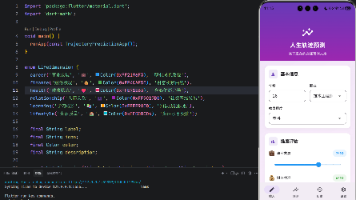
演示效果
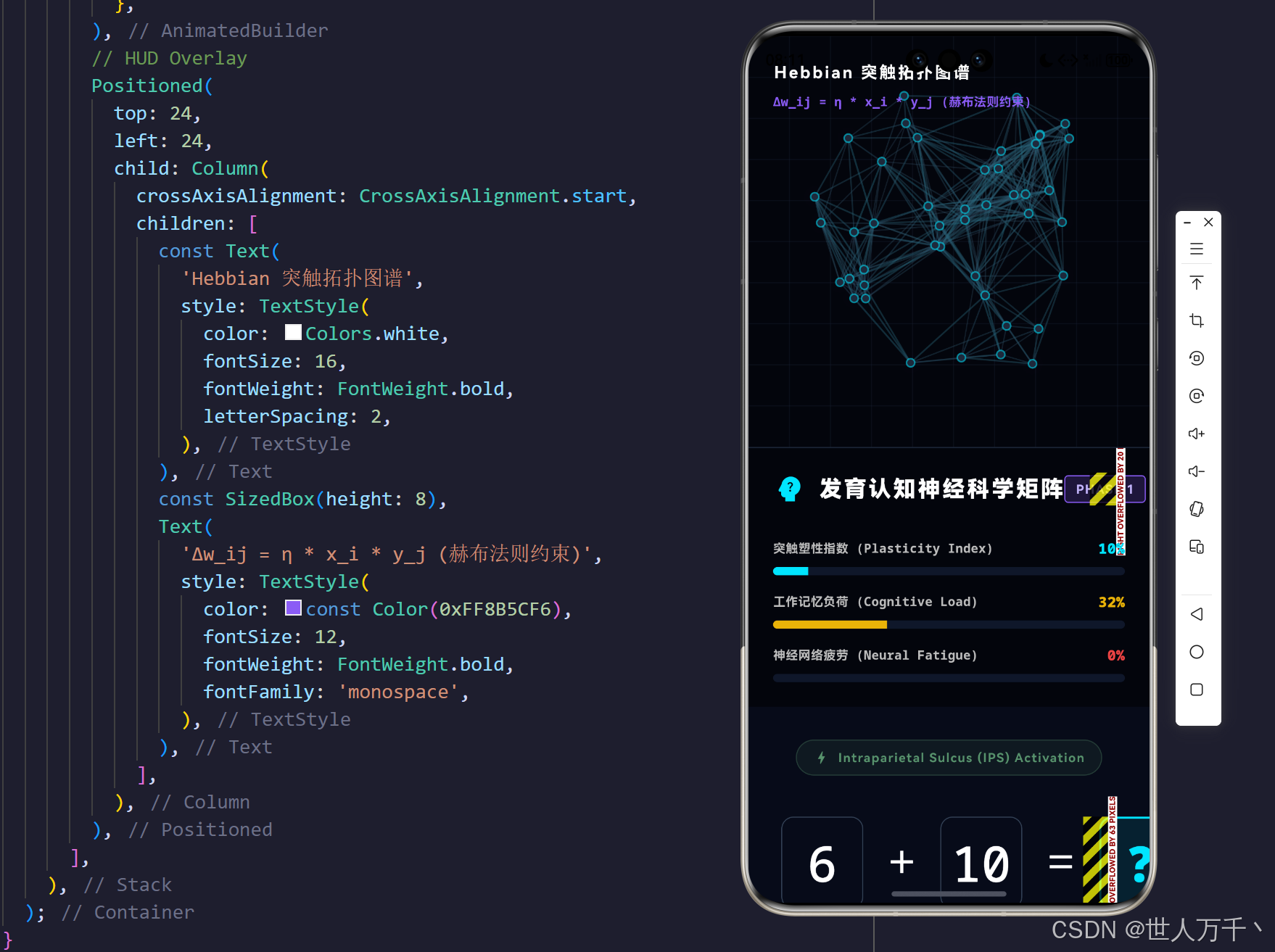
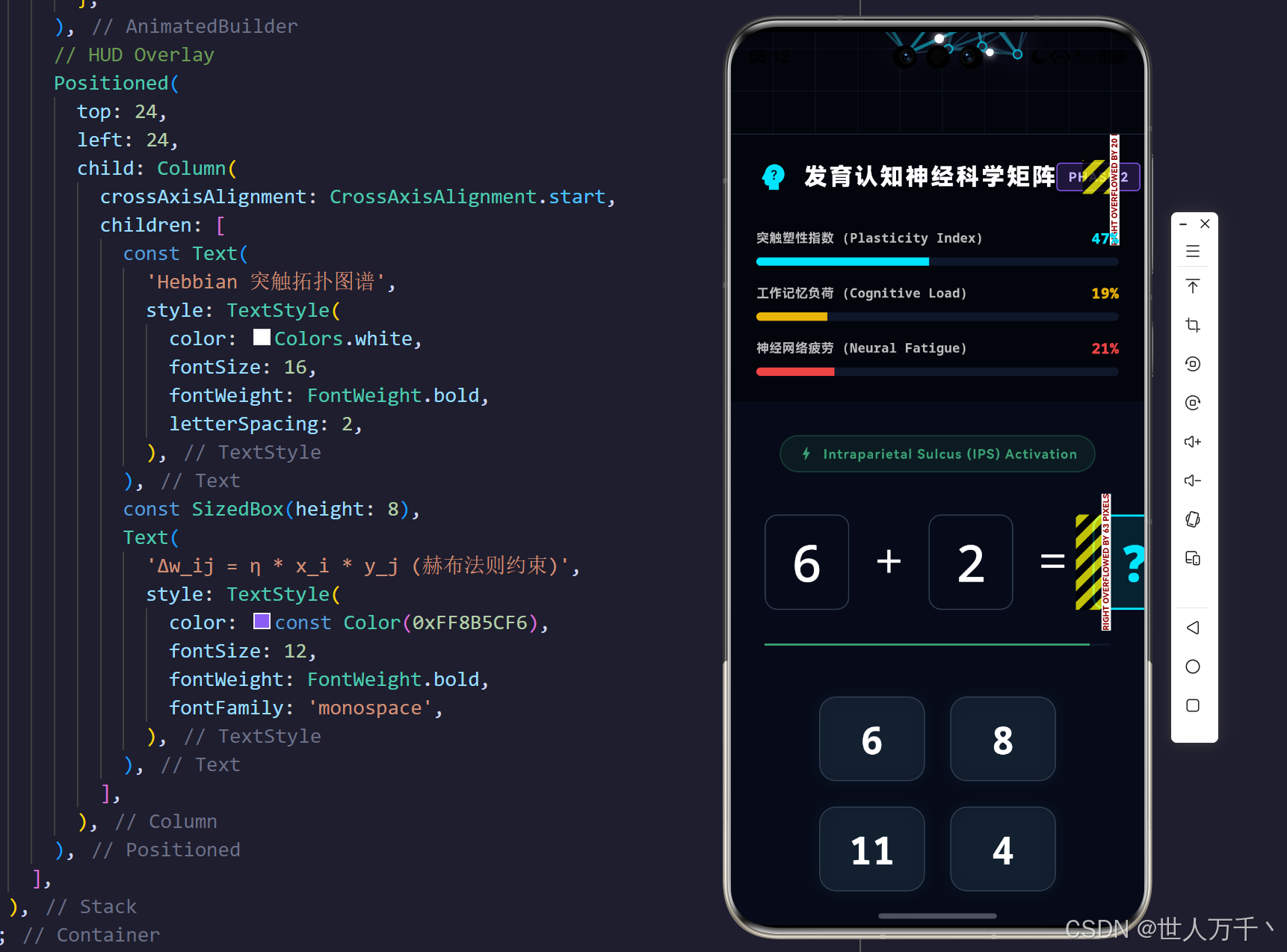
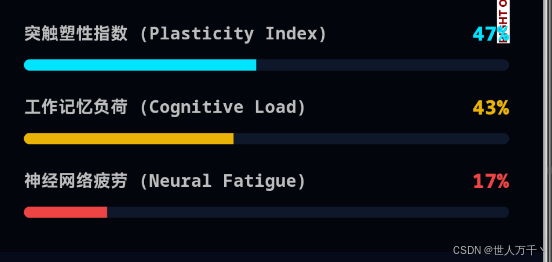
当我们要求一名儿童解开一道算术题时,实际上是在向其大脑的顶叶顶内沟(Intraparietal Sulcus, IPS)发送刺激信号。如果我们将“做数学题”这一行为,视作对儿童前额叶皮层(工作记忆中枢)与顶叶皮层(数量加工中枢)的“神经刻画工程”,那么传统的对错判断就显得过于单薄。真正的教育科技,应当能够测绘并干预儿童在此过程中的认知负荷(Cognitive Load)、神经突触塑性(Synaptic Plasticity)以及神经疲劳(Neural Fatigue)。
本文将打破传统早教软件的设计定式,依托 Flutter 强大的 CustomPaint 渲染管线与跨平台特性,构建一款极具赛博朋克深度的儿童数理认知与神经塑性演化引擎。我们将使用赫布学习法则(Hebbian Rule)模拟脑神经网络的突触连接强化过程,通过精准的状态阻尼算法与动态粒子动画,直观地在屏幕上映射出儿童大脑在处理数字时的生化状态流转。
一、 数理认知的神经科学模型构建
要将抽象的数学计算转化为可量化的 UI 反馈矩阵,我们需要建立严谨的生化与认知指标模型。
1. 核心认知参数表征矩阵
| 认知指标 | 脑区映射 | 交互触发条件 | 界面反馈表现 |
|---|---|---|---|
| 工作记忆负荷 (Cognitive Load) | 前额叶皮层 (PFC) | 问题难度提升、思考时间过长 | 警告红色调上升,IPS刺激器闪烁频次增加 |
| 突触塑性指数 (Plasticity Index) | 海马体 & 顶叶 (IPS) | 连续做出正确反应、产生奖励预期 | 赛博青色上升,拓扑网节点发光与连接强化 |
| 神经疲劳度 (Neural Fatigue) | 全脑边缘系统 | 连续答错或倒计时超时、皮质醇积聚 | 数值飙升,触发“突触修剪(剪除连接)” |
2. 神经突触可塑性数学模型 (KaTeX 推演)
著名的“赫布法则(Hebbian Theory)”被概括为:“一同放电的神经元,必将连结在一起(Cells that fire together, wire together)”。在我们的数学引擎中,每一次正确答题,都代表着相关数字皮层神经元的同步激活。
我们用以下公式模拟突触权重 w i j w_{ij} wij(神经元 i i i 与神经元 j j j 之间的连接强度)的更新机制:
Δ w i j = η ⋅ x i ⋅ y j − λ ⋅ w i j \Delta w_{ij} = \eta \cdot x_i \cdot y_j - \lambda \cdot w_{ij} Δwij=η⋅xi⋅yj−λ⋅wij
-
定义列表
- x i , y j x_i, y_j xi,yj:突触前后神经元的激活电位(在应用中,正确答题视为激活脉冲)。
- η \eta η:学习率参数,控制塑性增长的幅度(正确答题带来的正向强化)。
- λ \lambda λ:遗忘衰减系数(或称突触修剪参数),当儿童产生认知疲劳或长时间无刺激时, w i j w_{ij} wij 会随时间指数级回落。
在我们的系统中,每当儿童点击了正确选项,算法将随机挑选(模拟局部脑区)一批突触实例,大幅拉升其 weight,并同时渲染动作电位(Action Potential)放电的粒子轨迹。
二、 系统架构与生化反馈环路解析
系统的核心在于“刺激 -> 运算 -> 生化状态突变 -> 阻尼追踪 -> 渲染管线刷新”的闭环。
1. 领域模型类群结构 (UML Class Diagram)
2. 生化状态与答题反馈环路 (Flowchart)
三、 核心工程代码深度剖析
这套系统的工程落地,需要 Flutter 高效处理底层状态突变,以及庞大的图形矩阵计算。我们提取了四个极具代表性的技术切片进行深入探讨。
核心代码一:防爆裂视口管理与动态布局坍缩 (LayoutBuilder)
对于此类高信息密度的双面板(测绘图+控制台)系统,在跨设备(横屏平板 vs 竖屏手机)上保持 UI 不溢出是生命线。我们依靠 LayoutBuilder 搭配 CustomScrollView 彻底杜绝了 RenderFlex Error。
// 核心片段:动态视口坍缩管理
Widget build(BuildContext context) {
  return Scaffold(
    body: LayoutBuilder(
      builder: (context, constraints) {
        // 临界宽度设定为 950 像素
        final isCompact = constraints.maxWidth < 950;

        if (isCompact) {
          // 移动端/窄屏:启用 Sliver 降维打击,实行纵向瀑布流
          return CustomScrollView(
            slivers: [
              SliverToBoxAdapter(
                child: SizedBox(
                  height: 400,
                  child: _buildBrainVisualizer(isCompact: true), // 脑网络画布
                ),
              ),
              SliverToBoxAdapter(
                child: Container(height: 1, color: const Color(0xFF1E293B)),
              ),
              SliverToBoxAdapter(
                child: _buildCognitiveMetrics(), // 生理参数指标
              ),
              SliverToBoxAdapter(
                child: _buildMathConsole(), // 算式面板
              ),
            ],
          );
        }

        // 大屏设备:横向展开
        return Row(
          children: [
            Expanded(
              flex: 4,
              child: Column(
                children: [
                  _buildCognitiveMetrics(),
                  Expanded(child: _buildMathConsole()),
                ],
              ),
            ),
            Container(width: 1, color: const Color(0xFF1E293B)),
            Expanded(
              flex: 5,
              child: _buildBrainVisualizer(isCompact: false),
            ),
          ],
        );
      },
    ),
  );
}
工程思辨:在处理儿童教育应用时,由于需要承载庞大的触控按钮(如数学选项),在竖屏模式下直接使用 Column 是极度危险的。SliverToBoxAdapter 的引入,使得原本霸道的画布与面板退化为可以自然交接视口的高度的流式卡片,保证了跨端(尤其是 HarmonyOS 多设备生态)的安全分发。
核心代码二:内环境稳态阻尼与赫布突触调节器
与传统的“答对加分,答错扣分”不同,本系统的变量拥有物理学属性的阻尼(Damping)与遗忘曲线。
// 核心片段:稳态定时器与赫布突触修剪算法
void initState() {
super.initState();
// ...
_homeostasisTimer = Timer.periodic(const Duration(milliseconds: 100), (timer) {
setState(() {
// 神经疲劳缓慢恢复 (代谢)
if (_neuralFatigue > 0.0) _neuralFatigue -= 0.0005;
// 塑性指数自然遗忘衰减
if (_plasticityIndex > 0.1) _plasticityIndex -= 0.0002;
// 倒计时导致认知负荷不断逼近极值
if (_problemTimeLeft > 0) {
_problemTimeLeft -= 0.005;
_cognitiveLoad = math.min(1.0, _cognitiveLoad + 0.002);
} else {
_handleTimeout(); // 超时触发错误逻辑
}
// 推进突触放电动画轨迹
for (var syn in _synapses) {
if (syn.isFiring) {
syn.firingProgress += 0.05;
if (syn.firingProgress >= 1.0) {
syn.isFiring = false;
syn.firingProgress = 0.0;
}
}
}
});
});
}
// 模拟答错情况下的神经抑制(突触修剪)
void _triggerSynapticPruning() {
final random = math.Random();
// 选取 20% 的突触进行无情削弱
for (int i = 0; i < _synapses.length * 0.2; i++) {
int idx = random.nextInt(_synapses.length);
_synapses[idx].weight = math.max(0.05, _synapses[idx].weight - 0.1);
}
}
工程思辨:通过高频(100ms)触发的 Timer 重绘循环,我们将儿童的学习过程映射为一场“大脑代谢马拉松”。由于存在 _problemTimeLeft 对负荷的持续拉升,如果儿童思考过久,系统指示灯将渐变飙红;而如果错误率过高引发突触修剪,屏幕右侧原本密集的蓝绿色神经连接网将大面积断裂变暗。
核心代码三:神经拓扑图谱的布线与坐标映射
在脑网络图谱渲染时,我们首先要利用数学方法在画布上撒点,并判定阈值内生成初始连接。
// 核心片段:随机节点撒布与阈值连接
void _initNeuralNetwork() {
  final random = math.Random(42); // 保持伪随机种子使得每次初始化分布统一
  _nodes.clear();
  _synapses.clear();

  // 1. 生成 45 个神经元绝对坐标因子 (0.0~1.0)
  for (int i = 0; i < _nodeCount; i++) {
    _nodes.add(Offset(random.nextDouble(), random.nextDouble()));
  }

  // 2. 建立空间拓扑连接:计算欧氏距离 (Euclidean Distance)
  for (int i = 0; i < _nodeCount; i++) {
    for (int j = i + 1; j < _nodeCount; j++) {
      double dist = (_nodes[i] - _nodes[j]).distance;
      if (dist < 0.35) { // 拓扑临界距离过滤
        // 初始赋予较低的权重 (弱连接)
        _synapses.add(Synapse(i, j, random.nextDouble() * 0.2 + 0.05));
      }
    }
  }
}
工程思辨:通过设定 0.35 的距离阈值,我们避免了生成无意义的全局全连接网络(即每个点连向所有点,导致渲染灾难),而是构建出了一种具有**“小世界网络(Small-world Network)”**特性的丛集拓扑(Clustered Topology)。这与人类大脑真实的柱状皮层微观连接结构惊人地一致。
核心代码四:神经突触放电与动作电位粒子轨迹计算 (CustomPainter)
全篇最高潮的渲染逻辑,即是在判断答对题目时,激活 syn.isFiring 并沿着由突触权重控制粗细的线条,发射高亮动作电位粒子。
// 核心片段:绘制带有粒子拖尾的神经连接线
for (var syn in synapses) {
  final Offset p1 = scaledNodes[syn.sourceIndex];
  final Offset p2 = scaledNodes[syn.targetIndex];

  // 1. 绘制静态连接基干
  Color edgeColor = Color.lerp(
    const Color(0xFF334155), // 闲置微光
    const Color(0xFF00E5FF), // 强连接高亮
    syn.weight,
  )!;

  final Paint edgePaint = Paint()
    ..color = edgeColor.withValues(alpha: 0.3 + 0.5 * syn.weight)
    ..strokeWidth = 1.0 + 3.0 * syn.weight
    ..style = PaintingStyle.stroke;
  canvas.drawLine(p1, p2, edgePaint);

  // 2. 绘制动作电位 (Action Potential) 粒子
  if (syn.isFiring) {
    // 利用 lerpDouble 沿直线执行时间插值
    final Offset currentPos = Offset(
      ui.lerpDouble(p1.dx, p2.dx, syn.firingProgress)!,
      ui.lerpDouble(p1.dy, p2.dy, syn.firingProgress)!,
    );

    final Paint particlePaint = Paint()
      ..color = const Color(0xFFFFFFFF)
      ..style = PaintingStyle.fill
      ..maskFilter = const MaskFilter.blur(BlurStyle.solid, 4.0); // 核心发光特效

    // 权重越大的通道,输送的粒子体积越大
    canvas.drawCircle(currentPos, 3.0 + syn.weight * 2, particlePaint);

    // 3. 绘制彗星拖尾渐变
    final Offset tailPos = Offset(
      ui.lerpDouble(p1.dx, p2.dx, math.max(0.0, syn.firingProgress - 0.1))!,
      ui.lerpDouble(p1.dy, p2.dy, math.max(0.0, syn.firingProgress - 0.1))!,
    );
    final Paint tailPaint = Paint()
      ..shader = ui.Gradient.linear(currentPos, tailPos, [
        const Color(0xFFFFFFFF),
        const Color(0xFFFFFFFF).withValues(alpha: 0.0),
      ])
      ..strokeWidth = 2.0;
    canvas.drawLine(currentPos, tailPos, tailPaint);
  }
}
工程思辨:这里完美展现了线性代数与 Flutter 画笔 API 的结合。ui.lerpDouble 提供了一条完美的物理学轨迹路径。通过 MaskFilter 实现强高光点,并辅以 Gradient.linear 制作带有透明衰减(alpha: 0.0)的拖尾,彻底激活了整个神经网络,使得每一道算术题的解开,都在屏幕上引发一场壮观的脑电风暴。
四、 后记与学术展望
通过《儿童数理认知与神经塑性演化引擎》,我们在冰冷的代码与稚嫩的认知之间架起了一座生物物理学的桥梁。在这套使用 Flutter 构建的虚拟皮层网络中,计算的对错不再是粗暴的红叉与绿勾,而是演化成了能够清晰被测量的“认知负荷”、“突触塑性”与“神经疲劳”。
展望未来,若该系统与穿戴式设备(如含有脑电 EEG 或者近红外 fNIRS 传感器的儿童头戴设备)打通底层 API,我们将能够实时采集现实中的真实脑网络数据,反向映射至我们的 UI 引擎中。届时,儿童数理认知将彻底摆脱盲人摸象的窘境,跨入精准干预的赛博纪元。
完整代码
import 'dart:async';
import 'dart:math' as math;
import 'dart:ui' as ui;
import 'package:flutter/material.dart';
import 'package:flutter/services.dart';
void main() {
WidgetsFlutterBinding.ensureInitialized();
SystemChrome.setPreferredOrientations([
DeviceOrientation.landscapeLeft,
DeviceOrientation.landscapeRight,
DeviceOrientation.portraitUp,
]);
runApp(const NeuroCognitiveMathApp());
}
class NeuroCognitiveMathApp extends StatelessWidget {
const NeuroCognitiveMathApp({super.key});
@override
Widget build(BuildContext context) {
return MaterialApp(
title: '数理认知与神经塑性引擎',
debugShowCheckedModeBanner: false,
theme: ThemeData(
brightness: Brightness.dark,
scaffoldBackgroundColor: const Color(0xFF040613), // 极客深渊色
useMaterial3: true,
fontFamily: 'Roboto',
),
home: const CognitiveDashboard(),
);
}
}
// ==========================================
// 领域模型 (Domain Models - 认知负荷与数学逻辑)
// ==========================================
class MathProblem {
final int a;
final int b;
final String operator;
final int correctAnswer;
final List<int> options;
MathProblem({
required this.a,
required this.b,
required this.operator,
required this.correctAnswer,
required this.options,
});
factory MathProblem.generate(int level) {
final random = math.Random();
int a, b, ans;
String op;
// 依据等级提升认知负荷 (数字变大,引入减法)
if (level < 3) {
a = random.nextInt(10) + 1;
b = random.nextInt(10) + 1;
op = '+';
ans = a + b;
} else {
bool isSub = random.nextBool();
if (isSub) {
a = random.nextInt(20) + 10;
b = random.nextInt(10) + 1;
op = '-';
ans = a - b;
} else {
a = random.nextInt(20) + 1;
b = random.nextInt(20) + 1;
op = '+';
ans = a + b;
}
}
Set<int> opts = {ans};
while (opts.length < 4) {
int variance = random.nextInt(10) - 5;
if (variance != 0 && ans + variance > 0) {
opts.add(ans + variance);
}
}
List<int> shuffledOptions = opts.toList()..shuffle();
return MathProblem(
a: a,
b: b,
operator: op,
correctAnswer: ans,
options: shuffledOptions,
);
}
}
class Synapse {
final int sourceIndex;
final int targetIndex;
double weight; // 突触权重 (0.0 - 1.0)
bool isFiring;
double firingProgress;
Synapse(this.sourceIndex, this.targetIndex, this.weight)
: isFiring = false,
firingProgress = 0.0;
}
// ==========================================
// 核心状态控制面板 (Main Dashboard)
// ==========================================
class CognitiveDashboard extends StatefulWidget {
const CognitiveDashboard({super.key});
@override
State<CognitiveDashboard> createState() => _CognitiveDashboardState();
}
class _CognitiveDashboardState extends State<CognitiveDashboard> with TickerProviderStateMixin {
late AnimationController _neuralController;
late AnimationController _pulseController;
MathProblem? _currentProblem;
int _currentLevel = 1;
int _consecutiveCorrect = 0;
// 认知生化指标
double _plasticityIndex = 0.1; // 突触塑性 (随答对增加)
double _cognitiveLoad = 0.2; // 认知负荷 (随时间与难度增加)
double _neuralFatigue = 0.0; // 神经疲劳 (答错增加)
// 脑皮层拓扑网络
final int _nodeCount = 45;
List<Offset> _nodes = [];
List<Synapse> _synapses = [];
Timer? _homeostasisTimer;
Timer? _problemTimer;
double _problemTimeLeft = 1.0; // 1.0 to 0.0
@override
void initState() {
super.initState();
_neuralController = AnimationController(
vsync: this,
duration: const Duration(seconds: 4),
)..repeat();
_pulseController = AnimationController(
vsync: this,
duration: const Duration(milliseconds: 1500),
)..repeat(reverse: true);
_initNeuralNetwork();
_generateNextProblem();
// 生化状态内环境稳态与时间衰减
_homeostasisTimer = Timer.periodic(const Duration(milliseconds: 100), (timer) {
setState(() {
// 认知负荷自然缓慢下降
if (_cognitiveLoad > 0.1) _cognitiveLoad -= 0.001;
// 神经疲劳缓慢恢复
if (_neuralFatigue > 0.0) _neuralFatigue -= 0.0005;
// 塑性指数在没有刺激时轻微遗忘衰减
if (_plasticityIndex > 0.1) _plasticityIndex -= 0.0002;
// 答题倒计时衰减
if (_problemTimeLeft > 0) {
_problemTimeLeft -= 0.005; // 约 20 秒
// 倒计时越少,认知负荷越大
_cognitiveLoad = math.min(1.0, _cognitiveLoad + 0.002);
} else {
// 超时作答处理
_handleTimeout();
}
// 突触放电动画推进
for (var syn in _synapses) {
if (syn.isFiring) {
syn.firingProgress += 0.05;
if (syn.firingProgress >= 1.0) {
syn.isFiring = false;
syn.firingProgress = 0.0;
}
}
}
});
});
}
void _initNeuralNetwork() {
final random = math.Random(42);
_nodes.clear();
_synapses.clear();
// 随机生成顶叶皮层(Parietal Lobe)的神经元节点
for (int i = 0; i < _nodeCount; i++) {
_nodes.add(Offset(random.nextDouble(), random.nextDouble()));
}
// 建立初始突触连接 (距离较近的节点)
for (int i = 0; i < _nodeCount; i++) {
for (int j = i + 1; j < _nodeCount; j++) {
double dist = (_nodes[i] - _nodes[j]).distance;
if (dist < 0.35) { // 拓扑临界距离
// 初始权重较低
_synapses.add(Synapse(i, j, random.nextDouble() * 0.2 + 0.05));
}
}
}
}
@override
void dispose() {
_neuralController.dispose();
_pulseController.dispose();
_homeostasisTimer?.cancel();
_problemTimer?.cancel();
super.dispose();
}
void _generateNextProblem() {
setState(() {
_currentProblem = MathProblem.generate(_currentLevel);
_problemTimeLeft = 1.0;
});
}
void _handleTimeout() {
setState(() {
_neuralFatigue = math.min(1.0, _neuralFatigue + 0.15); // 增加疲劳
_consecutiveCorrect = 0;
_generateNextProblem();
});
}
void _onOptionSelected(int selectedAnswer) {
setState(() {
if (selectedAnswer == _currentProblem!.correctAnswer) {
// 正确反应:Heabbian学习发生,塑性上升,负荷下降
_consecutiveCorrect++;
if (_consecutiveCorrect % 3 == 0) _currentLevel++; // 难度升级
_plasticityIndex = math.min(1.0, _plasticityIndex + 0.08);
_cognitiveLoad = math.max(0.1, _cognitiveLoad - 0.15);
// 触发神经网络Heabbian加强与放电特效
_triggerSynapticPlasticity();
} else {
// 错误反应:疲劳度增加,负荷激增
_consecutiveCorrect = 0;
_neuralFatigue = math.min(1.0, _neuralFatigue + 0.2);
_cognitiveLoad = math.min(1.0, _cognitiveLoad + 0.2);
// 如果疲劳太高,触发突触修剪(权重下降)
_triggerSynapticPruning();
}
_generateNextProblem();
});
}
void _triggerSynapticPlasticity() {
final random = math.Random();
// 随机挑选一批突触进行权重加强(模拟顶叶皮层处理数字信息的脑区激活)
int firingCount = (_synapses.length * 0.3).toInt(); // 30% 突触活跃
for (int i = 0; i < firingCount; i++) {
int idx = random.nextInt(_synapses.length);
_synapses[idx].weight = math.min(1.0, _synapses[idx].weight + 0.15); // 赫布法则强化
_synapses[idx].isFiring = true;
_synapses[idx].firingProgress = 0.0;
}
}
void _triggerSynapticPruning() {
final random = math.Random();
// 模拟压力下的神经抑制
for (int i = 0; i < _synapses.length * 0.2; i++) {
int idx = random.nextInt(_synapses.length);
_synapses[idx].weight = math.max(0.05, _synapses[idx].weight - 0.1);
}
}
@override
Widget build(BuildContext context) {
return Scaffold(
body: LayoutBuilder(
builder: (context, constraints) {
final isCompact = constraints.maxWidth < 950;
if (isCompact) {
return CustomScrollView(
slivers: [
SliverToBoxAdapter(
child: SizedBox(
height: 400,
child: _buildBrainVisualizer(isCompact: true),
),
),
SliverToBoxAdapter(
child: Container(height: 1, color: const Color(0xFF1E293B)),
),
SliverToBoxAdapter(
child: _buildCognitiveMetrics(),
),
SliverToBoxAdapter(
child: _buildMathConsole(),
),
],
);
}
return Row(
children: [
Expanded(
flex: 4,
child: Column(
children: [
_buildCognitiveMetrics(),
Expanded(
child: _buildMathConsole(),
),
],
),
),
Container(width: 1, color: const Color(0xFF1E293B)),
Expanded(
flex: 5,
child: _buildBrainVisualizer(isCompact: false),
),
],
);
},
),
);
}
Widget _buildCognitiveMetrics() {
return Container(
color: const Color(0xFF03050C),
padding: const EdgeInsets.all(24.0),
child: Column(
crossAxisAlignment: CrossAxisAlignment.start,
children: [
Row(
children: [
const Icon(Icons.psychology_alt, color: Color(0xFF00E5FF), size: 32),
const SizedBox(width: 12),
const Text(
'发育认知神经科学矩阵',
style: TextStyle(
fontSize: 22,
fontWeight: FontWeight.w900,
color: Colors.white,
letterSpacing: 2,
),
),
const Spacer(),
Container(
padding: const EdgeInsets.symmetric(horizontal: 10, vertical: 4),
decoration: BoxDecoration(
color: const Color(0xFF8B5CF6).withValues(alpha: 0.2),
border: Border.all(color: const Color(0xFF8B5CF6)),
borderRadius: BorderRadius.circular(4),
),
child: Text(
'PHASE $_currentLevel',
style: const TextStyle(
color: Color(0xFFC4B5FD),
fontWeight: FontWeight.bold,
fontSize: 12,
letterSpacing: 1,
),
),
),
],
),
const SizedBox(height: 32),
_buildMetricBar('突触塑性指数 (Plasticity Index)', _plasticityIndex, const Color(0xFF00E5FF)),
const SizedBox(height: 16),
_buildMetricBar('工作记忆负荷 (Cognitive Load)', _cognitiveLoad, const Color(0xFFEAB308)),
const SizedBox(height: 16),
_buildMetricBar('神经网络疲劳 (Neural Fatigue)', _neuralFatigue, const Color(0xFFEF4444)),
],
),
);
}
Widget _buildMetricBar(String label, double value, Color color) {
return Column(
crossAxisAlignment: CrossAxisAlignment.start,
children: [
Row(
mainAxisAlignment: MainAxisAlignment.spaceBetween,
children: [
Text(
label,
style: TextStyle(
fontSize: 12,
color: Colors.grey[400],
fontWeight: FontWeight.bold,
fontFamily: 'monospace',
),
),
Text(
'${(value * 100).toInt()}%',
style: TextStyle(
fontSize: 14,
color: color,
fontWeight: FontWeight.w900,
fontFamily: 'monospace',
),
),
],
),
const SizedBox(height: 8),
ClipRRect(
borderRadius: BorderRadius.circular(4),
child: LinearProgressIndicator(
value: value,
backgroundColor: const Color(0xFF0F172A),
valueColor: AlwaysStoppedAnimation<Color>(color),
minHeight: 8,
),
),
],
);
}
Widget _buildMathConsole() {
if (_currentProblem == null) return const SizedBox.shrink();
// 动态阻力颜色
Color loadColor = Color.lerp(const Color(0xFF10B981), const Color(0xFFEF4444), _cognitiveLoad)!;
return Container(
color: const Color(0xFF070B19),
padding: const EdgeInsets.all(32.0),
child: Column(
mainAxisAlignment: MainAxisAlignment.center,
children: [
// 顶叶顶内沟 (IPS) 刺激模拟器
Container(
padding: const EdgeInsets.symmetric(horizontal: 16, vertical: 8),
decoration: BoxDecoration(
color: loadColor.withValues(alpha: 0.1),
borderRadius: BorderRadius.circular(20),
border: Border.all(color: loadColor.withValues(alpha: 0.3)),
),
child: Row(
mainAxisSize: MainAxisSize.min,
children: [
Icon(Icons.bolt, color: loadColor, size: 16),
const SizedBox(width: 8),
Text(
'Intraparietal Sulcus (IPS) Activation',
style: TextStyle(
color: loadColor,
fontSize: 12,
fontWeight: FontWeight.bold,
letterSpacing: 1,
),
),
],
),
),
const SizedBox(height: 40),
// 算式展示区
Row(
mainAxisAlignment: MainAxisAlignment.center,
children: [
_buildNumberBox(_currentProblem!.a.toString()),
Padding(
padding: const EdgeInsets.symmetric(horizontal: 24.0),
child: Text(
_currentProblem!.operator,
style: const TextStyle(
fontSize: 48,
fontWeight: FontWeight.w300,
color: Colors.white,
),
),
),
_buildNumberBox(_currentProblem!.b.toString()),
const Padding(
padding: EdgeInsets.symmetric(horizontal: 24.0),
child: Text(
'=',
style: TextStyle(
fontSize: 48,
fontWeight: FontWeight.w300,
color: Colors.white,
),
),
),
_buildNumberBox('?'),
],
),
const SizedBox(height: 32),
// 倒计时进度条
LinearProgressIndicator(
value: _problemTimeLeft,
backgroundColor: const Color(0xFF0F172A),
valueColor: AlwaysStoppedAnimation<Color>(loadColor),
minHeight: 2,
),
const SizedBox(height: 48),
// 选项按键区 (镜像突触映射)
Wrap(
spacing: 24,
runSpacing: 24,
alignment: WrapAlignment.center,
children: _currentProblem!.options.map((option) {
return InkWell(
onTap: () => _onOptionSelected(option),
borderRadius: BorderRadius.circular(16),
child: Container(
width: 100,
height: 80,
alignment: Alignment.center,
decoration: BoxDecoration(
color: const Color(0xFF1E293B).withValues(alpha: 0.5),
borderRadius: BorderRadius.circular(16),
border: Border.all(color: const Color(0xFF334155)),
boxShadow: [
BoxShadow(
color: const Color(0xFF00E5FF).withValues(alpha: 0.05),
blurRadius: 10,
)
],
),
child: Text(
option.toString(),
style: const TextStyle(
fontSize: 36,
fontWeight: FontWeight.bold,
color: Colors.white,
fontFamily: 'monospace',
),
),
),
);
}).toList(),
),
],
),
);
}
Widget _buildNumberBox(String text) {
bool isQuestion = text == '?';
return Container(
width: 80,
height: 90,
alignment: Alignment.center,
decoration: BoxDecoration(
color: isQuestion ? const Color(0xFF00E5FF).withValues(alpha: 0.1) : Colors.transparent,
borderRadius: BorderRadius.circular(12),
border: Border.all(
color: isQuestion ? const Color(0xFF00E5FF) : const Color(0xFF334155),
width: isQuestion ? 2 : 1,
),
),
child: Text(
text,
style: TextStyle(
fontSize: 48,
fontWeight: isQuestion ? FontWeight.w900 : FontWeight.w500,
color: isQuestion ? const Color(0xFF00E5FF) : Colors.white,
fontFamily: 'monospace',
),
),
);
}
Widget _buildBrainVisualizer({required bool isCompact}) {
return Container(
color: const Color(0xFF03050C),
child: Stack(
children: [
// Background Topology Grid
CustomPaint(
size: Size.infinite,
painter: TopologyGridPainter(),
),
// Neural Network Simulator
AnimatedBuilder(
animation: Listenable.merge([_neuralController, _pulseController]),
builder: (context, child) {
return CustomPaint(
size: Size.infinite,
painter: BrainNetworkPainter(
nodes: _nodes,
synapses: _synapses,
plasticityIndex: _plasticityIndex,
neuralProgress: _neuralController.value,
pulseProgress: _pulseController.value,
),
);
},
),
// HUD Overlay
Positioned(
top: 24,
left: 24,
child: Column(
crossAxisAlignment: CrossAxisAlignment.start,
children: [
const Text(
'Hebbian 突触拓扑图谱',
style: TextStyle(
color: Colors.white,
fontSize: 16,
fontWeight: FontWeight.bold,
letterSpacing: 2,
),
),
const SizedBox(height: 8),
Text(
'Δw_ij = η * x_i * y_j (赫布法则约束)',
style: TextStyle(
color: const Color(0xFF8B5CF6),
fontSize: 12,
fontWeight: FontWeight.bold,
fontFamily: 'monospace',
),
),
],
),
),
],
),
);
}
}
// ==========================================
// 极客物理渲染:神经突触拓扑网络渲染引擎
// ==========================================
class TopologyGridPainter extends CustomPainter {
@override
void paint(Canvas canvas, Size size) {
final paint = Paint()
..color = const Color(0xFF1E293B).withValues(alpha: 0.3)
..strokeWidth = 1.0;
// Hexagonal or simple grid to imply structural brain map
const double spacing = 40.0;
for (double i = 0; i < size.width; i += spacing) {
canvas.drawLine(Offset(i, 0), Offset(i, size.height), paint);
}
for (double i = 0; i < size.height; i += spacing) {
canvas.drawLine(Offset(0, i), Offset(size.width, i), paint);
}
}
@override
bool shouldRepaint(covariant CustomPainter oldDelegate) => false;
}
class BrainNetworkPainter extends CustomPainter {
final List<Offset> nodes;
final List<Synapse> synapses;
final double plasticityIndex;
final double neuralProgress;
final double pulseProgress;
BrainNetworkPainter({
required this.nodes,
required this.synapses,
required this.plasticityIndex,
required this.neuralProgress,
required this.pulseProgress,
});
@override
void paint(Canvas canvas, Size size) {
if (size.width <= 0 || size.height <= 0 || nodes.isEmpty) return;
// Scale normalized node coordinates to actual canvas size
// Leave some padding
final double padding = 50.0;
final double usableWidth = size.width - padding * 2;
final double usableHeight = size.height - padding * 2;
List<Offset> scaledNodes = nodes.map((n) {
// 赋予神经元基于正弦时间函数的微小浮动,模拟脑脊液中的生物活性
final double driftX = math.sin(neuralProgress * math.pi * 2 + n.dx * 10) * 5;
final double driftY = math.cos(neuralProgress * math.pi * 2 + n.dy * 10) * 5;
return Offset(
padding + n.dx * usableWidth + driftX,
padding + n.dy * usableHeight + driftY,
);
}).toList();
// 1. Draw Synaptic Edges (Connections)
for (var syn in synapses) {
final Offset p1 = scaledNodes[syn.sourceIndex];
final Offset p2 = scaledNodes[syn.targetIndex];
// 边缘颜色取决于权重,权重越高,颜色越偏亮青色
Color edgeColor = Color.lerp(
const Color(0xFF334155), // 未激活的暗灰色
const Color(0xFF00E5FF), // 强连接的青色
syn.weight,
)!;
final Paint edgePaint = Paint()
..color = edgeColor.withValues(alpha: 0.3 + 0.5 * syn.weight)
..strokeWidth = 1.0 + 3.0 * syn.weight
..style = PaintingStyle.stroke;
canvas.drawLine(p1, p2, edgePaint);
// 如果神经回路正在放电 (Action Potential Firing)
if (syn.isFiring) {
// 绘制沿着路径移动的动作电位粒子
final Offset currentPos = Offset(
ui.lerpDouble(p1.dx, p2.dx, syn.firingProgress)!,
ui.lerpDouble(p1.dy, p2.dy, syn.firingProgress)!,
);
final Paint particlePaint = Paint()
..color = const Color(0xFFFFFFFF)
..style = PaintingStyle.fill
..maskFilter = const MaskFilter.blur(BlurStyle.solid, 4.0);
canvas.drawCircle(currentPos, 3.0 + syn.weight * 2, particlePaint);
// 粒子拖尾
final Offset tailPos = Offset(
ui.lerpDouble(p1.dx, p2.dx, math.max(0.0, syn.firingProgress - 0.1))!,
ui.lerpDouble(p1.dy, p2.dy, math.max(0.0, syn.firingProgress - 0.1))!,
);
final Paint tailPaint = Paint()
..shader = ui.Gradient.linear(currentPos, tailPos, [
const Color(0xFFFFFFFF),
const Color(0xFFFFFFFF).withValues(alpha: 0.0),
])
..strokeWidth = 2.0;
canvas.drawLine(currentPos, tailPos, tailPaint);
}
}
// 2. Draw Neurons (Soma Nodes)
for (int i = 0; i < scaledNodes.length; i++) {
final Offset pt = scaledNodes[i];
// 根据塑性指数赋予节点发光特效
final Paint glowPaint = Paint()
..color = const Color(0xFF8B5CF6).withValues(alpha: 0.2 * plasticityIndex * pulseProgress)
..style = PaintingStyle.fill
..maskFilter = const MaskFilter.blur(BlurStyle.normal, 10.0);
canvas.drawCircle(pt, 15.0, glowPaint);
final Paint nodePaint = Paint()
..color = const Color(0xFF1E293B)
..style = PaintingStyle.fill;
canvas.drawCircle(pt, 4.0, nodePaint);
final Paint borderPaint = Paint()
..color = const Color(0xFF00E5FF).withValues(alpha: 0.5 + 0.5 * plasticityIndex)
..style = PaintingStyle.stroke
..strokeWidth = 1.5;
canvas.drawCircle(pt, 4.0, borderPaint);
}
}
@override
bool shouldRepaint(covariant BrainNetworkPainter oldDelegate) {
return oldDelegate.neuralProgress != neuralProgress ||
oldDelegate.pulseProgress != pulseProgress ||
oldDelegate.plasticityIndex != plasticityIndex ||
oldDelegate.synapses != synapses;
}
}

作为“人工智能6S店”的官方数字引擎,为AI开发者与企业提供一个覆盖软硬件全栈、一站式门户。
更多推荐
 1
1 0
0- 0


 已为社区贡献8条内容

所有评论(0)