
Flutter 框架跨平台鸿蒙开发 - 番茄钟花园
运行效果图番茄钟花园是一款将番茄工作法与游戏化元素相结合的专注应用。核心理念是"用专注浇灌你的花园"——用户在专注时段内保持专注,花朵会逐渐生长绽放;如果中途离开应用,花朵就会枯萎凋零。这种即时反馈机制让专注变得更有趣味性和成就感。应用采用CustomPainter实现花朵生长动画,通过AppLifecycleState监听应用状态变化来检测用户是否分心。支持5种专注时长选择(15/25/30/4
番茄钟花园应用
欢迎加入开源鸿蒙跨平台社区:
https://openharmonycrossplatform.csdn.net
一、项目概述
运行效果图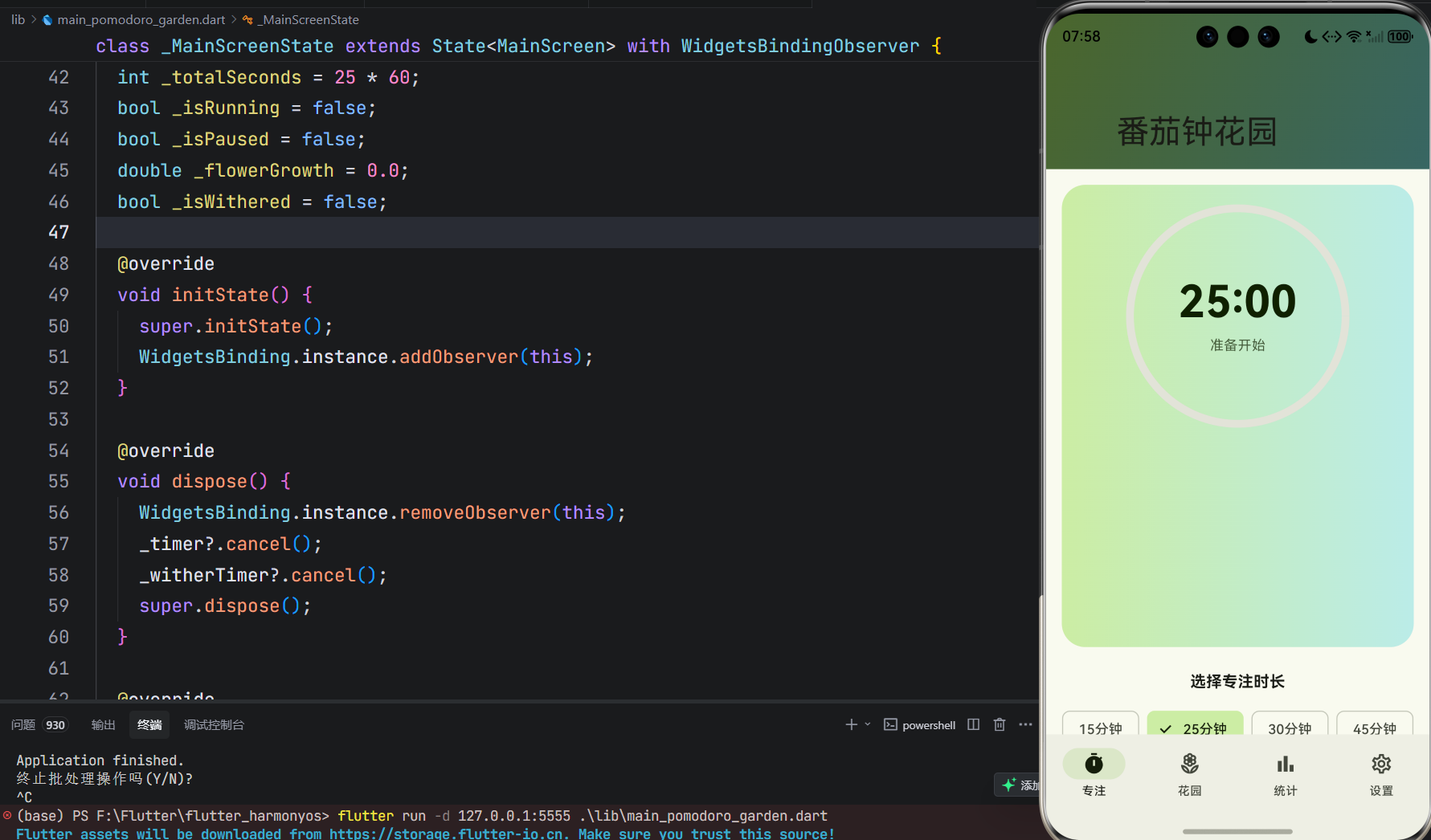
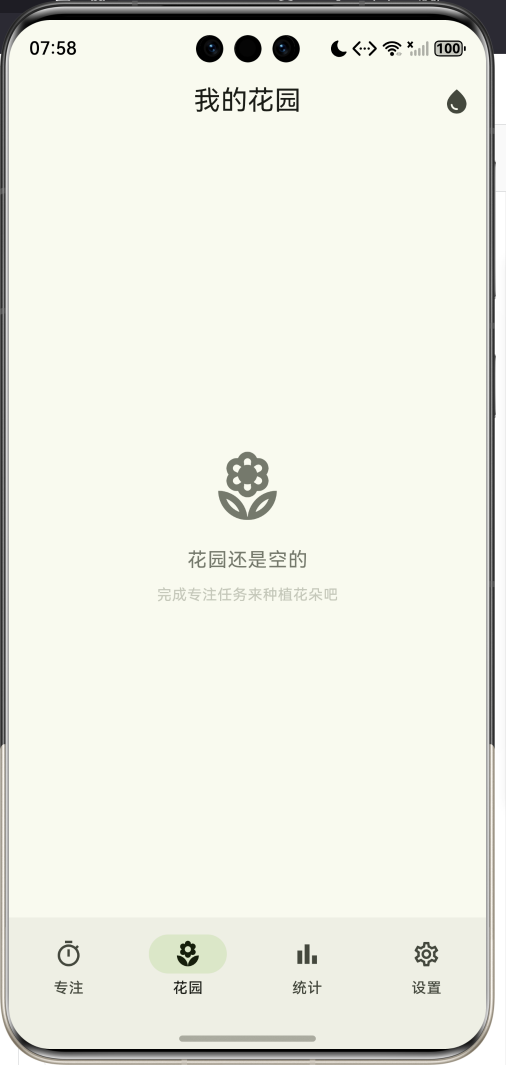
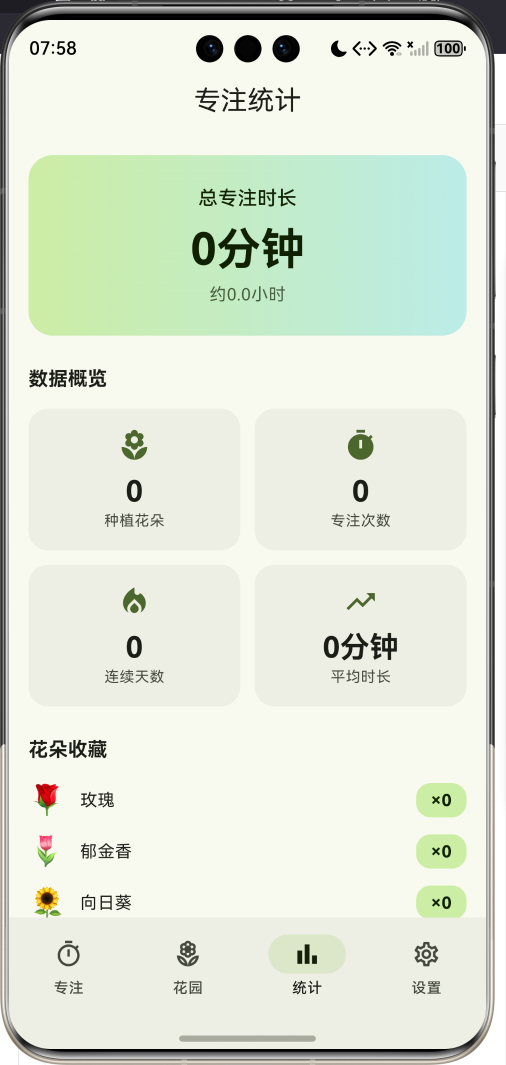
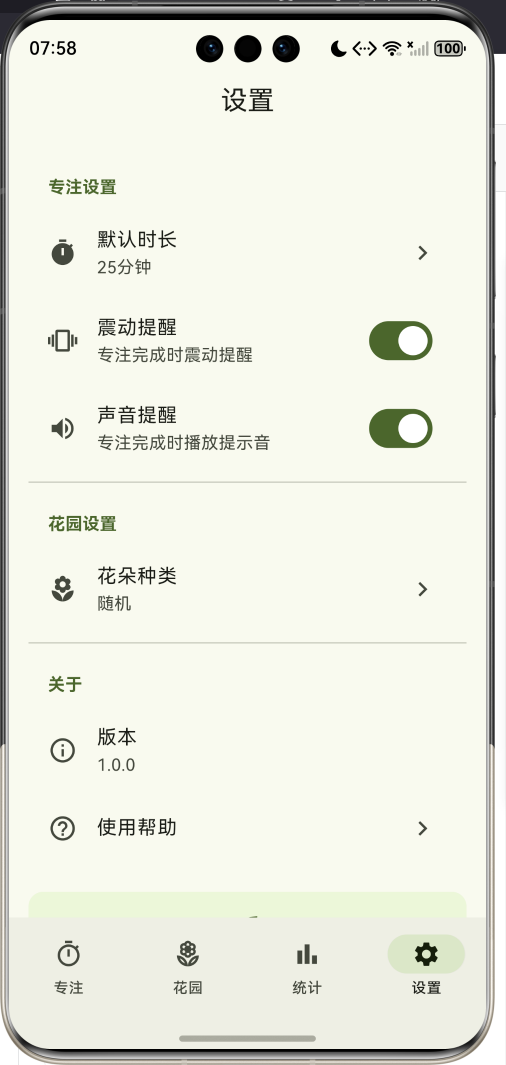
1.1 应用简介
番茄钟花园是一款将番茄工作法与游戏化元素相结合的专注应用。核心理念是"用专注浇灌你的花园"——用户在专注时段内保持专注,花朵会逐渐生长绽放;如果中途离开应用,花朵就会枯萎凋零。这种即时反馈机制让专注变得更有趣味性和成就感。
应用采用CustomPainter实现花朵生长动画,通过AppLifecycleState监听应用状态变化来检测用户是否分心。支持5种专注时长选择(15/25/30/45/60分钟),完成专注后随机获得6种花朵之一,所有花朵都会保存在虚拟花园中供用户欣赏。统计页面展示总专注时长、连续天数、花朵收藏等数据,激励用户持续保持专注习惯。
1.2 核心功能
| 功能模块 | 功能描述 | 实现方式 |
|---|---|---|
| 番茄钟计时 | 可选时长倒计时 | Timer + setState |
| 花朵生长 | 实时生长动画 | CustomPainter |
| 分心检测 | 离开应用检测 | AppLifecycleState |
| 花朵枯萎 | 离开时枯萎动画 | 渐变透明度 |
| 花园展示 | 种植花朵收藏 | GridView |
| 统计分析 | 专注数据汇总 | 数据聚合计算 |
1.3 花朵种类
| 花朵 | 表情 | 颜色 | 稀有度 |
|---|---|---|---|
| 玫瑰 | 🌹 | 红色 | 普通 |
| 郁金香 | 🌷 | 粉色 | 普通 |
| 向日葵 | 🌻 | 橙色 | 普通 |
| 樱花 | 🌸 | 粉红 | 普通 |
| 木槿 | 🌺 | 深红 | 普通 |
| 雏菊 | 🌼 | 黄色 | 普通 |
1.4 技术栈
| 技术领域 | 技术选型 | 版本要求 |
|---|---|---|
| 开发框架 | Flutter | >= 3.0.0 |
| 编程语言 | Dart | >= 2.17.0 |
| 设计规范 | Material Design 3 | - |
| 状态监听 | WidgetsBindingObserver | - |
| 自定义绘制 | CustomPainter | - |
| 目标平台 | 鸿蒙OS | API 21+ |
1.5 项目结构
lib/
└── main_pomodoro_garden.dart
    ├── PomodoroGardenApp       # 应用入口
    ├── MainScreen              # 主屏幕(底部导航)
    ├── FlowerPainter           # 花朵绘制器
    ├── FlowerType              # 花朵类型枚举
    ├── Flower                  # 花朵数据模型
    ├── GardenStorage           # 花园存储管理
    ├── GardenStats             # 统计数据模型
    ├── GardenPage              # 花园页面
    ├── StatsPage               # 统计页面
    └── SettingsPage            # 设置页面
二、系统架构
2.1 整体架构图
2.2 类图设计
2.3 专注流程
三、核心模块设计
3.1 数据模型设计
3.1.1 花朵类型枚举 (FlowerType)
enum FlowerType {
  rose('玫瑰', '🌹', Colors.red),
  tulip('郁金香', '🌷', Colors.pink),
  sunflower('向日葵', '🌻', Colors.orange),
  blossom('樱花', '🌸', Colors.pinkAccent),
  hibiscus('木槿', '🌺', Colors.redAccent),
  daisy('雏菊', '🌼', Colors.yellow);

  final String chineseName;
  final String emoji;
  final Color color;
}
3.1.2 花朵模型 (Flower)
class Flower {
  final String id;              // 唯一标识
  final FlowerType type;        // 花朵类型
  final int growthDuration;     // 生长时长(秒)
  final DateTime plantedAt;     // 种植时间
}
3.1.3 统计数据模型 (GardenStats)
class GardenStats {
  final int totalFlowers;       // 总花朵数
  final int totalSessions;      // 总专注次数
  final int totalMinutes;       // 总专注分钟数
  final int streak;             // 连续天数
  final int averageMinutes;     // 平均每次时长
  final Map<FlowerType, int> flowerCounts;  // 各类花朵数量
}
3.2 花朵绘制器
3.2.1 绘制器结构
class FlowerPainter extends CustomPainter {
final double growth; // 生长进度 0-1
final bool isWithered; // 是否枯萎
final FlowerType flowerType;
void paint(Canvas canvas, Size size) {
_drawStem(canvas, size); // 绘制茎
_drawLeaves(canvas, size); // 绘制叶子
if (growth > 0.3) {
_drawFlower(canvas, size); // 绘制花朵
}
if (growth > 0.1 && growth <= 0.3) {
_drawBud(canvas, size); // 绘制花苞
}
}
}
3.2.2 生长阶段
| 阶段 | growth范围 | 绘制内容 |
|---|---|---|
| 种子 | 0 - 0.1 | 仅茎 |
| 发芽 | 0.1 - 0.3 | 茎 + 花苞 |
| 生长 | 0.3 - 0.7 | 茎 + 叶 + 小花 |
| 盛开 | 0.7 - 1.0 | 茎 + 叶 + 完整花朵 |
3.3 分心检测机制
void didChangeAppLifecycleState(AppLifecycleState state) {
if (state == AppLifecycleState.paused && _isRunning && !_isPaused) {
_startWithering(); // 开始枯萎
} else if (state == AppLifecycleState.resumed) {
_stopWithering(); // 停止枯萎
}
}
void _startWithering() {
_witherTimer = Timer.periodic(const Duration(seconds: 1), (timer) {
setState(() {
_flowerGrowth -= 0.02; // 每秒减少2%
if (_flowerGrowth <= 0) {
_isWithered = true;
_stopTimer();
}
});
});
}
3.4 计时器控制
void _startTimer() {
  _timer = Timer.periodic(const Duration(seconds: 1), (timer) {
    setState(() {
      if (_remainingSeconds > 0) {
        _remainingSeconds--;
        _flowerGrowth = 1 - (_remainingSeconds / _totalSeconds);
      } else {
        _completeSession();
      }
    });
  });
}
四、UI设计规范
4.1 配色方案
应用采用浅色主题配合绿色主色调,营造自然清新的氛围:
| 颜色类型 | 色值 | 用途 |
|---|---|---|
| 主色 | #8BC34A | AppBar、强调、按钮 |
| 背景色 | #FFFFFF | 纯白背景 |
| 表面色 | #F5F5F5 | 浅灰卡片背景 |
| 主容器色 | #DCEDC8 | 浅绿选中状态 |
| 次容器色 | #C5E1A5 | 浅绿辅助色 |
4.2 组件规范
4.2.1 专注页面布局
┌─────────────────────────────────┐
│  ━━━━━━━━━━━━━━━━━━━━━━━━━━━    │  ← AppBar
│        🌸 番茄钟花园             │
├─────────────────────────────────┤
│  ┌─────────────────────────┐   │
│  │      ○─────────○        │   │
│  │     ╱   25:00   ╲       │   │  ← 进度环
│  │    │  专注中...  │       │   │
│  │     ╲           ╱       │   │
│  │      ○─────────○        │   │
│  │                         │   │
│  │        🌹               │   │  ← 花朵动画
│  │        │                │   │
│  │       ╱╲               │   │
│  │                         │   │
│  └─────────────────────────┘   │
│                                 │
│  选择专注时长                    │
│  [15分钟] [25分钟] [30分钟]      │
│  [45分钟] [60分钟]              │
│                                 │
│     [▶ 开始专注]                │
│                                 │
│  ℹ️ 专注时请保持应用在前台        │
└─────────────────────────────────┘
4.3 动画效果
| 动画 | 触发条件 | 效果描述 |
|---|---|---|
| 花朵生长 | 每秒更新 | 茎→叶→花苞→盛开 |
| 花朵枯萎 | 离开应用 | 逐渐变小变灰 |
| 进度环 | 每秒更新 | 顺时针填充 |
| 完成弹窗 | 专注完成 | 淡入显示 |
五、核心功能实现
5.1 开始专注
void _startTimer() {
  setState(() {
    _isRunning = true;
    _isPaused = false;
    _isWithered = false;
  });

  _timer = Timer.periodic(const Duration(seconds: 1), (timer) {
    if (_remainingSeconds > 0) {
      _remainingSeconds--;
      _flowerGrowth = 1 - (_remainingSeconds / _totalSeconds);
    } else {
      _completeSession();
    }
  });
}
5.2 完成专注
void _completeSession() {
  _timer?.cancel();

  final flower = Flower(
    id: DateTime.now().millisecondsSinceEpoch.toString(),
    type: _getRandomFlowerType(),
    growthDuration: _totalSeconds,
    plantedAt: DateTime.now(),
  );

  GardenStorage.addFlower(flower);
  _showCompletionDialog(flower);
}
5.3 花朵绘制
void _drawFlower(Canvas canvas, Size size, Color baseColor) {
  final flowerCenter = Offset(size.width / 2, size.height * 0.85 - stemHeight - 30);
  final petalSize = 25.0 * (growth - 0.3) / 0.7;

  // 绘制8片花瓣
  for (int i = 0; i < 8; i++) {
    final angle = (i * 45) * pi / 180;
    // 绘制花瓣路径...
  }

  // 绘制花蕊
  canvas.drawCircle(flowerCenter, 10, Paint()..color = Colors.yellow);
}
六、番茄工作法知识拓展
6.1 番茄工作法原理
6.2 时间管理方法对比
| 方法 | 核心理念 | 适用场景 |
|---|---|---|
| 番茄工作法 | 25分钟专注+5分钟休息 | 需要高度专注的任务 |
| 时间块 | 预先分配时间段 | 日程安排 |
| GTD | 收集-处理-组织-回顾 | 复杂项目管理 |
| 三件事法则 | 每天只做3件重要事 | 目标导向型工作 |
6.3 专注力科学
| 因素 | 影响 | 建议 |
|---|---|---|
| 环境 | 嘈杂环境降低专注 | 选择安静场所 |
| 手机 | 通知打断专注 | 开启勿扰模式 |
| 疲劳 | 疲劳降低效率 | 保证充足睡眠 |
| 动机 | 内在动机提升专注 | 设定明确目标 |
6.4 游戏化心理学
| 元素 | 心理效应 | 应用实现 |
|---|---|---|
| 即时反馈 | 多巴胺奖励 | 花朵实时生长 |
| 惩罚机制 | 损失厌恶 | 离开导致枯萎 |
| 收藏系统 | 收集欲望 | 花园展示 |
| 统计数据 | 成就感 | 专注时长统计 |
七、扩展功能规划
7.1 后续版本规划
7.2 功能扩展建议
| 功能 | 说明 |
|---|---|
| 浇水养护 | 定期浇水让花朵更鲜艳 |
| 稀有花朵 | 长时间专注获得稀有品种 |
| 季节花园 | 不同季节开放不同花朵 |
| 好友互动 | 参观好友花园、赠送花朵 |
八、注意事项
8.1 开发注意事项
-
生命周期监听:使用WidgetsBindingObserver监听应用状态
-
计时器释放:在dispose中取消所有Timer
-
状态同步:离开/返回时正确处理计时器状态
-
绘制优化:使用shouldRepaint控制重绘
-
花朵上限:限制花园最多100朵花
8.2 常见问题
| 问题 | 原因 | 解决方案 |
|---|---|---|
| 花朵不生长 | growth未更新 | 检查setState调用 |
| 离开不枯萎 | 未注册Observer | 添加WidgetsBindingObserver |
| 计时不准确 | Timer被系统暂停 | 使用精确计时方案 |
| 花朵数据丢失 | 内存存储 | 迁移至持久化存储 |
九、运行说明
9.1 环境要求
| 环境 | 版本要求 |
|---|---|
| Flutter SDK | >= 3.0.0 |
| Dart SDK | >= 2.17.0 |
| 鸿蒙OS | API 21+ |
9.2 运行命令
# 运行到鸿蒙设备
flutter run -d 127.0.0.1:5555 lib/main_pomodoro_garden.dart

# 代码分析
flutter analyze lib/main_pomodoro_garden.dart
十、总结
番茄钟花园应用将番茄工作法与游戏化元素巧妙结合,通过花朵生长动画提供即时反馈,让专注变得更有趣味性。应用采用CustomPainter实现花朵从种子到盛开的完整生长过程,通过AppLifecycleState监听应用状态变化来检测用户是否分心,离开应用会导致花朵枯萎,这种惩罚机制有效激励用户保持专注。
应用支持5种专注时长选择,完成专注后随机获得6种花朵之一,所有花朵保存在虚拟花园中。统计页面展示总专注时长、连续天数、花朵收藏等数据,帮助用户了解自己的专注习惯。游戏化设计利用即时反馈、损失厌恶、收集欲望等心理学原理,有效提升用户的专注动力。
后续版本计划增加浇水养护、稀有花朵、好友互动等功能,为用户提供更丰富的游戏化体验。通过持续专注,用户的花园将繁花似锦,既提升了工作效率,也获得了视觉上的愉悦和成就感。
用专注浇灌你的花园!

作为“人工智能6S店”的官方数字引擎,为AI开发者与企业提供一个覆盖软硬件全栈、一站式门户。
更多推荐
 2
2 0
0- 0


 已为社区贡献4条内容

所有评论(0)