
Flutter 框架跨平台鸿蒙开发 - 生命进度条
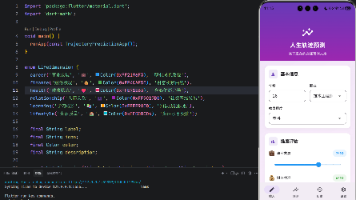
运行效果图生命进度条是一款人生可视化工具,旨在帮助用户直观地感受时间的流逝,珍惜每一天。灵感来源于经典的"生命日历"概念,将人生以周为单位可视化展示,每个小格子代表一周,让用户清晰地看到自己已经走过的人生旅程,以及还有多少时间可以珍惜。应用以粉紫色为主色调,界面优雅温馨。用户只需输入出生日期和预期寿命,即可看到自己的人生进度条、生命周历网格、详细的时间统计数据,以及人生里程碑等丰富内容。生命进度条
生命进度条应用
欢迎加入开源鸿蒙跨平台社区:
https://openharmonycrossplatform.csdn.net
一、项目概述
运行效果图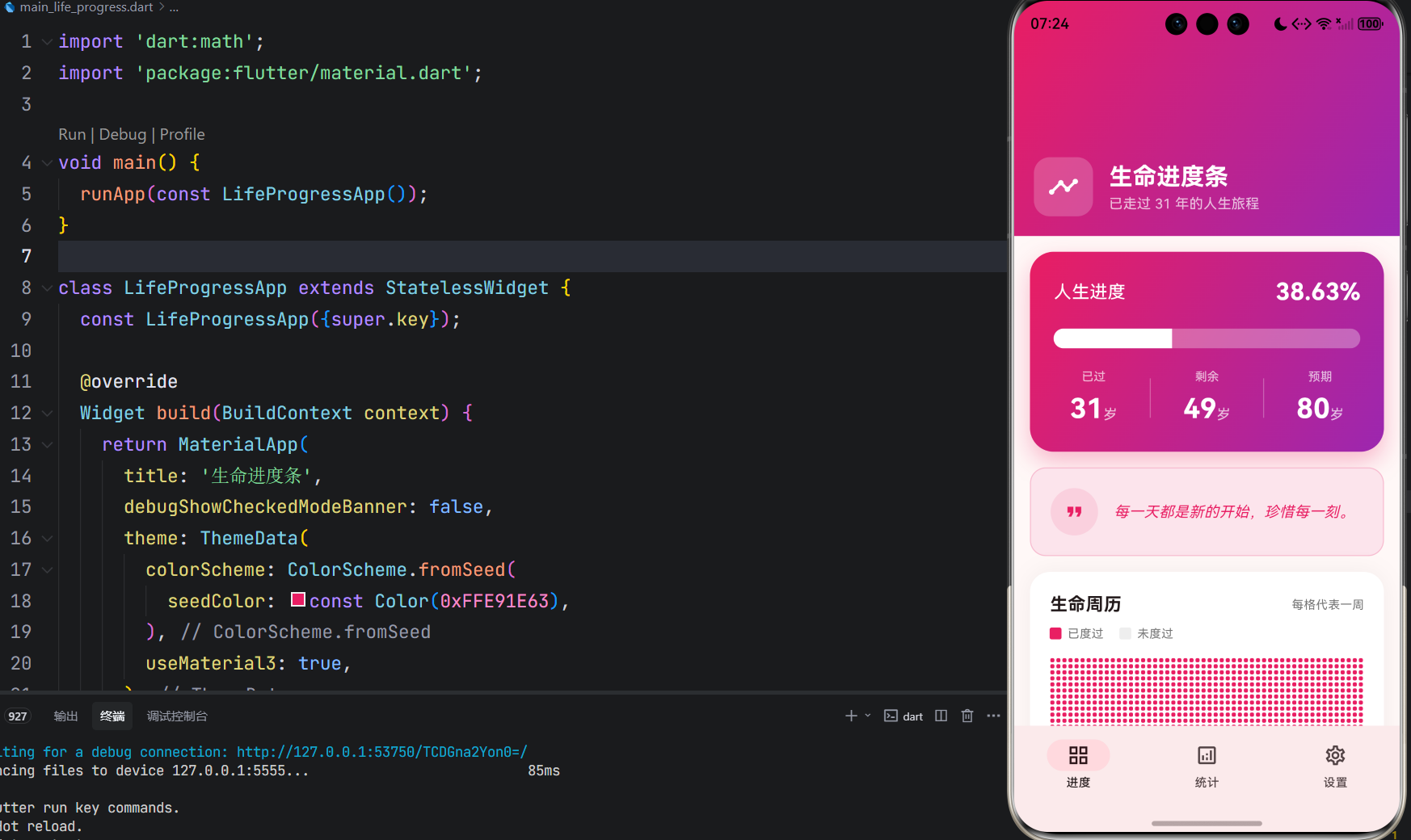
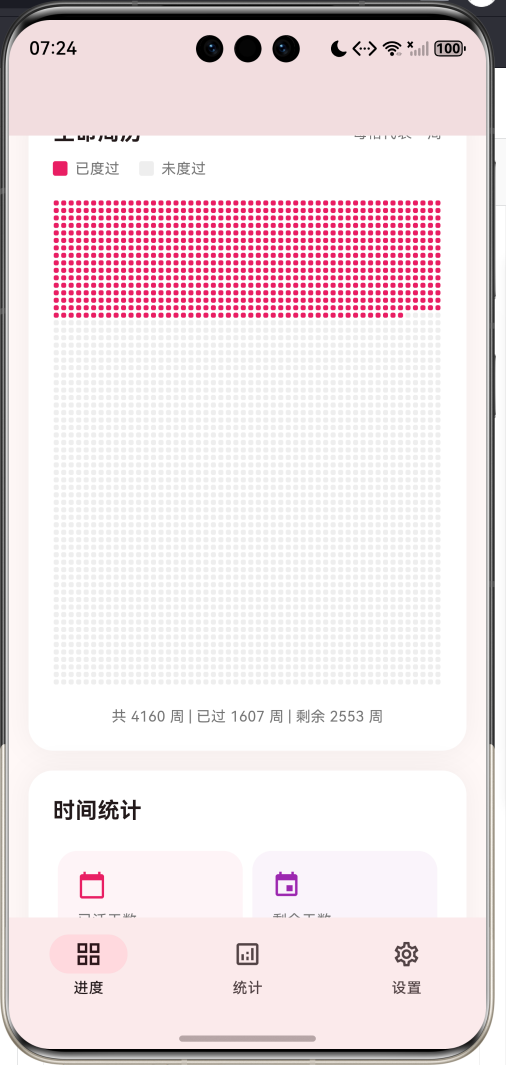
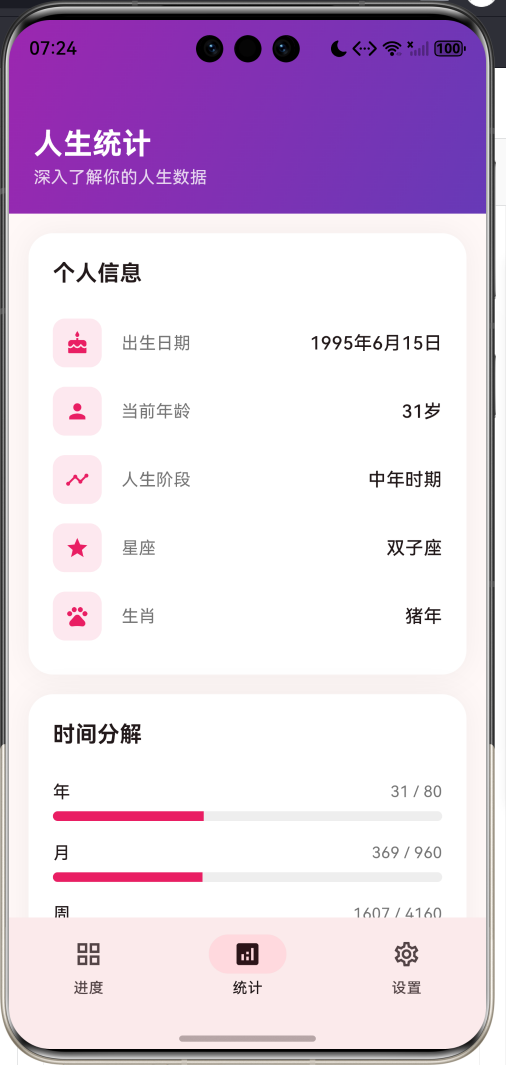
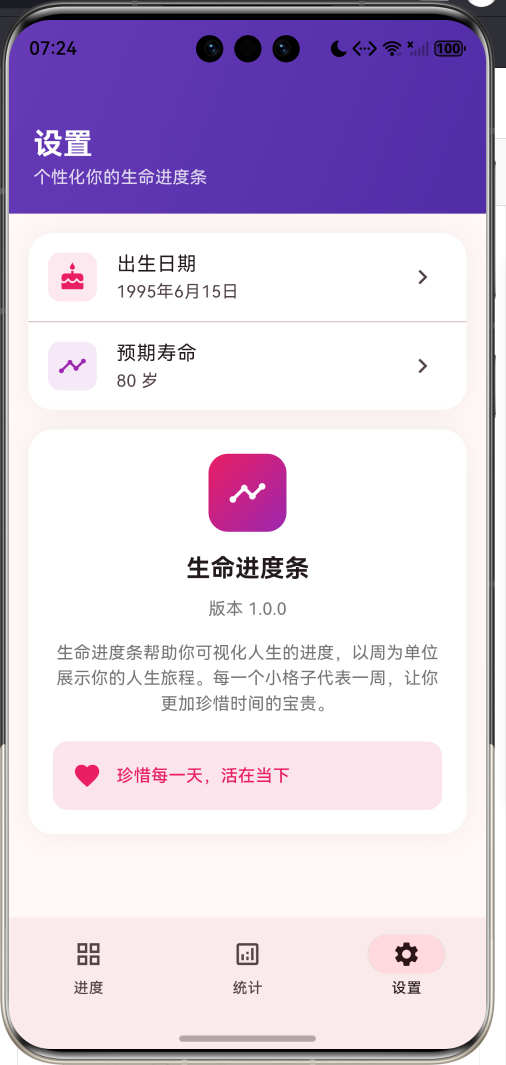
1.1 应用简介
生命进度条是一款人生可视化工具,旨在帮助用户直观地感受时间的流逝,珍惜每一天。灵感来源于经典的"生命日历"概念,将人生以周为单位可视化展示,每个小格子代表一周,让用户清晰地看到自己已经走过的人生旅程,以及还有多少时间可以珍惜。
应用以粉紫色为主色调,界面优雅温馨。用户只需输入出生日期和预期寿命,即可看到自己的人生进度条、生命周历网格、详细的时间统计数据,以及人生里程碑等丰富内容。
1.2 核心功能
| 功能模块 | 功能描述 | 实现方式 |
|---|---|---|
| 人生进度 | 显示人生完成百分比 | 进度条+百分比 |
| 生命周历 | 以周为单位的网格视图 | CustomPainter绘制 |
| 时间统计 | 已活/剩余时间多维度统计 | 数据计算展示 |
| 人生里程碑 | 重要年龄节点标记 | 标签式展示 |
| 个人信息 | 星座、生肖、人生阶段 | 日期计算 |
1.3 人生阶段划分
| 年龄范围 | 阶段名称 | 特点描述 |
|---|---|---|
| 0-17岁 | 少年时期 | 成长学习阶段 |
| 18-29岁 | 青年时期 | 探索奋斗阶段 |
| 30-49岁 | 中年时期 | 事业家庭阶段 |
| 50-64岁 | 壮年时期 | 成熟稳定阶段 |
| 65岁+ | 晚年时期 | 智慧传承阶段 |
1.4 技术栈
| 技术领域 | 技术选型 | 版本要求 |
|---|---|---|
| 开发框架 | Flutter | >= 3.0.0 |
| 编程语言 | Dart | >= 2.17.0 |
| 设计规范 | Material Design 3 | - |
| 状态管理 | setState | - |
| 自定义绘制 | CustomPainter | - |
| 目标平台 | 鸿蒙OS / Web | API 21+ |
1.5 项目结构
lib/
└── main_life_progress.dart
    ├── LifeProgressApp           # 应用入口
    ├── LifeStats                 # 生命统计数据模型
    ├── LifeProgressHomePage      # 主页面(底部导航)
    ├── LifeGridViewport          # 生命网格视图组件
    └── LifeGridPainter           # 生命网格绘制器
二、系统架构
2.1 整体架构图
2.2 类图设计
2.3 页面导航流程
2.4 数据计算流程
三、核心模块设计
3.1 数据模型设计
3.1.1 生命统计模型 (LifeStats)
class LifeStats {
  final DateTime birthDate;    // 出生日期
  final int expectedAge;       // 预期寿命
  final DateTime now;          // 当前时间

  // 周数计算
  int get totalWeeks => expectedAge * 52;
  int get livedWeeks => now.difference(birthDate).inDays ~/ 7;
  int get remainingWeeks => totalWeeks - livedWeeks;

  // 进度百分比
  double get progressPercent => (livedWeeks / totalWeeks * 100).clamp(0, 100);

  // 天数计算
  int get totalDays => expectedAge * 365;
  int get livedDays => now.difference(birthDate).inDays;
  int get remainingDays => totalDays - livedDays;

  // 月数计算
  int get totalMonths => expectedAge * 12;
  int get livedMonths {
    int months = (now.year - birthDate.year) * 12 + (now.month - birthDate.month);
    if (now.day < birthDate.day) months--;
    return months.clamp(0, totalMonths);
  }

  // 距下次生日天数
  int get nextBirthday {
    var next = DateTime(now.year, birthDate.month, birthDate.day);
    if (next.isBefore(now) || next.isAtSameMomentAs(now)) {
      next = DateTime(now.year + 1, birthDate.month, birthDate.day);
    }
    return next.difference(now).inDays;
  }
}
3.1.2 人生阶段划分
String get lifeStage {
  if (livedYears < 18) return '少年时期';
  if (livedYears < 30) return '青年时期';
  if (livedYears < 50) return '中年时期';
  if (livedYears < 65) return '壮年时期';
  return '晚年时期';
}
3.1.3 星座计算
String get zodiacSign {
  final month = birthDate.month;
  final day = birthDate.day;
  if ((month == 1 && day >= 20) || (month == 2 && day <= 18)) return '水瓶座';
  if ((month == 2 && day >= 19) || (month == 3 && day <= 20)) return '双鱼座';
  // ... 其他星座判断
  return '摩羯座';
}
3.1.4 生肖计算
String get chineseZodiac {
  const animals = ['猴', '鸡', '狗', '猪', '鼠', '牛', '虎', '兔', '龙', '蛇', '马', '羊'];
  return animals[birthDate.year % 12];
}
3.2 页面结构设计
3.2.1 主页面布局
3.2.2 进度页面结构
3.2.3 统计页面结构
3.3 生命网格绘制
四、UI设计规范
4.1 配色方案
应用采用粉紫色为主色调,传达温馨、珍视生命的情感:
| 颜色类型 | 色值 | 用途 |
|---|---|---|
| 主色 | #E91E63 (Pink) | 导航、强调元素 |
| 辅助色 | #9C27B0 (Purple) | 渐变、辅助强调 |
| 深紫 | #673AB7 | 统计页头部 |
| 深紫2 | #512DA8 | 设置页头部 |
| 已度过 | #E91E63 | 网格填充色 |
| 未度过 | #E0E0E0 | 网格填充色 |
| 背景渐变 | Pink → Purple | 头部背景 |
4.2 字体规范
| 元素 | 字号 | 字重 | 颜色 |
|---|---|---|---|
| 应用标题 | 24-36px | Bold | #FFFFFF |
| 页面标题 | 24px | Bold | #FFFFFF |
| 进度百分比 | 24px | Bold | #FFFFFF |
| 统计数值 | 24-28px | Bold | 主题色 |
| 卡片标题 | 18px | Bold | #000000 |
| 辅助文字 | 12-14px | Regular | #757575 |
4.3 组件规范
4.3.1 主进度卡片
┌─────────────────────────────────────────────────┐
│  人生进度                              36.25%   │
│                                                 │
│  ████████████████████░░░░░░░░░░░░░░░░░░░░░░░   │
│                                                 │
│     已过           剩余           预期          │
│     29岁           51岁           80岁          │
└─────────────────────────────────────────────────┘
4.3.2 生命网格
┌─────────────────────────────────────────────────┐
│  生命周历                     每格代表一周      │
│  █ 已度过  □ 未度过                            │
│                                                 │
│  ███████████████████████████████████████████████│
│  ███████████████████████████████████████████████│
│  ███████████████████████████████████████████████│
│  ████████████████████████████░░░░░░░░░░░░░░░░░░│
│  ░░░░░░░░░░░░░░░░░░░░░░░░░░░░░░░░░░░░░░░░░░░░░░│
│  ...                                            │
│                                                 │
│  共 4160 周 | 已过 1516 周 | 剩余 2644 周      │
└─────────────────────────────────────────────────┘
4.3.3 人生里程碑
┌─────────────────────────────────────────────────┐
│  人生里程碑                                     │
│                                                 │
│  [🎓 18岁 成年] [🎓 22岁 大学毕业]             │
│  [⭐ 30岁 而立之年] [🧠 40岁 不惑之年]         │
│  [✨ 50岁 知天命] [🎉 60岁 耳顺之年]           │
│  [❤️ 70岁 古稀之年] [🏆 80岁 耄耋之年]         │
└─────────────────────────────────────────────────┘
五、核心功能实现
5.1 生命统计计算
class LifeStats {
  final DateTime birthDate;
  final int expectedAge;
  final DateTime now;

  const LifeStats({
    required this.birthDate,
    required this.expectedAge,
    required this.now,
  });

  int get totalWeeks => expectedAge * 52;
  int get livedWeeks => now.difference(birthDate).inDays ~/ 7;
  int get remainingWeeks => totalWeeks - livedWeeks;
  double get progressPercent => (livedWeeks / totalWeeks * 100).clamp(0, 100);

  int get totalDays => expectedAge * 365;
  int get livedDays => now.difference(birthDate).inDays;
  int get remainingDays => totalDays - livedDays;

  int get livedYears => now.year - birthDate.year;
}
5.2 生命网格绘制
class LifeGridPainter extends CustomPainter {
final LifeStats stats;
final double cellWidth;
final double cellHeight;
LifeGridPainter({
required this.stats,
required this.cellWidth,
required this.cellHeight,
});
void paint(Canvas canvas, Size size) {
final livedPaint = Paint()
..color = const Color(0xFFE91E63)
..style = PaintingStyle.fill;
final emptyPaint = Paint()
..color = Colors.grey.shade200
..style = PaintingStyle.fill;
const columns = 52;
var weekIndex = 0;
for (var row = 0; weekIndex < stats.totalWeeks; row++) {
for (var col = 0; col < columns && weekIndex < stats.totalWeeks; col++) {
final rect = Rect.fromLTWH(
col * cellWidth,
row * cellHeight,
cellWidth - 1,
cellHeight - 1,
);
final isLived = weekIndex < stats.livedWeeks;
final paint = isLived ? livedPaint : emptyPaint;
final rrect = RRect.fromRectAndRadius(rect, const Radius.circular(2));
canvas.drawRRect(rrect, paint);
weekIndex++;
}
}
}
}
5.3 日期选择器
void _showDatePicker() async {
  final picked = await showDatePicker(
    context: context,
    initialDate: _birthDate ?? DateTime(2000, 1, 1),
    firstDate: DateTime(1900, 1, 1),
    lastDate: DateTime.now(),
    locale: const Locale('zh', 'CN'),
    builder: (context, child) {
      return Theme(
        data: Theme.of(context).copyWith(
          colorScheme: const ColorScheme.light(
            primary: Color(0xFFE91E63),
            onPrimary: Colors.white,
          ),
        ),
        child: child!,
      );
    },
  );

  if (picked != null) {
    setState(() {
      _birthDate = picked;
    });
  }
}
5.4 预期寿命设置
void _showExpectedAgeDialog() {
  final controller = TextEditingController(text: _expectedAge.toString());
  showDialog(
    context: context,
    builder: (context) => AlertDialog(
      title: const Text('设置预期寿命'),
      content: TextField(
        controller: controller,
        keyboardType: TextInputType.number,
        decoration: const InputDecoration(
          labelText: '预期寿命(岁)',
          suffix: Text('岁'),
        ),
      ),
      actions: [
        TextButton(
          onPressed: () => Navigator.pop(context),
          child: const Text('取消'),
        ),
        ElevatedButton(
          onPressed: () {
            final age = int.tryParse(controller.text);
            if (age != null && age > 0 && age <= 150) {
              setState(() {
                _expectedAge = age;
              });
              Navigator.pop(context);
            }
          },
          child: const Text('确定'),
        ),
      ],
    ),
  );
}
5.5 时间分解进度条
Widget _buildTimeRow(String unit, int lived, int total) {
  final percent = (lived / total * 100).clamp(0, 100);

  return Padding(
    padding: const EdgeInsets.symmetric(vertical: 8),
    child: Column(
      crossAxisAlignment: CrossAxisAlignment.start,
      children: [
        Row(
          mainAxisAlignment: MainAxisAlignment.spaceBetween,
          children: [
            Text(unit, style: const TextStyle(fontWeight: FontWeight.w500)),
            Text('$lived / $total', style: TextStyle(color: Colors.grey.shade600)),
          ],
        ),
        const SizedBox(height: 6),
        ClipRRect(
          borderRadius: BorderRadius.circular(4),
          child: LinearProgressIndicator(
            value: percent / 100,
            backgroundColor: Colors.grey.shade200,
            valueColor: const AlwaysStoppedAnimation<Color>(Color(0xFFE91E63)),
            minHeight: 8,
          ),
        ),
      ],
    ),
  );
}
六、交互设计
6.1 首次使用流程
6.2 设置修改流程
6.3 页面切换状态
七、扩展功能规划
7.1 后续版本规划
7.2 功能扩展建议
7.2.1 数据持久化
保存用户设置:
- 本地存储出生日期
- 保存预期寿命设置
- 记录查看历史
7.2.2 人生目标
目标追踪功能:
- 设置人生目标
- 标记重要事件
- 时间线展示
7.2.3 分享功能
社交分享能力:
- 生成精美图片
- 分享到社交平台
- 邀请好友一起使用
八、注意事项
8.1 开发注意事项
-
日期计算:使用DateTime的difference方法计算时间差
-
网格绘制:CustomPainter需要实现shouldRepaint方法
-
进度条显示:使用clamp确保百分比在0-100范围内
-
本地化:日期选择器需要设置中文locale
8.2 常见问题
| 问题 | 原因 | 解决方案 |
|---|---|---|
| 进度超过100% | 预期寿命设置过低 | 使用clamp限制 |
| 网格显示不全 | 高度计算错误 | 使用SingleChildScrollView |
| 日期选择器英文 | 未设置locale | 添加Locale(‘zh’, ‘CN’) |
| 生肖计算错误 | 年份取模错误 | 检查取模运算 |
8.3 使用提示
⏳ 生命进度条使用小贴士 ⏳
每一个小格子代表你生命中的一周。
看着已经填满的格子,珍惜剩余的空白。
时间是最公平的资源,每个人每天都只有24小时。
不要让昨天占据今天太多的时间。
九、运行说明
9.1 环境要求
| 环境 | 版本要求 |
|---|---|
| Flutter SDK | >= 3.0.0 |
| Dart SDK | >= 2.17.0 |
| 鸿蒙OS | API 21+ |
9.2 运行命令
# 查看可用设备
flutter devices

# 运行到Web服务器
flutter run -d web-server -t lib/main_life_progress.dart --web-port 8121

# 运行到鸿蒙设备
flutter run -d 127.0.0.1:5555 lib/main_life_progress.dart

# 运行到Windows
flutter run -d windows -t lib/main_life_progress.dart

# 代码分析
flutter analyze lib/main_life_progress.dart
十、总结
生命进度条通过直观的可视化方式,帮助用户感受时间的流逝,珍惜每一天。应用以周为单位展示人生旅程,每个小格子代表一周,让用户清晰地看到自己已经走过的人生,以及还有多少时间可以珍惜。
核心功能涵盖生命周历、进度统计、个人信息、人生里程碑四大模块。生命周历以网格形式展示,已度过的周用粉红色填充,未度过的用灰色表示;进度统计显示精确的百分比和各项时间数据;个人信息包含星座、生肖、人生阶段等趣味信息;人生里程碑标记了18岁成年、30而立等重要节点。
应用采用Material Design 3设计规范,以粉紫色为主色调,界面温馨优雅。通过本应用,希望能够帮助用户更加珍惜时间,活在当下,让每一天都过得有意义。
珍惜每一天,活在当下

作为“人工智能6S店”的官方数字引擎,为AI开发者与企业提供一个覆盖软硬件全栈、一站式门户。
更多推荐

 1
1 0
0- 0


 已为社区贡献10条内容

所有评论(0)