
Flutter 框架跨平台鸿蒙开发 - 问题漂流瓶
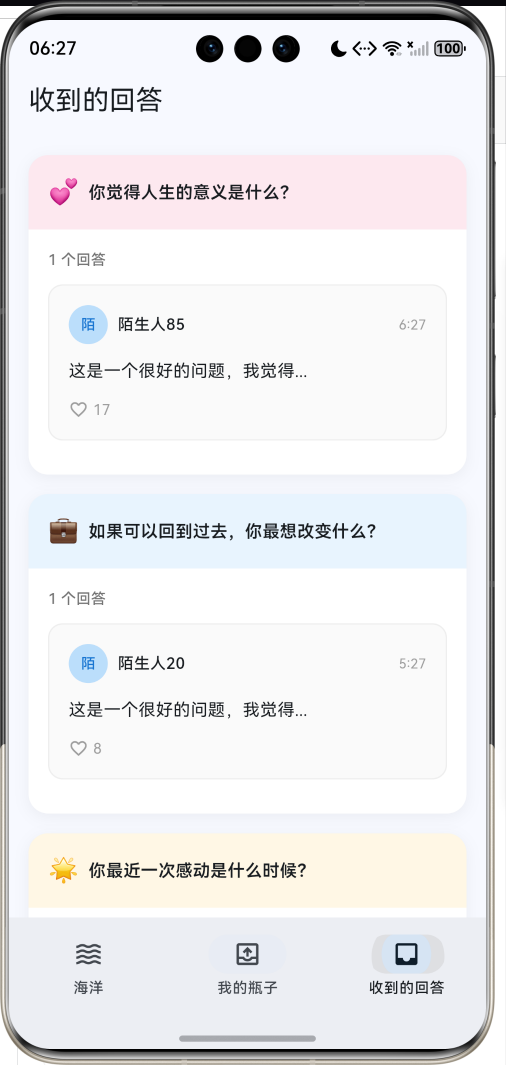
运行效果图问题漂流瓶应用是一款充满浪漫色彩的社交问答工具,灵感源自经典的漂流瓶概念。用户可以将自己的问题装入虚拟瓶子扔入"海洋",等待有缘人捡起并回答。应用以海洋蓝为主色调,营造广阔、神秘的海洋氛围。应用涵盖了扔瓶子、捡瓶子、回答问题、我的瓶子、收到的回答五大模块,支持6种问题分类,每种分类对应特定的颜色和图标。通过匿名问答、随机匹配、互动回复等功能,让陌生人之间的交流变得有趣而神秘。序号分类名称
问题漂流瓶应用
欢迎加入开源鸿蒙跨平台社区:
https://openharmonycrossplatform.csdn.net
一、项目概述
运行效果图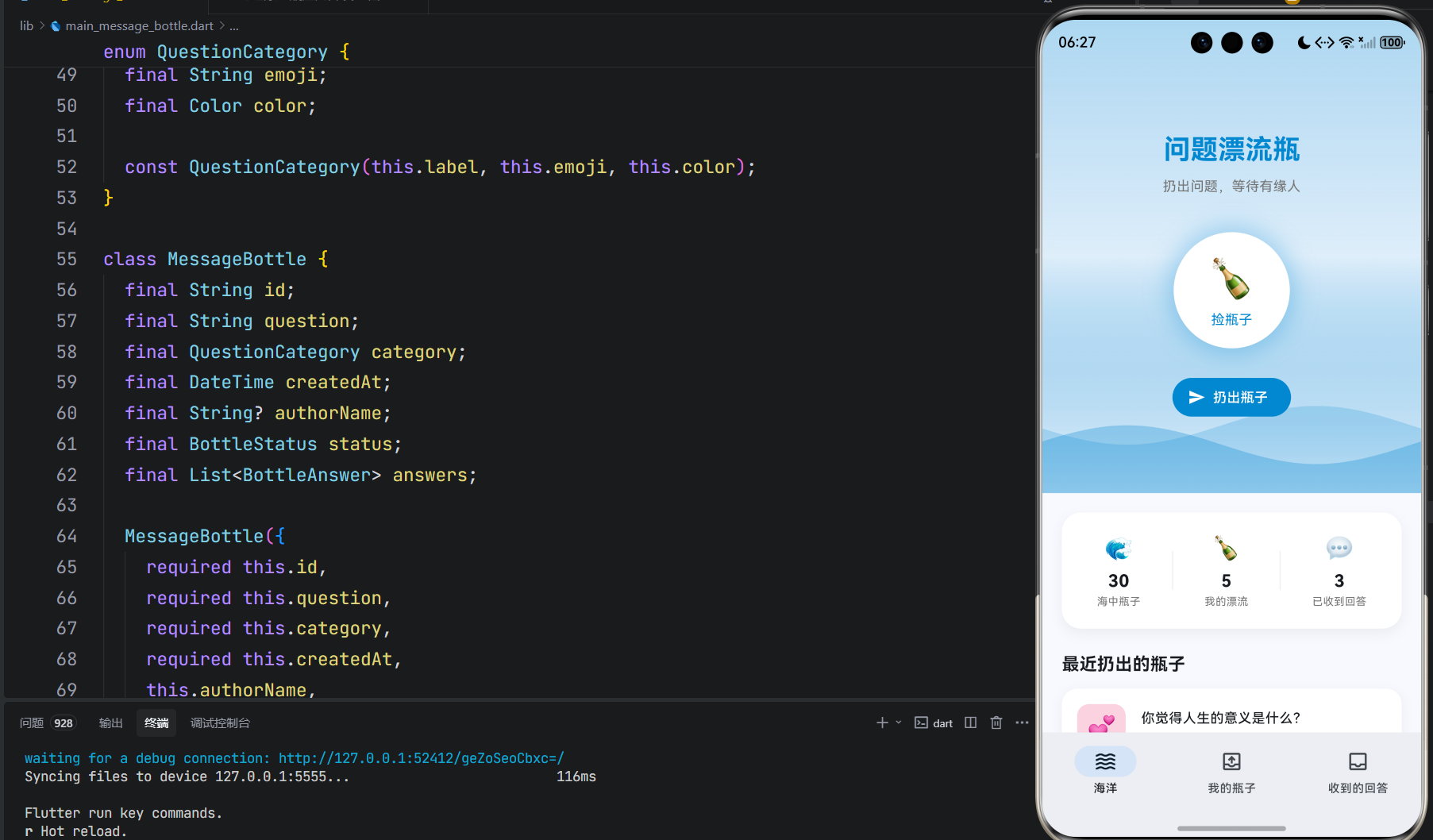
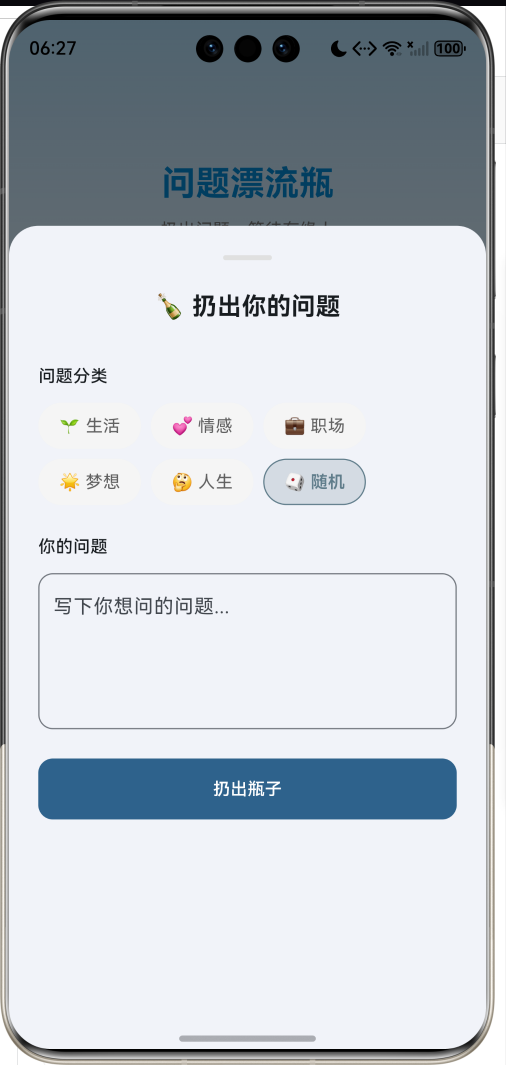
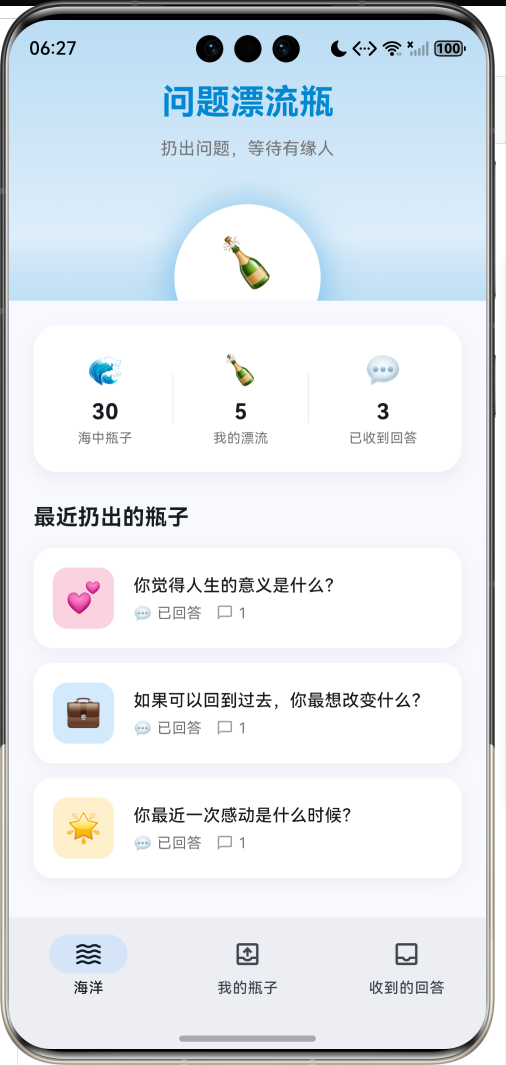
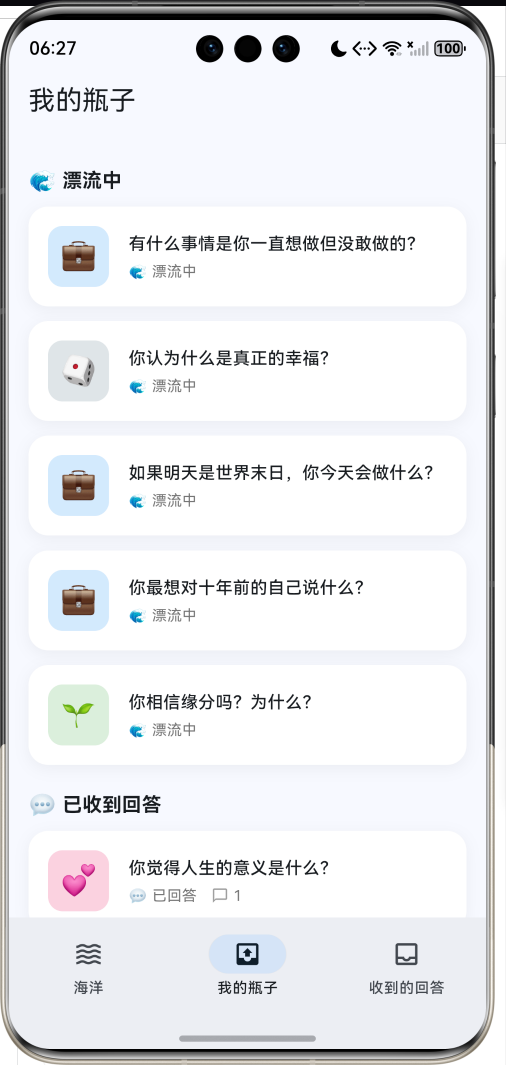
1.1 应用简介
问题漂流瓶应用是一款充满浪漫色彩的社交问答工具,灵感源自经典的漂流瓶概念。用户可以将自己的问题装入虚拟瓶子扔入"海洋",等待有缘人捡起并回答。应用以海洋蓝为主色调,营造广阔、神秘的海洋氛围。
应用涵盖了扔瓶子、捡瓶子、回答问题、我的瓶子、收到的回答五大模块,支持6种问题分类,每种分类对应特定的颜色和图标。通过匿名问答、随机匹配、互动回复等功能,让陌生人之间的交流变得有趣而神秘。
1.2 核心功能
| 功能模块 | 功能描述 | 实现方式 |
|---|---|---|
| 扔瓶子 | 发布问题到海洋 | 表单弹窗 |
| 捡瓶子 | 随机获取他人问题 | 随机算法 |
| 回答问题 | 回答捡到的问题 | 底部弹窗 |
| 我的瓶子 | 查看扔出的瓶子 | 列表展示 |
| 收到的回答 | 查看他人回答 | 卡片列表 |
| 海洋动画 | 波浪漂浮效果 | CustomPainter |
1.3 问题分类定义
| 序号 | 分类名称 | Emoji | 主题色 | 描述 |
|---|---|---|---|---|
| 1 | 生活 | 🌱 | #4CAF50 | 日常生活相关 |
| 2 | 情感 | 💕 | #E91E63 | 感情与人际关系 |
| 3 | 职业 | 💼 | #2196F3 | 工作与事业 |
| 4 | 梦想 | 🌟 | #FFB300 | 理想与追求 |
| 5 | 人生 | 🤔 | #9C27B0 | 哲学与思考 |
| 6 | 随机 | 🎲 | #607D8B | 不确定分类 |
1.4 瓶子状态
| 状态 | Emoji | 描述 |
|---|---|---|
| 漂流中 | 🌊 | 瓶子在海洋中等待被捡起 |
| 已回答 | 💬 | 已收到至少一个回答 |
| 已过期 | ⏰ | 超过有效期未被捡起 |
1.5 技术栈
| 技术领域 | 技术选型 | 版本要求 |
|---|---|---|
| 开发框架 | Flutter | >= 3.0.0 |
| 编程语言 | Dart | >= 2.17.0 |
| 设计规范 | Material Design 3 | - |
| 动画控制 | AnimationController | - |
| 图表绘制 | CustomPainter | - |
| 状态管理 | setState | - |
| 目标平台 | 鸿蒙OS / Web | API 21+ |
1.6 项目结构
lib/
└── main_message_bottle.dart
    ├── MessageBottleApp        # 应用入口
    ├── BottleStatus            # 瓶子状态枚举
    ├── QuestionCategory        # 问题分类枚举
    ├── MessageBottle           # 漂流瓶模型
    ├── BottleAnswer            # 回答模型
    ├── MessageBottleHomePage   # 主页面(底部导航)
    ├── _buildOceanPage         # 海洋页面
    ├── _buildMyBottlesPage     # 我的瓶子页面
    ├── _buildAnsweredPage      # 收到的回答页面
    └── WavePainter             # 波浪绘制器
二、系统架构
2.1 整体架构图
2.2 类图设计
2.3 页面导航流程
2.4 漂流瓶流程
三、核心模块设计
3.1 数据模型设计
3.1.1 瓶子状态枚举 (BottleStatus)
enum BottleStatus {
  floating('漂流中', '🌊'),
  answered('已回答', '💬'),
  expired('已过期', '⏰');

  final String label;  // 状态名称
  final String emoji;  // 状态图标
}
3.1.2 问题分类枚举 (QuestionCategory)
enum QuestionCategory {
  life('生活', '🌱', Color(0xFF4CAF50)),
  love('情感', '💕', Color(0xFFE91E63)),
  career('职场', '💼', Color(0xFF2196F3)),
  dream('梦想', '🌟', Color(0xFFFFB300)),
  philosophy('人生', '🤔', Color(0xFF9C27B0)),
  random('随机', '🎲', Color(0xFF607D8B));

  final String label;  // 分类名称
  final String emoji;  // 分类图标
  final Color color;   // 主题颜色
}
3.1.3 漂流瓶模型 (MessageBottle)
class MessageBottle {
  final String id;                    // 唯一标识
  final String question;              // 问题内容
  final QuestionCategory category;    // 问题分类
  final DateTime createdAt;           // 创建时间
  final String? authorName;           // 作者昵称(可选)
  final BottleStatus status;          // 瓶子状态
  final List<BottleAnswer> answers;   // 回答列表
}
3.1.4 回答模型 (BottleAnswer)
class BottleAnswer {
  final String id;           // 唯一标识
  final String content;      // 回答内容
  final DateTime answeredAt; // 回答时间
  final String? answererName;// 回答者昵称
  final int likes;           // 点赞数
}
3.1.5 问题分类分布
3.2 页面结构设计
3.2.1 主页面布局
3.2.2 海洋页面结构
3.2.3 扔瓶子弹窗结构
3.2.4 回答弹窗结构
3.3 捡瓶子流程
3.4 扔瓶子流程
四、UI设计规范
4.1 配色方案
应用以海洋蓝为主色调,营造广阔、神秘的海洋氛围:
| 颜色类型 | 色值 | 用途 |
|---|---|---|
| 主色 | #0288D1 (Ocean Blue) | 导航、强调元素 |
| 生活 | #4CAF50 | 绿色 |
| 情感 | #E91E63 | 粉红色 |
| 职业 | #2196F3 | 蓝色 |
| 梦想 | #FFB300 | 金黄色 |
| 人生 | #9C27B0 | 紫色 |
| 随机 | #607D8B | 灰色 |
4.2 海洋渐变
| 位置 | 颜色 | 透明度 |
|---|---|---|
| 顶部 | #0288D1 | 30% |
| 中间 | #0288D1 | 10% |
| 底部 | Surface | 0% |
4.3 字体规范
| 元素 | 字号 | 字重 | 颜色 |
|---|---|---|---|
| 应用标题 | 28px | Bold | 主色 |
| 问题内容 | 18px | SemiBold | #000000 |
| 分类标签 | 12px | Regular | 分类色 |
| 回答内容 | 14px | Regular | #000000 |
| 统计数值 | 18px | Bold | #000000 |
4.4 组件规范
4.4.1 海洋主界面
┌─────────────────────────────────────┐
│                                     │
│         问题漂流瓶                  │
│     扔出问题,等待有缘人            │
│                                     │
│           ┌─────────┐               │
│           │   🍾    │               │
│           │ 捡瓶子  │               │
│           └─────────┘               │
│                                     │
│     ┌─────────────────────┐         │
│     │  📤 扔出瓶子        │         │
│     └─────────────────────┘         │
│                                     │
│  〰️〰️〰️〰️〰️〰️〰️〰️〰️〰️〰️〰️  │
│  〰️〰️〰️〰️〰️〰️〰️〰️〰️〰️〰️〰️  │
└─────────────────────────────────────┘
4.4.2 瓶子卡片
┌─────────────────────────────────────────────┐
│ ┌────┐                              ┌────┐ │
│ │ 🌱 │  你觉得人生的意义是什么?    │ 🌊 │ │
│ │    │  🌊 漂流中    💬 2条回答     │    │ │
│ └────┘                              └────┘ │
└─────────────────────────────────────────────┘
4.4.3 回答卡片
┌─────────────────────────────────────────────┐
│ ┌──┐ 匿名用户42                    14:30   │
│ │A │                                       │
│ └──┘                                       │
│                                            │
│ 这是一个很好的问题,我觉得人生的意义       │
│ 在于不断探索和成长...                      │
│                                            │
│ ♡ 12                                       │
└─────────────────────────────────────────────┘
4.4.4 分类选择器
┌──────┐ ┌──────┐ ┌──────┐
│ 🌱   │ │ 💕   │ │ 💼   │
│ 生活 │ │ 情感 │ │ 职业 │
└──────┘ └──────┘ └──────┘
┌──────┐ ┌──────┐ ┌──────┐
│ 🌟   │ │ 🤔   │ │ 🎲   │
│ 梦想 │ │ 人生 │ │ 随机 │
└──────┘ └──────┘ └──────┘
五、核心功能实现
5.1 扔瓶子实现
void _throwBottle(String question, QuestionCategory category) {
  final bottle = MessageBottle(
    id: DateTime.now().millisecondsSinceEpoch.toString(),
    question: question,
    category: category,
    createdAt: DateTime.now(),
    authorName: '我',
  );

  setState(() {
    _myBottles.insert(0, bottle);
  });

  _showThrowAnimation();
}

void _showThrowAnimation() {
  _rippleController.forward(from: 0);

  ScaffoldMessenger.of(context).showSnackBar(
    SnackBar(
      content: const Row(
        children: [
          Text('🍾 '),
          Text('瓶子已扔出,等待有缘人捡到...'),
        ],
      ),
      backgroundColor: const Color(0xFF0288D1),
    ),
  );
}
5.2 捡瓶子实现
void _pickBottle() {
  if (_oceanBottles.isEmpty) {
    ScaffoldMessenger.of(context).showSnackBar(
      const SnackBar(content: Text('海洋里暂时没有瓶子了,稍后再来吧~')),
    );
    return;
  }

  final index = _random.nextInt(_oceanBottles.length);
  setState(() {
    _currentBottle = _oceanBottles[index];
  });

  _showBottleDetail(_currentBottle!);
}
5.3 提交回答实现
void _submitAnswer(MessageBottle bottle, String answer) {
  final newAnswer = BottleAnswer(
    id: DateTime.now().millisecondsSinceEpoch.toString(),
    content: answer,
    answeredAt: DateTime.now(),
    answererName: '我',
  );

  final myBottleIndex = _myBottles.indexWhere((b) => b.id == bottle.id);
  if (myBottleIndex != -1) {
    setState(() {
      _myBottles[myBottleIndex] = bottle.copyWith(
        status: BottleStatus.answered,
        answers: [...bottle.answers, newAnswer],
      );
    });
  }

  ScaffoldMessenger.of(context).showSnackBar(
    SnackBar(
      content: Row(
        children: [
          const Text('💌 '),
          Text('回答已发送给 ${bottle.authorName ?? "匿名"}'),
        ],
      ),
      backgroundColor: bottle.category.color,
    ),
  );
}
5.4 波浪动画实现
class WavePainter extends CustomPainter {
final Animation<double> animation;
final Color color;
final double offset;
WavePainter({
required this.animation,
required this.color,
required this.offset,
});
void paint(Canvas canvas, Size size) {
final paint = Paint()
..color = color
..style = PaintingStyle.fill;
final path = Path();
final value = animation.value + offset;
path.moveTo(0, size.height);
for (double x = 0; x <= size.width; x++) {
final y = 20 * sin((x / size.width * 2 * pi) + value) + 30;
path.lineTo(x, y);
}
path.lineTo(size.width, size.height);
path.close();
canvas.drawPath(path, paint);
}
bool shouldRepaint(covariant CustomPainter oldDelegate) => true;
}
5.5 瓶子漂浮动画
AnimatedBuilder(
  animation: _bottleFloatController,
  builder: (context, child) {
    return Transform.translate(
      offset: Offset(0, _bottleFloatController.value * 10 - 5),
      child: GestureDetector(
        onTap: _pickBottle,
        child: Container(
          width: 120,
          height: 120,
          decoration: BoxDecoration(
            color: Colors.white,
            shape: BoxShape.circle,
            boxShadow: [
              BoxShadow(
                color: const Color(0xFF0288D1).withValues(alpha: 0.3),
                blurRadius: 20,
                spreadRadius: 5,
              ),
            ],
          ),
          child: const Column(
            mainAxisAlignment: MainAxisAlignment.center,
            children: [
              Text('🍾', style: TextStyle(fontSize: 40)),
              SizedBox(height: 4),
              Text('捡瓶子', style: TextStyle(fontSize: 14)),
            ],
          ),
        ),
      ),
    );
  },
)
六、交互设计
6.1 扔瓶子流程
6.2 捡瓶子流程
6.3 查看回答流程
七、扩展功能规划
7.1 后续版本规划
7.2 功能扩展建议
7.2.1 数据持久化
本地数据存储:
- 使用SQLite存储瓶子数据
- 支持离线模式
- 数据同步机制
7.2.2 用户系统
用户身份管理:
- 匿名/注册用户
- 用户等级系统
- 积分与成就
7.2.3 瓶子装饰
个性化定制:
- 不同瓶子样式
- 瓶子贴纸
- 特殊效果
八、注意事项
8.1 开发注意事项
-
随机算法:使用Random确保随机性,可设置种子便于测试
-
动画释放:AnimationController需要在dispose中释放
-
状态更新:瓶子状态变化时需要copyWith创建新对象
-
列表管理:区分我的瓶子和海洋瓶子两个列表
8.2 常见问题
| 问题 | 原因 | 解决方案 |
|---|---|---|
| 波浪动画卡顿 | 未释放Controller | 在dispose中释放 |
| 瓶子状态不更新 | 直接修改对象 | 使用copyWith创建新对象 |
| 捡到重复瓶子 | 随机算法问题 | 添加已捡过标记 |
| 回答未关联 | ID不匹配 | 检查瓶子ID关联 |
8.3 漂流瓶寄语
🍾 漂流瓶寄语 🍾
每一个问题都是一次探索,
每一个回答都是一份温暖。
在茫茫人海中,
让瓶子成为连接彼此的桥梁。
扔出你的疑惑,
等待有缘人的回响。
愿每一个瓶子都能找到归宿 🌊
九、运行说明
9.1 环境要求
| 环境 | 版本要求 |
|---|---|
| Flutter SDK | >= 3.0.0 |
| Dart SDK | >= 2.17.0 |
| 鸿蒙OS | API 21+ |
9.2 运行命令
# 查看可用设备
flutter devices

# 运行到Web服务器
flutter run -d web-server -t lib/main_message_bottle.dart --web-port 8117

# 运行到鸿蒙设备
flutter run -d 127.0.0.1:5555 lib/main_message_bottle.dart

# 运行到Windows
flutter run -d windows -t lib/main_message_bottle.dart

# 代码分析
flutter analyze lib/main_message_bottle.dart
十、总结
问题漂流瓶应用通过扔瓶子、捡瓶子、回答问题、我的瓶子、收到的回答五大模块,为用户提供了一个浪漫的陌生人问答平台。应用支持6种问题分类,每种分类对应特定的颜色和图标,让问答变得更有趣味。
核心功能涵盖扔瓶子、捡瓶子、回答问题、查看回答四大模块。扔瓶子支持问题分类和内容输入;捡瓶子通过随机算法获取他人问题;回答问题以弹窗形式呈现;查看回答支持列表和详情展示。
应用采用Material Design 3设计规范,以海洋蓝为主色调,配合波浪动画和漂浮效果,营造浪漫的海洋氛围。通过本应用,希望能够让陌生人之间的交流变得有趣而神秘,让每一个问题都能找到答案。
扔出问题,等待有缘人的回响

作为“人工智能6S店”的官方数字引擎,为AI开发者与企业提供一个覆盖软硬件全栈、一站式门户。
更多推荐



 9
9 0
0- 0


 已为社区贡献51条内容

所有评论(0)