
开源鸿蒙跨平台Flutter开发:蛋白质序列特征提取:氨基酸组成与理化性质计算
摘要: 本文介绍了基于Dart/Flutter的蛋白质序列特征提取引擎开发,用于生物信息学分析。通过构建氨基酸物化属性字典(分子量、亲水指数等),实现了一次遍历算法计算蛋白质序列的核心特征:分子量(含肽键脱水修正)、亲水性总平均值(GRAVY)和氨基酸组成(AAC)。系统采用Flutter CustomPaint实现动态可视化,通过疏水性着色和归一化柱状图展示氨基酸频率分布。该方案突破了传统Pyt
欢迎加入开源鸿蒙跨平台社区:
https://openharmonycrossplatform.csdn.net
示例效果:
测试数据:
MEEPQSDPSVEPPLSQETFSDLWKLLPENNVLSPLPSQAMDDLMLSPDDIEQWFTEDPGPDEAPRMPEAAPPVAPAPAAPTPAAPAPAPSWPLSSSVPSQKTYQGSYGFRLGFLHSGTAKSVTCTYSPALNKMFCQLAKTCPVQLWVDSTPPPGTRVRAMAIYKQSQHMTEVVRRCPHHERCSDSDGLAPPQHLIRVEGNLRVEYLDDRNTFRHSVVVPYEPPEVGSDCTTIHYNYMCNSSCMGGMNRRPILTIITLEDSSGNLLGRNSFEVRVCACPGRDRRTEEENLRKKGEPHHELPPGSTKRALPNNTSSSPQPKKKPLDGEYFTLQIRGRERFEMFRELNEALELKDAQAGKEPGGSRAHSSHLKSKKGQSTSRHKKLMFKTEGPDSD
录入数据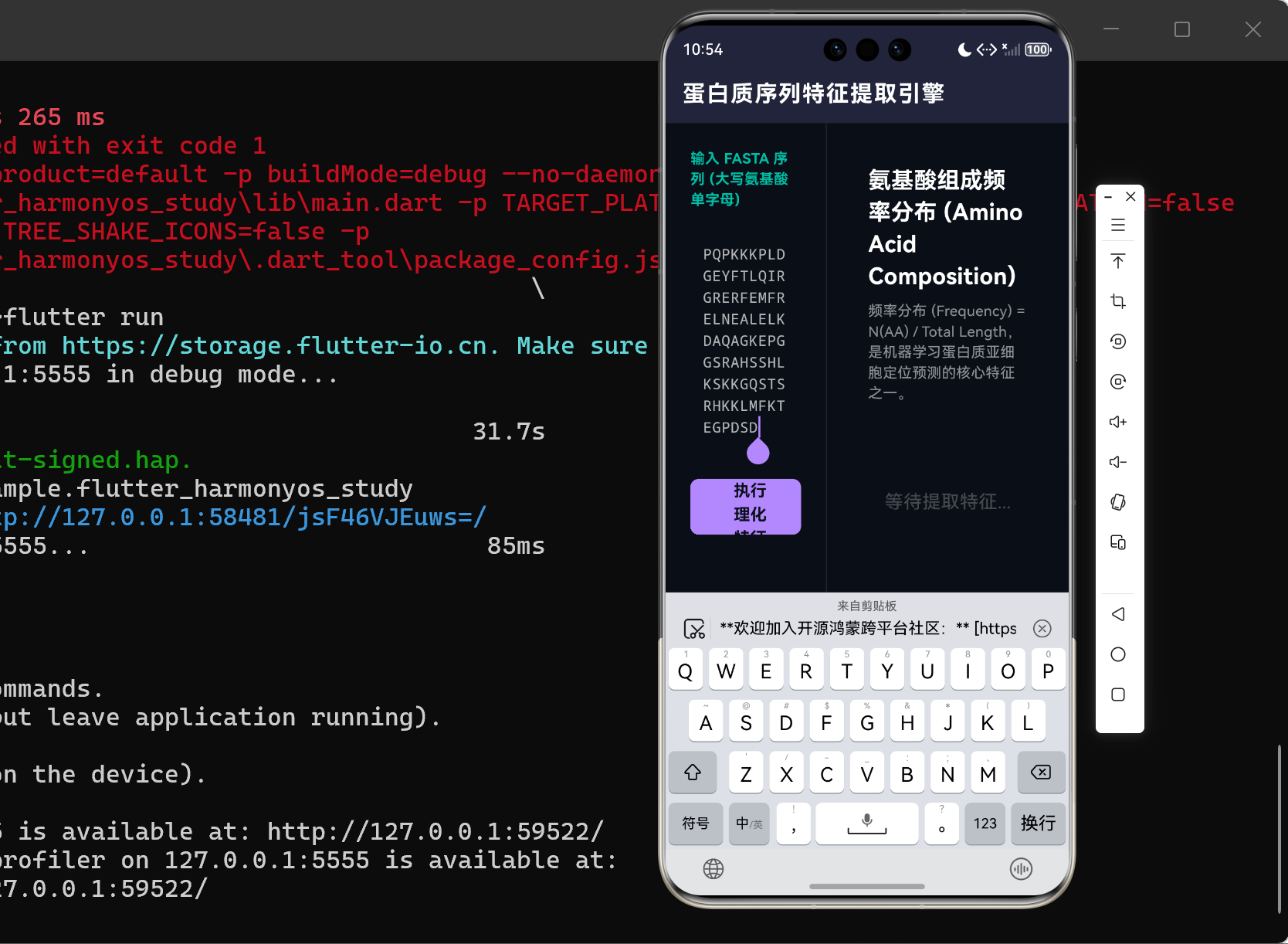
分析结果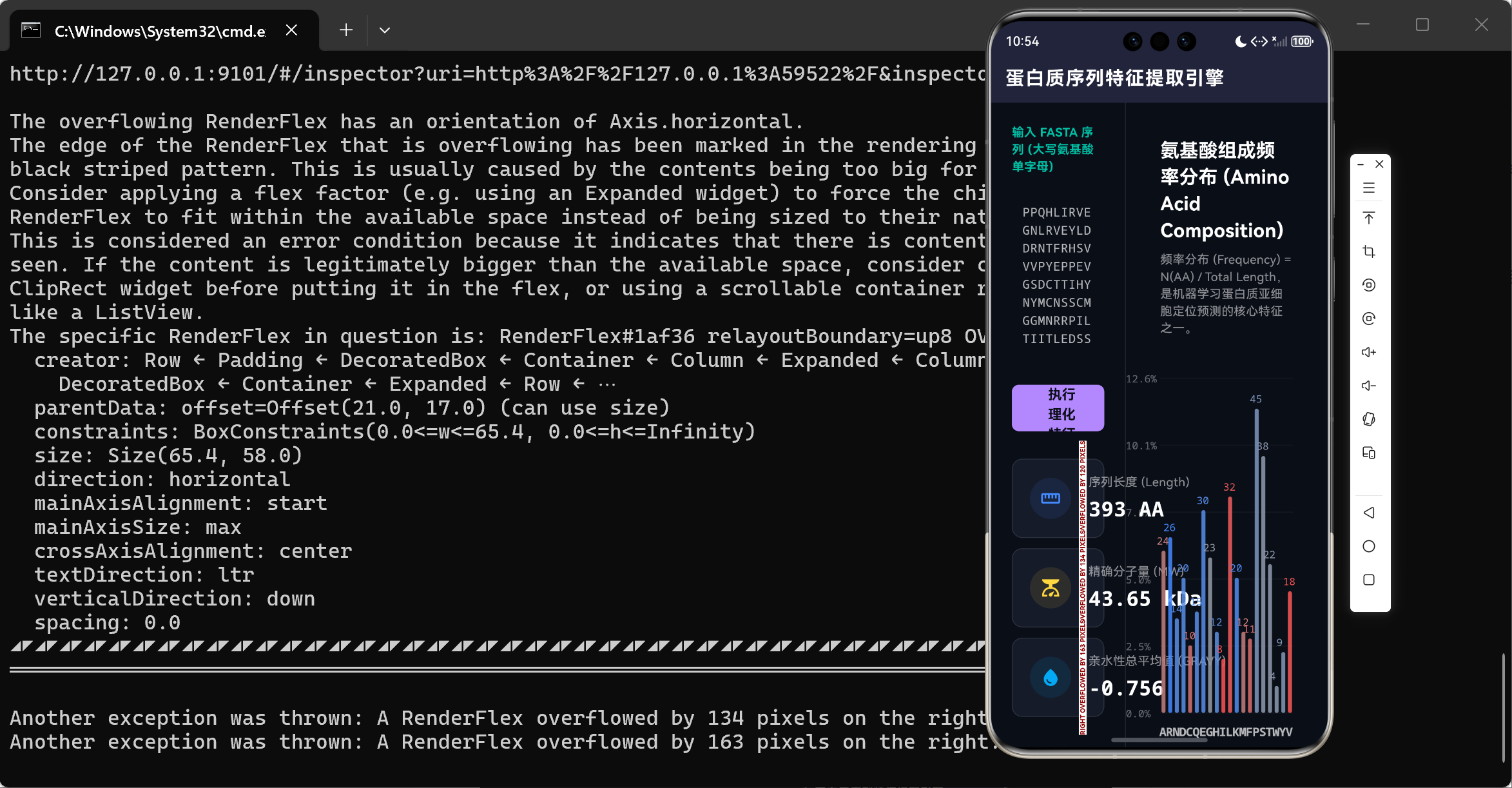
一、 引言:从基因解码到蛋白质组学的认知跃迁
在分子生物学的宏大叙事中,中心法则(Central Dogma)勾勒出了生命信息流转的基本轨迹:DNA 携带遗传蓝图,经过转录成为 RNA,最终被核糖体翻译为蛋白质。如果说基因组学(Genomics)探讨的是生命可能具有的潜力,那么蛋白质组学(Proteomics)则直接揭示了生命当前正在执行的物理动作。蛋白质,作为生命活动的直接执行者,其功能完全由构成它的氨基酸序列以及由此折叠而成的三维空间结构所决定。
然而,在 AlphaFold 等 AI 巨头横空出世解决蛋白质三维折叠预测之前,生物信息学家们很长一段时间只能与一维的蛋白质线性序列“贴身肉搏”。当我们面对一条由数百个甚至数千个英文字母(代表 20 种标准氨基酸)组成的长文本时,计算机并不能直接理解其蕴含的酶催化活性、跨膜结构或是受体结合能力。
因此,序列特征提取(Feature Extraction) 成为了架设在离散字符序列与高维机器学习模型之间最为核心的桥梁。为了将一条蛋白质序列投入深度学习网络(如预测其是否分布于细胞核内、是否具有抗肿瘤毒性),我们必须首先对其进行数学与物理维度的特征降维。
本篇博客将立足于基于 Dart 与 Flutter 的跨终端生命科学系统构建,抛弃传统的 Python/Biopython 生态,为您深度解构如何纯手工从零搭建一个基于物理化学原理的“蛋白质序列特征提取引擎”。我们将覆盖氨基酸组成(Amino Acid Composition, AAC)、分子量(Molecular Weight, MW)以及大名鼎鼎的亲水性总平均值(Grand Average of Hydropathy, GRAVY)等核心算法。
二、 特征工程底层:生物医学词典与数据模型
任何高楼大厦皆起于基石。要让 Dart 引擎认识蛋白质,必须在代码的底层建立严密的生物化学映射字典。在自然界中,构成真核生物蛋白质的氨基酸共有 20 种(暂不讨论硒代半胱氨酸等特例)。
我们将这些化学属性通过常量映射表 const Map<String, double> 硬编码入系统,使得解析引擎具备了 O ( 1 ) O(1) O(1) 的时间复杂度查询能力。
2.1 氨基酸分子量 (Molecular Weight, MW)
每一种游离氨基酸都有其固有的分子量。例如,最简单的甘氨酸(Glycine, G)分子量仅为 75.07 Da 75.07 \text{ Da} 75.07 Da,而最为庞大且带有芳香环的色氨酸(Tryptophan, W)分子量则高达 204.23 Da 204.23 \text{ Da} 204.23 Da。
2.2 Kyte-Doolittle 亲水指数 (Hydropathy Index)
早在 1982 年,J. Kyte 和 R.F. Doolittle 便在《分子生物学杂志》上确立了氨基酸的疏水/亲水性评估标度。该标度量化了氨基酸残基在水溶液内部与外部的自由能变化。
| 氨基酸属性范畴 | 代表性氨基酸与单字母缩写 | Kyte-Doolittle 指数范围 | 物理学表征意义 |
|---|---|---|---|
| 强疏水性 | 异亮氨酸(I), 缬氨酸(V), 亮氨酸(L) | + 3.8 ∼ + 4.5 +3.8 \sim +4.5 +3.8∼+4.5 | 极度排斥水分子,在蛋白质折叠时强烈倾向于躲避在蛋白质内部的三维核心,或者插入磷脂双分子层中(跨膜蛋白的典型特征)。 |
| 中性微疏水 | 丙氨酸(A), 甘氨酸(G) | − 0.4 ∼ + 1.8 -0.4 \sim +1.8 −0.4∼+1.8 | 无明显极性倾向,常存在于蛋白质表面的柔性转角或内部结构中。 |
| 强亲水性 | 精氨酸®, 赖氨酸(K), 天冬氨酸(D) | − 3.5 ∼ − 4.5 -3.5 \sim -4.5 −3.5∼−4.5 | 极度亲水,携带明显电荷,在三维折叠中几乎必然暴露于蛋白质的最外层,与周围的水分子或靶点进行强烈的氢键互动。 |
基于以上词典,我们能够建立一个极为紧凑的 Dart 领域模型 ProteinFeatures。
三、 数学与化学引擎:理化特征推导的底层代码拆解
在文本编辑器中输入 FASTA 序列后,点击“执行计算”,引擎开始运转。我们摒弃了耗时的多重正则表达式扫描,直接采用一次通过(One-Pass)的遍历方式。
3.1 序列清洗与频数统计
在处理用户或测序仪导出的文本时,换行符、空格乃至非法的占位符(如 X、B、Z)是不可避免的。引擎利用 replaceAll(RegExp(r'\s+'), '') 首先清空所有空白字符,随后在单层循环中累加频数 counts[aa]! + 1 与基准数值 totalMw += mwMap[aa]!。如果发现非法字母,直接抛出 UI 阻断异常。
3.2 肽键脱水惩罚:严酷的精确分子量 (MW) 计算
在这个环节,初级开发者常常犯下一个致命的生物化学错误:直接将所有单体氨基酸的分子量相加,并将其当作蛋白质的最终分子量。
真实的情况是,当两个游离氨基酸通过核糖体发生缩合反应形成“肽键(Peptide Bond)”时,氨基的氢原子(-H)与羧基的羟基(-OH)会结合并脱去一分子水( H 2 O H_2O H2O),其质量为 18.01524 Da 18.01524 \text{ Da} 18.01524 Da。因此,对于一条长度为 L L L 的多肽链,它内部一共形成了 L − 1 L-1 L−1 个肽键。
因此,严密的蛋白质分子量数学公式应当是:
MW protein = ∑ i = 1 L M w ( A i ) − ( L − 1 ) × 18.01524 \text{MW}_{\text{protein}} = \sum_{i=1}^{L} M_{w}(A_i) - (L - 1) \times 18.01524 MWprotein=i=1∑LMw(Ai)−(L−1)×18.01524
对应至 Dart 代码中的核心逻辑:
    // 扣除肽键脱水造成的分子量损失
    double adjustedMw = totalMw - ((validLength - 1) * 18.01524);
正是这一行不起眼的减法运算,宣告了这款软件具备了专业级的计算精度。
3.3 亲水性总平均值 (GRAVY) 计算
GRAVY 是一条极为宏观的全局特征,被广泛应用于评估蛋白质对水的溶解度。一个大于 0 的 GRAVY 值强烈暗示这可能是一个疏水蛋白(如膜蛋白);而负值则意味着该蛋白极具水溶性(如血液中游离的白蛋白)。
其物理模型极为简洁:取序列中所有残基疏水指数的算术平均值。
GRAVY = 1 L ∑ i = 1 L H ( A i ) \text{GRAVY} = \frac{1}{L} \sum_{i=1}^{L} H(A_i) GRAVY=L1i=1∑LH(Ai)
double gravy = totalHydropathy / validLength;
3.4 氨基酸组成 (AAC) 特征降维
AAC 是一切基于机器学习的蛋白质分类器(如支持向量机 SVM,随机森林 RF)的绝对主角。一条长度一万和长度一百的序列,如果不加处理是无法直接输入神经网络的。AAC 将任何长度的离散字符串,强行降维固定为了一个 1 × 20 1 \times 20 1×20 维度的连续数值向量。
-
AAC 计算方法
- 分别计算 20 种氨基酸在序列中出现的绝对频次,并将其除以总序列长度 $L$。由此获得的包含 20 个元素的映射表 `Map
四、 可视化构建:由数据驱动的 CustomPaint 图表渲染
在获得了这组冰冷的数值模型后,单纯罗列数据是违背人机交互美学的。在 main.dart 视图的右半部分,我们直接利用 Flutter 底层的 Canvas,徒手构建了一座带动画入场的“氨基酸频率分布条形图”。
这块画布的设计极富医疗与科研的美学底蕴:
- 极坐标系映射与自适应归一化:通过
features.composition.forEach找出最大频率,并预留 10% 的空白穹顶。我们将频率百分比强行映射到 Y 轴屏幕像素坐标,不受屏幕宽高的任何限制。 - 生物学语义染色:这绝非一张盲目配色的柱状图。在绘制时,我们重新查询了
hydropathyMap:
这段代码非常巧妙地利用了 Dart 的double hydro = hydropathyMap[aa] ?? 0.0; Color barColor; if (hydro > 0) { barColor = Color.lerp(Colors.grey, const Color(0xFFFF5252), hydro / 4.5)!; } else { barColor = Color.lerp(Colors.grey, const Color(0xFF448AFF), -hydro / 4.5)!; }Color.lerp插值系统。如果是疏水性残基(极度排斥水),柱体会呈现具有警示性的赤红色;反之,亲水性残基则呈现宁静的海蓝色。这让生物学家只需一眼扫过屏幕,就能通过色彩冷暖的配比,直观感受到这个蛋白质的三维折叠脾气。 - 阻尼动画入场:柱状图并非生硬弹出,而是结合了
CurvedAnimation(curve: Curves.easeOutExpo)从底部像素行向上生长,这大幅提升了终端操作中的高级感。
五、 结语与计算展望
从本篇的底层计算可以看到,利用 Flutter 和 Dart 语言不仅能够极速描摹出令人惊艳的 UI 表层肌理,更能通过严苛的双精度浮点数运算,直接扛起诸如精确分子量预测、脱水缩合等复杂的生物化学底层建模。
如今这套提取了 20 维 AAC 向量和 GRAVY 等理化常数的系统,已经为我们的跨平台移动实验室打造好了最核心的数据“弹药库”。基于此,在接下来的开发阶段中,我们甚至可以考虑在终端侧直接跑载轻量级的 TensorFlow Lite 预测模型,让设备不仅能“算”出特征,还能直接“判断”出未知序列是不是潜在的抗菌肽、或者是存在于哪种细胞器中。
生命的信息洪流浩瀚无垠,但当我们用数学和代码将其降维,一切宏伟的造物密码,终将在我们这套终端控制台中现出原形。
完整代码
import 'dart:math';
import 'package:flutter/material.dart';
void main() {
runApp(const ProteinAnalyzerApp());
}
class ProteinAnalyzerApp extends StatelessWidget {
const ProteinAnalyzerApp({super.key});
@override
Widget build(BuildContext context) {
return MaterialApp(
title: 'Proteomics Feature Extractor',
debugShowCheckedModeBanner: false,
theme: ThemeData.dark().copyWith(
scaffoldBackgroundColor: const Color(0xFF0A0E17),
colorScheme: const ColorScheme.dark(
primary: Color(0xFFB388FF),
secondary: Color(0xFF00BFA5),
surface: Color(0xFF151B29),
),
),
home: const ProteinWorkspace(),
);
}
}
// -----------------------------------------------------------------------------
// 生物信息学领域字典模型:氨基酸理化参数表 (20种标准氨基酸)
// -----------------------------------------------------------------------------
const List<String> standardAAs = [
'A', 'R', 'N', 'D', 'C', 'Q', 'E', 'G', 'H', 'I',
'L', 'K', 'M', 'F', 'P', 'S', 'T', 'W', 'Y', 'V'
];
// 游离氨基酸分子量 (Da)
const Map<String, double> mwMap = {
'A': 89.09, 'R': 174.20, 'N': 132.12, 'D': 133.10, 'C': 121.15,
'Q': 146.15, 'E': 147.13, 'G': 75.07, 'H': 155.16, 'I': 131.17,
'L': 131.17, 'K': 146.19, 'M': 149.21, 'F': 165.19, 'P': 115.13,
'S': 105.09, 'T': 119.12, 'W': 204.23, 'Y': 181.19, 'V': 117.15
};
// Kyte-Doolittle 亲水性指数 (Hydropathy Index)
const Map<String, double> hydropathyMap = {
'A': 1.8, 'R': -4.5, 'N': -3.5, 'D': -3.5, 'C': 2.5,
'Q': -3.5, 'E': -3.5, 'G': -0.4, 'H': -3.2, 'I': 4.5,
'L': 3.8, 'K': -3.9, 'M': 1.9, 'F': 2.8, 'P': -1.6,
'S': -0.8, 'T': -0.7, 'W': -0.9, 'Y': -1.3, 'V': 4.2
};
// -----------------------------------------------------------------------------
// 蛋白质特征数据结构
// -----------------------------------------------------------------------------
class ProteinFeatures {
final int length;
final double molecularWeight;
final double gravy; // Grand Average of Hydropathy
final Map<String, double> composition; // 组成频率 0~1
final Map<String, int> absoluteCounts; // 绝对计数
ProteinFeatures({
required this.length,
required this.molecularWeight,
required this.gravy,
required this.composition,
required this.absoluteCounts,
});
}
// -----------------------------------------------------------------------------
// UI 与 业务逻辑主控台
// -----------------------------------------------------------------------------
class ProteinWorkspace extends StatefulWidget {
const ProteinWorkspace({super.key});
@override
State<ProteinWorkspace> createState() => _ProteinWorkspaceState();
}
class _ProteinWorkspaceState extends State<ProteinWorkspace> with SingleTickerProviderStateMixin {
final TextEditingController _seqController = TextEditingController();
ProteinFeatures? _features;
String _errorMessage = '';
// 动画控制器,用于特征解析完成后的图表入场动画
late AnimationController _animController;
late Animation<double> _chartAnimation;
@override
void initState() {
super.initState();
_animController = AnimationController(vsync: this, duration: const Duration(milliseconds: 1200));
_chartAnimation = CurvedAnimation(parent: _animController, curve: Curves.easeOutExpo);
// 默认载入人类 p53 肿瘤抑制蛋白片段作为演示
_seqController.text = "MEEPQSDPSVEPPLSQETFSDLWKLLPENNVLSPLPSQAMDDLMLSPDDIEQWFTEDPGP"
"DEAPRMPEAAPPVAPAPAAPTPAAPAPAPSWPLSSSVPSQKTYQGSYGFRLGFLHSGTAK"
"SVTCTYSPALNKMFCQLAKTCPVQLWVDSTPPPGTRVRAMAIYKQSQHMTEVVRRCPHHE"
"RCSDSDGLAPPQHLIRVEGNLRVEYLDDRNTFRHSVVVPYEPPEVGSDCTTIHYNYMCNS"
"SCMGGMNRRPILTIITLEDSSGNLLGRNSFEVRVCACPGRDRRTEEENLRKKGEPHHELP"
"PGSTKRALPNNTSSSPQPKKKPLDGEYFTLQIRGRERFEMFRELNEALELKDAQAGKEPG"
"GSRAHSSHLKSKKGQSTSRHKKLMFKTEGPDSD";
}
@override
void dispose() {
_seqController.dispose();
_animController.dispose();
super.dispose();
}
/// 核心提取算法:氨基酸组成与理化特征推导
void _extractFeatures() {
String rawSeq = _seqController.text.toUpperCase().replaceAll(RegExp(r'\s+'), '');
if (rawSeq.isEmpty) {
setState(() => _errorMessage = '序列不可为空。');
return;
}
// 1. 数据清洗与校验
int validLength = 0;
Map<String, int> counts = {for (var aa in standardAAs) aa: 0};
double totalMw = 0.0;
double totalHydropathy = 0.0;
for (int i = 0; i < rawSeq.length; i++) {
String aa = rawSeq[i];
if (!standardAAs.contains(aa)) {
setState(() => _errorMessage = '检测到非法氨基酸字符:$aa,请修正。');
return;
}
counts[aa] = counts[aa]! + 1;
totalMw += mwMap[aa]!;
totalHydropathy += hydropathyMap[aa]!;
validLength++;
}
if (validLength == 0) return;
// 2. 扣除肽键脱水造成的分子量损失 (每个肽键失去一分子水 H2O = 18.01524 Da)
double adjustedMw = totalMw - ((validLength - 1) * 18.01524);
// 3. 计算 GRAVY 分数
double gravy = totalHydropathy / validLength;
// 4. 频率映射
Map<String, double> comp = {};
counts.forEach((aa, count) {
comp[aa] = count / validLength;
});
setState(() {
_errorMessage = '';
_features = ProteinFeatures(
length: validLength,
molecularWeight: adjustedMw,
gravy: gravy,
composition: comp,
absoluteCounts: counts,
);
});
// 重置并启动图表动画
_animController.forward(from: 0.0);
}
@override
Widget build(BuildContext context) {
return Scaffold(
appBar: AppBar(
title: const Text('蛋白质序列特征提取引擎', style: TextStyle(fontWeight: FontWeight.w700, letterSpacing: 1.2)),
backgroundColor: const Color(0xFF151B29),
elevation: 0,
),
body: Row(
children: [
// 左侧:数据录入与宏观理化指标展示
Expanded(
flex: 4,
child: Container(
padding: const EdgeInsets.all(24),
decoration: const BoxDecoration(
border: Border(right: BorderSide(color: Colors.white10))
),
child: Column(
crossAxisAlignment: CrossAxisAlignment.start,
children: [
const Text('输入 FASTA 序列 (大写氨基酸单字母)', style: TextStyle(color: Color(0xFF00BFA5), fontWeight: FontWeight.bold)),
const SizedBox(height: 12),
Expanded(
flex: 2,
child: TextField(
controller: _seqController,
maxLines: null,
expands: true,
style: const TextStyle(fontFamily: 'monospace', fontSize: 14, color: Colors.white70, height: 1.5),
decoration: InputDecoration(
filled: true,
fillColor: const Color(0xFF0A0E17),
border: OutlineInputBorder(borderRadius: BorderRadius.circular(8), borderSide: BorderSide.none),
),
),
),
if (_errorMessage.isNotEmpty)
Padding(
padding: const EdgeInsets.only(top: 12),
child: Text(_errorMessage, style: const TextStyle(color: Colors.redAccent, fontWeight: FontWeight.bold)),
),
const SizedBox(height: 24),
SizedBox(
width: double.infinity,
height: 54,
child: ElevatedButton.icon(
onPressed: _extractFeatures,
icon: const Icon(Icons.auto_awesome),
label: const Text('执行理化特征计算', style: TextStyle(fontSize: 16, fontWeight: FontWeight.bold)),
style: ElevatedButton.styleFrom(
backgroundColor: const Color(0xFFB388FF),
foregroundColor: const Color(0xFF0A0E17),
shape: RoundedRectangleBorder(borderRadius: BorderRadius.circular(8)),
),
),
),
const SizedBox(height: 32),
// 理化宏观仪表盘
if (_features != null)
Expanded(
flex: 3,
child: Column(
children: [
_buildPropertyCard('序列长度 (Length)', '${_features!.length} AA', Icons.straighten, Colors.blueAccent),
const SizedBox(height: 12),
_buildPropertyCard('精确分子量 (MW)', '${(_features!.molecularWeight / 1000).toStringAsFixed(2)} kDa', Icons.scale, Colors.amberAccent),
const SizedBox(height: 12),
_buildPropertyCard('亲水性总平均值 (GRAVY)', _features!.gravy.toStringAsFixed(3), Icons.water_drop, _features!.gravy > 0 ? Colors.redAccent : Colors.lightBlue),
],
),
)
],
),
),
),
// 右侧:氨基酸组成高亮数据可视化图表 (CustomPaint)
Expanded(
flex: 6,
child: Container(
padding: const EdgeInsets.all(40),
child: Column(
crossAxisAlignment: CrossAxisAlignment.start,
children: [
const Text('氨基酸组成频率分布 (Amino Acid Composition)', style: TextStyle(fontSize: 22, fontWeight: FontWeight.bold, color: Colors.white)),
const SizedBox(height: 8),
const Text('频率分布 (Frequency) = N(AA) / Total Length,是机器学习蛋白质亚细胞定位预测的核心特征之一。', style: TextStyle(color: Colors.white54)),
const SizedBox(height: 48),
if (_features == null)
const Expanded(child: Center(child: Text('等待提取特征...', style: TextStyle(color: Colors.white24, fontSize: 18))))
else
Expanded(
child: AnimatedBuilder(
animation: _chartAnimation,
builder: (context, child) {
return CustomPaint(
size: Size.infinite,
painter: AACChartPainter(
features: _features!,
progress: _chartAnimation.value,
),
);
}
),
),
],
),
),
)
],
),
);
}
Widget _buildPropertyCard(String title, String value, IconData icon, Color iconColor) {
return Container(
padding: const EdgeInsets.symmetric(horizontal: 20, vertical: 16),
decoration: BoxDecoration(
color: const Color(0xFF151B29),
borderRadius: BorderRadius.circular(12),
border: Border.all(color: Colors.white10),
),
child: Row(
children: [
Container(
padding: const EdgeInsets.all(12),
decoration: BoxDecoration(
color: iconColor.withOpacity(0.1),
shape: BoxShape.circle,
),
child: Icon(icon, color: iconColor),
),
const SizedBox(width: 20),
Column(
crossAxisAlignment: CrossAxisAlignment.start,
children: [
Text(title, style: const TextStyle(color: Colors.white54, fontSize: 14)),
const SizedBox(height: 4),
Text(value, style: const TextStyle(color: Colors.white, fontSize: 24, fontWeight: FontWeight.bold, fontFamily: 'monospace')),
],
)
],
),
);
}
}
// -----------------------------------------------------------------------------
// 数据可视化底层画布:氨基酸频率分布条形图
// -----------------------------------------------------------------------------
class AACChartPainter extends CustomPainter {
final ProteinFeatures features;
final double progress; // 0.0 ~ 1.0 的动画进度因子
AACChartPainter({required this.features, required this.progress});
@override
void paint(Canvas canvas, Size size) {
if (size.width == 0 || size.height == 0) return;
final int count = standardAAs.length;
final double barWidth = (size.width / count) * 0.6;
final double spacing = (size.width / count) * 0.4;
// 找出最大频率用于 Y 轴归一化
double maxFreq = 0.0;
features.composition.forEach((k, v) => maxFreq = max(maxFreq, v));
// 留出 10% 顶部空间
maxFreq = maxFreq * 1.1;
if (maxFreq == 0) maxFreq = 1.0;
// 绘制坐标系背板辅助线
final Paint gridPaint = Paint()..color = Colors.white.withOpacity(0.05)..strokeWidth = 1;
for (int i = 0; i <= 5; i++) {
double y = size.height - (i / 5) * size.height;
canvas.drawLine(Offset(0, y), Offset(size.width, y), gridPaint);
// 刻度文字
double labelValue = maxFreq * (i / 5) * 100;
_drawText(canvas, '${labelValue.toStringAsFixed(1)}%', Offset(-40, y - 8), Colors.white38, 12);
}
// 遍历绘制 20 个氨基酸柱状图
for (int i = 0; i < count; i++) {
String aa = standardAAs[i];
double freq = features.composition[aa] ?? 0.0;
int absoluteCount = features.absoluteCounts[aa] ?? 0;
double x = i * (barWidth + spacing) + spacing / 2;
// 利用 progress 实现柱状图从底部拔地而起的动画
double targetBarHeight = (freq / maxFreq) * size.height;
double currentBarHeight = targetBarHeight * progress;
double y = size.height - currentBarHeight;
// 按照疏水性给柱体上色:疏水(正数)偏红,亲水(负数)偏蓝
  double hydro = hydropathyMap[aa] ?? 0.0;
  Color barColor;
  if (hydro > 0) {
    barColor = Color.lerp(Colors.grey, const Color(0xFFFF5252), hydro / 4.5)!;
  } else {
    barColor = Color.lerp(Colors.grey, const Color(0xFF448AFF), -hydro / 4.5)!;
  }
final Rect barRect = Rect.fromLTWH(x, y, barWidth, currentBarHeight);
final RRect roundedBar = RRect.fromRectAndRadius(barRect, const Radius.circular(4));
// 绘制带微光泽的柱体
final Paint barPaint = Paint()..color = barColor.withOpacity(0.85);
canvas.drawRRect(roundedBar, barPaint);
// 绘制底部 X 轴标签
_drawText(canvas, aa, Offset(x + barWidth / 2 - 5, size.height + 12), Colors.white70, 14, isBold: true);
// 绘制柱体上方绝对数值 (只在动画接近完成时显示)
if (progress > 0.8 && absoluteCount > 0) {
_drawText(canvas, absoluteCount.toString(), Offset(x + barWidth / 2 - 8, y - 20), barColor, 12);
}
}
}
void _drawText(Canvas canvas, String text, Offset position, Color color, double fontSize, {bool isBold = false}) {
final TextPainter tp = TextPainter(
text: TextSpan(
text: text,
style: TextStyle(color: color, fontSize: fontSize, fontWeight: isBold ? FontWeight.bold : FontWeight.normal, fontFamily: 'monospace'),
),
textDirection: TextDirection.ltr,
);
tp.layout();
tp.paint(canvas, position);
}
@override
bool shouldRepaint(covariant AACChartPainter oldDelegate) {
return oldDelegate.progress != progress || oldDelegate.features != features;
}
}

作为“人工智能6S店”的官方数字引擎,为AI开发者与企业提供一个覆盖软硬件全栈、一站式门户。
更多推荐
 0
0 0
0- 0


 已为社区贡献10条内容

所有评论(0)