
Flutter 框架跨平台鸿蒙开发 - 电子宠物墓园 - 纪念你养过的所有电子宠物
运行效果图电子宠物墓园应用是一款充满温情的纪念类应用,旨在帮助用户纪念那些曾经陪伴过自己的电子宠物。从早期的电子鸡、数码宝贝,到手机上的 Pou、Moy,每一个电子宠物都承载着我们独特的回忆。应用以深紫色为主色调,营造庄重肃穆又不失温馨的纪念氛围。应用涵盖了墓园展示、纪念墙、祭奠功能、个人设置四大模块,支持8种电子宠物类型,提供点蜡烛、献花、上香、供品、奏乐、祈福6种祭奠方式。通过墓碑展示、故事记
电子宠物墓园应用
欢迎加入开源鸿蒙跨平台社区:
https://openharmonycrossplatform.csdn.net
一、项目概述
运行效果图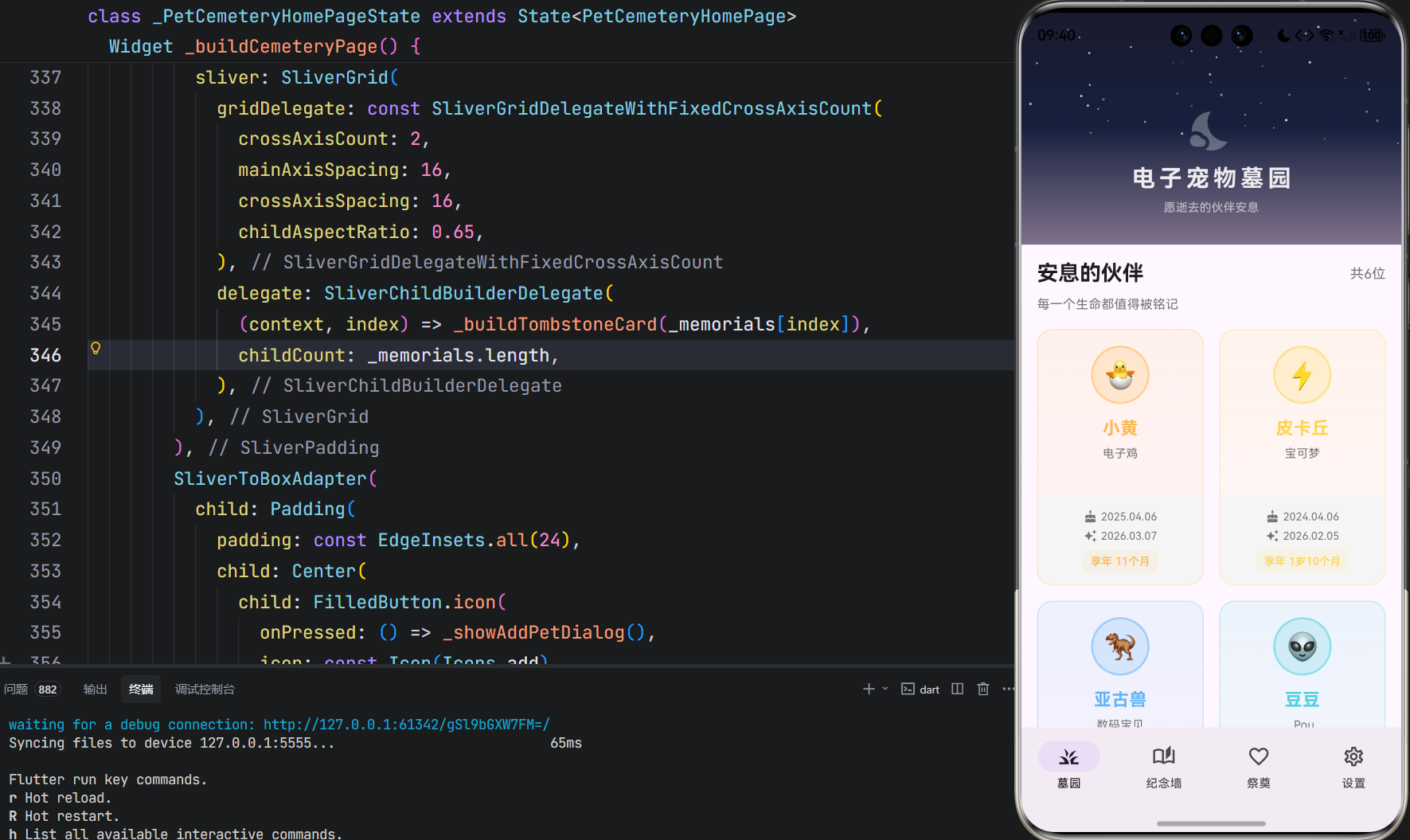
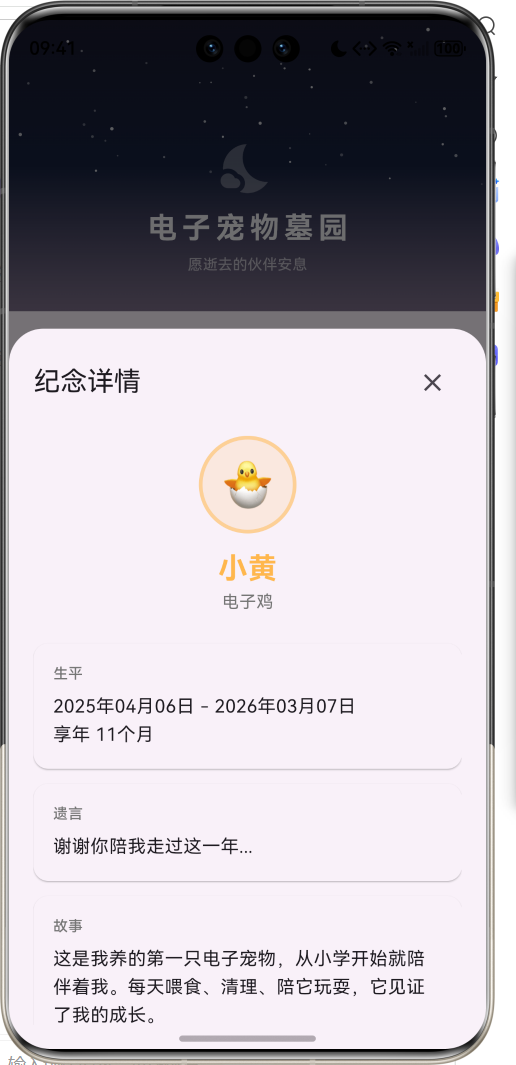
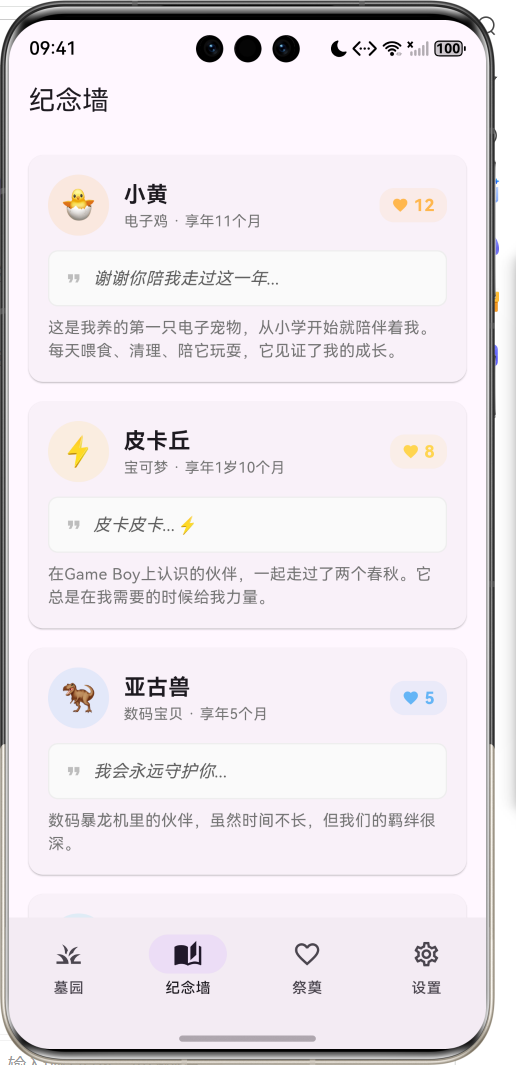
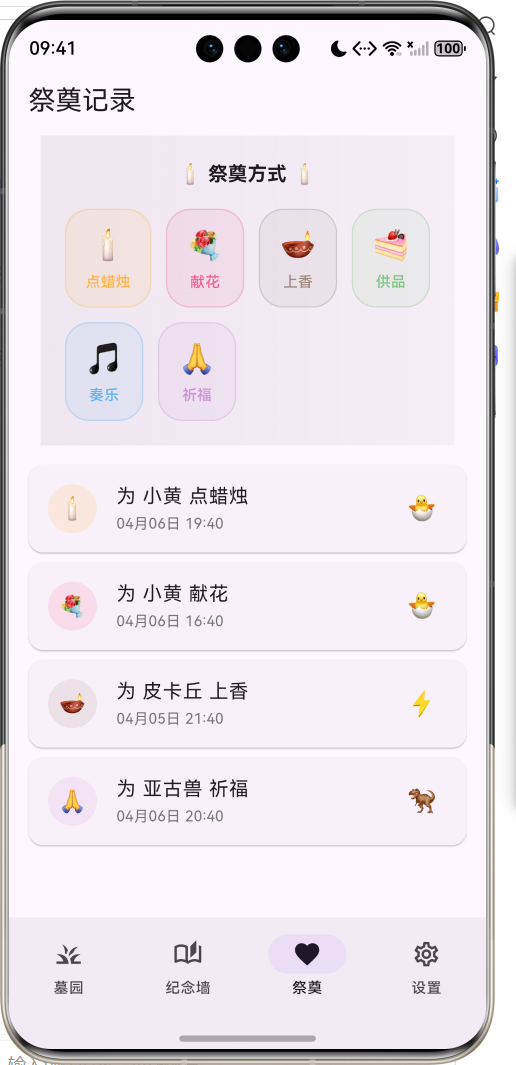
1.1 应用简介
电子宠物墓园应用是一款充满温情的纪念类应用,旨在帮助用户纪念那些曾经陪伴过自己的电子宠物。从早期的电子鸡、数码宝贝,到手机上的 Pou、Moy,每一个电子宠物都承载着我们独特的回忆。应用以深紫色为主色调,营造庄重肃穆又不失温馨的纪念氛围。
应用涵盖了墓园展示、纪念墙、祭奠功能、个人设置四大模块,支持8种电子宠物类型,提供点蜡烛、献花、上香、供品、奏乐、祈福6种祭奠方式。通过墓碑展示、故事记录、祭奠互动等功能,帮助用户永远铭记那些曾经陪伴过自己的数字伙伴。
1.2 核心功能
| 功能模块 | 功能描述 | 实现方式 |
|---|---|---|
| 墓园展示 | 墓碑网格展示 | SliverGrid布局 |
| 添加墓碑 | 创建宠物纪念 | 表单弹窗 |
| 纪念墙 | 故事与遗言展示 | 卡片列表 |
| 祭奠功能 | 6种祭奠方式 | 交互弹窗 |
| 详情查看 | 生平与回忆 | 底部抽屉 |
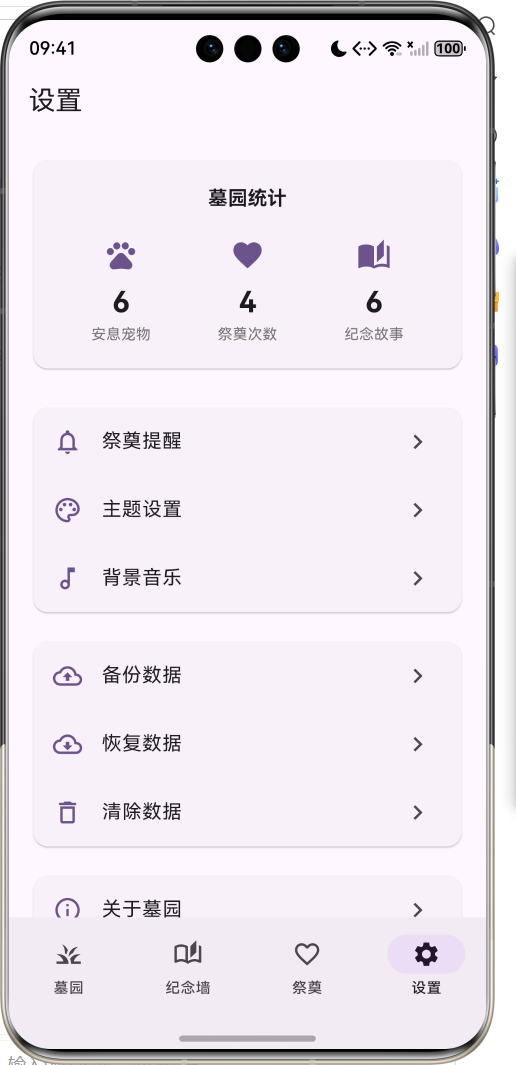
| 数据统计 | 墓园数据概览 | 统计卡片 |
1.3 宠物类型
| 序号 | 类型名称 | Emoji | 主题色 | 代表作 |
|---|---|---|---|---|
| 1 | 电子鸡 | 🐣 | #FFB74D | Tamagotchi |
| 2 | 数码宝贝 | 🦖 | #64B5F6 | Digimon |
| 3 | 宝可梦 | ⚡ | #FFD54F | Pokémon |
| 4 | 尼奥宠物 | 🌟 | #BA68C8 | Neopets |
| 5 | 网宠 | 🐕 | #81C784 | Webkinz |
| 6 | Pou | 👽 | #4DD0E1 | Pou |
| 7 | Moy | 🦠 | #AED581 | Moy |
| 8 | 其他 | 💫 | #90A4AE | 其他电子宠物 |
1.4 祭奠方式
| 序号 | 祭奠类型 | Emoji | 主题色 | 寓意 |
|---|---|---|---|---|
| 1 | 点蜡烛 | 🕯️ | #FFB74D | 照亮前行之路 |
| 2 | 献花 | 💐 | #F06292 | 表达思念之情 |
| 3 | 上香 | 🪔 | #A1887F | 寄托哀思 |
| 4 | 供品 | 🍰 | #81C784 | 感恩陪伴 |
| 5 | 奏乐 | 🎵 | #64B5F6 | 美好回忆 |
| 6 | 祈福 | 🙏 | #CE93D8 | 祝福安息 |
1.5 技术栈
| 技术领域 | 技术选型 | 版本要求 |
|---|---|---|
| 开发框架 | Flutter | >= 3.0.0 |
| 编程语言 | Dart | >= 2.17.0 |
| 设计规范 | Material Design 3 | - |
| 动画控制 | AnimationController | - |
| 状态管理 | setState | - |
| 目标平台 | 鸿蒙OS / Web | API 21+ |
1.6 项目结构
lib/
└── main_pet_cemetery.dart
    ├── PetCemeteryApp         # 应用入口
    ├── PetType                # 宠物类型枚举
    ├── TributeType            # 祭奠类型枚举
    ├── PetMemorial            # 宠物纪念数据模型
    ├── TributeRecord          # 祭奠记录数据模型
    ├── PetCemeteryHomePage    # 主页面(底部导航)
    ├── _buildCemeteryPage     # 墓园页面
    ├── _buildMemorialWallPage # 纪念墙页面
    ├── _buildTributePage      # 祭奠页面
    ├── _buildSettingsPage     # 设置页面
    └── _showAddPetDialog      # 添加宠物弹窗
二、系统架构
2.1 整体架构图
2.2 类图设计
2.3 页面导航流程
2.4 数据流向图
三、核心模块设计
3.1 数据模型设计
3.1.1 宠物类型枚举 (PetType)
enum PetType {
  tamagotchi('电子鸡', '🐣', Color(0xFFFFB74D)),
  digimon('数码宝贝', '🦖', Color(0xFF64B5F6)),
  pokemon('宝可梦', '⚡', Color(0xFFFFD54F)),
  neopet('尼奥宠物', '🌟', Color(0xFFBA68C8)),
  webkinz('网宠', '🐕', Color(0xFF81C784)),
  pou('Pou', '👽', Color(0xFF4DD0E1)),
  moy('Moy', '🦠', Color(0xFFAED581)),
  other('其他', '💫', Color(0xFF90A4AE));

  final String label;   // 类型名称
  final String emoji;   // 代表表情
  final Color color;    // 主题颜色
}
3.1.2 祭奠类型枚举 (TributeType)
enum TributeType {
  candle('点蜡烛', '🕯️', Color(0xFFFFB74D)),
  flower('献花', '💐', Color(0xFFF06292)),
  incense('上香', '🪔', Color(0xFFA1887F)),
  food('供品', '🍰', Color(0xFF81C784)),
  music('奏乐', '🎵', Color(0xFF64B5F6)),
  prayer('祈福', '🙏', Color(0xFFCE93D8));

  final String label;   // 祭奠名称
  final String emoji;   // 代表表情
  final Color color;    // 主题颜色
}
3.1.3 宠物纪念模型 (PetMemorial)
class PetMemorial {
  final String id;              // 唯一标识
  final String name;            // 宠物名字
  final PetType type;           // 宠物类型
  final DateTime birthDate;     // 出生日期
  final DateTime deathDate;     // 去世日期
  final String? lastWords;      // 遗言
  final String? story;          // 故事
  final int tributeCount;       // 祭奠次数
  final List<String> memories;  // 美好回忆
  final String? avatar;         // 头像

  int get age;                  // 计算年龄(天数)
  String get ageText;           // 格式化年龄文本
}
3.1.4 祭奠记录模型 (TributeRecord)
class TributeRecord {
  final String id;              // 唯一标识
  final String petId;           // 宠物ID
  final TributeType type;       // 祭奠类型
  final DateTime dateTime;      // 祭奠时间
  final String? message;        // 祭奠留言
}
3.1.5 宠物类型分布
3.2 页面结构设计
3.2.1 主页面布局
3.2.2 墓园页面结构
3.2.3 墓碑卡片结构
3.2.4 祭奠页面结构
3.3 祭奠流程
四、UI设计规范
4.1 配色方案
应用采用深紫色为主色调,营造庄重肃穆又不失温馨的纪念氛围:
| 颜色类型 | 色值 | 用途 |
|---|---|---|
| 主色 | #5D4E6D (Purple) | 导航、强调元素 |
| 背景深色 | #1a1a2e | 夜空背景 |
| 背景中间色 | #16213e | 渐变过渡 |
| 电子鸡 | #FFB74D | 金黄色 |
| 数码宝贝 | #64B5F6 | 蓝色 |
| 宝可梦 | #FFD54F | 黄色 |
| 尼奥宠物 | #BA68C8 | 紫色 |
| 网宠 | #81C784 | 绿色 |
| Pou | #4DD0E1 | 青色 |
| Moy | #AED581 | 浅绿 |
| 其他 | #90A4AE | 灰色 |
4.2 祭奠方式配色
| 祭奠类型 | 色值 | 情感表达 |
|---|---|---|
| 点蜡烛 | #FFB74D | 温暖光明 |
| 献花 | #F06292 | 爱与思念 |
| 上香 | #A1887F | 庄重肃穆 |
| 供品 | #81C784 | 感恩回馈 |
| 奏乐 | #64B5F6 | 美好回忆 |
| 祈福 | #CE93D8 | 祝福安息 |
4.3 字体规范
| 元素 | 字号 | 字重 | 颜色 |
|---|---|---|---|
| 应用标题 | 24px | Bold | #FFFFFF |
| 墓碑名字 | 18px | Bold | 主题色 |
| 页面标题 | 20px | Medium | #000000 |
| 类型标签 | 12px | Regular | #666666 |
| 享年标签 | 11px | Medium | 主题色 |
| 统计数值 | 24px | Bold | #000000 |
4.4 组件规范
4.4.1 墓碑卡片
┌─────────────────────┐
│                     │
│    ┌─────┐          │
│    │ 🐣  │          │
│    └─────┘          │
│                     │
│     小黄            │
│    电子鸡           │
│                     │
├─────────────────────┤
│  🎂 2023.01.01      │
│  ✨ 2024.01.01      │
│                     │
│  [享年 1岁]         │
└─────────────────────┘
4.4.2 纪念卡片
┌─────────────────────────────────────────────────┐
│ ┌────┐  小黄                              ❤️ 12 │
│ │ 🐣 │  电子鸡 · 享年1岁                        │
│ └────┘                                          │
│                                                 │
│ ┌─────────────────────────────────────────────┐ │
│ │ ❝ 谢谢你陪我走过这一年...                   │ │
│ └─────────────────────────────────────────────┘ │
│                                                 │
│ 这是我养的第一只电子宠物...                     │
└─────────────────────────────────────────────────┘
4.4.3 祭奠按钮
┌──────────┐
│   🕯️     │
│  点蜡烛  │
└──────────┘
4.4.4 统计卡片
┌────────────┐  ┌────────────┐  ┌────────────┐
│     🐾     │  │     ❤️     │  │     📖     │
│     6      │  │     4      │  │     6      │
│  安息宠物  │  │  祭奠次数  │  │  纪念故事  │
└────────────┘  └────────────┘  └────────────┘
五、核心功能实现
5.1 星空背景动画
List<Widget> _buildStars() {
  final value = _particleAnimationController.value;
  final random = Random(42);
  return List.generate(50, (index) {
    final x = random.nextDouble();
    final y = random.nextDouble() * 0.7;
    final size = 1.0 + random.nextDouble() * 2;
    final twinkle = sin(value * 2 * pi + index) * 0.5 + 0.5;
    return Positioned(
      left: x * 400,
      top: y * 200,
      child: Container(
        width: size,
        height: size,
        decoration: BoxDecoration(
          color: Colors.white.withValues(alpha: 0.3 + twinkle * 0.5),
          shape: BoxShape.circle,
        ),
      ),
    );
  });
}
5.2 墓碑卡片实现
Widget _buildTombstoneCard(PetMemorial memorial) {
  return GestureDetector(
    onTap: () => _showMemorialDetail(memorial),
    child: Container(
      decoration: BoxDecoration(
        gradient: LinearGradient(
          begin: Alignment.topCenter,
          end: Alignment.bottomCenter,
          colors: [
            memorial.type.color.withValues(alpha: 0.1),
            memorial.type.color.withValues(alpha: 0.05),
          ],
        ),
        borderRadius: BorderRadius.circular(16),
        border: Border.all(
          color: memorial.type.color.withValues(alpha: 0.3),
        ),
      ),
      child: Column(
        children: [
          // 宠物信息区域
          Container(
            padding: const EdgeInsets.all(16),
            child: Column(
              children: [
                // 类型图标
                Container(
                  width: 60,
                  height: 60,
                  decoration: BoxDecoration(
                    color: memorial.type.color.withValues(alpha: 0.2),
                    shape: BoxShape.circle,
                  ),
                  child: Text(memorial.type.emoji, style: const TextStyle(fontSize: 28)),
                ),
                // 名字和类型
                Text(memorial.name, style: TextStyle(fontWeight: FontWeight.bold)),
                Text(memorial.type.label),
              ],
            ),
          ),
          // 生卒日期区域
          Container(
            padding: const EdgeInsets.all(12),
            child: Column(
              children: [
                Text(DateFormat('yyyy.MM.dd').format(memorial.birthDate)),
                Text(DateFormat('yyyy.MM.dd').format(memorial.deathDate)),
                Text('享年 ${memorial.ageText}'),
              ],
            ),
          ),
        ],
      ),
    ),
  );
}
5.3 年龄计算
int get age {
  final duration = deathDate.difference(birthDate);
  return duration.inDays;
}

String get ageText {
  final days = age;
  if (days < 30) return '$days天';
  if (days < 365) return '${days ~/ 30}个月';
  return '${days ~/ 365}岁${(days % 365) ~/ 30}个月';
}
5.4 添加墓碑实现
void _showAddPetDialog() {
  final nameController = TextEditingController();
  final lastWordsController = TextEditingController();
  final storyController = TextEditingController();
  PetType selectedType = PetType.tamagotchi;
  DateTime birthDate = DateTime.now().subtract(const Duration(days: 365));
  DateTime deathDate = DateTime.now();

  showModalBottomSheet(
    context: context,
    isScrollControlled: true,
    builder: (context) => StatefulBuilder(
      builder: (context, setModalState) => DraggableScrollableSheet(
        initialChildSize: 0.9,
        builder: (context, scrollController) => Container(
          child: ListView(
            controller: scrollController,
            children: [
              TextField(controller: nameController, labelText: '宠物名字'),
              // 类型选择
              Wrap(
                children: PetType.values.map((type) => ChoiceChip(
                  label: Text('${type.emoji} ${type.label}'),
                  selected: selectedType == type,
                  onSelected: (selected) => setModalState(() => selectedType = type),
                )).toList(),
              ),
              // 日期选择
              ListTile(title: Text('出生日期'), subtitle: Text(birthDate.toString())),
              ListTile(title: Text('去世日期'), subtitle: Text(deathDate.toString())),
              // 遗言和故事
              TextField(controller: lastWordsController, labelText: '遗言'),
              TextField(controller: storyController, labelText: '故事'),
              // 创建按钮
              FilledButton(
                onPressed: () {
                  final memorial = PetMemorial(
                    id: DateTime.now().millisecondsSinceEpoch.toString(),
                    name: nameController.text,
                    type: selectedType,
                    birthDate: birthDate,
                    deathDate: deathDate,
                    lastWords: lastWordsController.text,
                    story: storyController.text,
                  );
                  setState(() => _memorials.insert(0, memorial));
                  Navigator.pop(context);
                },
                child: Text('创建墓碑'),
              ),
            ],
          ),
        ),
      ),
    ),
  );
}
5.5 祭奠功能实现
void _performTribute(PetMemorial memorial, TributeType type) {
  final record = TributeRecord(
    id: DateTime.now().millisecondsSinceEpoch.toString(),
    petId: memorial.id,
    type: type,
    dateTime: DateTime.now(),
  );

  setState(() {
    _tributes.insert(0, record);
  });

  ScaffoldMessenger.of(context).showSnackBar(
    SnackBar(content: Text('已为 ${memorial.name} ${type.label}')),
  );
}
六、交互设计
6.1 添加墓碑流程
6.2 祭奠流程
6.3 详情查看流程
七、扩展功能规划
7.1 后续版本规划
7.2 功能扩展建议
7.2.1 数据持久化
本地数据存储:
- 使用SharedPreferences存储基础设置
- 使用SQLite存储墓碑和祭奠记录
- 支持数据导出为JSON格式
7.2.2 照片上传
宠物照片管理:
- 上传宠物生前照片
- 创建照片墙
- 支持照片滤镜
7.2.3 回忆时间线
时间线功能:
- 记录与宠物的重要时刻
- 添加时间节点
- 生成回忆视频
八、注意事项
8.1 开发注意事项
-
日期计算:使用difference计算年龄
-
颜色处理:使用withValues方法设置透明度
-
表单验证:确保宠物名字不为空
-
状态管理:添加/删除后需要setState更新列表
8.2 常见问题
| 问题 | 原因 | 解决方案 |
|---|---|---|
| 年龄显示错误 | 日期计算错误 | 检查birthDate和deathDate |
| 墓碑不显示 | 列表未更新 | 确保setState调用 |
| 祭奠记录丢失 | petId不匹配 | 检查关联ID |
| 类型颜色不对 | 枚举值错误 | 检查PetType枚举 |
8.3 纪念寄语
🌈 纪念寄语 🌈
每一个电子宠物都曾是我们生活中的一部分,
它们陪伴我们度过孤独的时光,
见证我们的成长与变化。
虽然它们已经离开,
但那些美好的回忆将永远留在我们心中。
愿所有电子宠物安息 🙏
九、运行说明
9.1 环境要求
| 环境 | 版本要求 |
|---|---|
| Flutter SDK | >= 3.0.0 |
| Dart SDK | >= 2.17.0 |
| 鸿蒙OS | API 21+ |
9.2 运行命令
# 查看可用设备
flutter devices

# 运行到Web服务器
flutter run -d web-server -t lib/main_pet_cemetery.dart --web-port 8108

# 运行到鸿蒙设备
flutter run -d 127.0.0.1:5555 lib/main_pet_cemetery.dart

# 运行到Windows
flutter run -d windows -t lib/main_pet_cemetery.dart

# 代码分析
flutter analyze lib/main_pet_cemetery.dart
十、总结
电子宠物墓园应用通过墓碑展示、纪念墙、祭奠功能等模块,为用户提供了一个纪念电子宠物的温馨空间。应用支持8种电子宠物类型,提供6种祭奠方式,让用户可以用心纪念那些曾经陪伴过自己的数字伙伴。
核心功能涵盖墓园展示、添加墓碑、纪念墙、祭奠功能、数据统计五大模块。墓园展示以网格卡片形式呈现所有墓碑;添加墓碑支持完整的宠物信息录入;纪念墙展示故事与遗言;祭奠功能提供多种祭奠方式;数据统计展示墓园概览。
应用采用Material Design 3设计规范,以深紫色为主色调,界面庄重温馨。通过本应用,希望能够帮助用户永远铭记那些曾经陪伴过自己的电子宠物,让美好的回忆永远留存。
愿逝去的伙伴安息

作为“人工智能6S店”的官方数字引擎,为AI开发者与企业提供一个覆盖软硬件全栈、一站式门户。
更多推荐
 3
3 0
0- 0


 已为社区贡献10条内容

所有评论(0)