
Flutter 框架跨平台鸿蒙开发 - 环保知识应用
运行效果图环保知识应用是一款致力于普及环保知识、提升公众环保意识的科普类应用,旨在帮助环保爱好者和普通用户系统了解垃圾分类、节能减排、低碳生活、水资源保护、空气质量、生态保护六大知识领域。应用以绿色为主色调,营造清新自然的环保主题氛围。应用涵盖了垃圾分类、节能减排、低碳生活、水资源保护、空气质量、生态保护六大分类,收录了24篇详细知识内容。通过知识学习、趣味测验、实用小贴士等模块,帮助用户全面提升
环保知识应用
欢迎加入开源鸿蒙跨平台社区:
https://openharmonycrossplatform.csdn.net
一、项目概述
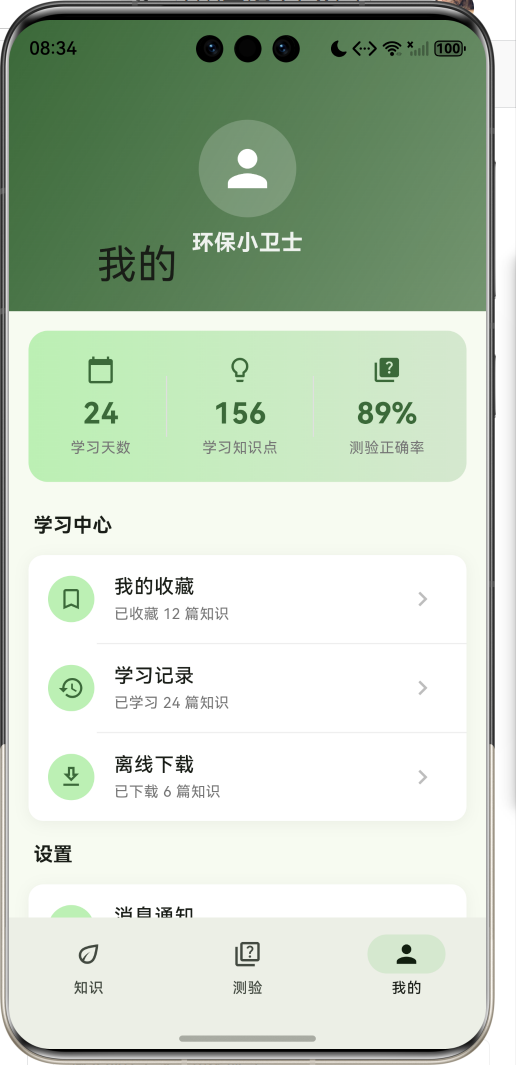
运行效果图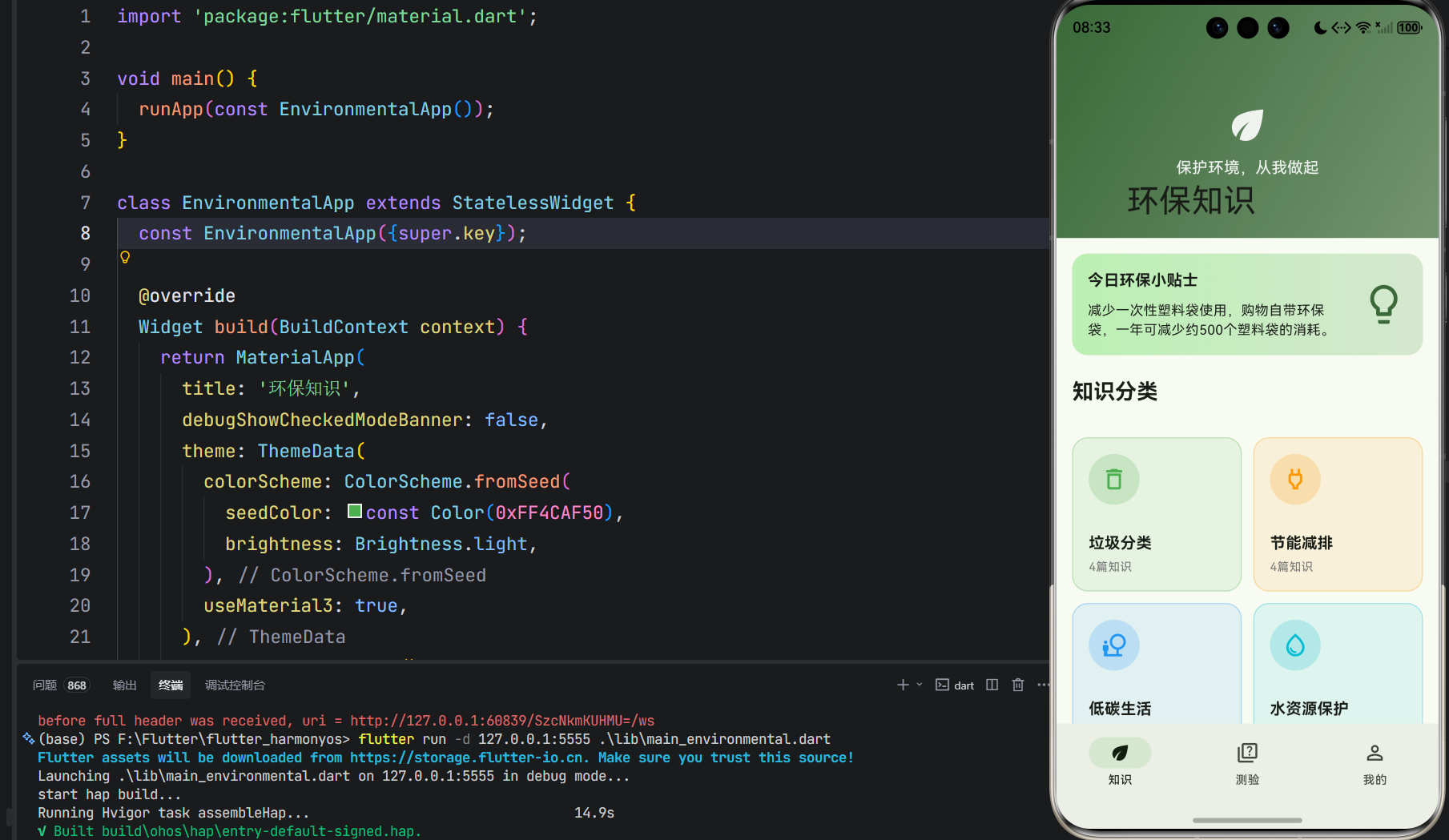
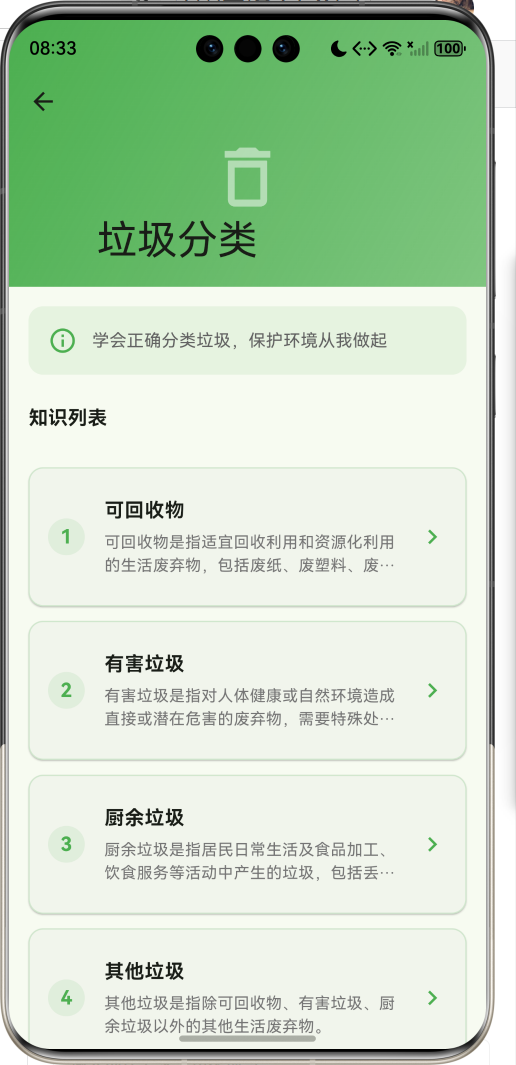
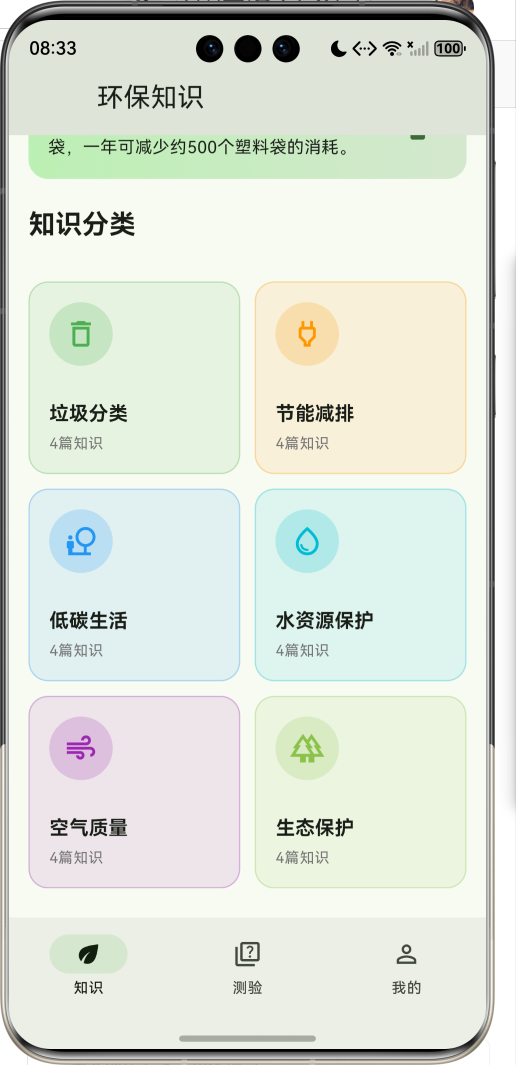
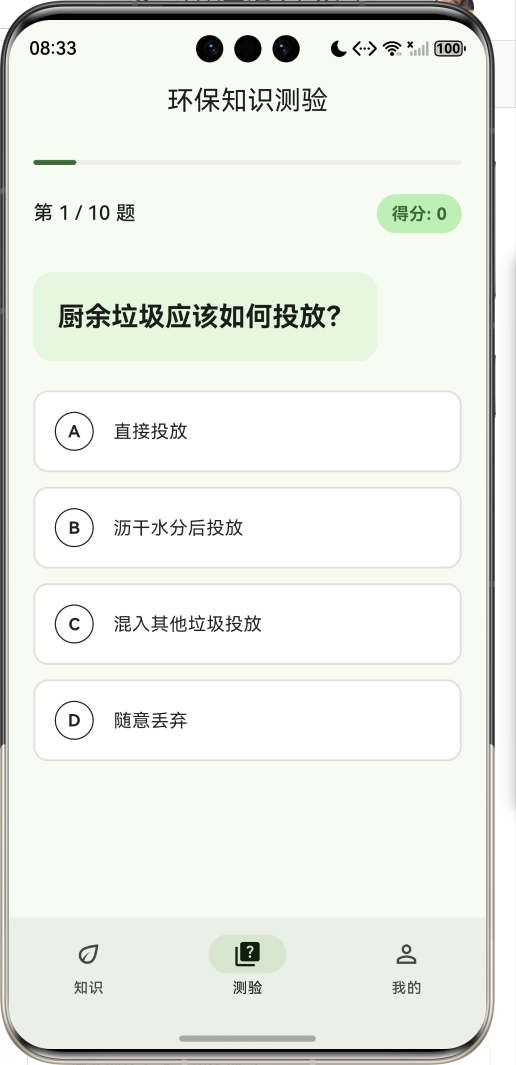
1.1 应用简介
环保知识应用是一款致力于普及环保知识、提升公众环保意识的科普类应用,旨在帮助环保爱好者和普通用户系统了解垃圾分类、节能减排、低碳生活、水资源保护、空气质量、生态保护六大知识领域。应用以绿色为主色调,营造清新自然的环保主题氛围。
应用涵盖了垃圾分类、节能减排、低碳生活、水资源保护、空气质量、生态保护六大分类,收录了24篇详细知识内容。通过知识学习、趣味测验、实用小贴士等模块,帮助用户全面提升环保意识和实践能力。
1.2 核心功能
| 功能模块 | 功能描述 | 实现方式 |
|---|---|---|
| 知识分类 | 六大环保领域展示 | 网格卡片布局 |
| 知识详情 | 完整知识内容展示 | 滚动页面+小贴士 |
| 环保测验 | 趣味知识测验 | 随机出题+即时反馈 |
| 测验结果 | 成绩评价与解析 | 分数统计+评语 |
| 个人中心 | 学习统计与设置 | 列表菜单 |
1.3 环保知识分类
| 序号 | 分类名称 | 知识数量 | 核心内容 |
|---|---|---|---|
| 1 | 垃圾分类 | 4篇 | 可回收物、有害垃圾、厨余垃圾、其他垃圾 |
| 2 | 节能减排 | 4篇 | 家庭节电、绿色出行、节约用水、低碳办公 |
| 3 | 低碳生活 | 4篇 | 低碳饮食、绿色购物、旧物利用、绿色家居 |
| 4 | 水资源保护 | 4篇 | 水污染来源、水环境保护、雨水利用、海洋保护 |
| 5 | 空气质量 | 4篇 | 空气污染来源、PM2.5防护、室内净化、改善空气 |
| 6 | 生态保护 | 4篇 | 生物多样性、森林保护、湿地保护、生态修复 |
1.4 技术栈
| 技术领域 | 技术选型 | 版本要求 |
|---|---|---|
| 开发框架 | Flutter | >= 3.0.0 |
| 编程语言 | Dart | >= 2.17.0 |
| 设计规范 | Material Design 3 | - |
| 状态管理 | setState | - |
| 目标平台 | 鸿蒙OS / Web | API 21+ |
1.5 项目结构
lib/
└── main_environmental.dart
    ├── EnvironmentalApp      # 应用入口
    ├── KnowledgeCategory     # 知识分类数据模型
    ├── KnowledgeItem         # 知识条目数据模型
    ├── QuizQuestion          # 测验题目数据模型
    ├── MainPage              # 主页面(底部导航)
    ├── HomePage              # 知识首页
    ├── CategoryDetailPage    # 分类详情页面
    ├── KnowledgeDetailPage   # 知识详情页面
    ├── QuizPage              # 测验页面
    └── ProfilePage           # 个人中心页面
二、系统架构
2.1 整体架构图
2.2 类图设计
2.3 页面导航流程
2.4 测验数据流向图
三、核心模块设计
3.1 数据模型设计
3.1.1 知识分类模型 (KnowledgeCategory)
class KnowledgeCategory {
  final String id;              // 唯一标识
  final String name;            // 分类名称
  final IconData icon;          // 分类图标
  final Color color;            // 主题颜色
  final String description;     // 分类描述
  final List<KnowledgeItem> items;  // 知识条目列表
}
3.1.2 知识条目模型 (KnowledgeItem)
class KnowledgeItem {
  final String id;              // 唯一标识
  final String title;           // 知识标题
  final String content;         // 知识内容
  final List<String> tips;      // 实用小贴士
  final String imagePath;       // 图片路径
}
3.1.3 测验题目模型 (QuizQuestion)
class QuizQuestion {
  final String question;        // 题目内容
  final List<String> options;   // 选项列表
  final int correctIndex;       // 正确答案索引
  final String explanation;     // 答案解析
}
3.1.4 知识分布
3.2 页面结构设计
3.2.1 主页面布局
3.2.2 知识首页结构
3.2.3 测验页面结构
3.2.4 结果页面结构
3.3 测验流程设计
四、UI设计规范
4.1 配色方案
应用采用绿色为主色调,营造清新自然的环保主题氛围:
| 颜色类型 | 色值 | 用途 |
|---|---|---|
| 主色 | #4CAF50 (Green) | 导航、强调元素 |
| 分类绿 | #4CAF50 | 垃圾分类 |
| 分类橙 | #FF9800 | 节能减排 |
| 分类蓝 | #2196F3 | 低碳生活 |
| 分类青 | #00BCD4 | 水资源保护 |
| 分类紫 | #9C27B0 | 空气质量 |
| 分类浅绿 | #8BC34A | 生态保护 |
4.2 字体规范
| 元素 | 字号 | 字重 | 颜色 |
|---|---|---|---|
| 页面标题 | 20px | Medium | #000000 |
| 分类名称 | 16px | Bold | #000000 |
| 知识标题 | 16px | Bold | #000000 |
| 知识内容 | 14px | Regular | #424242 |
| 小贴士 | 14px | Regular | #616161 |
| 测验题目 | 18px | Bold | #000000 |
4.3 组件规范
4.3.1 分类卡片
┌─────────────────────┐
│                     │
│    🗑️              │
│                     │
│   垃圾分类          │
│   4篇知识           │
│                     │
└─────────────────────┘
4.3.2 知识列表项
┌─────────────────────────────────────────────────┐
│ ┌────┐  可回收物                              > │
│ │ 1  │  可回收物是指适宜回收利用...              │
│ └────┘                                          │
└─────────────────────────────────────────────────┘
4.3.3 测验选项
┌─────────────────────────────────────────────────┐
│  A   塑料饮料瓶                                  │
│ ○                                               │
└─────────────────────────────────────────────────┘

正确答案样式:
┌─────────────────────────────────────────────────┐
│  A   塑料饮料瓶                          ✓      │
│ ●                                               │
└─────────────────────────────────────────────────┘
4.3.4 小贴士列表
┌─────────────────────────────────────────────────┐
│  ①  废纸应保持清洁干燥,避免污染               │
├─────────────────────────────────────────────────┤
│  ②  塑料瓶应清洗干净,压扁后投放               │
├─────────────────────────────────────────────────┤
│  ③  金属罐应清洗干净后投放                     │
└─────────────────────────────────────────────────┘
五、核心功能实现
5.1 知识分类卡片实现
Widget _buildCategoryCard(BuildContext context, KnowledgeCategory category) {
  return GestureDetector(
    onTap: () {
      Navigator.push(
        context,
        MaterialPageRoute(
          builder: (context) => CategoryDetailPage(category: category),
        ),
      );
    },
    child: Container(
      decoration: BoxDecoration(
        color: category.color.withValues(alpha: 0.1),
        borderRadius: BorderRadius.circular(16),
        border: Border.all(
          color: category.color.withValues(alpha: 0.3),
        ),
      ),
      child: Column(
        children: [
          Container(
            padding: const EdgeInsets.all(12),
            decoration: BoxDecoration(
              color: category.color.withValues(alpha: 0.2),
              shape: BoxShape.circle,
            ),
            child: Icon(category.icon, color: category.color, size: 28),
          ),
          Text(category.name, style: TextStyle(fontWeight: FontWeight.bold)),
          Text('${category.items.length}篇知识'),
        ],
      ),
    ),
  );
}
5.2 测验核心逻辑实现
class _QuizPageState extends State<QuizPage> {
  int _currentQuestionIndex = 0;
  int _score = 0;
  int? _selectedAnswer;
  bool _answered = false;
  bool _quizCompleted = false;
  List<int> _shuffledIndices = [];

  void _startNewQuiz() {
    _shuffledIndices = List.generate(_quizQuestions.length, (i) => i);
    _shuffledIndices.shuffle();
    _currentQuestionIndex = 0;
    _score = 0;
    _selectedAnswer = null;
    _answered = false;
    _quizCompleted = false;
    setState(() {});
  }

  void _selectAnswer(int index) {
    if (_answered) return;
    setState(() {
      _selectedAnswer = index;
      _answered = true;
      if (index == _currentQuestion.correctIndex) {
        _score++;
      }
    });
  }

  void _nextQuestion() {
    if (_currentQuestionIndex < _quizQuestions.length - 1) {
      setState(() {
        _currentQuestionIndex++;
        _selectedAnswer = null;
        _answered = false;
      });
    } else {
      setState(() {
        _quizCompleted = true;
      });
    }
  }
}
5.3 答案选项状态实现
Widget _buildOptionButton(int index) {
  Color backgroundColor = Colors.white;
  Color borderColor = Colors.grey.shade300;
  Color textColor = Colors.black87;
  IconData? trailingIcon;

  if (_answered) {
    if (index == _currentQuestion.correctIndex) {
      backgroundColor = Colors.green.shade50;
      borderColor = Colors.green;
      textColor = Colors.green.shade700;
      trailingIcon = Icons.check_circle;
    } else if (index == _selectedAnswer) {
      backgroundColor = Colors.red.shade50;
      borderColor = Colors.red;
      textColor = Colors.red.shade700;
      trailingIcon = Icons.cancel;
    }
  } else if (_selectedAnswer == index) {
    backgroundColor = Theme.of(context).colorScheme.primaryContainer;
    borderColor = Theme.of(context).colorScheme.primary;
  }

  return GestureDetector(
    onTap: () => _selectAnswer(index),
    child: Container(
      decoration: BoxDecoration(
        color: backgroundColor,
        borderRadius: BorderRadius.circular(12),
        border: Border.all(color: borderColor, width: 1.5),
      ),
      child: Row(
        children: [
          Container(
            width: 32,
            height: 32,
            decoration: BoxDecoration(
              shape: BoxShape.circle,
              border: Border.all(color: textColor),
            ),
            child: Text(String.fromCharCode(65 + index)),
          ),
          Expanded(child: Text(_currentQuestion.options[index])),
          if (trailingIcon != null) Icon(trailingIcon, color: textColor),
        ],
      ),
    ),
  );
}
5.4 结果评价实现
Widget _buildResultPage() {
  final percentage = (_score / _quizQuestions.length * 100).round();
  String message;
  IconData icon;
  Color color;

  if (percentage >= 80) {
    message = '太棒了!你是环保达人!';
    icon = Icons.emoji_events;
    color = Colors.green;
  } else if (percentage >= 60) {
    message = '不错!继续加油!';
    icon = Icons.thumb_up;
    color = Colors.orange;
  } else {
    message = '还需努力,多学习环保知识!';
    icon = Icons.school;
    color = Colors.blue;
  }

  return Center(
    child: Column(
      children: [
        Container(
          padding: const EdgeInsets.all(24),
          decoration: BoxDecoration(
            color: color.withValues(alpha: 0.1),
            shape: BoxShape.circle,
          ),
          child: Icon(icon, size: 64, color: color),
        ),
        Text('测验完成!'),
        Text(message),
        Text('$_score / ${_quizQuestions.length}'),
        Text('正确率 $percentage%'),
        ElevatedButton(
          onPressed: _startNewQuiz,
          child: Text('再来一次'),
        ),
      ],
    ),
  );
}
5.5 小贴士列表实现
Widget _buildTipsList(KnowledgeItem item, Color categoryColor) {
  return Column(
    children: item.tips.asMap().entries.map((entry) {
      return Padding(
        padding: const EdgeInsets.only(bottom: 12),
        child: Row(
          crossAxisAlignment: CrossAxisAlignment.start,
          children: [
            Container(
              width: 28,
              height: 28,
              decoration: BoxDecoration(
                color: categoryColor,
                shape: BoxShape.circle,
              ),
              child: Center(
                child: Text(
                  '${entry.key + 1}',
                  style: TextStyle(color: Colors.white, fontWeight: FontWeight.bold),
                ),
              ),
            ),
            const SizedBox(width: 12),
            Expanded(
              child: Container(
                padding: const EdgeInsets.all(12),
                decoration: BoxDecoration(
                  color: Colors.grey.shade100,
                  borderRadius: BorderRadius.circular(8),
                ),
                child: Text(entry.value),
              ),
            ),
          ],
        ),
      );
    }).toList(),
  );
}
六、交互设计
6.1 答题交互流程
6.2 知识浏览导航
6.3 测验状态流转
七、扩展功能规划
7.1 后续版本规划
7.2 功能扩展建议
7.2.1 搜索功能
增强查找能力:
- 按知识标题搜索
- 按分类筛选
- 按关键词搜索
7.2.2 收藏功能
个人收藏管理:
- 收藏喜欢的知识
- 创建收藏夹
- 离线阅读
7.2.3 学习打卡
激励用户学习:
- 每日学习打卡
- 学习积分系统
- 成就徽章
八、注意事项
8.1 开发注意事项
-
数据模型:KnowledgeCategory包含KnowledgeItem列表
-
测验逻辑:使用shuffle打乱题目顺序
-
导航传参:详情页通过构造函数接收数据对象
-
颜色处理:使用withValues方法设置透明度
8.2 常见问题
| 问题 | 原因 | 解决方案 |
|---|---|---|
| 测验题目顺序固定 | 未打乱顺序 | 使用shuffle方法 |
| 选项状态不更新 | setState未调用 | 确保状态更新在setState中 |
| 颜色透明度报错 | 使用废弃API | 使用withValues替代withOpacity |
| 图标找不到 | 图标名称错误 | 检查Icons中的正确名称 |
8.3 使用提示
🌿 环保小贴士 🌿
垃圾分类:可回收物、有害垃圾、厨余垃圾、其他垃圾,分类投放从我做起。
节能减排:空调26°C最节能,随手关灯节约电,绿色出行少开车。
低碳生活:自带购物袋,减少一次性用品,践行光盘行动。
保护环境:人人有责,从身边小事做起,共建美丽家园。
九、运行说明
9.1 环境要求
| 环境 | 版本要求 |
|---|---|
| Flutter SDK | >= 3.0.0 |
| Dart SDK | >= 2.17.0 |
| 鸿蒙OS | API 21+ |
9.2 运行命令
# 查看可用设备
flutter devices

# 运行到Web服务器
flutter run -d web-server -t lib/main_environmental.dart --web-port 8104

# 运行到鸿蒙设备
flutter run -d 127.0.0.1:5555 lib/main_environmental.dart

# 运行到Windows
flutter run -d windows -t lib/main_environmental.dart

# 代码分析
flutter analyze lib/main_environmental.dart
十、总结
环保知识应用通过系统化的环保知识展示,为环保爱好者提供了一个便捷的学习平台。应用涵盖了六大环保分类,收录了24篇详细知识内容,帮助用户全面了解环保知识。
核心功能涵盖知识分类、知识详情、趣味测验、个人中心四大模块。知识分类以网格卡片形式呈现六大领域;知识详情页完整呈现知识内容和实用小贴士;测验功能支持随机出题、即时反馈、详细解析;个人中心展示学习统计和设置菜单。
应用采用Material Design 3设计规范,以绿色为主色调,界面清新自然。通过本应用,希望能够帮助用户提升环保意识,践行绿色生活理念,为建设美丽中国贡献力量。
保护环境,从我做起

作为“人工智能6S店”的官方数字引擎,为AI开发者与企业提供一个覆盖软硬件全栈、一站式门户。
更多推荐
 3
3 0
0- 0


 已为社区贡献5条内容

所有评论(0)