
Flutter 框架跨平台鸿蒙开发 - 星座运势应用
运行效果图星座运势是一款专注于星座文化与运势查询的移动应用,为用户提供专业、有趣的星座信息服务。星座文化源远流长,从古巴比伦到现代,人们对星空的探索从未停止。本应用帮助用户了解十二星座的性格特点、每日运势、星座配对等信息,让星座文化融入日常生活。应用支持十二星座完整信息展示,每个星座包含性格特点、优缺点、幸运元素等详细资料。每日运势功能提供综合、爱情、事业、财富、健康五大维度的运势分析,帮助用户规
星座运势应用
欢迎加入开源鸿蒙跨平台社区:
https://openharmonycrossplatform.csdn.net
一、项目概述
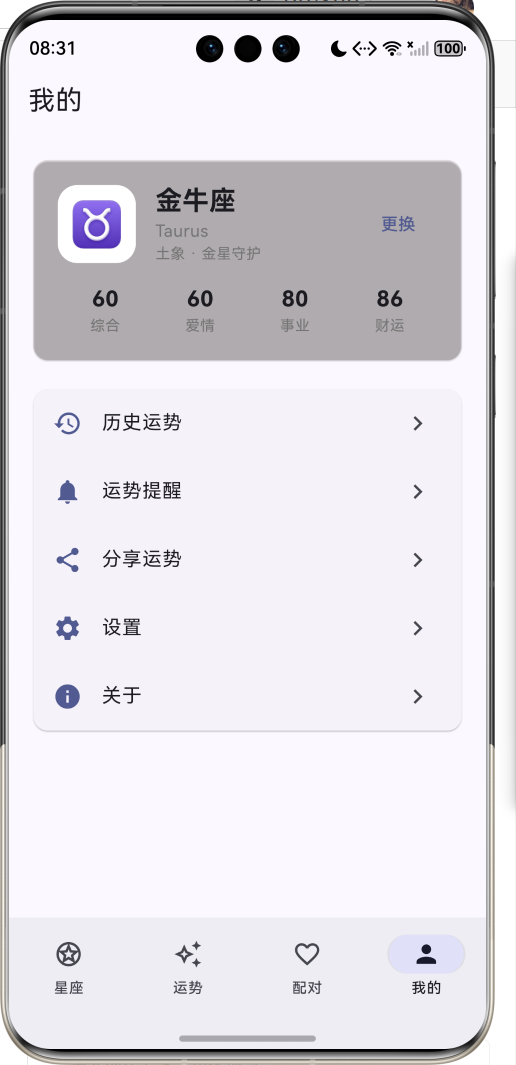
运行效果图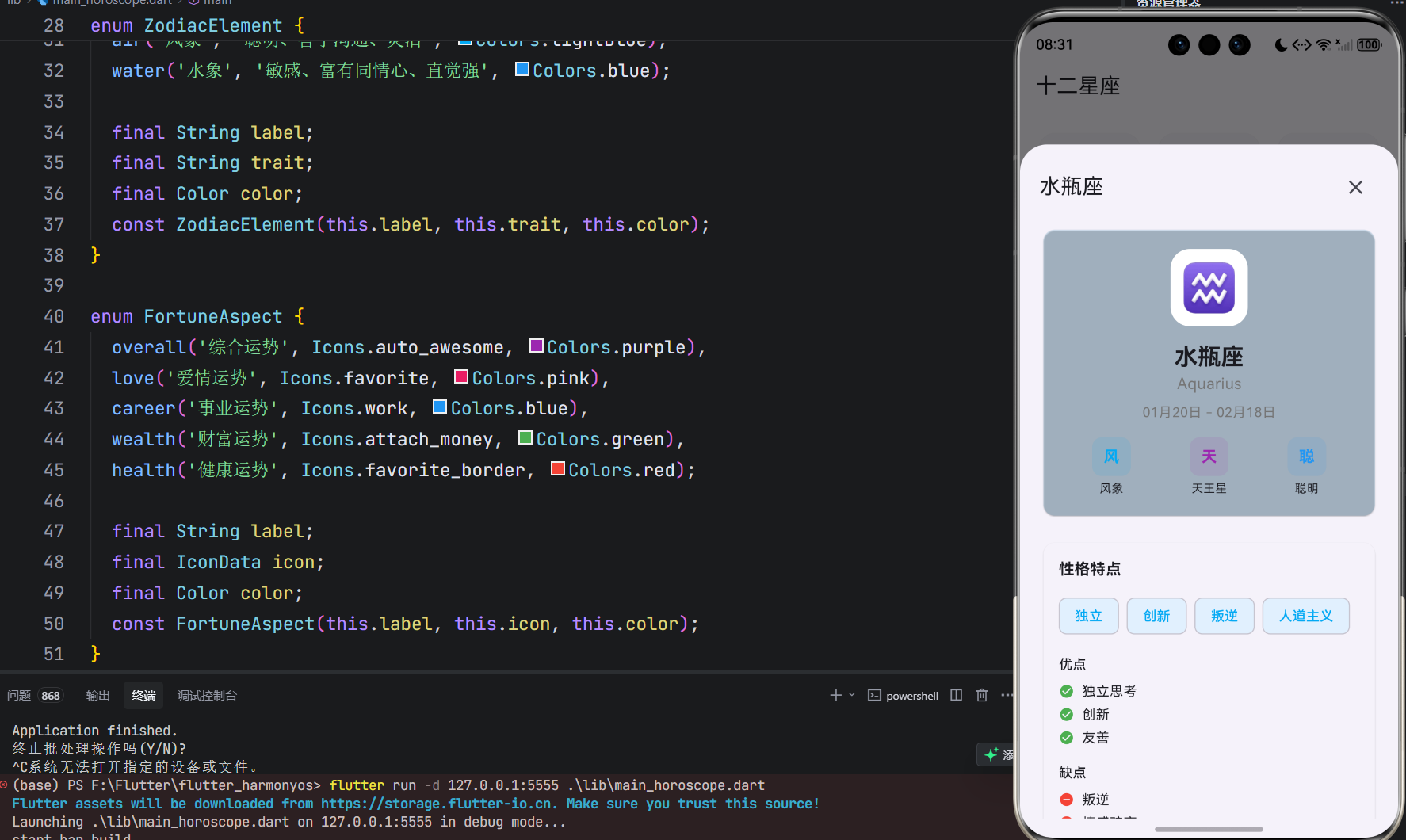
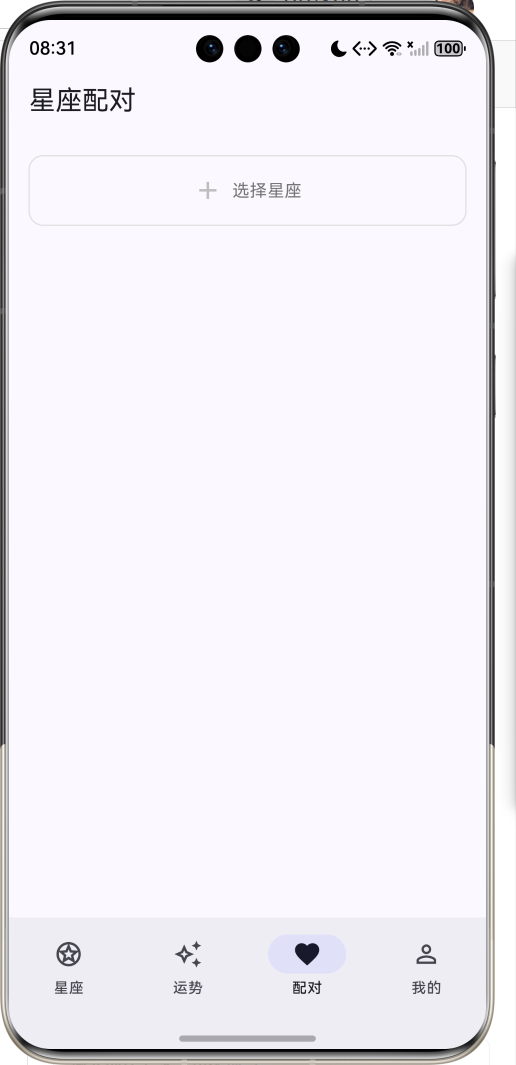
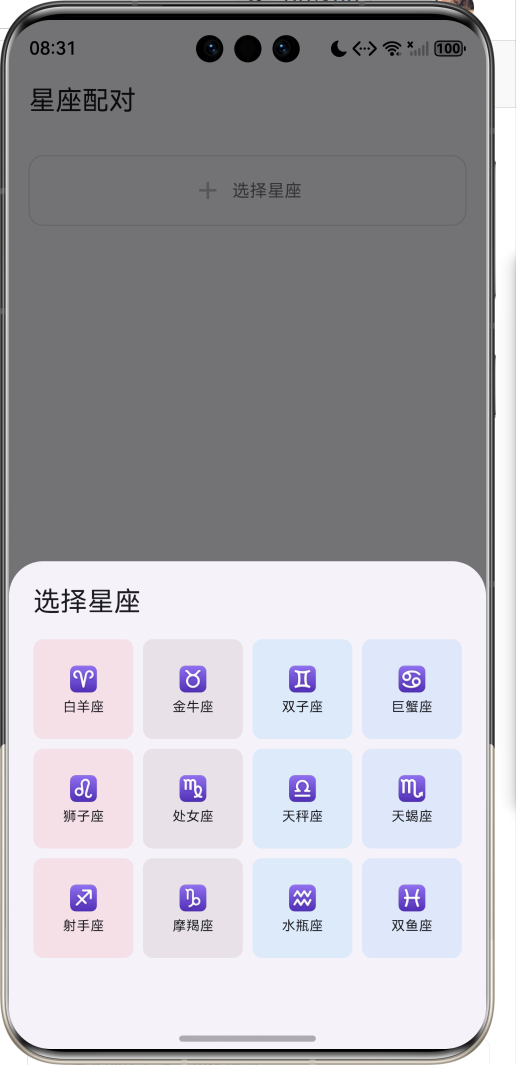
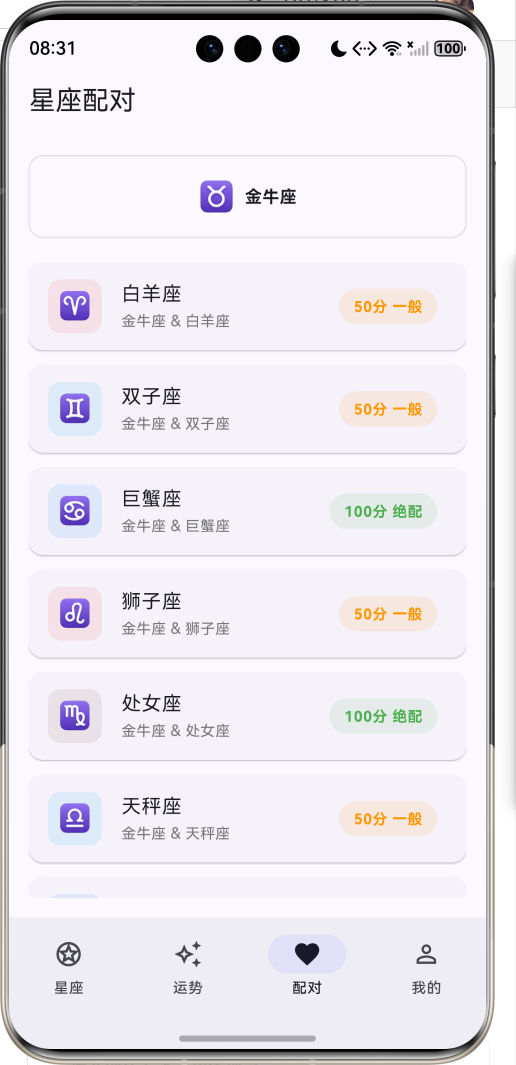
1.1 应用简介
星座运势是一款专注于星座文化与运势查询的移动应用,为用户提供专业、有趣的星座信息服务。星座文化源远流长,从古巴比伦到现代,人们对星空的探索从未停止。本应用帮助用户了解十二星座的性格特点、每日运势、星座配对等信息,让星座文化融入日常生活。
应用支持十二星座完整信息展示,每个星座包含性格特点、优缺点、幸运元素等详细资料。每日运势功能提供综合、爱情、事业、财富、健康五大维度的运势分析,帮助用户规划当日行程。星座配对功能通过科学的配对算法,分析两个星座之间的相容度,为用户提供情感参考。
1.2 核心功能
| 功能模块 | 功能描述 | 实现方式 |
|---|---|---|
| 星座列表 | 十二星座网格展示 | GridView |
| 星座详情 | 性格特点、幸运元素 | ModalBottomSheet |
| 每日运势 | 五大维度运势分析 | 进度条 + 卡片 |
| 星座配对 | 配对指数与分析 | ListView + 算法 |
| 个人中心 | 我的星座与设置 | ListView |
1.3 星座属性
| 属性 | 类型 | 说明 |
|---|---|---|
| 星座名称 | String | 中文名称 |
| 英文名称 | String | 英文名称 |
| 星座符号 | String | Unicode符号 |
| 日期范围 | DateTime | 起止日期 |
| 星座元素 | ZodiacElement | 火/土/风/水 |
| 守护星 | String | 守护行星 |
| 性格特点 | List | 主要特质 |
| 优点 | List | 性格优点 |
| 缺点 | List | 性格缺点 |
| 最佳配对 | List | 相配星座 |
| 幸运数字 | String | 幸运数字 |
| 幸运颜色 | String | 幸运颜色 |
| 幸运日 | String | 幸运星期 |
1.4 星座元素
| 元素 | 特质 | 颜色 | 包含星座 |
|---|---|---|---|
| 火象 | 热情、自信、有领导力 | 红色 | 白羊、狮子、射手 |
| 土象 | 务实、稳重、有耐心 | 棕色 | 金牛、处女、摩羯 |
| 风象 | 聪明、善于沟通、灵活 | 浅蓝 | 双子、天秤、水瓶 |
| 水象 | 敏感、富有同情心、直觉强 | 蓝色 | 巨蟹、天蝎、双鱼 |
1.5 运势维度
| 维度 | 图标 | 颜色 | 说明 |
|---|---|---|---|
| 综合运势 | auto_awesome | 紫色 | 整体运势概况 |
| 爱情运势 | favorite | 粉色 | 感情生活运势 |
| 事业运势 | work | 蓝色 | 工作发展运势 |
| 财富运势 | attach_money | 绿色 | 财运投资运势 |
| 健康运势 | favorite_border | 红色 | 身体健康运势 |
1.6 技术栈
| 技术领域 | 技术选型 | 版本要求 |
|---|---|---|
| 开发框架 | Flutter | >= 3.0.0 |
| 编程语言 | Dart | >= 2.17.0 |
| 设计规范 | Material Design 3 | - |
| 状态管理 | setState | - |
| 日期处理 | intl | ^0.19.0 |
| 目标平台 | 鸿蒙OS | API 21+ |
1.7 项目结构
lib/
└── main_horoscope.dart
    ├── HoroscopeApp              # 应用入口
    ├── ZodiacElement             # 星座元素枚举
    ├── FortuneAspect             # 运势维度枚举
    ├── Zodiac                    # 星座数据模型
    ├── DailyFortune              # 每日运势模型
    └── HoroscopeHomePage         # 主页面
        ├── _buildZodiacListPage()    # 星座列表页
        ├── _buildFortunePage()       # 运势展示页
        ├── _buildCompatibilityPage() # 星座配对页
        ├── _buildProfilePage()       # 个人中心页
        ├── _buildZodiacGridItem()    # 星座网格项
        ├── _buildFortuneScores()     # 运势评分
        └── _showZodiacDetail()       # 星座详情弹窗
二、系统架构
2.1 整体架构图
2.2 类图设计
2.3 数据流程图
2.4 运势生成流程
三、核心模块设计
3.1 数据模型设计
3.1.1 星座元素枚举 (ZodiacElement)
enum ZodiacElement {
  fire('火象', '热情、自信、有领导力', Colors.red),
  earth('土象', '务实、稳重、有耐心', Colors.brown),
  air('风象', '聪明、善于沟通、灵活', Colors.lightBlue),
  water('水象', '敏感、富有同情心、直觉强', Colors.blue);

  final String label;
  final String trait;
  final Color color;
  const ZodiacElement(this.label, this.trait, this.color);
}
3.1.2 运势维度枚举 (FortuneAspect)
enum FortuneAspect {
  overall('综合运势', Icons.auto_awesome, Colors.purple),
  love('爱情运势', Icons.favorite, Colors.pink),
  career('事业运势', Icons.work, Colors.blue),
  wealth('财富运势', Icons.attach_money, Colors.green),
  health('健康运势', Icons.favorite_border, Colors.red);

  final String label;
  final IconData icon;
  final Color color;
  const FortuneAspect(this.label, this.icon, this.color);
}
3.1.3 星座模型 (Zodiac)
class Zodiac {
  final String name;              // 星座名称
  final String englishName;       // 英文名称
  final String symbol;            // 星座符号
  final DateTime startDate;       // 起始日期
  final DateTime endDate;         // 结束日期
  final ZodiacElement element;    // 星座元素
  final String ruler;             // 守护星
  final List<String> traits;      // 性格特点
  final List<String> strengths;   // 优点
  final List<String> weaknesses;  // 缺点
  final List<String> compatible;  // 最佳配对
  final String luckyNumber;       // 幸运数字
  final String luckyColor;        // 幸运颜色
  final String luckyDay;          // 幸运日
}
3.1.4 每日运势模型 (DailyFortune)
class DailyFortune {
  final String zodiacName;        // 星座名称
  final DateTime date;            // 日期
  final int overallScore;         // 综合评分
  final int loveScore;            // 爱情评分
  final int careerScore;          // 事业评分
  final int wealthScore;          // 财富评分
  final int healthScore;          // 健康评分
  final String overallAdvice;     // 综合建议
  final String loveAdvice;        // 爱情建议
  final String careerAdvice;      // 事业建议
  final String wealthAdvice;      // 财富建议
  final String healthAdvice;      // 健康建议
  final String luckyDirection;    // 幸运方位
  final String luckyItem;         // 幸运物品
}
3.2 运势生成逻辑
3.2.1 生成流程
3.2.2 生成实现
void _generateFortunes() {
  final today = DateTime.now();
  final random = today.millisecondsSinceEpoch;

  for (var zodiac in _zodiacs) {
    final seed = random + zodiac.name.hashCode;
    _fortunes[zodiac.name] = DailyFortune(
      zodiacName: zodiac.name,
      date: today,
      overallScore: 60 + (seed % 40),
      loveScore: 50 + ((seed ~/ 100) % 50),
      careerScore: 55 + ((seed ~/ 200) % 45),
      wealthScore: 45 + ((seed ~/ 300) % 55),
      healthScore: 50 + ((seed ~/ 400) % 50),
      overallAdvice: _getOverallAdvice(seed),
      // ...
    );
  }
}
3.3 配对计算逻辑
3.3.1 配对算法
3.3.2 配对实现
int _calculateCompatibility(Zodiac a, Zodiac b) {
  int score = 50;

  // 同元素加分
  if (a.element == b.element) {
    score += 20;
  }

  // 最佳配对加分
  if (a.compatible.contains(b.name)) {
    score += 25;
  }
  if (b.compatible.contains(a.name)) {
    score += 15;
  }

  // 元素互补加分
  final elementBonus = {
    ZodiacElement.fire: [ZodiacElement.air],
    ZodiacElement.earth: [ZodiacElement.water],
    ZodiacElement.air: [ZodiacElement.fire],
    ZodiacElement.water: [ZodiacElement.earth],
  };

  if (elementBonus[a.element]?.contains(b.element) == true) {
    score += 10;
  }

  return score.clamp(20, 100);
}
3.4 页面结构设计
3.4.1 主页面布局
3.5 状态管理
3.5.1 核心状态变量
class _HoroscopeHomePageState extends State<HoroscopeHomePage> {
  int _selectedIndex = 0;                           // 当前Tab索引
  Zodiac? _selectedZodiac;                          // 选中的星座
  final Map<String, DailyFortune> _fortunes = {};   // 运势数据
  static final List<Zodiac> _zodiacs = [...];       // 星座列表
}
四、UI设计规范
4.1 配色方案
应用采用靛蓝色主题风格,体现神秘与智慧:
| 颜色类型 | 色值 | 用途 |
|---|---|---|
| 主色 | Indigo | AppBar、强调、按钮 |
| 火象 | Red | 白羊、狮子、射手 |
| 土象 | Brown | 金牛、处女、摩羯 |
| 风象 | LightBlue | 双子、天秤、水瓶 |
| 水象 | Blue | 巨蟹、天蝎、双鱼 |
4.2 运势维度颜色映射
| 维度 | 颜色 | 说明 |
|---|---|---|
| 综合 | 紫色 | 整体运势 |
| 爱情 | 粉色 | 感情运势 |
| 事业 | 蓝色 | 工作运势 |
| 财富 | 绿色 | 金钱运势 |
| 健康 | 红色 | 身体运势 |
4.3 组件规范
4.3.1 星座网格项
┌─────────────────┐
│    ┌────┐       │
│    │ ♈ │       │
│    └────┘       │
│    白羊座       │
│    Aries        │
└─────────────────┘
4.3.2 运势头部卡片
┌─────────────────────────────────────────────────────────────┐
│  ┌────┐  白羊座                              85            │
│  │ ♈ │  2024年03月15日                       综合评分     │
│  └────┘  ★★★★☆                                           │
└─────────────────────────────────────────────────────────────┘
4.3.3 运势评分条
┌─────────────────────────────────────────────────────────────┐
│  运势指数                                                   │
│                                                             │
│  ✨ 综合运势                                    85%        │
│  ████████████████████████████░░░░░░░░░░░░░░░░░░░░░░        │
│                                                             │
│  ❤️ 爱情运势                                    72%        │
│  █████████████████████████░░░░░░░░░░░░░░░░░░░░░░░░        │
│                                                             │
│  💼 事业运势                                    88%        │
│  ██████████████████████████████░░░░░░░░░░░░░░░░░░░        │
└─────────────────────────────────────────────────────────────┘
4.3.4 配对结果卡片
┌─────────────────────────────────────────────────────────────┐
│  ┌────┐  金牛座                                            │
│  │ ♉ │  白羊座 & 金牛座                      72分 相配    │
│  └────┘                                                    │
└─────────────────────────────────────────────────────────────┘
4.4 交互设计
4.4.1 操作方式
| 操作 | 手势 | 效果 |
|---|---|---|
| 查看星座详情 | 点击网格项 | 弹出详情面板 |
| 选择我的星座 | 点击选择按钮 | 更新选中状态 |
| 查看运势 | 切换到运势Tab | 显示运势详情 |
| 刷新运势 | 点击刷新按钮 | 重新生成运势 |
| 查看配对 | 切换到配对Tab | 显示配对列表 |
| 查看配对详情 | 点击配对项 | 弹出配对分析 |
五、核心功能实现
5.1 主页面构建
Widget build(BuildContext context) {
return Scaffold(
body: IndexedStack(
index: _selectedIndex,
children: [
_buildZodiacListPage(),
_buildFortunePage(),
_buildCompatibilityPage(),
_buildProfilePage(),
],
),
bottomNavigationBar: NavigationBar(
selectedIndex: _selectedIndex,
onDestinationSelected: (index) {
setState(() {
_selectedIndex = index;
});
},
destinations: const [
NavigationDestination(icon: Icon(Icons.stars_outlined), label: '星座'),
NavigationDestination(icon: Icon(Icons.auto_awesome_outlined), label: '运势'),
NavigationDestination(icon: Icon(Icons.favorite_border), label: '配对'),
NavigationDestination(icon: Icon(Icons.person_outline), label: '我的'),
],
),
);
}
5.2 星座网格
Widget _buildZodiacListPage() {
  return Scaffold(
    appBar: AppBar(title: const Text('十二星座')),
    body: GridView.builder(
      padding: const EdgeInsets.all(16),
      gridDelegate: const SliverGridDelegateWithFixedCrossAxisCount(
        crossAxisCount: 3,
        mainAxisSpacing: 12,
        crossAxisSpacing: 12,
        childAspectRatio: 1,
      ),
      itemCount: _zodiacs.length,
      itemBuilder: (context, index) {
        return _buildZodiacGridItem(_zodiacs[index]);
      },
    ),
  );
}
5.3 运势评分展示
Widget _buildScoreItem(FortuneAspect aspect, int score) {
  return Padding(
    padding: const EdgeInsets.only(bottom: 12),
    child: Column(
      children: [
        Row(
          children: [
            Icon(aspect.icon, size: 20, color: aspect.color),
            const SizedBox(width: 8),
            Text(aspect.label),
            const Spacer(),
            Text('$score%', style: TextStyle(fontWeight: FontWeight.bold, color: aspect.color)),
          ],
        ),
        const SizedBox(height: 6),
        ClipRRect(
          borderRadius: BorderRadius.circular(4),
          child: LinearProgressIndicator(
            value: score / 100,
            backgroundColor: Colors.grey[200],
            valueColor: AlwaysStoppedAnimation<Color>(aspect.color),
            minHeight: 6,
          ),
        ),
      ],
    ),
  );
}
5.4 配对计算
int _calculateCompatibility(Zodiac a, Zodiac b) {
  int score = 50;

  if (a.element == b.element) {
    score += 20;
  }

  if (a.compatible.contains(b.name)) {
    score += 25;
  }
  if (b.compatible.contains(a.name)) {
    score += 15;
  }

  final elementBonus = {
    ZodiacElement.fire: [ZodiacElement.air],
    ZodiacElement.earth: [ZodiacElement.water],
    ZodiacElement.air: [ZodiacElement.fire],
    ZodiacElement.water: [ZodiacElement.earth],
  };

  if (elementBonus[a.element]?.contains(b.element) == true) {
    score += 10;
  }

  return score.clamp(20, 100);
}
5.5 星座详情弹窗
void _showZodiacDetail(Zodiac zodiac) {
  showModalBottomSheet(
    context: context,
    isScrollControlled: true,
    builder: (context) => DraggableScrollableSheet(
      initialChildSize: 0.85,
      maxChildSize: 0.95,
      minChildSize: 0.5,
      expand: false,
      builder: (context, scrollController) => Container(
        padding: const EdgeInsets.all(20),
        child: ListView(
          controller: scrollController,
          children: [
            _buildZodiacInfoCard(zodiac),
            _buildTraitsSection(zodiac),
            _buildLuckySection(zodiac),
            FilledButton(
              onPressed: () {
                setState(() {
                  _selectedZodiac = zodiac;
                  _selectedIndex = 1;
                });
                Navigator.pop(context);
              },
              child: const Text('查看今日运势'),
            ),
          ],
        ),
      ),
    ),
  );
}
六、星座知识拓展
6.1 十二星座日期对照
6.2 星座元素关系
| 元素 | 特点 | 相生 | 相克 |
|---|---|---|---|
| 火象 | 热情冲动 | 风助火势 | 水火不容 |
| 土象 | 稳重务实 | 水润土肥 | 木克土 |
| 风象 | 灵活多变 | 火借风势 | 土掩风 |
| 水象 | 感性敏感 | 土涵水源 | 火蒸水 |
6.3 守护星与性格
6.4 星座配对原则
| 配对类型 | 分数范围 | 说明 |
|---|---|---|
| 绝配 | 80-100 | 天作之合,默契十足 |
| 相配 | 60-79 | 相处融洽,互补性强 |
| 一般 | 40-59 | 需要磨合,有成长空间 |
| 不合 | 20-39 | 差异较大,需要努力 |
七、扩展功能规划
7.1 后续版本规划
7.2 功能扩展建议
7.2.1 运势增强
| 功能 | 说明 |
|---|---|
| 周运势 | 每周运势预测 |
| 月运势 | 月度运势分析 |
| 年运势 | 年度运势总览 |
| 运势趋势 | 运势变化曲线 |
7.2.2 星盘功能
| 功能 | 说明 |
|---|---|
| 上升星座 | 根据出生时间计算 |
| 月亮星座 | 情感内在分析 |
| 星盘图 | 完整星盘展示 |
| 行星相位 | 行星关系分析 |
7.2.3 社交功能
| 功能 | 说明 |
|---|---|
| 运势分享 | 分享到社交平台 |
| 好友配对 | 与好友配对分析 |
| 星座社区 | 星座话题讨论 |
| 每日签语 | 生成精美签语 |
八、注意事项
8.1 开发注意事项
-
颜色处理:使用
withValues(alpha:)替代已废弃的withOpacity() -
日期格式化:使用intl包的DateFormat进行日期格式化
-
状态同步:弹窗使用StatefulBuilder保持状态同步
-
随机算法:运势生成使用时间戳作为种子,保证同一天结果一致
-
数据模型:Zodiac类不使用const构造函数,因为DateTime不是const
8.2 用户体验优化
⭐ 用户体验建议 ⭐
- 星座信息一目了然
- 运势展示直观清晰
- 配对分析科学有趣
- 操作流程简单便捷
8.3 常见问题
| 问题 | 原因 | 解决方案 |
|---|---|---|
| 运势数据不更新 | 种子未变化 | 添加刷新按钮 |
| 配对分数异常 | 算法边界问题 | 使用clamp限制范围 |
| 弹窗状态不同步 | StatefulBuilder未使用 | 使用setModalState |
| 星座日期判断错误 | 年份跨年问题 | 使用固定年份计算 |
九、运行说明
9.1 环境要求
| 环境 | 版本要求 |
|---|---|
| Flutter SDK | >= 3.0.0 |
| Dart SDK | >= 2.17.0 |
| intl包 | ^0.19.0 |
| 鸿蒙OS | API 21+ |
9.2 运行命令
# 查看可用设备
flutter devices

# 运行到鸿蒙设备
flutter run -d 127.0.0.1:5555 lib/main_horoscope.dart

# 运行到Windows
flutter run -d windows -t lib/main_horoscope.dart

# 代码分析
flutter analyze lib/main_horoscope.dart
十、总结
星座运势应用通过完善的功能设计,帮助用户了解星座文化与每日运势。应用支持十二星座完整信息展示,每个星座包含性格特点、优缺点、幸运元素等详细资料,让用户深入了解自己的星座特质。
每日运势功能提供综合、爱情、事业、财富、健康五大维度的运势分析,通过进度条直观展示各维度评分,配合详细的运势建议,帮助用户规划当日行程。幸运方位和幸运物品为用户带来额外的好运指引。
星座配对功能通过科学的配对算法,分析两个星座之间的相容度。算法综合考虑元素关系、最佳配对列表、元素互补等因素,给出合理的配对评分和分析建议,为用户提供情感参考。
界面设计采用靛蓝色主题风格,体现神秘与智慧。星座网格通过元素颜色区分不同类型,运势卡片通过维度颜色直观展示各维度状态。应用采用Material Design 3设计规范,遵循Flutter最佳实践,代码结构清晰,易于维护和扩展。
探索星空,了解自己!

作为“人工智能6S店”的官方数字引擎,为AI开发者与企业提供一个覆盖软硬件全栈、一站式门户。
更多推荐
 2
2 0
0- 0


 已为社区贡献5条内容

所有评论(0)