
Flutter 框架跨平台鸿蒙开发 - flutter版本样式的美食菜谱应用
美食菜谱应用开发摘要 本项目基于Flutter框架开发一款跨平台美食菜谱管理应用,专注于中华八大菜系(川、粤、湘、鲁等)的菜谱展示与管理。核心功能包括菜谱列表展示、菜系筛选、难度分级、关键词搜索、收藏管理以及完整的菜谱CRUD操作。采用Material Design 3设计规范,使用Dart语言开发,支持鸿蒙OS平台。系统架构分为表现层(列表/编辑/详情页面)、业务逻辑层(筛选/收藏/统计)和数据
欢迎加入开源鸿蒙跨平台社区:
https://openharmonycrossplatform.csdn.net
一、项目概述
运行效果图
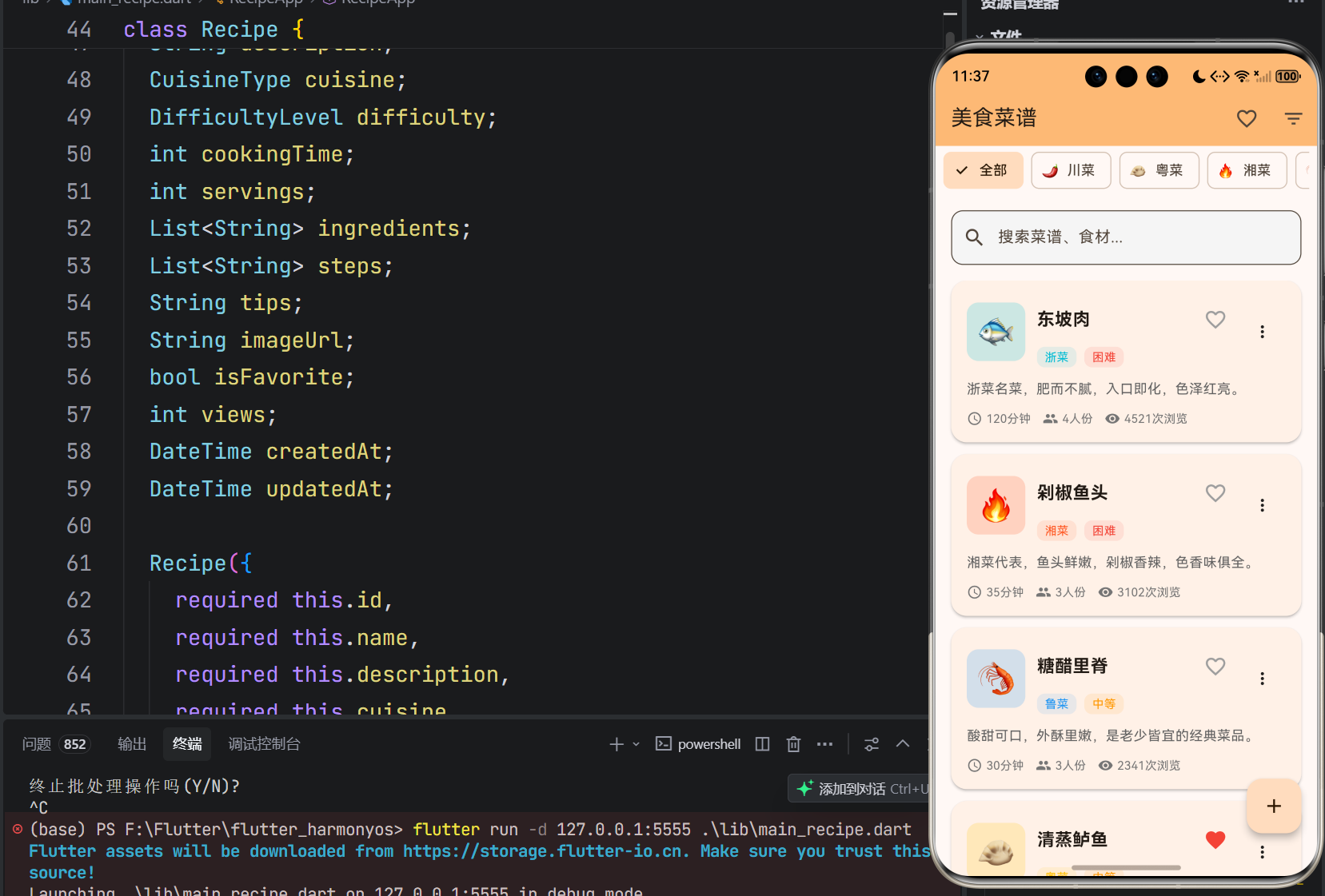
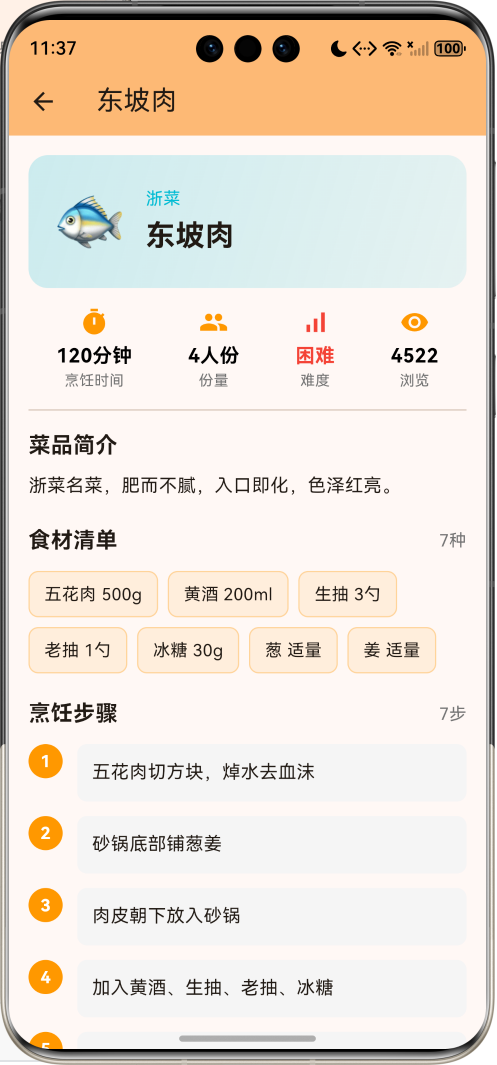
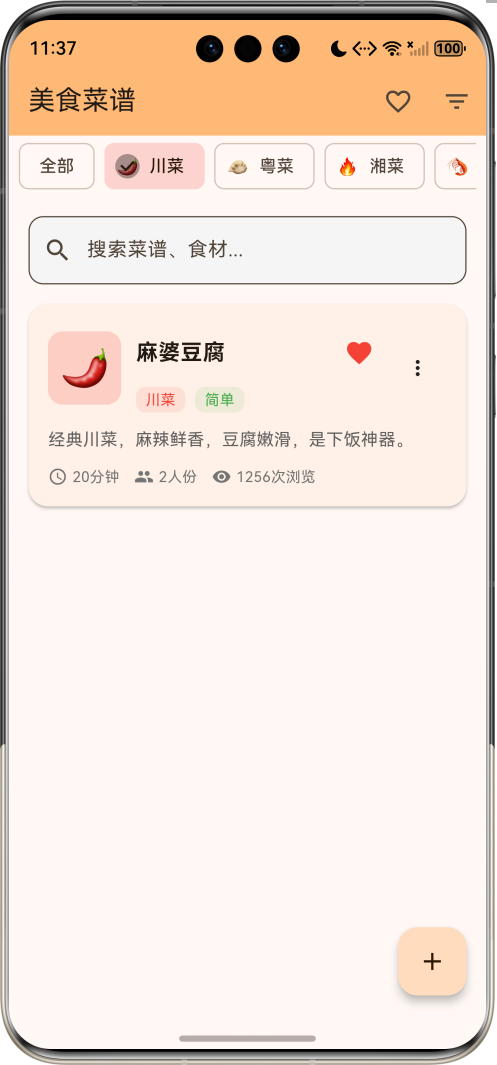
1.1 应用简介
美食菜谱是一款专注于中华美食文化传承与分享的移动应用,为用户提供一个便捷的菜谱管理平台。中华饮食文化源远流长,八大菜系各具特色,本应用帮助用户记录、收藏和管理各类菜谱,让烹饪变得更加简单有趣。
应用支持八大菜系分类,涵盖川菜、粤菜、湘菜、鲁菜、苏菜、浙菜、闽菜、徽菜,每种菜系配有专属表情符号与主题色彩。菜谱记录包含食材清单、烹饪步骤、烹饪小贴士等完整信息,难度分级让用户根据自身水平选择合适菜品。
1.2 核心功能
| 功能模块 | 功能描述 | 实现方式 |
|---|---|---|
| 菜谱列表 | 展示所有菜谱,支持浏览量排序 | ListView + Card |
| 菜系筛选 | 八大菜系快速筛选 | FilterChip |
| 难度分级 | 简单/中等/困难三级分类 | ChoiceChip |
| 搜索功能 | 按菜名、食材关键词搜索 | TextField过滤 |
| 收藏功能 | 收藏喜欢的菜谱 | IconButton切换 |
| 菜谱详情 | 完整展示食材、步骤、贴士 | 详情页面 |
| 添加菜谱 | 创建新的菜谱记录 | 表单页面 |
| 编辑菜谱 | 修改已有菜谱信息 | 表单预填充 |
| 删除菜谱 | 删除不需要的记录 | 确认对话框 |
1.3 菜谱记录字段
| 字段 | 类型 | 说明 |
|---|---|---|
| 菜谱ID | String | 唯一标识,时间戳生成 |
| 菜谱名称 | String | 菜品名称,必填 |
| 菜品简介 | String | 菜品描述,必填 |
| 菜系类型 | CuisineType | 八大菜系枚举 |
| 难度等级 | DifficultyLevel | 简单/中等/困难 |
| 烹饪时间 | int | 烹饪所需分钟数 |
| 份量 | int | 可供几人食用 |
| 食材清单 | List | 所需食材列表 |
| 烹饪步骤 | List | 步骤说明列表 |
| 烹饪贴士 | String | 烹饪技巧提示 |
| 收藏状态 | bool | 是否已收藏 |
| 浏览次数 | int | 菜谱浏览统计 |
| 创建时间 | DateTime | 记录创建时间 |
| 更新时间 | DateTime | 最后修改时间 |
1.4 技术栈
| 技术领域 | 技术选型 | 版本要求 |
|---|---|---|
| 开发框架 | Flutter | >= 3.0.0 |
| 编程语言 | Dart | >= 2.17.0 |
| 设计规范 | Material Design 3 | - |
| 状态管理 | setState | - |
| 目标平台 | 鸿蒙OS | API 21+ |
1.5 项目结构
lib/
└── main_recipe.dart
    ├── RecipeApp              # 应用入口
    ├── CuisineType            # 菜系类型枚举
    ├── DifficultyLevel        # 难度等级枚举
    ├── Recipe                 # 菜谱数据模型
    ├── RecipePage             # 主列表页面
    │   ├── _buildCuisineChips()   # 菜系筛选条
    │   ├── _buildSearchBar()      # 搜索栏
    │   ├── _buildRecipesList()    # 菜谱列表
    │   ├── _buildRecipeCard()     # 菜谱卡片
    │   └── _toggleFavorite()      # 收藏切换
    ├── RecipeEditPage         # 编辑页面
    │   ├── _addIngredient()       # 添加食材
    │   ├── _addStep()             # 添加步骤
    │   └── _save()                # 保存菜谱
    └── RecipeDetailPage       # 详情页面
        └── _buildStatItem()       # 统计项构建
二、系统架构
2.1 整体架构图
2.2 类图设计
2.3 数据流程图
2.4 菜谱详情流程
三、核心模块设计
3.1 数据模型设计
3.1.1 菜系类型枚举 (CuisineType)
enum CuisineType {
  sichuan,   // 川菜
  cantonese, // 粤菜
  hunan,     // 湘菜
  shandong,  // 鲁菜
  jiangsu,   // 苏菜
  zhejiang,  // 浙菜
  fujian,    // 闽菜
  anhui,     // 徽菜
}
3.1.2 菜系属性映射
| 菜系类型 | 中文名称 | 表情符号 | 主题颜色 |
|---|---|---|---|
| sichuan | 川菜 | 🌶️ | 红色 |
| cantonese | 粤菜 | 🥟 | 琥珀色 |
| hunan | 湘菜 | 🔥 | 深橙色 |
| shandong | 鲁菜 | 🦐 | 蓝色 |
| jiangsu | 苏菜 | 🦀 | 青色 |
| zhejiang | 浙菜 | 🐟 | 青绿色 |
| fujian | 闽菜 | 🍲 | 靛蓝色 |
| anhui | 徽菜 | 🍖 | 棕色 |
3.1.3 难度等级枚举 (DifficultyLevel)
enum DifficultyLevel {
  easy,    // 简单
  medium,  // 中等
  hard,    // 困难
}
3.1.4 难度属性映射
| 难度等级 | 中文名称 | 主题颜色 |
|---|---|---|
| easy | 简单 | 绿色 |
| medium | 中等 | 橙色 |
| hard | 困难 | 红色 |
3.1.5 菜谱模型 (Recipe)
class Recipe {
  final String id;                  // 唯一标识
  String name;                      // 菜谱名称
  String description;               // 菜品简介
  CuisineType cuisine;              // 菜系类型
  DifficultyLevel difficulty;       // 难度等级
  int cookingTime;                  // 烹饪时间(分钟)
  int servings;                     // 份量(人份)
  List<String> ingredients;         // 食材清单
  List<String> steps;               // 烹饪步骤
  String tips;                      // 烹饪贴士
  bool isFavorite;                  // 收藏状态
  int views;                        // 浏览次数
  DateTime createdAt;               // 创建时间
  DateTime updatedAt;               // 更新时间
}
3.2 筛选过滤算法
3.2.1 过滤流程
3.2.2 过滤实现
List<Recipe> get _filteredRecipes {
  var recipes = _recipes.toList();

  // 收藏筛选
  if (_showFavoritesOnly) {
    recipes = recipes.where((r) => r.isFavorite).toList();
  }

  // 菜系筛选
  if (_selectedCuisine != null) {
    recipes = recipes.where((r) => r.cuisine == _selectedCuisine).toList();
  }

  // 难度筛选
  if (_selectedDifficulty != null) {
    recipes = recipes.where((r) => r.difficulty == _selectedDifficulty).toList();
  }

  // 关键词搜索
  if (_searchQuery.isNotEmpty) {
    recipes = recipes.where((r) {
      return r.name.toLowerCase().contains(_searchQuery.toLowerCase()) ||
          r.description.toLowerCase().contains(_searchQuery.toLowerCase()) ||
          r.ingredients.any((ing) =>
              ing.toLowerCase().contains(_searchQuery.toLowerCase()));
    }).toList();
  }

  // 按浏览量排序
  recipes.sort((a, b) => b.views.compareTo(a.views));
  return recipes;
}
3.3 收藏管理
3.3.1 收藏切换流程
3.3.2 收藏切换实现
void _toggleFavorite(Recipe recipe) {
  setState(() {
    recipe.isFavorite = !recipe.isFavorite;
  });
}
3.4 页面结构设计
3.4.1 列表页面布局
3.4.2 编辑页面布局
┌─────────────────────────────────────────────────────────────┐
│  AppBar: 添加菜谱/编辑菜谱                          [💾 保存] │
├─────────────────────────────────────────────────────────────┤
│  🍽️ 菜谱名称 *                                              │
│  ┌─────────────────────────────────────────────────────┐   │
│  │                                                     │   │
│  └─────────────────────────────────────────────────────┘   │
│                                                             │
│  📝 菜品简介 *                                              │
│  ┌─────────────────────────────────────────────────────┐   │
│  │                                                     │   │
│  └─────────────────────────────────────────────────────┘   │
│                                                             │
│  菜系                                                       │
│  [🌶️川菜] [🥟粤菜] [🔥湘菜] [🦐鲁菜] [🦀苏菜] [🐟浙菜]...   │
│                                                             │
│  难度                                                       │
│  [简单] [中等] [困难]                                       │
│                                                             │
│  ⏱️ 烹饪时间(分钟)          👥 份量(人份)                   │
│  ┌──────────────────────┐  ┌──────────────────────┐        │
│  │         30           │  │          2           │        │
│  └──────────────────────┘  └──────────────────────┘        │
│                                                             │
│  食材清单                                           3种      │
│  ┌─────────────────────────────────────────────┐ [+添加]   │
│  │ 输入食材,如:五花肉 500g                     │           │
│  └─────────────────────────────────────────────┘           │
│  ┌─────────────────────────────────────────────────────┐   │
│  │ ① 五花肉 500g                                  [×]  │   │
│  │ ② 黄酒 200ml                                   [×]  │   │
│  │ ③ 生抽 3勺                                     [×]  │   │
│  └─────────────────────────────────────────────────────┘   │
│                                                             │
│  烹饪步骤                                           5步      │
│  ┌─────────────────────────────────────────────┐ [+添加]   │
│  │ 输入烹饪步骤                                   │           │
│  └─────────────────────────────────────────────┘           │
│  ┌─────────────────────────────────────────────────────┐   │
│  │ ① 五花肉切方块,焯水去血沫                      [×]  │   │
│  │ ② 砂锅底部铺葱姜                                [×]  │   │
│  │ ③ ...                                          [×]  │   │
│  └─────────────────────────────────────────────────────┘   │
│                                                             │
│  💡 烹饪小贴士                                              │
│  ┌─────────────────────────────────────────────────────┐   │
│  │                                                     │   │
│  └─────────────────────────────────────────────────────┘   │
└─────────────────────────────────────────────────────────────┘
3.5 状态管理
3.5.1 核心状态变量
class _RecipePageState extends State<RecipePage> {
  final List<Recipe> _recipes = [];       // 所有菜谱
  String _searchQuery = '';               // 搜索关键词
  CuisineType? _selectedCuisine;          // 选中的菜系筛选
  DifficultyLevel? _selectedDifficulty;   // 选中的难度筛选
  bool _showFavoritesOnly = false;        // 是否只看收藏
}

class _RecipeEditPageState extends State<RecipeEditPage> {
  late CuisineType _selectedCuisine;      // 选中的菜系
  late DifficultyLevel _selectedDifficulty; // 选中的难度
  late int _cookingTime;                  // 烹饪时间
  late int _servings;                     // 份量
  late List<String> _ingredients;         // 食材列表
  late List<String> _steps;               // 步骤列表
}
3.5.2 状态更新流程
// 添加菜谱
void _addRecipe() async {
  final result = await Navigator.push<Recipe>(
    context,
    MaterialPageRoute(builder: (context) => const RecipeEditPage()),
  );

  if (result != null) {
    setState(() {
      _recipes.insert(0, result);
    });
  }
}

// 删除菜谱
void _deleteRecipe(Recipe recipe) {
  setState(() {
    _recipes.removeWhere((r) => r.id == recipe.id);
  });
}
四、UI设计规范
4.1 配色方案
应用采用橙色主题风格,体现美食的温暖与活力:
| 颜色类型 | 色值 | 用途 |
|---|---|---|
| 主色 | Orange | AppBar、按钮、强调 |
| 简单难度 | Green | 简单菜品标识 |
| 中等难度 | Orange | 中等菜品标识 |
| 困难难度 | Red | 困难菜品标识 |
| 川菜 | Red | 川菜标识 |
| 粤菜 | Amber | 粤菜标识 |
| 湘菜 | DeepOrange | 湘菜标识 |
| 鲁菜 | Blue | 鲁菜标识 |
4.2 菜系样式
4.2.1 菜系筛选条
┌─────────────────────────────────────────────────────────────┐
│ [全部] [🌶️川菜] [🥟粤菜] [🔥湘菜] [🦐鲁菜] [🦀苏菜] ...     │
└─────────────────────────────────────────────────────────────┘
4.2.2 菜系卡片图标
┌─────────────────┐
│   🌶️            │  ← 菜系表情
│                 │
│   彩色圆角背景   │  ← 菜系对应颜色
└─────────────────┘
4.3 组件规范
4.3.1 菜谱卡片
┌─────────────────────────────────────────────────────────────┐
│  ┌────┐  麻婆豆腐                              ❤️      ⋮   │
│  │ 🌶️ │  [川菜] [简单]                                  │
│  └────┘                                                      │
│  经典川菜,麻辣鲜香,豆腐嫩滑,是下饭神器。                  │
│                                                              │
│  ⏱️ 20分钟  👥 2人份  👁️ 1256次浏览                         │
└─────────────────────────────────────────────────────────────┘
4.3.2 详情页面统计栏
┌─────────────────────────────────────────────────────────────┐
│    ⏱️          👥          📊          👁️                  │
│   20分钟       2人份       简单       1256                   │
│  烹饪时间      份量        难度       浏览                   │
└─────────────────────────────────────────────────────────────┘
4.3.3 食材标签
┌─────────────────────────────────────────────────────────────┐
│  [嫩豆腐 400g] [牛肉末 100g] [豆瓣酱 2勺] [花椒粉 1勺] ...  │
└─────────────────────────────────────────────────────────────┘
4.3.4 步骤列表
┌─────────────────────────────────────────────────────────────┐
│  ①  豆腐切块,用盐水浸泡备用                                │
│  ②  热锅冷油,爆香蒜末                                      │
│  ③  加入牛肉末炒散                                          │
│  ④  加入豆瓣酱炒出红油                                      │
│  ...                                                        │
└─────────────────────────────────────────────────────────────┘
4.4 交互设计
4.4.1 操作方式
| 操作 | 手势 | 效果 |
|---|---|---|
| 查看详情 | 点击卡片 | 跳转详情页,浏览量+1 |
| 新建菜谱 | 点击浮动按钮 | 跳转编辑页 |
| 编辑菜谱 | 点击菜单-编辑 | 跳转编辑页 |
| 删除菜谱 | 点击菜单-删除 | 确认后删除 |
| 搜索 | 输入关键词 | 实时过滤 |
| 筛选菜系 | 点击FilterChip | 按菜系过滤 |
| 收藏切换 | 点击心形图标 | 切换收藏状态 |
4.4.2 收藏交互
未收藏状态:  ♡  灰色心形图标
已收藏状态:  ❤️  红色实心图标
五、核心功能实现
5.1 列表页面构建
Widget build(BuildContext context) {
return Scaffold(
appBar: AppBar(
title: const Text('美食菜谱'),
actions: [
IconButton(
icon: Icon(_showFavoritesOnly ? Icons.favorite : Icons.favorite_border),
onPressed: () {
setState(() {
_showFavoritesOnly = !_showFavoritesOnly;
});
},
),
PopupMenuButton<CuisineType?>(
icon: const Icon(Icons.filter_list),
onSelected: (value) {
setState(() {
_selectedCuisine = value;
});
},
itemBuilder: (context) => [
const PopupMenuItem(value: null, child: Text('全部菜系')),
...CuisineType.values.map((cuisine) => PopupMenuItem(
value: cuisine,
child: Text(cuisineEmoji + ' ' + cuisineText),
)),
],
),
],
),
body: Column(
children: [
_buildCuisineChips(),
_buildSearchBar(),
Expanded(
child: _filteredRecipes.isEmpty
? _buildEmptyState()
: _buildRecipesList(),
),
],
),
floatingActionButton: FloatingActionButton(
onPressed: _addRecipe,
child: const Icon(Icons.add),
),
);
}
5.2 菜系筛选条
Widget _buildCuisineChips() {
  return Container(
    height: 50,
    padding: const EdgeInsets.symmetric(horizontal: 8),
    child: ListView(
      scrollDirection: Axis.horizontal,
      children: [
        FilterChip(
          label: const Text('全部'),
          selected: _selectedCuisine == null,
          onSelected: (selected) {
            setState(() {
              _selectedCuisine = null;
            });
          },
        ),
        ...CuisineType.values.map((cuisine) {
          return FilterChip(
            avatar: Text(cuisineEmoji),
            label: Text(cuisineText),
            selected: _selectedCuisine == cuisine,
            selectedColor: cuisineColor.withValues(alpha: 0.2),
            onSelected: (selected) {
              setState(() {
                _selectedCuisine = selected ? cuisine : null;
              });
            },
          );
        }),
      ],
    ),
  );
}
5.3 食材与步骤管理
// 添加食材
void _addIngredient() {
  if (_ingredientController.text.isNotEmpty) {
    setState(() {
      _ingredients.add(_ingredientController.text);
      _ingredientController.clear();
    });
  }
}

// 删除食材
void _removeIngredient(int index) {
  setState(() {
    _ingredients.removeAt(index);
  });
}

// 添加步骤
void _addStep() {
  if (_stepController.text.isNotEmpty) {
    setState(() {
      _steps.add(_stepController.text);
      _stepController.clear();
    });
  }
}

// 删除步骤
void _removeStep(int index) {
  setState(() {
    _steps.removeAt(index);
  });
}
5.4 表单验证与保存
void _save() {
  if (_formKey.currentState!.validate()) {
    if (_ingredients.isEmpty) {
      ScaffoldMessenger.of(context).showSnackBar(
        const SnackBar(content: Text('请至少添加一种食材')),
      );
      return;
    }
    if (_steps.isEmpty) {
      ScaffoldMessenger.of(context).showSnackBar(
        const SnackBar(content: Text('请至少添加一个步骤')),
      );
      return;
    }

    final now = DateTime.now();

    final recipe = Recipe(
      id: widget.recipe?.id ?? DateTime.now().millisecondsSinceEpoch.toString(),
      name: _nameController.text,
      description: _descriptionController.text,
      cuisine: _selectedCuisine,
      difficulty: _selectedDifficulty,
      cookingTime: _cookingTime,
      servings: _servings,
      ingredients: _ingredients,
      steps: _steps,
      tips: _tipsController.text,
      createdAt: widget.recipe?.createdAt ?? now,
      updatedAt: now,
    );

    Navigator.pop(context, recipe);
  }
}
5.5 详情页面构建
Widget build(BuildContext context) {
return Scaffold(
appBar: AppBar(title: Text(recipe.name)),
body: SingleChildScrollView(
padding: const EdgeInsets.all(16),
child: Column(
children: [
// 菜系信息卡片
_buildCuisineHeader(),
// 统计信息栏
_buildStatsRow(),
// 菜品简介
_buildDescription(),
// 食材清单
_buildIngredientsList(),
// 烹饪步骤
_buildStepsList(),
// 烹饪贴士
if (recipe.tips.isNotEmpty) _buildTips(),
],
),
),
);
}
六、中华美食知识拓展
6.1 八大菜系分布
6.2 菜系特色对比
| 菜系 | 口味特点 | 代表菜品 | 烹饪技法 |
|---|---|---|---|
| 川菜 | 麻辣鲜香 | 麻婆豆腐、宫保鸡丁 | 炒、炸、烧、煮 |
| 粤菜 | 清鲜爽嫩 | 白切鸡、清蒸鱼 | 蒸、炒、煎、炸 |
| 湘菜 | 酸辣香浓 | 剁椒鱼头、小炒肉 | 炒、蒸、烧、煮 |
| 鲁菜 | 咸鲜纯正 | 糖醋里脊、葱烧海参 | 爆、炒、烧、扒 |
| 苏菜 | 清淡甜美 | 松鼠鳜鱼、清炖蟹粉 | 炖、焖、蒸、炒 |
| 浙菜 | 鲜嫩软滑 | 东坡肉、西湖醋鱼 | 蒸、炖、烧、焖 |
| 闽菜 | 鲜香清淡 | 佛跳墙、沙茶面 | 炖、煮、蒸、炒 |
| 徽菜 | 重油重色 | 臭鳜鱼、毛豆腐 | 烧、炖、蒸、煮 |
6.3 烹饪技巧要点
七、扩展功能规划
7.1 后续版本规划
7.2 功能扩展建议
7.2.1 数据持久化
| 功能 | 说明 |
|---|---|
| SQLite存储 | 本地数据库存储菜谱 |
| 数据备份 | 支持数据导出备份 |
| 数据恢复 | 支持数据导入恢复 |
7.2.2 多媒体功能
| 功能 | 说明 |
|---|---|
| 图片上传 | 上传菜品成品图 |
| 视频教程 | 关联烹饪视频 |
| 语音步骤 | 语音播报步骤 |
7.2.3 智能功能
| 功能 | 说明 |
|---|---|
| 营养分析 | 计算菜品营养成分 |
| 食材推荐 | 根据食材推荐菜谱 |
| 购物清单 | 生成食材采购清单 |
八、注意事项
8.1 开发注意事项
-
菜系颜色处理:使用
withValues(alpha:)替代已废弃的withOpacity() -
食材步骤管理:删除后注意索引更新
-
表单验证:名称、简介为必填,食材和步骤至少各一项
-
浏览统计:进入详情页时自动增加浏览次数
8.2 用户体验优化
💡 用户体验建议 💡
- 菜系筛选直观便捷
- 食材步骤管理灵活
- 详情展示清晰完整
- 收藏功能快速访问
8.3 常见问题
| 问题 | 原因 | 解决方案 |
|---|---|---|
| 菜系颜色不显示 | 颜色值错误 | 检查cuisineColor getter |
| 食材列表为空 | 未添加食材 | 添加表单验证 |
| 步骤编号错误 | 删除后未更新 | 检查索引处理 |
| 搜索无结果 | 过滤条件错误 | 检查过滤逻辑 |
九、运行说明
9.1 环境要求
| 环境 | 版本要求 |
|---|---|
| Flutter SDK | >= 3.0.0 |
| Dart SDK | >= 2.17.0 |
| 鸿蒙OS | API 21+ |
9.2 运行命令
# 查看可用设备
flutter devices

# 运行到鸿蒙设备
flutter run -d 127.0.0.1:5555 lib/main_recipe.dart

# 运行到Windows
flutter run -d windows -t lib/main_recipe.dart

# 代码分析
flutter analyze lib/main_recipe.dart
十、总结
美食菜谱应用通过完善的功能设计,帮助用户记录和管理各类菜谱。应用支持八大菜系分类,配以专属表情符号与主题色彩,让菜系区分更加直观。菜谱记录包含食材清单、烹饪步骤、烹饪小贴士等完整信息,难度分级让用户根据自身水平选择合适菜品。
收藏功能帮助用户快速访问喜欢的菜谱,浏览统计功能记录菜谱热度。搜索和筛选功能让用户快速定位目标菜谱,提高管理效率。食材和步骤的灵活管理让菜谱记录更加便捷。
界面设计采用橙色主题风格,体现美食的温暖与活力。菜系筛选条采用横向滚动设计,节省空间同时展示全部选项。应用采用Material Design 3设计规范,遵循Flutter最佳实践,代码结构清晰,易于维护和扩展。
美食菜谱,传承经典,烹饪美味,享受生活!

作为“人工智能6S店”的官方数字引擎,为AI开发者与企业提供一个覆盖软硬件全栈、一站式门户。
更多推荐



 19
19 0
0- 0


 已为社区贡献27条内容

所有评论(0)