
Flutter 框架跨平台鸿蒙开发 - 生活中的书法练习应用开发文档
摘要: 书法练习应用是一款基于Flutter开发的跨平台工具,支持鸿蒙OS和Web平台。应用提供楷书、行书等5种传统书法字体选择,包含自由练习和临摹模式。核心功能包括触摸绘制、画笔设置、作品保存和历史记录管理。采用Material Design 3设计规范,以棕色为主色调营造古典氛围。技术架构分为表现层、数据层和绘图系统,使用CustomPaint实现书写画布,GestureDetector处理触
欢迎加入开源鸿蒙跨平台社区:
https://openharmonycrossplatform.csdn.net
一、项目概述
运行效果图
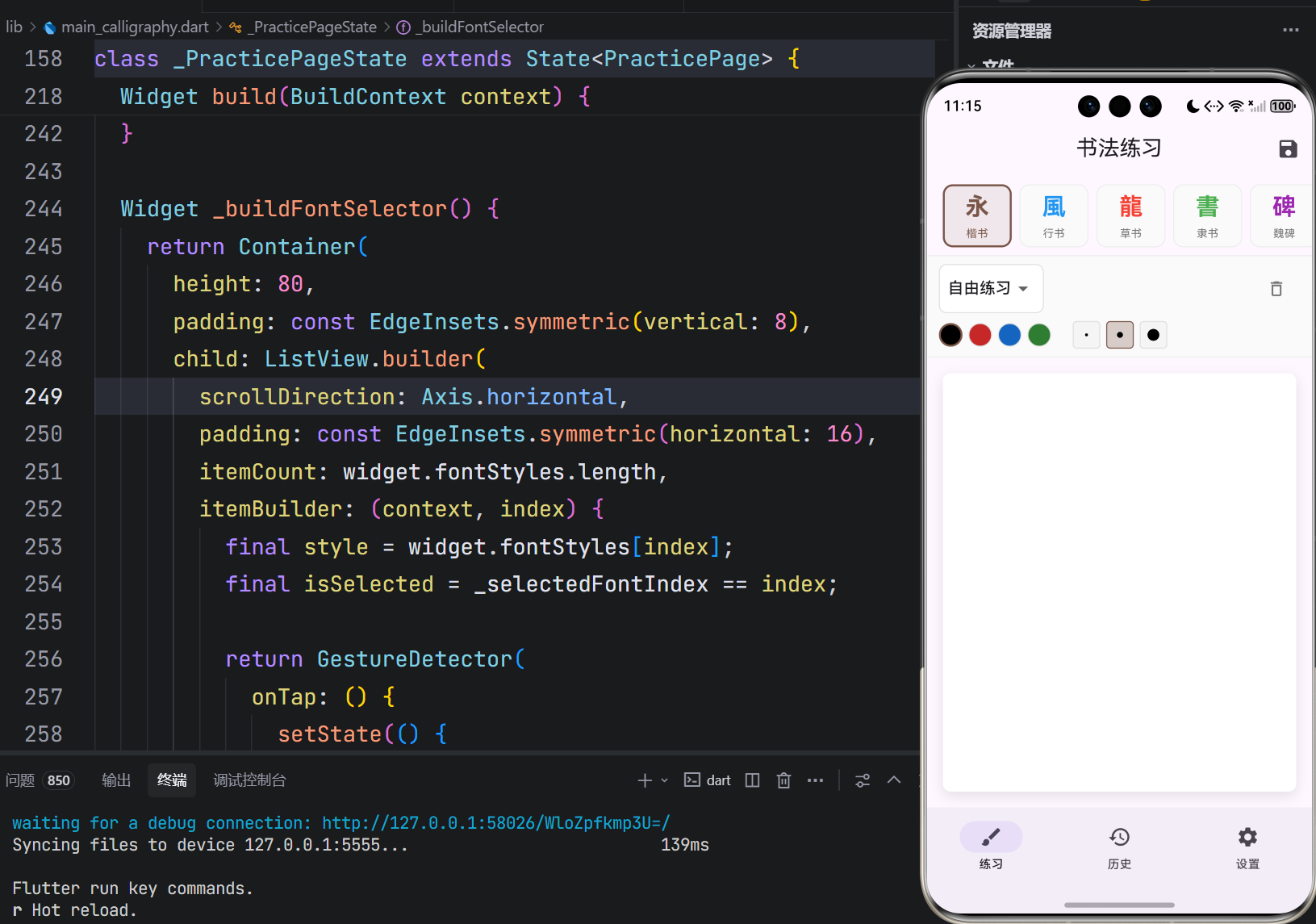
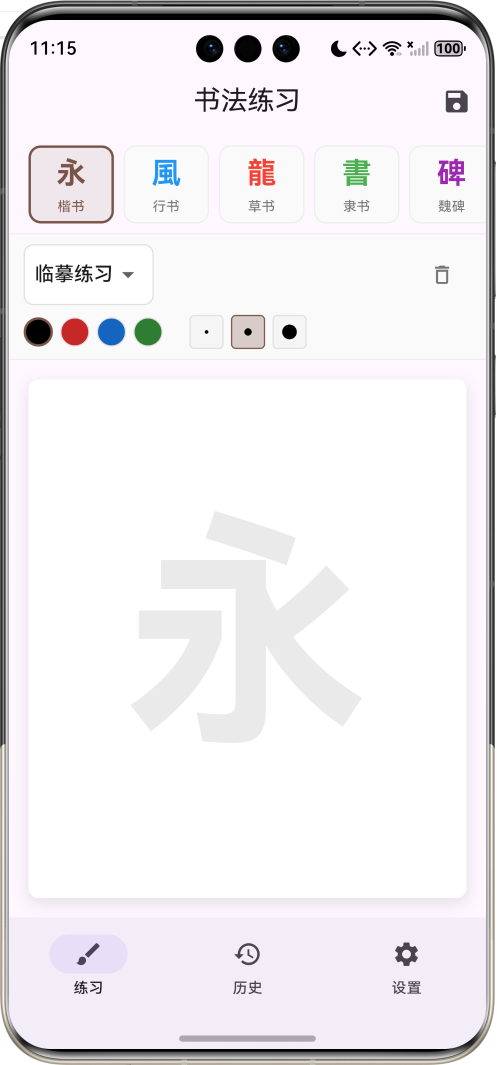
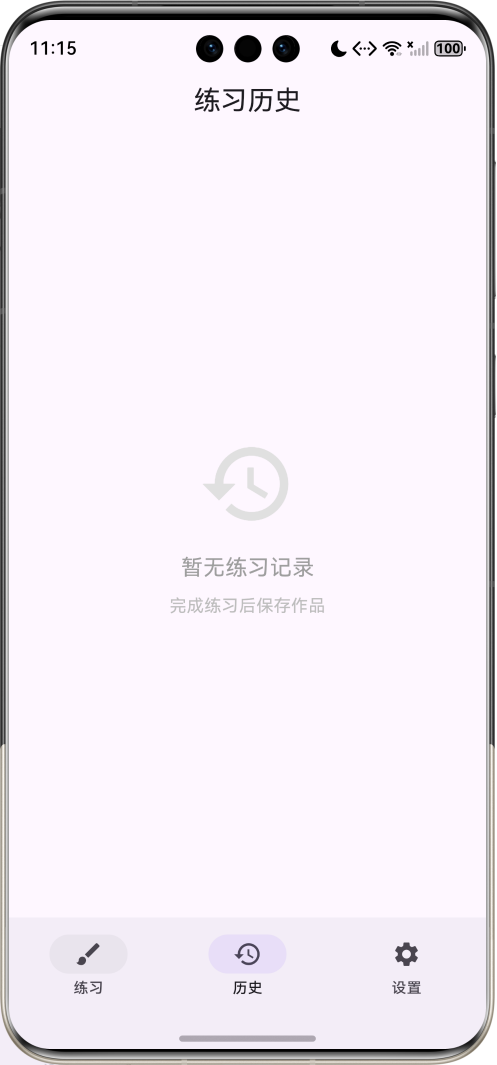
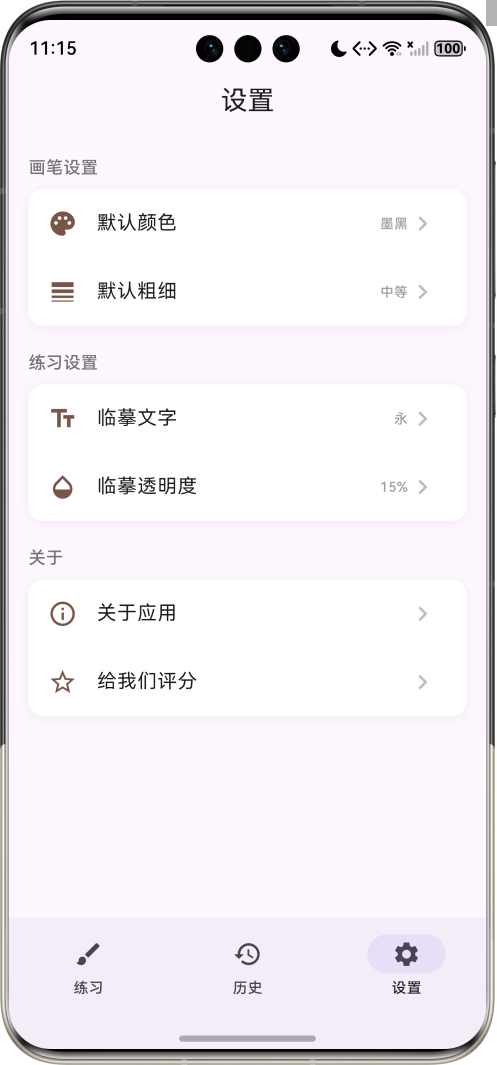
1.1 应用简介
书法练习应用是一款专注于书法练习与学习的工具类应用,旨在帮助书法爱好者随时随地进行书法练习。应用提供多种传统书法字体风格供选择,支持自由练习和临摹练习两种模式,通过触屏书写的方式模拟真实的书法体验。
应用采用中国传统书法的审美风格,以棕色为主色调,营造古朴典雅的文化氛围。界面设计简洁大方,操作直观易懂,用户可以自由选择字体风格、画笔颜色和粗细,在虚拟宣纸上挥毫泼墨,感受书法艺术的魅力。
1.2 核心功能
| 功能模块 | 功能描述 | 实现方式 |
|---|---|---|
| 字体选择 | 5种传统书法风格 | 横向滚动选择器 |
| 书写画布 | 触摸/鼠标绘制 | CustomPaint + GestureDetector |
| 画笔设置 | 颜色和粗细调节 | 工具栏选择器 |
| 练习模式 | 自由/临摹模式 | 模式切换 |
| 保存作品 | 保存到历史记录 | RepaintBoundary |
| 历史记录 | 练习记录管理 | 列表展示 |
1.3 字体风格
| 序号 | 字体名称 | 特点描述 | 示例字 |
|---|---|---|---|
| 1 | 楷书 | 工整规范,横平竖直 | 永 |
| 2 | 行书 | 潇洒飘逸,行云流水 | 風 |
| 3 | 草书 | 龙飞凤舞,狂放不羁 | 龍 |
| 4 | 隶书 | 蚕头燕尾,古朴典雅 | 書 |
| 5 | 魏碑 | 方正严谨,庄重典雅 | 碑 |
1.4 技术栈
| 技术领域 | 技术选型 | 版本要求 |
|---|---|---|
| 开发框架 | Flutter | >= 3.0.0 |
| 编程语言 | Dart | >= 2.17.0 |
| 设计规范 | Material Design 3 | - |
| 绘图组件 | CustomPaint | - |
| 目标平台 | 鸿蒙OS / Web | API 21+ |
1.5 项目结构
lib/
└── main_calligraphy.dart
    ├── CalligraphyApp           # 应用入口
    ├── FontStyle                # 字体风格模型
    ├── PracticeRecord           # 练习记录模型
    ├── MainPage                 # 主页面(底部导航)
    ├── PracticePage             # 练习页面
    ├── HistoryPage              # 历史记录页面
    ├── SettingsPage             # 设置页面
    └── _CalligraphyPainter      # 书法绘制器
二、系统架构
2.1 整体架构图
2.2 类图设计
2.3 页面导航流程
2.4 书写绘制流程
三、核心模块设计
3.1 数据模型设计
3.1.1 字体风格模型 (FontStyle)
class FontStyle {
  final String name;          // 字体名称
  final String description;   // 特点描述
  final String example;       // 示例字
  final Color color;          // 主题色

  const FontStyle({
    required this.name,
    required this.description,
    required this.example,
    required this.color,
  });
}
3.1.2 练习记录模型 (PracticeRecord)
class PracticeRecord {
  final String id;            // 唯一标识
  final DateTime time;        // 练习时间
  final String fontStyle;     // 字体风格
  final ui.Image? image;      // 作品图片

  PracticeRecord({
    required this.id,
    required this.time,
    required this.fontStyle,
    this.image,
  });
}
3.2 页面结构设计
3.2.1 主页面布局
3.2.2 练习页面结构
3.2.3 工具栏结构
3.3 绘图系统设计
3.3.1 CustomPaint架构
3.3.2 绘制器实现
class _CalligraphyPainter extends CustomPainter {
final List<Offset?> points;
final Color color;
final double strokeWidth;
void paint(Canvas canvas, Size size) {
final paint = Paint()
..color = color
..strokeWidth = strokeWidth
..strokeCap = StrokeCap.round
..strokeJoin = StrokeJoin.round
..style = PaintingStyle.stroke;
for (int i = 0; i < points.length - 1; i++) {
if (points[i] != null && points[i + 1] != null) {
canvas.drawLine(points[i]!, points[i + 1]!, paint);
}
}
}
}
四、UI设计规范
4.1 配色方案
应用采用棕色为主色调,营造古朴典雅的文化氛围:
| 颜色类型 | 色值 | 用途 |
|---|---|---|
| 主色 | #795548 (Brown) | 导航、强调元素 |
| 画布背景 | #FFFFFF | 书写区域 |
| 墨黑 | #000000 | 默认画笔颜色 |
| 朱红 | #C62828 | 红色画笔 |
| 靛蓝 | #1565C0 | 蓝色画笔 |
| 翠绿 | #2E7D32 | 绿色画笔 |
4.2 字体规范
| 元素 | 字号 | 字重 | 颜色 |
|---|---|---|---|
| 页面标题 | 20px | Medium | #000000 |
| 字体示例 | 28px | Bold | 根据字体风格 |
| 字体名称 | 12px | Regular | #757575 |
| 工具标签 | 14px | Medium | #000000 |
4.3 组件规范
4.3.1 字体选择卡片
┌─────────────┐
│             │
│     永      │
│             │
│    楷书     │
│             │
└─────────────┘
4.3.2 工具栏布局
┌─────────────────────────────────────────────────┐
│ [自由练习 ▼]  ⚫ 🔴 🔵 🟢  ○ ◐ ●      🗑️      │
└─────────────────────────────────────────────────┘
4.3.3 书写画布布局
┌─────────────────────────────────────────────────┐
│                                                 │
│                                                 │
│                    永                           │
│               (临摹文字,半透明)                 │
│                                                 │
│                                                 │
│                                                 │
└─────────────────────────────────────────────────┘
五、核心功能实现
5.1 字体选择器实现
Widget _buildFontSelector() {
  return Container(
    height: 100,
    child: ListView.builder(
      scrollDirection: Axis.horizontal,
      itemCount: widget.fontStyles.length,
      itemBuilder: (context, index) {
        final style = widget.fontStyles[index];
        final isSelected = _selectedFontIndex == index;

        return GestureDetector(
          onTap: () {
            setState(() {
              _selectedFontIndex = index;
            });
          },
          child: Container(
            decoration: BoxDecoration(
              color: isSelected ? style.color.withValues(alpha: 0.1) : Colors.grey.shade50,
              border: Border.all(
                color: isSelected ? style.color : Colors.grey.shade200,
                width: isSelected ? 2 : 1,
              ),
            ),
            child: Column(
              children: [
                Text(style.example, style: TextStyle(fontSize: 28)),
                Text(style.name, style: TextStyle(fontSize: 12)),
              ],
            ),
          ),
        );
      },
    ),
  );
}
5.2 书写画布实现
Widget _buildCanvas() {
  return GestureDetector(
    onPanStart: (details) {
      setState(() {
        _points.add(details.localPosition);
      });
    },
    onPanUpdate: (details) {
      setState(() {
        _points.add(details.localPosition);
      });
    },
    onPanEnd: (_) {
      setState(() {
        _points.add(null);  // 添加分隔符
      });
    },
    child: CustomPaint(
      painter: _CalligraphyPainter(
        points: _points,
        color: _brushColor,
        strokeWidth: _brushWidth,
      ),
      size: Size.infinite,
    ),
  );
}
5.3 画笔颜色选择
Widget _buildColorSelector() {
  return Row(
    children: _colorOptions.map((color) {
      final isSelected = _brushColor == color;
      return GestureDetector(
        onTap: () {
          setState(() {
            _brushColor = color;
          });
        },
        child: Container(
          decoration: BoxDecoration(
            color: color,
            shape: BoxShape.circle,
            border: Border.all(
              color: isSelected ? Colors.brown : Colors.grey.shade300,
              width: isSelected ? 3 : 1,
            ),
          ),
        ),
      );
    }).toList(),
  );
}
5.4 画笔粗细选择
Widget _buildWidthSelector() {
  return Row(
    children: _widthOptions.asMap().entries.map((entry) {
      final isSelected = _brushWidth == entry.value;
      return GestureDetector(
        onTap: () {
          setState(() {
            _brushWidth = entry.value;
          });
        },
        child: Container(
          child: Center(
            child: Container(
              width: entry.value * 2,
              height: entry.value * 2,
              decoration: BoxDecoration(
                color: Colors.black,
                shape: BoxShape.circle,
              ),
            ),
          ),
        ),
      );
    }).toList(),
  );
}
5.5 保存作品实现
Future<void> _saveCanvas() async {
  try {
    final boundary = _canvasKey.currentContext?.findRenderObject() as RenderRepaintBoundary?;
    if (boundary != null) {
      final image = await boundary.toImage(pixelRatio: 2.0);
      final record = PracticeRecord(
        id: DateTime.now().millisecondsSinceEpoch.toString(),
        time: DateTime.now(),
        fontStyle: widget.fontStyles[_selectedFontIndex].name,
        image: image,
      );
      widget.onSaved(record);
    }
  } catch (e) {
    // 处理错误
  }
}
六、交互设计
6.1 书写交互流程
6.2 模式切换
6.3 保存流程
七、扩展功能规划
7.1 后续版本规划
7.2 功能扩展建议
7.2.1 笔画演示功能
笔画学习:
- 动态展示笔画顺序
- 速度可调节
- 分步骤教学
7.2.2 作品导出功能
作品分享:
- 导出PNG图片
- 导出PDF格式
- 分享到社交平台
7.2.3 字帖库功能
丰富字帖:
- 历代名家字帖
- 按难度分类
- 按字体分类
八、注意事项
8.1 开发注意事项
-
性能优化:大量笔画时注意内存管理
-
触摸事件:正确处理onPanStart/Update/End
-
图片保存:需要使用RepaintBoundary
-
空值处理:点列表中的null用于分隔笔画
8.2 常见问题
| 问题 | 原因 | 解决方案 |
|---|---|---|
| 书写不流畅 | 刷新频率低 | 使用setState及时更新 |
| 笔画断裂 | 未使用StrokeCap.round | 设置strokeCap为round |
| 保存失败 | 未使用RepaintBoundary | 包裹RepaintBoundary |
| 画布抖动 | 坐标转换错误 | 使用localPosition |
8.3 使用提示
🖌️ 书法练习小贴士 🖌️
选择合适的字体风格开始练习。
临摹模式下可参考半透明文字。
调整画笔粗细模拟不同毛笔效果。
坚持每日练习,书法技艺日臻精进。
九、运行说明
9.1 环境要求
| 环境 | 版本要求 |
|---|---|
| Flutter SDK | >= 3.0.0 |
| Dart SDK | >= 2.17.0 |
| 鸿蒙OS | API 21+ |
9.2 运行命令
# 查看可用设备
flutter devices

# 运行到Web服务器
flutter run -d web-server -t lib/main_calligraphy.dart --web-port 8092

# 运行到鸿蒙设备
flutter run -d 127.0.0.1:5555 lib/main_calligraphy.dart

# 运行到Windows
flutter run -d windows -t lib/main_calligraphy.dart

# 代码分析
flutter analyze lib/main_calligraphy.dart
十、总结
书法练习应用通过数字化的方式,为书法爱好者提供了一个便捷的练习平台。应用支持楷书、行书、草书、隶书、魏碑五种传统书法风格,用户可以根据自己的喜好和水平选择合适的字体进行练习。
核心功能涵盖字体选择、书写画布、画笔设置、练习模式、作品保存五大模块。书写画布采用CustomPaint实现,支持触摸绘制和鼠标绘制;画笔设置提供四种颜色和三种粗细供选择;练习模式支持自由练习和临摹练习两种方式;作品保存功能可以将练习成果保存到历史记录中。
应用采用Material Design 3设计规范,以棕色为主色调,界面古朴典雅。通过本应用,希望能够帮助用户随时随地练习书法,感受传统文化的魅力。
挥毫泼墨,传承经典

作为“人工智能6S店”的官方数字引擎,为AI开发者与企业提供一个覆盖软硬件全栈、一站式门户。
更多推荐

 7
7 0
0- 0


 已为社区贡献5条内容

所有评论(0)