
Flutter 框架跨平台鸿蒙开发 - 企业项目任务清单应用
开源鸿蒙跨平台任务清单应用摘要 该项目是一个基于Flutter开发的跨平台任务管理应用,适配鸿蒙OS和Web平台。应用采用Material Design 3设计规范,提供任务创建、编辑、删除、状态切换等核心功能,支持分类筛选、优先级设置和截止日期提醒。技术栈使用Flutter框架+Dart语言,采用分层架构设计,包含表现层、业务逻辑层和数据层。主要功能模块包括任务列表展示、表单交互、数据统计等,通
欢迎加入开源鸿蒙跨平台社区:
https://openharmonycrossplatform.csdn.net
一、项目概述
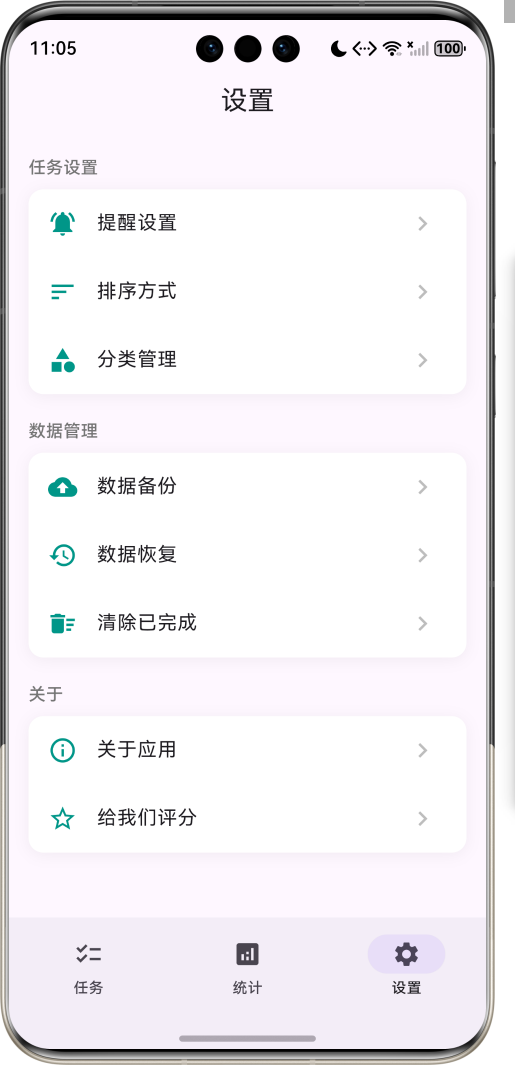
运行效果图
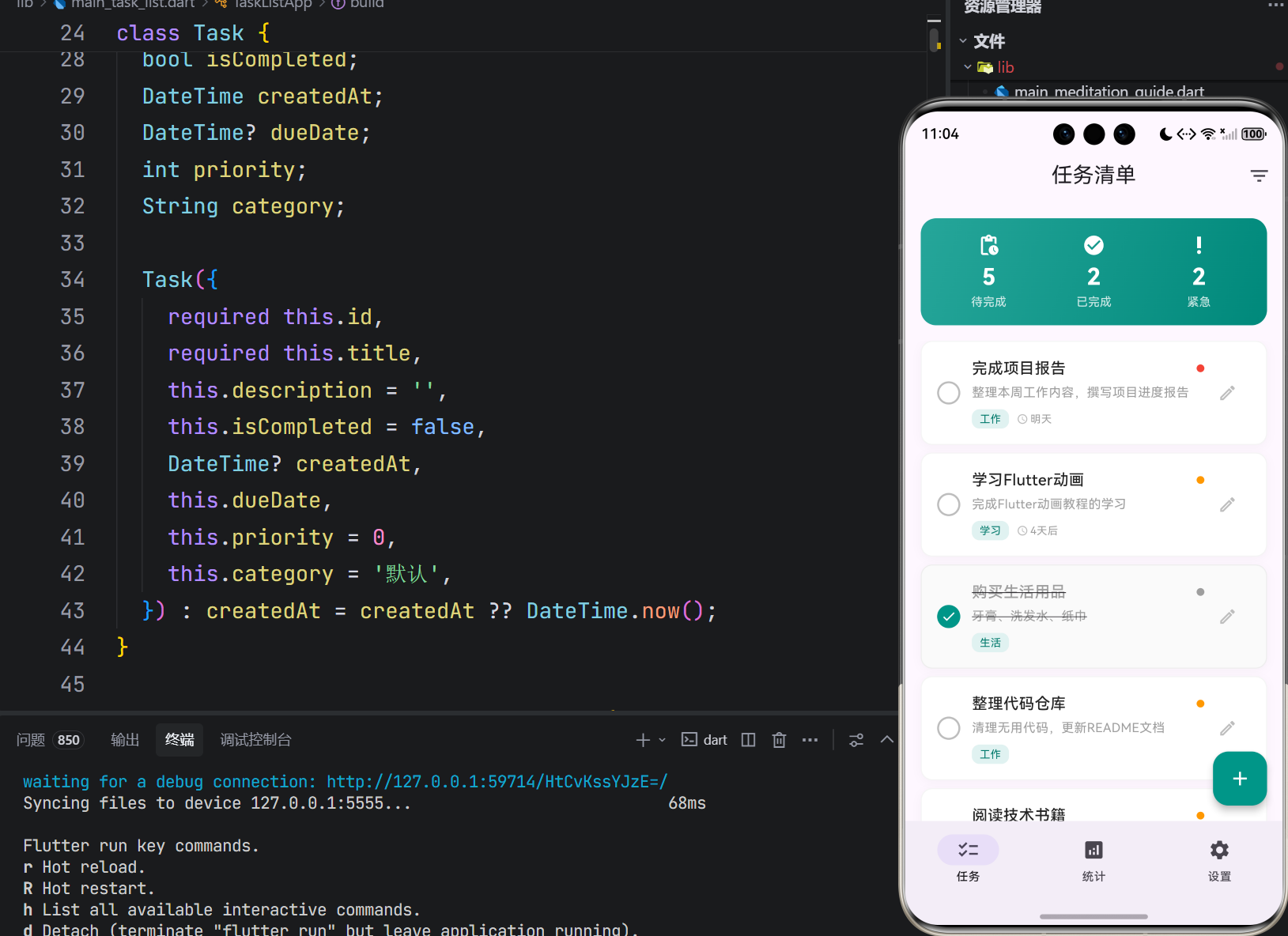
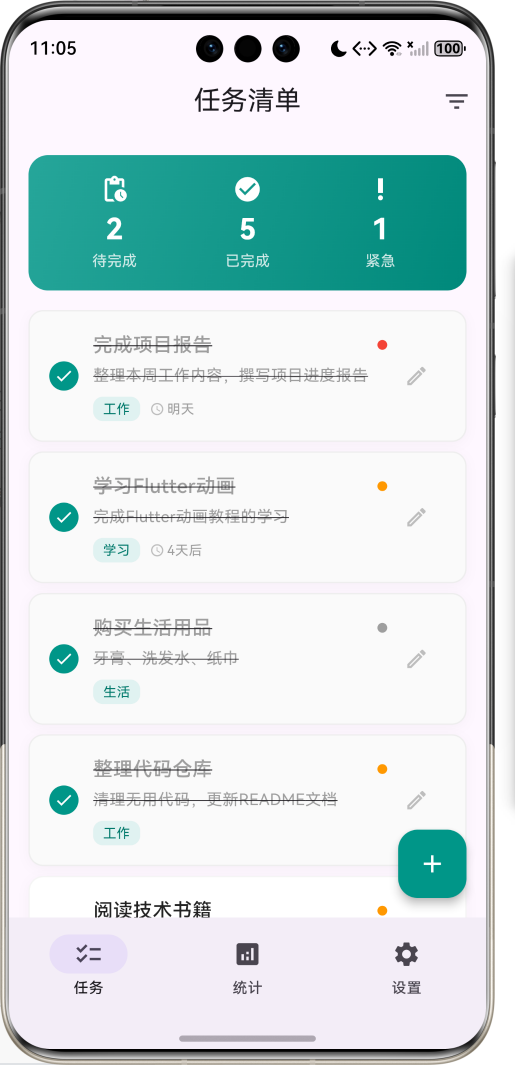
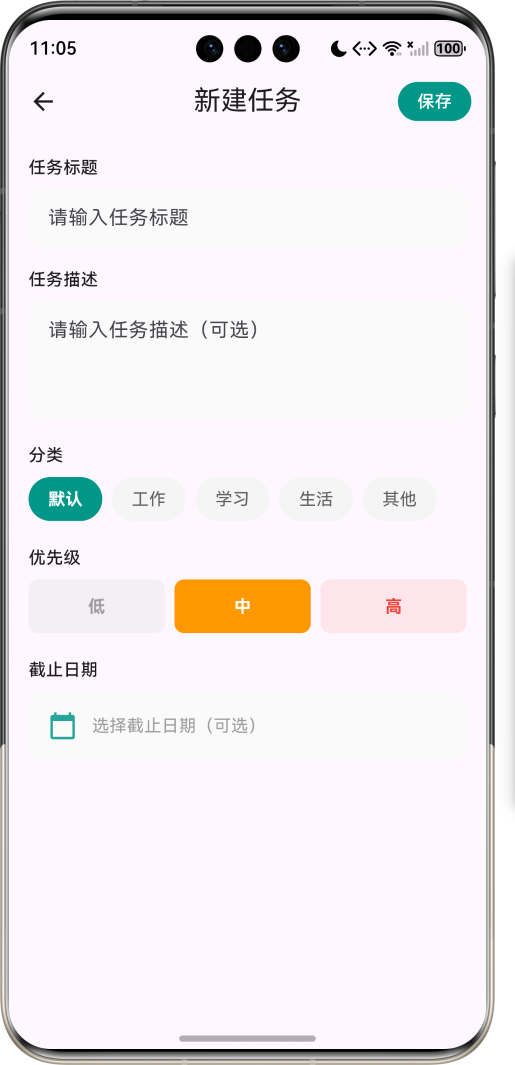
1.1 应用简介
任务清单应用是一款专注于个人任务管理的效率工具,旨在帮助用户高效管理日常任务、工作计划和待办事项。应用支持任务的创建、编辑、删除、状态切换等核心功能,同时提供分类管理、优先级设置、截止日期等扩展功能,帮助用户全面掌控自己的任务进度。
应用采用Material Design 3设计规范,以青色(Teal)为主色调,营造清新、高效的视觉体验。界面设计简洁直观,操作流程符合用户习惯,支持滑动删除、快速筛选等便捷交互方式。通过数据统计功能,用户可以直观了解任务完成情况和效率表现。
1.2 核心功能
| 功能模块 | 功能描述 | 实现方式 |
|---|---|---|
| 任务列表 | 任务卡片式展示 | ListView + Dismissible |
| 任务创建 | 新建任务表单 | 表单输入 + 日期选择 |
| 任务编辑 | 修改任务内容 | 预填充表单 |
| 任务删除 | 滑动删除任务 | Dismissible组件 |
| 状态切换 | 完成/未完成切换 | 点击圆形复选框 |
| 分类筛选 | 按分类/优先级筛选 | PopupMenu |
| 数据统计 | 完成率可视化 | 自定义图表 |
| 截止日期 | 设置任务截止时间 | DatePicker |
1.3 任务属性
| 属性 | 类型 | 说明 |
|---|---|---|
| id | String | 唯一标识符 |
| title | String | 任务标题 |
| description | String | 任务描述 |
| isCompleted | bool | 完成状态 |
| createdAt | DateTime | 创建时间 |
| dueDate | DateTime? | 截止日期 |
| priority | int | 优先级(0-2) |
| category | String | 任务分类 |
1.4 技术栈
| 技术领域 | 技术选型 | 版本要求 |
|---|---|---|
| 开发框架 | Flutter | >= 3.0.0 |
| 编程语言 | Dart | >= 2.17.0 |
| 设计规范 | Material Design 3 | - |
| 状态管理 | setState | - |
| 目标平台 | 鸿蒙OS / Web | API 21+ |
1.5 项目结构
lib/
└── main_task_list.dart
    ├── TaskListApp              # 应用入口
    ├── Task                     # 任务数据模型
    ├── MainPage                 # 主页面(底部导航)
    ├── TaskListPage             # 任务列表页面
    ├── TaskFormPage             # 任务表单页面
    ├── StatisticsPage           # 统计页面
    └── SettingsPage             # 设置页面
二、系统架构
2.1 整体架构图
2.2 类图设计
2.3 页面导航流程
2.4 数据流向图
三、核心模块设计
3.1 数据模型设计
3.1.1 任务模型 (Task)
class Task {
  final String id;              // 唯一标识
  String title;                 // 任务标题
  String description;           // 任务描述
  bool isCompleted;             // 完成状态
  DateTime createdAt;           // 创建时间
  DateTime? dueDate;            // 截止日期
  int priority;                 // 优先级 (0:低, 1:中, 2:高)
  String category;              // 分类

  Task({
    required this.id,
    required this.title,
    this.description = '',
    this.isCompleted = false,
    DateTime? createdAt,
    this.dueDate,
    this.priority = 0,
    this.category = '默认',
  }) : createdAt = createdAt ?? DateTime.now();
}
3.1.2 任务状态分布
3.2 页面结构设计
3.2.1 主页面布局
3.2.2 任务卡片结构
3.2.3 统计页面结构
3.3 筛选功能设计
四、UI设计规范
4.1 配色方案
应用采用青色(Teal)为主色调,营造清新、高效的视觉体验:
| 颜色类型 | 色值 | 用途 |
|---|---|---|
| 主色 | #009688 (Teal) | 导航、按钮、强调 |
| 完成状态 | #009688 (Teal) | 已完成复选框 |
| 高优先级 | #F44336 (Red) | 高优先级标识 |
| 中优先级 | #FF9800 (Orange) | 中优先级标识 |
| 低优先级 | #9E9E9E (Grey) | 低优先级标识 |
| 卡片背景 | #FFFFFF | 任务卡片 |
| 页面背景 | #FAFAFA | 页面底色 |
4.2 字体规范
| 元素 | 字号 | 字重 | 颜色 |
|---|---|---|---|
| 页面标题 | 20px | Medium | #000000 |
| 任务标题 | 16px | Medium | #000000 |
| 任务描述 | 13px | Regular | #757575 |
| 分类标签 | 11px | Regular | Teal 700 |
| 截止日期 | 11px | Regular | #9E9E9E |
| 统计数字 | 48px | Bold | #FFFFFF |
4.3 组件规范
4.3.1 任务卡片布局
┌─────────────────────────────────────────────────┐
│  ○  完成项目报告                          ●    ✎│
│     整理本周工作内容,撰写项目进度报告           │
│     [工作]  📅 2天后                            │
└─────────────────────────────────────────────────┘
4.3.2 统计概览卡片
┌─────────────────────────────────────────────────┐
│              任务完成率                         │
│                                                 │
│                  42%                           │
│                                                 │
│    7            3              4               │
│   总任务        已完成          待完成          │
└─────────────────────────────────────────────────┘
4.3.3 任务表单布局
┌─────────────────────────────────────────────────┐
│  新建任务                              [保存]   │
├─────────────────────────────────────────────────┤
│  任务标题                                       │
│  ┌─────────────────────────────────────────┐   │
│  │ 请输入任务标题                           │   │
│  └─────────────────────────────────────────┘   │
│                                                 │
│  任务描述                                       │
│  ┌─────────────────────────────────────────┐   │
│  │ 请输入任务描述(可选)                   │   │
│  └─────────────────────────────────────────┘   │
│                                                 │
│  分类                                           │
│  [默认] [工作] [学习] [生活] [其他]            │
│                                                 │
│  优先级                                         │
│  ┌────────┐ ┌────────┐ ┌────────┐             │
│  │   低   │ │   中   │ │   高   │             │
│  └────────┘ └────────┘ └────────┘             │
│                                                 │
│  截止日期                                       │
│  ┌─────────────────────────────────────────┐   │
│  │ 📅 选择截止日期(可选)                  │   │
│  └─────────────────────────────────────────┘   │
└─────────────────────────────────────────────────┘
五、核心功能实现
5.1 任务列表渲染
Widget _buildTaskCard(BuildContext context, Task task) {
  return Dismissible(
    key: Key(task.id),
    direction: DismissDirection.endToStart,
    background: Container(
      alignment: Alignment.centerRight,
      padding: const EdgeInsets.only(right: 20),
      decoration: BoxDecoration(
        color: Colors.red.shade100,
        borderRadius: BorderRadius.circular(12),
      ),
      child: Icon(Icons.delete, color: Colors.red.shade400),
    ),
    onDismissed: (_) => onDelete(task.id),
    child: Container(
      padding: const EdgeInsets.all(16),
      decoration: BoxDecoration(
        color: task.isCompleted ? Colors.grey.shade50 : Colors.white,
        borderRadius: BorderRadius.circular(12),
      ),
      child: Row(
        children: [
          _buildCheckbox(task),
          Expanded(child: _buildTaskContent(task)),
          IconButton(
            icon: Icon(Icons.edit_outlined),
            onPressed: () => _showEditTaskPage(context, task),
          ),
        ],
      ),
    ),
  );
}
5.2 状态切换实现
void _toggleTask(String id) {
  setState(() {
    final index = _tasks.indexWhere((t) => t.id == id);
    if (index != -1) {
      _tasks[index].isCompleted = !_tasks[index].isCompleted;
    }
  });
}

Widget _buildCheckbox(Task task) {
  return GestureDetector(
    onTap: () => onToggle(task.id),
    child: Container(
      width: 24,
      height: 24,
      decoration: BoxDecoration(
        color: task.isCompleted ? Colors.teal : Colors.transparent,
        border: Border.all(
          color: task.isCompleted ? Colors.teal : Colors.grey.shade400,
          width: 2,
        ),
        shape: BoxShape.circle,
      ),
      child: task.isCompleted
          ? const Icon(Icons.check, color: Colors.white, size: 16)
          : null,
    ),
  );
}
5.3 筛选功能实现
List<Task> get _filteredTasks {
  return _tasks.where((task) {
    if (_filterCategory != '全部' && task.category != _filterCategory) {
      return false;
    }
    if (_filterPriority >= 0 && task.priority != _filterPriority) {
      return false;
    }
    return true;
  }).toList();
}
5.4 截止日期格式化
String _formatDueDate(DateTime date) {
  final now = DateTime.now();
  final diff = date.difference(now);

  if (diff.inDays < 0) {
    return '已过期';
  } else if (diff.inDays == 0) {
    return '今天';
  } else if (diff.inDays == 1) {
    return '明天';
  } else if (diff.inDays < 7) {
    return '${diff.inDays}天后';
  } else {
    return '${date.month}/${date.day}';
  }
}
5.5 统计计算实现
Map<String, dynamic> _calculateStats() {
  final total = tasks.length;
  final completed = tasks.where((t) => t.isCompleted).length;
  final pending = total - completed;

  final categoryStats = <String, int>{};
  for (var task in tasks) {
    categoryStats[task.category] = (categoryStats[task.category] ?? 0) + 1;
  }

  final priorityStats = [0, 0, 0];
  for (var task in tasks.where((t) => !t.isCompleted)) {
    priorityStats[task.priority]++;
  }

  return {
    'total': total,
    'completed': completed,
    'pending': pending,
    'completionRate': total > 0 ? (completed / total * 100).toStringAsFixed(0) : '0',
    'categoryStats': categoryStats,
    'priorityStats': priorityStats,
  };
}
5.6 环形图绘制
class _DonutChartPainter extends CustomPainter {
final int completed;
final int total;
void paint(Canvas canvas, Size size) {
final center = Offset(size.width / 2, size.height / 2);
final radius = size.width / 2 - 10;
// 绘制背景圆环
final bgPaint = Paint()
..color = Colors.grey.shade300
..style = PaintingStyle.stroke
..strokeWidth = 15;
canvas.drawCircle(center, radius, bgPaint);
// 绘制完成进度
if (total > 0) {
final completedPaint = Paint()
..color = Colors.teal
..style = PaintingStyle.stroke
..strokeWidth = 15
..strokeCap = StrokeCap.round;
final sweepAngle = (completed / total) * 2 * 3.14159;
canvas.drawArc(
Rect.fromCircle(center: center, radius: radius),
-3.14159 / 2,
sweepAngle,
false,
completedPaint,
);
}
}
}
六、交互设计
6.1 滑动删除交互
6.2 任务状态切换
6.3 表单提交流程
七、扩展功能规划
7.1 后续版本规划
7.2 功能扩展建议
7.2.1 数据持久化
本地数据存储:
- 使用SharedPreferences存储基础配置
- 使用SQLite存储完整任务数据
- 支持数据导入导出
7.2.2 提醒功能
任务提醒:
- 截止日期提醒
- 自定义提醒时间
- 重复任务提醒
7.2.3 子任务支持
任务分解:
- 创建子任务列表
- 子任务进度追踪
- 子任务完成统计
八、注意事项
8.1 开发注意事项
-
Dismissible组件:需要为每个任务提供唯一的Key
-
状态管理:任务状态变更后需要调用setState刷新
-
日期比较:截止日期计算需要考虑时区问题
-
表单验证:提交前验证必填字段
8.2 常见问题
| 问题 | 原因 | 解决方案 |
|---|---|---|
| 滑动删除不生效 | Key值重复 | 使用任务ID作为Key |
| 状态不更新 | 未调用setState | 状态变更后调用setState |
| 筛选无效 | 筛选条件未重置 | 检查筛选逻辑 |
| 日期显示错误 | 时区问题 | 使用本地时间计算 |
8.3 使用提示
📋 任务清单小贴士 📋
按优先级处理任务,先完成重要紧急的事项。
合理设置截止日期,避免任务积压。
定期回顾已完成的任务,总结经验。
善用分类功能,让任务井然有序。
九、运行说明
9.1 环境要求
| 环境 | 版本要求 |
|---|---|
| Flutter SDK | >= 3.0.0 |
| Dart SDK | >= 2.17.0 |
| 鸿蒙OS | API 21+ |
9.2 运行命令
# 查看可用设备
flutter devices

# 运行到Web服务器
flutter run -d web-server -t lib/main_task_list.dart --web-port 8091

# 运行到鸿蒙设备
flutter run -d 127.0.0.1:5555 lib/main_task_list.dart

# 运行到Windows
flutter run -d windows -t lib/main_task_list.dart

# 代码分析
flutter analyze lib/main_task_list.dart
十、总结
任务清单应用通过系统化的任务管理功能,为用户提供了一个高效的待办事项管理工具。应用支持任务的创建、编辑、删除、状态切换等核心功能,同时提供分类管理、优先级设置、截止日期等扩展功能,帮助用户全面掌控自己的任务进度。
核心功能涵盖任务列表浏览、任务表单编辑、状态切换、筛选过滤、数据统计五大模块。任务列表采用卡片式布局,支持滑动删除和快速状态切换;任务表单支持标题、描述、分类、优先级、截止日期等属性的设置;统计页面通过环形图、进度条等可视化组件直观展示任务完成情况。
应用采用Material Design 3设计规范,以青色为主色调,界面清新专业。通过本应用,希望能够帮助用户提高工作效率,养成良好的任务管理习惯。
高效管理,事半功倍

作为“人工智能6S店”的官方数字引擎,为AI开发者与企业提供一个覆盖软硬件全栈、一站式门户。
更多推荐

 18
18 0
0- 0


 已为社区贡献25条内容

所有评论(0)