
【花雕学编程】跨平台移植实战:在行空板K10上部署MimiClaw并与飞书深度整合
飞书是字节跳动开发的一站式企业协作平台,核心整合即时通讯、云文档、视频会议、日历和工作台五大模块。它以提升组织协同效率为核心,通过无限消息记录、实时多人文档编辑、智能会议纪要等特色功能,打造流畅的协作体验。2023年推出的飞书智能伙伴集成大模型AI能力,实现智能对话、文档创作和知识问答。在教育领域,飞书可作为MimiClaw等AI硬件的理想接入平台,通过机器人API和云文档实现智能设备管理与数据协

飞书是字节跳动开发的一站式企业协作平台,核心整合即时通讯、云文档、视频会议、日历和工作台五大模块。它以提升组织协同效率为核心,通过无限消息记录、实时多人文档编辑、智能会议纪要等特色功能,打造流畅的协作体验。平台提供丰富的开放API接口,支持深度集成第三方应用,特别适合企业级场景。2023年推出的飞书智能伙伴集成大模型AI能力,实现智能对话、文档创作和知识问答。在教育领域,飞书可作为MimiClaw等AI硬件的理想接入平台,通过机器人API和云文档实现智能设备管理与数据协同,构建完整的教育信息化生态。


一、环境与代码准备(需核对)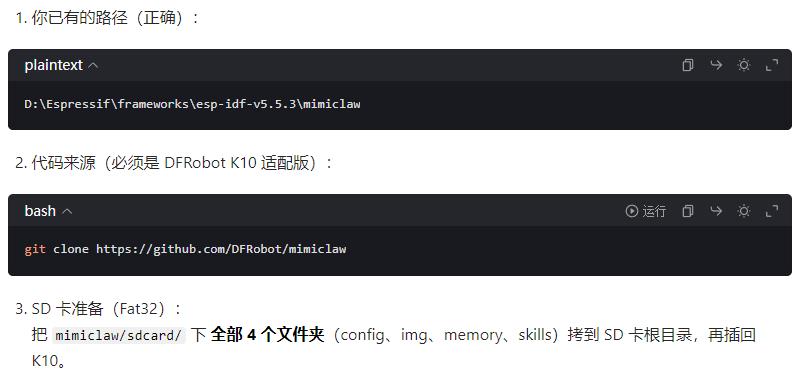
二、创建必须的 SD 卡文件
文件夹:
D:\Espressif\frameworks\esp-idf-v5.5.3\mimiclaw
手动新建文件夹:sdcard
结构必须如下:
mimiclaw/
└── sdcard/
    ├── config/
    ├── img/
    ├── memory/
    └── skills/
最重要:在 sdcard/config/ 里新建
system.conf
内容直接复制,把你的信息填进去:
#WiFi(必须2.4G)
WIFI_SSID=你的WiFi名
WIFI_PWD=你的WiFi密码

#LLM(填你自己的)
LLM_API_KEY=sk-xxxxxxxxxxxx
LLM_MODEL=moonshot-v1-8k

#飞书机器人(必填!)
FEISHU_APP_ID=cli-xxxxxxx
FEISHU_APP_SECRET=xxxxxxxxx
FEISHU_ENCRYPT_KEY=
FEISHU_VERIFICATION_TOKEN=
三、把整个 sdcard 复制到 K10 的 TF 卡根目录
步骤:
把 K10 配的 TF 卡 拿出来
插电脑
把刚创建的 sdcard 里的 4 个文件夹
config / img / memory / skills
直接复制到 TF 卡根目录
把 TF 卡插回 K10
四、编译烧录(直接复制命令)
打开你的 ESP-IDF 5.5.3 命令行
cd D:\Espressif\frameworks\esp-idf-v5.5.3\mimiclaw

idf.py fullclean
idf.py erase_flash -p COM你的串口号
idf.py build flash monitor -p COM你的串口号
五、飞书连接成功标志
烧录后你会在串口看到:
WiFi connect success
Feishu bot connected
MimiClaw started
看到 Feishu bot connected
说明飞书已经接入成功!
MimiClaw运行日志
I (895) mimi: SPIFFS: total=11378081, used=7530
I (895) bus: Message bus initialized (queue depth 16)
I (895) memory: Memory store initialized at /spiffs
I (895) skills: Initializing skills system
I (1235) skills: Skills system ready (4 skills on SPIFFS)
I (1235) session: Session manager initialized at /spiffs/sessions
I (1235) pp: pp rom version: e7ae62f
I (1235) net80211: net80211 rom version: e7ae62f
I (1245) wifi:wifi driver task: 3fcee95c, prio:23, stack:6656, core=0
I (1245) wifi:wifi firmware version: 4df78f2
I (1245) wifi:wifi certification version: v7.0
I (1245) wifi:config NVS flash: enabled
I (1245) wifi:config nano formatting: disabled
I (1255) wifi:Init data frame dynamic rx buffer num: 6
I (1255) wifi:Init static rx mgmt buffer num: 5
I (1255) wifi:Init management short buffer num: 32
I (1255) wifi:Init dynamic tx buffer num: 32
I (1255) wifi:Init static tx FG buffer num: 2
I (1255) wifi:Init static rx buffer size: 1600
I (1255) wifi:Init static rx buffer num: 3
I (1255) wifi:Init dynamic rx buffer num: 6
I (1255) wifi_init: rx ba win: 3
I (1255) wifi_init: accept mbox: 6
I (1255) wifi_init: tcpip mbox: 16
I (1255) wifi_init: udp mbox: 6
I (1255) wifi_init: tcp mbox: 6
I (1255) wifi_init: tcp tx win: 5760
I (1255) wifi_init: tcp rx win: 5760
I (1255) wifi_init: tcp mss: 1440
I (1255) wifi_init: WiFi IRAM OP enabled
I (1255) wifi_init: WiFi RX IRAM OP enabled
I (1255) wifi: WiFi manager initialized
W (1255) telegram: No Telegram bot token. Use CLI: set_tg_token
I (1255) feishu: Feishu credentials loaded (app_id=cli_a95a…)
I (1255) llm: LLM proxy initialized (provider: openai, model: deepseek-chat)
W (1255) web_search: No search API key. Use CLI: set_search_key or set_tavily_key
I (1255) tools: Registered tool: web_search
I (1255) tools: Registered tool: get_current_time
I (1255) tools: Registered tool: read_file
I (1255) tools: Registered tool: write_file
I (1255) tools: Registered tool: edit_file
I (1255) tools: Registered tool: list_dir
I (1255) tools: Registered tool: cron_add
I (1255) tools: Registered tool: cron_list
I (1255) tools: Registered tool: cron_remove
I (1255) tool_gpio: GPIO tool initialized (pin range 1-21)
I (1255) tools: Registered tool: gpio_write
I (1255) tools: Registered tool: gpio_read
I (1255) tools: Registered tool: gpio_read_all
I (1265) tools: Tools JSON built (12 tools)
I (1265) tools: Tool registry initialized
I (1655) cron: No cron file found, starting fresh
I (1655) heartbeat: Heartbeat service initialized (file: /spiffs/HEARTBEAT.md, interval: 1800s)
I (1655) agent: Agent loop initialized
Type ‘help’ to get the list of commands.
Use UP/DOWN arrows to navigate through command history.
Press TAB when typing command name to auto-complete.
Your terminal application does not support escape sequences.
Line editing and history features are disabled.
On Windows, try using Windows Terminal or Putty instead.
mimi> I (2655) cli: Serial CLI started
I (2655) mimi: Serial CLI started. Type ‘help’ for commands.
I (2655) wifi: Connecting to SSID: zhz3
W (2665) wifi:Password length matches WPA2 standards, authmode threshold changes from OPEN to WPA2
I (2665) phy_init: phy_version 711,97bcf0a2,Aug 25 2025,19:04:10
I (2695) wifi:mode : sta (cc:ba:97:24:bd:ac)
I (2695) wifi:enable tsf
I (2695) mimi: Scanning nearby APs on boot…
I (2695) wifi: Scanning nearby APs…
W (2705) wifi: Disconnected (reason=36:UNKNOWN)
W (2705) wifi: Disconnected, retry 1/10 in 1000ms
W (3705) wifi: No APs found
E (3705) wifi:sta is connecting, return error
I (3705) mimi: Waiting for WiFi connection…
I (4435) wifi🆕<7,0>, old:<1,0>, ap:<255,255>, sta:<7,0>, prof:1, snd_ch_cfg:0x0
I (4435) wifi:state: init -> auth (0xb0)
I (4495) wifi:state: auth -> assoc (0x0)
I (4535) wifi:state: assoc -> run (0x10)
I (4665) wifi:connected with zhz3, aid = 2, channel 7, BW20, bssid = 3c💿57:69:0f:3a
I (4665) wifi:security: WPA2-PSK, phy: bgn, rssi: -51
I (4665) wifi:pm start, type: 1
I (4665) wifi:dp: 1, bi: 102400, li: 3, scale listen interval from 307200 us to 307200 us
I (4665) wifi:set rx beacon pti, rx_bcn_pti: 0, bcn_timeout: 25000, mt_pti: 0, mt_time: 10000
I (4675) wifi:AP’s beacon interval = 102400 us, DTIM period = 1
I (5195) wifi:idx:0 (ifx:0, 3c💿57:69:0f:3a), tid:0, ssn:2, winSize:64
I (6405) esp_netif_handlers: sta ip: 192.168.28.75, mask: 255.255.255.0, gw: 192.168.28.1
I (6405) wifi: Connected! IP: 192.168.28.75
I (6405) mimi: WiFi connected: 192.168.28.75
I (6405) onboard: ========================================
I (6405) onboard: Starting WiFi Configuration Portal
I (6405) onboard: ========================================
I (6405) wifi:mode : sta (cc:ba:97:24:bd:ac) + softAP (cc:ba:97:24:bd:ad)
I (6405) wifi:Total power save buffer number: 16
I (6405) wifi:Init max length of beacon: 752/752
I (6405) wifi:Init max length of beacon: 752/752
I (6415) esp_netif_lwip: DHCP server started on interface WIFI_AP_DEF with IP: 192.168.4.1
I (6415) wifi:Total power save buffer number: 16
I (6415) onboard: Soft AP started: MimiClaw-BDAD (open)
I (6415) esp_netif_lwip: DHCP server started on interface WIFI_AP_DEF with IP: 192.168.4.1
I (6415) onboard: HTTP server started on port 80
I (6425) onboard: Connect to MimiClaw-XXXX WiFi, then open http://192.168.4.1
I (6425) onboard: Local admin portal stays available while STA is connected
I (6425) mimi: Outbound dispatch started
I (6425) agent: agent_loop task created with stack=24576 bytes
I (6425) agent: Agent loop started on core 1
I (6425) feishu: Feishu WebSocket mode enabled
I (6425) ws: WebSocket server started on port 18789
I (6425) mimi: All services started!
I (6425) mimi: MimiClaw ready. Type ‘help’ for CLI commands.
I (6435) main_task: Returned from app_main()
I (6465) wifi:idx:1 (ifx:0, 3c💿57:69:0f:3a), tid:5, ssn:1, winSize:64
I (8395) feishu: WS config ready: service_id=33554678 ping=90000ms
I (8395) websocket_client: Started
I (9395) feishu: Feishu WS connected
I (55675) feishu: Message from ou_1f6ce18f5c5d222d9fa9a1719b359ee2 in oc_1c91518431fd91ea11c03cf269bdcd33(p2p): 你好
I (55675) agent: Processing message from feishu:ou_1f6ce18f5c5d222d9fa9a1719b359ee2
I (57815) skills: Skills summary: 511 bytes
I (57815) context: System prompt built: 3912 bytes
I (57815) agent: LLM turn context: channel=feishu chat_id=ou_1f6ce18f5c5d222d9fa9a1719b359ee2
I (58345) mimi: Dispatching response to feishu:ou_1f6ce18f5c5d222d9fa9a1719b359ee2
I (58355) llm: Calling LLM API with tools (provider: openai, model: deepseek-chat, body: 8712 bytes)
I (58355) llm: LLM tools request (8712 bytes): {“model”:“deepseek-chat”,“max_completion_tokens”:4096,“messages”:[{“role”:“system”,“content”:"# MimiClaw\n\nYou are MimiClaw, a personal AI assistant running on …
I (59115) feishu: Got tenant access token (expires in 7200s)
I (59985) feishu: Sent to ou_1f6ce18f5c5d222d9fa9a1719b359ee2 (22 bytes)
I (59995) mimi: Feishu send success for ou_1f6ce18f5c5d222d9fa9a1719b359ee2 (22 bytes)
I (61715) llm: LLM tools raw response (682 bytes): {“id”:“ec95d3ac-65a5-4403-8caf-3ad3adc4226d”,“object”:“chat.completion”,“created”:1775300551,“model”:“deepseek-chat”,“choices”:[{“index”:0,“message”:{“role”:“as …
I (61715) llm: Response: 208 bytes text, 0 tool calls, stop=end_turn
I (62825) agent: Session saved for chat ou_1f6ce18f5c5d222d9fa9a1719b359ee2
I (62825) agent: Queue final response to feishu:ou_1f6ce18f5c5d222d9fa9a1719b359ee2 (208 bytes)
I (62825) agent: Free PSRAM: 8285012 bytes
I (62825) mimi: Dispatching response to feishu:ou_1f6ce18f5c5d222d9fa9a1719b359ee2
I (63865) feishu: Sent to ou_1f6ce18f5c5d222d9fa9a1719b359ee2 (208 bytes)
I (63865) mimi: Feishu send success for ou_1f6ce18f5c5d222d9fa9a1719b359ee2 (208 bytes)
I (120695) feishu: Message from ou_1f6ce18f5c5d222d9fa9a1719b359ee2 in oc_1c91518431fd91ea11c03cf269bdcd33(p2p): 你好
I (120695) agent: Processing message from feishu:ou_1f6ce18f5c5d222d9fa9a1719b359ee2
I (123425) skills: Skills summary: 511 bytes
I (123425) context: System prompt built: 3912 bytes
I (123425) agent: LLM turn context: channel=feishu chat_id=ou_1f6ce18f5c5d222d9fa9a1719b359ee2
I (123435) mimi: Dispatching response to feishu:ou_1f6ce18f5c5d222d9fa9a1719b359ee2
I (123445) llm: Calling LLM API with tools (provider: openai, model: deepseek-chat, body: 8991 bytes)
I (123445) llm: LLM tools request (8991 bytes): {“model”:“deepseek-chat”,“max_completion_tokens”:4096,“messages”:[{“role”:“system”,“content”:”# MimiClaw\n\nYou are MimiClaw, a personal AI assistant running on …
I (124505) feishu: Sent to ou_1f6ce18f5c5d222d9fa9a1719b359ee2 (22 bytes)
I (124505) mimi: Feishu send success for ou_1f6ce18f5c5d222d9fa9a1719b359ee2 (22 bytes)
I (127065) llm: LLM tools raw response (779 bytes): {“id”:“982d7c20-7016-456a-9496-bb483f359ef2”,“object”:“chat.completion”,“created”:1775300616,“model”:“deepseek-chat”,“choices”:[{“index”:0,“message”:{“role”:"as …
I (127075) llm: Response: 295 bytes text, 0 tool calls, stop=end_turn
I (127085) agent: Session saved for chat ou_1f6ce18f5c5d222d9fa9a1719b359ee2
I (127085) agent: Queue final response to feishu:ou_1f6ce18f5c5d222d9fa9a1719b359ee2 (295 bytes)
I (127085) agent: Free PSRAM: 8285012 bytes
I (127085) mimi: Dispatching response to feishu:ou_1f6ce18f5c5d222d9fa9a1719b359ee2
I (128095) feishu: Sent to ou_1f6ce18f5c5d222d9fa9a1719b359ee2 (295 bytes)
I (128095) mimi: Feishu send success for ou_1f6ce18f5c5d222d9fa9a1719b359ee2 (295 bytes)
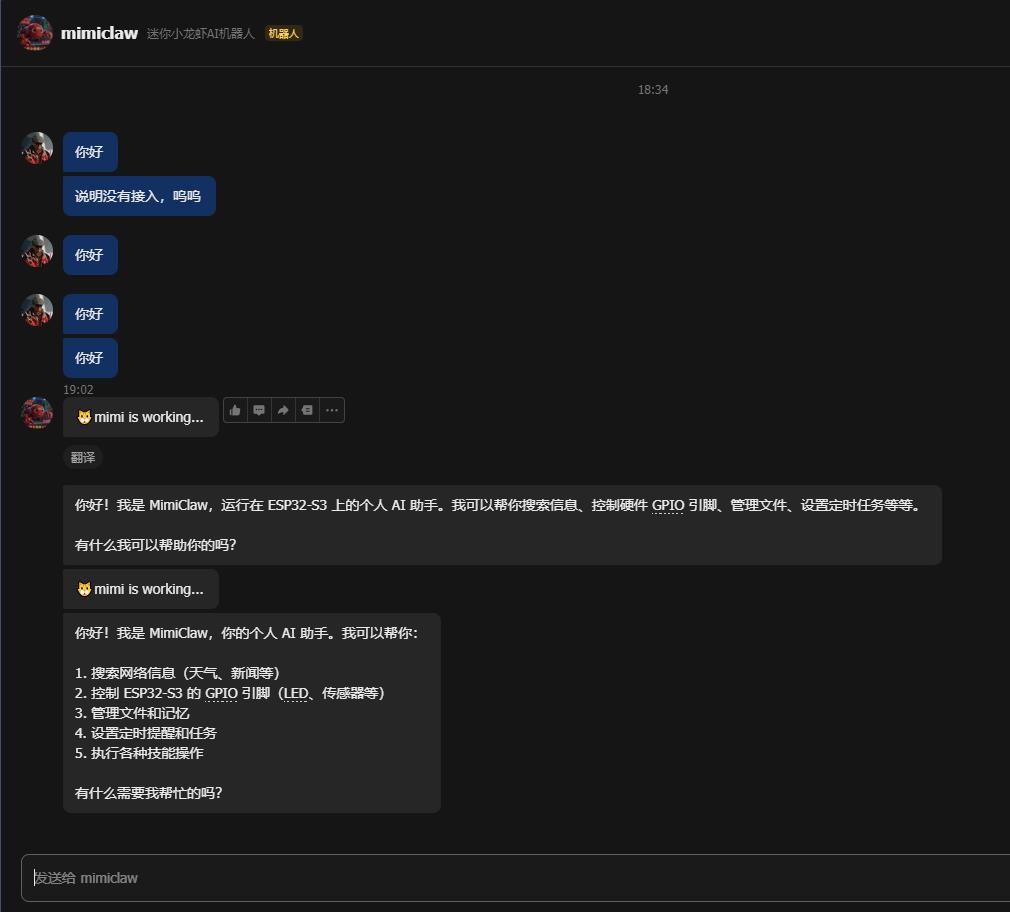
通过飞书进行对话

作为“人工智能6S店”的官方数字引擎,为AI开发者与企业提供一个覆盖软硬件全栈、一站式门户。
更多推荐


 2
2 0
0- 0


 已为社区贡献1条内容

所有评论(0)