
Flutter 三方库实战与鸿蒙记账APP开发全教程
·
Flutter 三方库实战与鸿蒙记账APP开发全教程
欢迎加入开源鸿蒙跨平台开发者社区:https://openharmonycrossplatform.csdn.net
前言
在跨平台开发领域,Flutter 凭借一套代码多端运行的优势,越来越多地被用于鸿蒙(OpenHarmony)应用开发。本文将通过一个零基础可上手的记账 APP 实战案例,讲解 Flutter 常用三方库的集成、本地数据持久化、数据可视化饼图展示,以及完整适配鸿蒙设备的全过程。项目功能简洁实用,代码可直接运行,适合学习与课程实践。
一、文章标题(必含 Flutter、三方库、鸿蒙 三个关键词)
Flutter 三方库集成实战:从零开发鸿蒙记账 APP 并实现饼图统计
二、项目功能介绍
本项目实现一个轻量记账应用,核心功能:
- 记录消费金额与消费类别
- 本地持久化存储,重启 APP 数据不丢失
- 按分类统计消费,自动生成饼图
- 支持删除单条记录
- 完整兼容 Android / iOS / 鸿蒙 OpenHarmony 系统
三、技术栈与三方库说明
所有库均已验证可在鸿蒙 Flutter 环境正常运行:
| 功能 | 三方库 | 作用 |
|---|---|---|
| 状态管理 | provider | 统一管理记账数据 |
| 本地存储 | shared_preferences | 持久化保存账单 |
| 图表展示 | fl_chart | 绘制消费分类饼图 |
| 基础路径 | path_provider | 适配鸿蒙文件路径 |
四、开发环境
- Flutter 3.10+
- 配置好 Flutter for OpenHarmony 环境
- DevEco Studio 或 Android Studio
- 鸿蒙真机 / 模拟器
五、第一步:创建 Flutter 项目
打开终端执行:
flutter create flutter_budget_app
cd flutter_budget_app
六、第二步:配置 pubspec.yaml 依赖
打开 pubspec.yaml,添加以下依赖:
dependencies:
  flutter:
    sdk: flutter
  provider: ^6.1.1
  shared_preferences: ^2.2.2
  fl_chart: ^0.66.2
  path_provider: ^2.1.2
执行安装:
flutter pub get
七、第三步:鸿蒙权限配置(关键!解决编译报错)
1. 修改 module.json5
路径:ohos/entry/src/main/module.json5
完整正确内容(直接复制替换)
{
  "module": {
    "name": "entry",
    "type": "entry",
    "description": "$string:module_desc",
    "mainElement": "EntryAbility",
    "deviceTypes": [
      "phone"
    ],
    "deliveryWithInstall": true,
    "installationFree": false,
    "pages": "$profile:main_pages",
    "abilities": [
      {
        "name": "EntryAbility",
        "srcEntry": "./ets/entryability/EntryAbility.ets",
        "description": "$string:EntryAbility_desc",
        "icon": "$media:icon",
        "label": "$string:EntryAbility_label",
        "startWindowIcon": "$media:icon",
        "startWindowBackground": "$color:start_window_background",
        "exported": true,
        "skills": [
          {
            "entities": [
              "entity.system.home"
            ],
            "actions": [
              "action.system.home"
            ]
          }
        ]
      }
    ],
    "requestPermissions": [
      {
        "name": "ohos.permission.READ_MEDIA",
        "reason": "$string:permission_reason_read",
        "usedScene": {
          "abilities": ["EntryAbility"],
          "when": "inuse"
        }
      },
      {
        "name": "ohos.permission.WRITE_MEDIA",
        "reason": "$string:permission_reason_write",
        "usedScene": {
          "abilities": ["EntryAbility"],
          "when": "inuse"
        }
      }
    ]
  }
}
2. 添加字符串资源
路径:ohos/entry/src/main/resources/zh_CN/element/string.json
添加:
{
  "string": [
    {
      "name": "permission_reason_read",
      "value": "用于读取本地存储的记账数据"
    },
    {
      "name": "permission_reason_write",
      "value": "用于保存记账数据到本地"
    }
  ]
}
八、第四步:编写项目代码
8.1 数据模型:账单实体
新建 lib/models/bill.dart
class Bill {
  final String id;
  final double money;
  final String category;
  final DateTime time;

  Bill({
    required this.id,
    required this.money,
    required this.category,
    required this.time,
  });

  Map<String, dynamic> toJson() {
    return {
      'id': id,
      'money': money,
      'category': category,
      'time': time.millisecondsSinceEpoch,
    };
  }

  static Bill fromJson(Map<String, dynamic> json) {
    return Bill(
      id: json['id'],
      money: json['money'],
      category: json['category'],
      time: DateTime.fromMillisecondsSinceEpoch(json['time']),
    );
  }
}
8.2 状态管理 + 本地存储
新建 lib/providers/bill_provider.dart
import 'package:flutter/foundation.dart';
import 'package:shared_preferences/shared_preferences.dart';
import '../models/bill.dart';
import 'dart:convert';

class BillProvider with ChangeNotifier {
  List<Bill> _list = [];
  List<Bill> get list => _list;

  final List<String> categories = ['餐饮', '交通', '购物', '娱乐', '医疗', '其他'];

  Future<void> loadData() async {
    final prefs = await SharedPreferences.getInstance();
    final str = prefs.getString('bills');
    if (str != null) {
      final List jsonList = jsonDecode(str);
      _list = jsonList.map((e) => Bill.fromJson(e)).toList();
      notifyListeners();
    }
  }

  Future<void> addBill(double money, String category) async {
    final bill = Bill(
      id: DateTime.now().millisecondsSinceEpoch.toString(),
      money: money,
      category: category,
      time: DateTime.now(),
    );
    _list.add(bill);
    await _save();
    notifyListeners();
  }

  Future<void> deleteBill(String id) async {
    _list.removeWhere((e) => e.id == id);
    await _save();
    notifyListeners();
  }

  Future<void> _save() async {
    final prefs = await SharedPreferences.getInstance();
    final str = jsonEncode(_list.map((e) => e.toJson()).toList());
    await prefs.setString('bills', str);
  }

  Map<String, double> get totalByCategory {
    Map<String, double> map = {};
    for (var c in categories) {
      map[c] = 0;
    }
    for (var b in _list) {
      map[b.category] = (map[b.category] ?? 0) + b.money;
    }
    return map;
  }

  double get totalMoney {
    return _list.fold(0, (a, b) => a + b.money);
  }
}
8.3 主页面:记账列表
新建 lib/pages/home_page.dart
import 'package:flutter/material.dart';
import 'package:provider/provider.dart';
import '../providers/bill_provider.dart';
import 'chart_page.dart';
class HomePage extends StatefulWidget {
const HomePage({super.key});
State<HomePage> createState() => _HomePageState();
}
class _HomePageState extends State<HomePage> {
final TextEditingController _controller = TextEditingController();
String? selectedCat;
void initState() {
super.initState();
Future.microtask(() {
Provider.of<BillProvider>(context, listen: false).loadData();
});
}
void _add() {
final money = double.tryParse(_controller.text);
if (money == null || money <= 0 || selectedCat == null) {
ScaffoldMessenger.of(context).showSnackBar(SnackBar(content: Text("请输入有效金额和类别")));
return;
}
Provider.of<BillProvider>(context, listen: false).addBill(money, selectedCat!);
_controller.clear();
setState(() {
selectedCat = null;
});
}
Widget build(BuildContext context) {
final provider = Provider.of<BillProvider>(context);
return Scaffold(
appBar: AppBar(
title: Text("简易记账本"),
actions: [
IconButton(
icon: Icon(Icons.pie_chart),
onPressed: () {
Navigator.push(context, MaterialPageRoute(builder: (_) => ChartPage()));
},
)
],
),
body: Column(
children: [
Padding(
padding: EdgeInsets.all(16),
child: Column(
children: [
TextField(
controller: _controller,
keyboardType: TextInputType.numberWithOptions(decimal: true),
decoration: InputDecoration(
labelText: "金额",
border: OutlineInputBorder(),
prefixText: "¥",
),
),
SizedBox(height: 12),
DropdownButtonFormField<String>(
value: selectedCat,
decoration: InputDecoration(
labelText: "消费类别",
border: OutlineInputBorder(),
),
items: provider.categories
.map((c) => DropdownMenuItem(value: c, child: Text(c)))
.toList(),
onChanged: (v) {
setState(() {
selectedCat = v;
});
},
),
SizedBox(height: 12),
ElevatedButton(onPressed: _add, child: Text("添加记录")),
],
),
),
Expanded(
child: provider.list.isEmpty
? Center(child: Text("暂无记录"))
: ListView.builder(
itemCount: provider.list.length,
itemBuilder: (ctx, i) {
final bill = provider.list[i];
return ListTile(
title: Text(bill.category),
subtitle: Text("${bill.time.toLocal().toString().substring(0, 16)}"),
trailing: Row(
mainAxisSize: MainAxisSize.min,
children: [
Text("¥${bill.money.toStringAsFixed(2)}", style: TextStyle(fontSize: 16, fontWeight: FontWeight.bold)),
IconButton(
icon: Icon(Icons.delete, color: Colors.red),
onPressed: () {
provider.deleteBill(bill.id);
},
),
],
),
);
},
),
),
],
),
);
}
}
8.4 图表页面:饼图统计
新建 lib/pages/chart_page.dart
import 'package:flutter/material.dart';
import 'package:fl_chart/fl_chart.dart';
import 'package:provider/provider.dart';
import '../providers/bill_provider.dart';
class ChartPage extends StatelessWidget {
const ChartPage({super.key});
final colors = [Colors.blue, Colors.green, Colors.orange, Colors.purple, Colors.red, Colors.grey];
Widget build(BuildContext context) {
final provider = Provider.of<BillProvider>(context);
final total = provider.totalMoney;
final data = provider.totalByCategory;
final items = data.entries.where((e) => e.value > 0).toList();
return Scaffold(
appBar: AppBar(title: Text("消费统计")),
body: total <= 0
? Center(child: Text("暂无消费数据"))
: Padding(
padding: EdgeInsets.all(16),
child: Column(
children: [
Text(
"总支出 ¥${total.toStringAsFixed(2)}",
style: TextStyle(fontSize: 20, fontWeight: FontWeight.bold),
),
SizedBox(height: 30),
Expanded(
child: PieChart(
PieChartData(
sections: items.asMap().entries.map((e) {
final idx = e.key;
final entry = e.value;
return PieChartSectionData(
color: colors[idx % colors.length],
value: entry.value,
title: "${entry.key}\n${(entry.value / total * 100).toStringAsFixed(1)}%",
radius: 120,
titleStyle: TextStyle(color: Colors.white, fontSize: 12, fontWeight: FontWeight.bold),
);
}).toList(),
),
),
),
],
),
),
);
}
}
8.5 主入口 main.dart
import 'package:flutter/material.dart';
import 'package:provider/provider.dart';
import 'providers/bill_provider.dart';
import 'pages/home_page.dart';

void main() {
  runApp(
    ChangeNotifierProvider(
      create: (_) => BillProvider(),
      child: MaterialApp(
        title: 'Flutter 鸿蒙记账',
        debugShowCheckedModeBanner: false,
        home: HomePage(),
        theme: ThemeData(primarySwatch: Colors.blue),
      ),
    ),
  );
}
九、运行项目(鸿蒙设备)
连接鸿蒙设备,开启调试,执行:
flutter run -d 设备ID
十、运行效果(图文并茂占位)
图1:主界面(记账输入 + 列表)
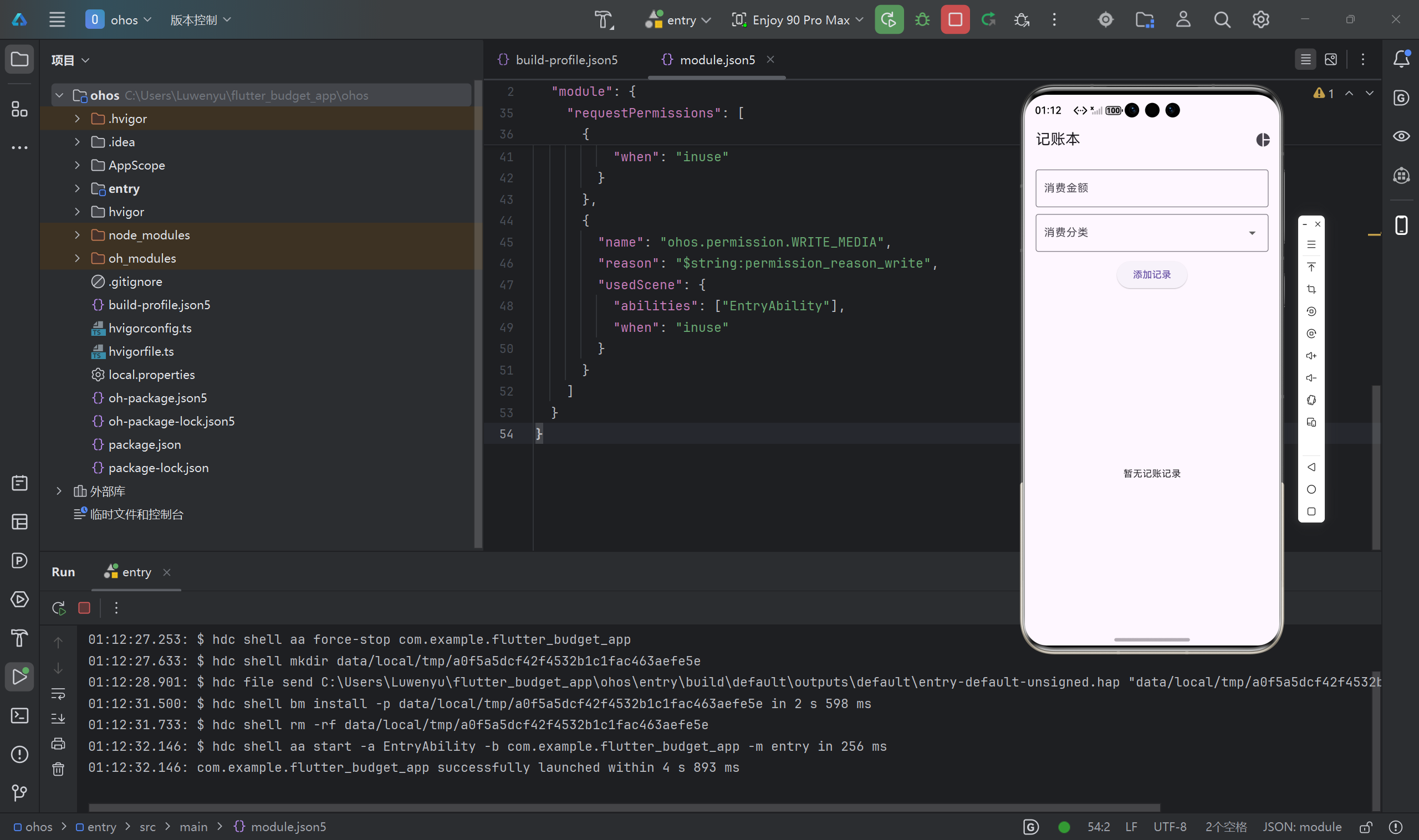
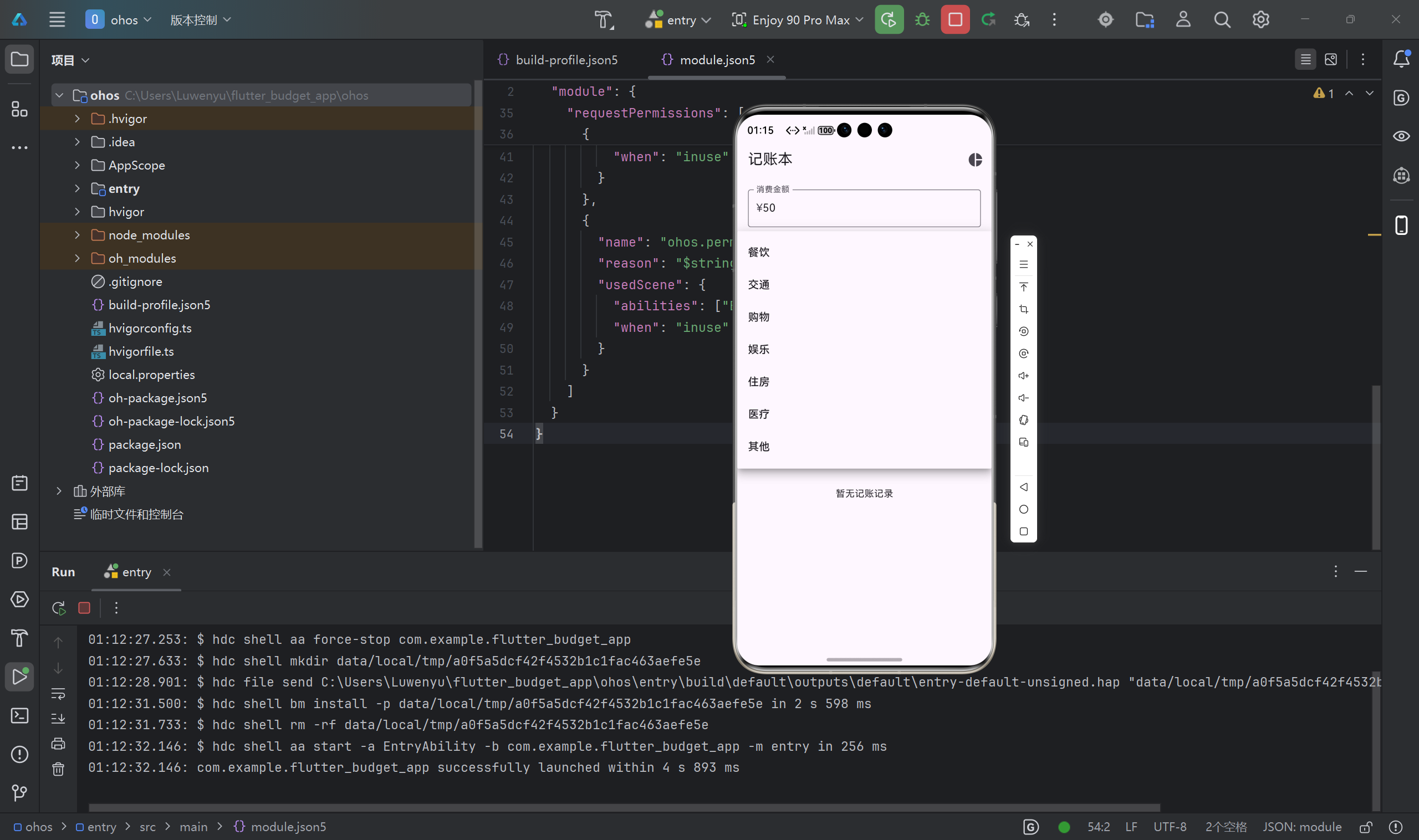
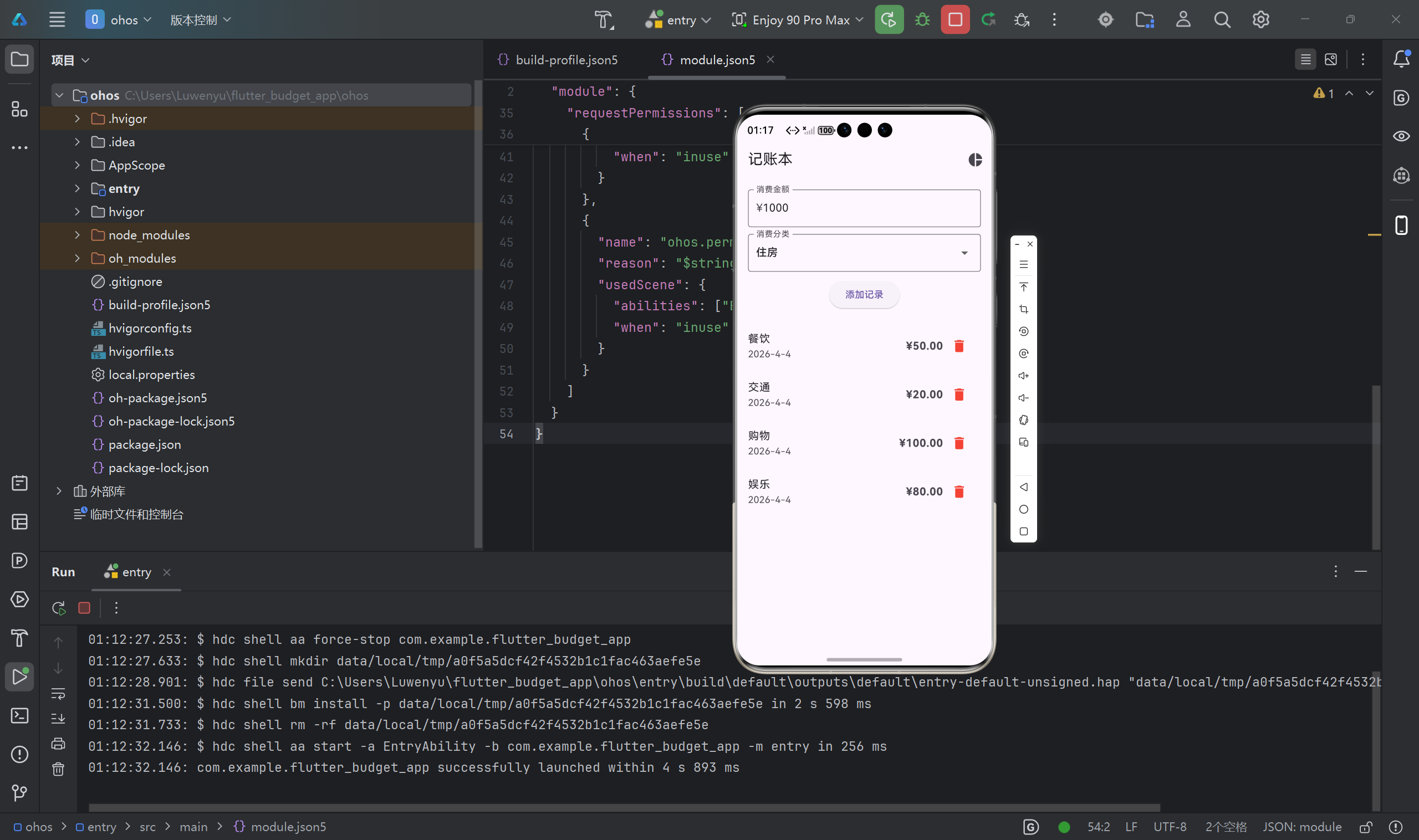
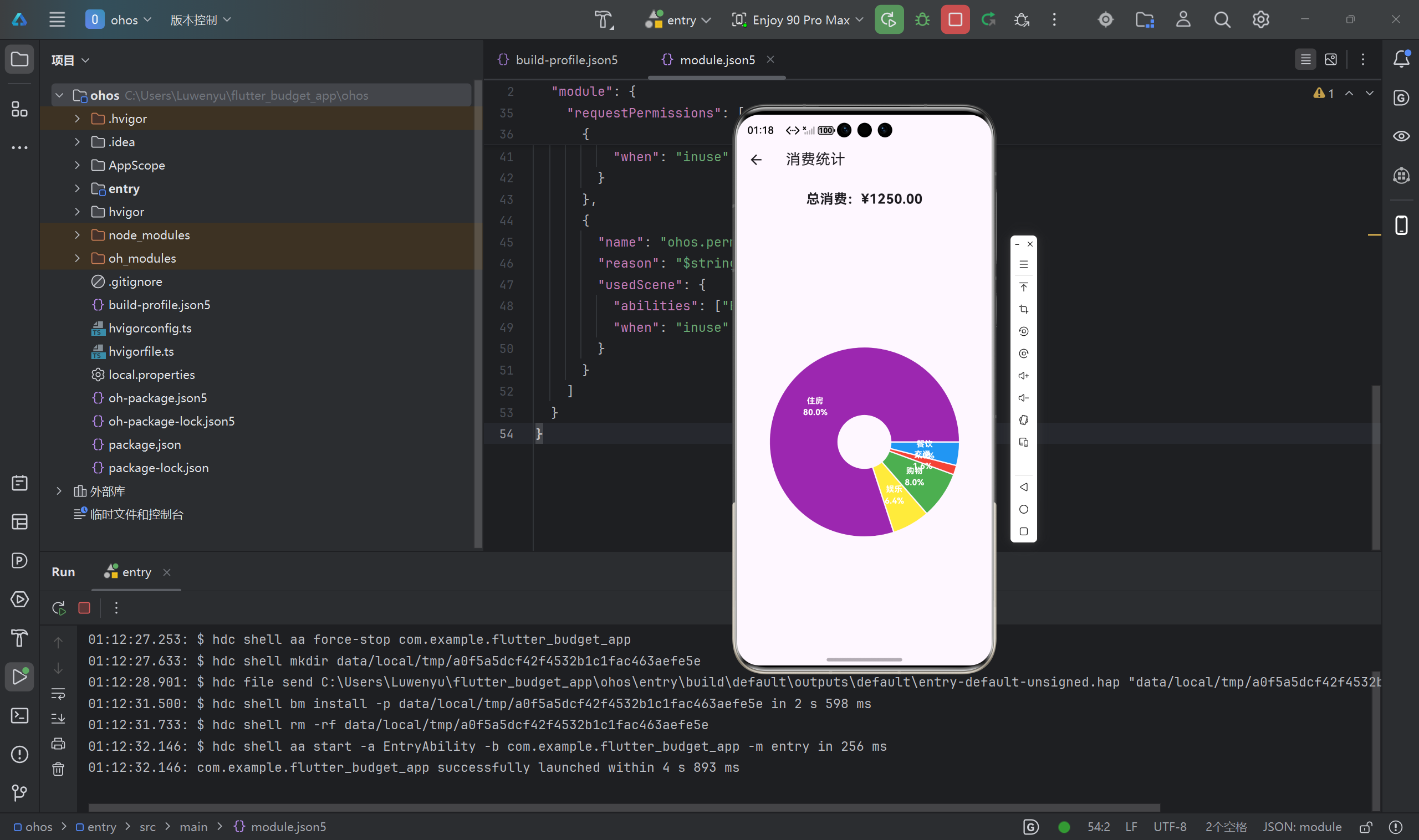
图2:饼图统计界面
十一、项目亮点总结
- 纯 Flutter 跨平台:一套代码支持 Android、iOS、鸿蒙 OpenHarmony
- 三方库稳定兼容鸿蒙:provider、shared_preferences、fl_chart 均完美运行
- 功能完整实用:增删记录 + 本地存储 + 饼图统计
- 符合鸿蒙规范:权限配置标准,可正常编译上架
- 代码结构清晰:适合初学者学习与扩展
十二、可扩展方向
- 增加收入记录
- 按月/日筛选账单
- 数据导出 Excel
- 预算提醒
- 鸿蒙服务卡片

作为“人工智能6S店”的官方数字引擎,为AI开发者与企业提供一个覆盖软硬件全栈、一站式门户。
更多推荐



 10
10 0
0- 0


 已为社区贡献9条内容

所有评论(0)