
Flutter 框架跨平台鸿蒙开发 - 古文学习应用
运行效果图古文学习应用是一款面向中华文化爱好者的移动端学习工具,旨在帮助用户系统地学习和欣赏中国古代经典文学作品。应用涵盖诗词、散文、诸子百家、史书、词、赋等多个类别,提供原文、译文、注释等完整的学习资源,让用户能够轻松领略古典文学的魅力。中华文化源远流长,古籍经典浩如烟海。从《诗经》的"关关雎鸠,在河之洲"到苏轼的"大江东去,浪淘尽,千古风流人物",古文承载着中华民族的智慧与情感。然而,对于现代
古文学习应用
欢迎加入开源鸿蒙跨平台社区: https://openharmonycrossplatform.csdn.net
一、项目概述
运行效果图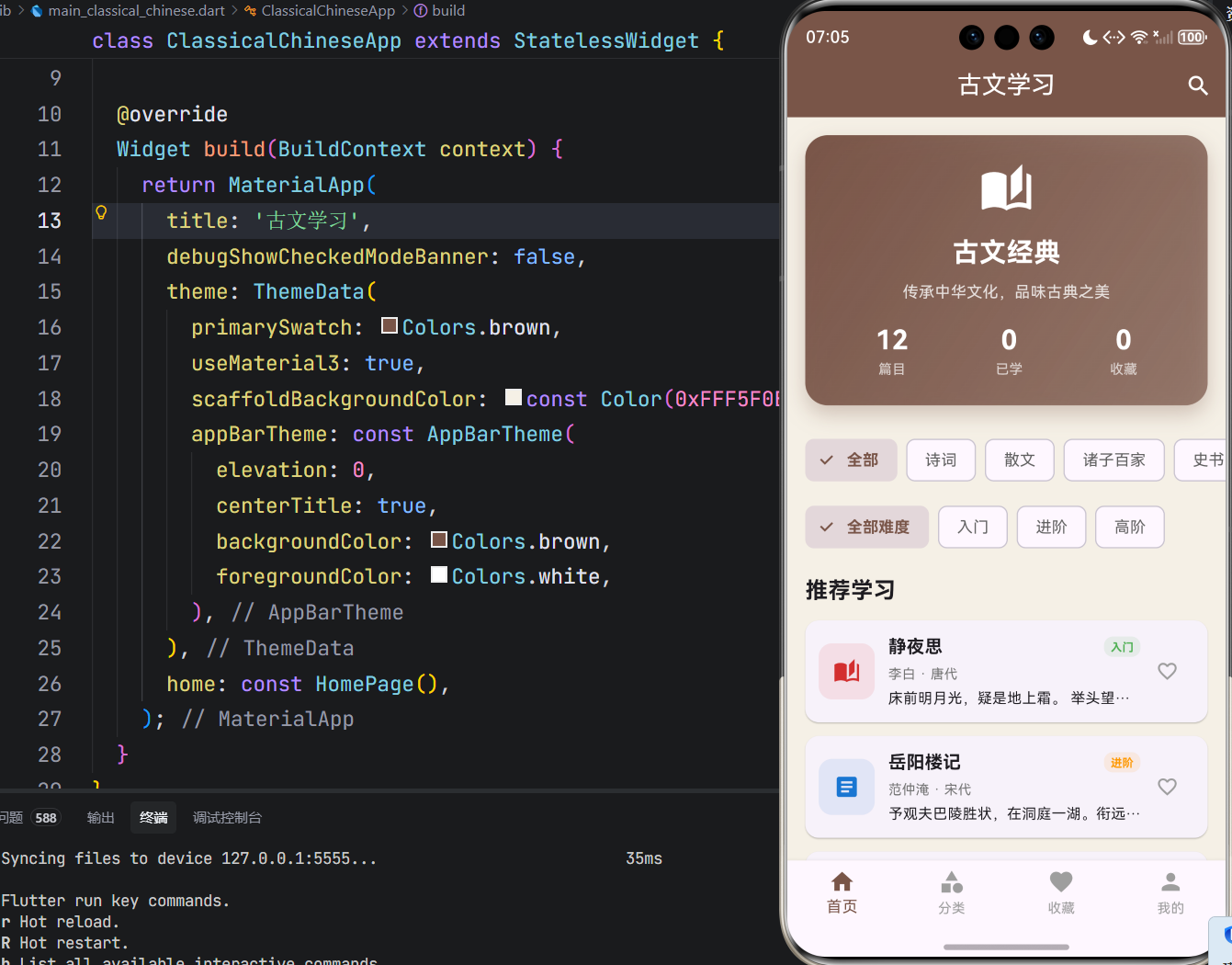
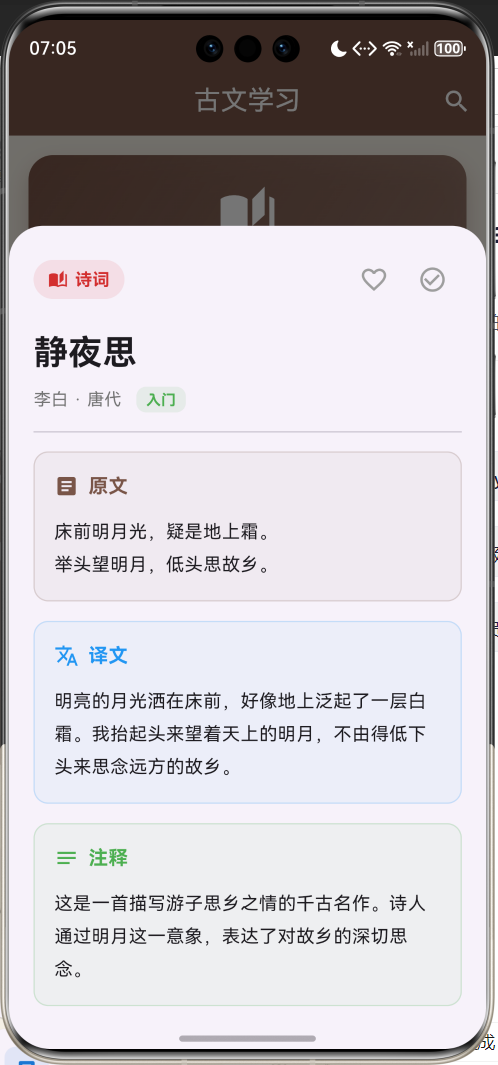
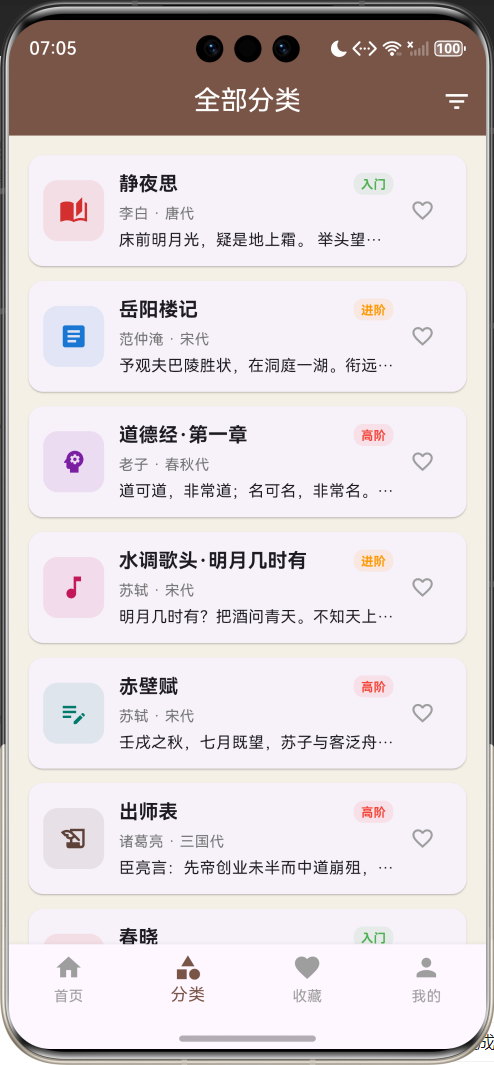
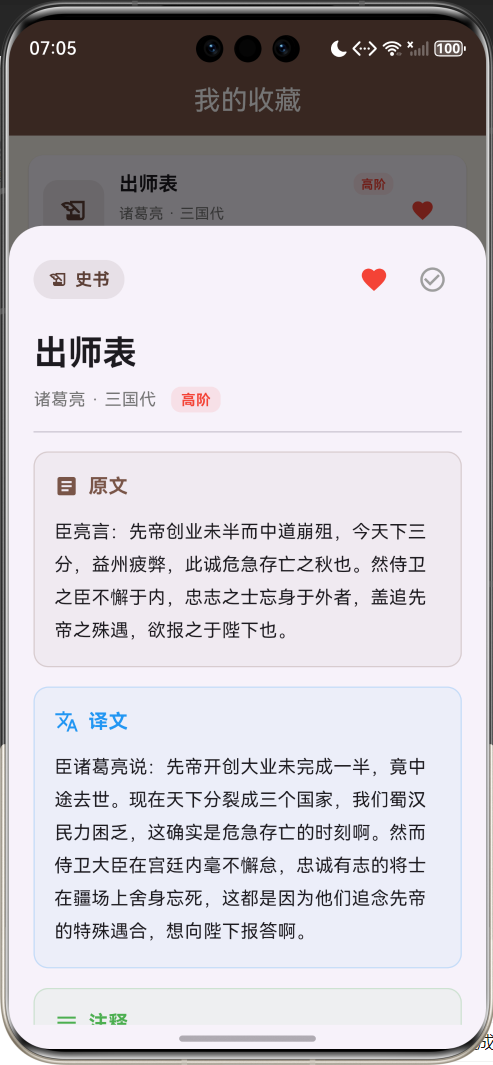
1.1 应用简介
古文学习应用是一款面向中华文化爱好者的移动端学习工具,旨在帮助用户系统地学习和欣赏中国古代经典文学作品。应用涵盖诗词、散文、诸子百家、史书、词、赋等多个类别,提供原文、译文、注释等完整的学习资源,让用户能够轻松领略古典文学的魅力。
中华文化源远流长,古籍经典浩如烟海。从《诗经》的"关关雎鸠,在河之洲"到苏轼的"大江东去,浪淘尽,千古风流人物",古文承载着中华民族的智慧与情感。然而,对于现代人而言,古文的学习往往面临诸多困难:文字晦涩难懂、缺乏系统指导、学习资源分散等问题,使得许多人望而却步。
本应用正是为解决这些痛点而生。通过精心设计的用户界面、科学的学习路径、丰富的辅助资料,让每一位用户都能轻松走进古文的世界,感受中华文化的博大精深。
1.2 核心功能
| 功能模块 | 功能描述 | 实现方式 |
|---|---|---|
| 篇目浏览 | 支持按分类、难度筛选古文篇目 | FilterChip + ListView |
| 学习详情 | 提供原文、译文、注释完整内容 | DraggableScrollableSheet |
| 收藏管理 | 收藏感兴趣的篇目,便于后续学习 | setState状态管理 |
| 学习进度 | 记录已学篇目,统计学习数据 | 计算属性 + 进度条 |
| 搜索功能 | 支持按标题、作者、内容搜索 | AlertDialog + TextField |
| 分类筛选 | 六大类别快速定位 | FilterChip横向滚动 |
| 难度筛选 | 入门/进阶/高阶三级难度 | FilterChip颜色区分 |
1.3 技术栈
| 技术领域 | 技术选型 | 版本要求 |
|---|---|---|
| 开发框架 | Flutter | >= 3.0.0 |
| 编程语言 | Dart | >= 2.17.0 |
| 设计规范 | Material Design 3 | - |
| 状态管理 | setState | - |
| 目标平台 | 鸿蒙OS | API 21+ |
1.4 项目结构
lib/
└── main_classical_chinese.dart
    ├── ClassicalChineseApp      # 应用入口
    ├── ClassicalCategory        # 分类枚举
    ├── DifficultyLevel          # 难度枚举
    ├── ClassicalText            # 数据模型
    ├── HomePage                 # 主页面
    │   ├── _buildHomePage()     # 首页
    │   ├── _buildCategoryPage() # 分类页
    │   ├── _buildFavoritesPage()# 收藏页
    │   └── _buildProfilePage()  # 个人中心
    └── 辅助方法
二、系统架构
2.1 整体架构图
2.2 类图设计
2.3 数据流程图
2.4 页面导航流程
三、核心模块设计
3.1 数据模型设计
3.1.1 古文篇目模型 (ClassicalText)
class ClassicalText {
  final String id;                      // 唯一标识符
  final String title;                   // 篇目标题,如"静夜思"
  final String author;                  // 作者姓名,如"李白"
  final String dynasty;                 // 所属朝代,如"唐"
  final ClassicalCategory category;     // 文学分类
  final DifficultyLevel difficulty;     // 难度等级
  final String originalText;            // 古文原文
  final String translation;             // 现代文译文
  final String annotation;              // 详细注释说明
  final List<String> keywords;          // 关键词标签
  final int wordCount;                  // 原文字数统计
  final int likes;                      // 点赞/喜欢数量
  final bool isFavorite;                // 用户是否收藏
  final bool isLearned;                 // 用户是否已学习
  final DateTime createdAt;             // 创建时间戳

  ClassicalText({
    required this.id,
    required this.title,
    required this.author,
    required this.dynasty,
    required this.category,
    required this.difficulty,
    required this.originalText,
    required this.translation,
    required this.annotation,
    this.keywords = const [],
    required this.wordCount,
    this.likes = 0,
    this.isFavorite = false,
    this.isLearned = false,
    DateTime? createdAt,
  }) : createdAt = createdAt ?? DateTime.now();

  // 便捷getter方法,直接访问分类属性
  String get categoryText => category.categoryText;
  IconData get categoryIcon => category.categoryIcon;
  Color get categoryColor => category.categoryColor;
}
3.1.2 分类枚举 (ClassicalCategory)
| 分类 | 英文标识 | 图标 | 颜色 | 代表作品 |
|---|---|---|---|---|
| 诗词 | poetry | auto_stories | 红色 #E53935 | 静夜思、春晓、登鹳雀楼 |
| 散文 | prose | article | 蓝色 #1E88E5 | 岳阳楼记、滕王阁序 |
| 诸子百家 | philosophy | psychology | 紫色 #8E24AA | 道德经、论语 |
| 史书 | history | history_edu | 棕色 #5D4037 | 出师表、史记选段 |
| 词 | ci | music_note | 粉色 #D81B60 | 水调歌头、念奴娇 |
| 赋 | fu | edit_note | 青色 #00897B | 赤壁赋、阿房宫赋 |
enum ClassicalCategory {
  poetry,      // 诗词:唐诗宋词等韵文作品
  prose,       // 散文:记叙、议论类文章
  philosophy,  // 诸子百家:哲学思想类著作
  history,     // 史书:历史文献记载
  ci,          // 词:长短句歌词
  fu,          // 赋:铺陈描写类文体
}

extension ClassicalCategoryExtension on ClassicalCategory {
  String get categoryText {
    switch (this) {
      case ClassicalCategory.poetry:
        return '诗词';
      case ClassicalCategory.prose:
        return '散文';
      case ClassicalCategory.philosophy:
        return '诸子百家';
      case ClassicalCategory.history:
        return '史书';
      case ClassicalCategory.ci:
        return '词';
      case ClassicalCategory.fu:
        return '赋';
    }
  }

  IconData get categoryIcon {
    switch (this) {
      case ClassicalCategory.poetry:
        return Icons.auto_stories;
      case ClassicalCategory.prose:
        return Icons.article;
      case ClassicalCategory.philosophy:
        return Icons.psychology;
      case ClassicalCategory.history:
        return Icons.history_edu;
      case ClassicalCategory.ci:
        return Icons.music_note;
      case ClassicalCategory.fu:
        return Icons.edit_note;
    }
  }

  Color get categoryColor {
    switch (this) {
      case ClassicalCategory.poetry:
        return Colors.red.shade700;
      case ClassicalCategory.prose:
        return Colors.blue.shade700;
      case ClassicalCategory.philosophy:
        return Colors.purple.shade700;
      case ClassicalCategory.history:
        return Colors.brown.shade700;
      case ClassicalCategory.ci:
        return Colors.pink.shade700;
      case ClassicalCategory.fu:
        return Colors.teal.shade700;
    }
  }
}
3.1.3 难度等级 (DifficultyLevel)
| 等级 | 英文标识 | 颜色 | 适用人群 | 代表篇目 |
|---|---|---|---|---|
| 入门 | beginner | 绿色 #4CAF50 | 初学者、中小学生 | 静夜思、春晓、登鹳雀楼 |
| 进阶 | intermediate | 橙色 #FF9800 | 有一定基础、高中生 | 岳阳楼记、水调歌头 |
| 高阶 | advanced | 红色 #F44336 | 文学爱好者、大学生 | 道德经、赤壁赋、出师表 |
enum DifficultyLevel {
  beginner,     // 入门:字词简单,易于理解
  intermediate, // 进阶:需要一定古文基础
  advanced,     // 高阶:涉及深层哲理或复杂典故
}

extension DifficultyLevelExtension on DifficultyLevel {
  String get levelText {
    switch (this) {
      case DifficultyLevel.beginner:
        return '入门';
      case DifficultyLevel.intermediate:
        return '进阶';
      case DifficultyLevel.advanced:
        return '高阶';
    }
  }

  Color get levelColor {
    switch (this) {
      case DifficultyLevel.beginner:
        return Colors.green;
      case DifficultyLevel.intermediate:
        return Colors.orange;
      case DifficultyLevel.advanced:
        return Colors.red;
    }
  }
}
3.2 页面结构设计
3.2.1 首页模块
首页核心功能实现:
Widget _buildHomePage() {
  return Scaffold(
    appBar: AppBar(
      title: const Text('古文学习'),
      actions: [
        IconButton(
          icon: const Icon(Icons.search),
          onPressed: () => _showSearchDialog(),
        ),
      ],
    ),
    body: SingleChildScrollView(
      child: Column(
        children: [
          _buildHeaderCard(),       // 头部统计卡片
          _buildCategoryChips(),    // 分类筛选
          _buildDifficultyChips(),  // 难度筛选
          _buildRecentTexts(),      // 推荐列表
        ],
      ),
    ),
    bottomNavigationBar: _buildBottomNav(),
  );
}
3.2.2 分类页模块
分类页核心代码:
Widget _buildCategoryPage() {
  return Scaffold(
    appBar: AppBar(
      title: Text(_selectedCategory?.categoryText ?? '全部分类'),
      actions: [
        PopupMenuButton<ClassicalCategory?>(
          icon: const Icon(Icons.filter_list),
          onSelected: (category) {
            setState(() {
              _selectedCategory = category;
            });
          },
          itemBuilder: (context) => [
            const PopupMenuItem(value: null, child: Text('全部')),
            ...ClassicalCategory.values.map(
              (category) => PopupMenuItem(
                value: category,
                child: Text(category.categoryText),
              ),
            ),
          ],
        ),
      ],
    ),
    body: _filteredTexts.isEmpty
        ? _buildEmptyState()
        : ListView.builder(
            padding: const EdgeInsets.all(16),
            itemCount: _filteredTexts.length,
            itemBuilder: (context, index) {
              return _buildTextCard(_filteredTexts[index]);
            },
          ),
    bottomNavigationBar: _buildBottomNav(),
  );
}
3.2.3 详情页模块
详情页采用 DraggableScrollableSheet 实现,支持拖拽调整高度,提供沉浸式阅读体验。
详情页核心实现:
void _showTextDetail(ClassicalText text) {
  showModalBottomSheet(
    context: context,
    isScrollControlled: true,
    builder: (context) => DraggableScrollableSheet(
      initialChildSize: 0.8,    // 初始高度80%
      minChildSize: 0.5,        // 最小高度50%
      maxChildSize: 0.95,       // 最大高度95%
      expand: false,
      builder: (context, scrollController) => Container(
        padding: const EdgeInsets.all(20),
        child: ListView(
          controller: scrollController,
          children: [
            // 标题与操作按钮
            _buildDetailHeader(text),
            // 原文区块
            _buildDetailSection('原文', text.originalText, Colors.brown, Icons.article),
            // 译文章节
            _buildDetailSection('译文', text.translation, Colors.blue, Icons.translate),
            // 注释区块
            _buildDetailSection('注释', text.annotation, Colors.green, Icons.notes),
            // 关键词标签
            _buildKeywordTags(text.keywords),
            // 操作按钮
            _buildActionButtons(text),
          ],
        ),
      ),
    ),
  );
}
3.2.4 个人中心模块
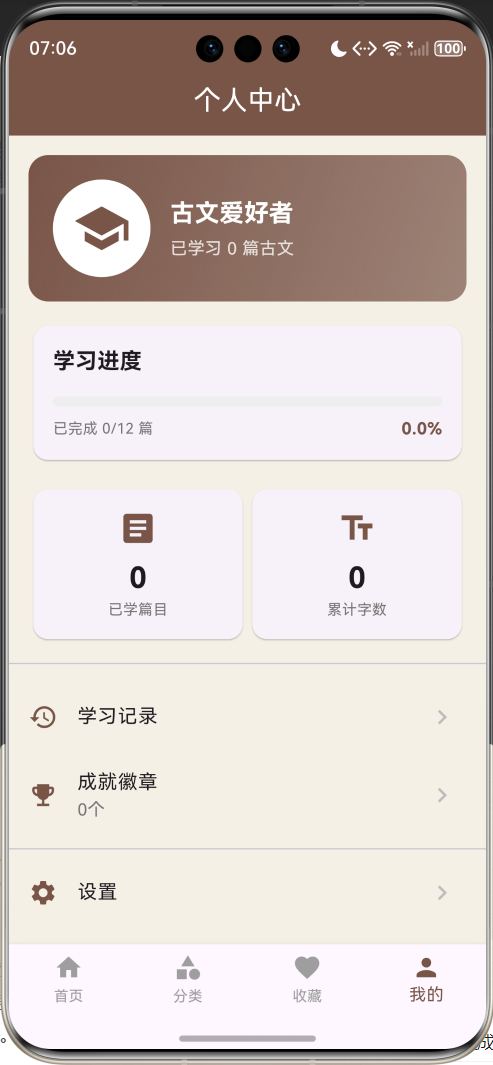
3.3 状态管理
应用采用 setState 进行状态管理,主要状态变量如下:
class _HomePageState extends State<HomePage> with TickerProviderStateMixin {
  // 核心数据状态
  final List<ClassicalText> _texts = [];        // 所有篇目列表

  // 导航状态
  int _currentIndex = 0;                         // 当前页面索引(0-3)

  // 筛选状态
  ClassicalCategory? _selectedCategory;          // 当前选中的分类
  DifficultyLevel? _selectedDifficulty;          // 当前选中的难度
  String _searchQuery = '';                      // 搜索关键词

  // 动画状态
  late AnimationController _animationController; // 动画控制器
  late Animation<double> _fadeAnimation;         // 淡入动画
}
状态更新流程:
四、UI设计规范
4.1 配色方案
应用采用古典风格的配色方案,以棕色为主色调,营造典雅的文化氛围:
| 颜色类型 | 色值 | 用途 | 示例 |
|---|---|---|---|
| 主色 | #795548 (Brown) | AppBar、按钮、强调元素 | 标题栏背景 |
| 背景色 | #F5F0E6 | 页面背景 | 整体背景 |
| 卡片背景 | #FFFFFF | 卡片、弹窗 | 篇目卡片 |
| 次要文字 | #9E9E9E | 辅助信息 | 作者、朝代 |
| 分割线 | #E0E0E0 | 分隔区域 | 列表分割 |
分类专属颜色:
// 诗词 - 红色系
Colors.red.shade700     // #E53935

// 散文 - 蓝色系
Colors.blue.shade700    // #1E88E5

// 诸子百家 - 紫色系
Colors.purple.shade700  // #8E24AA

// 史书 - 棕色系
Colors.brown.shade700   // #5D4037

// 词 - 粉色系
Colors.pink.shade700    // #D81B60

// 赋 - 青色系
Colors.teal.shade700    // #00897B
4.2 字体规范
| 元素 | 字号 | 字重 | 颜色 | 行高 |
|---|---|---|---|---|
| 详情页标题 | 28px | Bold | #212121 | 1.2 |
| 列表标题 | 16px | Bold | #212121 | 1.4 |
| 章节标题 | 16px | Bold | 分类色 | 1.4 |
| 原文内容 | 15px | Regular | #212121 | 1.8 |
| 译文内容 | 15px | Regular | #424242 | 1.8 |
| 作者朝代 | 12px | Regular | #757575 | 1.4 |
| 难度标签 | 10-12px | Bold | 难度色 | 1.2 |
| 辅助信息 | 12px | Regular | #9E9E9E | 1.4 |
4.3 组件规范
4.3.1 篇目卡片
┌─────────────────────────────────────────────────┐
│ ┌──────────┐  静夜思                  [入门]    │
│ │   📖     │  李白 · 唐代                       │
│ │  诗词    │  床前明月光,疑是地上霜...   ❤️    │
│ └──────────┘                                    │
└─────────────────────────────────────────────────┘
卡片设计要点:
- 左侧图标区域:50x50px,圆角12px,背景色为分类色10%透明度
- 标题字号16px,加粗
- 作者朝代字号12px,灰色
- 原文预览最多2行,超出省略
- 右侧收藏按钮,点击切换状态
4.3.2 详情区块
┌─────────────────────────────────────────────────┐
│ 📖 原文                                         │
│                                                 │
│ 床前明月光,疑是地上霜。                         │
│ 举头望明月,低头思故乡。                         │
│                                                 │
└─────────────────────────────────────────────────┘
区块设计要点:
- 容器内边距16px
- 圆角12px
- 背景色为标题色5%透明度
- 边框为标题色20%透明度
- 内容行高1.8倍
4.3.3 难度标签
入门级:绿色背景 + 绿色文字
进阶级:橙色背景 + 橙色文字
高阶级:红色背景 + 红色文字
4.4 动画效果
4.4.1 淡入动画
// 初始化动画控制器
_animationController = AnimationController(
  duration: const Duration(milliseconds: 500),
  vsync: this,
);

_fadeAnimation = Tween<double>(begin: 0.0, end: 1.0).animate(
  CurvedAnimation(parent: _animationController, curve: Curves.easeInOut),
);

// 应用到卡片
FadeTransition(
  opacity: _fadeAnimation,
  child: _buildTextCard(text),
)
4.4.2 底部弹窗动画
使用 showModalBottomSheet 自带动画,配合 DraggableScrollableSheet 实现拖拽效果。
五、核心功能实现
5.1 筛选功能
筛选功能支持多条件组合,包括分类、难度和搜索关键词:
List<ClassicalText> get _filteredTexts {
  var texts = _texts;

  // 分类筛选
  if (_selectedCategory != null) {
    texts = texts.where((t) => t.category == _selectedCategory).toList();
  }

  // 难度筛选
  if (_selectedDifficulty != null) {
    texts = texts.where((t) => t.difficulty == _selectedDifficulty).toList();
  }

  // 搜索筛选(支持标题、作者、内容)
  if (_searchQuery.isNotEmpty) {
    texts = texts.where((t) =>
        t.title.contains(_searchQuery) ||
        t.author.contains(_searchQuery) ||
        t.originalText.contains(_searchQuery)).toList();
  }

  return texts;
}
筛选流程图:
5.2 收藏功能
收藏功能通过创建新对象来更新状态,保持数据的不可变性:
void _toggleFavorite(ClassicalText text) {
  setState(() {
    final index = _texts.indexWhere((t) => t.id == text.id);
    if (index != -1) {
      _texts[index] = ClassicalText(
        id: text.id,
        title: text.title,
        author: text.author,
        dynasty: text.dynasty,
        category: text.category,
        difficulty: text.difficulty,
        originalText: text.originalText,
        translation: text.translation,
        annotation: text.annotation,
        keywords: text.keywords,
        wordCount: text.wordCount,
        likes: text.likes,
        isFavorite: !text.isFavorite,  // 切换收藏状态
        isLearned: text.isLearned,
        createdAt: text.createdAt,
      );
    }
  });
}
5.3 学习进度统计
// 获取已学习篇目列表
List<ClassicalText> get _learnedTexts {
  return _texts.where((t) => t.isLearned).toList();
}

// 计算学习进度百分比
double get _learningProgress {
  if (_texts.isEmpty) return 0.0;
  return _learnedTexts.length / _texts.length;
}

// 计算累计学习字数
int get _totalLearnedWords {
  return _learnedTexts.fold<int>(0, (sum, t) => sum + t.wordCount);
}

// 计算获得的成就徽章数量
int _calculateBadges() {
  int badges = 0;
  if (_learnedTexts.length >= 1) badges++;   // 初学者徽章
  if (_learnedTexts.length >= 5) badges++;   // 进取者徽章
  if (_learnedTexts.length >= 10) badges++;  // 博学者徽章
  return badges;
}
5.4 搜索功能
void _showSearchDialog() {
  showDialog(
    context: context,
    builder: (context) => AlertDialog(
      title: const Text('搜索古文'),
      content: TextField(
        autofocus: true,
        decoration: const InputDecoration(
          hintText: '输入标题、作者或内容',
          prefixIcon: Icon(Icons.search),
          border: OutlineInputBorder(),
        ),
        onChanged: (value) {
          setState(() {
            _searchQuery = value;
          });
        },
      ),
      actions: [
        TextButton(
          onPressed: () {
            setState(() {
              _searchQuery = '';
            });
            Navigator.pop(context);
          },
          child: const Text('清除'),
        ),
        TextButton(
          onPressed: () => Navigator.pop(context),
          child: const Text('确定'),
        ),
      ],
    ),
  );
}
六、数据示例
6.1 预置篇目列表
应用预置了12篇经典古文,涵盖各个类别和难度:
| 序号 | 标题 | 作者 | 朝代 | 分类 | 难度 | 字数 |
|---|---|---|---|---|---|---|
| 1 | 静夜思 | 李白 | 唐 | 诗词 | 入门 | 20 |
| 2 | 岳阳楼记 | 范仲淹 | 宋 | 散文 | 进阶 | 43 |
| 3 | 道德经·第一章 | 老子 | 春秋 | 诸子百家 | 高阶 | 59 |
| 4 | 水调歌头·明月几时有 | 苏轼 | 宋 | 词 | 进阶 | 95 |
| 5 | 赤壁赋 | 苏轼 | 宋 | 赋 | 高阶 | 67 |
| 6 | 出师表 | 诸葛亮 | 三国 | 史书 | 高阶 | 53 |
| 7 | 春晓 | 孟浩然 | 唐 | 诗词 | 入门 | 20 |
| 8 | 论语·学而 | 孔子 | 春秋 | 诸子百家 | 入门 | 33 |
| 9 | 滕王阁序 | 王勃 | 唐 | 散文 | 高阶 | 52 |
| 10 | 念奴娇·赤壁怀古 | 苏轼 | 宋 | 词 | 进阶 | 44 |
| 11 | 阿房宫赋 | 杜牧 | 唐 | 赋 | 高阶 | 61 |
| 12 | 登鹳雀楼 | 王之涣 | 唐 | 诗词 | 入门 | 20 |
6.2 数据加载示例
void _loadTexts() {
  _texts.addAll([
    ClassicalText(
      id: '1',
      title: '静夜思',
      author: '李白',
      dynasty: '唐',
      category: ClassicalCategory.poetry,
      difficulty: DifficultyLevel.beginner,
      originalText: '床前明月光,疑是地上霜。\n举头望明月,低头思故乡。',
      translation: '明亮的月光洒在床前,好像地上泛起了一层白霜。我抬起头来望着天上的明月,不由得低下头来思念远方的故乡。',
      annotation: '这是一首描写游子思乡之情的千古名作。诗人通过明月这一意象,表达了对故乡的深切思念。',
      keywords: ['思乡', '明月', '游子'],
      wordCount: 20,
      likes: 12580,
    ),
    // ... 更多篇目
  ]);
}
七、扩展功能规划
7.1 后续版本规划
7.2 功能扩展建议
7.2.1 朗读功能
集成TTS(Text-to-Speech)引擎,支持古文朗读:
- 支持多种语音风格
- 可调节朗读速度
- 支持循环朗读
- 标注生僻字读音
7.2.2 背诵模式
辅助用户背诵古文:
- 隐藏部分关键词
- 填空练习模式
- 背诵进度记录
- 错误提示与纠正
7.2.3 学习打卡
培养持续学习习惯:
- 每日学习打卡
- 连续打卡奖励
- 学习日历展示
- 打卡提醒通知
7.2.4 成就系统
激励用户学习动力:
| 成就名称 | 获得条件 | 徽章图标 |
|---|---|---|
| 初学者 | 学习第1篇古文 | 🌱 |
| 进取者 | 累计学习5篇 | 📚 |
| 博学者 | 累计学习10篇 | 🎓 |
| 诗词达人 | 学完所有诗词 | 📜 |
| 全能学者 | 学完所有分类 | 🏆 |
7.2.5 社区功能
构建学习交流平台:
- 用户评论与讨论
- 学习心得分享
- 优秀笔记推荐
- 学习排行榜
八、性能优化建议
8.1 列表优化
// 使用ListView.builder实现懒加载
ListView.builder(
  itemCount: _filteredTexts.length,
  itemBuilder: (context, index) {
    return _buildTextCard(_filteredTexts[index]);
  },
)

// 使用IndexedStack保持页面状态
IndexedStack(
  index: _currentIndex,
  children: [
    _buildHomePage(),
    _buildCategoryPage(),
    _buildFavoritesPage(),
    _buildProfilePage(),
  ],
)
8.2 动画优化
// 使用AnimationController复用
void dispose() {
_animationController.dispose(); // 及时释放资源
super.dispose();
}
// 使用FadeTransition实现高效淡入
FadeTransition(
opacity: _fadeAnimation,
child: child,
)
8.3 内存优化
- 避免在build方法中创建对象
- 使用const构造函数
- 及时释放AnimationController
- 合理使用StatefulWidget和StatelessWidget
九、注意事项
9.1 开发注意事项
-
枚举扩展方法:所有枚举类型都需要添加Extension,提供categoryText、categoryIcon、categoryColor等属性
-
数据不可变性:更新状态时创建新对象,而非修改原对象
-
空安全处理:使用可空类型(?)和空值检查
-
资源释放:在dispose中释放AnimationController等资源
9.2 常见问题
| 问题 | 原因 | 解决方案 |
|---|---|---|
| 枚举属性未定义 | 缺少Extension | 添加对应的Extension扩展 |
| 状态不更新 | 未调用setState | 在状态变更时调用setState |
| 动画不生效 | 未初始化Controller | 在initState中初始化 |
| 页面重建 | 未使用IndexedStack | 使用IndexedStack保持状态 |
十、运行说明
10.1 环境要求
| 环境 | 版本要求 |
|---|---|
| Flutter SDK | >= 3.0.0 |
| Dart SDK | >= 2.17.0 |
| 鸿蒙OS | API 21+ |
| Android | API 21+ (可选) |
| iOS | 12.0+ (可选) |
10.2 运行命令
# 查看可用设备
flutter devices

# 运行到鸿蒙设备
flutter run -d 127.0.0.1:5555 -t lib/main_classical_chinese.dart

# 运行到Windows
flutter run -d windows -t lib/main_classical_chinese.dart

# 代码分析
flutter analyze lib/main_classical_chinese.dart
10.3 项目依赖
dependencies:
  flutter:
    sdk: flutter

# 本应用仅使用Flutter SDK内置组件,无需额外依赖
十一、总结
古文学习应用通过精心设计的用户界面和科学的学习路径,为用户提供了一个便捷、高效的古文学习平台。应用采用Flutter框架开发,支持鸿蒙OS等多平台运行,具有良好的跨平台兼容性。
核心功能包括篇目浏览、分类筛选、收藏管理、学习进度统计等,满足了用户学习古文的基本需求。后续版本将陆续推出朗读功能、背诵模式、学习打卡、成就系统等增强功能,进一步提升用户体验。
通过本应用,希望能够帮助更多人走进古文的世界,感受中华文化的博大精深,传承和弘扬中华优秀传统文化。

作为“人工智能6S店”的官方数字引擎,为AI开发者与企业提供一个覆盖软硬件全栈、一站式门户。
更多推荐

 2
2 0
0- 0


 已为社区贡献11条内容

所有评论(0)