
Flutter 框架跨平台鸿蒙开发 - 考试倒计时
运行效果图String?location;String?note;String?subject;int?duration;基础信息包括ID、名称、类型、日期时间;扩展信息包括地点、备注、科目、时长;提醒信息包括是否提醒和提前天数。这种设计既满足了展示需求,又支持灵活的提醒设置。finalExam, // 期末考试midterm, // 期中考试quiz, // 测验cet4, // 英语四级cet
Flutter考试倒计时
欢迎加入开源鸿蒙跨平台社区:https://openharmonycrossplatform.csdn.net
项目概述
运行效果图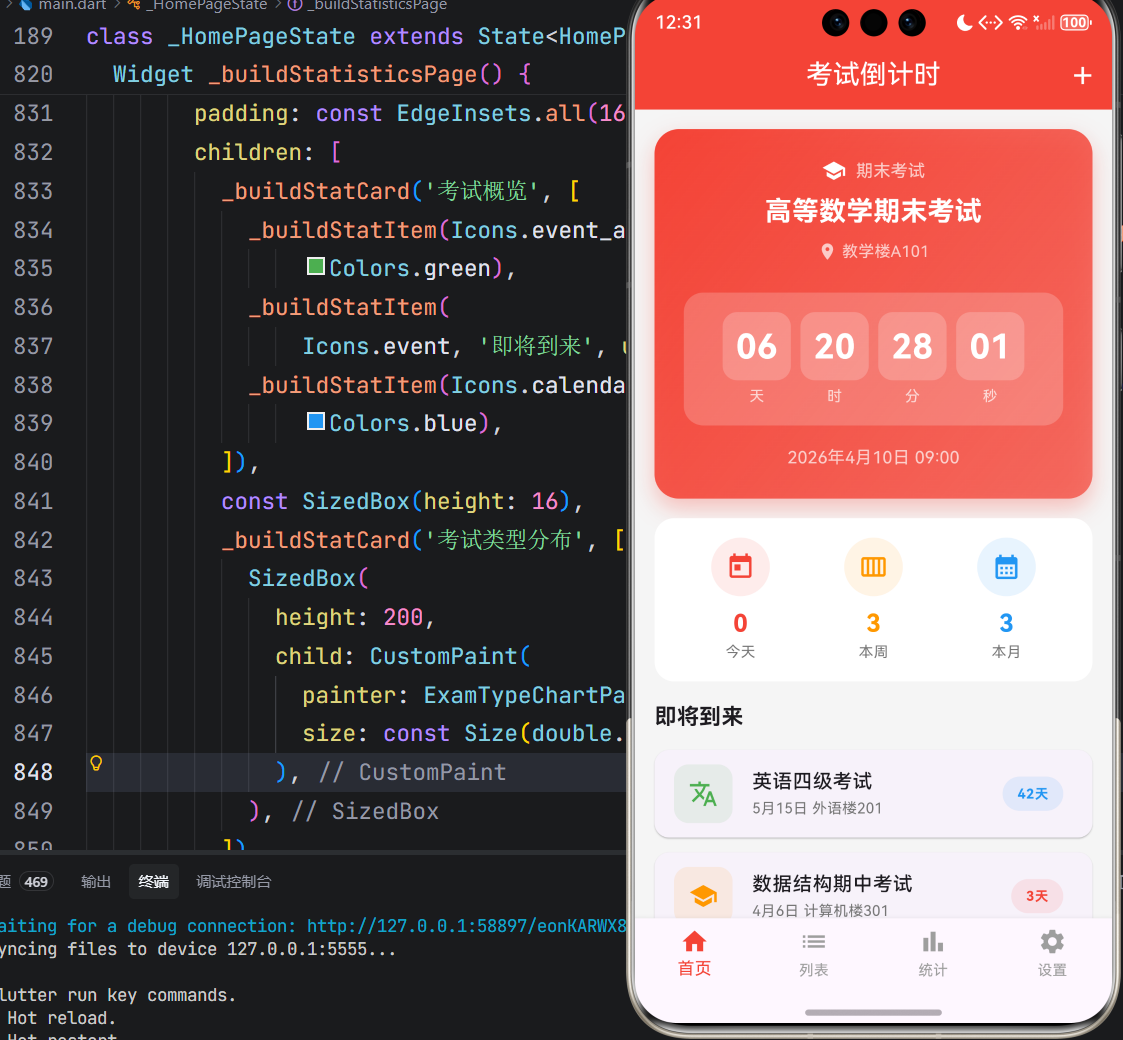
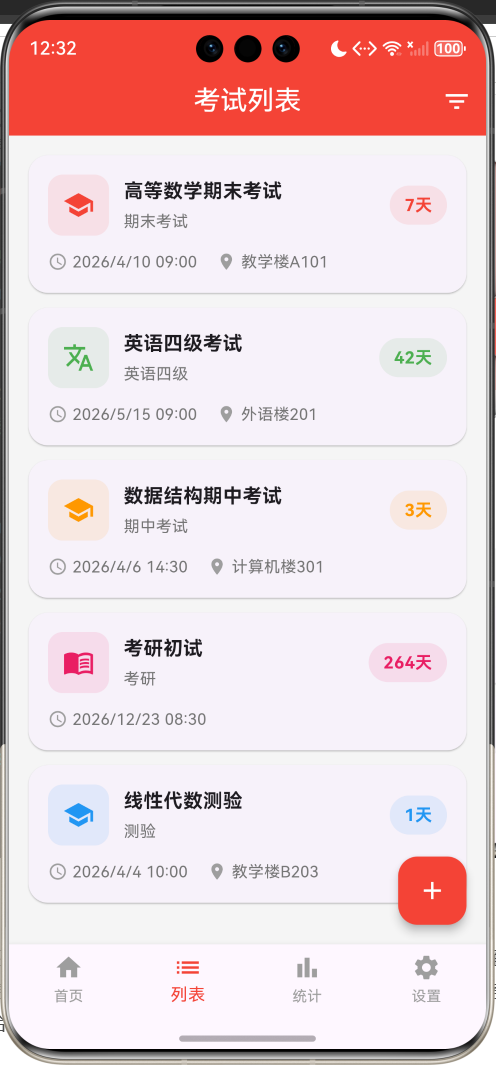
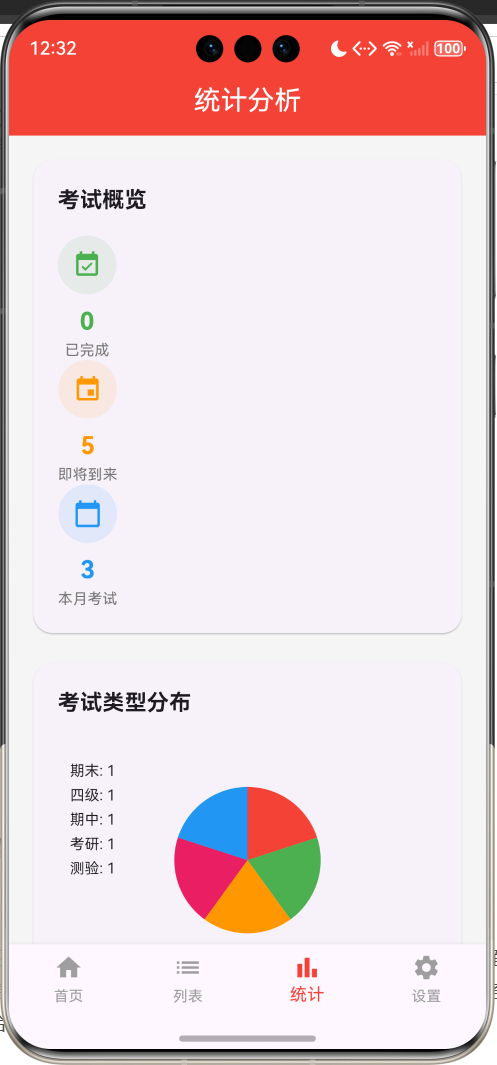
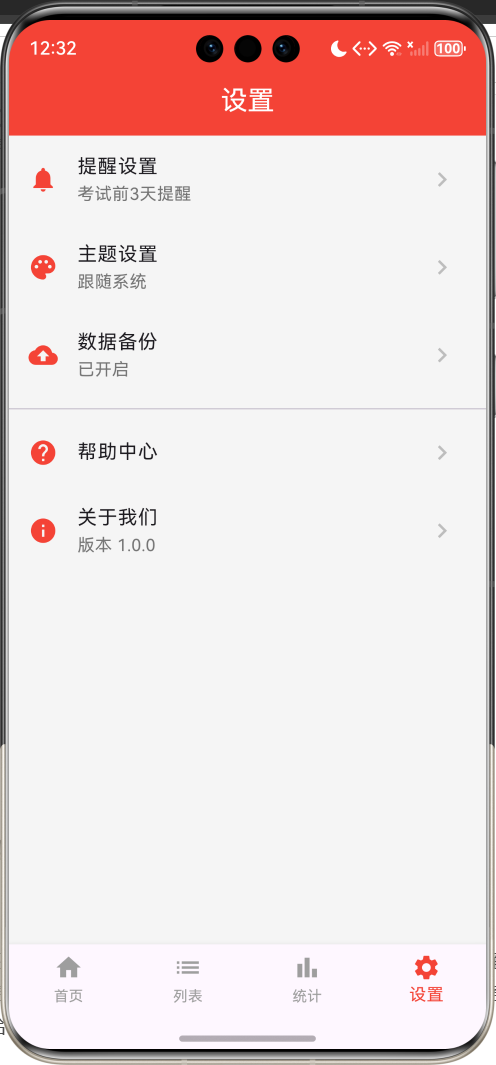
一、项目背景与目标
考试是学生学习生涯中的重要节点,合理安排复习时间、把握考试进度对于取得好成绩至关重要。然而,面对众多的考试安排,学生往往难以有效管理考试信息,容易遗漏重要考试。本项目基于Flutter框架开发一款考试倒计时应用,旨在帮助学生清晰掌握考试时间,合理规划复习进度,提升学习效率。
项目的核心目标涵盖多个维度:构建完整的考试管理系统,实现精确的倒计时显示,设计直观的信息展示,打造便捷的操作体验,以及确保应用的稳定性和性能表现。通过本项目的开发,不仅能够深入理解Flutter在时间管理类应用中的应用,更能掌握定时器、日期处理、数据持久化等核心技术要点。
二、技术选型与架构设计
技术栈分析
本项目选用Flutter作为开发框架,主要基于以下考量:Flutter的跨平台特性能够同时支持Android和iOS平台,降低开发成本;声明式UI编程范式能够高效构建复杂的倒计时界面;丰富的Widget组件库为应用UI开发提供了坚实基础;优秀的性能表现确保了倒计时的实时更新。
Dart语言作为Flutter的开发语言,具备强类型、异步编程支持、优秀的性能表现等特性。项目采用单文件架构,将所有应用逻辑集中在main.dart文件中,这种设计既便于代码管理,又利于理解应用整体架构。
架构层次划分
应用架构采用分层设计思想,主要分为以下几个层次:
数据模型层:定义应用中的核心数据结构,包括Exam(考试实体)、ExamType(考试类型)、ExamStatus(考试状态)等类和枚举。这些模型类封装了考试的状态和行为,构成了应用逻辑的基础。
业务逻辑层:实现应用的核心功能逻辑,包括倒计时计算、状态判断、考试管理、统计聚合等。这一层是应用的心脏,决定了应用的功能性和可用性。
渲染表现层:负责应用界面的绘制和UI展示,使用Flutter的Material Design组件库实现现代化的界面设计,通过CustomPaint组件实现统计图表的绘制。
状态管理层:管理应用的各种状态,包括考试列表、当前页面索引、倒计时更新等,确保应用状态的一致性和可预测性。
核心功能模块详解
一、考试数据模型
考试属性定义
考试实体封装了完整的信息属性:
class Exam {
  final String id;
  String name;
  ExamType type;
  DateTime dateTime;
  String? location;
  String? note;
  String? subject;
  int? duration;
  bool reminder;
  int reminderDays;
}
基础信息包括ID、名称、类型、日期时间;扩展信息包括地点、备注、科目、时长;提醒信息包括是否提醒和提前天数。这种设计既满足了展示需求,又支持灵活的提醒设置。
考试类型定义
应用支持多种考试类型:
enum ExamType {
  finalExam,     // 期末考试
  midterm,       // 期中考试
  quiz,          // 测验
  cet4,          // 英语四级
  cet6,          // 英语六级
  ielts,         // 雅思
  toefl,         // 托福
  gre,           // GRE
  postgraduate,  // 考研
  civil,         // 公务员
  custom,        // 自定义
}
每种类型对应不同的图标和颜色,便于用户快速识别考试性质。
状态计算属性
考试状态通过计算属性动态获取:
ExamStatus get status {
  final now = DateTime.now();
  final today = DateTime(now.year, now.month, now.day);
  final examDay = DateTime(dateTime.year, dateTime.month, dateTime.day);

  if (examDay.isBefore(today)) {
    return ExamStatus.completed;
  } else if (examDay.isAtSameMomentAs(today)) {
    return ExamStatus.today;
  } else {
    return ExamStatus.upcoming;
  }
}
状态分为三种:已完成(考试日期已过)、今天(考试日期是今天)、即将到来(考试日期在未来)。
倒计时计算
剩余时间通过计算属性获取:
Duration get remaining {
  final now = DateTime.now();
  return dateTime.difference(now);
}

int get daysRemaining {
  final now = DateTime.now();
  final today = DateTime(now.year, now.month, now.day);
  final examDay = DateTime(dateTime.year, dateTime.month, dateTime.day);
  return examDay.difference(today).inDays;
}
remaining返回精确到秒的剩余时间,daysRemaining返回剩余天数,用于不同场景的展示。
二、倒计时系统
定时器实现
倒计时使用Timer.periodic实现每秒更新:
void _startTimer() {
_timer = Timer.periodic(const Duration(seconds: 1), (_) {
setState(() {});
});
}
void dispose() {
_timer?.cancel();
super.dispose();
}
定时器每秒触发一次setState,重新计算并显示剩余时间。页面销毁时取消定时器,避免内存泄漏。
时间分解显示
剩余时间分解为天、时、分、秒四个单位:
Widget _buildCountdownCard(Exam exam) {
  final remaining = exam.remaining;
  final days = remaining.inDays;
  final hours = remaining.inHours % 24;
  final minutes = remaining.inMinutes % 60;
  final seconds = remaining.inSeconds % 60;

  return Container(
    child: Row(
      mainAxisAlignment: MainAxisAlignment.spaceEvenly,
      children: [
        _buildTimeUnit(days, '天'),
        _buildTimeUnit(hours, '时'),
        _buildTimeUnit(minutes, '分'),
        _buildTimeUnit(seconds, '秒'),
      ],
    ),
  );
}
每个时间单位使用独立容器显示,数值使用两位数格式,不足补零。
时间单位组件
时间单位使用卡片样式展示:
Widget _buildTimeUnit(int value, String label) {
  return Column(
    children: [
      Container(
        width: 56,
        height: 56,
        decoration: BoxDecoration(
          color: Colors.white.withOpacity(0.2),
          borderRadius: BorderRadius.circular(12),
        ),
        alignment: Alignment.center,
        child: Text(
          value.toString().padLeft(2, '0'),
          style: const TextStyle(
            color: Colors.white,
            fontSize: 28,
            fontWeight: FontWeight.bold,
          ),
        ),
      ),
      const SizedBox(height: 4),
      Text(label, style: const TextStyle(color: Colors.white70, fontSize: 12)),
    ],
  );
}
数值使用大号粗体字,标签使用小号浅色字,层次分明。
三、考试管理系统
添加考试功能
添加考试使用底部弹窗表单:
void _showAddExamDialog() {
  showModalBottomSheet(
    context: context,
    isScrollControlled: true,
    builder: (context) => _AddExamForm(
      onAdd: (exam) {
        _addExam(exam);
        Navigator.pop(context);
      },
    ),
  );
}
表单包含考试名称、类型、日期、时间、地点、备注等字段,支持日期选择器和时间选择器。
日期时间选择
日期选择使用Flutter内置的日期选择器:
Future<void> _selectDate() async {
  final date = await showDatePicker(
    context: context,
    initialDate: _selectedDate,
    firstDate: DateTime.now(),
    lastDate: DateTime.now().add(const Duration(days: 365 * 5)),
  );
  if (date != null) {
    setState(() => _selectedDate = date);
  }
}
日期范围限制为当前日期到未来5年,符合实际使用场景。时间选择同理,使用showTimePicker实现。
考试列表管理
考试列表按时间排序:
void _addExam(Exam exam) {
  setState(() {
    _exams.add(exam);
    _exams.sort((a, b) => a.dateTime.compareTo(b.dateTime));
  });
}
添加考试后自动排序,确保最近的考试显示在最前面。删除考试直接从列表中移除。
考试详情展示
考试详情使用底部弹窗展示:
void _showExamDetail(Exam exam) {
  showModalBottomSheet(
    context: context,
    isScrollControlled: true,
    builder: (context) => Container(
      padding: const EdgeInsets.all(24),
      child: Column(
        children: [
          // 考试信息
          // 操作按钮
        ],
      ),
    ),
  );
}
详情弹窗展示完整的考试信息,提供编辑和删除操作按钮。
四、统计分析功能
快速统计卡片
首页展示今日、本周、本月的考试数量:
Widget _buildQuickStats() {
  final today = _exams.where((e) => e.status == ExamStatus.today).length;
  final thisWeek = _exams.where((e) => e.daysRemaining <= 7 && e.status != ExamStatus.completed).length;
  final thisMonth = _exams.where((e) => e.daysRemaining <= 30 && e.status != ExamStatus.completed).length;

  return Row(
    mainAxisAlignment: MainAxisAlignment.spaceAround,
    children: [
      _buildStatItem(Icons.today, '今天', today.toString(), Colors.red),
      _buildStatItem(Icons.calendar_view_week, '本周', thisWeek.toString(), Colors.orange),
      _buildStatItem(Icons.calendar_month, '本月', thisMonth.toString(), Colors.blue),
    ],
  );
}
统计使用where方法过滤符合条件的考试,计算数量。
类型分布图表
统计页面使用饼图展示考试类型分布:
class ExamTypeChartPainter extends CustomPainter {
final List<Exam> exams;
void paint(Canvas canvas, Size size) {
final typeCount = <ExamType, int>{};
for (var exam in exams) {
typeCount[exam.type] = (typeCount[exam.type] ?? 0) + 1;
}
final entries = typeCount.entries.toList();
final total = exams.length;
final center = Offset(size.width / 2, size.height / 2);
final radius = math.min(size.width, size.height) / 2 - 40;
final paint = Paint()..style = PaintingStyle.fill;
double startAngle = -math.pi / 2;
for (var entry in entries) {
final sweepAngle = 2 * math.pi * entry.value / total;
paint.color = _getTypeColor(entry.key);
canvas.drawArc(
Rect.fromCircle(center: center, radius: radius),
startAngle,
sweepAngle,
true,
paint,
);
startAngle += sweepAngle;
}
}
}
饼图使用CustomPaint绘制,每种类型使用对应颜色,图例显示在左侧。
UI界面开发
一、主界面布局
主界面采用底部导航栏设计,包含四个主要页面:
BottomNavigationBar(
  currentIndex: _currentIndex,
  onTap: (index) => setState(() => _currentIndex = index),
  selectedItemColor: Colors.red,
  unselectedItemColor: Colors.grey,
  type: BottomNavigationBarType.fixed,
  items: const [
    BottomNavigationBarItem(icon: Icon(Icons.home), label: '首页'),
    BottomNavigationBarItem(icon: Icon(Icons.list), label: '列表'),
    BottomNavigationBarItem(icon: Icon(Icons.bar_chart), label: '统计'),
    BottomNavigationBarItem(icon: Icon(Icons.settings), label: '设置'),
  ],
)
四个页面分别是首页、考试列表、统计分析和设置,覆盖了应用的主要功能入口。
二、倒计时卡片设计
倒计时卡片使用渐变背景和阴影效果:
Container(
  margin: const EdgeInsets.all(16),
  padding: const EdgeInsets.all(24),
  decoration: BoxDecoration(
    gradient: LinearGradient(
      colors: [exam.typeColor, exam.typeColor.withOpacity(0.7)],
      begin: Alignment.topLeft,
      end: Alignment.bottomRight,
    ),
    borderRadius: BorderRadius.circular(20),
    boxShadow: [
      BoxShadow(
        color: exam.typeColor.withOpacity(0.3),
        blurRadius: 15,
        offset: const Offset(0, 8),
      ),
    ],
  ),
  child: Column(
    children: [
      // 考试名称
      // 倒计时显示
      // 考试时间
    ],
  ),
)
卡片背景色根据考试类型动态变化,渐变效果增强视觉层次,阴影效果营造立体感。
三、考试列表设计
考试列表使用卡片布局展示:
Widget _buildExamCard(Exam exam) {
  return Card(
    margin: const EdgeInsets.only(bottom: 12),
    shape: RoundedRectangleBorder(borderRadius: BorderRadius.circular(16)),
    child: InkWell(
      onTap: () => _showExamDetail(exam),
      child: Padding(
        padding: const EdgeInsets.all(16),
        child: Row(
          children: [
            Container(
              width: 50,
              height: 50,
              decoration: BoxDecoration(
                color: exam.typeColor.withOpacity(0.1),
                borderRadius: BorderRadius.circular(12),
              ),
              child: Icon(exam.typeIcon, color: exam.typeColor),
            ),
            const SizedBox(width: 12),
            Expanded(
              child: Column(
                crossAxisAlignment: CrossAxisAlignment.start,
                children: [
                  Text(exam.name, style: const TextStyle(fontSize: 16, fontWeight: FontWeight.bold)),
                  Text(exam.typeText, style: TextStyle(color: Colors.grey.shade600, fontSize: 13)),
                ],
              ),
            ),
            Container(
              padding: const EdgeInsets.symmetric(horizontal: 12, vertical: 6),
              decoration: BoxDecoration(
                color: exam.typeColor.withOpacity(0.1),
                borderRadius: BorderRadius.circular(16),
              ),
              child: Text(
                exam.daysRemaining <= 0 ? '已结束' : '${exam.daysRemaining}天',
                style: TextStyle(color: exam.typeColor, fontWeight: FontWeight.bold),
              ),
            ),
          ],
        ),
      ),
    ),
  );
}
卡片左侧显示类型图标,中间显示名称和类型,右侧显示剩余天数。
性能优化方案
一、定时器优化
定时器只在首页激活:
void dispose() {
_timer?.cancel();
super.dispose();
}
页面销毁时取消定时器,避免后台持续运行消耗资源。
二、列表渲染优化
考试列表使用ListView.builder实现按需渲染:
ListView.builder(
  padding: const EdgeInsets.all(16),
  itemCount: _exams.length,
  itemBuilder: (context, index) {
    return _buildExamCard(_exams[index]);
  },
)
只有可见区域的卡片才会被创建和渲染,大幅降低了内存占用。
三、状态更新优化
倒计时更新只刷新必要部分:
_timer = Timer.periodic(const Duration(seconds: 1), (_) {
  setState(() {});
});
setState触发整个页面重建,但对于简单的倒计时应用,性能影响可接受。对于复杂场景,可以考虑使用ValueNotifier或Stream进行局部更新。
测试方案与步骤
一、功能测试
倒计时测试:验证倒计时是否每秒更新;测试跨天倒计时是否正确;检查负数倒计时的处理。
考试管理测试:验证添加考试功能;测试编辑和删除功能;检查考试排序是否正确。
状态判断测试:验证考试状态判断是否正确;测试今天考试的识别;检查已完成考试的标记。
二、边界测试
过去日期测试:测试添加过去日期的考试。
跨年倒计时测试:验证跨年倒计时的正确性。
空列表测试:测试没有考试时的界面展示。
三、用户体验测试
界面响应测试:测试按钮响应的及时性。
视觉体验测试:评估界面设计和颜色搭配。
操作便捷性测试:评估添加考试的流程是否便捷。
项目总结与展望
一、项目成果总结
本项目成功实现了一款功能完整、界面现代的考试倒计时应用,涵盖了时间管理类应用开发的核心要素。通过Flutter框架的应用,实现了跨平台的应用体验,证明了Flutter在工具类应用开发领域的可行性。
项目采用模块化设计思想,将应用功能划分为考试管理、倒计时显示、统计分析等独立模块,各模块职责明确,耦合度低,便于维护和扩展。
二、技术亮点总结
实时倒计时:使用Timer.periodic实现每秒更新的精确倒计时,提供直观的时间感知。
多类型支持:支持11种考试类型,每种类型对应不同的图标和颜色,便于快速识别。
智能状态判断:自动判断考试状态(即将到来、今天、已完成),提供清晰的状态展示。
统计图表:使用CustomPaint绘制饼图,直观展示考试类型分布。
便捷操作:底部弹窗表单、日期时间选择器等组件,提供便捷的操作体验。
三、未来优化方向
本地存储:使用shared_preferences或sqflite实现数据持久化,确保考试信息不丢失。
提醒通知:集成本地通知功能,在考试前提醒用户。
日历集成:与系统日历集成,自动同步考试安排。
桌面小组件:支持桌面小组件,无需打开应用即可查看倒计时。
复习计划:根据考试时间自动生成复习计划,帮助用户合理安排复习进度。
成绩记录:记录考试成绩,分析学习效果。
云端同步:实现数据云端同步,支持多设备共享。
四、开发经验总结
通过本项目的开发,积累了宝贵的Flutter应用开发经验:
时间处理的重要性:倒计时应用的核心是时间处理,理解DateTime、Duration等类型的使用,掌握时区处理、日期比较等技巧,是开发此类应用的基础。
定时器的合理使用:定时器需要谨慎使用,确保在合适的时机启动和取消,避免资源泄漏和性能问题。
用户体验的核心地位:工具类应用最终服务于用户,从倒计时的实时性到操作的便捷性,每个细节都需要精心打磨。
数据管理的必要性:考试信息是用户的重要数据,需要考虑数据持久化、备份恢复等功能,确保数据安全。
本项目为Flutter时间管理应用开发提供了一个完整的实践案例,展示了如何实现倒计时、考试管理、统计图表等核心功能,希望能够为相关开发者提供参考和启发,推动Flutter在工具类应用开发领域的应用和发展。

作为“人工智能6S店”的官方数字引擎,为AI开发者与企业提供一个覆盖软硬件全栈、一站式门户。
更多推荐


 1
1 0
0- 0


 已为社区贡献10条内容

所有评论(0)