
Flutter 框架跨平台鸿蒙开发 - 数学学习助手
运行效果图本项目成功实现了一款功能完整、界面友好的数学学习助手应用,涵盖了教育类应用开发的核心要素。通过Flutter框架的应用,实现了跨平台的应用体验,证明了Flutter在教育科技领域的可行性。项目采用模块化设计思想,将应用功能划分为题库系统、答题流程、进度追踪、数学工具等独立模块,各模块职责明确,耦合度低,便于维护和扩展。动态题目生成:使用随机数生成器动态生成各类数学题目,确保每次练习的内容
Flutter数学学习助手
欢迎加入开源鸿蒙跨平台社区:https://openharmonycrossplatform.csdn.net
项目概述
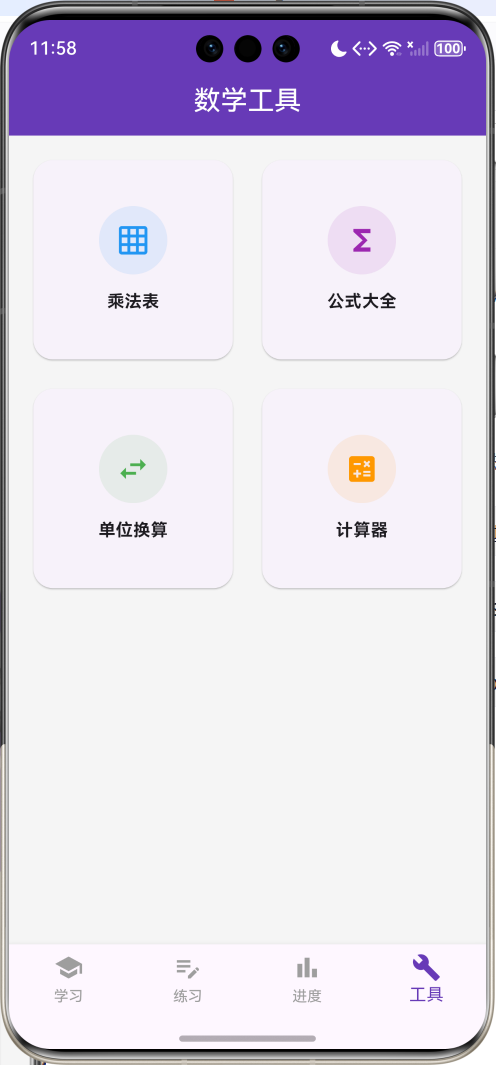
运行效果图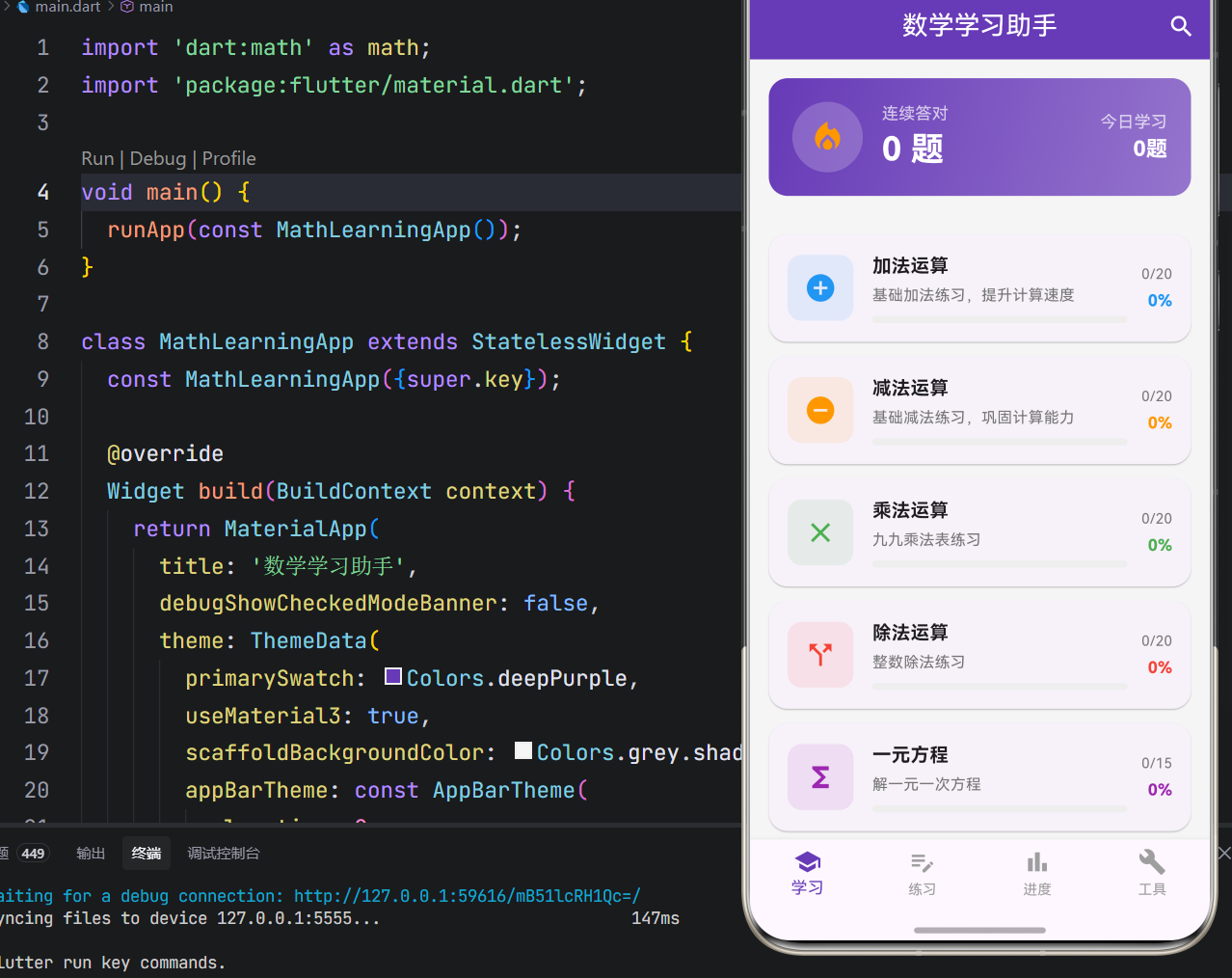
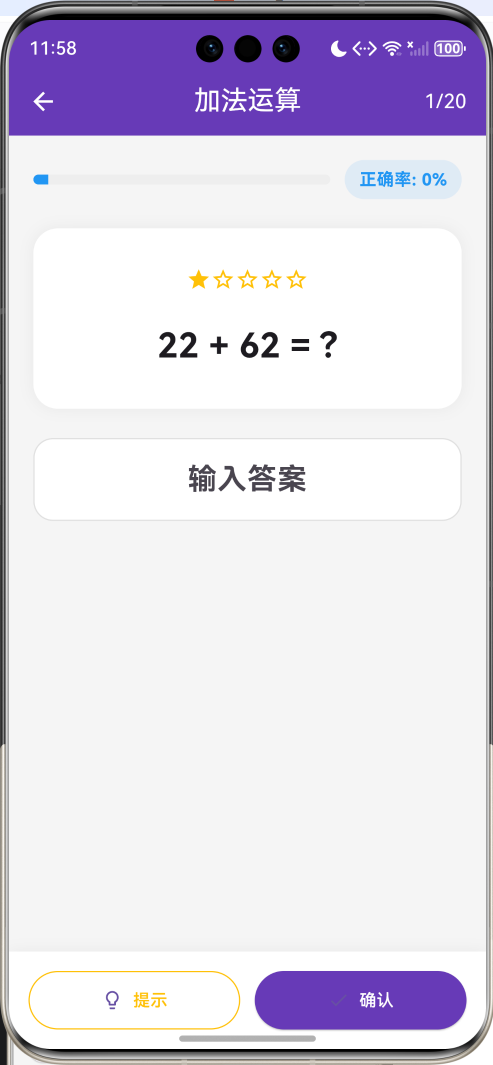
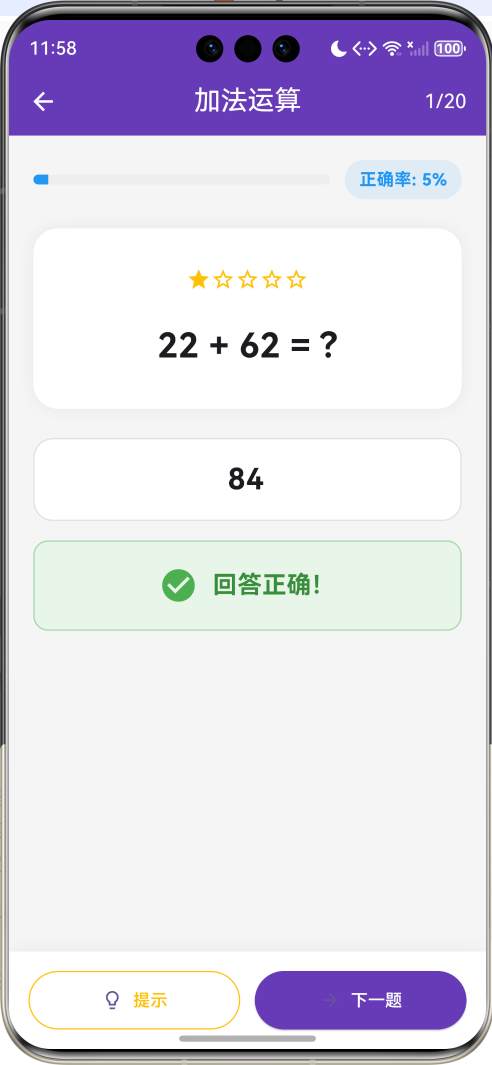
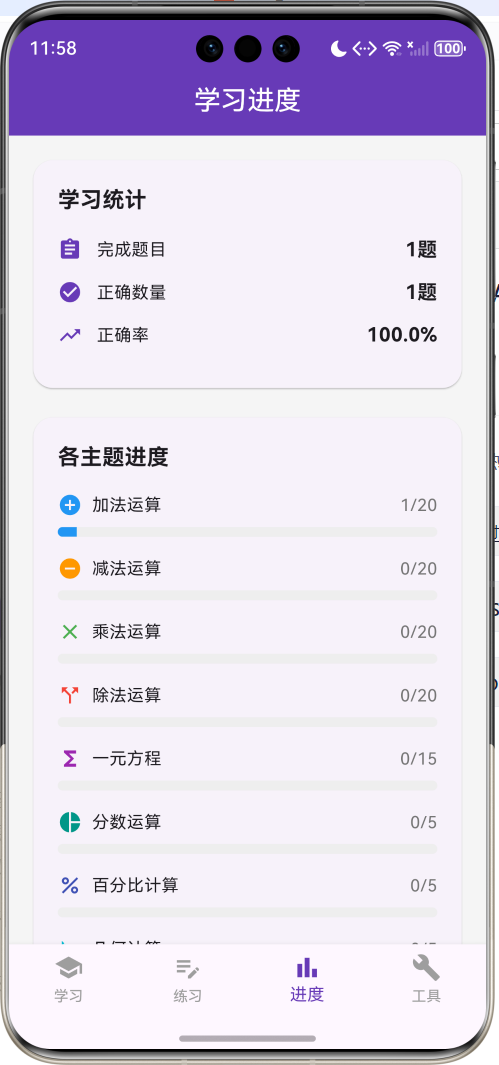
一、项目背景与目标
数学作为基础学科,对学生的逻辑思维能力和问题解决能力培养至关重要。然而传统的数学学习方式往往枯燥乏味,缺乏即时反馈和个性化指导。本项目基于Flutter框架开发一款数学学习助手应用,旨在通过游戏化的学习体验、即时答案反馈、进度追踪等功能,激发学习兴趣,提升数学学习效率。
项目的核心目标涵盖多个维度:构建完整的数学题库系统,实现多种题型练习,设计激励性的学习机制,打造直观的进度展示,以及确保应用的稳定性和性能表现。通过本项目的开发,不仅能够深入理解Flutter在教育类应用中的应用,更能掌握动态题目生成、状态管理、数据统计等核心技术要点。
二、技术选型与架构设计
技术栈分析
本项目选用Flutter作为开发框架,主要基于以下考量:Flutter的跨平台特性能够同时支持Android和iOS平台,降低开发成本;声明式UI编程范式能够高效构建复杂的学习界面;丰富的Widget组件库为应用UI开发提供了坚实基础;优秀的性能表现确保了答题流程的流畅性。
Dart语言作为Flutter的开发语言,具备强类型、异步编程支持、优秀的性能表现等特性。项目采用单文件架构,将所有应用逻辑集中在main.dart文件中,这种设计既便于代码管理,又利于理解应用整体架构。
架构层次划分
应用架构采用分层设计思想,主要分为以下几个层次:
数据模型层:定义应用中的核心数据结构,包括MathTopic(数学主题)、MathProblem(数学题目)、LearningProgress(学习进度)、TopicCategory(主题分类)等类和枚举。这些模型类封装了数学学习的状态和行为,构成了应用逻辑的基础。
业务逻辑层:实现应用的核心功能逻辑,包括题目生成、答案校验、进度计算、连续答对统计等。这一层是应用的心脏,决定了应用的功能性和可用性。
渲染表现层:负责应用界面的绘制和UI展示,使用Flutter的Material Design组件库实现现代化的界面设计,通过卡片布局和进度条展示学习内容。
状态管理层:管理应用的各种状态,包括当前主题、题目索引、答案输入、提示显示、正确率统计等,确保应用状态的一致性和可预测性。
核心功能模块详解
一、题库系统设计
主题分类结构
题库按主题分类组织,涵盖多个数学领域:
enum TopicCategory {
  arithmetic,   // 算术
  algebra,      // 代数
  geometry,     // 几何
  statistics,   // 统计
}
每个主题包含唯一标识、名称、描述、分类、图标、颜色和题目列表:
class MathTopic {
  final String id;
  final String name;
  final String description;
  final TopicCategory category;
  final IconData icon;
  final Color color;
  final List<MathProblem> problems;
}
主题设计采用差异化配色,加法使用蓝色、减法使用橙色、乘法使用绿色、除法使用红色,通过颜色编码帮助用户快速识别主题类型。
题目数据结构
题目实体封装了完整的练习信息:
class MathProblem {
  final String id;
  final String question;
  final String answer;
  final String? hint;
  final String? solution;
  final int difficulty;
  final String topicId;
}
基础信息包括ID、题目文本、答案;辅助信息包括提示、解题步骤;元信息包括难度等级和所属主题。难度使用1-5的星级表示,帮助用户了解题目难度。
二、动态题目生成
加法题目生成
加法题目随机生成两个100以内的整数:
List<MathProblem> _generateAdditionProblems() {
  final random = math.Random();
  return List.generate(20, (i) {
    final a = random.nextInt(100) + 1;
    final b = random.nextInt(100) + 1;
    return MathProblem(
      id: 'add_$i',
      question: '$a + $b = ?',
      answer: '${a + b}',
      hint: '将两个数相加',
      solution: '$a + $b = ${a + b}',
      difficulty: 1,
      topicId: 'addition',
    );
  });
}
使用math.Random生成随机数,确保每次练习的题目都不相同。题目数量设置为20道,提供充足的练习机会。
减法题目生成
减法题目确保结果为正数:
List<MathProblem> _generateSubtractionProblems() {
  final random = math.Random();
  return List.generate(20, (i) {
    final a = random.nextInt(100) + 50;
    final b = random.nextInt(a);
    return MathProblem(
      id: 'sub_$i',
      question: '$a - $b = ?',
      answer: '${a - b}',
      hint: '从较大的数中减去较小的数',
      difficulty: 1,
      topicId: 'subtraction',
    );
  });
}
被减数设置为50-150范围,减数小于被减数,避免出现负数结果,符合初学者的认知水平。
乘法题目生成
乘法题目使用九九乘法表范围:
List<MathProblem> _generateMultiplicationProblems() {
  final random = math.Random();
  return List.generate(20, (i) {
    final a = random.nextInt(9) + 1;
    final b = random.nextInt(9) + 1;
    return MathProblem(
      id: 'mul_$i',
      question: '$a × $b = ?',
      answer: '${a * b}',
      hint: '使用乘法口诀表',
      difficulty: 1,
      topicId: 'multiplication',
    );
  });
}
乘数和被乘数限制在1-9范围,对应九九乘法表,适合小学阶段练习。
除法题目生成
除法题目确保整除:
List<MathProblem> _generateDivisionProblems() {
  final random = math.Random();
  return List.generate(20, (i) {
    final b = random.nextInt(9) + 1;
    final result = random.nextInt(10) + 1;
    final a = b * result;
    return MathProblem(
      id: 'div_$i',
      question: '$a ÷ $b = ?',
      answer: '$result',
      hint: '找出能被除数整除的数',
      difficulty: 1,
      topicId: 'division',
    );
  });
}
先生成除数和商,再计算被除数,确保题目能够整除,避免小数结果。
方程题目生成
方程题目生成一元一次方程:
List<MathProblem> _generateEquationProblems() {
  final random = math.Random();
  return List.generate(15, (i) {
    final x = random.nextInt(20) + 1;
    final a = random.nextInt(10) + 1;
    final b = a * x + random.nextInt(10);
    return MathProblem(
      id: 'eq_$i',
      question: '${a}x + ${b - a * x} = $b,求x',
      answer: '$x',
      hint: '将含x的项移到一边',
      solution: '${a}x = ${b - (b - a * x)},x = $x',
      difficulty: 2,
      topicId: 'equations',
    );
  });
}
方程形式为ax + c = b,其中x为预设解,确保方程有整数解。难度设置为2星,适合有一定基础的学习者。
三、答题流程设计
答案校验机制
用户提交答案后进行校验:
void _checkAnswer() {
  if (_currentTopic == null) return;
  final problem = _currentTopic!.problems[_currentProblemIndex];
  final userAnswer = _answerController.text.trim();

  setState(() {
    _isCorrect = userAnswer == problem.answer;
    if (_isCorrect!) {
      _streak++;
      _progress[_currentTopic!.id]!.correct++;
    } else {
      _streak = 0;
    }
    _progress[_currentTopic!.id]!.completed++;
  });
}
答案比较采用字符串精确匹配,去除首尾空格后比较。答对时增加连续答对计数和正确数,答错时重置连续答对计数。无论对错都增加完成数。
提示功能实现
提示功能帮助用户思考:
Widget _buildHintCard(MathProblem problem) {
  return Container(
    width: double.infinity,
    margin: const EdgeInsets.only(top: 16),
    padding: const EdgeInsets.all(16),
    decoration: BoxDecoration(
      color: Colors.amber.shade50,
      borderRadius: BorderRadius.circular(12),
      border: Border.all(color: Colors.amber.shade200),
    ),
    child: Row(
      children: [
        Icon(Icons.lightbulb, color: Colors.amber.shade700),
        const SizedBox(width: 12),
        Expanded(
          child: Text(
            problem.hint ?? '仔细思考',
            style: TextStyle(color: Colors.amber.shade900),
          ),
        ),
      ],
    ),
  );
}
提示卡片使用琥珀色背景,配合灯泡图标,视觉上突出提示性质。点击"提示"按钮后显示,不自动消失。
解题步骤展示
解题步骤帮助用户理解:
Widget _buildSolutionCard(MathProblem problem) {
  return Container(
    width: double.infinity,
    margin: const EdgeInsets.only(top: 16),
    padding: const EdgeInsets.all(16),
    decoration: BoxDecoration(
      color: Colors.blue.shade50,
      borderRadius: BorderRadius.circular(12),
      border: Border.all(color: Colors.blue.shade200),
    ),
    child: Column(
      crossAxisAlignment: CrossAxisAlignment.start,
      children: [
        Row(
          children: [
            Icon(Icons.menu_book, color: Colors.blue.shade700),
            const SizedBox(width: 12),
            Text('解题步骤', style: TextStyle(color: Colors.blue.shade900, fontWeight: FontWeight.bold)),
          ],
        ),
        const SizedBox(height: 12),
        Text(
          problem.solution ?? problem.answer,
          style: TextStyle(color: Colors.blue.shade900),
        ),
      ],
    ),
  );
}
解题步骤使用蓝色背景,配合书本图标,提供详细的解题过程。
四、进度追踪系统
进度数据模型
学习进度记录完成情况和正确率:
class LearningProgress {
  final String topicId;
  int completed;
  int correct;
  int total;

  double get accuracy => total > 0 ? correct / total : 0;
  double get progress => total > 0 ? completed / total : 0;
}
进度通过计算属性动态计算,正确率等于正确数除以总数,完成进度等于完成数除以总数。
连续答对统计
连续答对数激励用户保持正确:
int _streak = 0;

void _checkAnswer() {
  setState(() {
    _isCorrect = userAnswer == problem.answer;
    if (_isCorrect!) {
      _streak++;
    } else {
      _streak = 0;
    }
  });
}
答对时连续计数加一,答错时重置为零。连续答对数显示在首页卡片中,激励用户保持正确率。
统计数据聚合
进度页面聚合所有主题的统计数据:
Widget _buildProgressPage() {
  final totalCompleted = _progress.values.fold(0, (sum, p) => sum + p.completed);
  final totalCorrect = _progress.values.fold(0, (sum, p) => sum + p.correct);
  final accuracy = totalCompleted > 0 ? totalCorrect / totalCompleted : 0.0;

  return Scaffold(
    body: ListView(
      children: [
        _buildStatCard('学习统计', [
          _buildStatItem(Icons.assignment, '完成题目', '$totalCompleted题'),
          _buildStatItem(Icons.check_circle, '正确数量', '$totalCorrect题'),
          _buildStatItem(Icons.trending_up, '正确率', '${(accuracy * 100).toStringAsFixed(1)}%'),
        ]),
        _buildStatCard('各主题进度', ...),
      ],
    ),
  );
}
使用fold方法对所有主题的进度进行聚合计算,展示总体学习情况。
五、数学工具集成
乘法表展示
乘法表使用表格组件展示:
void _showMultiplicationTable() {
  showDialog(
    context: context,
    builder: (context) => Dialog(
      child: Container(
        padding: const EdgeInsets.all(16),
        child: Column(
          mainAxisSize: MainAxisSize.min,
          children: [
            const Text('九九乘法表', style: TextStyle(fontSize: 18, fontWeight: FontWeight.bold)),
            const SizedBox(height: 16),
            Table(
              border: TableBorder.all(color: Colors.grey.shade300),
              children: List.generate(9, (i) {
                return TableRow(
                  children: List.generate(9, (j) {
                    return Container(
                      padding: const EdgeInsets.all(8),
                      alignment: Alignment.center,
                      child: Text(
                        '${i + 1}×${j + 1}=${(i + 1) * (j + 1)}',
                        style: const TextStyle(fontSize: 11),
                      ),
                    );
                  }),
                );
              }),
            ),
          ],
        ),
      ),
    ),
  );
}
乘法表使用Table组件实现9×9网格,每个单元格显示一个乘法算式。通过对话框形式展示,不占用主界面空间。
UI界面开发
一、主界面布局
主界面采用底部导航栏设计,包含四个主要页面:
BottomNavigationBar(
  currentIndex: _currentIndex,
  onTap: (index) => setState(() => _currentIndex = index),
  selectedItemColor: Colors.deepPurple,
  unselectedItemColor: Colors.grey,
  type: BottomNavigationBarType.fixed,
  items: const [
    BottomNavigationBarItem(icon: Icon(Icons.school), label: '学习'),
    BottomNavigationBarItem(icon: Icon(Icons.edit_note), label: '练习'),
    BottomNavigationBarItem(icon: Icon(Icons.bar_chart), label: '进度'),
    BottomNavigationBarItem(icon: Icon(Icons.build), label: '工具'),
  ],
)
四个页面分别是学习主题、练习答题、进度统计和数学工具,覆盖了应用的主要功能入口。
二、连续答对卡片
首页顶部展示连续答对数和今日学习数:
Widget _buildStreakCard() {
  return Container(
    margin: const EdgeInsets.all(16),
    padding: const EdgeInsets.all(20),
    decoration: BoxDecoration(
      gradient: LinearGradient(
        colors: [Colors.deepPurple, Colors.deepPurple.shade300],
        begin: Alignment.topLeft,
        end: Alignment.bottomRight,
      ),
      borderRadius: BorderRadius.circular(16),
    ),
    child: Row(
      children: [
        Container(
          width: 60,
          height: 60,
          decoration: BoxDecoration(
            color: Colors.white.withOpacity(0.2),
            shape: BoxShape.circle,
          ),
          child: const Icon(Icons.local_fire_department, color: Colors.orange, size: 32),
        ),
        const SizedBox(width: 16),
        Expanded(
          child: Column(
            crossAxisAlignment: CrossAxisAlignment.start,
            children: [
              const Text('连续答对', style: TextStyle(color: Colors.white70, fontSize: 14)),
              Text('$_streak 题', style: const TextStyle(color: Colors.white, fontSize: 28, fontWeight: FontWeight.bold)),
            ],
          ),
        ),
        Column(
          crossAxisAlignment: CrossAxisAlignment.end,
          children: [
            const Text('今日学习', style: TextStyle(color: Colors.white70, fontSize: 14)),
            Text('${_progress.values.fold(0, (sum, p) => sum + p.completed)}题', style: const TextStyle(color: Colors.white, fontSize: 18, fontWeight: FontWeight.bold)),
          ],
        ),
      ],
    ),
  );
}
卡片使用渐变背景,火焰图标象征连续答对的热情,左右分别展示连续答对数和今日学习数。
三、主题卡片设计
主题卡片展示主题信息和进度:
Widget _buildTopicCard(MathTopic topic) {
  final progress = _progress[topic.id]!;
  return Card(
    margin: const EdgeInsets.only(bottom: 12),
    shape: RoundedRectangleBorder(borderRadius: BorderRadius.circular(16)),
    child: InkWell(
      onTap: () => _startTopic(topic),
      child: Padding(
        padding: const EdgeInsets.all(16),
        child: Row(
          children: [
            Container(
              width: 56,
              height: 56,
              decoration: BoxDecoration(
                color: topic.color.withOpacity(0.1),
                borderRadius: BorderRadius.circular(12),
              ),
              child: Icon(topic.icon, color: topic.color, size: 28),
            ),
            const SizedBox(width: 16),
            Expanded(
              child: Column(
                crossAxisAlignment: CrossAxisAlignment.start,
                children: [
                  Text(topic.name, style: const TextStyle(fontSize: 16, fontWeight: FontWeight.bold)),
                  Text(topic.description, style: TextStyle(fontSize: 13, color: Colors.grey.shade600)),
                  LinearProgressIndicator(value: progress.progress, ...),
                ],
              ),
            ),
            Column(
              crossAxisAlignment: CrossAxisAlignment.end,
              children: [
                Text('${progress.completed}/${progress.total}'),
                Text('${(progress.accuracy * 100).toStringAsFixed(0)}%'),
              ],
            ),
          ],
        ),
      ),
    ),
  );
}
卡片左侧显示主题图标,中间显示名称、描述和进度条,右侧显示完成数和正确率。
四、答题界面设计
答题界面分为题目展示、答案输入、提示区域和操作按钮:
Column(
  children: [
    _buildProgressBar(progress),
    const SizedBox(height: 24),
    _buildQuestionCard(problem),
    const SizedBox(height: 24),
    _buildAnswerInput(),
    if (_showHint) _buildHintCard(problem),
    if (_showSolution) _buildSolutionCard(problem),
    if (_isCorrect != null) _buildResultCard(),
  ],
)
界面采用垂直布局,从上到下依次是进度条、题目卡片、答案输入框、提示卡片、解题步骤和结果反馈。
性能优化方案
一、题目生成优化
题目在应用启动时一次性生成:
void _loadTopics() {
  _topics.addAll([
    MathTopic(problems: _generateAdditionProblems()),
    MathTopic(problems: _generateSubtractionProblems()),
    ...
  ]);
}
预生成避免了答题过程中的计算延迟,确保答题流程的流畅性。
二、状态管理优化
进度更新采用增量方式:
void _checkAnswer() {
  setState(() {
    _isCorrect = userAnswer == problem.answer;
    if (_isCorrect!) {
      _streak++;
      _progress[_currentTopic!.id]!.correct++;
    }
    _progress[_currentTopic!.id]!.completed++;
  });
}
只更新变化的字段,避免重建整个数据结构,减少不必要的计算开销。
三、列表渲染优化
主题列表使用ListView.builder实现按需渲染:
ListView.builder(
  padding: const EdgeInsets.all(16),
  itemCount: _topics.length,
  itemBuilder: (context, index) {
    return _buildTopicCard(_topics[index]);
  },
)
只有可见区域的卡片才会被创建和渲染,大幅降低了内存占用。
测试方案与步骤
一、功能测试
题目生成测试:验证各类题目生成是否正确;测试题目数量是否符合预期;检查答案计算是否准确。
答题流程测试:验证答案校验是否正确;测试提示功能是否有效;检查解题步骤是否显示。
进度统计测试:验证正确率计算是否准确;测试连续答对统计是否正确;检查进度更新是否及时。
二、边界测试
空输入测试:测试不输入答案直接提交的情况。
错误答案测试:验证错误答案的处理逻辑。
完成所有题目测试:测试完成所有题目后的界面跳转。
三、用户体验测试
界面响应测试:测试按钮响应的及时性。
视觉体验测试:评估界面设计和颜色搭配。
学习激励测试:评估连续答对等激励机制的效果。
项目总结与展望
一、项目成果总结
本项目成功实现了一款功能完整、界面友好的数学学习助手应用,涵盖了教育类应用开发的核心要素。通过Flutter框架的应用,实现了跨平台的应用体验,证明了Flutter在教育科技领域的可行性。
项目采用模块化设计思想,将应用功能划分为题库系统、答题流程、进度追踪、数学工具等独立模块,各模块职责明确,耦合度低,便于维护和扩展。
二、技术亮点总结
动态题目生成:使用随机数生成器动态生成各类数学题目,确保每次练习的内容不同。
多主题支持:支持加减乘除、方程、分数、百分比、几何等多种主题,覆盖基础数学知识点。
即时反馈机制:答案提交后立即显示正确与否,配合提示和解题步骤帮助学习。
进度追踪系统:记录每个主题的完成情况和正确率,提供学习数据可视化。
激励机制设计:连续答对统计激励用户保持正确率,提升学习积极性。
三、未来优化方向
难度自适应:根据用户答题情况自动调整题目难度,实现个性化学习。
错题本功能:记录答错的题目,支持针对性复习。
学习报告:生成详细的学习报告,分析学习情况。
多人竞技:支持多人在线竞技答题,增加学习趣味性。
AI辅导:集成AI助手,提供个性化学习建议和解题指导。
家长监控:支持家长查看孩子学习进度和报告。
四、开发经验总结
通过本项目的开发,积累了宝贵的Flutter应用开发经验:
教育应用的设计理念:教育类应用需要平衡学习效果和用户体验,通过激励机制和即时反馈提升学习积极性,避免枯燥乏味。
动态内容生成的重要性:题目动态生成确保了练习的新鲜感,避免了固定题库的局限性,同时减少了存储空间占用。
数据统计的价值:学习进度和正确率的统计不仅帮助用户了解自己的学习情况,也为应用优化提供了数据支持。
界面设计的友好性:教育类应用面向学生群体,界面设计需要简洁明了、色彩鲜明,操作流程需要直观易懂。
本项目为Flutter教育类应用开发提供了一个完整的实践案例,展示了如何实现题目生成、答题流程、进度追踪等核心功能,希望能够为相关开发者提供参考和启发,推动Flutter在教育科技领域的应用和发展。

作为“人工智能6S店”的官方数字引擎,为AI开发者与企业提供一个覆盖软硬件全栈、一站式门户。
更多推荐
 0
0 0
0- 0


 已为社区贡献6条内容

所有评论(0)