
ReactNative项目OpenHarmony三方库集成实战:react-native-push-notification-ios
在移动应用开发中,推送通知是与用户保持互动的重要方式。无论是即时消息提醒、系统公告还是定时提醒,都需要使用本地通知或远程推送功能。是 React Native 官方社区维护的推送通知库,提供了完整的本地通知和远程推送功能支持。库名称版本信息1.11.2: 支持 RN 0.72 版本1.12.0: 支持 RN 0.77 版本官方仓库鸿蒙仓库主要功能🔔 发送本地通知📋 管理已送达通知🔢 设置应用
欢迎加入开源鸿蒙跨平台社区:https://openharmonycrossplatform.csdn.net
📋 前言
在移动应用开发中,推送通知是与用户保持互动的重要方式。无论是即时消息提醒、系统公告还是定时提醒,都需要使用本地通知或远程推送功能。@react-native-community/push-notification-ios 是 React Native 官方社区维护的推送通知库,提供了完整的本地通知和远程推送功能支持。
应用场景
| 场景 | 说明 | 示例 |
|---|---|---|
| 即时消息提醒 | 收到新消息时立即通知用户 | 聊天应用、社交应用 |
| 系统公告 | 向用户推送重要系统通知 | 维护公告、版本更新 |
| 任务提醒 | 提醒用户完成待办事项 | 日历应用、待办事项应用 |
| 后台同步 | 静默通知触发后台数据同步 | 邮件同步、数据更新 |
| 营销推送 | 向用户推送促销活动信息 | 电商应用、优惠活动 |
| 状态更新 | 通知用户某个状态发生变化 | 订单状态、审批结果 |
🎯 库简介
基本信息
- 库名称:
@react-native-community/push-notification-ios - 版本信息:
1.11.2+@react-native-ohos/push-notification-ios: 支持 RN 0.72 版本1.12.0+@react-native-ohos/push-notification-ios: 支持 RN 0.77 版本
- 官方仓库: https://github.com/react-native-community/push-notification-ios
- 鸿蒙仓库: https://github.com/react-native-oh-library/react-native-push-notification-ios
- 主要功能:
- 🔔 发送本地通知
- 📋 管理已送达通知
- 🔢 设置应用角标
- 🔕 静默通知支持
- 📦 自定义通知数据
为什么需要 push-notification-ios?
| 特性 | React Native 原生通知 | push-notification-ios |
|---|---|---|
| 统一 API | ❌ 平台差异大 | ✅ 跨平台一致 |
| 本地通知 | ⚠️ 需自行实现 | ✅ 内置支持 |
| 角标管理 | ❌ 不支持 | ✅ 支持 |
| 通知管理 | ❌ 不支持 | ✅ 支持增删查 |
| 自定义数据 | ❌ 不支持 | ✅ userInfo 支持 |
| 静默通知 | ❌ 不支持 | ✅ 支持 |
| HarmonyOS 支持 | ❌ 不支持 | ✅ 完全支持 |
支持的功能
| 功能 | 说明 | HarmonyOS 支持 |
|---|---|---|
| addNotificationRequest | 发送通知请求 | ✅ |
| getDeliveredNotifications | 获取已送达通知 | ✅ |
| removeAllDeliveredNotifications | 清除所有通知 | ✅ |
| removeDeliveredNotifications | 清除指定通知 | ✅ |
| setApplicationIconBadgeNumber | 设置角标数字 | ✅ |
| requestPermissions | 申请通知权限 | ❌ |
| checkPermissions | 检查通知权限 | ❌ |
| getInitialNotification | 获取启动通知 | ❌ |
| cancelLocalNotifications | 取消本地通知 | ❌ |
| getScheduledLocalNotifications | 获取计划通知 | ❌ |
HarmonyOS 与 iOS 差异说明
| 功能 | iOS | HarmonyOS |
|---|---|---|
| 定时通知 | 支持 fireDate 设置触发时间 | 不支持,需自行实现定时逻辑 |
| 重复通知 | 支持 repeats 设置重复 | 不支持 |
| 通知音效 | 支持 sound 自定义音效 | 不支持 |
| 通知副标题 | 支持 subtitle | 不支持 |
| 通知分类 | 支持 category | 不支持 |
| 权限申请 | 支持 requestPermissions | 需使用 react-native-permissions |
| 角标获取 | 支持 getApplicationIconBadgeNumber | 不支持 |
📦 安装步骤
1. 安装依赖
在项目根目录执行以下命令:
# RN 0.72 版本
npm install @react-native-ohos/push-notification-ios@1.11.2-rc.1

# RN 0.77 版本
npm install @react-native-ohos/push-notification-ios@1.12.0-rc.1
2. 验证安装
安装完成后,检查 package.json 中是否包含:
{
  "dependencies": {
    "@react-native-ohos/push-notification-ios": "^1.11.2-rc.1"
  }
}
3. 检查 HAR 包
确认 HAR 包已正确安装:
# 检查 HAR 包是否存在
ls node_modules/@react-native-ohos/push-notification-ios/harmony/

# 应该看到 push_notification.har 文件
🔐 权限配置说明
普通应用通知权限配置
对于普通应用,发送本地通知只需要:
- 在代码中请求用户授权通知(无需在 module.json5 中声明权限)
- 用户在系统设置中开启应用通知权限
代码中请求通知权限
使用 react-native-permissions 库请求通知权限:
适配这个库可以看另一篇文章:https://blog.csdn.net/2402_83107102/article/details/159431029
import { requestNotifications, checkNotifications } from 'react-native-permissions';

// 检查通知权限状态
const checkNotificationPermission = async () => {
  const { status } = await checkNotifications();
  console.log('通知权限状态:', status);
  return status;
};

// 请求通知权限
const requestNotificationPermission = async () => {
  const { status } = await requestNotifications(['alert', 'badge', 'sound']);
  console.log('通知权限请求结果:', status);
  return status;
};
🔧 原生模块配置(RN 0.72)
1. 配置 oh-package.json5
打开 harmony/entry/oh-package.json5,添加依赖:
{
  "license": "ISC",
  "devDependencies": {},
  "author": "",
  "name": "entry",
  "description": "Please describe the basic information.",
  "main": "",
  "version": "1.0.0",
  "dynamicDependencies": {},
  "dependencies": {
    "@rnoh/react-native-openharmony": "0.72.90",
    "@react-native-ohos/push-notification-ios": "file:../../node_modules/@react-native-ohos/push-notification-ios/harmony/push_notification.har"
  }
}
点击右上角的 sync 按钮,或在终端执行:
cd harmony/entry
ohpm install
2. 配置 CMakeLists.txt
打开 harmony/entry/src/main/cpp/CMakeLists.txt,添加以下内容:
# 在文件顶部添加
+ set(OH_MODULES "${CMAKE_CURRENT_SOURCE_DIR}/../../../oh_modules")

# 在 RNOH_BEGIN: manual_package_linking_1 注释后添加
# RNOH_BEGIN: manual_package_linking_1
+ add_subdirectory("${OH_MODULES}/@react-native-ohos/push-notification-ios/src/main/cpp" ./push_notification)
# RNOH_END: manual_package_linking_1

# 在 RNOH_BEGIN: manual_package_linking_2 注释后添加
# RNOH_BEGIN: manual_package_linking_2
+ target_link_libraries(rnoh_app PUBLIC rnoh_push_notification)
# RNOH_END: manual_package_linking_2
3. 配置 PackageProvider.cpp
打开 harmony/entry/src/main/cpp/PackageProvider.cpp,添加:
#include "RNOH/PackageProvider.h"
#include "SamplePackage.h"
+#include "PushNotificationPackage.h"  // 添加此行

using namespace rnoh;

std::vector<std::shared_ptr<Package>> PackageProvider::getPackages(Package::Context ctx) {
    return {
        std::make_shared<SamplePackage>(ctx),
        +std::make_shared<PushNotificationPackage>(ctx),  // 添加此行
    };
}
4. 配置 RNPackagesFactory.ts
打开 harmony/entry/src/main/ets/RNPackagesFactory.ts,添加:
import { RNPackageContext, RNPackage } from '@rnoh/react-native-openharmony/ts';
import { SamplePackage } from './ts/SamplePackage';
+import { PushNotificationPackage } from '@react-native-ohos/push-notification-ios/ts';  // 添加此行

export function createRNPackages(ctx: RNPackageContext): RNPackage[] {
  return [
    new SamplePackage(ctx),
   + new PushNotificationPackage(ctx),  // 添加此行
  ];
}
5. 配置 EntryAbility.ets(必须配置)
打开 harmony/entry/src/main/ets/entryability/EntryAbility.ets,添加通知处理:
import UIAbility from '@ohos.app.ability.UIAbility';
import hilog from '@ohos.hilog';
import Window from '@ohos.window';
import Want from '@ohos.app.ability.Want';
import AbilityConstant from '@ohos.app.ability.AbilityConstant';
import { PushNotificationModule } from '@react-native-ohos/push-notification-ios/ts';  // 添加此行

export default class EntryAbility extends UIAbility {
  onCreate(want: Want, launchParam: AbilityConstant.LaunchParam): void {
    hilog.info(0x0000, 'testTag', '%{public}s', 'Ability onCreate');
  }

  onDestroy(): void {
    hilog.info(0x0000, 'testTag', '%{public}s', 'Ability onDestroy');
  }

  onWindowStageCreate(windowStage: Window.WindowStage): void {
    hilog.info(0x0000, 'testTag', '%{public}s', 'Ability onWindowStageCreate');

    windowStage.loadContent('pages/Index', (err, data) => {
      if (err.code) {
        hilog.error(0x0000, 'testTag', 'Failed to load the content. Cause: %{public}s',
          JSON.stringify(err) ?? '');
        return;
      }
      hilog.info(0x0000, 'testTag', 'Succeeded in loading the content. Data: %{public}s',
        JSON.stringify(data) ?? '');
    });
  }

  onWindowStageDestroy(): void {
    hilog.info(0x0000, 'testTag', '%{public}s', 'Ability onWindowStageDestroy');
  }

  onForeground(): void {
    hilog.info(0x0000, 'testTag', '%{public}s', 'Ability onForeground');
  }

  onBackground(): void {
    hilog.info(0x0000, 'testTag', '%{public}s', 'Ability onBackground');
  }

  // 添加此方法 - 处理点击通知启动应用
  onNewWant(want: Want, _launchParam: AbilityConstant.LaunchParam): void {
    PushNotificationModule.getInstance().didReceiveRemoteNotification(want);
  }
}
原生模块配置(RN 0.77)
RN 0.77 版本不支持 Autolink,需要手动配置原生模块,配置步骤与 RN 0.72 相同。
📖 API 详解
通知请求参数详解
NotificationRequest 接口定义
interface NotificationRequest {
  id: string;           // 通知唯一标识(必填)
  title: string;        // 通知标题(必填)
  body: string;         // 通知内容(必填)
  badge?: number;       // 角标数字(可选)
  isSilent?: boolean;   // 是否静默通知(可选)
  userInfo?: {          // 自定义数据(可选)
    [key: string]: any;
  };
  // 以下参数 HarmonyOS 不支持
  subtitle?: string;    // 通知副标题
  fireDate?: Date;      // 触发时间
  repeats?: boolean;    // 是否重复
  sound?: string;       // 通知音效
  category?: string;    // 通知分类
}
参数详细说明
| 参数名 | 类型 | 必填 | 说明 | HarmonyOS 支持 | 使用场景 |
|---|---|---|---|---|---|
| id | string | 是 | 通知唯一标识 | ✅ | 用于管理通知 |
| title | string | 是 | 通知标题 | ✅ | 显示在通知栏标题 |
| body | string | 是 | 通知内容 | ✅ | 显示在通知栏内容 |
| badge | number | 否 | 角标数字 | ✅ | 显示在应用图标 |
| isSilent | boolean | 否 | 是否静默通知 | ✅ | 后台同步、静默更新 |
| userInfo | object | 否 | 自定义数据 | ✅ | 点击通知后处理 |
| subtitle | string | 否 | 通知副标题 | ❌ | - |
| fireDate | Date | 否 | 触发时间 | ❌ | - |
| repeats | boolean | 否 | 是否重复 | ❌ | - |
| sound | string | 否 | 通知音效 | ❌ | - |
| category | string | 否 | 通知分类 | ❌ | - |
基础 API 使用
1. addNotificationRequest - 发送通知
发送本地通知请求,支持普通通知和静默通知。
import PushNotification from '@react-native-community/push-notification-ios';

// 发送普通通知
const sendNormalNotification = () => {
  PushNotification.addNotificationRequest({
    id: `notification-${Date.now()}`,
    title: '新消息',
    body: '您有一条新消息,请查收',
    badge: 1,
    userInfo: {
      type: 'message',
      messageId: '12345',
      timestamp: Date.now()
    }
  });
};

// 发送静默通知(用于后台同步)
const sendSilentNotification = () => {
  PushNotification.addNotificationRequest({
    id: `silent-${Date.now()}`,
    title: '后台同步',
    body: '正在同步数据...',
    isSilent: true,
    userInfo: {
      action: 'sync',
      syncType: 'messages'
    }
  });
};

// 发送带角标的通知
const sendBadgeNotification = (count: number) => {
  PushNotification.addNotificationRequest({
    id: `badge-${Date.now()}`,
    title: '未读消息',
    body: `您有 ${count} 条未读消息`,
    badge: count,
    userInfo: {
      badgeCount: count
    }
  });
};
2. getDeliveredNotifications - 获取已送达通知
获取当前显示在通知中心的应用通知列表。
⚠️ HarmonyOS 数据格式差异:
- iOS 返回格式:
{ identifier, content: { title, body, userInfo } }- HarmonyOS 返回格式:
{ id, title, body, userInfo }- 建议使用兼容性写法处理两种格式
import PushNotification from '@react-native-community/push-notification-ios';

// 获取所有已送达通知(兼容 iOS 和 HarmonyOS)
const getNotifications = () => {
  PushNotification.getDeliveredNotifications((notifications) => {
    console.log('已送达通知数量:', notifications.length);

    notifications.forEach((notification, index) => {
      console.log(`通知 ${index + 1}:`);
      // 兼容 iOS 和 HarmonyOS 两种数据格式
      console.log('  ID:', notification.id || notification.identifier);
      console.log('  标题:', notification.title || notification.content?.title);
      console.log('  内容:', notification.body || notification.content?.body);
      console.log('  数据:', notification.userInfo || notification.content?.userInfo);
    });
  });
};

// 检查是否有特定类型的通知(兼容写法)
const hasNotificationOfType = (type: string): Promise<boolean> => {
  return new Promise((resolve) => {
    PushNotification.getDeliveredNotifications((notifications) => {
      const found = notifications.some((n: any) => {
        const userInfo = n.userInfo || n.content?.userInfo;
        return userInfo?.type === type;
      });
      resolve(found);
    });
  });
};

// 解析通知数据(兼容函数)
const parseNotification = (notification: any) => {
  return {
    id: String(notification.id || notification.identifier || ''),
    title: notification.title || notification.content?.title || '',
    body: notification.body || notification.content?.body || '',
    userInfo: notification.userInfo || notification.content?.userInfo || {},
  };
};
3. removeDeliveredNotifications - 移除指定通知
从通知中心移除指定的已送达通知。
import PushNotification from '@react-native-community/push-notification-ios';

// 移除单个通知
const removeSingleNotification = (id: string) => {
  PushNotification.removeDeliveredNotifications([id]);
};

// 移除多个通知
const removeMultipleNotifications = (ids: string[]) => {
  PushNotification.removeDeliveredNotifications(ids);
};

// 移除特定类型的所有通知(兼容写法)
const removeNotificationsByType = async (type: string) => {
  PushNotification.getDeliveredNotifications((notifications) => {
    const idsToRemove = notifications
      .filter((n: any) => {
        const userInfo = n.userInfo || n.content?.userInfo;
        return userInfo?.type === type;
      })
      .map((n: any) => String(n.id || n.identifier));

    if (idsToRemove.length > 0) {
      PushNotification.removeDeliveredNotifications(idsToRemove);
    }
  });
};
4. removeAllDeliveredNotifications - 清除所有通知
从通知中心移除所有已送达通知。
import PushNotification from '@react-native-community/push-notification-ios';

// 清除所有通知
const clearAllNotifications = () => {
  PushNotification.removeAllDeliveredNotifications();
};

// 清除所有通知并重置角标
const clearAllAndResetBadge = () => {
  PushNotification.removeAllDeliveredNotifications();
  PushNotification.setApplicationIconBadgeNumber(0);
};
5. setApplicationIconBadgeNumber - 设置角标
设置应用图标上显示的角标数字。
import PushNotification from '@react-native-community/push-notification-ios';

// 设置角标数字
const setBadge = (count: number) => {
  PushNotification.setApplicationIconBadgeNumber(count);
};

// 清除角标
const clearBadge = () => {
  PushNotification.setApplicationIconBadgeNumber(0);
};

// 增加角标
const incrementBadge = (currentCount: number) => {
  PushNotification.setApplicationIconBadgeNumber(currentCount + 1);
};

// 减少角标
const decrementBadge = (currentCount: number) => {
  const newCount = Math.max(0, currentCount - 1);
  PushNotification.setApplicationIconBadgeNumber(newCount);
  return newCount;
};
💡 高级用法
1. 通知类型封装
封装不同类型的通知,便于统一管理:
import PushNotification from '@react-native-community/push-notification-ios';

type NotificationType = 'message' | 'system' | 'reminder' | 'promotion';

interface NotificationData {
  type: NotificationType;
  title: string;
  body: string;
  data?: Record<string, any>;
}

class NotificationManager {
  private static instance: NotificationManager;
  private badgeCount: number = 0;

  static getInstance(): NotificationManager {
    if (!NotificationManager.instance) {
      NotificationManager.instance = new NotificationManager();
    }
    return NotificationManager.instance;
  }

  // 发送消息通知
  sendMessage(title: string, body: string, messageId: string) {
    this.send({
      type: 'message',
      title,
      body,
      data: { messageId, timestamp: Date.now() }
    });
  }

  // 发送系统通知
  sendSystem(title: string, body: string) {
    this.send({
      type: 'system',
      title: `【系统】${title}`,
      body,
      data: { timestamp: Date.now() }
    });
  }

  // 发送提醒通知
  sendReminder(title: string, body: string, reminderId: string) {
    this.send({
      type: 'reminder',
      title: `⏰ ${title}`,
      body,
      data: { reminderId }
    });
  }

  // 发送促销通知
  sendPromotion(title: string, body: string, promotionId: string) {
    this.send({
      type: 'promotion',
      title: `🎁 ${title}`,
      body,
      data: { promotionId }
    });
  }

  // 通用发送方法
  private send(notification: NotificationData) {
    this.badgeCount++;

    PushNotification.addNotificationRequest({
      id: `${notification.type}-${Date.now()}`,
      title: notification.title,
      body: notification.body,
      badge: this.badgeCount,
      userInfo: {
        type: notification.type,
        ...notification.data
      }
    });
  }

  // 清除特定类型通知
  async clearByType(type: NotificationType) {
    return new Promise<void>((resolve) => {
      PushNotification.getDeliveredNotifications((notifications) => {
        const idsToRemove = notifications
          .filter((n: any) => n.content?.userInfo?.type === type)
          .map((n: any) => n.identifier);

        if (idsToRemove.length > 0) {
          PushNotification.removeDeliveredNotifications(idsToRemove);
          this.badgeCount = Math.max(0, this.badgeCount - idsToRemove.length);
          PushNotification.setApplicationIconBadgeNumber(this.badgeCount);
        }
        resolve();
      });
    });
  }

  // 获取当前角标数
  getBadgeCount(): number {
    return this.badgeCount;
  }

  // 重置角标
  resetBadge() {
    this.badgeCount = 0;
    PushNotification.setApplicationIconBadgeNumber(0);
  }
}

// 使用示例
const notificationManager = NotificationManager.getInstance();

// 发送不同类型的通知
notificationManager.sendMessage('张三', '你好,在吗?', 'msg-001');
notificationManager.sendSystem('维护通知', '系统将于今晚维护');
notificationManager.sendReminder('会议提醒', '下午3点有会议', 'rem-001');
notificationManager.sendPromotion('限时优惠', '全场5折起', 'promo-001');

// 清除特定类型通知
notificationManager.clearByType('promotion');
2. 通知点击处理
处理用户点击通知后的行为:
import { useState, useEffect } from 'react';
import { Alert, Linking } from 'react-native';
import PushNotification from '@react-native-community/push-notification-ios';

interface NotificationHandlerProps {
  onMessageNotification?: (messageId: string) => void;
  onSystemNotification?: () => void;
  onReminderNotification?: (reminderId: string) => void;
  onPromotionNotification?: (promotionId: string) => void;
}

const useNotificationHandler = (handlers: NotificationHandlerProps) => {
  const [lastNotification, setLastNotification] = useState<any>(null);

  useEffect(() => {
    // 监听应用从通知启动
    checkInitialNotification();
  }, []);

  const checkInitialNotification = async () => {
    // 获取当前显示的通知
    PushNotification.getDeliveredNotifications((notifications) => {
      if (notifications.length > 0) {
        const latest = notifications[notifications.length - 1];
        handleNotification(latest.content?.userInfo);
      }
    });
  };

  const handleNotification = (userInfo: any) => {
    if (!userInfo) return;

    setLastNotification(userInfo);

    switch (userInfo.type) {
      case 'message':
        handlers.onMessageNotification?.(userInfo.messageId);
        break;
      case 'system':
        handlers.onSystemNotification?.();
        break;
      case 'reminder':
        handlers.onReminderNotification?.(userInfo.reminderId);
        break;
      case 'promotion':
        handlers.onPromotionNotification?.(userInfo.promotionId);
        break;
      default:
        console.log('未知通知类型:', userInfo.type);
    }
  };

  const clearLastNotification = () => {
    if (lastNotification?.id) {
      PushNotification.removeDeliveredNotifications([lastNotification.id]);
    }
    setLastNotification(null);
  };

  return {
    lastNotification,
    clearLastNotification,
    handleNotification
  };
};

// 使用示例
const App = () => {
  const { lastNotification, clearLastNotification } = useNotificationHandler({
    onMessageNotification: (messageId) => {
      console.log('打开消息:', messageId);
      // 导航到消息详情页
    },
    onSystemNotification: () => {
      console.log('打开系统通知');
      // 导航到系统通知页
    },
    onReminderNotification: (reminderId) => {
      console.log('打开提醒:', reminderId);
      // 导航到提醒详情页
    },
    onPromotionNotification: (promotionId) => {
      console.log('打开促销:', promotionId);
      // 导航到促销页面
    }
  });

  return (
    // ... 你的应用组件
  );
};
3. 与 react-native-permissions 配合
在 HarmonyOS 上,需要使用 react-native-permissions 来申请通知权限:
import { useState, useEffect } from 'react';
import { Alert, Platform } from 'react-native';
import {
  checkNotifications,
  requestNotifications,
  RESULTS
} from 'react-native-permissions';
import PushNotification from '@react-native-community/push-notification-ios';

const useNotificationPermission = () => {
  const [hasPermission, setHasPermission] = useState(false);
  const [isChecking, setIsChecking] = useState(true);

  useEffect(() => {
    checkPermission();
  }, []);

  const checkPermission = async () => {
    setIsChecking(true);
    try {
      const { status } = await checkNotifications();
      setHasPermission(status === RESULTS.GRANTED);
    } catch (error) {
      console.error('检查通知权限失败:', error);
      setHasPermission(false);
    } finally {
      setIsChecking(false);
    }
  };

  const requestPermission = async () => {
    try {
      const { status } = await requestNotifications(['alert', 'sound', 'badge']);

      if (status === RESULTS.GRANTED) {
        setHasPermission(true);
        return true;
      } else if (status === RESULTS.BLOCKED) {
        Alert.alert(
          '权限被拒绝',
          '通知权限被拒绝,请在系统设置中手动开启',
          [
            { text: '取消', style: 'cancel' },
            { text: '去设置', onPress: () => openSettings() }
          ]
        );
        return false;
      }

      return false;
    } catch (error) {
      console.error('申请通知权限失败:', error);
      return false;
    }
  };

  const openSettings = () => {
    // 打开系统设置
    // 可以使用 Linking.openURL 或 openSettings() from react-native-permissions
  };

  const sendNotificationIfPermitted = async (
    title: string,
    body: string,
    data?: any
  ) => {
    if (!hasPermission) {
      const granted = await requestPermission();
      if (!granted) {
        Alert.alert('提示', '需要通知权限才能发送通知');
        return false;
      }
    }

    PushNotification.addNotificationRequest({
      id: `notification-${Date.now()}`,
      title,
      body,
      userInfo: data
    });

    return true;
  };

  return {
    hasPermission,
    isChecking,
    checkPermission,
    requestPermission,
    sendNotificationIfPermitted
  };
};

// 使用示例
const NotificationScreen = () => {
  const {
    hasPermission,
    isChecking,
    requestPermission,
    sendNotificationIfPermitted
  } = useNotificationPermission();

  const handleSendNotification = async () => {
    await sendNotificationIfPermitted(
      '测试通知',
      '这是一条测试通知',
      { type: 'test' }
    );
  };

  if (isChecking) {
    return <Text>检查权限中...</Text>;
  }

  return (
    <>
      <Text>通知权限: {hasPermission ? '已授权' : '未授权'}</Text>
      {!hasPermission && (
        <Button title="申请权限" onPress={requestPermission} />
      )}
      <Button title="发送通知" onPress={handleSendNotification} />
    </>
  );
};
4. 批量通知管理
管理大量通知的场景:
import PushNotification from '@react-native-community/push-notification-ios';

interface BatchNotificationOptions {
  notifications: Array<{
    title: string;
    body: string;
    data?: any;
  }>;
  interval?: number; // 发送间隔(毫秒)
  onProgress?: (current: number, total: number) => void;
}

const sendBatchNotifications = async (options: BatchNotificationOptions) => {
  const { notifications, interval = 100, onProgress } = options;
  const results: string[] = [];

  for (let i = 0; i < notifications.length; i++) {
    const notification = notifications[i];
    const id = `batch-${Date.now()}-${i}`;

    PushNotification.addNotificationRequest({
      id,
      title: notification.title,
      body: notification.body,
      userInfo: {
        ...notification.data,
        batchIndex: i,
        batchTotal: notifications.length
      }
    });

    results.push(id);

    if (onProgress) {
      onProgress(i + 1, notifications.length);
    }

    // 等待间隔时间
    if (i < notifications.length - 1 && interval > 0) {
      await new Promise(resolve => setTimeout(resolve, interval));
    }
  }

  return results;
};

// 使用示例
const sendDailyDigest = async () => {
  const notifications = [
    { title: '今日要闻', body: '头条新闻摘要...' },
    { title: '财经动态', body: '股市行情摘要...' },
    { title: '科技资讯', body: '科技新闻摘要...' },
    { title: '体育快报', body: '体育赛事摘要...' },
    { title: '娱乐八卦', body: '娱乐新闻摘要...' }
  ];

  const ids = await sendBatchNotifications({
    notifications,
    interval: 200,
    onProgress: (current, total) => {
      console.log(`发送进度: ${current}/${total}`);
    }
  });

  console.log('批量通知发送完成,ID列表:', ids);
};
📱 完整示例
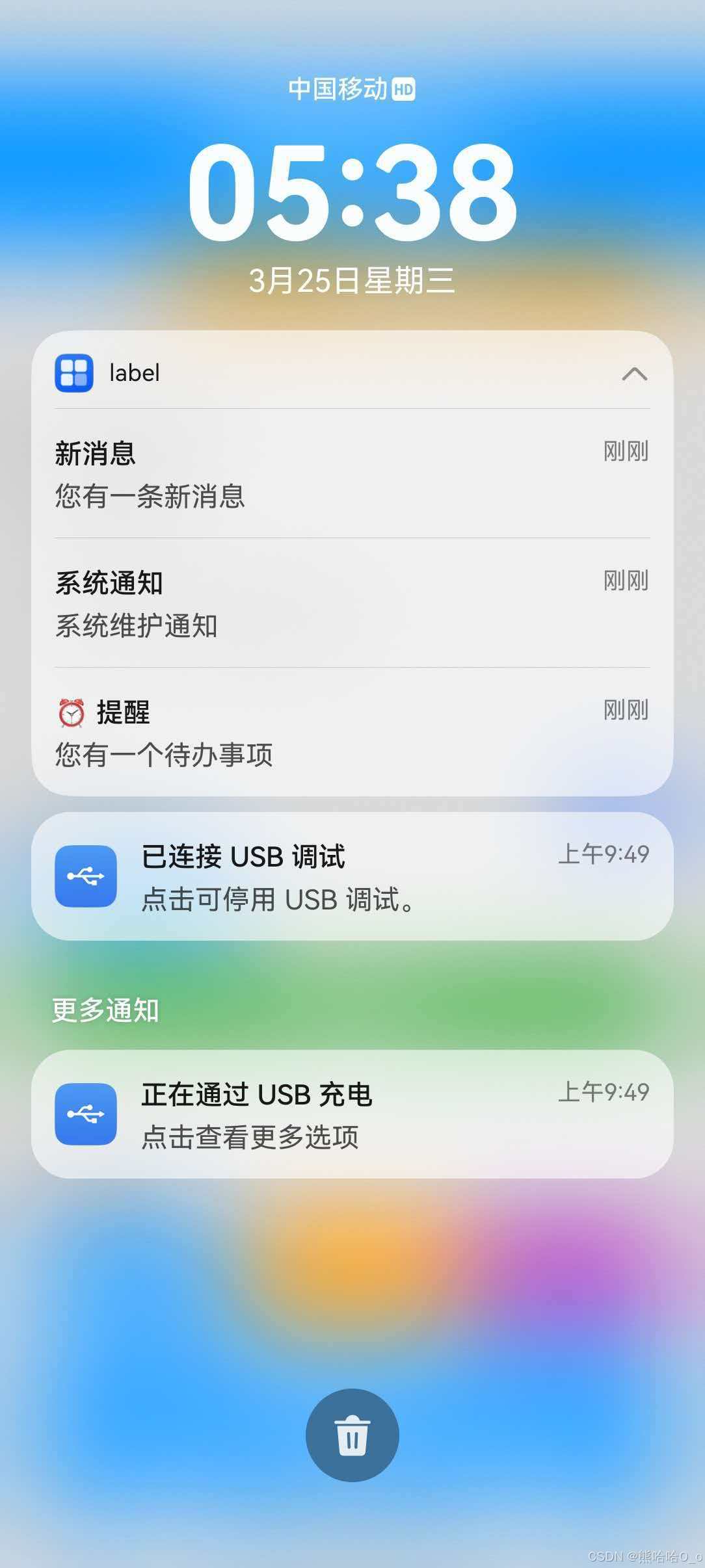
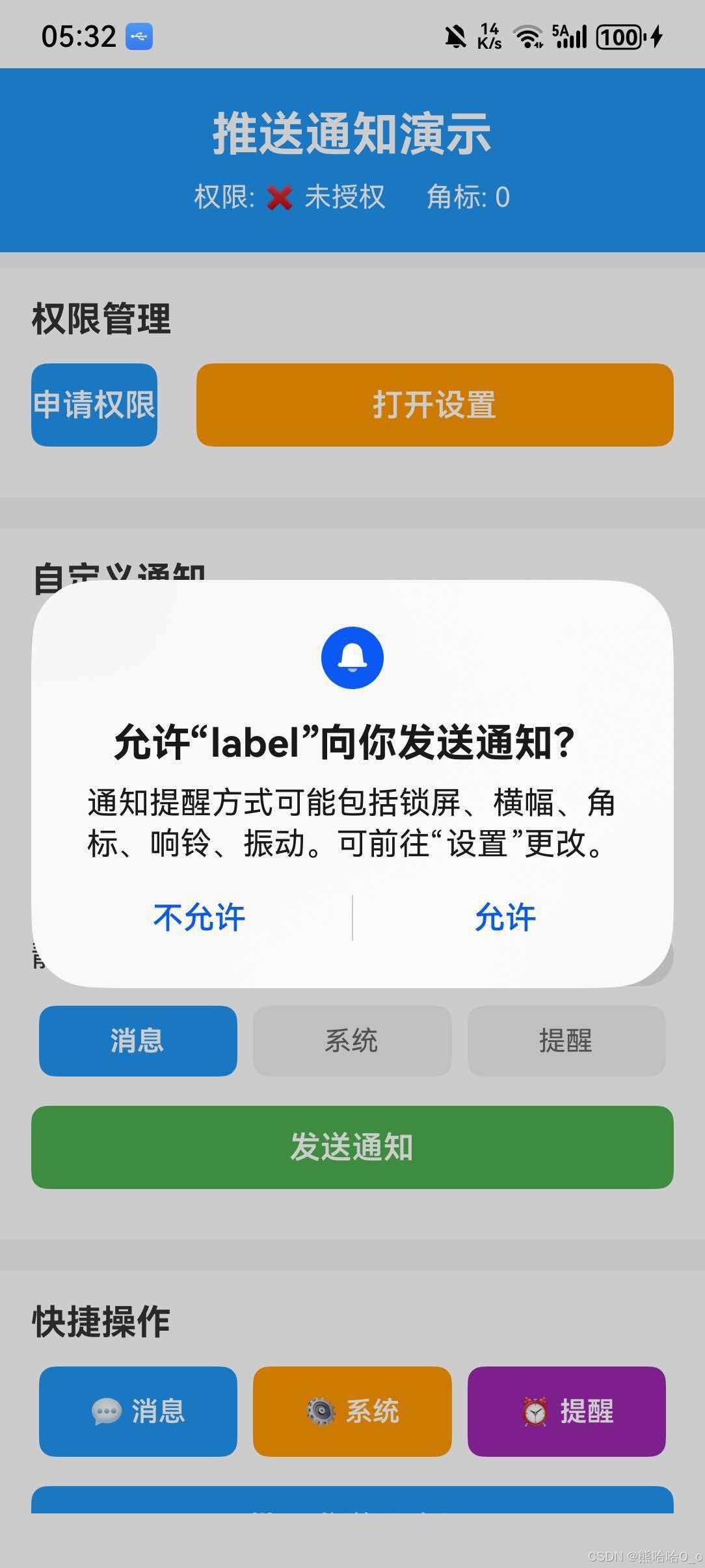
本节展示一个完整的推送通知应用,包含权限管理、发送通知、管理通知、设置角标等功能。
import React, { useState, useEffect, useCallback } from 'react';
import {
  View,
  Text,
  StyleSheet,
  TouchableOpacity,
  Alert,
  ScrollView,
  TextInput,
  Switch,
} from 'react-native';
import {
  checkNotifications,
  requestNotifications,
  openSettings,
  RESULTS,
} from 'react-native-permissions';
import PushNotification from '@react-native-community/push-notification-ios';

interface NotificationItem {
  id: string;
  title: string;
  body: string;
  type: string;
  timestamp: number;
}

const PushNotificationDemo = () => {
  const [notifications, setNotifications] = useState<NotificationItem[]>([]);
  const [badgeCount, setBadgeCount] = useState(0);
  const [hasPermission, setHasPermission] = useState(false);
  const [sentNotifications, setSentNotifications] = useState<NotificationItem[]>([]);

  // 表单状态
  const [title, setTitle] = useState('测试通知');
  const [body, setBody] = useState('这是一条测试通知内容');
  const [isSilent, setIsSilent] = useState(false);
  const [notificationType, setNotificationType] = useState<'message' | 'system' | 'reminder'>('message');

  // 检查权限
  const checkPermission = useCallback(async () => {
    try {
      const { status } = await checkNotifications();
      setHasPermission(status === RESULTS.GRANTED);
    } catch (error) {
      console.error('检查权限失败:', error);
    }
  }, []);

  // 申请权限
  const requestPermission = async () => {
    try {
      const { status } = await requestNotifications(['alert', 'sound', 'badge']);

      if (status === RESULTS.GRANTED) {
        setHasPermission(true);
        Alert.alert('成功', '通知权限已授权');
      } else if (status === RESULTS.BLOCKED) {
        Alert.alert(
          '权限被拒绝',
          '请在系统设置中手动开启通知权限',
          [
            { text: '取消', style: 'cancel' },
            { text: '去设置', onPress: () => openSettings() }
          ]
        );
      }
    } catch (error) {
      console.error('申请权限失败:', error);
      Alert.alert('错误', '申请权限失败');
    }
  };

  // 刷新通知列表
  const refreshNotifications = useCallback(() => {
    try {
      PushNotification.getDeliveredNotifications((data) => {
        console.log('getDeliveredNotifications result:', JSON.stringify(data));
        if (data && Array.isArray(data) && data.length > 0) {
          const items = data.map((item: any) => ({
            id: String(item.id || item.identifier || ''),
            title: item.title || item.content?.title || '无标题',
            body: item.body || item.content?.body || '无内容',
            type: item.userInfo?.type || item.content?.userInfo?.type || 'unknown',
            timestamp: item.userInfo?.timestamp || item.content?.userInfo?.timestamp || 0,
          }));
          setNotifications(items);
        } else {
          setNotifications(sentNotifications);
        }
      });
    } catch (error) {
      console.error('获取通知列表失败:', error);
      setNotifications(sentNotifications);
    }
  }, [sentNotifications]);

  useEffect(() => {
    checkPermission();
    refreshNotifications();
  }, [checkPermission, refreshNotifications]);

  // 发送通知
  const sendNotification = () => {
    if (!hasPermission) {
      Alert.alert('提示', '请先申请通知权限');
      return;
    }

    const id = `notification-${Date.now()}`;
    const timestamp = Date.now();

    const newNotification: NotificationItem = {
      id,
      title,
      body,
      type: notificationType,
      timestamp,
    };

    PushNotification.addNotificationRequest({
      id: id,
      title: title,
      body: body,
      isSilent: isSilent,
      userInfo: {
        type: notificationType,
        timestamp,
        customData: {
          source: 'manual'
        }
      }
    });

    setSentNotifications(prev => {
      const newList = [newNotification, ...prev];
      const newBadge = newList.length;
      setBadgeCount(newBadge);
      PushNotification.setApplicationIconBadgeNumber(newBadge);
      return newList;
    });
    setNotifications(prev => [newNotification, ...prev]);

    Alert.alert('成功', isSilent ? '静默通知已发送' : '通知已发送');
  };

  // 发送预设通知
  const sendPresetNotification = (type: 'message' | 'system' | 'reminder') => {
    if (!hasPermission) {
      Alert.alert('提示', '请先申请通知权限');
      return;
    }

    const presets = {
      message: { title: '新消息', body: '您有一条新消息' },
      system: { title: '系统通知', body: '系统维护通知' },
      reminder: { title: '⏰ 提醒', body: '您有一个待办事项' }
    };

    const preset = presets[type];
    const id = `${type}-${Date.now()}`;
    const timestamp = Date.now();

    const newNotification: NotificationItem = {
      id,
      title: preset.title,
      body: preset.body,
      type,
      timestamp,
    };

    PushNotification.addNotificationRequest({
      id: id,
      title: preset.title,
      body: preset.body,
      userInfo: {
        type: type,
        timestamp
      }
    });

    setSentNotifications(prev => {
      const newList = [newNotification, ...prev];
      const newBadge = newList.length;
      setBadgeCount(newBadge);
      PushNotification.setApplicationIconBadgeNumber(newBadge);
      return newList;
    });
    setNotifications(prev => [newNotification, ...prev]);
  };

  // 批量发送通知
  const sendMultipleNotifications = () => {
    if (!hasPermission) {
      Alert.alert('提示', '请先申请通知权限');
      return;
    }

    const newNotifications: NotificationItem[] = [];
    const timestamp = Date.now();

    for (let i = 1; i <= 3; i++) {
      const id = `batch-${timestamp}-${i}`;
      newNotifications.push({
        id,
        title: `批量通知 ${i}`,
        body: `这是批量发送的第 ${i} 条通知`,
        type: 'batch',
        timestamp,
      });

      PushNotification.addNotificationRequest({
        id,
        title: `批量通知 ${i}`,
        body: `这是批量发送的第 ${i} 条通知`,
        userInfo: {
          type: 'batch',
          index: i,
          timestamp
        }
      });
    }

    setSentNotifications(prev => {
      const newList = [...newNotifications, ...prev];
      const newBadge = newList.length;
      setBadgeCount(newBadge);
      PushNotification.setApplicationIconBadgeNumber(newBadge);
      return newList;
    });
    setNotifications(prev => [...newNotifications, ...prev]);
  };

  // 删除单个通知
  const removeNotification = (id: string) => {
    PushNotification.removeDeliveredNotifications([id]);

    setSentNotifications(prev => {
      const newList = prev.filter(n => String(n.id) !== String(id));
      const newBadge = newList.length;
      setBadgeCount(newBadge);
      PushNotification.setApplicationIconBadgeNumber(newBadge);
      return newList;
    });
    setNotifications(prev => prev.filter(n => String(n.id) !== String(id)));
  };

  const clearAllNotifications = () => {
    PushNotification.removeAllDeliveredNotifications();
    PushNotification.setApplicationIconBadgeNumber(0);
    setNotifications([]);
    setSentNotifications([]);
    setBadgeCount(0);
  };

  // 角标操作
  const incrementBadge = () => {
    const newCount = notifications.length + 1;
    setBadgeCount(newCount);
    PushNotification.setApplicationIconBadgeNumber(newCount);
  };

  const clearBadge = () => {
    setBadgeCount(0);
    PushNotification.setApplicationIconBadgeNumber(0);
  };

  // 按类型筛选通知
  const filterByType = (type: string) => {
    return notifications.filter(n => n.type === type);
  };

  // 删除特定类型通知
  const removeByType = (type: string) => {
    const ids = filterByType(type).map(n => n.id);
    if (ids.length > 0) {
      PushNotification.removeDeliveredNotifications(ids);

      setSentNotifications(prev => {
        const newList = prev.filter(n => n.type !== type);
        const newBadge = newList.length;
        setBadgeCount(newBadge);
        PushNotification.setApplicationIconBadgeNumber(newBadge);
        return newList;
      });
      setNotifications(prev => prev.filter(n => n.type !== type));
    }
  };

  const getTypeTagStyle = (type: string) => {
    const typeStyles: Record<string, any> = {
      message: styles.messageTag,
      system: styles.systemTag,
      reminder: styles.reminderTag,
      batch: styles.batchTag,
    };
    return typeStyles[type] || styles.unknownTag;
  };

  return (
    <View style={styles.container}>
      <View style={styles.header}>
        <Text style={styles.title}>推送通知演示</Text>
        <View style={styles.statusRow}>
          <Text style={styles.statusText}>
            权限: {hasPermission ? '✅ 已授权' : '❌ 未授权'}
          </Text>
          <Text style={styles.statusText}>角标: {badgeCount}</Text>
        </View>
      </View>

      <ScrollView style={styles.scrollView}>
        <View style={styles.section}>
          <Text style={styles.sectionTitle}>权限管理</Text>
          <View style={styles.buttonRow}>
            <TouchableOpacity
              style={[styles.button, hasPermission && styles.buttonDisabled]}
              onPress={hasPermission ? checkPermission : requestPermission}
            >
              <Text style={styles.buttonText}>
                {hasPermission ? '已授权' : '申请权限'}
              </Text>
            </TouchableOpacity>
            <TouchableOpacity style={[styles.button, styles.settingsButton]} onPress={openSettings}>
              <Text style={styles.buttonText}>打开设置</Text>
            </TouchableOpacity>
          </View>
        </View>

        <View style={styles.section}>
          <Text style={styles.sectionTitle}>自定义通知</Text>

          <TextInput
            style={styles.input}
            value={title}
            onChangeText={setTitle}
            placeholder="通知标题"
          />

          <TextInput
            style={[styles.input, styles.textArea]}
            value={body}
            onChangeText={setBody}
            placeholder="通知内容"
            multiline
            numberOfLines={3}
          />

          <View style={styles.switchRow}>
            <Text style={styles.switchLabel}>静默通知</Text>
            <Switch value={isSilent} onValueChange={setIsSilent} />
          </View>

          <View style={styles.typeSelector}>
            {(['message', 'system', 'reminder'] as const).map((type) => (
              <TouchableOpacity
                key={type}
                style={[
                  styles.typeButton,
                  notificationType === type && styles.typeButtonActive
                ]}
                onPress={() => setNotificationType(type)}
              >
                <Text style={[
                  styles.typeButtonText,
                  notificationType === type && styles.typeButtonTextActive
                ]}>
                  {type === 'message' ? '消息' : type === 'system' ? '系统' : '提醒'}
                </Text>
              </TouchableOpacity>
            ))}
          </View>

          <TouchableOpacity style={[styles.button, styles.primaryButton]} onPress={sendNotification}>
            <Text style={styles.buttonText}>发送通知</Text>
          </TouchableOpacity>
        </View>

        <View style={styles.section}>
          <Text style={styles.sectionTitle}>快捷操作</Text>

          <View style={styles.quickButtons}>
            <TouchableOpacity
              style={[styles.quickButton, styles.messageButton]}
              onPress={() => sendPresetNotification('message')}
            >
              <Text style={styles.quickButtonText}>💬 消息</Text>
            </TouchableOpacity>

            <TouchableOpacity
              style={[styles.quickButton, styles.systemButton]}
              onPress={() => sendPresetNotification('system')}
            >
              <Text style={styles.quickButtonText}>⚙️ 系统</Text>
            </TouchableOpacity>

            <TouchableOpacity
              style={[styles.quickButton, styles.reminderButton]}
              onPress={() => sendPresetNotification('reminder')}
            >
              <Text style={styles.quickButtonText}>⏰ 提醒</Text>
            </TouchableOpacity>
          </View>

          <TouchableOpacity style={styles.button} onPress={sendMultipleNotifications}>
            <Text style={styles.buttonText}>批量发送 (3条)</Text>
          </TouchableOpacity>

          <View style={styles.buttonRow}>
            <TouchableOpacity style={[styles.button, styles.halfButton]} onPress={incrementBadge}>
              <Text style={styles.buttonText}>角标+1</Text>
            </TouchableOpacity>
            <TouchableOpacity style={[styles.button, styles.halfButton]} onPress={clearBadge}>
              <Text style={styles.buttonText}>清除角标</Text>
            </TouchableOpacity>
          </View>
        </View>

        <View style={styles.section}>
          <View style={styles.listHeader}>
            <Text style={styles.sectionTitle}>已送达通知 ({notifications.length})</Text>
            <TouchableOpacity onPress={refreshNotifications}>
              <Text style={styles.refreshText}>刷新</Text>
            </TouchableOpacity>
          </View>

          {notifications.length > 0 && (
            <TouchableOpacity style={styles.clearAllButton} onPress={clearAllNotifications}>
              <Text style={styles.clearAllText}>清除全部</Text>
            </TouchableOpacity>
          )}

          {notifications.length === 0 ? (
            <View style={styles.emptyContainer}>
              <Text style={styles.emptyText}>暂无通知</Text>
            </View>
          ) : (
            notifications.map((item, index) => (
              <View key={index} style={styles.notificationItem}>
                <View style={styles.notificationContent}>
                  <View style={styles.notificationHeader}>
                    <Text style={styles.notificationTitle}>{item.title}</Text>
                    <View style={[styles.typeTag, getTypeTagStyle(item.type)]}>
                      <Text style={styles.typeTagText}>{item.type}</Text>
                    </View>
                  </View>
                  <Text style={styles.notificationBody}>{item.body}</Text>
                  <Text style={styles.notificationId}>ID: {item.id}</Text>
                </View>
                <TouchableOpacity
                  style={styles.deleteButton}
                  onPress={() => removeNotification(item.id)}
                >
                  <Text style={styles.deleteButtonText}>删除</Text>
                </TouchableOpacity>
              </View>
            ))
          )}
        </View>
      </ScrollView>
    </View>
  );
};

const styles = StyleSheet.create({
  container: {
    flex: 1,
    backgroundColor: '#f5f5f5',
  },
  header: {
    backgroundColor: '#2196F3',
    padding: 20,
    alignItems: 'center',
  },
  title: {
    fontSize: 24,
    fontWeight: 'bold',
    color: '#fff',
  },
  statusRow: {
    flexDirection: 'row',
    marginTop: 10,
    gap: 20,
  },
  statusText: {
    fontSize: 14,
    color: '#fff',
  },
  scrollView: {
    flex: 1,
  },
  section: {
    backgroundColor: '#fff',
    marginVertical: 8,
    padding: 16,
  },
  sectionTitle: {
    fontSize: 18,
    fontWeight: 'bold',
    color: '#333',
    marginBottom: 12,
  },
  input: {
    borderWidth: 1,
    borderColor: '#ddd',
    borderRadius: 8,
    padding: 12,
    fontSize: 16,
    marginBottom: 10,
  },
  textArea: {
    height: 80,
    textAlignVertical: 'top',
  },
  switchRow: {
    flexDirection: 'row',
    justifyContent: 'space-between',
    alignItems: 'center',
    paddingVertical: 10,
  },
  switchLabel: {
    fontSize: 16,
    color: '#333',
  },
  typeSelector: {
    flexDirection: 'row',
    justifyContent: 'space-between',
    marginBottom: 15,
  },
  typeButton: {
    flex: 1,
    paddingVertical: 10,
    marginHorizontal: 4,
    borderRadius: 8,
    backgroundColor: '#f0f0f0',
    alignItems: 'center',
  },
  typeButtonActive: {
    backgroundColor: '#2196F3',
  },
  typeButtonText: {
    fontSize: 14,
    color: '#666',
  },
  typeButtonTextActive: {
    color: '#fff',
    fontWeight: 'bold',
  },
  button: {
    backgroundColor: '#2196F3',
    paddingVertical: 12,
    borderRadius: 8,
    alignItems: 'center',
    marginBottom: 10,
  },
  primaryButton: {
    backgroundColor: '#4CAF50',
  },
  settingsButton: {
    backgroundColor: '#FF9800',
    flex: 1,
    marginLeft: 10,
  },
  buttonDisabled: {
    backgroundColor: '#ccc',
  },
  buttonRow: {
    flexDirection: 'row',
    gap: 10,
  },
  halfButton: {
    flex: 1,
  },
  buttonText: {
    color: '#fff',
    fontSize: 16,
    fontWeight: '600',
  },
  quickButtons: {
    flexDirection: 'row',
    justifyContent: 'space-between',
    marginBottom: 15,
  },
  quickButton: {
    flex: 1,
    paddingVertical: 15,
    marginHorizontal: 4,
    borderRadius: 8,
    alignItems: 'center',
  },
  messageButton: { backgroundColor: '#2196F3' },
  systemButton: { backgroundColor: '#FF9800' },
  reminderButton: { backgroundColor: '#9C27B0' },
  quickButtonText: {
    color: '#fff',
    fontSize: 14,
    fontWeight: '600',
  },
  listHeader: {
    flexDirection: 'row',
    justifyContent: 'space-between',
    alignItems: 'center',
  },
  refreshText: {
    fontSize: 14,
    color: '#2196F3',
  },
  clearAllButton: {
    backgroundColor: '#F44336',
    paddingVertical: 10,
    borderRadius: 8,
    alignItems: 'center',
    marginBottom: 15,
  },
  clearAllText: {
    color: '#fff',
    fontSize: 14,
    fontWeight: '600',
  },
  emptyContainer: {
    alignItems: 'center',
    paddingVertical: 40,
  },
  emptyText: {
    fontSize: 16,
    color: '#999',
  },
  notificationItem: {
    flexDirection: 'row',
    backgroundColor: '#f9f9f9',
    borderRadius: 8,
    padding: 12,
    marginBottom: 10,
    borderLeftWidth: 4,
    borderLeftColor: '#2196F3',
  },
  notificationContent: {
    flex: 1,
  },
  notificationHeader: {
    flexDirection: 'row',
    justifyContent: 'space-between',
    alignItems: 'center',
  },
  notificationTitle: {
    fontSize: 16,
    fontWeight: 'bold',
    color: '#333',
    flex: 1,
  },
  typeTag: {
    paddingHorizontal: 8,
    paddingVertical: 2,
    borderRadius: 4,
  },
  messageTag: { backgroundColor: '#2196F3' },
  systemTag: { backgroundColor: '#FF9800' },
  reminderTag: { backgroundColor: '#9C27B0' },
  batchTag: { backgroundColor: '#4CAF50' },
  unknownTag: { backgroundColor: '#999' },
  typeTagText: {
    fontSize: 10,
    color: '#fff',
  },
  notificationBody: {
    fontSize: 14,
    color: '#666',
    marginTop: 4,
  },
  notificationId: {
    fontSize: 10,
    color: '#999',
    marginTop: 8,
  },
  deleteButton: {
    backgroundColor: '#F44336',
    paddingHorizontal: 12,
    borderRadius: 6,
    justifyContent: 'center',
  },
  deleteButtonText: {
    color: '#fff',
    fontSize: 12,
    fontWeight: '600',
  },
});

export default PushNotificationDemo;
⚠️ 常见问题
1. 通知不显示
原因分析:
- 未申请通知权限
- 未在
module.json5中声明权限 - 通知 ID 重复
- 应用在后台时系统限制了通知
解决方案:
- 确保已在
module.json5中声明通知权限:
{
  "name": "ohos.permission.NOTIFICATION_CONTROLLER"
}
- 使用
react-native-permissions申请通知权限:
import { requestNotifications, RESULTS } from 'react-native-permissions';

const { status } = await requestNotifications(['alert', 'sound', 'badge']);
if (status !== RESULTS.GRANTED) {
  // 权限未授予
}
- 使用唯一的通知 ID:
PushNotification.addNotificationRequest({
  id: `notification-${Date.now()}`, // 使用时间戳确保唯一
  title: '标题',
  body: '内容',
});
- 检查系统通知设置:
import { checkNotifications, openSettings } from 'react-native-permissions';

const { status } = await checkNotifications();
if (status === RESULTS.BLOCKED) {
  // 引导用户去设置开启
  openSettings();
}
2. 角标不更新
原因分析:
- 设备不支持角标功能
- 角标权限未开启
- 系统设置中关闭了角标显示
解决方案:
- 检查设备是否支持角标功能
- 在系统设置中开启应用角标权限
- 使用
setApplicationIconBadgeNumber设置角标:
// 设置角标
PushNotification.setApplicationIconBadgeNumber(5);

// 清除角标
PushNotification.setApplicationIconBadgeNumber(0);
- 在发送通知时同步更新角标:
const currentBadge = 3;
PushNotification.addNotificationRequest({
  id: 'test-1',
  title: '新消息',
  body: '您有新消息',
  badge: currentBadge + 1, // 通知中设置角标
});

// 同时更新本地角标状态
PushNotification.setApplicationIconBadgeNumber(currentBadge + 1);
3. 点击通知无响应
原因分析:
- 未在
EntryAbility.ets中配置onNewWant回调 PushNotificationModule未正确导入- 通知数据未正确传递
解决方案:
确保在 EntryAbility.ets 中添加:
import { PushNotificationModule } from '@react-native-ohos/push-notification-ios/ts';

export default class EntryAbility extends UIAbility {
  // ... 其他方法

  onNewWant(want: Want, _launchParam: AbilityConstant.LaunchParam): void {
    // 处理点击通知启动应用
    PushNotificationModule.getInstance().didReceiveRemoteNotification(want);

    // 可以在这里处理通知数据
    if (want.parameters) {
      const notificationData = want.parameters;
      console.log('通知数据:', notificationData);
    }
  }
}
4. getDeliveredNotifications 返回空数组或数据格式错误
原因分析:
- HarmonyOS 的
getActiveNotificationsAPI 返回数据格式与 iOS 不同 - 通知已被系统清除或权限限制
userInfo在转换过程中可能变成字符串格式
HarmonyOS 数据格式差异:
| 字段 | iOS 格式 | HarmonyOS 格式 |
|---|---|---|
| ID | notification.identifier |
notification.id |
| 标题 | notification.content.title |
notification.title |
| 内容 | notification.content.body |
notification.body |
| 自定义数据 | notification.content.userInfo |
notification.userInfo |
解决方案:
- 使用兼容性写法处理两种格式:
const parseNotification = (notification: any) => {
  return {
    id: String(notification.id || notification.identifier || ''),
    title: notification.title || notification.content?.title || '',
    body: notification.body || notification.content?.body || '',
    type: notification.userInfo?.type || notification.content?.userInfo?.type || 'unknown',
  };
};

PushNotification.getDeliveredNotifications((data) => {
  if (data && Array.isArray(data)) {
    const notifications = data.map(parseNotification);
    console.log('通知列表:', notifications);
  }
});
- 推荐方案:使用本地状态管理通知列表
由于 getDeliveredNotifications 在 HarmonyOS 上可能返回空数组,建议在发送通知时同时维护本地状态:
import { useState } from 'react';

interface NotificationItem {
  id: string;
  title: string;
  body: string;
  type: string;
  timestamp: number;
}

const useNotificationManager = () => {
  const [notifications, setNotifications] = useState<NotificationItem[]>([]);
  const [sentNotifications, setSentNotifications] = useState<NotificationItem[]>([]);

  const sendNotification = (request: NotificationRequest) => {
    const newNotification: NotificationItem = {
      id: request.id,
      title: request.title,
      body: request.body,
      type: request.userInfo?.type || 'unknown',
      timestamp: Date.now(),
    };

    PushNotification.addNotificationRequest(request);

    // 同时更新本地状态
    setSentNotifications(prev => [newNotification, ...prev]);
    setNotifications(prev => [newNotification, ...prev]);
  };

  const refreshNotifications = () => {
    try {
      PushNotification.getDeliveredNotifications((data) => {
        if (data && Array.isArray(data) && data.length > 0) {
          const items = data.map(parseNotification);
          setNotifications(items);
        } else {
          // 如果返回空数组,使用本地状态
          setNotifications(sentNotifications);
        }
      });
    } catch (error) {
      // 出错时使用本地状态
      setNotifications(sentNotifications);
    }
  };

  const removeNotification = (id: string) => {
    PushNotification.removeDeliveredNotifications([id]);
    setNotifications(prev => prev.filter(n => n.id !== id));
    setSentNotifications(prev => prev.filter(n => n.id !== id));
  };

  return {
    notifications,
    sendNotification,
    refreshNotifications,
    removeNotification,
  };
};
- 检查通知权限状态:
import { checkNotifications } from 'react-native-permissions';

const checkPermission = async () => {
  const { status } = await checkNotifications();
  if (status !== 'granted') {
    console.log('通知权限未授予');
  }
};
5. 静默通知不生效
原因分析:
- HarmonyOS 对后台任务有严格限制
- 静默通知需要特殊权限
解决方案:
- 确保应用有后台运行权限
- 在
module.json5中添加后台任务权限:
{
  "requestPermissions": [
    {
      "name": "ohos.permission.KEEP_BACKGROUND_RUNNING"
    }
  ]
}
- 静默通知主要用于后台同步,不会显示在通知栏:
PushNotification.addNotificationRequest({
  id: 'silent-1',
  title: '后台同步',
  body: '正在同步...',
  isSilent: true,
  userInfo: {
    action: 'sync'
  }
});
6. 通知 ID 重复导致覆盖
原因分析:
- 使用相同 ID 发送通知会覆盖之前的通知
- 时间戳精度不够导致 ID 重复
解决方案:
// 使用更精确的唯一 ID
const generateUniqueId = () => {
  return `notification-${Date.now()}-${Math.random().toString(36).substr(2, 9)}`;
};

PushNotification.addNotificationRequest({
  id: generateUniqueId(),
  title: '标题',
  body: '内容',
});
📊 API 兼容性对照表
| API | iOS | Android | HarmonyOS | 说明 |
|---|---|---|---|---|
| addNotificationRequest | ✅ | ✅ | ✅ | 发送通知 |
| getDeliveredNotifications | ✅ | ✅ | ✅ | 获取已送达通知 |
| removeAllDeliveredNotifications | ✅ | ✅ | ✅ | 清除所有通知 |
| removeDeliveredNotifications | ✅ | ✅ | ✅ | 清除指定通知 |
| setApplicationIconBadgeNumber | ✅ | ✅ | ✅ | 设置角标 |
| getApplicationIconBadgeNumber | ✅ | ❌ | ❌ | 获取角标数字 |
| requestPermissions | ✅ | ✅ | ❌ | 申请通知权限 |
| checkPermissions | ✅ | ✅ | ❌ | 检查通知权限 |
| getInitialNotification | ✅ | ✅ | ❌ | 获取启动通知 |
| cancelLocalNotifications | ✅ | ✅ | ❌ | 取消本地通知 |
| getScheduledLocalNotifications | ✅ | ✅ | ❌ | 获取计划通知 |
| abandonPermissions | ✅ | ❌ | ❌ | 放弃权限 |
通知参数兼容性
| 参数 | iOS | Android | HarmonyOS | 说明 |
|---|---|---|---|---|
| id | ✅ | ✅ | ✅ | 通知唯一标识 |
| title | ✅ | ✅ | ✅ | 通知标题 |
| body | ✅ | ✅ | ✅ | 通知内容 |
| badge | ✅ | ✅ | ✅ | 角标数字 |
| isSilent | ✅ | ✅ | ✅ | 静默通知 |
| userInfo | ✅ | ✅ | ✅ | 自定义数据 |
| subtitle | ✅ | ❌ | ❌ | 副标题 |
| fireDate | ✅ | ❌ | ❌ | 触发时间 |
| repeats | ✅ | ❌ | ❌ | 是否重复 |
| sound | ✅ | ✅ | ❌ | 通知音效 |
| category | ✅ | ✅ | ❌ | 通知分类 |
| isCritical | ✅ | ❌ | ❌ | 重要通知 |
| criticalSoundVolume | ✅ | ❌ | ❌ | 重要通知音量 |
| interruptionLevel | ✅ | ❌ | ❌ | 干扰级别 |
💡 最佳实践
1. 通知权限管理
// 封装权限检查和申请
const ensureNotificationPermission = async (): Promise<boolean> => {
  const { status } = await checkNotifications();

  if (status === RESULTS.GRANTED) {
    return true;
  }

  if (status === RESULTS.BLOCKED) {
    Alert.alert(
      '需要通知权限',
      '请在设置中开启通知权限',
      [{ text: '去设置', onPress: openSettings }]
    );
    return false;
  }

  const { status: newStatus } = await requestNotifications(['alert', 'sound', 'badge']);
  return newStatus === RESULTS.GRANTED;
};
2. 通知 ID 管理
// 使用有意义的 ID 前缀
const NotificationIds = {
  message: (id: string) => `msg-${id}`,
  system: (id: string) => `sys-${id}`,
  reminder: (id: string) => `rem-${id}`,
};

// 发送消息通知
PushNotification.addNotificationRequest({
  id: NotificationIds.message('12345'),
  title: '新消息',
  body: '内容',
});
3. 角标同步管理
class BadgeManager {
  private static instance: BadgeManager;
  private count: number = 0;

  static getInstance(): BadgeManager {
    if (!BadgeManager.instance) {
      BadgeManager.instance = new BadgeManager();
    }
    return BadgeManager.instance;
  }

  increment(): number {
    this.count++;
    this.sync();
    return this.count;
  }

  decrement(): number {
    this.count = Math.max(0, this.count - 1);
    this.sync();
    return this.count;
  }

  set(count: number): void {
    this.count = Math.max(0, count);
    this.sync();
  }

  clear(): void {
    this.count = 0;
    this.sync();
  }

  private sync(): void {
    PushNotification.setApplicationIconBadgeNumber(this.count);
  }

  getCount(): number {
    return this.count;
  }
}
4. 错误处理
const safeSendNotification = async (options: NotificationRequest): Promise<boolean> => {
  try {
    const hasPermission = await ensureNotificationPermission();
    if (!hasPermission) {
      return false;
    }

    PushNotification.addNotificationRequest(options);
    return true;
  } catch (error) {
    console.error('发送通知失败:', error);
    return false;
  }
};
🔗 相关链接
参考文档:

作为“人工智能6S店”的官方数字引擎,为AI开发者与企业提供一个覆盖软硬件全栈、一站式门户。
更多推荐

 2
2 0
0- 0


 已为社区贡献37条内容

所有评论(0)