
鸿蒙 HarmonyOS 6 | 多媒体(06)录音与低延迟音效 Audio 基础开发
本文详细解剖了 `SoundPool` 这台底层极速音效引擎的核心运转机理。我们掌握了通过将媒体物理文件直接解析并预热至系统物理运存,彻底消解了高层播放器因为系统状态机频繁流转造成的响应延迟顽疾。
文章目录
前言
在前面的多媒体系列中我们探讨了高层级的音视频播放与全局系统级播控机制。但在实际的商业应用开发中,开发者经常会遇到一些颗粒度更细致的音频处理需求。比如在即时通讯应用中按住录音按钮时立刻发出一声短促的提示音,或者需要直接获取麦克风的原始声波流来进行自定义的音频降噪与识别编码。
面对这些要求极致响应速度的场景,高度封装的媒体播放器接口就显得过于臃肿且存在不可避免的启动延迟。
本文将带你切入更底层的音频调度框架。我们将解析如何利用 SoundPool 极速音效引擎实现真正的无延迟声音反馈,并掌握 AudioCapturer 采集原始音频裸流的技术细节。最终我们将结合这两个底层能力编写一个包含完整交互的语音备忘录组件。
一、 突破延迟瓶颈 SoundPool 极速音效引擎
很多开发者在实现按钮点击音效时,习惯性地在事件回调中实例化一个常规播放器。这种做法在连续快速点击时会暴露出严重的性能问题。常规播放器的状态机流转与底层解码器资源分配通常需要消耗几十到上百毫秒,这对于要求即时反馈的界面交互体验是完全不可接受的。
鸿蒙系统为此专门提供了极速音效模块 SoundPool。它的核心运行逻辑是将短促的音频文件预先完整解码,并将其以原始波形数据的形式常驻在设备的物理运存中。当业务代码触发播放指令时,底层系统可以直接将解码后的数据推入音频硬件轨道,从而实现了近乎零延迟的极速发声。在初始化该模块时,开发者需要明确指定最大并发流数量以控制对运存的开销限制。
import { media } from '@kit.MediaKit';
import { audio } from '@kit.AudioKit';
import { fileIo as fs } from '@kit.CoreFileKit';

let soundPool: media.SoundPool | null = null;
let soundId: number = -1;

async function initAndLoadSoundPool(filePath: string) {
  try {
    // 明确音频渲染属性 参与系统的常规焦点控制
    const audioRendererInfo: audio.AudioRendererInfo = {
      usage: audio.StreamUsage.STREAM_USAGE_MEDIA,
      rendererFlags: 0
    };

    // 初始化最大并发数量为 5 的音效池
    soundPool = await media.createSoundPool(5, audioRendererInfo);

    // 开启系统物理文件通道
    const file = fs.openSync(filePath, fs.OpenMode.READ_ONLY);
    const stat = fs.statSync(filePath);

    // 将物理文件内容完整加载并常驻至运存
    soundId = await soundPool.load(file.fd, 0, stat.size);
    fs.closeSync(file);
  } catch (err) {
    console.error(`[SoundPool] Initialization failed ${(err as Error).message}`);
  }
}
二、 掌控原始声波 AudioCapturer 采集模型
如果业务仅仅需要录制一段标准格式的语音文件,使用高层级的封装模块是最便捷的路径。但若需要对采集到的声音进行实时识别转化,或者需要监测当前的音量分贝大小来渲染波形动画,我们就必须拿到最原始的声波数据。
底层音频采集模块 AudioCapturer 正是为此而生。它直接打通了麦克风硬件的数据缓冲区。配置该模块时必须精确指定音频流的采样率、声道数以及位深格式。通常人声录制采用一万六千赫兹频率、单声道以及十六位数据深度的配置,即可在兼顾人声清晰度的同时维持极低的数据量占用。
三、 动态流转 缓冲区的读写控制
麦克风硬件启动后,会源源不断地将外部模拟声音转换为数字信号并填入系统的底层缓冲区。开发者需要注册专用的数据读取事件,在事件回调中及时将缓冲区内的字节流提取出来,并直接追加写入应用的私有沙箱文件中。
由于原始声波是纯粹的物理裸流数据且不包含任何规范的文件头信息,如果直接保存为常规音频后缀,绝大多数播放器都无法正确识别并解析播放。在实际的商业工程中,我们通常会在录制开始或结束的环节,通过代码手动为这批裸流数据拼装一个标准的波形文件格式头,以便于后续在网络层面的分享与验证环节能够畅通无阻。
四、 动态权限拦截 麦克风的安全调用
涉及麦克风这种极其敏感的硬件调用,必须经过操作系统级别的动态安全校验。在应用配置清单文件中静态声明权限标识是远远不够的。每次执行录音硬件初始化前,代码层必须向用户发起动态弹窗授权请求。只有当系统权限检验模块明确返回授权通过的标志后,方可继续执行后续的底层硬件操控,否则运行时环境会直接抛出安全阻断异常。
import { abilityAccessCtrl, common } from '@kit.AbilityKit';

async function checkAndRequestMicPermission(context: common.UIAbilityContext): Promise<boolean> {
  const atManager = abilityAccessCtrl.createAtManager();
  try {
    // 拉起系统权限确认弹窗
    const result = await atManager.requestPermissionsFromUser(context, ['ohos.permission.MICROPHONE']);
    // 验证用户授权结果
    return result.authResults[0] === 0;
  } catch (err) {
    console.error(`[Permission] Request failed ${(err as Error).message}`);
    return false;
  }
}
五、 综合实战 语音备忘录组件
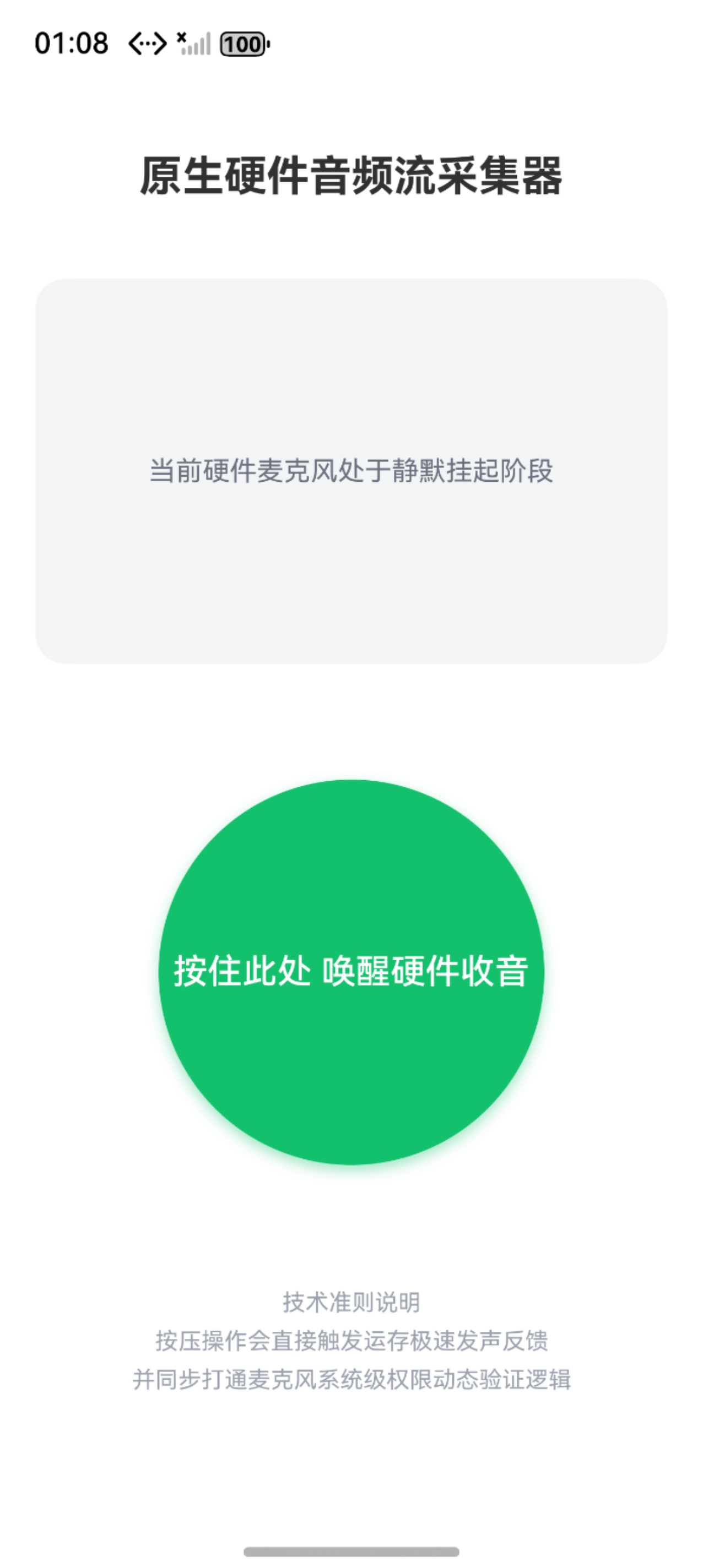
基于上述完整的底层理论框架,我们将构建一个具备实用价值的语音交互组件。当用户长按屏幕上的录音按钮时,程序会立即利用运存中的 SoundPool 播放一声短促的提示音,并同步启动底层麦克风收集原始声波。当用户松开手指,录音行为停止,程序会自动在沙箱内拼装生成包含标准头信息的音频物理文件。
为了保证该案例能够在没有任何外部素材的前提下独立运转,我们在初始化生命周期阶段内置了一套极简的数据构造逻辑,动态向物理沙箱内写入一段高频方波字节序列用以模拟真实的提示音素材。
import { audio } from '@kit.AudioKit';
import { media } from '@kit.MediaKit';
import { fileIo as fs } from '@kit.CoreFileKit';
import { common, abilityAccessCtrl } from '@kit.AbilityKit';
import { promptAction } from '@kit.ArkUI';

// 封装隔离的底层多媒体与硬件采集服务类
class VoiceMemoService {
  private static instance: VoiceMemoService;
  private context: common.UIAbilityContext | null = null;

  // 核心极速音效实例模块
  private soundPool: media.SoundPool | null = null;
  private beepSoundId: number = -1;
  private dummySoundPath: string = '';

  // 核心底层声波采集实例模块
  private audioCapturer: audio.AudioCapturer | null = null;
  private recordFile: fs.File | null = null;
  private currentRecordPath: string = '';

  public static getInstance(): VoiceMemoService {
    if (!VoiceMemoService.instance) {
      VoiceMemoService.instance = new VoiceMemoService();
    }
    return VoiceMemoService.instance;
  }

  public init(context: common.UIAbilityContext) {
    this.context = context;
    this.dummySoundPath = context.filesDir + '/beep.wav';
  }

  // 构建模拟音频文件并装载至常驻运存
  public async prepareBeepSound() {
    if (!this.context) return;

    try {
      if (!fs.accessSync(this.dummySoundPath)) {
        this.generateDummyWavFile(this.dummySoundPath);
      }

      const audioRendererInfo: audio.AudioRendererInfo = {
        usage: audio.StreamUsage.STREAM_USAGE_MEDIA,
        rendererFlags: 0
      };

      this.soundPool = await media.createSoundPool(3, audioRendererInfo);
      const file = fs.openSync(this.dummySoundPath, fs.OpenMode.READ_ONLY);
      const stat = fs.statSync(this.dummySoundPath);

      this.beepSoundId = await this.soundPool.load(file.fd, 0, stat.size);
      fs.closeSync(file);
      console.info('[MemoService] SoundPool loaded successfully');
    } catch (err) {
      console.error(`[MemoService] Sound prepare failed ${(err as Error).message}`);
    }
  }

  // 纯代码构建基础的符合系统解析标准的微型音频文件
  private generateDummyWavFile(filePath: string) {
    const sampleRate = 16000;
    const dataSize = sampleRate * 1;
    const buffer = new ArrayBuffer(44 + dataSize);
    const view = new DataView(buffer);

    const writeString = (offset: number, str: string) => {
      for (let i = 0; i < str.length; i++) {
        view.setUint8(offset + i, str.charCodeAt(i));
      }
    };

    writeString(0, 'RIFF');
    view.setUint32(4, 36 + dataSize, true);
    writeString(8, 'WAVE');
    writeString(12, 'fmt ');
    view.setUint32(16, 16, true);
    view.setUint16(20, 1, true);
    view.setUint16(22, 1, true);
    view.setUint32(24, sampleRate, true);
    view.setUint32(28, sampleRate * 2, true);
    view.setUint16(32, 2, true);
    view.setUint16(34, 16, true);
    writeString(36, 'data');
    view.setUint32(40, dataSize, true);

    for (let i = 0; i < dataSize / 2; i++) {
      const sample = (i % 40 < 20) ? 8000 : -8000;
      view.setInt16(44 + i * 2, sample, true);
    }

    const file = fs.openSync(filePath, fs.OpenMode.CREATE | fs.OpenMode.READ_WRITE | fs.OpenMode.TRUNC);
    fs.writeSync(file.fd, buffer);
    fs.closeSync(file);
  }

  // 触发极速无延迟硬件发声
  public async playBeep() {
    if (this.soundPool && this.beepSoundId !== -1) {
      try {
        await this.soundPool.play(this.beepSoundId);
      } catch (err) {
        console.error(`[MemoService] Play beep failed ${(err as Error).message}`);
      }
    }
  }

  // 启动底层硬件级原始声波录制引擎
  public async startRecording(): Promise<boolean> {
    if (!this.context) return false;

    try {
      const atManager = abilityAccessCtrl.createAtManager();
      const authResult = await atManager.requestPermissionsFromUser(this.context, ['ohos.permission.MICROPHONE']);
      if (authResult.authResults[0] !== 0) {
        promptAction.showToast({ message: '麦克风调用已被安全拦截' });
        return false;
      }

      const audioStreamInfo: audio.AudioStreamInfo = {
        samplingRate: audio.AudioSamplingRate.SAMPLE_RATE_16000,
        channels: audio.AudioChannel.CHANNEL_1,
        sampleFormat: audio.AudioSampleFormat.SAMPLE_FORMAT_S16LE,
        encodingType: audio.AudioEncodingType.ENCODING_TYPE_RAW
      };

      const audioCapturerInfo: audio.AudioCapturerInfo = {
        source: audio.SourceType.SOURCE_TYPE_MIC,
        capturerFlags: 0
      };

      this.audioCapturer = await audio.createAudioCapturer({
        streamInfo: audioStreamInfo,
        capturerInfo: audioCapturerInfo
      });

      this.currentRecordPath = `${this.context.filesDir}/record_${Date.now()}.pcm`;
      this.recordFile = fs.openSync(this.currentRecordPath, fs.OpenMode.CREATE | fs.OpenMode.READ_WRITE);

      this.audioCapturer.on('readData', (buffer: ArrayBuffer) => {
        if (this.recordFile) {
          fs.writeSync(this.recordFile.fd, buffer);
        }
      });

      await this.audioCapturer.start();
      console.info('[MemoService] Hardware capturer started');
      return true;

    } catch (err) {
      console.error(`[MemoService] Start recording failed ${(err as Error).message}`);
      return false;
    }
  }

  // 阻断底层采集回收内存句柄
  public async stopRecording(): Promise<string> {
    try {
      if (this.audioCapturer) {
        await this.audioCapturer.stop();
        await this.audioCapturer.release();
        this.audioCapturer = null;
      }

      if (this.recordFile) {
        fs.closeSync(this.recordFile);
        this.recordFile = null;
      }

      console.info(`[MemoService] Hardware capturer stopped, file saved at ${this.currentRecordPath}`);
      return this.currentRecordPath;

    } catch (err) {
      console.error(`[MemoService] Stop recording failed ${(err as Error).message}`);
      return '';
    }
  }

  public releaseResources() {
    this.stopRecording();
    if (this.soundPool) {
      this.soundPool.release();
      this.soundPool = null;
    }
  }
}

const voiceMemoService = VoiceMemoService.getInstance();


@Entry
@Component
struct VoiceMemoPage {
  // 管控界面交互的压感状态标识
  @State isRecording: boolean = false;
  // 记录并展示最新的安全落盘数据路径
  @State lastRecordPath: string = '';

  async aboutToAppear() {
    const context = getContext(this) as common.UIAbilityContext;
    voiceMemoService.init(context);
    await voiceMemoService.prepareBeepSound();
  }

  aboutToDisappear() {
    voiceMemoService.releaseResources();
  }

  build() {
    Column() {
      Text('原生硬件音频流采集器')
        .fontSize(22)
        .fontWeight(FontWeight.Bold)
        .margin({ top: 40, bottom: 40 })

      Column() {
        if (this.isRecording) {
          // 模拟底层音频波形跳动渲染面板
          Row({ space: 8 }) {
            ForEach([1, 2, 3, 4, 5], () => {
              Rect()
                .width(6)
                .height(30 + Math.random() * 40)
                .fill('#0A59F7')
                .animation({ duration: 150 })
            })
          }
          .height(80)
          .alignItems(VerticalAlign.Center)

          Text('正在持续读取底层缓冲流')
            .fontColor('#0A59F7')
            .fontSize(16)
            .margin({ top: 20 })
        } else {
          Text('当前硬件麦克风处于静默挂起阶段')
            .fontColor('#6B7280')
            .fontSize(14)
        }
      }
      .width('90%')
      .height(200)
      .backgroundColor('#F3F4F6')
      .borderRadius(16)
      .justifyContent(FlexAlign.Center)
      .margin({ bottom: 60 })

      // 核心交互触发面板
      Button(this.isRecording ? '松开手指 切断底层采集' : '按住此处 唤醒硬件收音')
        .width(200)
        .height(200)
        .type(ButtonType.Circle)
        .fontSize(18)
        .fontWeight(FontWeight.Medium)
        .backgroundColor(this.isRecording ? '#F75555' : '#10C16C')
        .shadow({ radius: 20, color: this.isRecording ? 'rgba(247,85,85,0.4)' : 'rgba(16,193,108,0.4)', offsetY: 10 })
        .onTouch(async (event: TouchEvent) => {
          if (event.type === TouchType.Down) {
            this.isRecording = true;
            await voiceMemoService.playBeep();
            await voiceMemoService.startRecording();
          } else if (event.type === TouchType.Up || event.type === TouchType.Cancel) {
            this.isRecording = false;
            const path = await voiceMemoService.stopRecording();
            if (path !== '') {
              this.lastRecordPath = path;
              promptAction.showDialog({
                title: '硬件录制顺利终结',
                message: `原始物理数据已封装落盘\n系统绝对路径归档于\n${path}`
              });
            }
          }
        })

      Text('技术准则说明\n按压操作会直接触发运存极速发声反馈\n并同步打通麦克风系统级权限动态验证逻辑')
        .fontSize(12)
        .fontColor('#9CA3AF')
        .textAlign(TextAlign.Center)
        .lineHeight(20)
        .margin({ top: 60 })
    }
    .width('100%')
    .height('100%')
    .backgroundColor('#FFFFFF')
    .alignItems(HorizontalAlign.Center)
  }
}
总结
要在移动端构建媲美原生级别响应的高质量音频交互模块,必须深刻理解高阶业务封装模块与底层原生流操作模块的边界界限。
本文详细解剖了 SoundPool 这台底层极速音效引擎的核心运转机理。我们掌握了通过将媒体物理文件直接解析并预热至系统物理运存,彻底消解了高层播放器因为系统状态机频繁流转造成的响应延迟顽疾。
与此同时,我们利用 AudioCapturer 建立了一条无视任何封装层面的数据抽取管线,学会了在系统动态鉴权屏障的保护下,将源源不断的底层麦克风声波裸流安全落盘转移。
掌控这套组合运用策略,是实现类似乐器弹奏软件以及即时语音通话等要求苛刻场景的底层技术根基。

作为“人工智能6S店”的官方数字引擎,为AI开发者与企业提供一个覆盖软硬件全栈、一站式门户。
更多推荐
 6
6 0
0- 0



 已为社区贡献30条内容

所有评论(0)