
基于 HarmonyOS鸿蒙开发校园二手闲置交易应用开发
·
校园二手闲置交易应用开发实践
文章目录
一、前言
随着高校学生生活需求的多样化,二手闲置交易成为校园内的常见现象。传统的线下交易方式效率低下,信息传播范围有限,而基于移动应用的交易平台能够有效解决这些问题。本文将介绍一个基于HarmonyOS开发的校园二手闲置交易应用,详细阐述其功能模块设计与技术实现。
二、 项目概述
本项目是一个基于HarmonyOS的校园二手闲置交易应用,旨在为高校学生提供一个便捷、安全的二手物品交易平台。应用采用现代前端技术栈,结合关系型数据库存储,实现了完整的交易流程。
技术栈
- 开发框架:HarmonyOS ArkTS
- 数据库:关系型数据库(relationalStore)
- 状态管理:@State、@StorageLink
- 页面导航:Router
- UI组件:ArkUI组件库
三、功能模块设计
1. 用户模块
用户模块实现了完整的用户管理功能,包括:
- 登录/注册:支持用户名密码登录和注册
- 用户信息管理:个人资料查看和编辑
- 身份验证:确保用户操作的安全性
核心代码实现:
// 用户登录验证
async validateUser(username: string, password: string): Promise<boolean> {
  const user = await this.getUserByUsername(username);
  return user !== null && user.password === password;
}
2. 商品模块
商品模块是应用的核心,实现了:
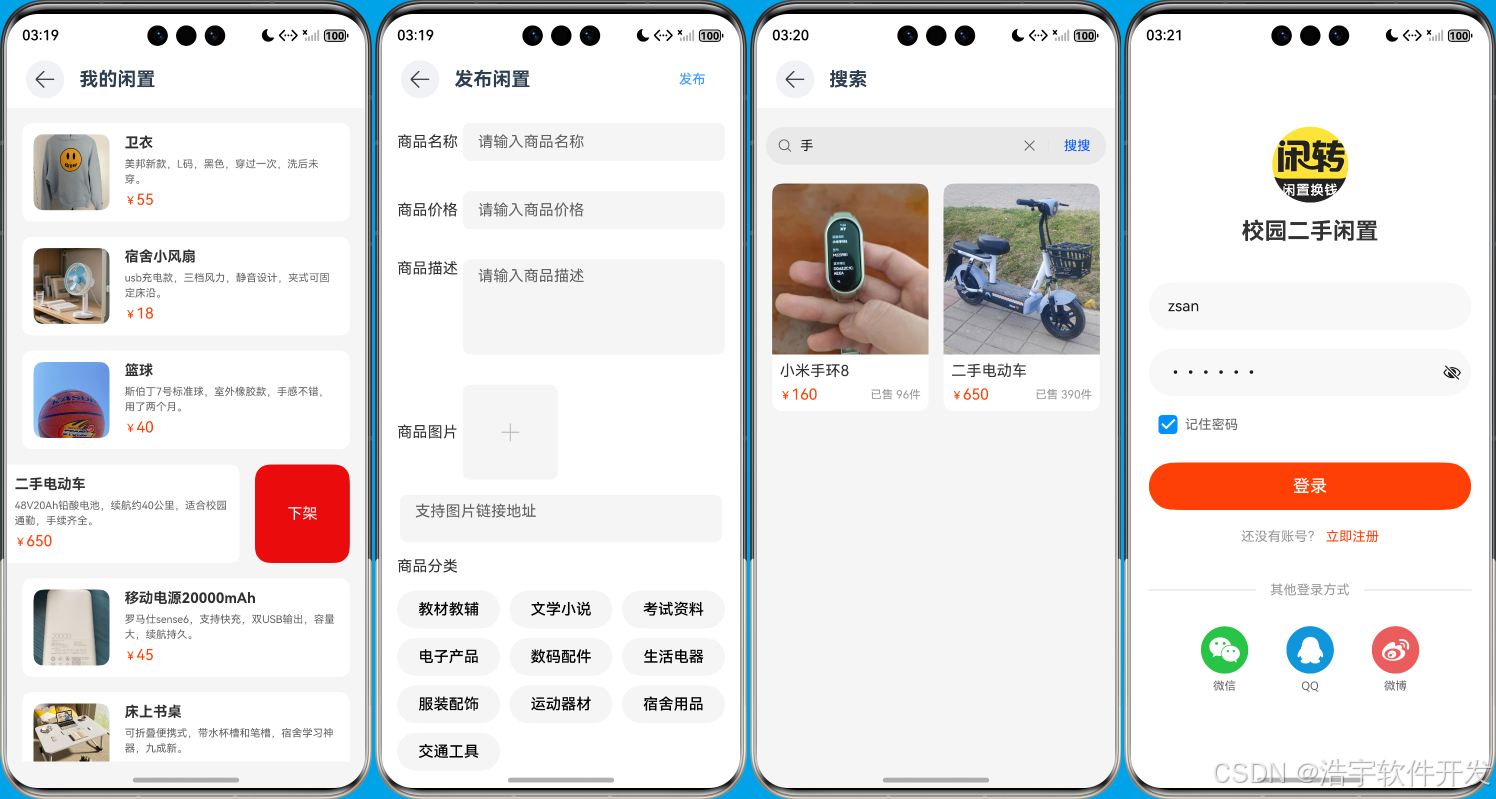
- 商品发布:支持用户发布二手闲置商品
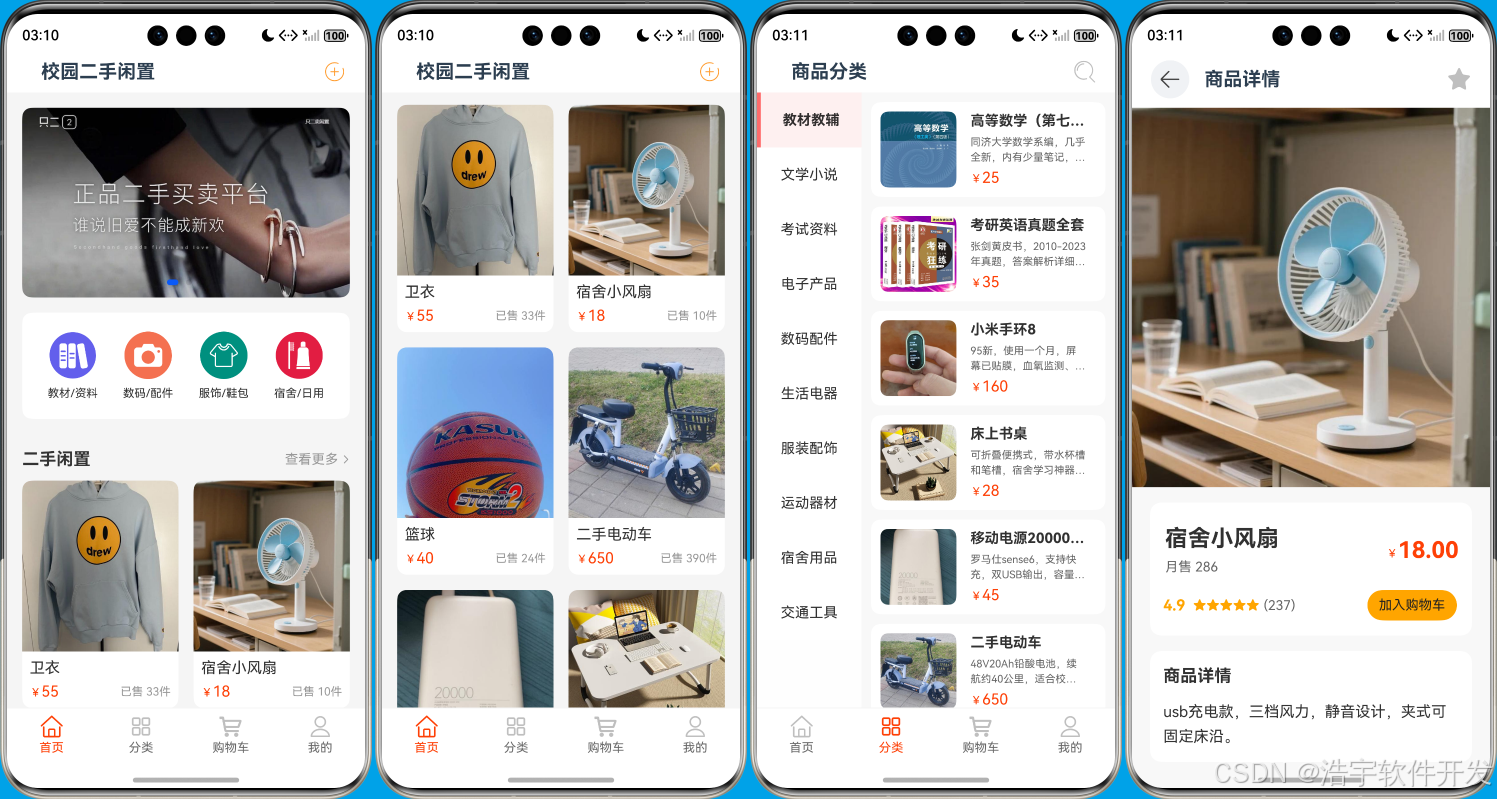
- 商品浏览:首页展示商品列表
- 商品搜索:支持关键词搜索
- 商品分类:按类别浏览商品
- 商品详情:查看商品详细信息
核心代码实现:
// 发布商品
async publishProduct(user_id: number, product: ProductInfo): Promise<number> {
  const valueBucket: relationalStore.ValuesBucket = {
    "user_id": user_id,
    "name": product.name,
    "price": product.price,
    "description": product.description,
    "image": product.image,
    "category": product.category
  };
  const rowId = await this.rdbStore.insert('products', valueBucket);
  return rowId;
}
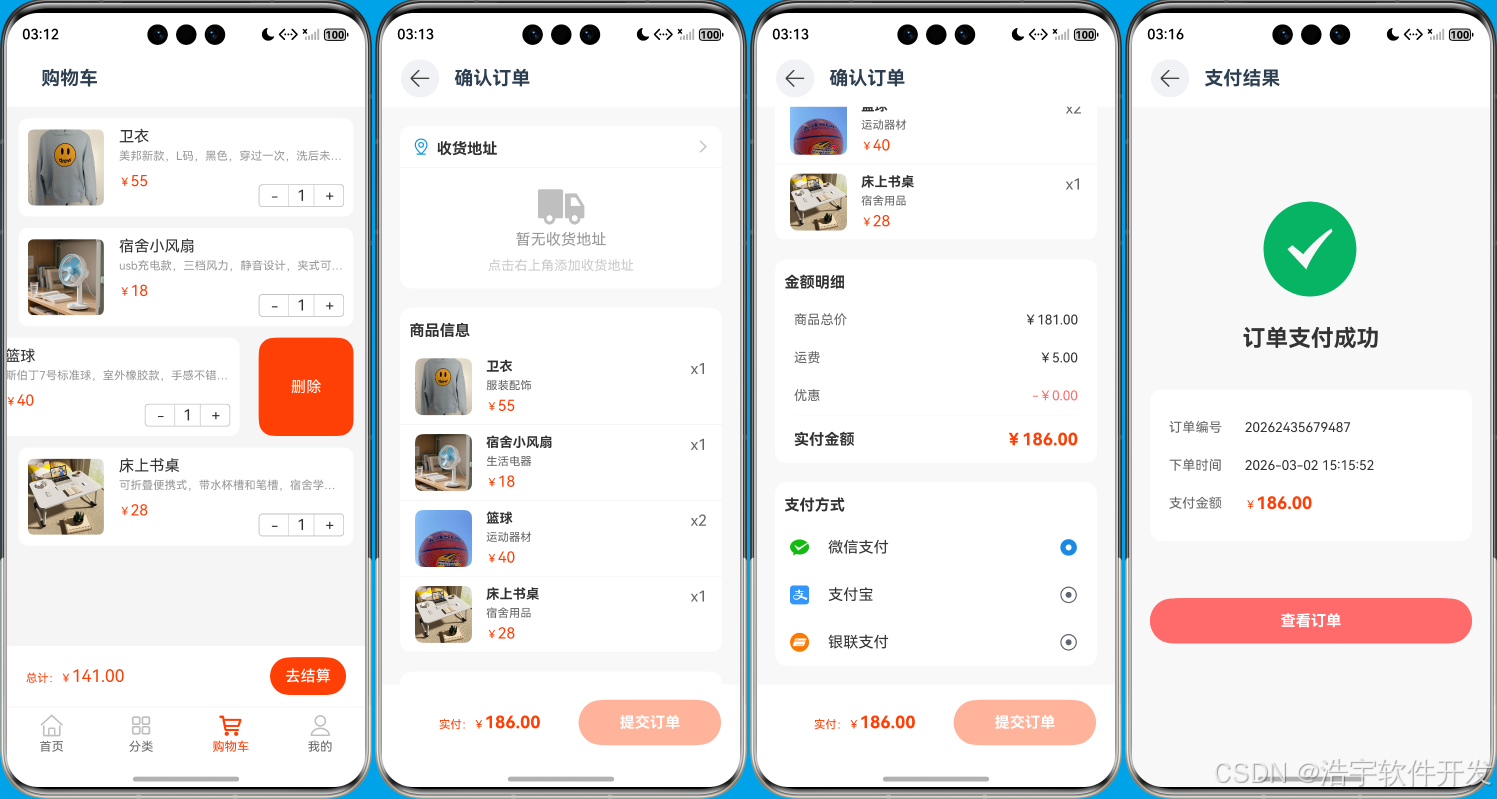
3. 购物车模块
购物车模块实现了:
- 添加商品:将商品加入购物车
- 购物车管理:修改商品数量、删除商品
- 购物车清空:一键清空购物车
核心代码实现:
// 添加到购物车
async addToCart(cartInfo: CartInfo): Promise<void> {
  // 检查购物车中是否已存在该商品
  const checkSql = 'SELECT * FROM cart WHERE user_id = ? AND product_id = ?';
  const checkValues = [cartInfo.user_id, cartInfo.product_id];
  const resultSet = await this.rdbStore.querySql(checkSql, checkValues);

  if (resultSet.rowCount > 0) {
    // 如果已存在,增加数量
    resultSet.goToFirstRow();
    const currentQuantity = resultSet.getLong(resultSet.getColumnIndex('quantity'));
    const newQuantity = currentQuantity + 1;

    const updateSql = `UPDATE cart SET quantity = ? WHERE user_id = ? AND product_id = ?`;
    const updateValues = [newQuantity, cartInfo.user_id, cartInfo.product_id];
    await this.rdbStore.executeSql(updateSql, updateValues);
  } else {
    // 如果不存在,添加新商品
    const valueBucket: relationalStore.ValuesBucket = {
      user_id: cartInfo.user_id,
      product_id: cartInfo.product_id,
      product_name: cartInfo.product_name,
      quantity: cartInfo.quantity,
      price: cartInfo.price,
      description: cartInfo.description,
      image: cartInfo.image,
      category: cartInfo.category
    };

    await this.rdbStore.insert('cart', valueBucket);
  }
}
4. 订单模块
订单模块实现了:
- 创建订单:从购物车生成订单
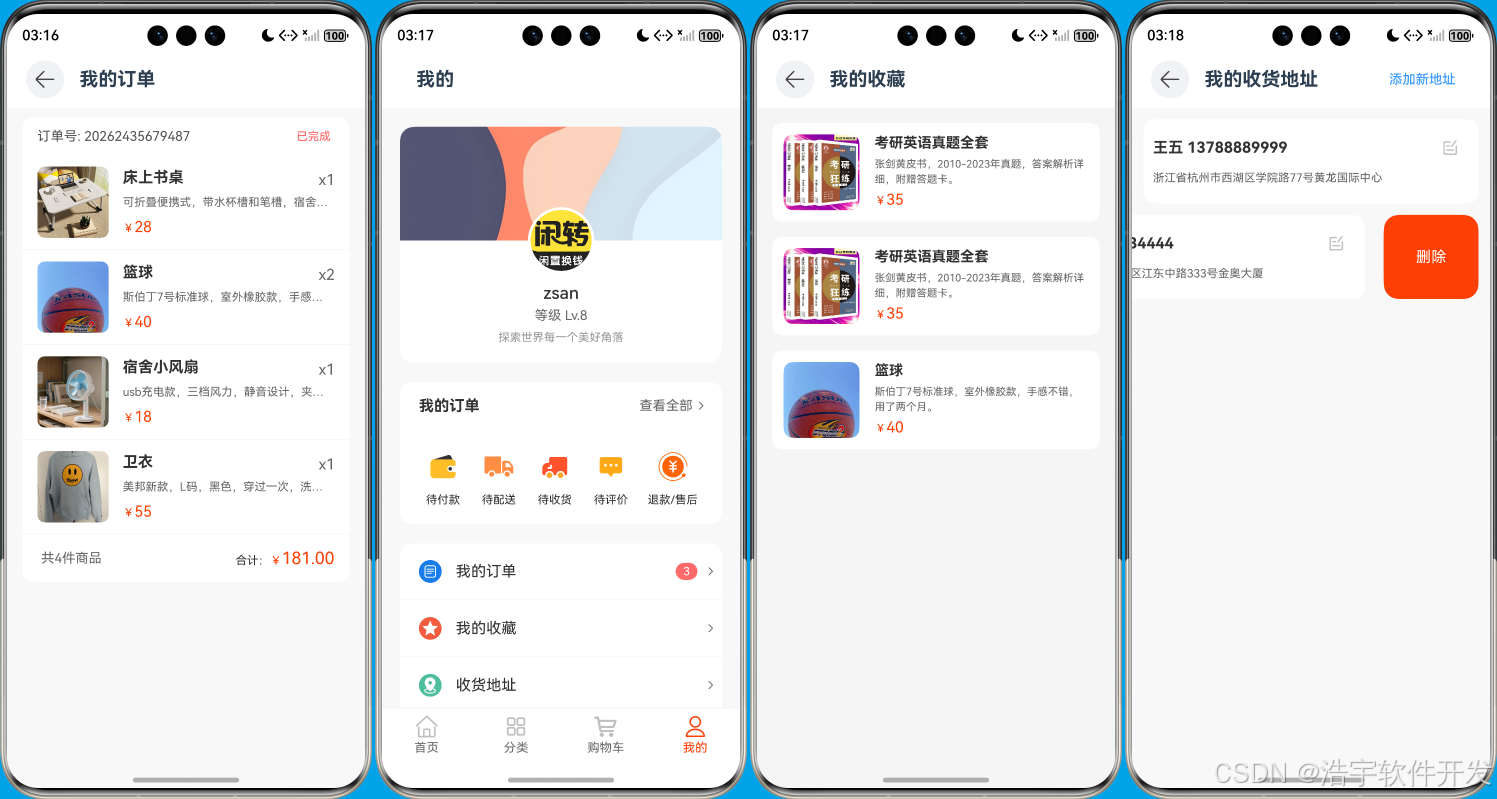
- 订单管理:查看订单列表、取消订单
- 订单详情:查看订单详细信息
核心代码实现:
// 创建订单
async createOrder(user_id: number, cartItems: CartInfo[], order_num: string): Promise<void> {
  const insertSql =
    'INSERT INTO orders (user_id, product_id, product_name, quantity, price, description, image, category, order_num) VALUES (?, ?, ?, ?, ?, ?, ?, ?, ?)';
  for (const item of cartItems) {
    const values =
      [user_id, item.product_id, item.product_name, item.quantity, item.price, item.description, item.image,
        item.category, order_num];
    await this.rdbStore.executeSql(insertSql, values);
  }
}
5. 地址模块
地址模块实现了:
- 地址管理:添加、修改、删除收货地址
- 默认地址设置:设置默认收货地址
核心代码实现:
// 添加地址
async addAddress(addressInfo: AddressInfo): Promise<void> {
  const insertSql = 'INSERT INTO address (user_id, name, phone, address) VALUES (?, ?, ?, ?)';
  const values = [addressInfo.user_id, addressInfo.name, addressInfo.phone, addressInfo.address];
  await this.rdbStore.executeSql(insertSql, values);
}
6. 收藏模块
收藏模块实现了:
- 商品收藏:收藏感兴趣的商品
- 收藏管理:查看收藏列表、取消收藏
核心代码实现:
// 添加收藏
async addFavorite(user_id: number, productInfo: ProductInfo): Promise<void> {
  const insertSql =
    'INSERT INTO favorites (user_id, product_id, product_name, price, description, image, category) VALUES (?, ?, ?, ?, ?, ?, ?)';
  const values =
    [user_id, productInfo.id, productInfo.name, productInfo.price, productInfo.description, productInfo.image,
      productInfo.category];
  await this.rdbStore.executeSql(insertSql, values);
}
四、数据库设计
应用使用关系型数据库存储数据,主要表结构包括:
- users表:存储用户信息
- products表:存储商品信息
- cart表:存储购物车信息
- orders表:存储订单信息
- address表:存储收货地址
- favorites表:存储用户收藏
数据库初始化代码:
async initDatabase(context: Context): Promise<void> {
  try {
    this.rdbStore = await relationalStore.getRdbStore(context, this.STORE_CONFIG);
    await this.createTables();
    console.info('-----------', '数据库初始化成功');
  } catch (error) {
    console.info('-----------', '数据库初始化失败:', error);
    throw new Error('数据库初始化失败');
  }
}
五、页面结构
应用包含以下主要页面:
- 首页:展示商品列表、轮播图、分类导航
- 分类页:按类别浏览商品
- 购物车页:管理购物车商品
- 个人中心:用户信息、我的发布、我的订单、我的收藏
- 发布页:发布二手闲置商品
- 商品详情页:查看商品详细信息
- 订单确认页:确认订单信息
- 订单列表页:查看订单历史
- 地址管理页:管理收货地址
- 登录/注册页:用户登录和注册
六、技术亮点
- 组件化开发:将UI拆分为多个可复用组件,提高代码复用率
- 响应式状态管理:使用@State、@StorageLink等装饰器实现状态管理
- 异步操作处理:使用async/await处理异步操作,代码更清晰
- 错误处理:完善的错误处理机制,提高应用稳定性
- 数据库优化:合理的数据库设计和查询优化,提高数据访问效率
七、项目优化
在开发过程中,我们遇到了一些问题并进行了优化:
- 数据库初始化时机:通过修改EntryAbility的onWindowStageCreate方法,确保数据库初始化完成后再加载页面
- 数据加载重试机制:在HomeComponent中添加了数据加载失败后的重试机制,确保数据能够正确加载
- UI组件优化:使用Swiper、Grid等组件实现流畅的用户界面
- 响应式布局:适配不同屏幕尺寸,提供良好的用户体验
八、总结
本项目实现了一个功能完整的校园二手闲置交易应用,涵盖了用户管理、商品发布、购物车、订单、地址和收藏等核心功能。通过使用HarmonyOS的现代前端技术,我们构建了一个性能良好、用户体验优秀的应用。
该应用不仅满足了校园二手交易的基本需求,还通过合理的架构设计和技术实现,为用户提供了便捷、安全的交易平台。未来,我们可以进一步扩展功能,如添加聊天功能、实现支付集成、优化搜索算法等,使应用更加完善。
通过这个项目,我们不仅掌握了HarmonyOS应用开发的核心技术,也积累了完整应用开发的经验,为未来的开发工作打下了坚实的基础。
九、项目运行效果图

作为“人工智能6S店”的官方数字引擎,为AI开发者与企业提供一个覆盖软硬件全栈、一站式门户。
更多推荐


 19
19 0
0- 0


 已为社区贡献16条内容

所有评论(0)