
lutter 三方库 day 的鸿蒙化实战 - 引入全能日期拦截格式化引擎,碾碎繁杂且高消耗的时间展示解析壁垒
在 OpenHarmony (开源鸿蒙) 应用开发中,处理复杂系统的时间、时区、以及各种日期的格式展现是一项非常繁琐且容易出错的工作。原生的DateTime类在很多高级场景下显得不够灵活,过度使用原生类会导致代码冗长、解析困难甚至带来性能隐患。day组件的作用正如前端老牌霸主moment.js或day.js,它是一款轻量然而功能极其强大的时间拦截和格式化系统!它为我们提供了一个流畅且极其简洁的日期
欢迎加入开源鸿蒙跨平台社区:https://openharmonycrossplatform.csdn.net
Flutter 三方库 day 的鸿蒙化实战 - 引入全能日期拦截格式化引擎,碾碎繁杂且高消耗的时间展示解析壁垒
前言
在 OpenHarmony (开源鸿蒙) 应用开发中,处理复杂系统的时间、时区、以及各种日期的格式展现是一项非常繁琐且容易出错的工作。原生的 DateTime 类在很多高级场景下显得不够灵活,过度使用原生类会导致代码冗长、解析困难甚至带来性能隐患。
day 组件的作用正如前端老牌霸主 moment.js 或 day.js,它是一款轻量然而功能极其强大的时间拦截和格式化系统!它为我们提供了一个流畅且极其简洁的日期操作体验引擎,帮我们在鸿蒙端应用的业务层大幅削减和时间有关的脏活累活。
一、原理解析 / 概念介绍
1.1 基础原理/概念介绍
day 提供了一种极其轻便的数据结构来代理系统的原生时间对象。它把对各种字符串转换、偏移计算以及格式化展现等接口,用优雅的链式结构封装起来,并且对时区处理提供了友好的底层支持策略。
1.2 核心业务优势
选择 day 接入系统架构能够带来显著的体验收益:
- 不可变对象的数据安全性:所有对
Day实例的运算(例如添加天数)均会返回一个全新的实例对象,从根本上防止了多组件共享时间变量引发的指针耦合和状态污染。 - 极简优雅且贴近人类直觉的 API:极其熟悉的
YYYY-MM-DD格式化规则,一网打尽以前需要写十几行格式化解析逻辑的各种痛点。
二、鸿蒙基础指导
2.1 适配情况
- 是否原生支持?:完全通过,这是纯 Dart 开发的系统核心辅助类库,不碰及端侧特有底层 API。
- 是否鸿蒙官方支持?:作为处理业务日期的辅助构件,其表现十分优异平稳,鸿蒙应用无缝搭载。
- 是否需要额外干预?:使用时不需要任何额外的权限介入配置。
2.2 适配代码引入
将依赖声明添加到项目中的 pubspec.yaml 中即可在项目里引入这个引擎:
dependencies:
  day: ^1.2.0
三、核心 API / 组件详解
3.1 快速上手与核心方法
在业务代码里调用并进行时间转换时如此简单顺畅:
| 句法组件调用特征 | 功能说明 | 极简调用代码特征 |
|---|---|---|
Day.fromString(...) |
解析极度恶心的各类字符串文本,并提取出标准操作体。 | final d = Day.fromString('2023-01-01') |
d.format(...) |
利用占位符体系,轻松将其转化为任意需求形式展现。 | d.format('YYYY-MM-DD') |
d.add(val, unit) |
便捷快速的核心推后及拨前演算计算。 | d.add(1, 'd') // 加 1 天 |
3.2 基础拦截并读取数据特征
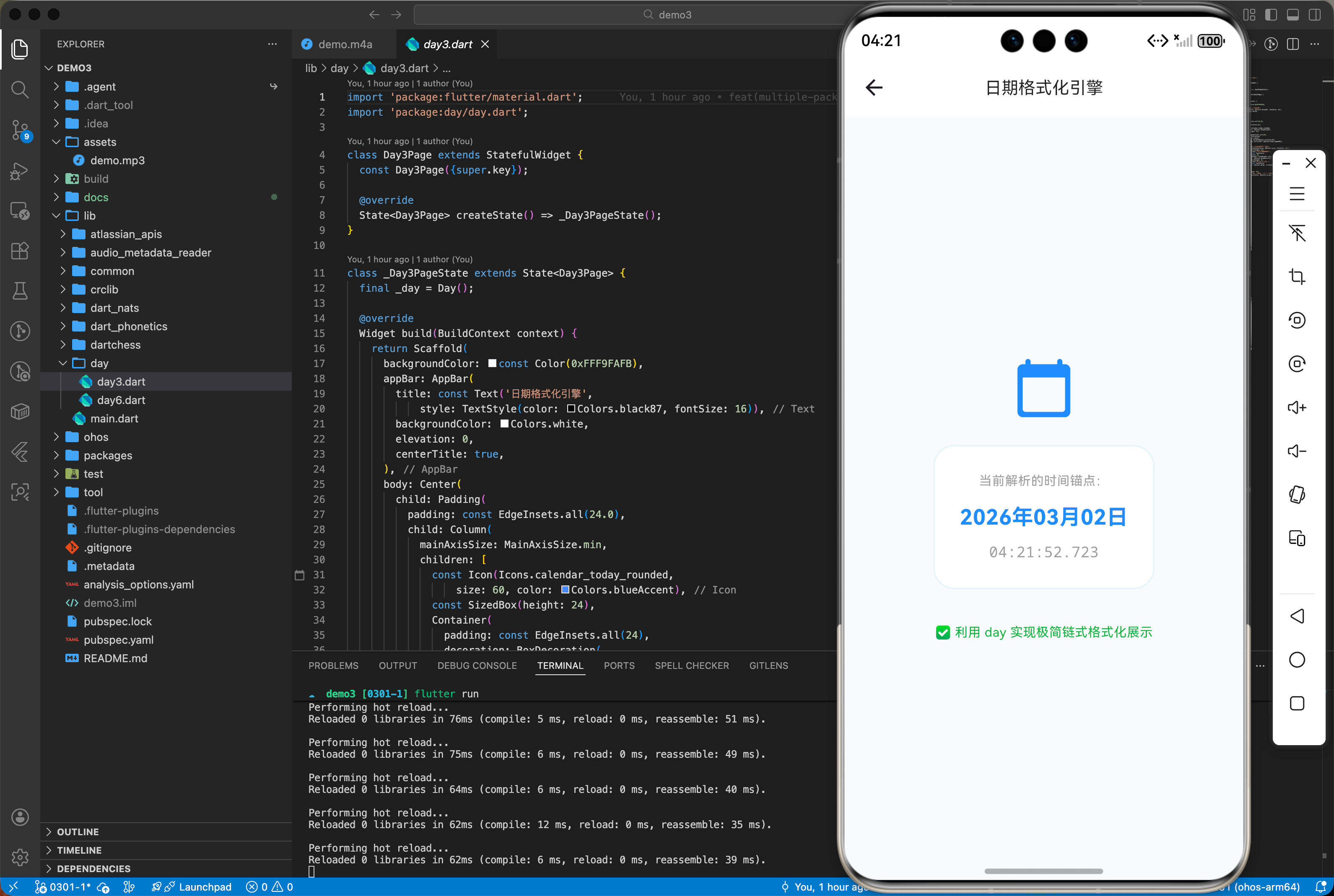
import 'package:flutter/material.dart';
import 'package:day/day.dart';
class Day3Page extends StatefulWidget {
const Day3Page({super.key});
State<Day3Page> createState() => _Day3PageState();
}
class _Day3PageState extends State<Day3Page> {
final _day = Day();
Widget build(BuildContext context) {
return Scaffold(
backgroundColor: const Color(0xFFF9FAFB),
appBar: AppBar(
title: const Text('日期格式化引擎',
style: TextStyle(color: Colors.black87, fontSize: 16)),
backgroundColor: Colors.white,
elevation: 0,
centerTitle: true,
),
body: Center(
child: Padding(
padding: const EdgeInsets.all(24.0),
child: Column(
mainAxisSize: MainAxisSize.min,
children: [
const Icon(Icons.calendar_today_rounded,
size: 60, color: Colors.blueAccent),
const SizedBox(height: 24),
Container(
padding: const EdgeInsets.all(24),
decoration: BoxDecoration(
color: Colors.white,
borderRadius: BorderRadius.circular(20),
border: Border.all(color: Colors.blue.shade50)),
child: Column(
children: [
const Text('当前解析的时间锚点:',
style: TextStyle(color: Colors.grey, fontSize: 12)),
const SizedBox(height: 12),
Text(_day.format('YYYY年MM月DD日'),
style: const TextStyle(
fontSize: 20,
fontWeight: FontWeight.bold,
color: Colors.blueAccent)),
const SizedBox(height: 8),
Text(_day.format('HH:mm:ss.SSS'),
style: const TextStyle(
color: Colors.grey, fontFamily: 'monospace')),
],
),
),
const SizedBox(height: 32),
const Text('✅ 利用 day 实现极简链式格式化展示',
style: TextStyle(color: Colors.green, fontSize: 12)),
],
),
),
),
);
}
}
四、典型应用场景
4.1 超高要求与重排版的交互记录时间打标组件模块
如果你的页面含有比如聊天日志模块,需要实时把过去的时间格式化为诸如“5分钟前”、“昨天 14:00”等拟人的动态展现。使用原生方法堆叠 if-else 一定会让你苦不堪言。而借用 day 所构建的处理系统能够让这些格式转码仅仅变成一行配置指令就能得出结果。
五、OpenHarmony 平台适配挑战
5.1 国际化与全球由于时区差异导致的显示补偿处理
在使用跨端编译出海时,不同的设备系统底座预设的时区获取由于底层 OS 版本不同可能产生异常漂移。day 的大优势之一便是允许你在其内部配置锁定偏移或者是使用强制 Utc 核算策略解决此类因为本地环境时间错误造成的各种隐患!
六、综合实战演示
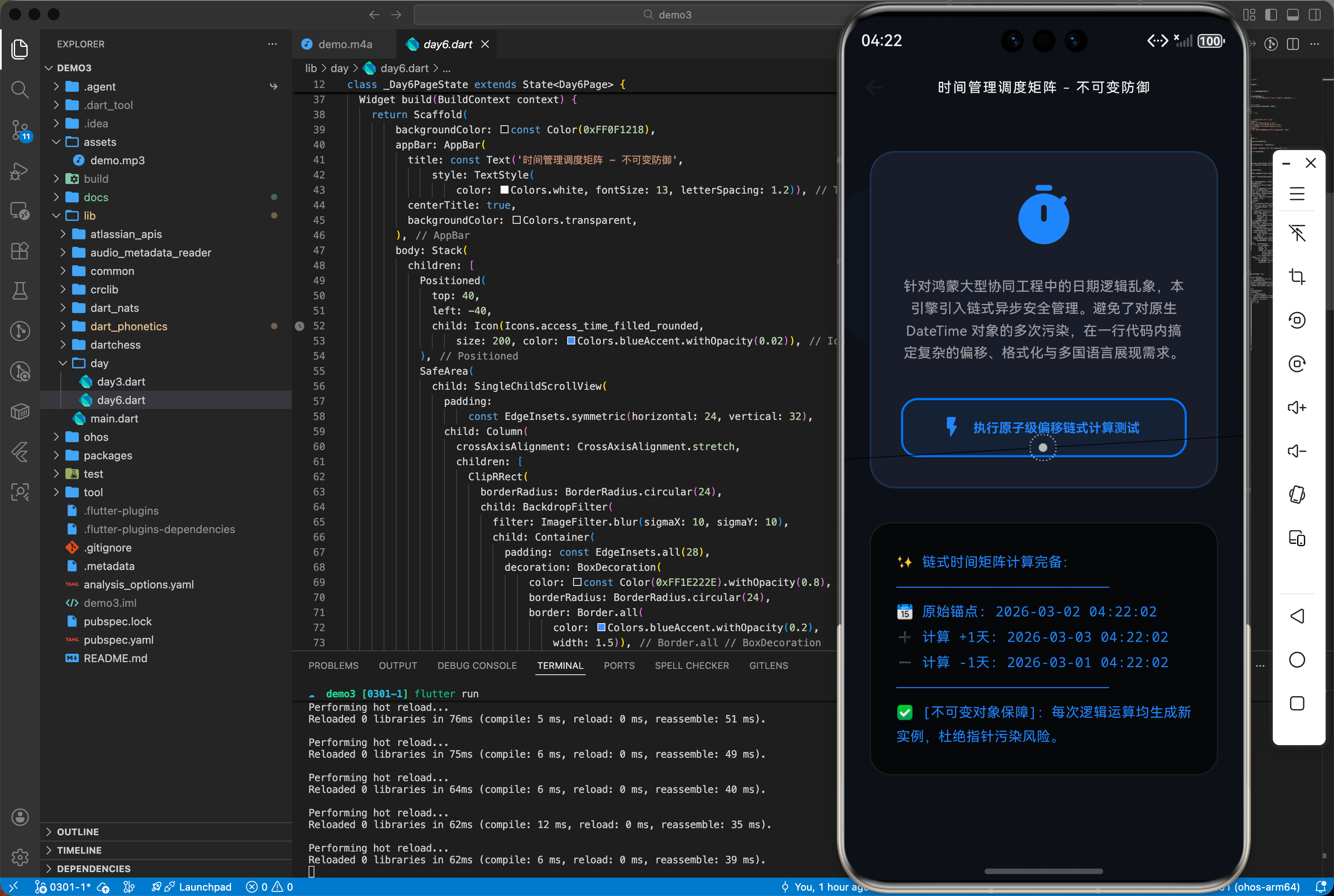
如下在 DayDashPage.dart 展示如何利用此库轻易构建推算日期的表现系统面板:
import 'dart:ui';
import 'package:flutter/material.dart';
import 'package:day/day.dart';
class Day6Page extends StatefulWidget {
const Day6Page({super.key});
State<Day6Page> createState() => _Day6PageState();
}
class _Day6PageState extends State<Day6Page> {
String _radarDisplayContext = ">>> 时间矩阵待命:准备展示链式运算与原子态变更...";
bool _isProcessing = false;
void _runTimeChain() async {
setState(() => _isProcessing = true);
await Future.delayed(const Duration(milliseconds: 1200));
final d = Day();
final dPlus1 = d.add(1, 'd');
final dMinus1 = d.subtract(1, 'd');
setState(() {
_isProcessing = false;
_radarDisplayContext = "✨ 链式时间矩阵计算完备:\n"
"─────────────────────────\n"
"📅 原始锚点: ${d.format('YYYY-MM-DD HH:mm:ss')}\n"
"➕ 计算 +1天: ${dPlus1.format('YYYY-MM-DD HH:mm:ss')}\n"
"➖ 计算 -1天: ${dMinus1.format('YYYY-MM-DD HH:mm:ss')}\n"
"─────────────────────────\n"
"✅ [不可变对象保障]:每次逻辑运算均生成新实例,杜绝指针污染风险。";
});
}
Widget build(BuildContext context) {
return Scaffold(
backgroundColor: const Color(0xFF0F1218),
appBar: AppBar(
title: const Text('时间管理调度矩阵 - 不可变防御',
style: TextStyle(
color: Colors.white, fontSize: 13, letterSpacing: 1.2)),
centerTitle: true,
backgroundColor: Colors.transparent,
),
body: Stack(
children: [
Positioned(
top: 40,
left: -40,
child: Icon(Icons.access_time_filled_rounded,
size: 200, color: Colors.blueAccent.withOpacity(0.02)),
),
SafeArea(
child: SingleChildScrollView(
padding:
const EdgeInsets.symmetric(horizontal: 24, vertical: 32),
child: Column(
crossAxisAlignment: CrossAxisAlignment.stretch,
children: [
ClipRRect(
borderRadius: BorderRadius.circular(24),
child: BackdropFilter(
filter: ImageFilter.blur(sigmaX: 10, sigmaY: 10),
child: Container(
padding: const EdgeInsets.all(28),
decoration: BoxDecoration(
color: const Color(0xFF1E222E).withOpacity(0.8),
borderRadius: BorderRadius.circular(24),
border: Border.all(
color: Colors.blueAccent.withOpacity(0.2),
width: 1.5)),
child: Column(
children: [
const Icon(Icons.timer_rounded,
size: 64, color: Colors.blueAccent),
const SizedBox(height: 24),
const Text(
"针对鸿蒙大型协同工程中的日期逻辑乱象,本引擎引入链式异步安全管理。避免了对原生 DateTime 对象的多次污染,在一行代码内搞定复杂的偏移、格式化与多国语言展现需求。",
textAlign: TextAlign.center,
style: TextStyle(
color: Colors.white60,
fontSize: 13,
height: 1.6)),
const SizedBox(height: 32),
ElevatedButton.icon(
onPressed: _isProcessing ? null : _runTimeChain,
style: ElevatedButton.styleFrom(
backgroundColor:
Colors.blueAccent.withOpacity(0.1),
foregroundColor: Colors.blueAccent.shade200,
side: BorderSide(
color: Colors.blueAccent.shade400,
width: 2),
minimumSize: const Size(double.infinity, 56),
shape: RoundedRectangleBorder(
borderRadius: BorderRadius.circular(16)),
),
icon: _isProcessing
? const SizedBox(
width: 20,
height: 20,
child: CircularProgressIndicator(
color: Colors.blueAccent,
strokeWidth: 2))
: const Icon(Icons.flash_on_rounded),
label: const Text("执行原子级偏移链式计算测试",
style: TextStyle(
fontWeight: FontWeight.bold,
fontSize: 12)),
)
],
),
),
),
),
const SizedBox(height: 32),
Container(
width: double.infinity,
padding: const EdgeInsets.all(24),
decoration: BoxDecoration(
color: Colors.black.withOpacity(0.6),
borderRadius: BorderRadius.circular(20),
border: Border.all(color: Colors.white10),
),
child: Text(
_radarDisplayContext,
style: TextStyle(
color: _isProcessing
? Colors.blueAccent.shade100
: Colors.blueAccent.shade200,
fontFamily: 'monospace',
fontSize: 13,
height: 1.8),
),
),
],
),
),
)
],
));
}
}
七、总结
通过本篇对 day 类库这枚利器的深度使用指导。对于在构建拥有庞大数据交互大网的工程时,采用这个不仅语法友好看齐现代前端流行做法、且具有完全防止状态变量互相污染极其好用的独立对象管理模型。这是你打造鸿蒙级高级前端项目必须要常备的轻量全能基建。

作为“人工智能6S店”的官方数字引擎,为AI开发者与企业提供一个覆盖软硬件全栈、一站式门户。
更多推荐


 1
1 0
0- 0


 已为社区贡献4条内容

所有评论(0)