
基于 HarmonyOS鸿蒙开发的宠物商城APP实现
文章目录
基于 HarmonyOS 的宠物商城应用开发实践
一、前言
随着移动互联网的快速发展,宠物经济逐渐成为消费市场的重要组成部分。越来越多的宠物主人希望能够通过线上渠道便捷地购买宠物用品。本文将介绍如何使用 HarmonyOS 开发一个功能完整的宠物商城应用,包括项目架构、核心功能模块的实现以及技术亮点。
二、项目概述
本项目是一个基于 HarmonyOS 平台开发的宠物商城应用,旨在为用户提供便捷的宠物用品购买体验。应用采用组件化开发方式,使用 TypeScript/ArkTS 语言实现,具有以下特点:
- 现代化的 UI 设计,符合 HarmonyOS 的设计规范
- 完整的电商功能链路,从浏览商品到下单购买
- 本地数据存储,确保用户数据安全
- 响应式布局,适配不同尺寸的设备
三、项目架构
目录结构
Harmony-pet-shopping-mall/
├── AppScope/              # 应用全局配置
├── entry/                 # 主入口模块
│   ├── src/main/ets/      # 源代码目录
│   │   ├── component/     # 通用组件
│   │   ├── database/      # 本地数据库
│   │   ├── model/         # 数据模型
│   │   ├── pages/         # 页面
│   │   └── entryability/  # 应用入口能力
│   └── resources/         # 资源文件
└── hvigor/                # 构建配置
核心模块
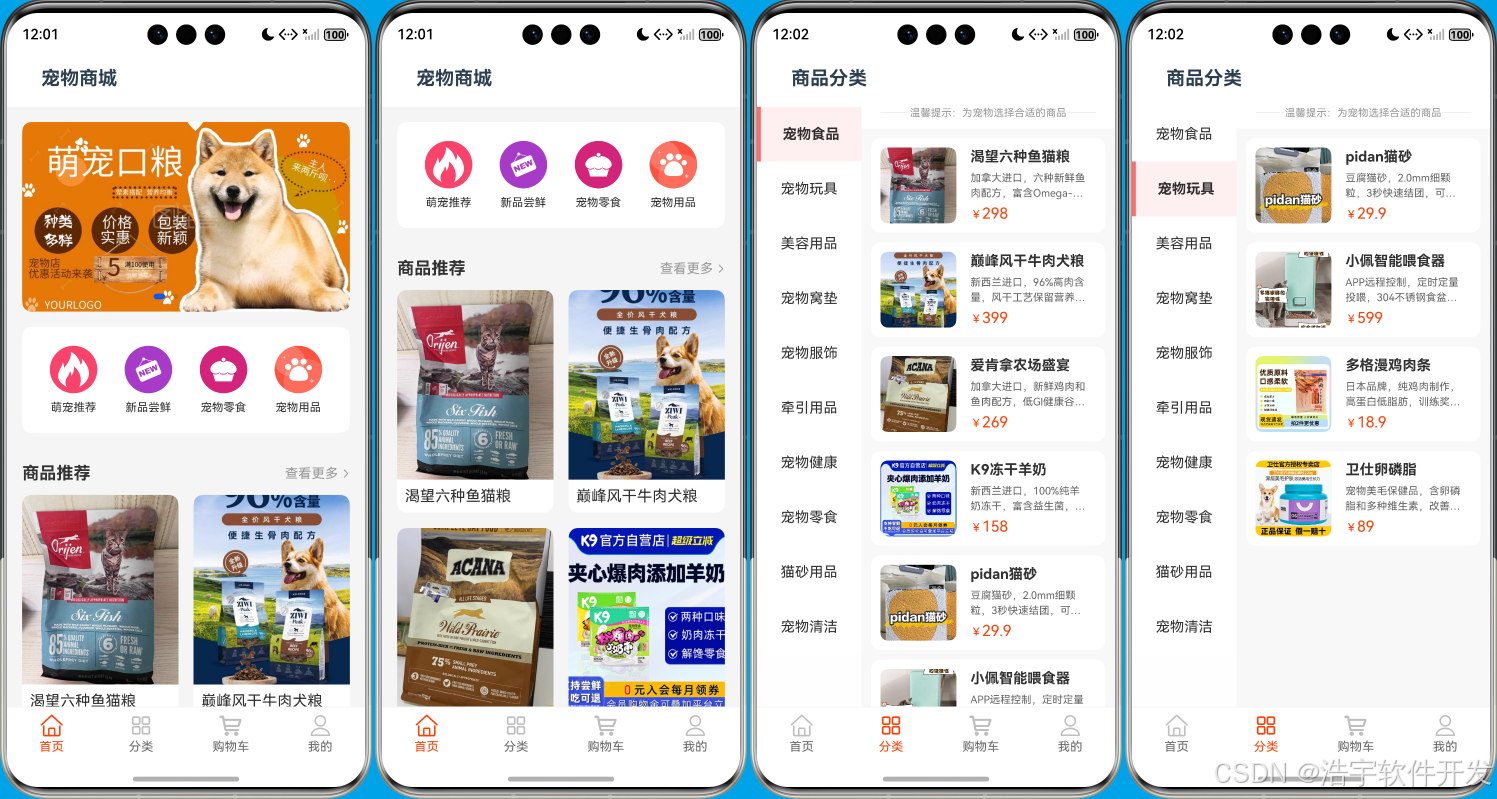
- 首页模块:轮播图展示、导航金刚区、商品推荐列表
- 分类模块:左侧分类列表、右侧商品列表
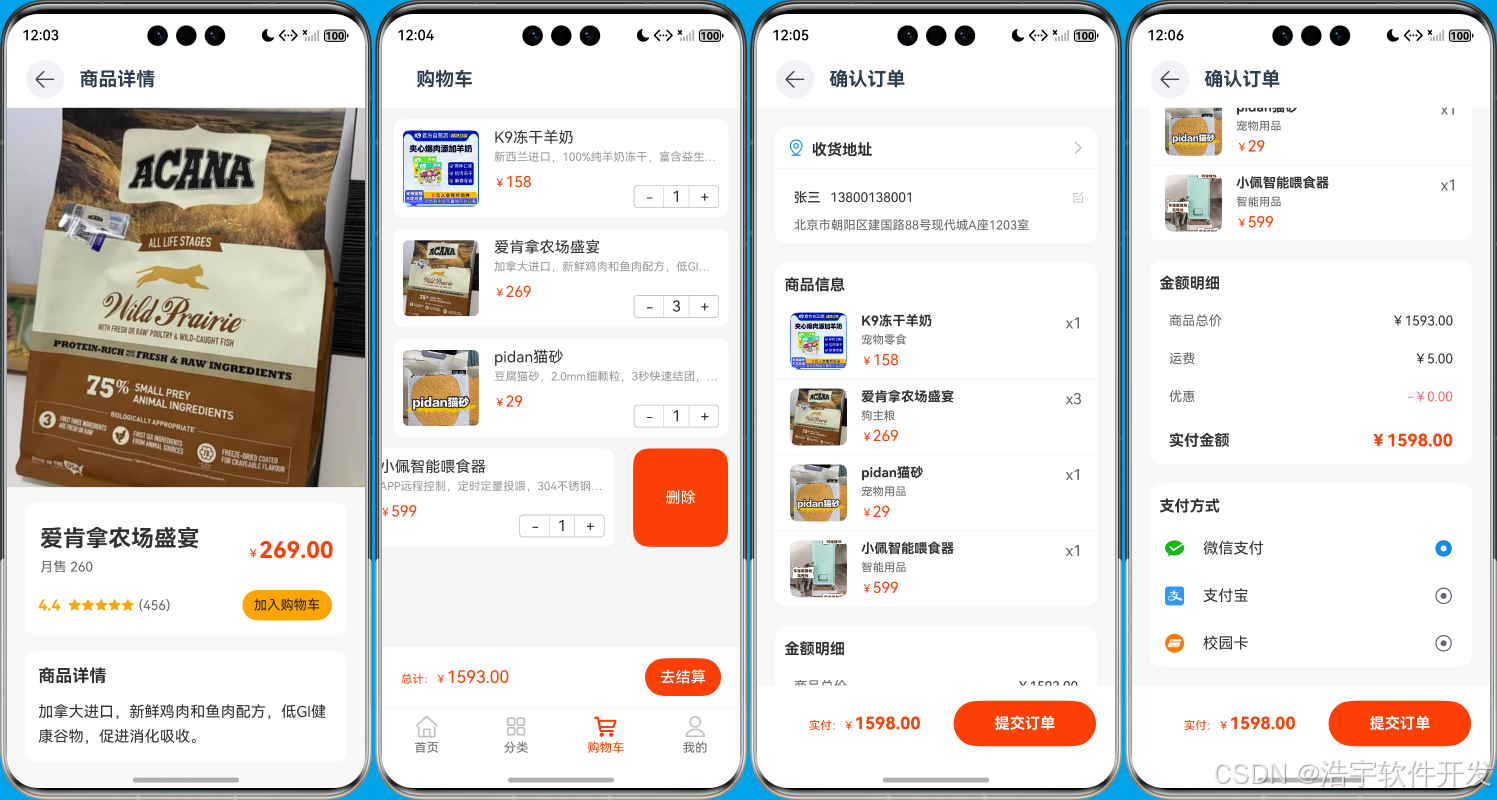
- 购物车模块:商品管理、数量调整、结算功能
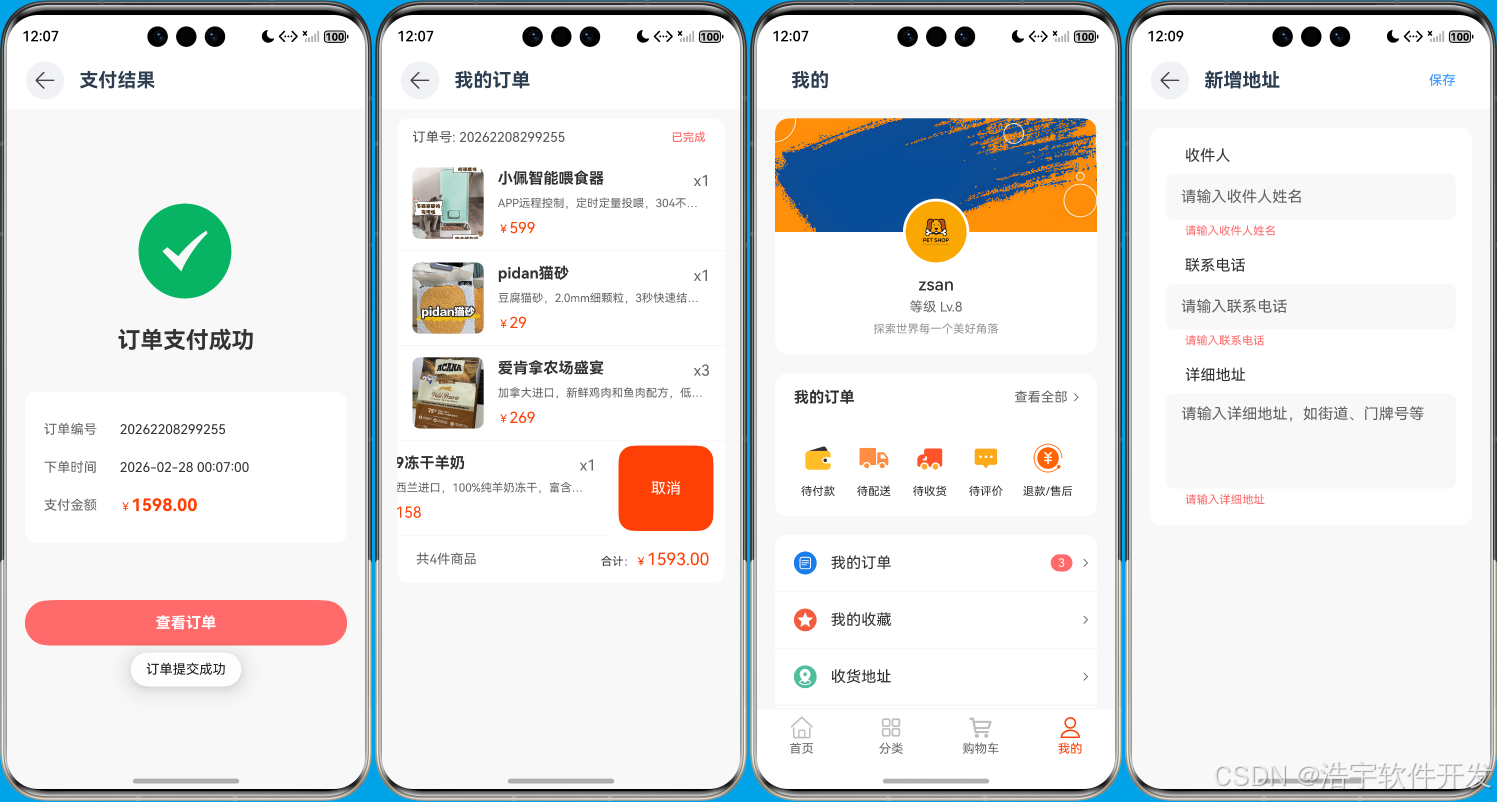
- 个人中心模块:用户信息、订单管理、地址管理
- 商品详情模块:商品信息展示、加入购物车
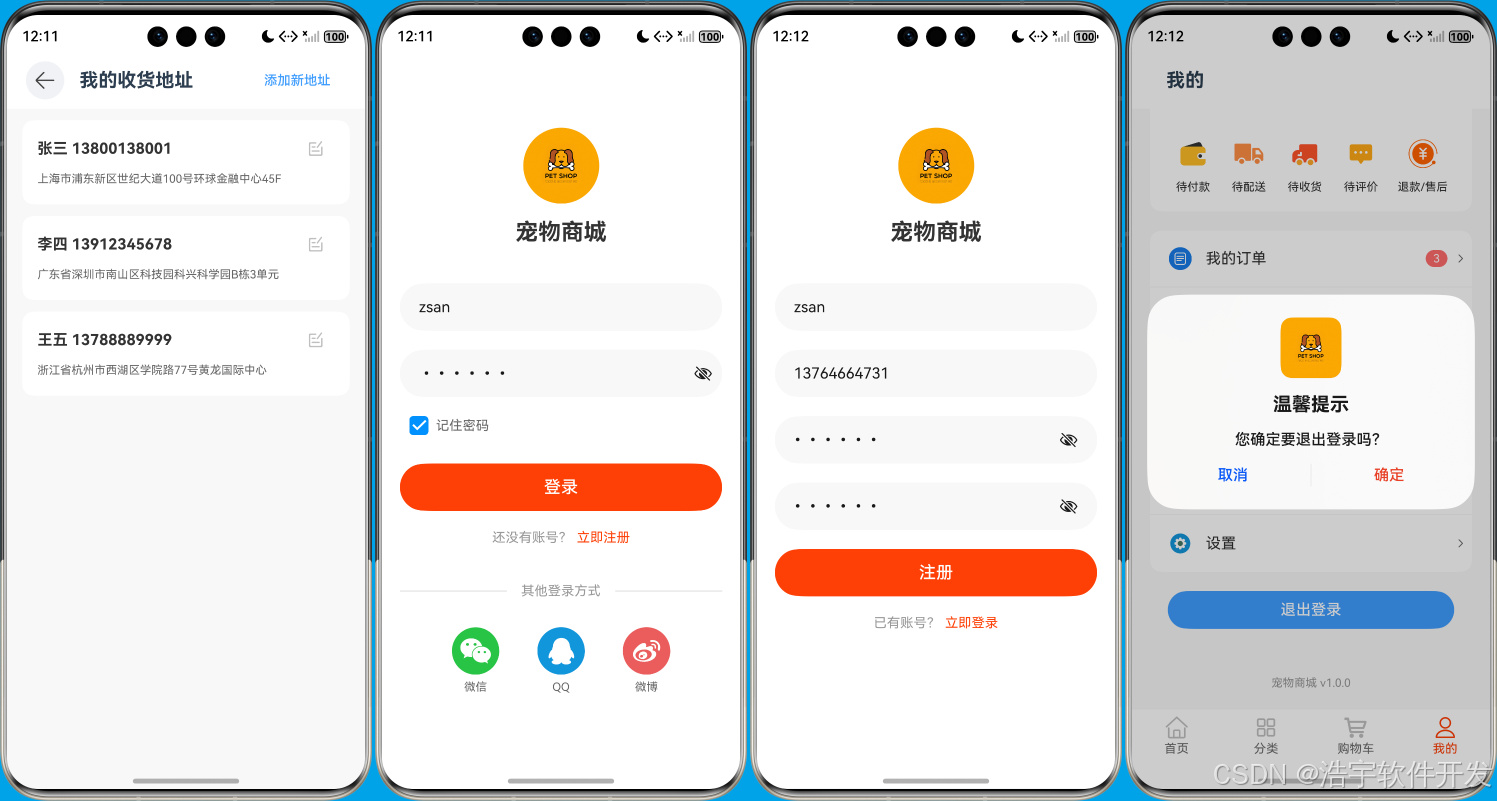
- 用户管理模块:登录、注册功能
- 订单模块:订单创建、订单列表、订单状态管理
- 地址模块:地址列表、添加地址
四、 核心功能实现
1. 首页模块
首页模块采用 Scroll 组件实现可滚动布局,包含轮播图、导航金刚区和商品推荐列表。轮播图使用 Swiper 组件实现,支持自动播放和循环滚动。商品推荐列表使用 Grid 组件实现,展示热门商品。
// 轮播图实现
Swiper() {
  ForEach(this.bannerList, (item: string) => {
    Image(item)
      .width('100%')
      .height('100%')
      .objectFit(ImageFit.Cover)
      .borderRadius(10)
  })
}
.height('200')
.loop(true)
.margin(16)
.autoPlay(true)
.interval(2000)

// 商品推荐列表
Grid() {
  ForEach(DataService.getHotProductData(), (item: ProductInfo) => {
    GridItem() {
      GridItemComponent({ item: item })
    }
    .onClick(() => {
      this.getUIContext().getRouter().pushUrl({
        url: 'pages/DetailsPage',
        params: item
      })
    })
  })
}
.columnsTemplate('1fr 1fr')
.columnsGap(16)
.rowsGap(16)
.margin({ left: 16, right: 16, bottom: 16 })
2. 分类模块
分类模块采用左右分栏布局,左侧是分类列表,右侧是对应分类的商品列表。左侧分类列表使用 ForEach 循环渲染,右侧商品列表根据选中的分类动态更新。
// 左侧分类列表
Column() {
  ForEach(this.categoryList, (category: CategoryInfo) => {
    Column() {
      Text(category.name)
        .fontSize(16)
        .fontWeight(this.selectedCategoryId === category.id ? FontWeight.Bold : FontWeight.Normal)
        .margin({
          left: 15,
          right: 15,
          top: 20,
          bottom: 20
        })
        .textAlign(TextAlign.Center)
    }
    .width(110)
    .backgroundColor(this.selectedCategoryId === category.id ? "#FFF0F0" : "#FFFFFF")
    .borderWidth({ left: this.selectedCategoryId === category.id ? 4 : 0 })
    .borderColor(this.selectedCategoryId === category.id ? "#FF6B6B" : "#FFFFFF")
    .onClick(() => {
      this.selectCategory(category.id);
    })
  })
}

// 右侧商品列表
List() {
  ForEach(this.productList, (product: ProductInfo) => {
    ListItem() {
      Row() {
        Image(product.image)
          .width(80)
          .height(80)
          .borderRadius(8)
          .margin({ left: 10, right: 15 })

        Column() {
          Text(product.name)
            .fontSize(16)
            .fontWeight(FontWeight.Bold)
            .margin({ bottom: 5 })
            .textOverflow({ overflow: TextOverflow.Ellipsis })

          Text(product.description)
            .fontSize(11)
            .fontColor("#666666")
            .lineHeight(16)
            .margin({ bottom: 5 })
            .textOverflow({ overflow: TextOverflow.Ellipsis })
            .maxLines(2)

          Row() {
            Text(`¥`)
              .fontColor("#fe4006")
              .fontSize(12)
              .margin({ top: 2 })

            Text(product.price.toString())
              .fontColor("#fe4006")
              .fontSize(16)
          }
        }
        .flexGrow(1)
        .alignItems(HorizontalAlign.Start)
        .margin({ right: 20 })
        .layoutWeight(1)
      }
      .height(100)
      .backgroundColor("#FFFFFF")
      .borderColor("#F5F5F5")
      .borderRadius(10)
      .margin({ bottom: 10 })

    }
    .onClick(() => {
      this.getUIContext().getRouter().pushUrl({
        url: 'pages/DetailsPage',
        params: product
      })
    })
  })
}
3. 购物车模块
购物车模块实现了商品的增删改查功能,使用本地数据库存储购物车数据。支持商品数量调整、商品删除和批量结算功能。
// 购物车商品列表
List({ space: 12 }) {
  ForEach(this.cartInfoList, (item: CartInfo, index: number) => {
    ListItem() {
      Row() {
        Image(item.image)
          .width(80)
          .height(80)
          .borderRadius(6)
          .syncLoad(true)

        Column() {
          Text(item.product_name)
            .fontSize(16)

          Text(item.description)
            .fontSize(12)
            .maxLines(1)
            .fontColor("#999999")
            .textOverflow({ overflow: TextOverflow.Ellipsis })
            .margin({ top: 4 })

          Row() {
            Text(`¥`)
              .fontColor("#fe4006")
              .fontSize(12)
              .margin({ top: 2 })

            Text(item.price.toString())
              .fontColor("#fe4006")
              .fontSize(16)
          }
          .margin({ top: 10 })

          Row() {
            Blank().layoutWeight(1)
            Counter() {
              Text(item.quantity.toString())
            }
            .width(90)
            .height(24)
            .onInc(() => {
              this.increaseQuantity(item.product_id)
            })
            .onDec(() => {
              this.decreaseQuantity(item.product_id)
            })

          }
          .margin({ top: -6 })
        }
        .margin({ left: 16 })
        .alignItems(HorizontalAlign.Start)
        .layoutWeight(1)
      }
      .padding(10)
      .borderRadius(10)
      .margin({ left: 12, right: 12 })

      .backgroundColor('#ffffff')
    }
    .swipeAction({ end: this.itemEnd(item), edgeEffect: SwipeEdgeEffect.Spring })
  })
}
4. 个人中心模块
个人中心模块展示用户信息、订单状态和功能菜单。支持用户登录、查看订单、管理地址等功能。
// 用户信息卡片
@Builder
UserInfoCard() {
  Column() {
    // 背景渐变色块
    Image($r('app.media.img_header'))
      .height(120)
      .width('100%')
      .borderRadius({
        topLeft: 15,
        topRight: 15,
        bottomLeft: 0,
        bottomRight: 0
      })
    // 头像和信息
    Column() {
      // 头像
      Image($r("app.media.default_icon"))
        .width(70)
        .height(70)
        .borderRadius(35)
        .margin({ top: -35 })
        .border({ width: 3, color: Color.White })

      // 用户名和等级
      Text(this.userInfo.username)
        .fontSize(18)
        .fontWeight(FontWeight.Medium)
        .fontColor('#333')
        .margin({ top: 10 })

      Text('等级 Lv.8')
        .fontSize(14)
        .fontColor('#666')
        .margin({ top: 5 })

      // 签名
      Text(this.userInfo.signature)
        .fontSize(12)
        .fontColor('#999')
        .margin({ top: 8, bottom: 20 })
    }
    .alignItems(HorizontalAlign.Center)
    .onClick(() => {
      this.getUIContext().getRouter().pushUrl({
        url: 'pages/LoginPage'
      })
    })

  }
  .width('90%')
  .margin({ top: 10 })
  .borderRadius(15)
  .backgroundColor(Color.White)

}
5. 商品详情模块
商品详情模块展示商品的详细信息,包括商品图片、名称、价格、描述等。支持加入购物车功能。
// 商品信息区域
Column() {
  // 商品名称和价格
  Column() {
    Row() {
      Column() {
        Text(this.product.name)
          .fontSize(24)
          .fontWeight(FontWeight.Bold)
          .margin({ left: 16, top: 24 })
          .textAlign(TextAlign.Start)

        Text(`月售 ${this.generateRandomSales()}`)
          .fontSize(14)
          .fontColor("#666666")
          .margin({ top: 8, left: 16 })
      }
      .alignItems(HorizontalAlign.Start)

      Blank().layoutWeight(1)
      Row() {
        Text(`¥`)
          .fontColor("#fe4006")
          .fontSize(12)
          .margin({ top: 7 })

        Text(this.product.price.toFixed(2))
          .fontColor("#fe4006")
          .fontWeight(FontWeight.Bold)
          .fontSize(24)
      }
      .margin({ right: 14, top: 24 })
    }
    .width('100%')
    .justifyContent(FlexAlign.Start)


    // 评分和销量
    Row() {
      Row() {
        Text(this.generateRandomRating().toString())
          .fontSize(16)
          .fontWeight(FontWeight.Bold)
          .fontColor("#FFA500")
          .margin({ left: 14, top: 16 })

        Text("★★★★★")
          .fontSize(14)
          .fontColor("#FFA500")
          .margin({ left: 8, top: 16 })

        Text(`(${this.generateRandomSales()})`)
          .fontSize(14)
          .fontColor("#666666")
          .margin({ left: 4, top: 16 })
      }

      Text("加入购物车")
        .fontSize(14)
        .fontColor("#222222")
        .margin({ right: 16, top: 16 })
        .backgroundColor('#FFA500')
        .padding({
          left: 12,
          right: 12,
          top: 8,
          bottom: 8
        })
        .borderRadius(20)
        .onClick(() => {
          this.addToCart()
        })
    }
    .width('100%')
    .justifyContent(FlexAlign.SpaceBetween)
    .margin({ bottom: 16 })
  }
  .width('90%')
  .backgroundColor('#ffffff')
  .borderRadius(12)
  .margin({ top: 16, bottom: 16 })

  // 商品描述
  Column() {
    Text("商品详情")
      .fontSize(18)
      .fontWeight(FontWeight.Bold)
      .margin({ left: 14, top: 16 })

    Text(this.product.description)
      .fontSize(16)
      .fontColor("#333333")
      .lineHeight(26)
      .margin({ left: 14, right: 14, top: 12 })
      .padding({ bottom: 16 })
      .textAlign(TextAlign.Start)
  }
  .alignItems(HorizontalAlign.Start)
  .backgroundColor('#ffffff')
  .width('90%')
  .borderRadius(12)

}
五、技术亮点
-
组件化开发:采用组件化开发方式,将页面拆分为多个可复用的组件,提高代码复用率和可维护性。
-
响应式状态管理:使用 @State、@StorageLink 等装饰器实现组件内部状态和全局状态的管理,使状态变化更加可控。
-
本地数据存储:使用 MallDatabase 实现本地数据存储,确保用户数据的安全性和持久性。
-
路由导航:使用 getRouter() 实现页面间的导航,支持参数传递和页面跳转。
-
现代化 UI 设计:采用 HarmonyOS 的设计规范,实现现代化的 UI 界面,包括卡片式布局、渐变色、阴影效果等。
-
交互体验优化:实现了滑动删除、下拉刷新、轮播图等交互效果,提升用户体验。
六、总结
本项目基于 HarmonyOS 平台,实现了一个功能完整的宠物商城应用。通过组件化开发、响应式状态管理、本地数据存储等技术,构建了一个现代化、用户友好的电商应用。项目涵盖了电商应用的核心功能,包括商品浏览、分类查询、购物车管理、订单管理等。
通过本项目的开发,我们可以看到 HarmonyOS 平台在移动应用开发方面的强大能力,尤其是其组件化开发模式和响应式状态管理,使得应用开发更加高效和便捷。同时,我们也了解了如何构建一个完整的电商应用,包括前端界面设计、数据管理、用户交互等方面。
未来,随着 HarmonyOS 生态的不断发展,我们可以进一步优化和扩展这个项目,添加更多功能,如支付集成、推送通知、社交分享等,为用户提供更加全面和便捷的宠物用品购买体验。
七、项目运行效果截图

作为“人工智能6S店”的官方数字引擎,为AI开发者与企业提供一个覆盖软硬件全栈、一站式门户。
更多推荐

 17
17 0
0- 0


 已为社区贡献16条内容

所有评论(0)