
Flutter-OH 跳转鸿蒙页面实现指南
Flutter与鸿蒙原生页面交互实现指南摘要: 本文详细介绍了通过MethodChannel实现Flutter与鸿蒙原生页面跳转的技术方案。核心实现分为四部分:1) Flutter端封装MethodChannel通信接口;2) 添加跳转按钮UI;3) 鸿蒙端注册MethodChannel并处理跳转请求;4) 创建目标原生页面。关键技术点包括:两端通道名称必须一致、使用BinaryMessenger
·
Flutter-OH 跳转鸿蒙原生页面完整实现指南
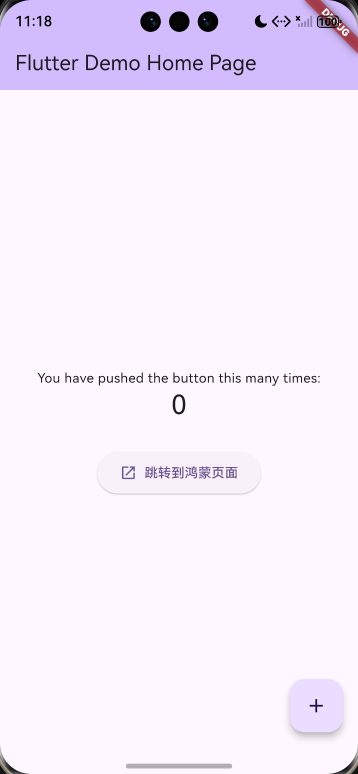
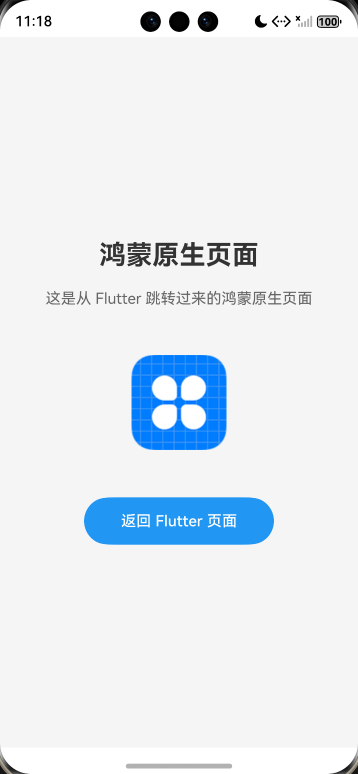
一、实现原理
Flutter 与鸿蒙原生通信通过 MethodChannel 实现:
- Flutter 端:通过 MethodChannel 发送跳转请求
- 鸿蒙端:接收请求并启动新的 Ability(原生页面)
┌─────────────┐     MethodChannel        ┌─────────────┐
│  Flutter    │ ─────────────────────>   │   鸿蒙原生   │
│  页面按钮   │  "navigateToHarmonyPage"  │  SecondAbility │
└─────────────┘                           └─────────────┘
二、完整代码实现
1. Flutter 端 - 平台通道封装
文件: lib/harmony_channel.dart
import 'package:flutter/services.dart';

/// 鸿蒙平台通道 - 用于 Flutter 与鸿蒙原生通信
class HarmonyChannel {
  // 定义 MethodChannel,名称必须与鸿蒙端一致
  static const MethodChannel _channel =
      MethodChannel('com.example.test1/harmony');

  /// 跳转到鸿蒙原生页面
  static Future<void> navigateToHarmonyPage() async {
    try {
      // 调用鸿蒙端的 navigateToHarmonyPage 方法
      await _channel.invokeMethod('navigateToHarmonyPage');
    } on PlatformException catch (e) {
      print('跳转到鸿蒙页面失败: ${e.message}');
      rethrow;
    }
  }
}
代码解读:
MethodChannel:Flutter 与平台通信的桥梁- 通道名称
'com.example.test1/harmony':唯一标识符,两端必须一致 invokeMethod:调用原生端定义的方法PlatformException:处理平台调用异常
2. Flutter 端 - UI 界面
文件: lib/main.dart(关键修改部分)
import 'package:flutter/material.dart';
import 'harmony_channel.dart';  // 导入平台通道

// ... 其他代码 ...

children: <Widget>[
  const Text('You have pushed the button this many times:'),
  Text(
    '$_counter',
    style: Theme.of(context).textTheme.headlineMedium,
  ),
  const SizedBox(height: 30),
  // 新增:跳转到鸿蒙页面的按钮
  ElevatedButton.icon(
    onPressed: () async {
      await HarmonyChannel.navigateToHarmonyPage();
    },
    icon: const Icon(Icons.open_in_new),
    label: const Text('跳转到鸿蒙页面'),
    style: ElevatedButton.styleFrom(
      padding: const EdgeInsets.symmetric(horizontal: 24, vertical: 12),
    ),
  ),
],
代码解读:
- 导入
harmony_channel.dart - 使用
ElevatedButton.icon创建带图标的按钮 - 点击时调用
HarmonyChannel.navigateToHarmonyPage() async/await:处理异步操作
3. 鸿蒙端 - EntryAbility(MethodChannel 注册)
文件: ohos/entry/src/main/ets/entryability/EntryAbility.ets
import {
  FlutterAbility,
  FlutterEngine,
  MethodChannel,
  Log,
  MethodCall,
  MethodResult,
  MethodCallHandler,
  BinaryMessenger
} from '@ohos/flutter_ohos';
import { GeneratedPluginRegistrant } from '../plugins/GeneratedPluginRegistrant';
import { Want } from '@kit.AbilityKit';
import { BusinessError } from '@kit.BasicServicesKit';

const TAG = 'EntryAbility';
const CHANNEL_NAME = 'com.example.test1/harmony';

export default class EntryAbility extends FlutterAbility {
  private methodChannel: MethodChannel | null = null;

  configureFlutterEngine(flutterEngine: FlutterEngine) {
    super.configureFlutterEngine(flutterEngine)
    GeneratedPluginRegistrant.registerWith(flutterEngine)

    // 1. 获取 BinaryMessenger(通信信使)
    let messenger: BinaryMessenger = flutterEngine.dartExecutor.getBinaryMessenger();

    // 2. 创建 MethodChannel
    this.methodChannel = new MethodChannel(messenger, CHANNEL_NAME);

    // 3. 定义方法调用处理器
    let methodCallHandler: MethodCallHandler = {
      onMethodCall: (call: MethodCall, result: MethodResult) => {
        Log.i(TAG, '收到 Flutter 调用: ' + call.method);

        if (call.method === 'navigateToHarmonyPage') {
          this.navigateToSecondAbility();
          result.success(null);  // 返回成功
        } else if (call.method === 'returnToFlutter') {
          result.success(null);
        } else {
          result.notImplemented();  // 方法未实现
        }
      }
    };

    // 4. 设置方法处理器
    this.methodChannel.setMethodCallHandler(methodCallHandler);
  }

  // 跳转到 SecondAbility(鸿蒙原生页面)
  private navigateToSecondAbility(): void {
    Log.i(TAG, '开始跳转到 SecondAbility');

    // 定义跳转意图(Want)
    let want: Want = {
      bundleName: 'com.example.test1',  // 应用包名
      abilityName: 'SecondAbility'       // 目标 Ability 名称
    };

    // 启动 Ability
    this.context.startAbility(want)
      .then(() => {
        Log.i(TAG, '成功跳转到 SecondAbility');
      })
      .catch((err: BusinessError) => {
        Log.e(TAG, '跳转到 SecondAbility 失败: ' + JSON.stringify(err));
      });
  }
}
代码解读:
| 代码段 | 说明 |
|---|---|
BinaryMessenger |
Flutter 与原生通信的二进制信使 |
MethodChannel |
创建通道,参数:信使 + 通道名 |
MethodCallHandler |
方法调用处理器接口 |
MethodCall |
包含方法名和参数 |
MethodResult |
用于返回结果给 Flutter |
Want |
鸿蒙中用于跨组件通信的意图对象 |
startAbility(want) |
启动新的 Ability(页面) |
4. 鸿蒙端 - SecondAbility(目标页面)
文件: ohos/entry/src/main/ets/entryability/SecondAbility.ets
import { AbilityConstant, UIAbility, Want } from '@kit.AbilityKit';
import { window } from '@kit.ArkUI';

export default class SecondAbility extends UIAbility {
  onCreate(want: Want, launchParam: AbilityConstant.LaunchParam): void {
    console.info('[SecondAbility] onCreate');
  }

  onDestroy(): void {
    console.info('[SecondAbility] onDestroy');
  }

  onWindowStageCreate(windowStage: window.WindowStage): void {
    console.info('[SecondAbility] onWindowStageCreate');
    // 加载 SecondPage 页面
    windowStage.loadContent('pages/SecondPage', (err) => {
      if (err.code) {
        console.error('[SecondAbility] Failed to load content');
        return;
      }
      console.info('[SecondAbility] Succeeded in loading content');
    });
  }

  onWindowStageDestroy(): void {
    console.info('[SecondAbility] onWindowStageDestroy');
  }

  onForeground(): void {
    console.info('[SecondAbility] onForeground');
  }

  onBackground(): void {
    console.info('[SecondAbility] onBackground');
  }
}
代码解读:
- 继承
UIAbility:鸿蒙应用的基本组件 onWindowStageCreate:窗口创建时加载页面内容loadContent('pages/SecondPage'):加载 SecondPage.ets 页面
5. 鸿蒙端 - SecondPage(页面 UI)
文件: ohos/entry/src/main/ets/pages/SecondPage.ets
import common from '@ohos.app.ability.common';

@Entry
@Component
struct SecondPage {
  private context = getContext(this) as common.UIAbilityContext;

  build() {
    Column({ space: 20 }) {
      Text('鸿蒙原生页面')
        .fontSize(28)
        .fontWeight(FontWeight.Bold)
        .fontColor('#333333')

      Text('这是从 Flutter 跳转过来的鸿蒙原生页面')
        .fontSize(16)
        .fontColor('#666666')
        .textAlign(TextAlign.Center)
        .padding({ left: 30, right: 30 })

      Image($r('app.media.icon'))
        .width(100)
        .height(100)
        .margin({ top: 30, bottom: 30 })

      // 返回 Flutter 页面的按钮
      Button('返回 Flutter 页面')
        .width(200)
        .height(50)
        .fontSize(16)
        .backgroundColor('#2196F3')
        .onClick(() => {
          // 关闭当前 Ability,返回 Flutter
          this.context.terminateSelf();
        })
    }
    .width('100%')
    .height('100%')
    .backgroundColor('#F5F5F5')
    .justifyContent(FlexAlign.Center)
  }
}
代码解读:
@Entry:标记页面入口@Component:声明为组件getContext(this):获取当前 Ability 上下文terminateSelf():关闭当前 Ability,返回上一个页面- ArkTS 声明式 UI:类似 Flutter 的 Widget 写法
6. 鸿蒙端 - 配置文件
module.json5(模块配置)
文件: ohos/entry/src/main/module.json5
{
  "module": {
    "name": "entry",
    "type": "entry",
    "description": "$string:module_desc",
    "mainElement": "EntryAbility",
    "deviceTypes": ["phone"],
    "pages": "$profile:main_pages",
    "abilities": [
      {
        "name": "EntryAbility",
        "srcEntry": "./ets/entryability/EntryAbility.ets",
        "description": "$string:EntryAbility_desc",
        "icon": "$media:icon",
        "label": "$string:EntryAbility_label",
        "startWindowIcon": "$media:icon",
        "startWindowBackground": "$color:start_window_background",
        "exported": true,
        "skills": [
          {
            "entities": ["entity.system.home"],
            "actions": ["action.system.home"]
          }
        ]
      },
      {
        "name": "SecondAbility",           // 新增 Ability
        "srcEntry": "./ets/entryability/SecondAbility.ets",
        "description": "$string:SecondAbility_desc",
        "icon": "$media:icon",
        "label": "$string:SecondAbility_label",
        "startWindowIcon": "$media:icon",
        "startWindowBackground": "$color:start_window_background",
        "exported": false                   // 不允许外部应用启动
      }
    ]
  }
}
关键配置:
SecondAbility:声明新的 Abilityexported: false:仅内部使用,不暴露给其他应用
main_pages.json(页面路由)
文件: ohos/entry/src/main/resources/base/profile/main_pages.json
{
  "src": [
    "pages/Index",
    "pages/SecondPage"    // 新增页面路由
  ]
}
string.json(字符串资源)
文件: ohos/entry/src/main/resources/base/element/string.json
{
  "string": [
    {
      "name": "SecondAbility_desc",
      "value": "Second Ability description"
    },
    {
      "name": "SecondAbility_label",
      "value": "鸿蒙页面"
    }
  ]
}
build-profile.json5(构建配置)
文件: ohos/build-profile.json5
{
  "app": {
    "signingConfigs": [
      {
        "name": "default",
        "type": "HarmonyOS",
        "material": {
          "certpath": "C:\\Users\\...\\.cer",
          "keyAlias": "debugKey",
          "keyPassword": "...",
          "profile": "C:\\Users\\...\\.p7b",
          "signAlg": "SHA256withECDSA",
          "storeFile": "C:\\Users\\...\\.p12",
          "storePassword": "..."
        }
      }
    ],
    "products": [
      {
        "name": "default",
        "signingConfig": "default",          // 引用签名配置
        "compatibleSdkVersion": "5.0.0(12)",
        "runtimeOS": "HarmonyOS",
        "targetSdkVersion": "5.0.0(12)"
      }
    ]
  }
}
三、项目文件结构
test1/
├── lib/
│   ├── main.dart                    # Flutter 主页面(添加跳转按钮)
│   └── harmony_channel.dart         # 平台通道封装(新增)
│
├── ohos/
│   ├── build-profile.json5          # 构建配置(添加签名)
│   │
│   └── entry/
│       ├── src/
│       │   └── main/
│       │       ├── ets/
│       │       │   ├── entryability/
│       │       │   │   ├── EntryAbility.ets      # 注册 MethodChannel(修改)
│       │       │   │   └── SecondAbility.ets     # 鸿蒙原生 Ability(新增)
│       │       │   │
│       │       │   └── pages/
│       │       │       ├── Index.ets
│       │       │       └── SecondPage.ets        # 鸿蒙原生页面 UI(新增)
│       │       │
│       │       ├── resources/
│       │       │   └── base/
│       │       │       ├── element/
│       │       │       │   └── string.json       # 添加 SecondAbility 字符串
│       │       │       │
│       │       │       └── profile/
│       │       │           └── main_pages.json   # 添加 SecondPage 路由
│       │       │
│       │       └── module.json5      # 声明 SecondAbility(修改)
四、运行效果
- Flutter 页面显示"跳转到鸿蒙页面"按钮
- 点击按钮 → 通过 MethodChannel 发送消息
- 鸿蒙原生页面打开,显示"鸿蒙原生页面"标题
- 点击"返回 Flutter 页面" → 关闭鸿蒙页面,回到 Flutter
五、关键技术点总结
| 技术点 | 说明 |
|---|---|
| MethodChannel | Flutter 与原生平台的双向通信通道 |
| MethodCallHandler | 处理 Flutter 端的方法调用 |
| Want | 鸿蒙系统中用于组件间通信的意图对象 |
| startAbility() | 启动新的 Ability(页面) |
| terminateSelf() | 关闭当前 Ability |
| ArkTS 声明式 UI | 使用 @Entry 和 @Component 构建页面 |
六、构建命令
# 清理构建缓存
flutter clean

# 获取依赖
flutter pub get

# 构建 HAP 包
flutter build hap --debug

作为“人工智能6S店”的官方数字引擎,为AI开发者与企业提供一个覆盖软硬件全栈、一站式门户。
更多推荐

 11
11 0
0- 0


 已为社区贡献2条内容

所有评论(0)