
Flutter三方库适配OpenHarmony【flutter_web_auth】— 调试技巧与常见问题排查
欢迎加入开源鸿蒙跨平台社区:https://openharmonycrossplatform.csdn.netflutter_web_auth 的调试比一般的 Flutter 插件要难——因为它涉及跨进程通信。App 打开浏览器是一个进程,浏览器重定向回来是另一个进程,中间还有系统的深度链接匹配。任何一个环节出问题,表现都是"回调不触发"。这篇把排查流程系统化,帮你快速定位问题。清除日志开始监控触
前言
欢迎加入开源鸿蒙跨平台社区:https://openharmonycrossplatform.csdn.net
flutter_web_auth 的调试比一般的 Flutter 插件要难——因为它涉及跨进程通信。App 打开浏览器是一个进程,浏览器重定向回来是另一个进程,中间还有系统的深度链接匹配。任何一个环节出问题,表现都是"回调不触发"。这篇把排查流程系统化,帮你快速定位问题。
一、console.info / console.error 日志规范
1.1 当前的日志点
const TAG: string = 'FlutterWebAuthPlugin';

// 插件生命周期
console.info(TAG, 'onAttachedToEngine called');
console.info(TAG, 'onAttachedToAbility called, ability is set');
console.info(TAG, 'onDetachedFromAbility called');

// 方法调用
console.info(TAG, `onMethodCall: ${call.method}`);
console.info(TAG, `authenticate called with url=${url}, scheme=${callbackUrlScheme}`);

// 浏览器启动
console.info(TAG, 'openLink succeeded, browser should be open');
console.error(TAG, `openLink failed: ${err.code} ${err.message}`);
console.info(TAG, 'startAbility fallback succeeded');
console.error(TAG, `startAbility fallback also failed: ${err.code} ${err.message}`);

// 深度链接回调
console.info(TAG, `onNewWant received URI: ${uri}`);
console.info(TAG, `Resolved callback for scheme: ${scheme}`);
console.info(TAG, `No pending callback for scheme: ${scheme}`);
1.2 日志级别使用规范
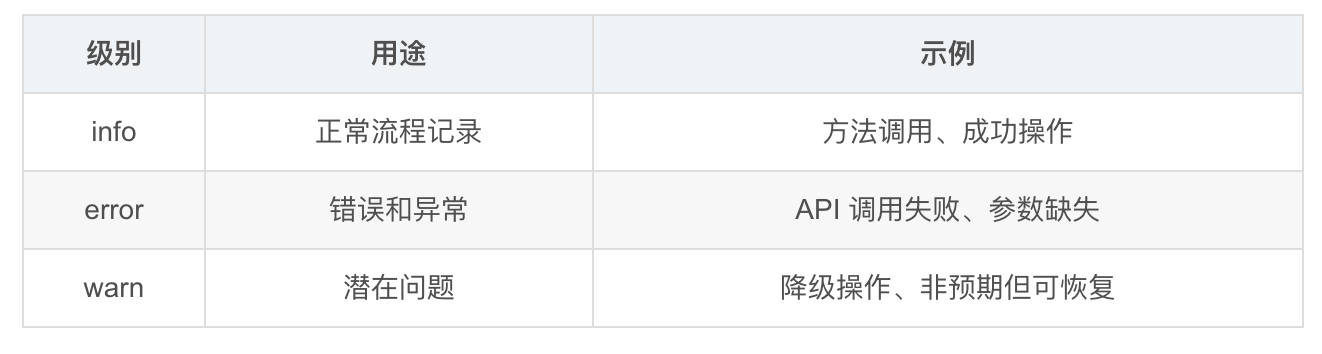
1.3 TAG 统一管理
const TAG: string = 'FlutterWebAuthPlugin';
所有日志使用统一的 TAG,方便过滤。
二、hdc hilog 过滤日志
2.1 基本过滤
# 过滤 FlutterWebAuthPlugin 的所有日志
hdc hilog | grep FlutterWebAuthPlugin

# 只看 error 级别
hdc hilog | grep FlutterWebAuthPlugin | grep -i error

# 实时查看
hdc hilog -w start
hdc hilog | grep FlutterWebAuthPlugin
2.2 完整的调试命令
# 清除旧日志
hdc hilog -r

# 开始实时监控
hdc hilog | grep -E "FlutterWebAuthPlugin|EntryAbility"
2.3 关键日志序列
正常流程应该看到这些日志(按顺序):
FlutterWebAuthPlugin: onAttachedToEngine called
FlutterWebAuthPlugin: onAttachedToAbility called, ability is set
FlutterWebAuthPlugin: onMethodCall: authenticate
FlutterWebAuthPlugin: authenticate called with url=..., scheme=myapp
FlutterWebAuthPlugin: openLink succeeded, browser should be open
... (用户在浏览器中操作) ...
FlutterWebAuthPlugin: onNewWant received URI: myapp://callback?code=abc
FlutterWebAuthPlugin: Resolved callback for scheme: myapp
如果某一行缺失,就是那个环节出了问题。
三、深度链接不触发的排查流程
3.1 排查决策树
回调不触发
    │
    ├── 浏览器打开了吗?
    │       │
    │       ├── NO → 检查 openLink 日志
    │       │       ├── NO_CONTEXT → AbilityAware 问题
    │       │       └── LAUNCH_FAILED → INTERNET 权限 / URL 格式
    │       │
    │       └── YES → 浏览器重定向了吗?
    │               │
    │               ├── NO → OAuth 配置问题(redirect_uri 不匹配)
    │               │
    │               └── YES → App 被唤起了吗?
    │                       │
    │                       ├── NO → skills 配置问题
    │                       │       ├── Scheme 拼写错误
    │                       │       ├── launchType 不是 singleton
    │                       │       └── entities/actions 缺失
    │                       │
    │                       └── YES → onNewWant 被调用了吗?
    │                               │
    │                               ├── NO → EntryAbility 未集成
    │                               │
    │                               └── YES → callbacks 有匹配吗?
    │                                       │
    │                                       ├── NO → Scheme 不一致
    │                                       │
    │                                       └── YES → 应该正常工作
3.2 skills 配置检查
// 必须包含以下配置
{
  "entities": ["entity.system.browsable"],
  "actions": ["ohos.want.action.viewData"],
  "uris": [{ "scheme": "myapp" }]
}
| 检查项 | 常见错误 |
|---|---|
| entities | 拼写错误:entity.system.browseable(多了个 e) |
| actions | 使用了 Android 的 action:android.intent.action.VIEW |
| uris.scheme | 大小写不一致:MyApp vs myapp |
3.3 使用 hdc 模拟深度链接
# 直接模拟深度链接,跳过浏览器
hdc shell aa start -a EntryAbility -b com.example.myapp -U "myapp://callback?code=test123"
如果这个命令能触发 onNewWant,说明 skills 配置没问题,问题在浏览器端。
四、openLink 失败的降级日志分析
4.1 openLink 失败日志
FlutterWebAuthPlugin: openLink failed: 16000001 The specified ability does not exist.
FlutterWebAuthPlugin: Falling back to startAbility...
4.2 常见 BusinessError 码
| 错误码 | 含义 | 解决方案 |
|---|---|---|
| 16000001 | Ability 不存在 | 检查是否有浏览器应用 |
| 16000002 | 参数不正确 | 检查 URL 格式 |
| 16000004 | 后台启动限制 | 确保 App 在前台 |
| 16000011 | Context 不存在 | 检查 Ability 生命周期 |
| 16000050 | 内部错误 | 重启设备 |
4.3 双重失败日志
FlutterWebAuthPlugin: openLink failed: 16000001 ...
FlutterWebAuthPlugin: Falling back to startAbility...
FlutterWebAuthPlugin: startAbility fallback also failed: 16000001 ...
如果 openLink 和 startAbility 都失败,通常是设备上没有安装浏览器应用,或者 URL 格式有问题。
五、MethodChannel 通信调试
5.1 Dart 层调试
// 添加调试日志
final result = await FlutterWebAuth.authenticate(
  url: authUrl,
  callbackUrlScheme: scheme,
);
debugPrint('authenticate returned: $result');
5.2 检查通道名称一致性
// Dart 层
static const MethodChannel _channel = const MethodChannel('flutter_web_auth');
// 原生层
this.channel = new MethodChannel(binding.getBinaryMessenger(), "flutter_web_auth");
两端的通道名称必须完全一致,包括大小写。
5.3 MissingPluginException 排查
MissingPluginException: No implementation found for method authenticate on channel flutter_web_auth
排查步骤:
- 检查
pubspec.yaml中是否有 ohos 平台声明 - 运行
flutter pub get重新生成插件注册代码 - 检查
GeneratedPluginRegistrant是否包含 FlutterWebAuthPlugin - 清理构建缓存:
flutter clean && flutter pub get
六、常见问题 Checklist
6.1 回调不返回
| 检查项 | 命令/方法 |
|---|---|
| skills 配置正确 | 检查 module.json5 |
| launchType = singleton | 检查 module.json5 |
| EntryAbility 已集成 | 检查 onNewWant 方法 |
| Scheme 一致 | 对比 Dart/module.json5/OAuth redirect_uri |
| INTERNET 权限 | 检查 requestPermissions |
6.2 浏览器不打开
| 检查项 | 命令/方法 |
|---|---|
| ability 不为 null | 检查 onAttachedToAbility 日志 |
| context 不为 null | 检查 authenticate 日志 |
| URL 格式正确 | 在浏览器中手动打开 URL |
| INTERNET 权限 | 检查 module.json5 |
6.3 Scheme 不匹配
常见的不一致:
Dart:          callbackUrlScheme: "myApp"     ← 大写 A
module.json5:  "scheme": "myapp"              ← 全小写
OAuth 配置:    redirect_uri: "my_app://..."   ← 下划线

三个地方的 Scheme 必须完全一致!
6.4 快速验证脚本
#!/bin/bash
# verify_deep_link.sh - 验证深度链接配置

PACKAGE="com.example.myapp"
SCHEME="myapp"
TEST_URI="${SCHEME}://callback?code=test123"

echo "=== 验证深度链接配置 ==="
echo "包名: $PACKAGE"
echo "Scheme: $SCHEME"
echo "测试 URI: $TEST_URI"
echo ""

echo "1. 检查应用是否安装..."
hdc shell bm dump -n $PACKAGE | head -5

echo ""
echo "2. 模拟深度链接..."
hdc shell aa start -a EntryAbility -b $PACKAGE -U "$TEST_URI"

echo ""
echo "3. 查看日志..."
sleep 2
hdc hilog | grep FlutterWebAuthPlugin | tail -10
七、DevEco Studio 调试技巧
7.1 断点调试
在 DevEco Studio 中可以对 ArkTS 代码设置断点:
- 打开
FlutterWebAuthPlugin.ets - 在
onMethodCall方法入口设置断点 - 在
onNewWant方法入口设置断点 - 使用 Debug 模式运行
7.2 日志窗口过滤
DevEco Studio 的 Log 窗口支持过滤:
| 过滤条件 | 值 |
|---|---|
| Tag | FlutterWebAuthPlugin |
| Level | Info 及以上 |
| PID | 应用进程 ID |
7.3 网络抓包
# 使用 hdc 抓包查看 OAuth 请求
hdc shell netstat -an | grep ESTABLISHED
如果需要查看 HTTPS 请求内容,可以使用 Charles 或 mitmproxy 配合设备代理。
八、调试流程总结
8.1 标准调试流程
- 清除日志:
hdc hilog -r - 开始监控:
hdc hilog | grep FlutterWebAuthPlugin - 触发认证:在 App 中点击登录
- 检查日志:对照正常日志序列
- 定位缺失:找到第一个缺失的日志
- 针对性排查:根据决策树排查
8.2 常见问题解决速查
| 症状 | 最可能的原因 | 解决方案 |
|---|---|---|
| 浏览器不打开 | INTERNET 权限 | 添加权限声明 |
| 浏览器打开但不跳回 | skills Scheme 错误 | 检查拼写和大小写 |
| App 打开但认证失败 | Scheme 不一致 | 统一三处 Scheme |
| 热重载后失效 | 插件状态丢失 | 完全重启应用 |
| 第二次认证失败 | callbacks 未清理 | 检查 cleanUpDanglingCalls |
总结
本文系统化了 flutter_web_auth 的调试流程:
- 日志规范:统一 TAG,区分 info/error 级别
- hdc hilog:实时过滤插件日志
- 排查决策树:从浏览器到深度链接逐步排查
- hdc 模拟:跳过浏览器直接测试深度链接
- Checklist:回调不返回、浏览器不打开、Scheme 不匹配
下一篇我们讲安全增强——PKCE、State 参数、Token 安全存储。
如果这篇文章对你有帮助,欢迎点赞👍、收藏⭐、关注🔔,你的支持是我持续创作的动力!
相关资源:

作为“人工智能6S店”的官方数字引擎,为AI开发者与企业提供一个覆盖软硬件全栈、一站式门户。
更多推荐
 29
29 0
0- 0


 已为社区贡献51条内容

所有评论(0)