
Flutter三方库适配OpenHarmony【doc_text】— Piece Table 结构与 Unicode/ANSI 双编码处理
欢迎加入开源鸿蒙跨平台社区:https://openharmonycrossplatform.csdn.netPiece Table 是 .doc 文本提取的核心数据结构。它把文档的文本分成若干"片段"(piece),每个片段记录了文本在 WordDocument 流中的位置和编码方式。同一个文档中可能同时存在 Unicode 和 ANSI 两种编码的片段——这就是为什么 .doc 解析比 .do
前言
欢迎加入开源鸿蒙跨平台社区:https://openharmonycrossplatform.csdn.net
Piece Table 是 .doc 文本提取的核心数据结构。它把文档的文本分成若干"片段"(piece),每个片段记录了文本在 WordDocument 流中的位置和编码方式。同一个文档中可能同时存在 Unicode 和 ANSI 两种编码的片段——这就是为什么 .doc 解析比 .docx 复杂得多。
一、extractTextWithPieceTable 完整代码
1.1 源码
private extractTextWithPieceTable(
  wordBytes: Uint8Array,
  tableBytes: Uint8Array,
  fcClx: number,
  lcbClx: number,
  ccpText: number
): string | null {
  if (fcClx + lcbClx > tableBytes.length) {
    return null;
  }

  let result = "";
  let pos = fcClx;
  const endPos = fcClx + lcbClx;

  while (pos < endPos) {
    const clxt = tableBytes[pos];
    pos++;

    if (clxt === 0x01) {
      // grpprl - 跳过
      const cb = this.readU16(tableBytes, pos);
      pos += 2 + cb;
    } else if (clxt === 0x02) {
      // piece table
      const lcb = this.readU32(tableBytes, pos);
      pos += 4;

      const numPieces = Math.floor((lcb - 4) / 12);
      if (numPieces <= 0 || numPieces > 10000) {
        break;
      }

      const cpArrayStart = pos;
      const pcdArrayStart = pos + (numPieces + 1) * 4;

      for (let i = 0; i < numPieces; i++) {
        const cpStart = this.readU32(tableBytes, cpArrayStart + i * 4);
        const cpEnd = this.readU32(tableBytes, cpArrayStart + (i + 1) * 4);

        if (cpStart >= ccpText) break;

        const pcdOffset = pcdArrayStart + i * 8;
        if (pcdOffset + 8 > tableBytes.length) break;

        const fc = this.readU32(tableBytes, pcdOffset + 2);
        const isUnicode = (fc & 0x40000000) === 0;
        const actualFc = fc & 0x3FFFFFFF;

        const charCount = Math.min(cpEnd - cpStart, ccpText - cpStart);
        if (charCount <= 0) continue;

        if (isUnicode) {
          result += this.extractUnicodeChars(wordBytes, actualFc, charCount);
        } else {
          result += this.extractAnsiChars(wordBytes, Math.floor(actualFc / 2), charCount);
        }
      }
      break;
    } else {
      break;
    }
  }

  return result.length > 0 ? result : null;
}
二、CLX 结构
2.1 CLX 的组成
CLX (Complex) 结构:
┌──────────────────────────────────────┐
│ [可选] grpprl 条目 (clxt=0x01)       │  ← 格式信息,跳过
│ [可选] grpprl 条目 (clxt=0x01)       │
│ ...                                  │
│ Piece Table 条目 (clxt=0x02)         │  ← 我们要的
│   ├── lcb (4字节) — Piece Table 大小  │
│   ├── CP 数组 (numPieces+1 个 U32)   │
│   └── PCD 数组 (numPieces 个 8字节)   │
└──────────────────────────────────────┘
2.2 CLX 遍历逻辑
while (pos < endPos) {
  const clxt = tableBytes[pos];  // 读取类型标记
  pos++;

  if (clxt === 0x01) {
    // grpprl:格式属性,跳过
    const cb = this.readU16(tableBytes, pos);
    pos += 2 + cb;  // 跳过 cb 字节的数据
  } else if (clxt === 0x02) {
    // Piece Table:我们要的
    // ... 解析 Piece Table
    break;  // 只有一个 Piece Table,处理完就退出
  } else {
    break;  // 未知类型,退出
  }
}
2.3 clxt 类型
| clxt 值 | 含义 | 处理 |
|---|---|---|
| 0x01 | grpprl(格式属性) | 跳过 |
| 0x02 | Piece Table | 解析 |
| 其他 | 未知 | 退出 |
三、Piece Table 内部结构
3.1 布局
Piece Table (clxt=0x02 之后):
┌─────────────────────────────────────────┐
│ lcb (4字节) — 整个 Piece Table 的大小    │
├─────────────────────────────────────────┤
│ CP 数组:(numPieces + 1) 个 U32          │
│   CP[0], CP[1], CP[2], ..., CP[n]       │
├─────────────────────────────────────────┤
│ PCD 数组:numPieces 个 8 字节条目         │
│   PCD[0], PCD[1], ..., PCD[n-1]         │
└─────────────────────────────────────────┘
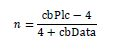
3.2 numPieces 计算
const lcb = this.readU32(tableBytes, pos);
pos += 4;

const numPieces = Math.floor((lcb - 4) / 12);
lcb = CP数组大小 + PCD数组大小
CP数组大小 = (numPieces + 1) × 4
PCD数组大小 = numPieces × 8

lcb = (numPieces + 1) × 4 + numPieces × 8
lcb = 4 × numPieces + 4 + 8 × numPieces
lcb = 12 × numPieces + 4

numPieces = (lcb - 4) / 12
3.3 安全检查
if (numPieces <= 0 || numPieces > 10000) {
  break;
}
| 检查 | 原因 |
|---|---|
| numPieces <= 0 | 无效的 Piece Table |
| numPieces > 10000 | 异常值,可能是格式错误 |
四、CP 数组与 PCD 数组
4.1 CP 数组(Character Position)
CP 数组定义了每个 piece 的字符范围:
CP[0] = 0        ← 第一个 piece 从字符 0 开始
CP[1] = 100      ← 第一个 piece 到字符 99,第二个从 100 开始
CP[2] = 250      ← 第二个 piece 到字符 249,第三个从 250 开始
CP[3] = 500      ← 第三个 piece 到字符 499(最后一个)
const cpArrayStart = pos;
const cpStart = this.readU32(tableBytes, cpArrayStart + i * 4);
const cpEnd = this.readU32(tableBytes, cpArrayStart + (i + 1) * 4);
4.2 PCD 数组(Piece Descriptor)
每个 PCD 条目 8 字节:
偏移 0: 2字节 — 属性(通常忽略)
偏移 2: 4字节 — fc(文件偏移 + 编码标志)
偏移 6: 2字节 — prm(属性修饰符,忽略)
const pcdOffset = pcdArrayStart + i * 8;
const fc = this.readU32(tableBytes, pcdOffset + 2);
4.3 数组位置计算
const cpArrayStart = pos;
const pcdArrayStart = pos + (numPieces + 1) * 4;
内存布局:
pos → CP[0] CP[1] CP[2] ... CP[n] | PCD[0] PCD[1] ... PCD[n-1]
      ←── (n+1) × 4 字节 ──→       ←── n × 8 字节 ──→
      cpArrayStart                   pcdArrayStart
五、编码判断:fc 的第 30 位
5.1 代码
const fc = this.readU32(tableBytes, pcdOffset + 2);
const isUnicode = (fc & 0x40000000) === 0;
const actualFc = fc & 0x3FFFFFFF;
5.2 位布局
fc 的 32 位:
位 31: 保留
位 30: fCompressed — 0=Unicode, 1=ANSI(压缩)
位 0-29: 实际的文件偏移

0x40000000 = 0100 0000 0000 0000 0000 0000 0000 0000
                ↑ 位 30

fc & 0x40000000:提取位 30
  = 0 → isUnicode = true(Unicode,UTF-16LE)
  ≠ 0 → isUnicode = false(ANSI,压缩编码)

fc & 0x3FFFFFFF:提取位 0-29
  = 实际的文件偏移(去掉标志位)
5.3 为什么叫"压缩"
Unicode (UTF-16LE):每个字符 2 字节
ANSI (压缩):每个字符 1 字节

"压缩"是相对于 Unicode 来说的——
ANSI 用 1 字节存一个字符,比 Unicode 的 2 字节"压缩"了一半。
| 编码 | 每字符字节数 | fc 位 30 | isUnicode |
|---|---|---|---|
| Unicode (UTF-16LE) | 2 | 0 | true |
| ANSI (压缩) | 1 | 1 | false |
📌 同一个文档中可能混用两种编码。比如英文部分用 ANSI(节省空间),中文部分用 Unicode。Piece Table 的每个 piece 都有自己的编码标志。
六、extractUnicodeChars
6.1 实现
private extractUnicodeChars(bytes: Uint8Array, offset: number, count: number): string {
  let result = "";
  let i = offset;
  let charCount = 0;

  while (i + 1 < bytes.length && charCount < count) {
    const codeUnit = bytes[i] | (bytes[i + 1] << 8);
    i += 2;
    charCount++;

    const char = this.convertToChar(codeUnit);
    if (char) {
      result += char;
    }
  }

  return result;
}
6.2 UTF-16LE 读取
内存中的字节:[0x48, 0x00, 0x65, 0x00, 0x6C, 0x00]

读取过程:
bytes[0] | (bytes[1] << 8) = 0x48 | 0x0000 = 0x0048 → 'H'
bytes[2] | (bytes[3] << 8) = 0x65 | 0x0000 = 0x0065 → 'e'
bytes[4] | (bytes[5] << 8) = 0x6C | 0x0000 = 0x006C → 'l'
6.3 中文字符示例
"你好" 在 UTF-16LE 中:
[0x60, 0x4F, 0x7D, 0x59]

bytes[0] | (bytes[1] << 8) = 0x60 | 0x4F00 = 0x4F60 → '你'
bytes[2] | (bytes[3] << 8) = 0x7D | 0x5900 = 0x597D → '好'
七、extractAnsiChars
7.1 实现
private extractAnsiChars(bytes: Uint8Array, offset: number, count: number): string {
  let result = "";
  let i = offset;
  let charCount = 0;

  while (i < bytes.length && charCount < count) {
    const byte = bytes[i];
    i++;
    charCount++;

    if (byte === 0x0D || byte === 0x0B) {
      result += "\n";
    } else if (byte === 0x09) {
      result += "\t";
    } else if (byte >= 0x20 && byte < 0x7F) {
      result += String.fromCharCode(byte);
    } else if (byte >= 0x80) {
      result += String.fromCharCode(byte);
    }
  }

  return result;
}
7.2 ANSI 偏移的特殊处理
if (isUnicode) {
  result += this.extractUnicodeChars(wordBytes, actualFc, charCount);
} else {
  result += this.extractAnsiChars(wordBytes, Math.floor(actualFc / 2), charCount);
  //                                        ^^^^^^^^^^^^^^^^^^^^^^^^
  //                                        ANSI 的偏移需要除以 2
}
| 编码 | 偏移计算 | 原因 |
|---|---|---|
| Unicode | actualFc | fc 直接就是字节偏移 |
| ANSI | actualFc / 2 | fc 是按 Unicode 字节计算的,ANSI 要除以 2 |
💡 这是 Word 二进制格式的一个设计特点:fc 总是按 Unicode 的字节偏移来记录。如果实际是 ANSI 编码,需要把偏移除以 2 才能得到正确的字节位置。
7.3 字节范围处理
| 字节范围 | 处理 | 说明 |
|---|---|---|
| 0x0D, 0x0B | \n |
回车、垂直制表符 → 换行 |
| 0x09 | \t |
水平制表符 |
| 0x20-0x7E | String.fromCharCode | 可打印 ASCII |
| 0x80+ | String.fromCharCode | 扩展字符(可能是 GBK 等) |
| 其他 | 忽略 | 控制字符 |
八、piece 遍历的完整流程
8.1 遍历代码
for (let i = 0; i < numPieces; i++) {
  const cpStart = this.readU32(tableBytes, cpArrayStart + i * 4);
  const cpEnd = this.readU32(tableBytes, cpArrayStart + (i + 1) * 4);

  if (cpStart >= ccpText) break;

  const pcdOffset = pcdArrayStart + i * 8;
  if (pcdOffset + 8 > tableBytes.length) break;

  const fc = this.readU32(tableBytes, pcdOffset + 2);
  const isUnicode = (fc & 0x40000000) === 0;
  const actualFc = fc & 0x3FFFFFFF;

  const charCount = Math.min(cpEnd - cpStart, ccpText - cpStart);
  if (charCount <= 0) continue;

  if (isUnicode) {
    result += this.extractUnicodeChars(wordBytes, actualFc, charCount);
  } else {
    result += this.extractAnsiChars(wordBytes, Math.floor(actualFc / 2), charCount);
  }
}
8.2 遍历示例
假设 numPieces = 3, ccpText = 500

CP 数组:[0, 100, 300, 500]
PCD 数组:[PCD0, PCD1, PCD2]

Piece 0: CP[0..100), PCD0 → fc=0x1000, Unicode
  → extractUnicodeChars(wordBytes, 0x1000, 100)

Piece 1: CP[100..300), PCD1 → fc=0x40002000, ANSI
  → extractAnsiChars(wordBytes, 0x2000/2, 200)

Piece 2: CP[300..500), PCD2 → fc=0x3000, Unicode
  → extractUnicodeChars(wordBytes, 0x3000, 200)

result = piece0文本 + piece1文本 + piece2文本
8.3 防御性检查
| 检查 | 代码 | 防御的问题 |
|---|---|---|
| 超出文本范围 | cpStart >= ccpText |
piece 超出正文 |
| PCD 越界 | pcdOffset + 8 > tableBytes.length |
Table 流不完整 |
| 字符数校正 | Math.min(cpEnd - cpStart, ccpText - cpStart) |
最后一个 piece 可能超出 |
| 空 piece | charCount <= 0 |
跳过空片段 |
总结
Piece Table 是 .doc 文本提取的核心机制:
- CLX 结构:clxt=0x01 跳过,clxt=0x02 是 Piece Table
- CP 数组:定义每个 piece 的字符范围
- PCD 数组:记录每个 piece 的文件偏移和编码标志
- 编码判断:fc 位 30 为 0 是 Unicode,为 1 是 ANSI
- 双编码提取:extractUnicodeChars(2字节/字符)和 extractAnsiChars(1字节/字符)
下一篇我们看直接提取回退策略——当 Piece Table 解析失败时的暴力方法。
如果这篇文章对你有帮助,欢迎点赞👍、收藏⭐、关注🔔,你的支持是我持续创作的动力!
相关资源:
- MS-DOC Piece Table 规范
- UTF-16LE 编码
- doc_text Gitcode 仓库
- ANSI 代码页
- JavaScript 位运算
- String.fromCharCode
- Apache POI PieceTable
- 开源鸿蒙跨平台社区
Piece Table 的 CP 数组与 PCD 数组布局

作为“人工智能6S店”的官方数字引擎,为AI开发者与企业提供一个覆盖软硬件全栈、一站式门户。
更多推荐
 8
8 0
0- 0


 已为社区贡献49条内容

所有评论(0)