
Flutter三方库适配OpenHarmony【doc_text】— parseDocxXml:正则驱动的 XML 文本提取
前言
欢迎加入开源鸿蒙跨平台社区:https://openharmonycrossplatform.csdn.net
用正则表达式解析 XML——听起来像是"反模式",但在 doc_text 的场景下,这其实是一个非常务实的选择。我们只需要提取 <w:t> 标签中的文本,不需要构建完整的 DOM 树。30 行代码就搞定了,比引入一个 XML 解析库划算得多。
一、parseDocxXml 完整代码
1.1 源码
private parseDocxXml(xmlData: ArrayBuffer): string {
  let result = "";
  const decoder = new util.TextDecoder("utf-8");
  const xmlString = decoder.decodeWithStream(new Uint8Array(xmlData));

  // 简单的 XML 文本提取
  // 提取 <w:t> 标签中的内容
  const textRegex = /<w:t[^>]*>([^<]*)<\/w:t>/g;
  const paraRegex = /<\/w:p>/g;

  let match: RegExpExecArray | null;
  let lastIndex = 0;

  while ((match = textRegex.exec(xmlString)) !== null) {
    // 检查是否有段落结束
    const substring = xmlString.substring(lastIndex, match.index);
    const paraMatches = substring.match(paraRegex);
    if (paraMatches) {
      result += "\n".repeat(paraMatches.length);
    }
    result += match[1];
    lastIndex = match.index + match[0].length;
  }

  return this.cleanText(result);
}
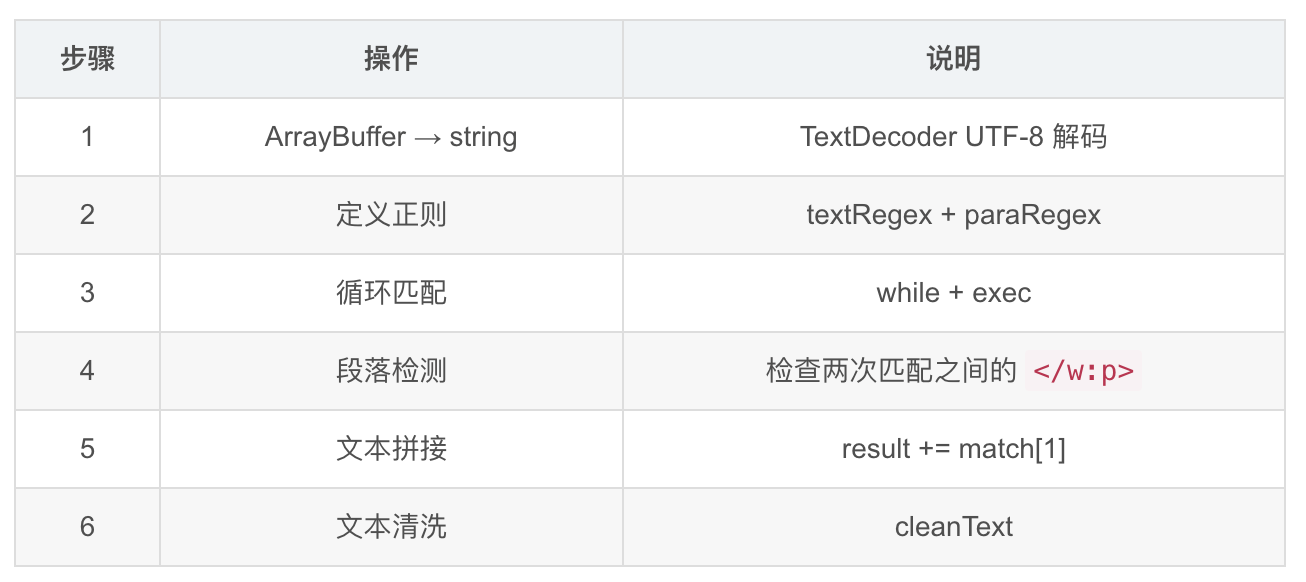
1.2 执行步骤
二、textRegex 正则逐字拆解
2.1 正则表达式
const textRegex = /<w:t[^>]*>([^<]*)<\/w:t>/g;
2.2 逐部分解析
| 部分 | 含义 | 匹配示例 |
|---|---|---|
<w:t | 匹配开始标签的前缀 | <w:t |
[^>]* | 匹配标签中的任意属性 | xml:space="preserve" |
> | 标签结束 | > |
([^<]*) | 捕获组:标签内的文本 | Hello World |
<\/w:t> | 匹配结束标签 | </w:t> |
/g | 全局匹配 | 匹配所有出现 |
2.3 匹配示例
<!-- 输入 -->
<w:t>Hello</w:t>
<w:t xml:space="preserve"> World</w:t>

<!-- 匹配结果 -->
match[0] = '<w:t>Hello</w:t>'           match[1] = 'Hello'
match[0] = '<w:t xml:space="preserve"> World</w:t>'  match[1] = ' World'
2.4 [^>]* 的作用
<!-- 没有属性 -->
<w:t>文本</w:t>
<!-- [^>]* 匹配空字符串 -->

<!-- 有属性 -->
<w:t xml:space="preserve">文本</w:t>
<!-- [^>]* 匹配 ' xml:space="preserve"' -->
xml:space="preserve" 是 Word 用来保留空格的属性。如果不加 [^>]*,带属性的 <w:t> 标签就匹配不到了。
💡
[^>]*是处理 XML 标签属性的常用技巧——匹配除>之外的任意字符,直到遇到>。这样无论标签有没有属性、有几个属性,都能正确匹配。
三、paraRegex 段落检测
3.1 正则表达式
const paraRegex = /<\/w:p>/g;
3.2 段落检测逻辑
while ((match = textRegex.exec(xmlString)) !== null) {
  // 取上一次匹配位置到这次匹配位置之间的字符串
  const substring = xmlString.substring(lastIndex, match.index);

  // 检查这段字符串中有几个 </w:p>
  const paraMatches = substring.match(paraRegex);
  if (paraMatches) {
    result += "\n".repeat(paraMatches.length);
  }

  result += match[1];
  lastIndex = match.index + match[0].length;
}
3.3 工作原理
<w:p><w:r><w:t>第一段</w:t></w:r></w:p>
<w:p><w:r><w:t>第二段</w:t></w:r></w:p>
第一次匹配:match[1] = "第一段",lastIndex 更新
第二次匹配:match[1] = "第二段"
  → substring = "</w:r></w:p>\n<w:p><w:r>"
  → paraMatches = ["</w:p>"](找到 1 个段落结束)
  → result += "\n"(插入换行)
  → result += "第二段"

最终结果:"第一段\n第二段"
3.4 多个连续空段落
<w:p></w:p>
<w:p></w:p>
<w:p><w:r><w:t>文本</w:t></w:r></w:p>
匹配 "文本" 时:
substring 中有 2 个 </w:p>
→ result += "\n\n"
→ result += "文本"

最终结果:"\n\n文本"
(cleanText 会过滤掉开头的空行)
四、lastIndex 追踪机制
4.1 变量作用
let lastIndex = 0;

while ((match = textRegex.exec(xmlString)) !== null) {
  const substring = xmlString.substring(lastIndex, match.index);
  // ...
  lastIndex = match.index + match[0].length;
}
4.2 追踪过程
XML: "<w:p><w:r><w:t>A</w:t></w:r></w:p><w:p><w:r><w:t>B</w:t></w:r></w:p>"
      0         1         2         3         4         5         6

初始:lastIndex = 0

第一次匹配:
  match.index = 10(<w:t>A</w:t> 的起始位置)
  substring = xmlString.substring(0, 10) = "<w:p><w:r>"
  paraMatches = null(没有 </w:p>)
  result = "A"
  lastIndex = 10 + 16 = 26("<w:t>A</w:t>" 的长度)

第二次匹配:
  match.index = 46(<w:t>B</w:t> 的起始位置)
  substring = xmlString.substring(26, 46) = "</w:r></w:p><w:p><w:r>"
  paraMatches = ["</w:p>"](找到 1 个)
  result = "A\nB"
  lastIndex = 46 + 16 = 62
📌 lastIndex 的核心作用是避免重复检查。每次只检查上一次匹配结束到这次匹配开始之间的区域,确保每个
</w:p>只被计算一次。
五、为什么用正则而不用 XML 解析器
5.1 OpenHarmony 的 XML 支持
import xml from '@ohos.xml';

// @ohos.xml 提供了 XmlPullParser
// 但它是 SAX 风格的流式解析器
// 对 OOXML 的命名空间处理不够友好
5.2 方案对比
| 方案 | 代码量 | 依赖 | 准确性 | 性能 |
|---|---|---|---|---|
| 正则提取 | ~30 行 | 无 | 中 | 高 |
| @ohos.xml | ~100 行 | 系统 API | 高 | 中 |
| 第三方 XML 库 | ~20 行 | 外部依赖 | 高 | 中 |
| 手写 SAX 解析 | ~200 行 | 无 | 高 | 高 |
5.3 正则方案的合理性
doc_text 只需要:
1. 提取 <w:t> 标签中的文本 ✅ 正则可以做到
2. 检测段落边界 </w:p> ✅ 正则可以做到

doc_text 不需要:
1. 解析 XML 属性 ❌
2. 处理命名空间 ❌
3. 构建 DOM 树 ❌
4. 遍历节点关系 ❌
💡 "用正则解析 XML 是反模式"这个说法是对的——如果你需要完整解析 XML 的话。但如果你只需要提取特定标签的文本内容,正则是最简单高效的方案。
六、正则方案的局限性
6.1 嵌套标签
<!-- 正常情况:<w:t> 不会嵌套 -->
<w:t>Hello</w:t>

<!-- 如果出现嵌套(理论上不会)-->
<w:t>Hello <w:t>World</w:t></w:t>
<!-- 正则会匹配到 "Hello " 和 "World",但可能丢失结构 -->
实际上 OOXML 规范中 <w:t> 不会嵌套,所以这不是问题。
6.2 CDATA 和转义字符
<!-- XML 转义字符 -->
<w:t>A & B</w:t>
<!-- 正则匹配到 "A & B",不会自动转义为 "A & B" -->
<!-- 常见的 XML 转义 -->
| 转义 | 含义 | 正则是否处理 |
|---|---|---|
& | & | ❌ 不处理 |
< | < | ❌ 不处理 |
> | > | ❌ 不处理 |
" | " | ❌ 不处理 |
' | ’ | ❌ 不处理 |
6.3 表格内容
<w:tbl>
  <w:tr>
    <w:tc>
      <w:p><w:r><w:t>单元格1</w:t></w:r></w:p>
    </w:tc>
    <w:tc>
      <w:p><w:r><w:t>单元格2</w:t></w:r></w:p>
    </w:tc>
  </w:tr>
</w:tbl>
表格中的文本仍然在 <w:t> 标签里,所以正则可以提取到。但表格的结构信息(行、列)会丢失——所有单元格的文本会被拼成一行。
6.4 页眉页脚
.docx 中的页眉页脚在单独的文件中:
word/header1.xml
word/footer1.xml

当前实现只读取 word/document.xml
→ 页眉页脚的文本不会被提取
七、exec 的全局匹配机制
7.1 exec 与 /g 标志
const textRegex = /<w:t[^>]*>([^<]*)<\/w:t>/g;

let match: RegExpExecArray | null;
while ((match = textRegex.exec(xmlString)) !== null) {
  // 每次调用 exec 返回下一个匹配
  // textRegex.lastIndex 自动前进
}
7.2 exec 返回值
match = textRegex.exec('<w:t>Hello</w:t> <w:t>World</w:t>');

// 第一次调用:
match[0] = '<w:t>Hello</w:t>'  // 完整匹配
match[1] = 'Hello'              // 捕获组
match.index = 0                 // 匹配位置

// 第二次调用:
match[0] = '<w:t>World</w:t>'
match[1] = 'World'
match.index = 17

// 第三次调用:
match = null  // 没有更多匹配
7.3 为什么用 exec 而不是 matchAll
// 方案1:exec 循环(当前实现)
while ((match = textRegex.exec(xmlString)) !== null) {
  // 可以在循环中访问 match.index
}

// 方案2:matchAll(更现代)
for (const match of xmlString.matchAll(textRegex)) {
  // 同样可以访问 match.index
}
两种方式功能等价。exec 是更传统的写法,matchAll 是 ES2020 的新 API。doc_text 用 exec 可能是为了更好的兼容性。
八、cleanText 的后处理
8.1 调用
return this.cleanText(result);
parseDocxXml 返回的原始文本可能包含多余的换行、空行等,cleanText 负责清理。具体的清洗逻辑在第 17 篇详细讲。
8.2 清洗前后对比
清洗前:
"\n\n第一段\n\n\n第二段\n  \n第三段\n"

清洗后:
"第一段\n第二段\n第三段"
总结
parseDocxXml 用 30 行代码实现了 .docx 文本提取:
- TextDecoder:ArrayBuffer → UTF-8 字符串
- textRegex:
/<w:t[^>]*>([^<]*)<\/w:t>/g提取文本 - paraRegex:
/<\/w:p>/g检测段落边界 - lastIndex 追踪:避免重复检查段落标记
- 局限性:不处理 XML 转义、不保留表格结构、不读页眉页脚
下一篇我们进入 .doc 解析的世界——OLE2 复合文档格式深度解析。
如果这篇文章对你有帮助,欢迎点赞👍、收藏⭐、关注🔔,你的支持是我持续创作的动力!
相关资源:

作为“人工智能6S店”的官方数字引擎,为AI开发者与企业提供一个覆盖软硬件全栈、一站式门户。
更多推荐


 13
13 0
0- 0


 已为社区贡献49条内容

所有评论(0)