
Flutter三方库适配OpenHarmony【doc_text】— .docx 解析全流程:从 ZIP 解压到 XML 提取
前言
欢迎加入开源鸿蒙跨平台社区:https://openharmonycrossplatform.csdn.net
.docx 的解析是整个 doc_text 中最"轻松"的部分——因为 .docx 本质上就是个 ZIP 包,解压后读 XML 就行。整个流程不到 100 行代码,用到了 OpenHarmony 的 @ohos.file.fs 和 @ohos.zlib 两个系统模块。这篇把每一步都拆开来看。
一、extractTextFromDocx 完整代码
1.1 源码
private async extractTextFromDocx(filePath: string): Promise<string | null> {
  try {
    // 读取文件
    const file = fs.openSync(filePath, fs.OpenMode.READ_ONLY);
    const stat = fs.statSync(filePath);
    const buf = new ArrayBuffer(stat.size);
    fs.readSync(file.fd, buf);
    fs.closeSync(file);

    // 解压 docx (ZIP 格式)
    const tempDir = filePath + "_temp";
    try {
      fs.mkdirSync(tempDir);
    } catch (e) {
      // 目录可能已存在
    }

    await zlib.decompressFile(filePath, tempDir);

    // 读取 word/document.xml
    const documentXmlPath = tempDir + "/word/document.xml";
    if (!fs.accessSync(documentXmlPath)) {
      this.cleanupTempDir(tempDir);
      return null;
    }

    const xmlFile = fs.openSync(documentXmlPath, fs.OpenMode.READ_ONLY);
    const xmlStat = fs.statSync(documentXmlPath);
    const xmlBuf = new ArrayBuffer(xmlStat.size);
    fs.readSync(xmlFile.fd, xmlBuf);
    fs.closeSync(xmlFile);

    // 解析 XML
    const text = this.parseDocxXml(xmlBuf);

    // 清理临时目录
    this.cleanupTempDir(tempDir);

    return text;
  } catch (e) {
    console.error("DocTextPlugin: Error parsing docx", e);
    return null;
  }
}
1.2 执行步骤
| 步骤 | 操作 | API |
|---|---|---|
| 1 | 读取原始文件 | fs.openSync + readSync |
| 2 | 创建临时目录 | fs.mkdirSync |
| 3 | 解压 ZIP | zlib.decompressFile |
| 4 | 检查 document.xml | fs.accessSync |
| 5 | 读取 XML 文件 | fs.openSync + readSync |
| 6 | 解析 XML 提取文本 | parseDocxXml(正则) |
| 7 | 清理临时目录 | cleanupTempDir |
二、文件读取:fs 模块的同步 API
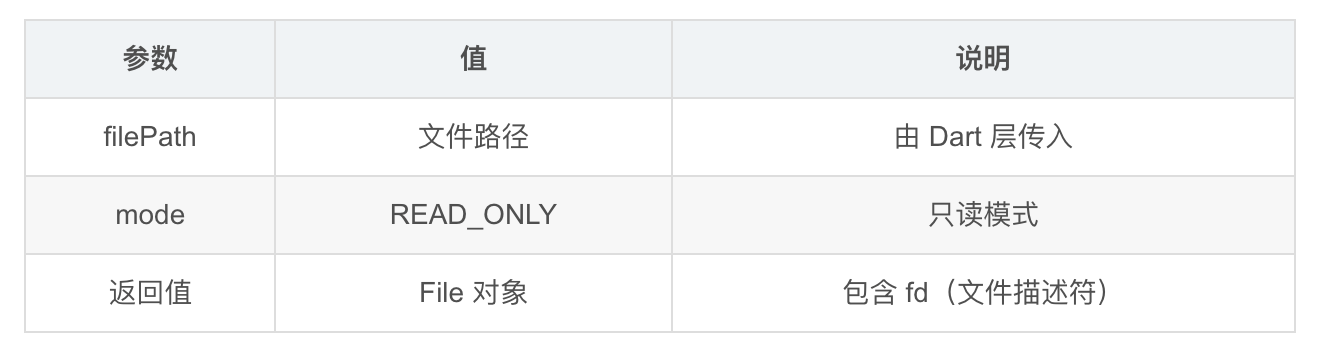
2.1 打开文件
const file = fs.openSync(filePath, fs.OpenMode.READ_ONLY);
2.2 获取文件大小
const stat = fs.statSync(filePath);
// stat.size → 文件大小(字节)
2.3 读取文件内容
const buf = new ArrayBuffer(stat.size);  // 分配缓冲区
fs.readSync(file.fd, buf);               // 读取到缓冲区
2.4 关闭文件
fs.closeSync(file);
2.5 完整的文件读取模式
// 标准的文件读取三步曲
const file = fs.openSync(path, fs.OpenMode.READ_ONLY);  // 1. 打开
const stat = fs.statSync(path);
const buf = new ArrayBuffer(stat.size);
fs.readSync(file.fd, buf);                                // 2. 读取
fs.closeSync(file);                                       // 3. 关闭
💡 这个模式在 doc_text 中出现了两次——一次读取原始 .docx 文件,一次读取解压后的 document.xml。如果要优化,可以提取成一个工具方法。
三、ZIP 解压:zlib.decompressFile
3.1 临时目录创建
const tempDir = filePath + "_temp";
try {
  fs.mkdirSync(tempDir);
} catch (e) {
  // 目录可能已存在
}
| 场景 | 行为 |
|---|---|
| 目录不存在 | mkdirSync 创建成功 |
| 目录已存在 | mkdirSync 抛异常,被 catch 忽略 |
3.2 解压
await zlib.decompressFile(filePath, tempDir);
这是整个方法中唯一的异步操作。zlib.decompressFile 会把 ZIP 文件解压到指定目录。
解压前:
/data/storage/test.docx

解压后:
/data/storage/test.docx_temp/
├── [Content_Types].xml
├── _rels/
│   └── .rels
├── word/
│   ├── document.xml      ← 我们要的
│   ├── styles.xml
│   ├── fontTable.xml
│   └── _rels/
│       └── document.xml.rels
└── docProps/
    ├── core.xml
    └── app.xml
3.3 临时目录命名策略
const tempDir = filePath + "_temp";
// 例如:"/data/storage/test.docx" → "/data/storage/test.docx_temp"
| 方案 | 示例 | 优点 | 缺点 |
|---|---|---|---|
| filePath + “_temp” | test.docx_temp | 简单、可预测 | 可能冲突 |
| 随机目录名 | /tmp/abc123 | 不冲突 | 不可预测 |
| 系统临时目录 | context.tempDir | 标准 | 需要 Context |
📌 当前的命名策略有一个潜在问题:如果同时解析两个同名文件(不同路径),临时目录不会冲突。但如果对同一个文件并发调用两次,第二次的 mkdirSync 会失败(被 catch 忽略),然后 decompressFile 会覆盖第一次的解压结果。实际使用中这种并发场景很少见。
四、document.xml 的定位与读取
4.1 检查文件是否存在
const documentXmlPath = tempDir + "/word/document.xml";
if (!fs.accessSync(documentXmlPath)) {
  this.cleanupTempDir(tempDir);
  return null;
}
4.2 为什么要检查
正常的 .docx 文件一定有 word/document.xml。
但如果文件损坏或者不是真正的 .docx(只是扩展名改了),
解压后可能没有这个文件。
| 场景 | document.xml 存在 | 处理 |
|---|---|---|
| 正常 .docx | ✅ | 继续读取 |
| 损坏的 .docx | ❌ | 清理 + 返回 null |
| 改名的 ZIP | ❌ | 清理 + 返回 null |
| 改名的 .doc | 解压失败 | catch 捕获 |
4.3 读取 XML 内容
const xmlFile = fs.openSync(documentXmlPath, fs.OpenMode.READ_ONLY);
const xmlStat = fs.statSync(documentXmlPath);
const xmlBuf = new ArrayBuffer(xmlStat.size);
fs.readSync(xmlFile.fd, xmlBuf);
fs.closeSync(xmlFile);
和前面读取原始文件的代码完全一样的模式。
五、ArrayBuffer 到字符串的转换
5.1 在 parseDocxXml 中
private parseDocxXml(xmlData: ArrayBuffer): string {
  let result = "";
  const decoder = new util.TextDecoder("utf-8");
  const xmlString = decoder.decodeWithStream(new Uint8Array(xmlData));
  // ...
}
5.2 转换链
ArrayBuffer(原始字节)
    ↓
new Uint8Array(xmlData)(类型化数组)
    ↓
TextDecoder("utf-8").decodeWithStream(...)(UTF-8 解码)
    ↓
string(XML 字符串)
5.3 为什么用 UTF-8
<?xml version="1.0" encoding="UTF-8" standalone="yes"?>
.docx 中的 XML 文件统一使用 UTF-8 编码(在 XML 声明中指定)。所以 TextDecoder 用 “utf-8” 是正确的。
5.4 TextDecoder 的来源
import util from '@ohos.util';

const decoder = new util.TextDecoder("utf-8");
@ohos.util 模块提供了 TextDecoder 类,功能类似于 Web API 的 TextDecoder。
六、解压后的清理
6.1 正常流程的清理
// 解析完成后清理
const text = this.parseDocxXml(xmlBuf);
this.cleanupTempDir(tempDir);  // 清理临时目录
return text;
6.2 异常流程的清理
// document.xml 不存在时清理
if (!fs.accessSync(documentXmlPath)) {
  this.cleanupTempDir(tempDir);  // 清理临时目录
  return null;
}
6.3 未覆盖的清理场景
// 如果在 readSync 或 parseDocxXml 中抛出异常
// 会被外层 catch 捕获,但 cleanupTempDir 不会被调用
// 临时目录会残留
| 场景 | 是否清理 |
|---|---|
| 正常解析完成 | ✅ |
| document.xml 不存在 | ✅ |
| readSync 异常 | ❌ 残留 |
| parseDocxXml 异常 | ❌ 残留 |
| decompressFile 异常 | ❌ 残留 |
💡 可以用 try-finally 来保证清理:
// 改进写法
const tempDir = filePath + "_temp";
try {
  // 解压和解析逻辑
} finally {
  this.cleanupTempDir(tempDir);  // 无论成功失败都清理
}
七、与 Android 端 .docx 解析的对比
7.1 Android 端
// Android:POI 在内存中处理,不需要临时文件
FileInputStream fis = new FileInputStream(filePath);
XWPFDocument docx = new XWPFDocument(fis);  // 内存中解压
XWPFWordExtractor extractor = new XWPFWordExtractor(docx);
String text = extractor.getText();
7.2 对比
| 维度 | OpenHarmony | Android |
|---|---|---|
| ZIP 解压 | 解压到磁盘(临时目录) | 在内存中解压 |
| XML 解析 | 正则提取 | DOM/SAX 解析 |
| 临时文件 | 有(需要清理) | 无 |
| 内存占用 | 低(流式读取) | 高(全部加载) |
| 代码量 | ~70 行 | ~10 行(POI 封装) |
7.3 各有优劣
| 优势 | OpenHarmony | Android |
|---|---|---|
| 内存效率 | ✅ 不需要全部加载到内存 | ❌ 全部加载 |
| 磁盘 I/O | ❌ 需要写临时文件 | ✅ 纯内存操作 |
| 代码简洁 | ❌ 手写解析 | ✅ POI 封装 |
| 依赖 | ✅ 零依赖 | ❌ POI 库 |
八、完整的 .docx 解析时序
8.1 时序图
┌──────┐     ┌──────┐     ┌──────┐     ┌──────────┐
│ Dart │     │Plugin│     │  fs  │     │   zlib   │
└──┬───┘     └──┬───┘     └──┬───┘     └────┬─────┘
   │ invoke     │            │               │
   │ ────────> │            │               │
   │            │ openSync   │               │
   │            │ ────────> │               │
   │            │ readSync   │               │
   │            │ ────────> │               │
   │            │ closeSync  │               │
   │            │ ────────> │               │
   │            │ mkdirSync  │               │
   │            │ ────────> │               │
   │            │            │  decompress   │
   │            │ ──────────────────────────>│
   │            │            │  (async)      │
   │            │ <──────────────────────────│
   │            │ accessSync │               │
   │            │ ────────> │               │
   │            │ openSync   │               │
   │            │ ────────> │               │
   │            │ readSync   │               │
   │            │ ────────> │               │
   │            │ closeSync  │               │
   │            │ ────────> │               │
   │            │ parseXml   │               │
   │            │ (正则)     │               │
   │            │ cleanup    │               │
   │            │ ────────> │               │
   │  success   │            │               │
   │ <──────── │            │               │
总结
.docx 解析是 doc_text 中最简单的部分:
- 文件读取:fs.openSync + readSync + closeSync 标准三步
- ZIP 解压:zlib.decompressFile 到临时目录
- XML 定位:固定路径 word/document.xml
- 文本提取:TextDecoder + 正则(下一篇详细讲)
- 资源清理:cleanupTempDir 递归删除
下一篇我们深入 parseDocxXml——看正则表达式是怎么从 XML 中提取文本的。
如果这篇文章对你有帮助,欢迎点赞👍、收藏⭐、关注🔔,你的支持是我持续创作的动力!
相关资源:
- @ohos.file.fs 文档
- @ohos.zlib 文档
- @ohos.util TextDecoder
- doc_text Gitcode 仓库
- OOXML 规范
- ZIP 文件格式
- ArrayBuffer MDN
- 开源鸿蒙跨平台社区
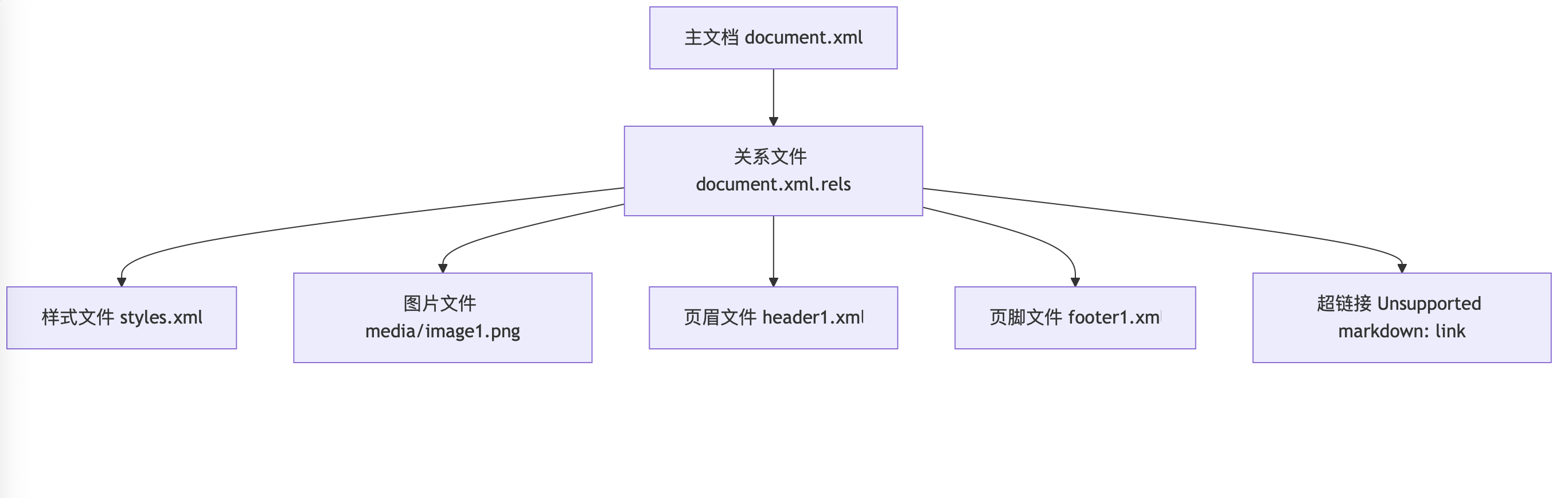
OOXML (.docx) 文件内部结构

作为“人工智能6S店”的官方数字引擎,为AI开发者与企业提供一个覆盖软硬件全栈、一站式门户。
更多推荐



 19
19 0
0- 0


 已为社区贡献49条内容

所有评论(0)