
【HarmonyOS】day40:React Native实战项目+自定义Hooks开发指南
·
发布时间:2026年2月21日
标签:HarmonyOS、React Native、RNOH、Custom Hooks、跨平台开发、性能优化
一、前言
进入2026年,随着HarmonyOS NEXT彻底剥离AOSP,移动端开发已形成 Android、iOS、HarmonyOS 三足鼎立 的格局。React Native for OpenHarmony(RNOH)已成为跨平台开发的重要选择,基于RN 0.77.1新架构(TurboModules & Fabric)的生产环境版本已正式发布。
然而,在鸿蒙平台上构建高质量应用时,代码复用与逻辑抽象依然是核心挑战。自定义Hooks作为React生态中最强大的扩展机制,能显著提升开发效率与代码质量。
本文将以实战项目为载体,带你掌握HarmonyOS + React Native场景下的自定义Hooks开发全流程。
二、技术背景与选型分析
2.1 2026年跨平台开发生态
┌─────────────────────────────────────────────────────────────────┐
│                    2026跨平台框架对比                            │
├──────────────┬──────────────┬──────────────┬──────────────────┤
│    维度      │   Flutter    │React Native  │   uni-app x      │
├──────────────┼──────────────┼──────────────┼──────────────────┤
│  鸿蒙支持    │   社区适配   │   RNOH官方   │   部分支持       │
│  性能表现    │   ⭐⭐⭐⭐⭐   │   ⭐⭐⭐⭐    │   ⭐⭐⭐⭐        │
│  开发效率    │   ⭐⭐⭐⭐    │   ⭐⭐⭐⭐⭐  │   ⭐⭐⭐⭐⭐      │
│  生态成熟度  │   ⭐⭐⭐⭐⭐   │   ⭐⭐⭐⭐⭐  │   ⭐⭐⭐⭐        │
│  热更新能力  │   受限       │   EAS完善    │   完善           │
└──────────────┴──────────────┴──────────────┴──────────────────┘
2.2 RNOH版本演进
| 版本 | 发布日期 | React Native版本 | 关键特性 |
|---|---|---|---|
| v5.0 | 2025-Q2 | 0.72.5 | 基础适配完成 |
| v5.1 | 2025-Q3 | 0.75.0 | TurboModules支持 |
| v5.2 | 2026-Q1 | 0.77.1 | Fabric渲染引擎 |
| v5.3 | 2026-Q2 | 0.79.0 | 性能优化 |
2.3 为什么需要自定义Hooks?
根据2025年React官方开发者调查,87%的开发者在项目中积极使用自定义Hook提升代码复用率。在HarmonyOS场景下,自定义Hooks的价值更加突出:
- 平台差异封装:隐藏HarmonyOS特有的API调用
- 逻辑复用:跨组件、跨页面复用业务逻辑
- 测试友好:Hook逻辑可独立测试
- 维护成本低:一处修改,多处生效
三、环境配置(2026最新版)
3.1 核心依赖
{
  "react": "18.3.1",
  "react-native": "0.77.1",
  "@rnoh/react-native-openharmony": "0.77.0",
  "typescript": "5.3.0",
  "dev-eco-studio": "5.0.4",
  "harmonyos-sdk": "API 12+"
}
3.2 快速搭建
# 1. 安装Node.js (v18.18.0+)
node -v

# 2. 配置npm镜像
npm config set registry https://registry.npmmirror.com

# 3. 创建React Native项目
npx @react-native-community/cli init HarmonyRNProject --template react-native-template-typescript

# 4. 安装RNOH依赖
cd HarmonyRNProject
npm install @rnoh/react-native-openharmony

# 5. 初始化鸿蒙工程
npx rnoh init-harmony

# 6. 安装常用Hooks库
npm install @react-native-async-storage/async-storage
npm install @react-navigation/native
npm install react-native-gesture-handler
3.3 项目结构
HarmonyRNProject/
├── App.tsx
├── src/
│   ├── components/          # 可复用UI组件
│   ├── hooks/               # 自定义Hooks
│   │   ├── index.ts         # Hooks统一导出
│   │   ├── useAsync.ts      # 异步操作Hook
│   │   ├── useDebounce.ts   # 防抖Hook
│   │   ├── useNetwork.ts    # 网络状态Hook
│   │   ├── useStorage.ts    # 本地存储Hook
│   │   ├── useAnimation.ts  # 动画Hook
│   │   └── usePlatform.ts   # 平台检测Hook
│   ├── services/            # API服务层
│   ├── store/               # 状态管理
│   ├── utils/               # 工具函数
│   └── types/               # TypeScript类型定义
├── harmony/                 # 鸿蒙原生工程
└── package.json
四、自定义Hooks设计原则
4.1 命名规范
// ✅ 正确:以use开头,驼峰命名
useAsync
useDebounce
useNetworkStatus
useLocalStorage

// ❌ 错误:不符合规范
asyncHook
debounceFn
getNetwork
4.2 单一职责原则
// ✅ 每个Hook只负责一件事
const { data, loading, error } = useFetch(url);
const { value, setValue } = useLocalStorage(key);
const { isOnline } = useNetwork();

// ❌ 避免一个Hook做太多事
const useEverything = () => {
  // 既处理网络,又处理存储,还处理动画...
};
4.3 返回值设计
// 推荐:对象返回,便于解构和扩展
const useCounter = (initialValue = 0) => {
  const [count, setCount] = useState(initialValue);

  return {
    count,
    increment: () => setCount(c => c + 1),
    decrement: () => setCount(c => c - 1),
    reset: () => setCount(initialValue),
    set: setCount,
  };
};

// 使用
const { count, increment, reset } = useCounter(10);
4.4 依赖管理
// ✅ 明确声明依赖
useEffect(() => {
  // 副作用逻辑
}, [dependency1, dependency2]);

// ❌ 避免遗漏依赖
useEffect(() => {
  // 可能使用未声明的依赖
}, []);
五、核心Hooks实战实现
5.1 useAsync - 异步操作管理
// src/hooks/useAsync.ts

import { useState, useCallback, useEffect } from 'react';

interface AsyncState<T> {
  data: T | null;
  loading: boolean;
  error: Error | null;
}

interface UseAsyncOptions {
  immediate?: boolean;  // 是否立即执行
  onError?: (error: Error) => void;
  onSuccess?: (data: any) => void;
}

export const useAsync = <T,>(
  asyncFunction: () => Promise<T>,
  options: UseAsyncOptions = {}
) => {
  const { immediate = false, onError, onSuccess } = options;

  const [state, setState] = useState<AsyncState<T>>({
    data: null,
    loading: false,
    error: null,
  });

  const execute = useCallback(async () => {
    setState(prev => ({ ...prev, loading: true, error: null }));

    try {
      const data = await asyncFunction();
      setState({ data, loading: false, error: null });
      onSuccess?.(data);
      return data;
    } catch (error) {
      const err = error instanceof Error ? error : new Error(String(error));
      setState(prev => ({ ...prev, loading: false, error: err }));
      onError?.(err);
      throw err;
    }
  }, [asyncFunction, onError, onSuccess]);

  useEffect(() => {
    if (immediate) {
      execute();
    }
  }, [immediate, execute]);

  return {
    ...state,
    execute,
    retry: execute,
  };
};

export default useAsync;
使用示例:
// 获取用户信息
const { data, loading, error, execute } = useAsync(
  () => fetchUserInfo(userId),
  { immediate: true }
);

// 手动触发
<TouchableOpacity onPress={execute}>
  <Text>重新加载</Text>
</TouchableOpacity>
5.2 useDebounce - 防抖处理
// src/hooks/useDebounce.ts

import { useState, useEffect } from 'react';

export const useDebounce = <T>(value: T, delay: number): T => {
  const [debouncedValue, setDebouncedValue] = useState<T>(value);

  useEffect(() => {
    const handler = setTimeout(() => {
      setDebouncedValue(value);
    }, delay);

    return () => clearTimeout(handler);
  }, [value, delay]);

  return debouncedValue;
};

// 防抖回调版本
export const useDebounceCallback = <T extends (...args: any[]) => any>(
  callback: T,
  delay: number
) => {
  const [debouncedCallback, setDebouncedCallback] = useState<T | null>(null);

  useEffect(() => {
    const handler = setTimeout(() => {
      setDebouncedCallback(() => callback);
    }, delay);

    return () => clearTimeout(handler);
  }, [callback, delay]);

  return debouncedCallback;
};

export default useDebounce;
使用示例:
// 搜索框防抖
const [searchText, setSearchText] = useState('');
const debouncedSearch = useDebounce(searchText, 500);

useEffect(() => {
  if (debouncedSearch) {
    searchAPI(debouncedSearch);
  }
}, [debouncedSearch]);
5.3 useNetwork - 网络状态监听
// src/hooks/useNetwork.ts

import { useState, useEffect } from 'react';
import NetInfo from '@react-native-community/netinfo';

interface NetworkState {
  isConnected: boolean;
  isInternetReachable: boolean | null;
  type: string;
}

export const useNetwork = () => {
  const [networkState, setNetworkState] = useState<NetworkState>({
    isConnected: false,
    isInternetReachable: null,
    type: 'unknown',
  });

  useEffect(() => {
    // 初始获取
    NetInfo.fetch().then(state => {
      setNetworkState({
        isConnected: state.isConnected ?? false,
        isInternetReachable: state.isInternetReachable,
        type: state.type ?? 'unknown',
      });
    });

    // 监听变化
    const unsubscribe = NetInfo.addEventListener(state => {
      setNetworkState({
        isConnected: state.isConnected ?? false,
        isInternetReachable: state.isInternetReachable,
        type: state.type ?? 'unknown',
      });
    });

    return () => unsubscribe();
  }, []);

  return networkState;
};

export default useNetwork;
使用示例:
// 网络状态感知组件
const { isConnected, type } = useNetwork();

if (!isConnected) {
  return <OfflineBanner />;
}

return (
  <View>
    <Text>网络类型: {type}</Text>
    {/* 正常内容 */}
  </View>
);
5.4 useStorage - 本地存储封装
// src/hooks/useStorage.ts

import { useState, useEffect, useCallback } from 'react';
import AsyncStorage from '@react-native-async-storage/async-storage';
import { Platform } from 'react-native';

interface UseStorageOptions<T> {
  defaultValue?: T;
  parse?: (value: string) => T;
  stringify?: (value: T) => string;
}

export const useStorage = <T,>(
  key: string,
  options: UseStorageOptions<T> = {}
) => {
  const { defaultValue, parse = JSON.parse, stringify = JSON.stringify } = options;

  const [storedValue, setStoredValue] = useState<T | undefined>(defaultValue);
  const [isLoading, setIsLoading] = useState(true);

  // 读取数据
  const loadValue = useCallback(async () => {
    try {
      const item = await AsyncStorage.getItem(key);
      if (item !== null) {
        setStoredValue(parse(item));
      } else {
        setStoredValue(defaultValue);
      }
    } catch (error) {
      console.warn(`读取存储失败: ${key}`, error);
      setStoredValue(defaultValue);
    } finally {
      setIsLoading(false);
    }
  }, [key, defaultValue, parse]);

  // 写入数据
  const setValue = useCallback(async (value: T | ((prev: T | undefined) => T)) => {
    try {
      const valueToStore = value instanceof Function ? value(storedValue) : value;
      setStoredValue(valueToStore);
      await AsyncStorage.setItem(key, stringify(valueToStore));
    } catch (error) {
      console.warn(`写入存储失败: ${key}`, error);
    }
  }, [key, storedValue, stringify]);

  // 删除数据
  const removeValue = useCallback(async () => {
    try {
      await AsyncStorage.removeItem(key);
      setStoredValue(defaultValue);
    } catch (error) {
      console.warn(`删除存储失败: ${key}`, error);
    }
  }, [key, defaultValue]);

  useEffect(() => {
    loadValue();
  }, [loadValue]);

  return {
    value: storedValue,
    setValue,
    removeValue,
    reload: loadValue,
    isLoading,
  };
};

export default useStorage;
使用示例:
// 用户主题设置
const { value: theme, setValue: setTheme } = useStorage<'light' | 'dark'>('app_theme', {
  defaultValue: 'light',
});

// 用户登录状态
const { value: token, setValue: setToken, removeValue: logout } = useStorage<string>('auth_token');
5.5 useAnimation - 动画控制
// src/hooks/useAnimation.ts

import { useRef, useCallback } from 'react';
import { Animated, Easing } from 'react-native';

interface UseAnimationOptions {
  duration?: number;
  easing?: (value: number) => number;
  useNativeDriver?: boolean;
}

export const useAnimation = (initialValue = 0, options: UseAnimationOptions = {}) => {
  const {
    duration = 300,
    easing = Easing.inOut(Easing.ease),
    useNativeDriver = true,
  } = options;

  const animatedValue = useRef(new Animated.Value(initialValue)).current;

  const animate = useCallback((toValue: number) => {
    return new Promise<void>((resolve) => {
      Animated.timing(animatedValue, {
        toValue,
        duration,
        easing,
        useNativeDriver,
      }).start(resolve);
    });
  }, [animatedValue, duration, easing, useNativeDriver]);

  const fadeIn = useCallback(() => animate(1), [animate]);
  const fadeOut = useCallback(() => animate(0), [animate]);
  const slideIn = useCallback(() => animate(1), [animate]);
  const slideOut = useCallback(() => animate(0), [animate]);

  const reset = useCallback(() => {
    animatedValue.setValue(initialValue);
  }, [animatedValue, initialValue]);

  return {
    animatedValue,
    animate,
    fadeIn,
    fadeOut,
    slideIn,
    slideOut,
    reset,
  };
};

export default useAnimation;
使用示例:
// 淡入动画组件
const { animatedValue, fadeIn } = useAnimation(0, { duration: 500 });

useEffect(() => {
  fadeIn();
}, [fadeIn]);

return (
  <Animated.View style={{ opacity: animatedValue }}>
    <Text>欢迎使用</Text>
  </Animated.View>
);
5.6 usePlatform - 平台检测与适配
// src/hooks/usePlatform.ts

import { Platform, StatusBar } from 'react-native';
import { useMemo } from 'react';

interface PlatformInfo {
  isIOS: boolean;
  isAndroid: boolean;
  isHarmony: boolean;
  isWeb: boolean;
  osVersion: string;
  statusBarHeight: number;
}

export const usePlatform = (): PlatformInfo => {
  const platformInfo = useMemo(() => {
    const isHarmony = Platform.OS === 'harmony';
    const isIOS = Platform.OS === 'ios';
    const isAndroid = Platform.OS === 'android';
    const isWeb = Platform.OS === 'web';

    // HarmonyOS状态栏高度特殊处理
    let statusBarHeight = StatusBar.currentHeight || 0;
    if (isHarmony) {
      // HarmonyOS NEXT状态栏高度
      statusBarHeight = 44; // 根据实际设备调整
    }

    return {
      isIOS,
      isAndroid,
      isHarmony,
      isWeb,
      osVersion: Platform.Version as string,
      statusBarHeight,
    };
  }, []);

  return platformInfo;
};

// 平台特定样式Hook
export const usePlatformStyles = () => {
  const { isHarmony, isIOS, statusBarHeight } = usePlatform();

  return useMemo(() => ({
    safeArea: {
      paddingTop: statusBarHeight,
    },
    platformShadow: isIOS
      ? { shadowColor: '#000', shadowOffset: { width: 0, height: 2 }, shadowOpacity: 0.1, shadowRadius: 4 }
      : isHarmony
      ? { elevation: 4 }
      : { elevation: 4 },
    platformFont: isHarmony
      ? { fontFamily: 'HarmonyOS_Sans' }
      : isIOS
      ? { fontFamily: 'System' }
      : { fontFamily: 'Roboto' },
  }), [isHarmony, isIOS, statusBarHeight]);
};

export default usePlatform;
使用示例:
// 平台适配组件
const { isHarmony, statusBarHeight } = usePlatform();
const styles = usePlatformStyles();

return (
  <View style={[styles.safeArea, styles.platformShadow]}>
    <Text style={styles.platformFont}>
      {isHarmony ? 'HarmonyOS' : '其他平台'}
    </Text>
  </View>
);
5.7 usePagination - 分页加载
// src/hooks/usePagination.ts

import { useState, useCallback, useRef } from 'react';

interface UsePaginationOptions<T> {
  initialPage?: number;
  pageSize?: number;
  fetchFunction: (page: number, pageSize: number) => Promise<{ data: T[]; total: number }>;
}

interface PaginationState<T> {
  data: T[];
  loading: boolean;
  hasMore: boolean;
  page: number;
  total: number;
  refreshing: boolean;
}

export const usePagination = <T,>(options: UsePaginationOptions<T>) => {
  const { initialPage = 1, pageSize = 10, fetchFunction } = options;

  const [state, setState] = useState<PaginationState<T>>({
    data: [],
    loading: false,
    hasMore: true,
    page: initialPage,
    total: 0,
    refreshing: false,
  });

  const loadingRef = useRef(false);

  const loadMore = useCallback(async () => {
    if (loadingRef.current || !state.hasMore) return;

    loadingRef.current = true;
    setState(prev => ({ ...prev, loading: true }));

    try {
      const { data, total } = await fetchFunction(state.page, pageSize);

      setState(prev => ({
        ...prev,
        data: [...prev.data, ...data],
        page: prev.page + 1,
        total,
        hasMore: prev.data.length + data.length < total,
        loading: false,
      }));
    } catch (error) {
      console.error('加载失败:', error);
      setState(prev => ({ ...prev, loading: false }));
    } finally {
      loadingRef.current = false;
    }
  }, [state.page, state.hasMore, pageSize, fetchFunction]);

  const refresh = useCallback(async () => {
    setState(prev => ({ ...prev, refreshing: true }));

    try {
      const { data, total } = await fetchFunction(initialPage, pageSize);

      setState({
        data,
        loading: false,
        hasMore: data.length < total,
        page: initialPage + 1,
        total,
        refreshing: false,
      });
    } catch (error) {
      console.error('刷新失败:', error);
      setState(prev => ({ ...prev, refreshing: false, loading: false }));
    }
  }, [initialPage, pageSize, fetchFunction]);

  const reset = useCallback(() => {
    setState({
      data: [],
      loading: false,
      hasMore: true,
      page: initialPage,
      total: 0,
      refreshing: false,
    });
  }, [initialPage]);

  return {
    ...state,
    loadMore,
    refresh,
    reset,
  };
};

export default usePagination;
使用示例:
// 列表分页
const { data, loading, hasMore, loadMore, refresh } = usePagination({
  fetchFunction: (page, pageSize) => fetchArticleList(page, pageSize),
  pageSize: 20,
});

return (
  <FlatList
    data={data}
    onRefresh={refresh}
    refreshing={refreshing}
    onEndReached={loadMore}
    onEndReachedThreshold={0.3}
    renderItem={({ item }) => <ArticleItem item={item} />}
  />
);
六、Hooks组合使用
6.1 组合示例:useFetchWithCache
// src/hooks/useFetchWithCache.ts

import { useAsync } from './useAsync';
import { useStorage } from './useStorage';
import { useNetwork } from './useNetwork';

interface UseFetchWithCacheOptions<T> {
  key: string;
  fetchFunction: () => Promise<T>;
  cacheDuration?: number; // 缓存有效期(毫秒)
  staleWhileRevalidate?: boolean; // 是否使用过期缓存
}

export const useFetchWithCache = <T,>(options: UseFetchWithCacheOptions<T>) => {
  const { key, fetchFunction, cacheDuration = 5 * 60 * 1000, staleWhileRevalidate = true } = options;

  const { isConnected } = useNetwork();
  const { value: cachedData, setValue: setCache } = useStorage<{ data: T; timestamp: number }>(key);

  const { data, loading, error, execute } = useAsync(fetchFunction);

  // 检查缓存是否有效
  const isCacheValid = cachedData && (Date.now() - cachedData.timestamp < cacheDuration);

  // 智能数据获取策略
  const fetchData = async () => {
    // 有有效缓存,直接返回
    if (isCacheValid && cachedData) {
      return cachedData.data;
    }

    // 无网络且有过期缓存
    if (!isConnected && cachedData && staleWhileRevalidate) {
      return cachedData.data;
    }

    // 执行网络请求
    const result = await execute();

    // 更新缓存
    if (result) {
      await setCache({ data: result, timestamp: Date.now() });
    }

    return result;
  };

  return {
    data: data || cachedData?.data,
    loading,
    error,
    isFromCache: isCacheValid,
    refresh: fetchData,
  };
};

export default useFetchWithCache;
七、性能优化策略
7.1 避免不必要的重渲染
// ✅ 使用useCallback和useMemo
const useOptimizedHook = (data: any[]) => {
  const processedData = useMemo(() => {
    return data.map(item => transform(item));
  }, [data]);

  const handler = useCallback(() => {
    // 处理逻辑
  }, [processedData]);

  return { processedData, handler };
};

// ❌ 避免每次渲染都创建新函数
const useBadHook = (data: any[]) => {
  const processedData = data.map(item => transform(item));
  const handler = () => { /* 处理逻辑 */ };
  return { processedData, handler };
};
7.2 清理副作用
// ✅ 正确清理
useEffect(() => {
  const subscription = eventEmitter.addListener('event', handler);
  return () => subscription.remove();
}, []);

// ✅ 定时器清理
useEffect(() => {
  const timer = setInterval(() => {
    // 定时任务
  }, 1000);
  return () => clearInterval(timer);
}, []);
7.3 条件执行优化
// ✅ 条件执行Hook
const useConditionalHook = (condition: boolean) => {
  if (!condition) {
    return null; // 提前返回
  }

  // Hook逻辑
  const [state, setState] = useState(0);
  return state;
};
八、HarmonyOS平台特殊适配
8.1 平台差异处理
// src/hooks/useHarmonyCompat.ts

import { Platform, NativeModules } from 'react-native';

const { HarmonyModule } = NativeModules;

export const useHarmonyCompat = () => {
  const isHarmony = Platform.OS === 'harmony';

  // HarmonyOS特有API封装
  const requestPermission = async (permission: string) => {
    if (isHarmony && HarmonyModule) {
      return HarmonyModule.requestPermission(permission);
    }
    // 其他平台回退
    return true;
  };

  // 系统能力检测
  const checkSystemCapability = async (capability: string) => {
    if (isHarmony && HarmonyModule) {
      return HarmonyModule.checkCapability(capability);
    }
    return false;
  };

  return {
    isHarmony,
    requestPermission,
    checkSystemCapability,
  };
};
8.2 性能监控Hook
// src/hooks/usePerformance.ts

import { useEffect, useRef } from 'react';
import { InteractionManager, Platform } from 'react-native';

export const usePerformance = (componentName: string) => {
  const renderStartTime = useRef<number>(Date.now());

  useEffect(() => {
    // 记录渲染时间
    const renderTime = Date.now() - renderStartTime.current;
    console.log(`[${componentName}] 渲染时间: ${renderTime}ms`);

    // 交互就绪回调
    InteractionManager.runAfterInteractions(() => {
      const interactionTime = Date.now() - renderStartTime.current;
      console.log(`[${componentName}] 交互就绪: ${interactionTime}ms`);
    });

    // HarmonyOS性能埋点
    if (Platform.OS === 'harmony') {
      // 调用鸿蒙性能监控API
    }
  }, [componentName]);
};
九、测试与调试
9.1 Hook单元测试
// __tests__/hooks/useDebounce.test.ts

import { renderHook, act } from '@testing-library/react-hooks';
import { useDebounce } from '../../src/hooks/useDebounce';

jest.useFakeTimers();

describe('useDebounce', () => {
  it('应该延迟更新值', () => {
    const { result, rerender } = renderHook(
      ({ value, delay }) => useDebounce(value, delay),
      { initialProps: { value: 'initial', delay: 100 } }
    );

    expect(result.current).toBe('initial');

    act(() => {
      rerender({ value: 'updated', delay: 100 });
    });

    expect(result.current).toBe('initial');

    act(() => {
      jest.advanceTimersByTime(100);
    });

    expect(result.current).toBe('updated');
  });
});
9.2 调试工具
// src/hooks/useDebug.ts

import { useEffect } from 'react';

export const useDebug = (hookName: string, value: any) => {
  useEffect(() => {
    if (__DEV__) {
      console.log(`[${hookName}]`, {
        timestamp: new Date().toISOString(),
        value,
        type: typeof value,
      });
    }
  }, [hookName, value]);
};

// 使用
const { data } = useAsync(fetchData);
useDebug('useAsync', data);
十、常见问题与解决方案
| 问题 | 原因 | 解决方案 |
|---|---|---|
| Hooks在条件语句中调用 | 违反Hooks规则 | 确保Hooks在顶层调用 |
| 闭包陷阱 | 依赖项未正确声明 | 使用函数式更新或正确声明依赖 |
| 内存泄漏 | 副作用未清理 | useEffect返回清理函数 |
| 无限重渲染 | 依赖项引用变化 | 使用useMemo/useCallback稳定引用 |
| HarmonyOS平台API不可用 | 原生模块未正确链接 | 检查RNOH配置和原生模块注册 |
十一、总结与展望
11.1 核心收获
- 设计原则:遵循单一职责、明确依赖、规范命名
- 实用Hooks:掌握异步、防抖、网络、存储等核心Hook
- 组合能力:通过Hook组合实现复杂业务逻辑
- 平台适配:针对HarmonyOS做特殊优化
11.2 后续优化方向
- 集成AI智能代码生成
- 支持Server Components
- 完善TypeScript类型推导
- 增加性能监控与告警
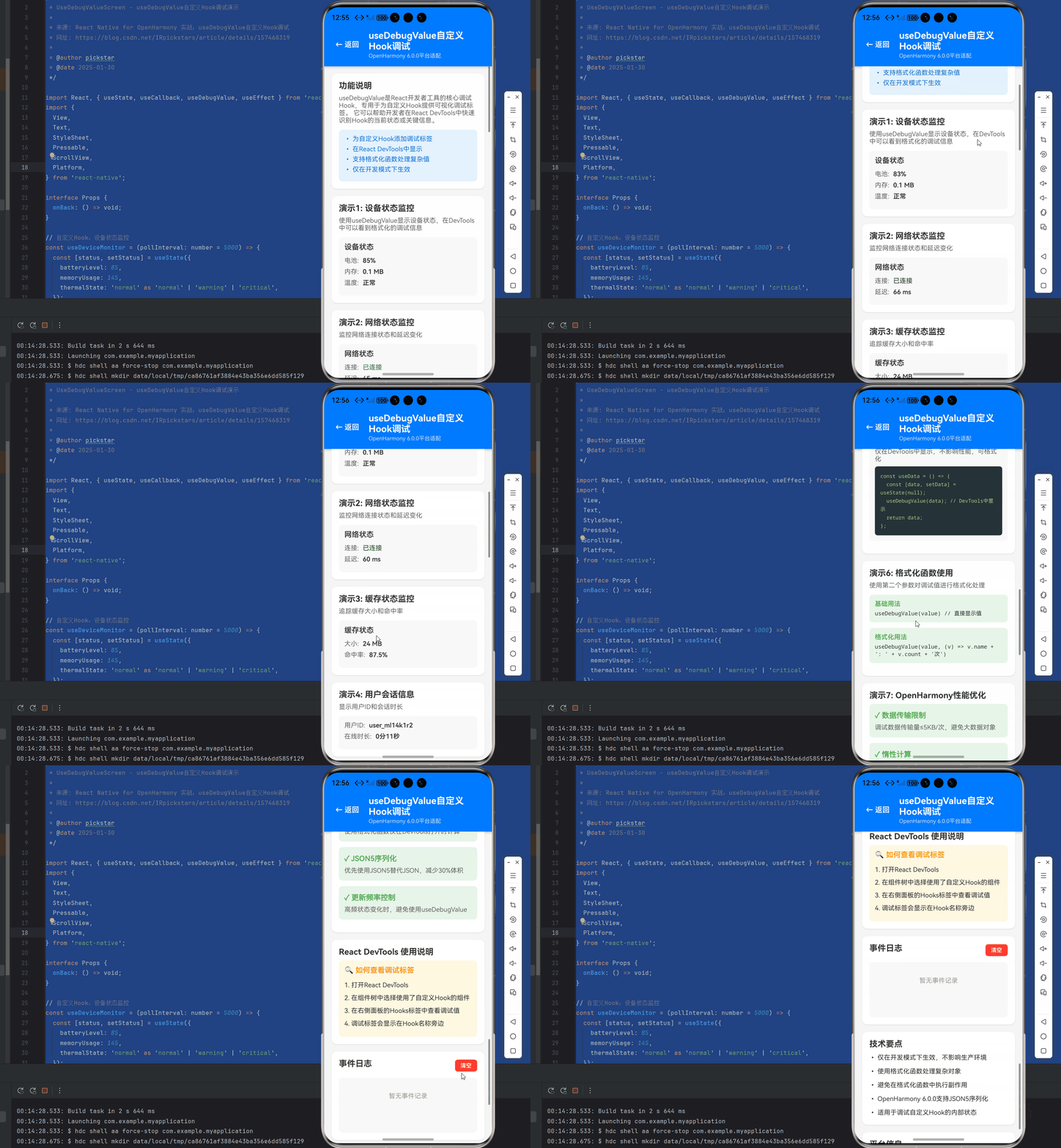
十二、效果图
十三、参考资源
感谢阅读! 如果你觉得本文有帮助,欢迎点赞、收藏、转发。有任何问题欢迎在评论区交流讨论~ 🚀
欢迎加入开源鸿蒙跨平台社区:
https://openharmonycrossplatform.csdn.net

作为“人工智能6S店”的官方数字引擎,为AI开发者与企业提供一个覆盖软硬件全栈、一站式门户。
更多推荐



 2
2 0
0- 0


 已为社区贡献17条内容

所有评论(0)