
Flutter三方库适配OpenHarmony【secure_application】— 窗口事件监听与应用切换检测
欢迎加入开源鸿蒙跨平台社区:https://openharmonycrossplatform.csdn.net用户按 Home 键、打开最近任务列表、切换到其他 App——这些操作都需要被检测到,以便及时锁定应用内容。窗口事件监听和应用生命周期回调。本篇讲第一种——通过监听窗口失焦事件。:窗口失焦事件,用户切走时触发注册方式箭头函数:确保 this 指向正确的插件实例注销清理防止内存泄漏与 And
前言
欢迎加入开源鸿蒙跨平台社区:https://openharmonycrossplatform.csdn.net
用户按 Home 键、打开最近任务列表、切换到其他 App——这些操作都需要被检测到,以便及时锁定应用内容。在 OpenHarmony 上,检测应用切换有两种机制:窗口事件监听和应用生命周期回调。本篇讲第一种——通过 Window.on('windowEvent') 监听窗口失焦事件。
一、Window.on(‘windowEvent’) 事件注册
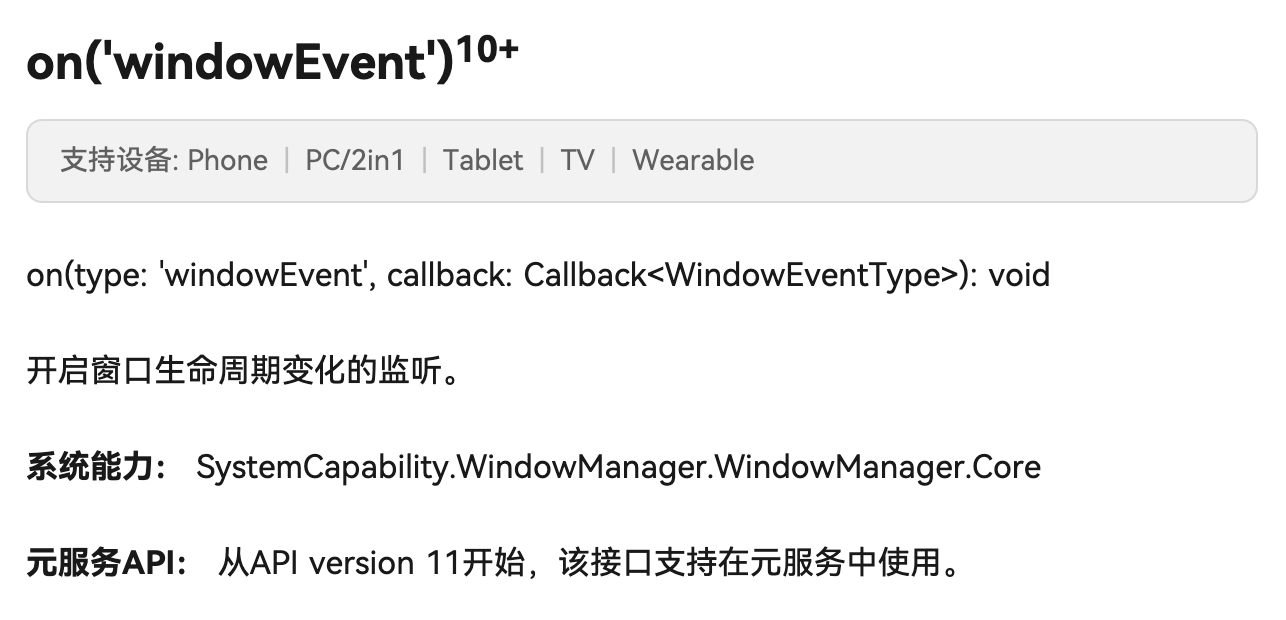
1.1 API 签名
Window.on(type: 'windowEvent', callback: (event: WindowEventType) => void): void
| 参数 | 类型 | 说明 |
|---|---|---|
| type | ‘windowEvent’ | 事件类型,固定字符串 |
| callback | Function | 事件回调函数 |
1.2 WindowEventType 枚举
| 枚举值 | 含义 | 触发场景 |
|---|---|---|
| WINDOW_SHOWN | 窗口显示 | 窗口首次显示或从隐藏恢复 |
| WINDOW_ACTIVE | 窗口获得焦点 | 用户回到 App |
| WINDOW_INACTIVE | 窗口失去焦点 | 用户切走、下拉通知栏、弹出对话框 |
| WINDOW_HIDDEN | 窗口隐藏 | 窗口被完全隐藏 |
对 secure_application 来说,最关键的是 WINDOW_INACTIVE——它表示用户正在离开当前 App。
1.3 WINDOW_INACTIVE 的触发场景
| 场景 | 是否触发 WINDOW_INACTIVE | 是否需要锁定 |
|---|---|---|
| 按 Home 键 | ✅ | ✅ |
| 打开最近任务 | ✅ | ✅ |
| 切换到其他 App | ✅ | ✅ |
| 下拉通知栏 | ✅ | ⚠️ 可选 |
| 系统弹窗(如来电) | ✅ | ⚠️ 可选 |
| 应用内弹窗 | ❌ | ❌ |
📌 注意:下拉通知栏也会触发 WINDOW_INACTIVE。这意味着用户只是看一眼通知就会触发锁定。在某些场景下这可能不太友好,但从安全角度来说是合理的。
二、registerWindowEventCallback 实现
2.1 完整代码
private registerWindowEventCallback(win: window.Window): void {
  try {
    win.on('windowEvent', (eventType: window.WindowEventType) => {
      if (eventType === window.WindowEventType.WINDOW_INACTIVE) {
        Log.i(TAG, "Window became inactive (app switcher or lost focus)");
        if (this.secured && this.channel != null) {
          this.channel.invokeMethod("lock", null);
        }
      }
    });
    Log.i(TAG, "Window event callback registered");
  } catch (err) {
    Log.e(TAG, "Failed to register window event callback: " + JSON.stringify(err));
  }
}
2.2 逐行分析
| 行 | 操作 | 说明 |
|---|---|---|
| try | 异常保护 | 防止注册失败导致崩溃 |
| win.on | 注册事件监听 | 监听所有窗口事件 |
| eventType === WINDOW_INACTIVE | 过滤事件 | 只关心窗口失焦 |
| this.secured | 检查保护状态 | 只在保护开启时才锁定 |
| this.channel != null | 检查通道 | 确保可以通知 Dart 层 |
| channel.invokeMethod(“lock”) | 通知 Dart | 让 Dart 层执行锁定逻辑 |
2.3 为什么要检查 this.secured
if (this.secured && this.channel != null) {
  this.channel.invokeMethod("lock", null);
}
如果不检查 this.secured,即使用户没有调用 controller.secure(),切后台也会触发锁定。这不符合预期——只有明确开启保护的 App 才应该在切后台时锁定。
2.4 调用时机
// 在获取窗口成功后立即注册
private getMainWindow(): void {
  window.getLastWindow(this.context).then((win: window.Window) => {
    this.mainWindow = win;
    this.registerWindowEventCallback(win);  // ← 这里
  });
}
窗口事件回调在获取到窗口后立即注册,确保从一开始就能检测到窗口失焦。
三、事件回调中的 this 指向
3.1 潜在问题
win.on('windowEvent', (eventType: window.WindowEventType) => {
  // 这里的 this 指向谁?
  if (this.secured && this.channel != null) {
    this.channel.invokeMethod("lock", null);
  }
});
在 ArkTS 中,箭头函数会捕获外层的 this,所以这里的 this 指向 SecureApplicationPlugin 实例。这是正确的行为。
3.2 如果用普通函数
// ❌ 错误:普通函数的 this 不指向插件实例
win.on('windowEvent', function(eventType) {
  this.secured;  // this 可能是 undefined 或 window 对象
});
| 函数类型 | this 指向 | 是否正确 |
|---|---|---|
箭头函数 () => {} |
外层的 SecureApplicationPlugin | ✅ |
普通函数 function() {} |
调用者(可能是 undefined) | ❌ |
💡 最佳实践:在事件回调中始终使用箭头函数,避免 this 指向问题。这在 flutter_speech 的适配中也遇到过同样的问题。
四、unregisterWindowEventCallback 注销
4.1 完整代码
private unregisterWindowEventCallback(): void {
  if (this.mainWindow == null) {
    return;
  }
  try {
    this.mainWindow.off('windowEvent');
    Log.i(TAG, "Window event callback unregistered");
  } catch (err) {
    Log.e(TAG, "Failed to unregister window event callback: " + JSON.stringify(err));
  }
}
4.2 off 方法
Window.off(type: 'windowEvent', callback?: Function): void
| 参数 | 说明 |
|---|---|
| type | 事件类型 |
| callback | 可选,指定要移除的回调。不传则移除所有 |
secure_application 没有传 callback 参数,所以会移除所有 windowEvent 监听器。
4.3 注销时机
onDetachedFromEngine(binding: FlutterPluginBinding): void {
  // ...
  this.unregisterWindowEventCallback();  // 插件解绑时注销
  // ...
}
4.4 不注销的后果
| 后果 | 严重程度 | 说明 |
|---|---|---|
| 内存泄漏 | 中 | 回调函数持有插件实例的引用 |
| 崩溃 | 高 | 回调触发时 channel 已为 null |
| 重复触发 | 中 | 热重载后新旧回调同时存在 |
五、与 Android onActivityPaused 的对比
5.1 Android 的做法
// Android:通过 ActivityLifecycleCallbacks 监听
override fun onActivityPaused(activity: Activity) {
    if (secured) {
        channel?.invokeMethod("lock", null)
    }
}
5.2 OpenHarmony 的做法
// OpenHarmony:通过 Window 事件监听
win.on('windowEvent', (eventType) => {
  if (eventType === window.WindowEventType.WINDOW_INACTIVE) {
    if (this.secured && this.channel != null) {
      this.channel.invokeMethod("lock", null);
    }
  }
});
5.3 行为差异
| 维度 | Android onActivityPaused | OHOS WINDOW_INACTIVE |
|---|---|---|
| 触发粒度 | Activity 级别 | Window 级别 |
| 下拉通知栏 | 不触发 paused | ✅ 触发 |
| 多窗口模式 | 可能不触发 | ✅ 触发 |
| 系统弹窗 | 可能不触发 | ✅ 触发 |
📌 关键差异:WINDOW_INACTIVE 比 onActivityPaused 更敏感。下拉通知栏在 Android 上不会触发 paused,但在 OpenHarmony 上会触发 WINDOW_INACTIVE。这意味着 OpenHarmony 上的保护更严格。
5.4 是否需要调整
对于安全类应用,更严格的检测是好事。但如果用户反馈"只是看一眼通知就被锁了",可以考虑在 Dart 层加一个短暂的延迟:
// Dart 层:延迟锁定,给用户一点缓冲时间
case 'lock':
  Future.delayed(Duration(milliseconds: 500), () {
    if (mounted && secureApplicationController.secured) {
      lock();
    }
  });
  break;
六、窗口事件与 Dart 层的协作
6.1 完整流程
用户按 Home 键
    │
    ▼
系统触发 WINDOW_INACTIVE
    │
    ▼
Native: registerWindowEventCallback 中的回调被调用
    │
    ├── 检查 this.secured == true
    ├── 检查 this.channel != null
    │
    ▼
Native: this.channel.invokeMethod("lock", null)
    │
    ▼ MethodChannel (Native → Dart)
    │
Dart: SecureApplicationNative.secureApplicationHandler
    │ case 'lock':
    ▼
Dart: lockIfSecured()  →  controller.lock()
    │
    ├── SecureApplicationNative.lock()  →  通知原生端(空实现)
    ├── value = value.copyWith(locked: true)
    ├── notifyListeners()
    │       │
    │       ▼
    │   SecureGate._sercureNotified()
    │       │
    │       ▼
    │   _gateVisibility.value = 1  →  模糊遮罩立即显示
    │
    └── _lockEventsController.add(true)  →  锁定事件流
6.2 时序图
  用户      系统      Native      Dart       SecureGate
   │         │          │          │            │
   │──Home──►│          │          │            │
   │         │─INACTIVE─►│         │            │
   │         │          │──lock───►│            │
   │         │          │          │──notify───►│
   │         │          │          │            │──显示遮罩
   │         │          │          │            │
七、边界场景处理
7.1 快速切换
用户快速切走又切回:
WINDOW_INACTIVE → lock → WINDOW_ACTIVE → onNeedUnlock → unlock
如果切换非常快(<100ms),可能出现锁定还没完成就解锁了。但由于锁定是立即的(_gateVisibility.value = 1),不会出现内容泄露。
7.2 多次 WINDOW_INACTIVE
某些系统操作可能连续触发多次 WINDOW_INACTIVE:
// 防重入:Dart 层的 lock() 已经有防重入逻辑
void lock() {
  if (!value.locked) {  // 已经锁定就不重复操作
    value = value.copyWith(locked: true);
    notifyListeners();
  }
}
7.3 channel 为 null
if (this.secured && this.channel != null) {
  this.channel.invokeMethod("lock", null);
}
在插件解绑过程中,channel 可能已经被置为 null。这个检查确保不会在解绑后尝试发送消息。
总结
本文详细讲解了窗口事件监听机制:
- WINDOW_INACTIVE:窗口失焦事件,用户切走时触发
- 注册方式:
Window.on('windowEvent', callback) - 箭头函数:确保 this 指向正确的插件实例
- 注销清理:
Window.off('windowEvent')防止内存泄漏 - 与 Android 的差异:WINDOW_INACTIVE 比 onActivityPaused 更敏感
下一篇我们讲应用生命周期回调——第二道防线,确保前后台切换也能被检测到。
如果这篇文章对你有帮助,欢迎点赞👍、收藏⭐、关注🔔,你的支持是我持续创作的动力!
相关资源:

作为“人工智能6S店”的官方数字引擎,为AI开发者与企业提供一个覆盖软硬件全栈、一站式门户。
更多推荐
 27
27 0
0- 0


 已为社区贡献49条内容

所有评论(0)