
Flutter for OpenHarmony 实战:State Notifier — 极致简约的状态管理内功
摘要:本文介绍了在Flutter for OpenHarmony项目中使用State Notifier进行状态管理的实践方案。State Notifier以其不可变性和轻量级特性,成为鸿蒙应用开发的理想选择。文章详细阐述了其核心哲学、环境配置方法,并通过三个高阶场景展示了状态定义、异步任务处理和单元测试的优势。针对OpenHarmony平台,提供了内存泄漏防御和多分辨率适配建议,最后以主题管理系统
Flutter for OpenHarmony 实战:State Notifier — 极致简约的状态管理内功
前言
在 Flutter for OpenHarmony 的项目架构选择中,状态管理(State Management)始终是开发者讨论的焦点。如果你觉得 provider 略显厚重,或者 bloc 的样板代码过多,那么从架构底层回归本质,你会发现 State Notifier 是一个近乎完美的平衡点。
它是顶级开发者 Remi Rousselet(Riverpod 的作者)专门为那些追求极致代码纯洁性的场景设计的。通过将“状态”与“逻辑”完全解耦,它确保了鸿蒙逻辑层代码可以脱离 Flutter UI 独立运行和测试。本文将带你探索这一“四两拨千斤”的状态管理方案。
一、State Notifier 的核心哲学
1.1 不可变性(Immutability)
不同于 ChangeNotifier 这种通过内部修改属性并调用 notifyListeners() 的方式,State Notifier 强制推行“状态整体替换”。每一次状态变更都是一次全新的分配,这天然规避了引用追踪导致的 UI 刷新失败问题。
1.2 极致的轻量级
它的核心源码极短,意味着在鸿蒙系统上,它的内存开销几乎可以忽略不计。对于那些需要多端适配(手机、手表、智慧屏)的鸿蒙应用来说,这套方案具备极佳的兼容性。
二、配置环境 📦
在项目中引入包:
dependencies:
  state_notifier: ^1.0.0
提示:虽然它可以独立使用,但通常建议配合 flutter_state_notifier 或 riverpod 进行 UI 侧的绑定。
三、核心功能:3 个高阶状态操作场景
3.1 声明式状态定义 (@immutable)
定义一个不可变的业务状态模型。
import 'package:state_notifier/state_notifier.dart';

class OhosUserInfo {
  final String nickname;
  final bool isVip;
  const OhosUserInfo({this.nickname = '游客', this.isVip = false});
}

// 💡 技巧:强制使用新的实例替换状态
class UserNotifier extends StateNotifier<OhosUserInfo> {
  UserNotifier() : super(const OhosUserInfo());

  void updateName(String name) {
    state = OhosUserInfo(nickname: name, isVip: state.isVip);
  }
}
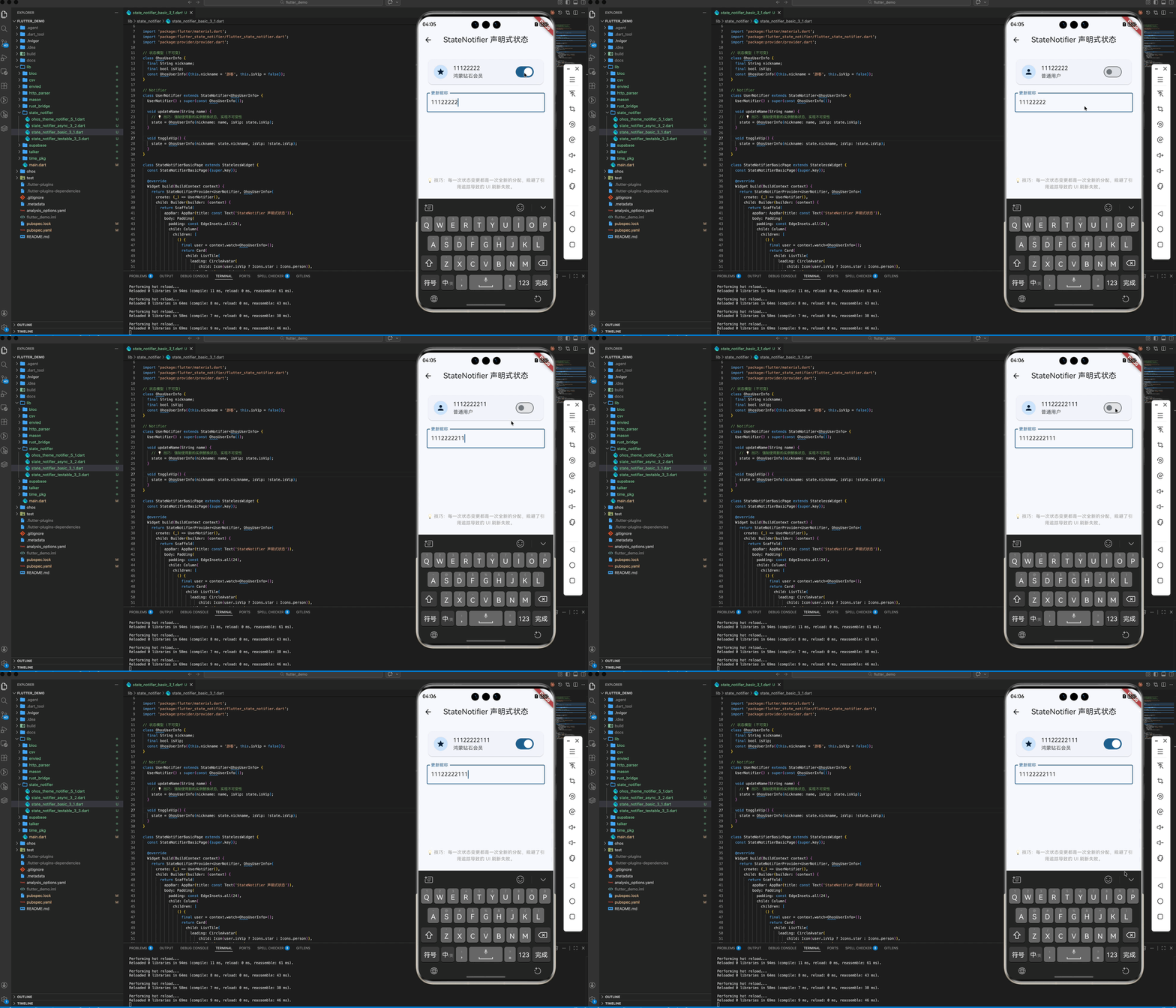
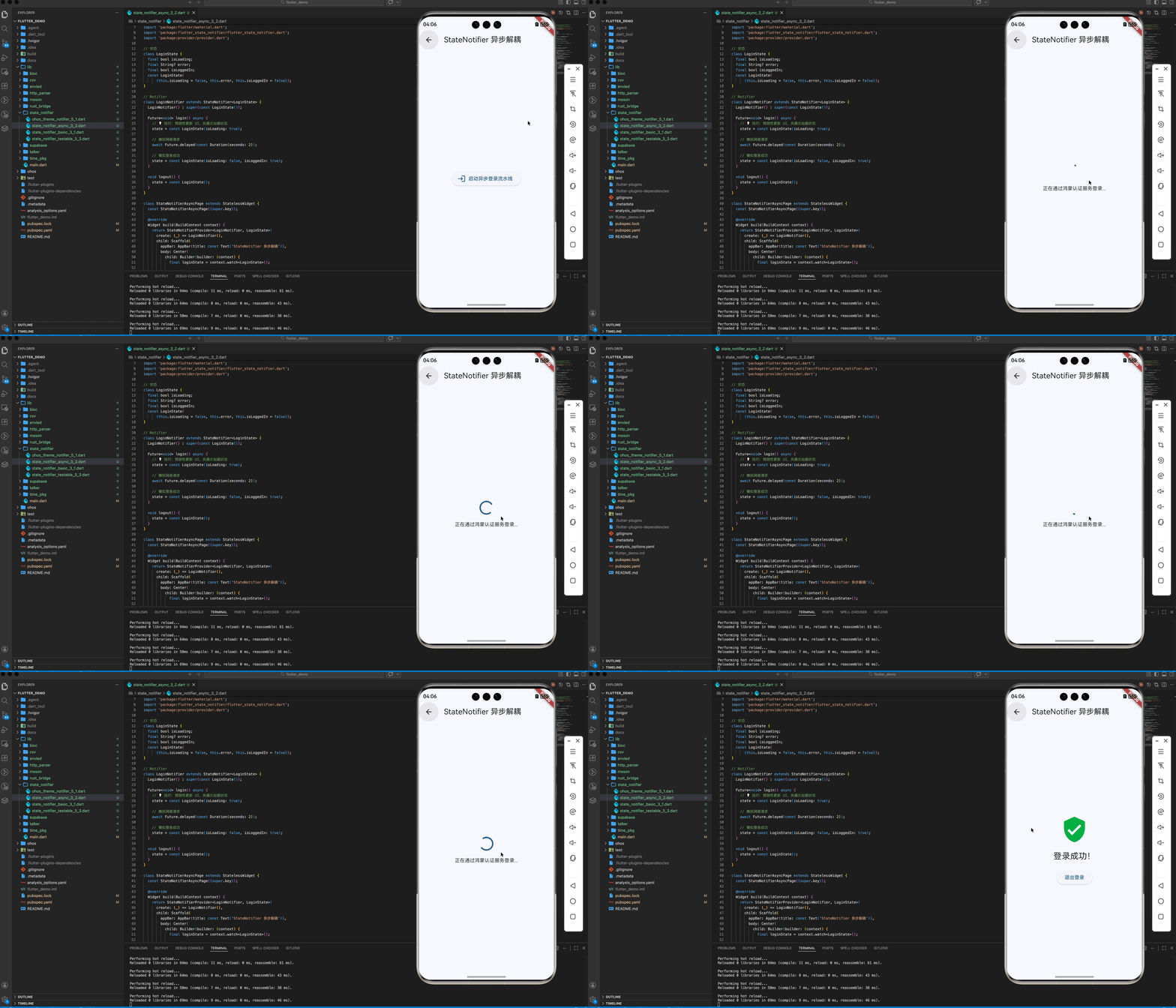
3.2 同步与异步任务的优雅分离
在 Notifier 内部处理异步请求,外部 UI 只需关注最终的 State 结果。
Future<void> login() async {
  state = state.copyWith(isLoading: true); // 预测性更新 UI
  final user = await api.fetchUser();
  state = user; // 最终合并结果
}
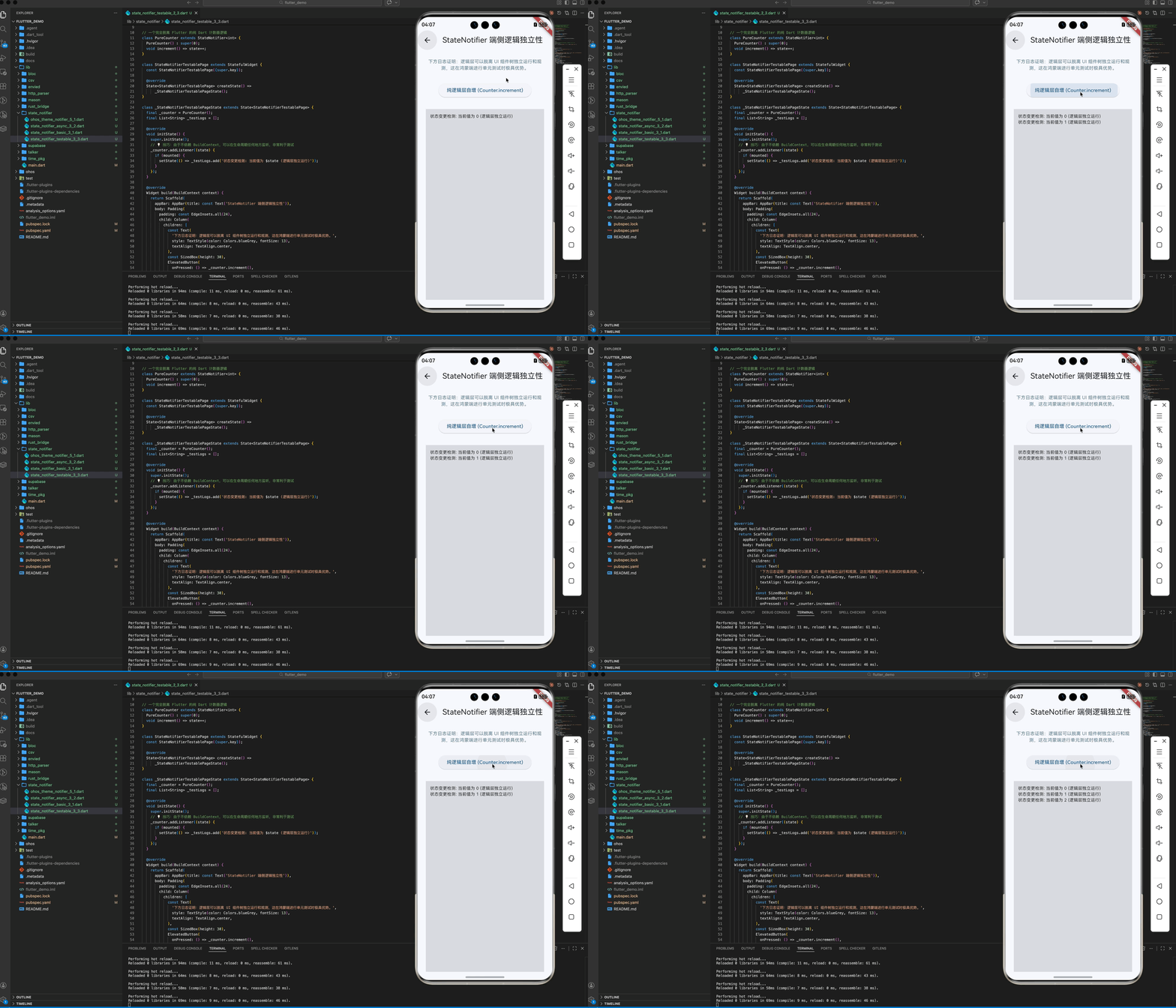
3.3 单元测试的“降维打击”
由于不依赖 BuildContext 和 Flutter 框架,你可以像测试纯 Dart 类一样测试鸿蒙的业务逻辑。
四、OpenHarmony 平台适配建议
4.1 内存泄漏的防御 🏗️
⚠️ 注意:在鸿蒙多页签应用(如 Tab 架构)中。
- ✅ 建议做法:确保在 Notifier 使用完毕后,及时在销毁生命周期中调用
dispose()。虽然 State Notifier 本身很轻,但内部持有的长期变量引用如果不释放,在鸿蒙长驻应用中仍有累积风险。
4.2 适配鸿蒙系统的多分辨率感知
- 💡 技巧:创建一个全局的
DeviceStateNotifier。当鸿蒙折叠屏发生展开或收起动作时,由该 Notifier 统一计算新的布局断点(Breakpoint),并同步分发给所有与之关联的子组件,实现响应式的 UI 布局逻辑。
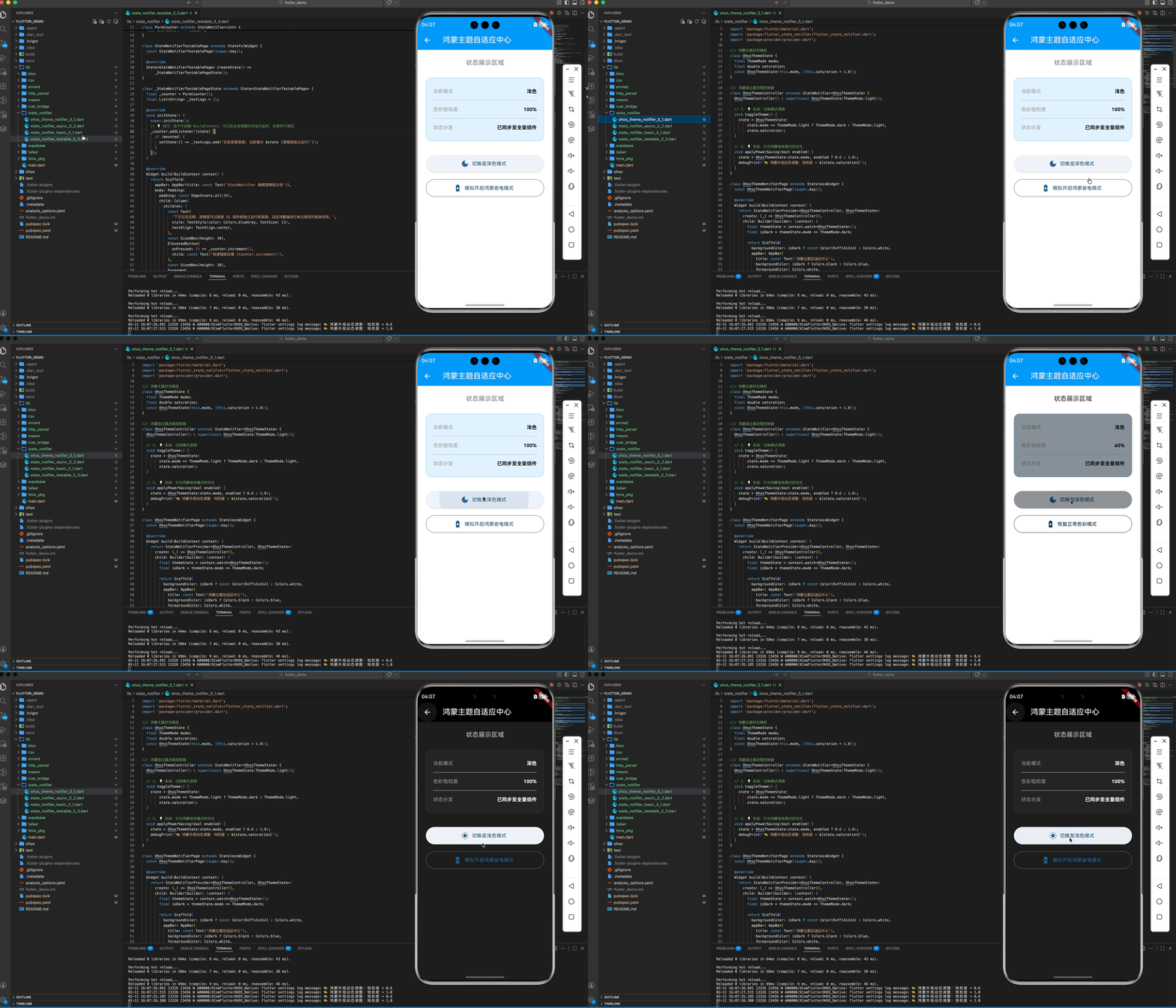
五、完整实战示例:构建鸿蒙“深色/浅色”主题自适应中心
我们将实现一个高级的主题管理组件。它不仅能控制明暗模式,还能根据鸿蒙系统的省电模式自动调整应用的色调饱和度。
import 'package:flutter/material.dart';
import 'package:flutter_state_notifier/flutter_state_notifier.dart';
import 'package:provider/provider.dart';
/// 鸿蒙主题状态模型
class OhosThemeState {
final ThemeMode mode;
final double saturation;
const OhosThemeState(this.mode, [this.saturation = 1.0]);
}
/// 鸿蒙级主题决策控制器
class OhosThemeController extends StateNotifier<OhosThemeState> {
OhosThemeController() : super(const OhosThemeState(ThemeMode.light));
// 1. 💡 实战:切换模式逻辑
void toggleTheme() {
state = OhosThemeState(
state.mode == ThemeMode.light ? ThemeMode.dark : ThemeMode.light,
state.saturation);
}
// 2. 💡 实战:针对鸿蒙省电模式的优化
void applyPowerSaving(bool enabled) {
state = OhosThemeState(state.mode, enabled ? 0.6 : 1.0);
debugPrint('🎨 鸿蒙外观动态调整:饱和度 = ${state.saturation}');
}
}
class OhosThemeNotifierPage extends StatelessWidget {
const OhosThemeNotifierPage({super.key});
Widget build(BuildContext context) {
return StateNotifierProvider<OhosThemeController, OhosThemeState>(
create: (_) => OhosThemeController(),
child: Builder(builder: (context) {
final themeState = context.watch<OhosThemeState>();
final isDark = themeState.mode == ThemeMode.dark;
return Scaffold(
backgroundColor: isDark ? const Color(0xFF1A1A1A) : Colors.white,
appBar: AppBar(
title: const Text('鸿蒙主题自适应中心'),
backgroundColor: isDark ? Colors.black : Colors.blue,
foregroundColor: Colors.white,
),
body: ColorFiltered(
colorFilter: ColorFilter.matrix([
themeState.saturation,
0,
0,
0,
0,
0,
themeState.saturation,
0,
0,
0,
0,
0,
themeState.saturation,
0,
0,
0,
0,
0,
1,
0,
]),
child: Padding(
padding: const EdgeInsets.all(24),
child: Column(
children: [
const Text('状态展示区域',
style: TextStyle(
fontSize: 18,
fontWeight: FontWeight.bold,
color: Colors.grey)),
const SizedBox(height: 30),
_buildStatusCard(isDark, themeState.saturation < 1.0),
const SizedBox(height: 40),
ElevatedButton.icon(
onPressed: () =>
context.read<OhosThemeController>().toggleTheme(),
icon: Icon(isDark ? Icons.light_mode : Icons.dark_mode),
label: Text(isDark ? '切换至浅色模式' : '切换至深色模式'),
style: ElevatedButton.styleFrom(
minimumSize: const Size(double.infinity, 50)),
),
const SizedBox(height: 20),
OutlinedButton.icon(
onPressed: () => context
.read<OhosThemeController>()
.applyPowerSaving(themeState.saturation == 1.0),
icon: const Icon(Icons.battery_saver),
label: Text(themeState.saturation == 1.0
? '模拟开启鸿蒙省电模式'
: '恢复正常色彩模式'),
style: OutlinedButton.styleFrom(
minimumSize: const Size(double.infinity, 50)),
),
],
),
),
),
);
}),
);
}
Widget _buildStatusCard(bool isDark, bool isLowPower) {
return Container(
padding: const EdgeInsets.all(20),
decoration: BoxDecoration(
color: isDark ? Colors.grey[900] : Colors.blue[50],
borderRadius: BorderRadius.circular(16),
border: Border.all(
color: isDark ? Colors.white10 : Colors.blue.withOpacity(0.3)),
),
child: Column(
children: [
_buildRow('当前模式', isDark ? '深色' : '浅色', isDark),
const Divider(),
_buildRow('色彩饱和度', '${(isLowPower ? 60 : 100)}%', isDark),
const Divider(),
_buildRow('状态分发', '已同步至全量组件', isDark),
],
),
);
}
Widget _buildRow(String label, String value, bool isDark) {
return Padding(
padding: const EdgeInsets.symmetric(vertical: 8),
child: Row(
mainAxisAlignment: MainAxisAlignment.spaceBetween,
children: [
Text(label, style: const TextStyle(color: Colors.grey)),
Text(value,
style: TextStyle(
color: isDark ? Colors.white : Colors.black,
fontWeight: FontWeight.bold)),
],
),
);
}
}
六、总结
在追求“少即是多”的 Flutter for OpenHarmony 开发理念中,State Notifier 是提升代码质感的良药。它移除了状态管理中那些华而不实的装饰,只留下了最纯粹的逻辑转换。
如果你追求代码的高可测性与长期的可维护性,State Notifier 绝对是构建鸿蒙商业级架构稳健底座的不二法门。
🌐 欢迎加入开源鸿蒙跨平台社区:开源鸿蒙跨平台开发者社区

作为“人工智能6S店”的官方数字引擎,为AI开发者与企业提供一个覆盖软硬件全栈、一站式门户。
更多推荐



 6
6 0
0- 0


 已为社区贡献16条内容

所有评论(0)