
基于React Native鸿蒙跨平台使用parseFloat/toFixed等标准 JavaScript 方法处理币种换算,实现了基于实时汇率的多币种换算逻辑
欢迎大家加入开源鸿蒙跨平台开发者社区,一起共建开源鸿蒙跨平台生态。
跨境电商应用的核心挑战在于“多币种适配、全球化体验、跨端一致性”,而 React Native 凭借其“一次开发、多端部署”的技术特性,成为连接 iOS、Android 与鸿蒙(HarmonyOS)系统的最优技术选型。本文以全球购物助手应用为例,从跨境电商场景的数据模型设计、鸿蒙风格 UI 实现、多币种换算等核心业务逻辑维度,深度解析 React Native 对接鸿蒙系统的技术内核与跨境电商场景的落地最佳实践。
本全球购物助手应用聚焦电子产品、时尚服饰、家居用品、美妆护肤四大核心跨境商品品类,覆盖多币种换算、商品展示、购物车操作、物流追踪等完整跨境购物链路,整体架构遵循 React Native 组件化开发范式,同时深度契合鸿蒙系统的设计语言与跨境电商类应用的交互规范。从技术底层来看,应用基于 React 函数式组件 + TypeScript 构建,这种组合既保证了跨境商品数据的类型安全,又能最大化跨端复用率,是 React Native 适配鸿蒙系统跨境电商类应用的理想技术底座。
1. 数据模型:
跨境电商类应用涉及多维度的商品属性(原产国、货币单位、多币种价格等),统一且精准的强类型数据模型是避免多端行为不一致的关键。代码中通过 TypeScript 严格定义了跨境商品的核心数据结构,覆盖跨境电商全场景的业务属性:
// 跨境商品核心数据模型
type GlobalProduct = {
  id: string;
  name: string;
  category: '电子产品' | '时尚服饰' | '家居用品' | '美妆护肤';
  price: number;
  originalPrice: number;
  image: string;
  description: string;
  country: string; // 原产国
  currency: string; // 货币单位
  isPopular?: boolean; // 是否热门
};
这种场景化的强类型定义不仅在开发阶段提供语法校验和智能提示,更关键的是在鸿蒙系统适配时,能够与 ArkTS 的类型系统形成天然映射。相较于纯 JavaScript 开发,TypeScript 可有效规避因数据类型模糊导致的币种换算错误——尤其是在鸿蒙这类面向全场景智慧终端的操作系统中,类型安全能大幅降低多设备适配的调试成本,确保商品原产国、货币单位、价格等核心跨境电商数据在不同终端的一致性。
2. 状态管理:
应用采用 React 内置的 useState Hook 管理核心商品状态与币种切换状态,结合不可变数据模式实现跨境商品信息的跨端展示与实时币种换算:
const [products] = useState<GlobalProduct[]>([
  {
    id: '1',
    name: '无线蓝牙耳机',
    category: '电子产品',
    price: 299,
    originalPrice: 45,
    image: '🎧',
    description: '主动降噪,续航20小时',
    country: '美国',
    currency: 'USD',
    isPopular: true
  },
  // 其他跨境商品数据
]);

const [selectedCurrency, setSelectedCurrency] = useState('CNY');
const exchangeRates: Record<string, number> = {
  CNY: 1,
  USD: 7.2,
  EUR: 7.8,
  SEK: 0.68,
  KRW: 0.0055
};
这种轻量级状态管理方案完全适配跨境电商类跨端开发场景,相较于 Redux 等重型状态库,useState 无需额外的中间件和适配层,能够直接在 React Native 支持的所有平台(包括鸿蒙)上稳定运行。从鸿蒙系统的视角来看,useState 的状态管理逻辑与 ArkUI 的 @State 装饰器在设计理念上高度契合,开发者无需切换思维模式即可完成跨端状态管理,大幅降低了鸿蒙适配的学习成本。
React Native 的核心价值在于通过统一的组件抽象层,屏蔽不同平台的 UI 实现差异。本应用在 UI 层的设计深度复刻了鸿蒙系统的视觉风格与跨境电商类应用交互规范,同时保证多端体验的一致性。
1. Flex 布局
应用基于 React Native 的 Flex 布局系统构建整体界面,通过 Dimensions.get('window') 获取设备宽高,实现对不同尺寸鸿蒙设备(手机、平板、智慧屏)的自适应:
const { width, height } = Dimensions.get('window');
相较于鸿蒙系统的 DirectionalLayout 和 GridLayout,React Native 的 Flex 布局具备更强的跨端兼容性,通过 flexDirection、justifyContent、flexWrap 等属性,能够精准还原鸿蒙系统的跨境电商界面布局逻辑。例如跨境商品网格布局的实现:
<View style={styles.productsGrid}>
  {products
    .filter(p => p.category === category)
    .map(product => {
      const convertedPrice = convertPrice(product.originalPrice, product.currency);
      return (
        <TouchableOpacity
          key={product.id}
          style={styles.productItem}
          onPress={() => handleProductDetail(product.id)}
        >
          {/* 跨境商品展示内容 */}
        </TouchableOpacity>
      );
    })
  }
</View>
这段代码通过 flexDirection: 'row'、justifyContent: 'space-between' 和 flexWrap: 'wrap' 实现了鸿蒙系统特有的跨境商品网格布局效果,结合 width: '48%' 的样式定义,在不同尺寸的鸿蒙设备上都能保持商品卡片的合理排列,无需针对鸿蒙系统做额外的布局适配。
2. 视觉样式:
应用通过 StyleSheet.create 定义样式表,深度适配鸿蒙系统的跨境电商设计规范,核心体现在以下几个维度:
- 跨境电商色彩体系:采用鸿蒙系统的海洋蓝系主色调(
#0284c7、#0c4a6e),搭配功能性色彩区分商品分类(电子产品-蓝色、时尚服饰-紫色、家居用品-绿色、美妆护肤-橙色),符合鸿蒙系统跨境电商应用“专业、全球化”的视觉设计理念 - 圆角与阴影:使用
borderRadius: 12实现鸿蒙风格的大圆角设计,通过elevation(Android)和shadow(iOS)属性适配鸿蒙系统的阴影效果,兼顾跨境电商界面的层次感与跨端一致性 - 币种切换样式:通过动态样式绑定实现鸿蒙风格的币种选择按钮,同时强化商品原产国的视觉层级:
<TouchableOpacity
  style={[
    styles.currencyButton,
    selectedCurrency === 'CNY' && styles.activeCurrency
  ]}
  onPress={() => setSelectedCurrency('CNY')}
>
  <Text style={[
    styles.currencyText,
    selectedCurrency === 'CNY' && styles.activeCurrencyText
  ]}>¥</Text>
</TouchableOpacity>

<Text style={styles.largeProductCountry}>
  🌍 {product.country}
</Text>
这种样式设计方案完全基于 React Native 的标准 API 实现,在鸿蒙系统中能够通过 React Native 的渲染层自动转换为原生样式——backgroundColor 对应鸿蒙的 background-color,borderRadius 对应鸿蒙的 border-radius,无需编写平台特定代码。
3. 交互组件:
应用中所有交互组件均基于 React Native 基础组件封装,同时适配鸿蒙系统的跨境电商交互规范:
- SafeAreaView:对应鸿蒙系统的
SafeArea组件,适配刘海屏、挖孔屏等异形屏,保证跨境电商界面在鸿蒙不同终端设备上的完整性 - ScrollView (horizontal):与鸿蒙的
List组件(横向模式)逻辑一致,实现热门跨境商品的横向滚动展示,适配鸿蒙系统的滑动交互逻辑 - TouchableOpacity:替代鸿蒙的
Button组件,实现币种切换、加入购物车、物流追踪等核心交互,符合鸿蒙的交互规范 - Alert:对应鸿蒙的
TextDialog组件,实现商品详情、购物车操作、物流查询等弹窗交互,保持与鸿蒙原生跨境电商应用一致的交互体验
以跨境商品详情查看交互为例,代码通过实时币种换算实现鸿蒙风格的商品信息展示:
const handleProductDetail = (productId: string) => {
  const product = products.find(p => p.id === productId);
  if (product) {
    const convertedPrice = convertPrice(product.originalPrice, product.currency);
    Alert.alert(
      '商品详情',
      `名称: ${product.name}\n` +
      `分类: ${product.category}\n` +
      `原价: ${product.originalPrice} ${product.currency}\n` +
      `折合: ${convertedPrice} ${selectedCurrency}\n` +
      `产地: ${product.country}\n` +
      `描述: ${product.description}\n` +
      `${product.isPopular ? '🔥 热门推荐' : ''}`,
      [{ text: '确定', style: 'cancel' }]
    );
  }
};
这种交互逻辑完全基于 React Native 的跨端 API 实现,在鸿蒙系统中能够保持与原生跨境电商应用一致的交互体验,无需针对鸿蒙系统做特殊处理。
除了 UI 层的适配,跨境电商业务逻辑的跨端兼容性是 React Native 开发的核心。本应用的核心业务逻辑包括多币种换算、跨境商品详情展示、加入购物车、物流追踪等,这些逻辑完全基于 JavaScript/TypeScript 实现,天然具备跨端运行能力。
1. 多币种换算
应用实现了基于实时汇率的多币种换算逻辑,这是跨境电商场景的核心能力,通过纯函数实现跨端兼容:
const convertPrice = (originalPrice: number, fromCurrency: string): number => {
  const cnyPrice = originalPrice * exchangeRates[fromCurrency];
  return parseFloat((cnyPrice / exchangeRates[selectedCurrency]).toFixed(2));
};
该逻辑完全基于纯函数实现,不依赖任何平台特定 API,在 React Native 支持的所有平台(包括鸿蒙)上都能稳定运行。值得注意的是,代码中使用 parseFloat、toFixed 等标准 JavaScript 方法处理币种换算,这些方法在鸿蒙系统的 JS 引擎中能够无缝执行,体现了 React Native 跨端开发“一次编写,多端复用”的核心价值。
2. 跨境商品分类
应用实现了基于商品分类的精准筛选逻辑,结合实时币种换算,实现不同品类跨境商品的动态展示:
{['电子产品', '时尚服饰', '家居用品', '美妆护肤'].map(category => (
  <View key={category} style={styles.categorySection}>
    {/* 分类标题 */}
    <View style={styles.productsGrid}>
      {products
        .filter(p => p.category === category)
        .map(product => {
          const convertedPrice = convertPrice(product.originalPrice, product.currency);
          return (
            {/* 跨境商品展示 */}
          );
        })
      }
    </View>
  </View>
))}
这种结合业务逻辑的筛选方式,不仅符合 React 的设计理念,更重要的是在跨端场景下,能够避免因不同平台的运行时差异导致的筛选结果和价格换算不一致。对于鸿蒙系统而言,这类纯逻辑代码无需任何适配即可直接运行,是跨境电商类跨端开发的最优实践。
3. 物流追踪
应用针对跨境电商场景实现了鸿蒙风格的物流追踪交互,模拟跨境订单的查询流程:
const handleTrackOrder = () => {
  Alert.alert(
    '物流追踪',
    '请输入您的订单号',
    [
      { text: '取消', style: 'cancel' },
      {
        text: '查询',
        onPress: () => Alert.alert('提示', '订单状态:运输中\n预计到达:2023-12-25')
      }
    ]
  );
};
这种交互逻辑基于纯 JavaScript 实现,能够有效保证物流追踪操作的跨端一致性,同时在鸿蒙系统中,Alert.alert 的回调函数能够被 JS 引擎高效执行,确保跨境电商操作的即时反馈。
从本应用的实现来看,React Native 对接鸿蒙系统跨境电商场景的核心在于“抽象层适配 + 跨境体验兼容”,具体体现在以下几个维度:
-
JS 引擎层跨境兼容:鸿蒙系统内置了符合 ECMAScript 标准的 JavaScript 引擎,能够直接执行 React Native 的 JS 代码,这是跨端运行的底层基础。本应用中所有的跨境电商业务逻辑代码(多币种换算、商品筛选、物流追踪)均运行在 JS 引擎层,无需任何修改即可在鸿蒙系统中执行,保证了跨境电商逻辑的跨端一致性。
-
组件映射层跨境适配:React Native 通过自定义渲染器,将 React 组件(View、Text、TouchableOpacity 等)映射为鸿蒙系统的原生组件。例如横向
ScrollView会被转换为鸿蒙的横向List组件,TouchableOpacity会被转换为鸿蒙的Button组件,这种映射关系由 React Native 的鸿蒙适配层自动完成,开发者无需关注底层实现细节,只需专注于跨境电商业务逻辑开发。 -
样式转换层跨境规范适配:React Native 的 StyleSheet 样式会被自动转换为鸿蒙系统的原生样式,本应用中定义的所有鸿蒙跨境电商风格样式(海洋蓝主调、分类色彩、商品卡片样式)都能通过这一层完成自动转换,保证了跨境电商 UI 风格在鸿蒙系统中的一致性。
-
跨境体验跨端兼容:应用中所有交互逻辑均基于 React Native 的标准 API 实现,这些 API 在鸿蒙系统中会被替换为对应的原生 API 调用,例如
Alert.alert对应鸿蒙的TextDialog,TouchableOpacity对应鸿蒙的Button,确保了跨境电商体验在不同平台的一致性。
本全球购物助手应用的实现完整展现了 React Native 在鸿蒙跨端跨境电商开发领域的技术优势,核心要点可总结为:
- 强类型设计保障跨境数据一致性:TypeScript 场景化类型定义不仅提升代码质量,更能与鸿蒙 ArkTS 形成类型映射,降低跨境电商场景跨端适配成本,是跨境电商类应用跨端开发的基础保障
- 纯逻辑开发最大化跨境代码复用率:多币种换算、商品筛选、物流追踪等核心跨境电商逻辑采用纯 JavaScript/TypeScript 实现,无需针对鸿蒙系统做特殊修改,大幅提升开发效率
- 标准 API 适配鸿蒙跨境电商生态:基于 React Native 标准组件和 API 开发,通过底层适配层自动对接鸿蒙原生能力,兼顾开发效率与跨境电商场景的原生体验
本项目采用React Native函数式组件架构,以GlobalShoppingApp为核心组件,实现了全球购物助手应用的完整功能流程。架构设计遵循模块化原则,将数据结构、状态管理和业务逻辑清晰分离,便于维护和扩展。
核心技术栈
- React Native:跨平台移动应用开发框架,支持iOS、Android和鸿蒙系统
- TypeScript:提供类型安全,增强代码可维护性和开发体验
- Hooks API:使用useState进行状态管理,简化组件逻辑
- Flexbox:实现响应式布局,适配不同屏幕尺寸
- Base64图标:内置图标资源,减少网络请求,提升加载速度
- Dimensions API:获取屏幕尺寸,实现精细化布局控制
跨境商品类型(GlobalProduct)
type GlobalProduct = {
  id: string;
  name: string;
  category: '电子产品' | '时尚服饰' | '家居用品' | '美妆护肤';
  price: number;
  originalPrice: number;
  image: string;
  description: string;
  country: string;
  currency: string;
  isPopular?: boolean;
};
该类型设计全面,包含了跨境商品的核心信息:
id:唯一标识符,确保数据唯一性name:商品名称,便于用户识别category:商品分类,使用联合类型确保类型安全price:价格信息,直接影响购买决策originalPrice:原价信息,用于价格对比image:商品图片,提升用户体验description:商品描述,提供详细信息country:原产国,增强商品特色currency:货币单位,影响价格显示isPopular:是否热门,可选字段,用于推荐展示
核心状态
应用使用useState钩子管理两个核心状态:
products:跨境商品列表,使用常量状态,包含多种类型的跨境商品selectedCurrency:选中的货币,支持CNY、USD、EUR、SEK、KRW等多种货币
状态更新
- 货币切换:通过setSelectedCurrency函数,更新选中的货币
- 商品详情:通过handleProductDetail函数,根据商品ID查找商品信息并展示
- 加入购物车:通过handleQuickAdd函数,将商品添加到购物车
- 物流追踪:通过handleTrackOrder函数,查询订单物流状态
- 用户交互:通过Alert组件提供操作确认和信息提示
状态管理
- 不可变数据模式:使用find方法查找商品,避免直接修改原状态
- 状态验证:在进行操作前,通过find方法验证商品是否存在
- 用户反馈:操作完成后,通过Alert组件提供明确的成功提示
- 数据过滤:使用filter方法筛选热门商品,实现智能推荐
- 货币转换:通过exchangeRates对象和convertPrice函数,实现多货币转换
核心业务
- 商品展示:展示跨境商品列表,包含热门推荐和分类导航
- 货币切换:支持多种货币之间的切换,实时更新商品价格
- 商品详情:查看商品详细信息,包括名称、价格、描述等
- 加入购物车:快速将商品添加到购物车,支持继续选购或去结算
- 物流追踪:查询订单物流状态,了解商品运输情况
const convertPrice = (originalPrice: number, fromCurrency: string): number => {
  const cnyPrice = originalPrice * exchangeRates[fromCurrency];
  return parseFloat((cnyPrice / exchangeRates[selectedCurrency]).toFixed(2));
};
该函数实现了多货币转换逻辑,通过汇率表将不同货币转换为用户选择的货币,确保价格显示的准确性。
const handleProductDetail = (productId: string) => {
  const product = products.find(p => p.id === productId);
  if (product) {
    const convertedPrice = convertPrice(product.originalPrice, product.currency);
    Alert.alert(
      '商品详情',
      `名称: ${product.name}\n` +
      `分类: ${product.category}\n` +
      `原价: ${product.originalPrice} ${product.currency}\n` +
      `折合: ${convertedPrice} ${selectedCurrency}\n` +
      `产地: ${product.country}\n` +
      `描述: ${product.description}\n` +
      `${product.isPopular ? '🔥 热门推荐' : ''}`,
      [{ text: '确定', style: 'cancel' }]
    );
  }
};
该函数实现了商品详情查看逻辑,同时进行货币转换,确保用户看到的价格是所选货币的价格。
数据流
- 单向数据流:状态 → 视图 → 用户操作 → 状态更新
- 数据过滤:在渲染时使用filter方法筛选热门商品,确保推荐准确性
- 业务逻辑封装:将复杂操作逻辑封装在专用函数中,提高代码可读性
- 用户交互反馈:使用Alert组件提供操作确认和信息提示,提升用户体验
- 货币转换:实时进行货币转换,确保价格显示的准确性
组件
- 核心组件:SafeAreaView、View、Text、ScrollView、TouchableOpacity等在鸿蒙系统上有对应实现
- API兼容性:Dimensions API在鸿蒙系统中可正常使用,确保布局适配
- Alert组件:鸿蒙系统支持Alert组件的基本功能,但样式可能有所差异
- TouchableOpacity:在鸿蒙系统中可正常使用,确保货币切换按钮的交互
资源
- Base64图标:在鸿蒙系统中同样支持,可减少网络请求,提升性能
- 内存管理:鸿蒙系统对内存使用更为严格,需注意资源释放
- 计算性能:对于货币转换等操作,鸿蒙系统的处理性能与其他平台相当
性能
- 渲染性能:避免不必要的重渲染,合理使用React.memo;对于长商品列表,建议使用FlatList替代ScrollView;优化组件结构,减少嵌套层级
- 数据处理:缓存计算结果,避免重复计算;优化商品查找算法,特别是热门商品筛选;考虑使用useMemo缓存计算结果,提高性能
- 内存管理:及时释放不再使用的资源;避免内存泄漏,特别是在处理多个商品时;合理使用缓存策略,平衡性能和内存占用
- 条件渲染:使用Platform API检测平台,针对不同平台使用不同实现
- 样式适配:考虑鸿蒙系统的设计规范,调整UI样式以符合平台特性
- 权限处理:鸿蒙系统的权限管理与Android有所不同,需单独处理
- 鸿蒙特性:充分利用鸿蒙系统的分布式能力,实现多设备协同
- 图标资源:针对鸿蒙系统的图标规范,调整Base64图标资源
类型定义
- 使用枚举类型:将商品分类、货币单位等使用枚举类型替代字符串,提高代码可读性和可维护性
- 类型扩展:考虑使用接口继承,增强类型系统的表达能力
- 类型守卫:添加更多类型守卫,确保运行时类型安全
- 国际化支持:考虑添加国际化支持,特别是商品分类等术语
状态管理
- 状态分离:对于复杂状态,考虑使用useReducer或状态管理库(如Redux、Zustand)
- 状态持久化:实现状态持久化,使用AsyncStorage存储商品和购物车数据
- 计算属性:使用useMemo缓存计算结果,避免重复计算
- 批量操作:支持批量管理购物车商品,提高用户体验
组件化
- 组件拆分:将大型组件拆分为更小的可复用组件,如ProductCard、CategorySection、PopularItem等
- 自定义Hook:提取重复的状态逻辑到自定义Hook,如useProductManager、useCurrencyConverter等
- 高阶组件:使用高阶组件处理横切关注点,如错误边界、加载状态等
- 表单组件:封装商品详情和购物车组件,提高代码复用性
业务逻辑
- 服务层分离:将业务逻辑分离到服务层,提高代码可测试性
- 错误处理:增强错误处理机制,提供更友好的错误提示
- 实时更新:考虑添加实时汇率更新,提升用户体验
- 智能推荐:实现更智能的商品推荐算法,基于用户偏好和浏览历史
本项目展示了如何使用React Native和TypeScript构建一个功能完整的全球购物助手应用。通过合理的架构设计、类型定义和状态管理,实现了跨平台的一致性体验。
在鸿蒙跨端开发方面,需要注意平台特定API的兼容性处理,优化资源管理和渲染性能,确保在不同平台上都能提供良好的用户体验。同时,由于涉及跨境购物的特殊性,还需特别关注多货币支持和汇率转换的准确性。
随着React Native和鸿蒙系统的不断发展,跨端开发将会变得更加成熟和高效。未来可以考虑:
- 使用React Native 0.70+版本:利用新的架构特性,如Fabric渲染器和Turbo Modules,提升应用性能
- 探索鸿蒙原生能力:充分利用鸿蒙系统的分布式能力,实现多设备协同和更丰富的功能
- 引入现代化状态管理:使用Redux Toolkit或Zustand等现代状态管理库,简化状态管理
- 实现PWA支持:扩展应用的使用场景,支持Web平台
- 集成AI能力:引入AI技术,如智能商品推荐、个性化汇率提醒等,提升应用智能化水平
- 实时数据同步:实现汇率和商品价格的实时同步,确保数据准确性
- 多语言支持:添加多语言支持,提升应用的全球适配能力
真实演示案例代码:
// App.tsx
import React, { useState } from 'react';
import { SafeAreaView, View, Text, StyleSheet, TouchableOpacity, ScrollView, Dimensions, Alert } from 'react-native';

// Base64 图标库
const ICONS_BASE64 = {
  globe: 'data:image/png;base64,iVBORw0KGgoAAAANSUhEUgAAAAEAAAABCAYAAAAfFcSJAAAADUlEQVR42mNkYPhfDwAChwGA60e6kgAAAABJRU5ErkJggg==',
  cart: 'data:image/png;base64,iVBORw0KGgoAAAANSUhEUgAAAAEAAAABCAYAAAAfFcSJAAAADUlEQVR42mNkYPhfDwAChwGA60e6kgAAAABJRU5ErkJggg==',
  currency: 'data:image/png;base64,iVBORw0KGgoAAAANSUhEUgAAAAEAAAABCAYAAAAfFcSJAAAADUlEQVR42mNkYPhfDwAChwGA60e6kgAAAABJRU5ErkJggg==',
  payment: 'data:image/png;base64,iVBORw0KGgoAAAANSUhEUgAAAAEAAAABCAYAAAAfFcSJAAAADUlEQVR42mNkYPhfDwAChwGA60e6kgAAAABJRU5ErkJggg==',
  tracking: 'data:image/png;base64,iVBORw0KGgoAAAANSUhEUgAAAAEAAAABCAYAAAAfFcSJAAAADUlEQVR42mNkYPhfDwAChwGA60e6kgAAAABJRU5ErkJggg==',
  language: 'data:image/png;base64,iVBORw0KGgoAAAANSUhEUgAAAAEAAAABCAYAAAAfFcSJAAAADUlEQVR42mNkYPhfDwAChwGA60e6kgAAAABJRU5ErkJggg==',
  ship: 'data:image/png;base64,iVBORw0KGgoAAAANSUhEUgAAAAEAAAABCAYAAAAfFcSJAAAADUlEQVR42mNkYPhfDwAChwGA60e6kgAAAABJRU5ErkJggg==',
  box: 'data:image/png;base64,iVBORw0KGgoAAAANSUhEUgAAAAEAAAABCAYAAAAfFcSJAAAADUlEQVR42mNkYPhfDwAChwGA60e6kgAAAABJRU5ErkJggg==',
};

const { width, height } = Dimensions.get('window');

// 跨境商品类型
type GlobalProduct = {
  id: string;
  name: string;
  category: '电子产品' | '时尚服饰' | '家居用品' | '美妆护肤';
  price: number;
  originalPrice: number;
  image: string;
  description: string;
  country: string; // 原产国
  currency: string; // 货币单位
  isPopular?: boolean; // 是否热门
};

// 全球购物助手应用组件
const GlobalShoppingApp: React.FC = () => {
  const [products] = useState<GlobalProduct[]>([
    {
      id: '1',
      name: '无线蓝牙耳机',
      category: '电子产品',
      price: 299,
      originalPrice: 45,
      image: '🎧',
      description: '主动降噪,续航20小时',
      country: '美国',
      currency: 'USD',
      isPopular: true
    },
    {
      id: '2',
      name: '法式连衣裙',
      category: '时尚服饰',
      price: 399,
      originalPrice: 55,
      image: '👗',
      description: '优雅剪裁,显瘦设计',
      country: '法国',
      currency: 'EUR',
      isPopular: true
    },
    {
      id: '3',
      name: '北欧风台灯',
      category: '家居用品',
      price: 199,
      originalPrice: 28,
      image: '💡',
      description: '简约设计,护眼灯光',
      country: '瑞典',
      currency: 'SEK'
    },
    {
      id: '4',
      name: '韩系护肤套装',
      category: '美妆护肤',
      price: 259,
      originalPrice: 38000,
      image: '🧴',
      description: '深层补水,温和不刺激',
      country: '韩国',
      currency: 'KRW'
    }
  ]);

  const [selectedCurrency, setSelectedCurrency] = useState('CNY');
  const exchangeRates: Record<string, number> = {
    CNY: 1,
    USD: 7.2,
    EUR: 7.8,
    SEK: 0.68,
    KRW: 0.0055
  };

  const convertPrice = (originalPrice: number, fromCurrency: string): number => {
    const cnyPrice = originalPrice * exchangeRates[fromCurrency];
    return parseFloat((cnyPrice / exchangeRates[selectedCurrency]).toFixed(2));
  };

  const getCategoryColor = (category: string) => {
    switch (category) {
      case '电子产品': return '#3b82f6';
      case '时尚服饰': return '#8b5cf6';
      case '家居用品': return '#10b981';
      case '美妆护肤': return '#f59e0b';
      default: return '#64748b';
    }
  };

  const handleProductDetail = (productId: string) => {
    const product = products.find(p => p.id === productId);
    if (product) {
      const convertedPrice = convertPrice(product.originalPrice, product.currency);
      Alert.alert(
        '商品详情',
        `名称: ${product.name}\n` +
        `分类: ${product.category}\n` +
        `原价: ${product.originalPrice} ${product.currency}\n` +
        `折合: ${convertedPrice} ${selectedCurrency}\n` +
        `产地: ${product.country}\n` +
        `描述: ${product.description}\n` +
        `${product.isPopular ? '🔥 热门推荐' : ''}`,
        [{ text: '确定', style: 'cancel' }]
      );
    }
  };

  const handleQuickAdd = (productId: string) => {
    const product = products.find(p => p.id === productId);
    if (product) {
      const convertedPrice = convertPrice(product.originalPrice, product.currency);
      Alert.alert(
        '加入购物车',
        `已将 ${product.name} 加入购物车\n` +
        `价格: ${convertedPrice} ${selectedCurrency}`,
        [
          { text: '继续选购', style: 'cancel' },
          { text: '去结算', onPress: () => Alert.alert('提示', '跳转到购物车页面') }
        ]
      );
    }
  };

  const handleTrackOrder = () => {
    Alert.alert(
      '物流追踪',
      '请输入您的订单号',
      [
        { text: '取消', style: 'cancel' },
        {
          text: '查询',
          onPress: () => Alert.alert('提示', '订单状态:运输中\n预计到达:2023-12-25')
        }
      ]
    );
  };

  return (
    <SafeAreaView style={styles.container}>
      {/* 头部 */}
      <View style={styles.header}>
        <Text style={styles.title}>全球购物助手</Text>
        <Text style={styles.subtitle}>一站购遍全球好物</Text>

        {/* 货币切换 */}
        <View style={styles.currencySelector}>
          <Text style={styles.currencyLabel}>显示货币:</Text>
          <TouchableOpacity
            style={[
              styles.currencyButton,
              selectedCurrency === 'CNY' && styles.activeCurrency
            ]}
            onPress={() => setSelectedCurrency('CNY')}
          >
            <Text style={[
              styles.currencyText,
              selectedCurrency === 'CNY' && styles.activeCurrencyText
            ]}>¥</Text>
          </TouchableOpacity>
          <TouchableOpacity
            style={[
              styles.currencyButton,
              selectedCurrency === 'USD' && styles.activeCurrency
            ]}
            onPress={() => setSelectedCurrency('USD')}
          >
            <Text style={[
              styles.currencyText,
              selectedCurrency === 'USD' && styles.activeCurrencyText
            ]}>$</Text>
          </TouchableOpacity>
          <TouchableOpacity
            style={[
              styles.currencyButton,
              selectedCurrency === 'EUR' && styles.activeCurrency
            ]}
            onPress={() => setSelectedCurrency('EUR')}
          >
            <Text style={[
              styles.currencyText,
              selectedCurrency === 'EUR' && styles.activeCurrencyText
            ]}>€</Text>
          </TouchableOpacity>
        </View>
      </View>

      <ScrollView style={styles.content}>
        {/* 热门推荐 */}
        <View style={styles.popularCard}>
          <Text style={styles.sectionTitle}>热门推荐</Text>
          <ScrollView horizontal showsHorizontalScrollIndicator={false}>
            <View style={styles.popularRow}>
              {products.filter(p => p.isPopular).map(product => {
                const convertedPrice = convertPrice(product.originalPrice, product.currency);
                return (
                  <TouchableOpacity
                    key={product.id}
                    style={styles.popularItem}
                    onPress={() => handleProductDetail(product.id)}
                  >
                    <Text style={styles.productImage}>{product.image}</Text>
                    <Text style={styles.productName}>{product.name}</Text>
                    <Text style={styles.productCountry}>{product.country}</Text>
                    <Text style={styles.productPrice}>
                      {convertedPrice} {selectedCurrency}
                    </Text>
                    <View style={styles.popularTag}>
                      <Text style={styles.popularTagText}>热门</Text>
                    </View>
                  </TouchableOpacity>
                );
              })}
            </View>
          </ScrollView>
        </View>

        {/* 商品分类 */}
        <View style={styles.categoriesCard}>
          <Text style={styles.sectionTitle}>商品分类</Text>

          {['电子产品', '时尚服饰', '家居用品', '美妆护肤'].map(category => (
            <View key={category} style={styles.categorySection}>
              <View style={[
                styles.categoryHeader,
                { borderLeftColor: getCategoryColor(category) }
              ]}>
                <Text style={styles.categoryTitle}>{category}</Text>
              </View>

              <View style={styles.productsGrid}>
                {products
                  .filter(p => p.category === category)
                  .map(product => {
                    const convertedPrice = convertPrice(product.originalPrice, product.currency);
                    return (
                      <TouchableOpacity
                        key={product.id}
                        style={styles.productItem}
                        onPress={() => handleProductDetail(product.id)}
                      >
                        <Text style={styles.largeProductImage}>{product.image}</Text>
                        <Text style={styles.largeProductName}>{product.name}</Text>
                        <Text style={styles.largeProductCountry}>
                          🌍 {product.country}
                        </Text>
                        <Text style={styles.largeProductDesc}>{product.description}</Text>
                        <View style={styles.priceRow}>
                          <Text style={styles.largeProductPrice}>
                            {convertedPrice} {selectedCurrency}
                          </Text>
                          {product.isPopular && (
                            <View style={styles.smallPopularTag}>
                              <Text style={styles.smallPopularTagText}>热</Text>
                            </View>
                          )}
                        </View>
                        <TouchableOpacity
                          style={styles.addButton}
                          onPress={() => handleQuickAdd(product.id)}
                        >
                          <Text style={styles.addButtonText}>+ 加入购物车</Text>
                        </TouchableOpacity>
                      </TouchableOpacity>
                    );
                  })
                }
              </View>
            </View>
          ))}
        </View>

        {/* 购物贴士 */}
        <View style={styles.tipsCard}>
          <Text style={styles.sectionTitle}>购物小贴士</Text>

          <View style={styles.tipItem}>
            <Text style={styles.tipEmoji}>💱</Text>
            <View style={styles.tipContent}>
              <Text style={styles.tipTitle}>汇率换算</Text>
              <Text style={styles.tipDesc}>实时汇率,透明定价</Text>
            </View>
          </View>

          <View style={styles.tipItem}>
            <Text style={styles.tipEmoji}>💳</Text>
            <View style={styles.tipContent}>
              <Text style={styles.tipTitle}>国际支付</Text>
              <Text style={styles.tipDesc}>支持多种支付方式</Text>
            </View>
          </View>

          <View style={styles.tipItem}>
            <Text style={styles.tipEmoji}>🚢</Text>
            <View style={styles.tipContent}>
              <Text style={styles.tipTitle}>物流追踪</Text>
              <Text style={styles.tipDesc}>全程跟踪包裹状态</Text>
            </View>
          </View>
        </View>

        {/* 使用说明 */}
        <View style={styles.infoCard}>
          <Text style={styles.sectionTitle}>使用说明</Text>
          <Text style={styles.infoText}>• 支持多语言界面切换</Text>
          <Text style={styles.infoText}>• 精选全球优质商品</Text>
          <Text style={styles.infoText}>• 实时汇率换算显示</Text>
          <Text style={styles.infoText}>• 国际支付安全保障</Text>
          <Text style={styles.infoText}>• 全程物流状态追踪</Text>
        </View>
      </ScrollView>

      {/* 底部功能栏 */}
      <View style={styles.bottomBar}>
        <TouchableOpacity
          style={styles.bottomBarItem}
          onPress={handleTrackOrder}
        >
          <Text style={styles.bottomBarIcon}>📦</Text>
          <Text style={styles.bottomBarText}>物流追踪</Text>
        </TouchableOpacity>
        <TouchableOpacity style={styles.bottomBarItem}>
          <Text style={styles.bottomBarIcon}>🛒</Text>
          <Text style={styles.bottomBarText}>购物车</Text>
        </TouchableOpacity>
        <TouchableOpacity style={styles.bottomBarItem}>
          <Text style={styles.bottomBarIcon}>👤</Text>
          <Text style={styles.bottomBarText}>我的</Text>
        </TouchableOpacity>
      </View>
    </SafeAreaView>
  );
};

const styles = StyleSheet.create({
  container: {
    flex: 1,
    backgroundColor: '#f0f9ff',
  },
  header: {
    flexDirection: 'column',
    padding: 16,
    backgroundColor: '#ffffff',
    borderBottomWidth: 1,
    borderBottomColor: '#bae6fd',
  },
  title: {
    fontSize: 20,
    fontWeight: 'bold',
    color: '#0c4a6e',
    marginBottom: 4,
  },
  subtitle: {
    fontSize: 14,
    color: '#0284c7',
    marginBottom: 12,
  },
  currencySelector: {
    flexDirection: 'row',
    alignItems: 'center',
  },
  currencyLabel: {
    fontSize: 14,
    color: '#0c4a6e',
    marginRight: 12,
  },
  currencyButton: {
    width: 32,
    height: 32,
    borderRadius: 16,
    backgroundColor: '#e0f2fe',
    alignItems: 'center',
    justifyContent: 'center',
    marginRight: 8,
  },
  activeCurrency: {
    backgroundColor: '#0284c7',
  },
  currencyText: {
    fontSize: 16,
    color: '#0c4a6e',
    fontWeight: '600',
  },
  activeCurrencyText: {
    color: '#ffffff',
  },
  content: {
    flex: 1,
    marginTop: 12,
  },
  popularCard: {
    backgroundColor: '#ffffff',
    marginHorizontal: 16,
    marginBottom: 12,
    borderRadius: 12,
    padding: 16,
    elevation: 2,
    shadowColor: '#000',
    shadowOffset: { width: 0, height: 2 },
    shadowOpacity: 0.1,
    shadowRadius: 4,
  },
  sectionTitle: {
    fontSize: 16,
    fontWeight: '600',
    color: '#0c4a6e',
    marginBottom: 12,
  },
  popularRow: {
    flexDirection: 'row',
  },
  popularItem: {
    width: 120,
    backgroundColor: '#f0f9ff',
    borderRadius: 12,
    padding: 12,
    marginRight: 12,
    alignItems: 'center',
  },
  productImage: {
    fontSize: 28,
    marginBottom: 8,
  },
  productName: {
    fontSize: 12,
    fontWeight: '500',
    color: '#0c4a6e',
    marginBottom: 4,
    textAlign: 'center',
  },
  productCountry: {
    fontSize: 10,
    color: '#0284c7',
    marginBottom: 4,
  },
  productPrice: {
    fontSize: 14,
    fontWeight: 'bold',
    color: '#0284c7',
  },
  popularTag: {
    backgroundColor: '#f59e0b',
    paddingHorizontal: 8,
    paddingVertical: 2,
    borderRadius: 12,
    position: 'absolute',
    top: 8,
    right: 8,
  },
  popularTagText: {
    fontSize: 10,
    color: '#ffffff',
    fontWeight: '600',
  },
  categoriesCard: {
    backgroundColor: '#ffffff',
    marginHorizontal: 16,
    marginBottom: 12,
    borderRadius: 12,
    padding: 16,
    elevation: 2,
    shadowColor: '#000',
    shadowOffset: { width: 0, height: 2 },
    shadowOpacity: 0.1,
    shadowRadius: 4,
  },
  categorySection: {
    marginBottom: 16,
  },
  categoryHeader: {
    flexDirection: 'row',
    alignItems: 'center',
    borderLeftWidth: 4,
    paddingLeft: 12,
    marginBottom: 12,
  },
  categoryTitle: {
    fontSize: 14,
    fontWeight: '600',
    color: '#0c4a6e',
  },
  productsGrid: {
    flexDirection: 'row',
    justifyContent: 'space-between',
    flexWrap: 'wrap',
  },
  productItem: {
    width: '48%',
    backgroundColor: '#f0f9ff',
    borderRadius: 12,
    padding: 12,
    marginBottom: 12,
  },
  largeProductImage: {
    fontSize: 32,
    marginBottom: 8,
    textAlign: 'center',
  },
  largeProductName: {
    fontSize: 14,
    fontWeight: '600',
    color: '#0c4a6e',
    marginBottom: 4,
    textAlign: 'center',
  },
  largeProductCountry: {
    fontSize: 10,
    color: '#0284c7',
    marginBottom: 4,
    textAlign: 'center',
  },
  largeProductDesc: {
    fontSize: 12,
    color: '#64748b',
    marginBottom: 8,
    textAlign: 'center',
    lineHeight: 16,
  },
  priceRow: {
    flexDirection: 'row',
    alignItems: 'center',
    justifyContent: 'center',
    marginBottom: 8,
  },
  largeProductPrice: {
    fontSize: 16,
    fontWeight: 'bold',
    color: '#0284c7',
  },
  smallPopularTag: {
    backgroundColor: '#f59e0b',
    paddingHorizontal: 6,
    paddingVertical: 2,
    borderRadius: 8,
    marginLeft: 8,
  },
  smallPopularTagText: {
    fontSize: 10,
    color: '#ffffff',
    fontWeight: '600',
  },
  addButton: {
    backgroundColor: '#0284c7',
    paddingHorizontal: 12,
    paddingVertical: 6,
    borderRadius: 16,
    alignItems: 'center',
  },
  addButtonText: {
    color: '#ffffff',
    fontSize: 12,
    fontWeight: '500',
  },
  tipsCard: {
    backgroundColor: '#ffffff',
    marginHorizontal: 16,
    marginBottom: 12,
    borderRadius: 12,
    padding: 16,
    elevation: 2,
    shadowColor: '#000',
    shadowOffset: { width: 0, height: 2 },
    shadowOpacity: 0.1,
    shadowRadius: 4,
  },
  tipItem: {
    flexDirection: 'row',
    alignItems: 'center',
    paddingVertical: 12,
    borderBottomWidth: 1,
    borderBottomColor: '#bae6fd',
  },
  tipEmoji: {
    fontSize: 20,
    width: 30,
  },
  tipContent: {
    flex: 1,
  },
  tipTitle: {
    fontSize: 14,
    fontWeight: '600',
    color: '#0c4a6e',
    marginBottom: 2,
  },
  tipDesc: {
    fontSize: 12,
    color: '#64748b',
  },
  infoCard: {
    backgroundColor: '#ffffff',
    marginHorizontal: 16,
    marginBottom: 70,
    borderRadius: 12,
    padding: 16,
    elevation: 2,
    shadowColor: '#000',
    shadowOffset: { width: 0, height: 2 },
    shadowOpacity: 0.1,
    shadowRadius: 4,
  },
  infoText: {
    fontSize: 14,
    color: '#64748b',
    lineHeight: 20,
    marginBottom: 4,
  },
  bottomBar: {
    flexDirection: 'row',
    justifyContent: 'space-around',
    backgroundColor: '#ffffff',
    borderTopWidth: 1,
    borderTopColor: '#bae6fd',
    paddingVertical: 12,
    position: 'absolute',
    bottom: 0,
    left: 0,
    right: 0,
  },
  bottomBarItem: {
    alignItems: 'center',
    flex: 1,
  },
  bottomBarIcon: {
    fontSize: 20,
    color: '#0c4a6e',
    marginBottom: 4,
  },
  bottomBarText: {
    fontSize: 12,
    color: '#0c4a6e',
  },
});

export default GlobalShoppingApp;
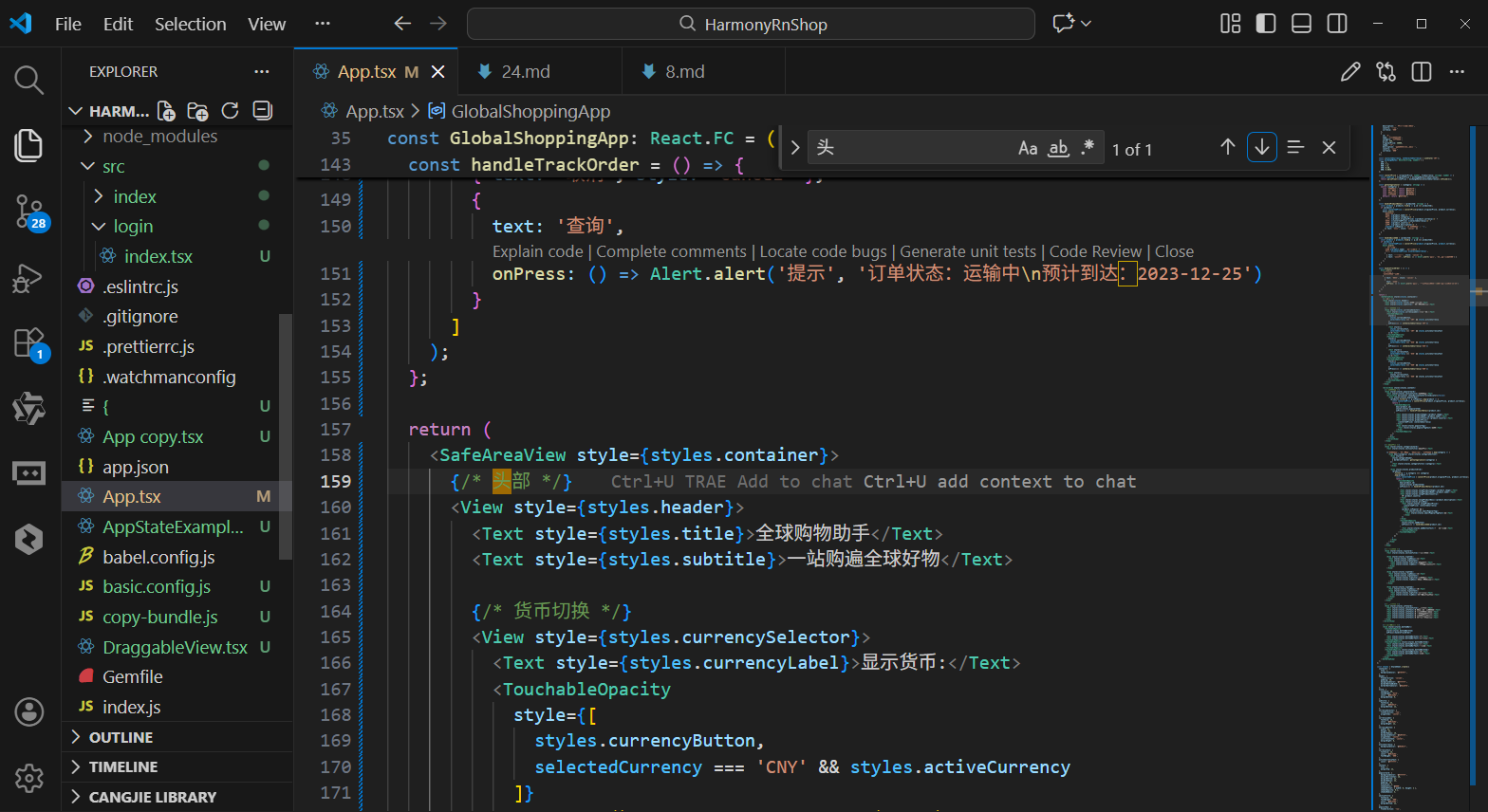
打包
接下来通过打包命令npn run harmony将reactNative的代码打包成为bundle,这样可以进行在开源鸿蒙OpenHarmony中进行使用。

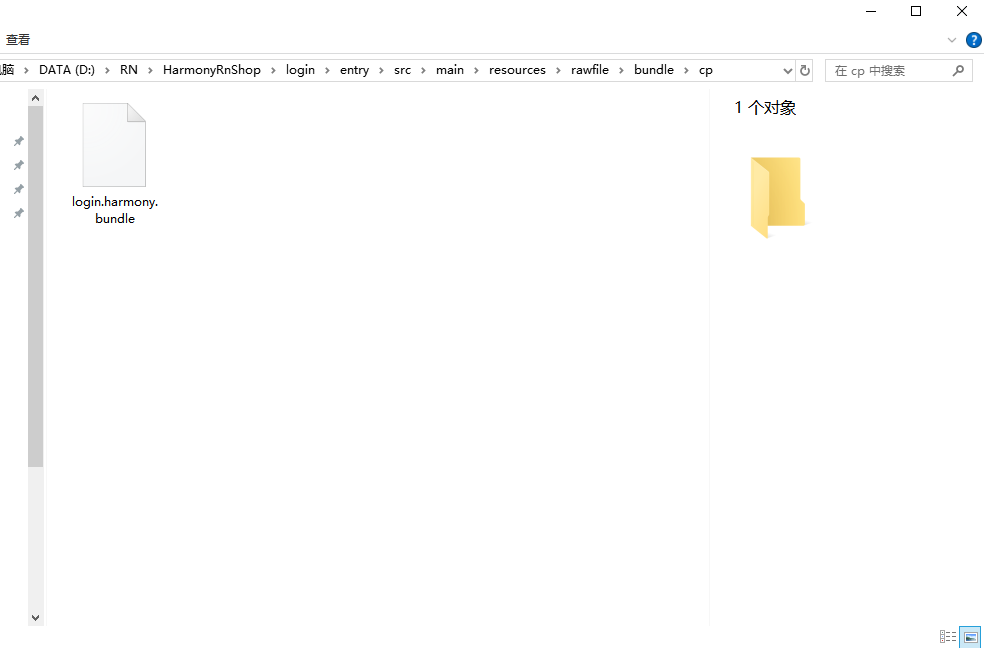
打包之后再将打包后的鸿蒙OpenHarmony文件拷贝到鸿蒙的DevEco-Studio工程目录去:
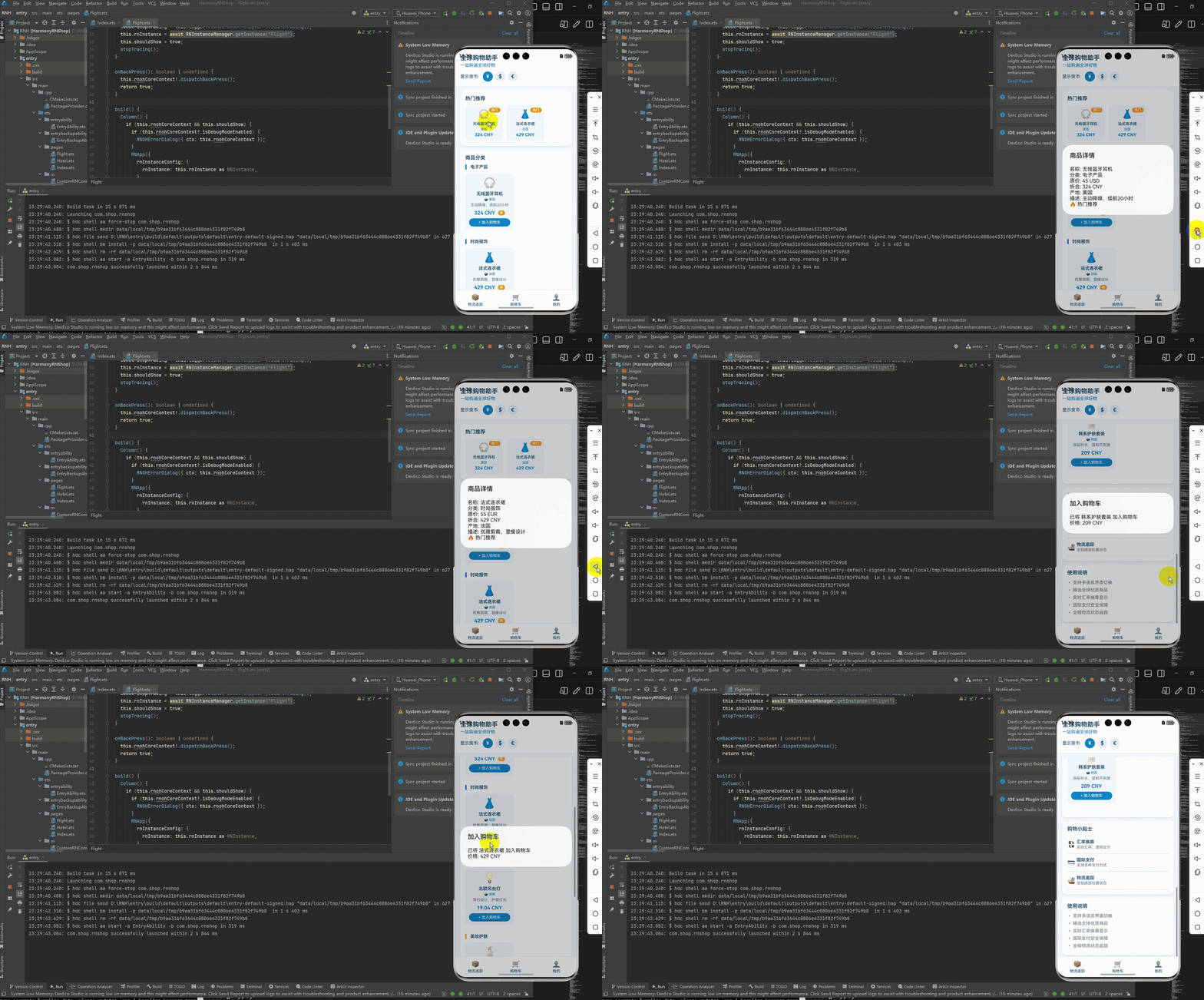
最后运行效果图如下显示:
本文介绍了基于React Native开发跨境电商应用并适配鸿蒙系统的技术实践。通过TypeScript强类型定义商品数据模型,结合React状态管理实现多币种换算功能。UI层采用Flex布局和鸿蒙设计规范,确保跨端体验一致性。文章详细解析了数据模型设计、状态管理、布局适配等核心环节,展示了React Native在鸿蒙系统上的跨境电商应用开发方案,为开发者提供了跨平台技术选型的参考案例。
欢迎大家加入开源鸿蒙跨平台开发者社区,一起共建开源鸿蒙跨平台生态。

作为“人工智能6S店”的官方数字引擎,为AI开发者与企业提供一个覆盖软硬件全栈、一站式门户。
更多推荐



 17
17 0
0- 0


 已为社区贡献36条内容

所有评论(0)