
Flutter for OpenHarmony 实战:crypto 插件保障数据加密与安全签名
本文介绍了如何在 HarmonyOS NEXT 生态中使用 Flutter 的 crypto 插件实现数据加密与安全签名。crypto 作为纯 Dart 实现的跨平台库,具有计算一致性、高性能流处理等优势,支持 MD5、SHA 系列算法及 HMAC 签名。文章详细解析了哈希算法原理,提供了依赖配置指南,并通过基础摘要计算、HMAC 签名等核心代码示例,展示了加盐哈希等安全实践。最后通过完整的&qu
Flutter for OpenHarmony 实战:crypto 插件保障数据加密与安全签名

前言
身处 HarmonyOS NEXT 这样一个极度重视隐私与安全(Security & Privacy)的生态系统中,数据的明文传输是绝对不被允许的。无论是用户密码的哈希处理、敏感报文的摘要计算,还是 API 请求的 HMAC 签名校验,都离不开坚固的密码学支持。
crypto 插件是 Dart 官方维护的纯 Dart 算法库。它不需要任何原生代码介入,即可在鸿蒙端实现 MD5, SHA-1, SHA-256 以及 HMAC 等标准散列算法。
一、 为什么在鸿蒙开发中首选 crypto 库?
1.1 纯 Dart 实现的跨端一致性
由于其不依赖任何原生库,它在所有的鸿蒙 CPU 架构上都能表现出完全一致的计算结果。
1.2 高性能流处理 (Stream Support)
在处理大体积内容时,crypto 支持对数据进行 Chunk(分块)流式哈希计算,能保持极低的内存占用。
二、 技术内幕:哈希算法的底层运作机制
2.1 消息填充与确定性
crypto 库严格遵循了 RFC 6234 标准。在鸿蒙端,通过 crypto 生成的每一段摘要都具有“雪崩效应”:输入的一位微小变化都会导致完全不同的输出。
三、 集成指南
3.1 添加依赖
在 pubspec.yaml 中添加以下代码。注意:若需处理大文件流,必须额外引入 convert 库提供汇聚器支持。
dependencies:
  crypto: ^3.0.7
  convert: ^3.1.2 # 💡 用于 AccumulatorSink 流式汇聚
四、 核心关键技术分解
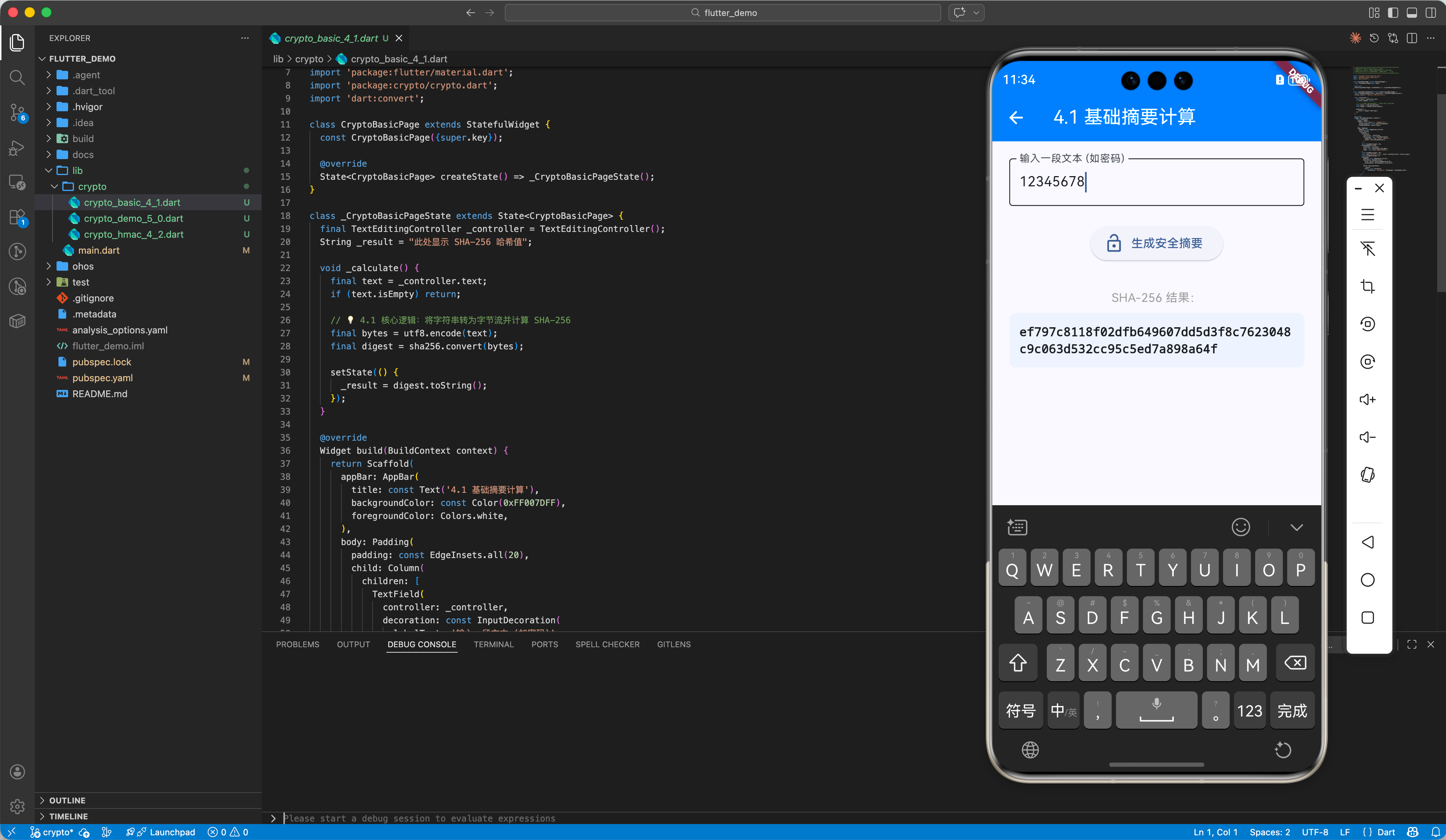
4.1 基础摘要计算 (SHA-256)
这是处理密码脱敏、文件指纹最常用的手段。
📂 示例代码:
lib/crypto/crypto_basic_4_1.dart
import 'package:crypto/crypto.dart';
import 'dart:convert';

// 💡 技巧:将字符串转为 UTF-8 字节流后再计算
final bytes = utf8.encode("my_password");
final digest = sha256.convert(bytes);
print("散列值: $digest");
4.2 进阶场景:HMAC 签名与流式处理
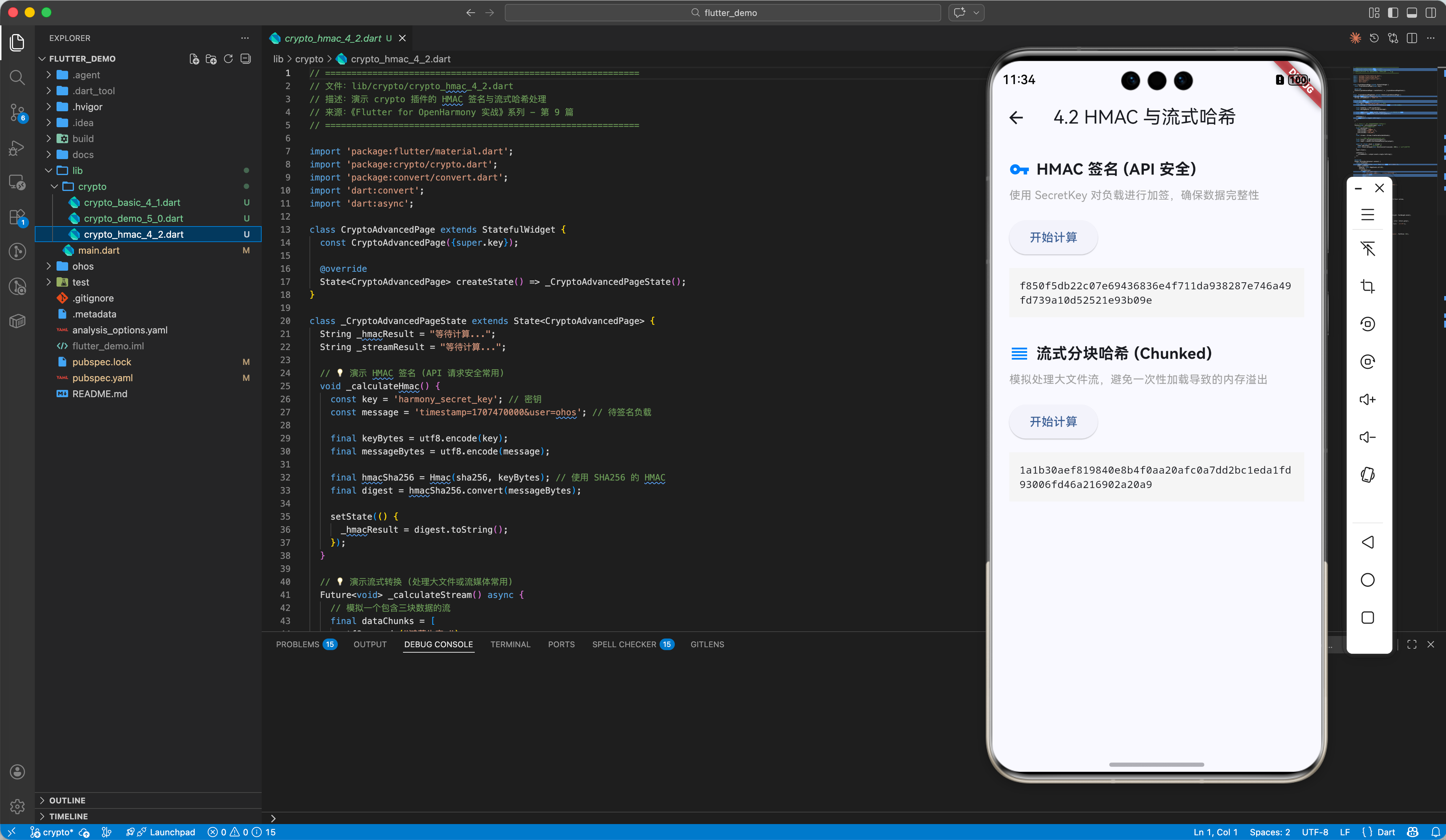
用于 API 请求的安全鉴权以及超大文件的哈希计算。
📂 示例代码:
lib/crypto/crypto_hmac_4_2.dart
import 'package:convert/convert.dart'; // 💡 必须导入,用于处理分块流

// 1. HMAC 签名
final hmacSha256 = Hmac(sha256, utf8.encode("secret_key"));
final signature = hmacSha256.convert(utf8.encode("message_body"));

// 2. 流式分块计算 (💡 配合 convert 库避免内存溢出)
final output = AccumulatorSink<Digest>(); // 来自 convert 库
final input = sha256.startChunkedConversion(output);
await for (final chunk in largeDataStream) {
  input.add(chunk);
}
input.close();
五、 完整示例:鸿蒙加密实验室
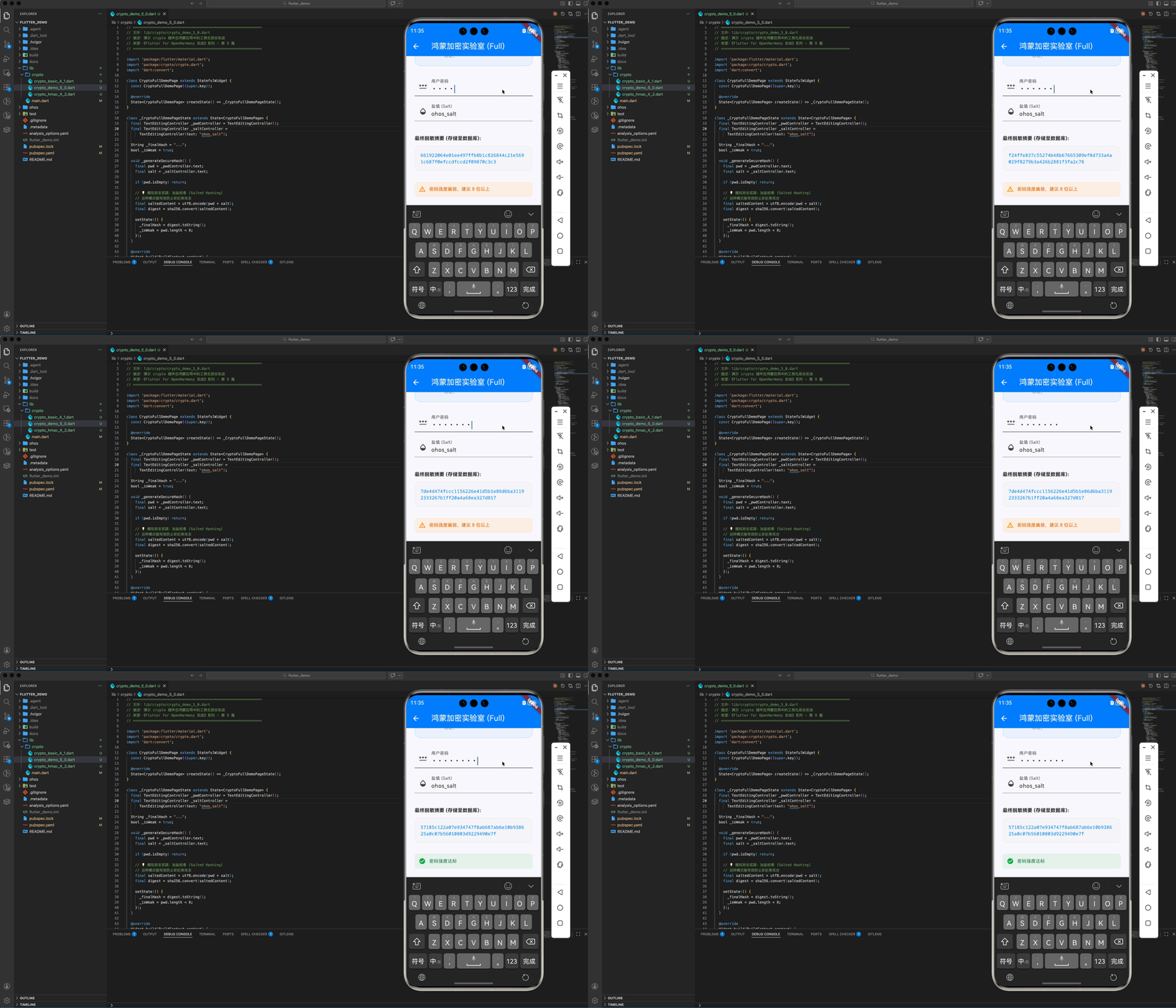
本示例通过模拟“加盐哈希(Salted Hashing)”这一工业级实践,演示如何在 HarmonyOS NEXT 内部构建一套可靠的密码预处理系统。
import 'package:flutter/material.dart';
import 'package:crypto/crypto.dart';
import 'dart:convert';
class CryptoFullDemoPage extends StatefulWidget {
const CryptoFullDemoPage({super.key});
State<CryptoFullDemoPage> createState() => _CryptoFullDemoPageState();
}
class _CryptoFullDemoPageState extends State<CryptoFullDemoPage> {
final TextEditingController _pwdController = TextEditingController();
final TextEditingController _saltController =
TextEditingController(text: "ohos_salt");
String _finalHash = "...";
bool _isWeak = true;
void _generateSecureHash() {
final pwd = _pwdController.text;
final salt = _saltController.text;
if (pwd.isEmpty) return;
// 💡 模拟安全实践:加盐哈希 (Salted Hashing)
// 这种模式能有效防止彩虹表攻击
final saltedContent = utf8.encode(pwd + salt);
final digest = sha256.convert(saltedContent);
setState(() {
_finalHash = digest.toString();
_isWeak = pwd.length < 8;
});
}
Widget build(BuildContext context) {
return Scaffold(
appBar: AppBar(
title: const Text('鸿蒙加密实验室 (Full)'),
backgroundColor: const Color(0xFF007DFF),
foregroundColor: Colors.white,
),
body: SingleChildScrollView(
padding: const EdgeInsets.all(24),
child: Column(
children: [
_buildSecurityHeader(),
const SizedBox(height: 30),
TextField(
controller: _pwdController,
obscureText: true,
decoration: const InputDecoration(
labelText: '用户密码',
hintText: '输入模拟密码进行脱敏处理',
prefixIcon: Icon(Icons.password),
),
onChanged: (_) => _generateSecureHash(),
),
const SizedBox(height: 16),
TextField(
controller: _saltController,
decoration: const InputDecoration(
labelText: '盐值 (Salt)',
prefixIcon: Icon(Icons.opacity),
),
onChanged: (_) => _generateSecureHash(),
),
const SizedBox(height: 40),
_buildResultPanel(),
const SizedBox(height: 30),
_buildWarning(),
],
),
),
);
}
Widget _buildSecurityHeader() {
return Container(
padding: const EdgeInsets.all(20),
decoration: BoxDecoration(
color: const Color(0xFF007DFF).withOpacity(0.05),
borderRadius: BorderRadius.circular(16),
border: Border.all(color: const Color(0xFF007DFF).withOpacity(0.2)),
),
child: const Row(
children: [
Icon(Icons.verified_user, size: 48, color: Color(0xFF007DFF)),
SizedBox(width: 16),
Expanded(
child: Column(
crossAxisAlignment: CrossAxisAlignment.start,
children: [
Text('加盐摘要技术 (Salted SHA-256)',
style:
TextStyle(fontWeight: FontWeight.bold, fontSize: 16)),
SizedBox(height: 4),
Text('在存储用户密码前,务必通过 crypto 进行脱敏。',
style: TextStyle(fontSize: 12, color: Colors.grey)),
],
),
),
],
),
);
}
Widget _buildResultPanel() {
return Column(
crossAxisAlignment: CrossAxisAlignment.start,
children: [
const Text('最终脱敏摘要 (存储至数据库):',
style: TextStyle(fontSize: 14, fontWeight: FontWeight.bold)),
const SizedBox(height: 12),
Container(
width: double.infinity,
padding: const EdgeInsets.all(16),
decoration: BoxDecoration(
color: Colors.black.withOpacity(0.02),
borderRadius: BorderRadius.circular(12),
border: Border.all(color: Colors.grey[200]!),
),
child: SelectableText(
_finalHash,
style: const TextStyle(
fontFamily: 'monospace',
fontSize: 13,
color: Color(0xFF007DFF)),
),
),
],
);
}
Widget _buildWarning() {
return Container(
padding: const EdgeInsets.all(12),
decoration: BoxDecoration(
color: _isWeak
? Colors.orange.withOpacity(0.1)
: Colors.green.withOpacity(0.1),
borderRadius: BorderRadius.circular(8),
),
child: Row(
children: [
Icon(_isWeak ? Icons.warning_amber : Icons.check_circle,
color: _isWeak ? Colors.orange : Colors.green, size: 20),
const SizedBox(width: 10),
Text(_isWeak ? '密码强度偏弱,建议 8 位以上' : '密码强度达标',
style: TextStyle(
color: _isWeak ? Colors.orange[800] : Colors.green[800],
fontSize: 13)),
],
),
);
}
}
六、 适配鸿蒙的安全建议
6.1 强制迁移至安全算法
尽管 MD5 依然被支持,但在鸿蒙高安全环境下,强烈建议所有敏感业务均使用 SHA-256。
6.2 异步计算 (compute)
对于超大资源计算(如全盘资源扫描),务必将哈希逻辑放入 Flutter 的 compute 方法中异步执行,防止阻塞鸿蒙 UI 线程。
七、 总结
数据主权与安全是鸿蒙生态的中流砥柱。通过 crypto 方案,我们不仅在鸿蒙平台上实现了一套符合国际标准的密码学引擎,更通过技术手段守护了用户的数据边界。
🌐 欢迎加入开源鸿蒙跨平台社区:开源鸿蒙跨平台开发者社区

作为“人工智能6S店”的官方数字引擎,为AI开发者与企业提供一个覆盖软硬件全栈、一站式门户。
更多推荐


 28
28 0
0- 0


 已为社区贡献30条内容

所有评论(0)