
Flutter for OpenHarmony 实战::利用 package_info_plus 精准获取鸿蒙应用版本与原生元数据
本文介绍了在Flutter开发中利用package_info_plus插件获取鸿蒙应用元数据的方法。该插件通过统一API自动同步鸿蒙配置文件中定义的版本号、构建号等信息,避免了硬编码的低效问题。文章详细说明了插件集成步骤,包括添加依赖、确认原生配置字段,并提供了异步初始化和UI展示的代码示例。此外还探讨了鸿蒙环境下的进阶应用场景,如自动更新检查和多版本SDK适配,最后给出了完整Demo代码。该方案

Flutter 实战:利用 package_info_plus 精准获取鸿蒙应用版本与原生元数据
前言
在 App 开发中,诸如“检查更新”、“展示应用版本号”或“在关于页面显示内部 Build 号”是极其常见的需求。这些信息被统称为“应用元数据”。
在 OpenHarmony 平台上,这些元数据被定义在项目的 module.json5 和 AppScope/app.json5 中。传统的硬编码(Hardcoding)方案不仅低效且容易出错。今天我们来看一看如何通过 package_info_plus 这个业界最流行的插件,实现对鸿蒙应用信息的自动化提取。
一、 package_info_plus 的核心价值
1.1 自动化同步
你只需在鸿蒙原生配置文件中修改一次版本号,Dart 代码层通过 package_info_plus 即可实时同步获取。
1.2 跨平台抽象
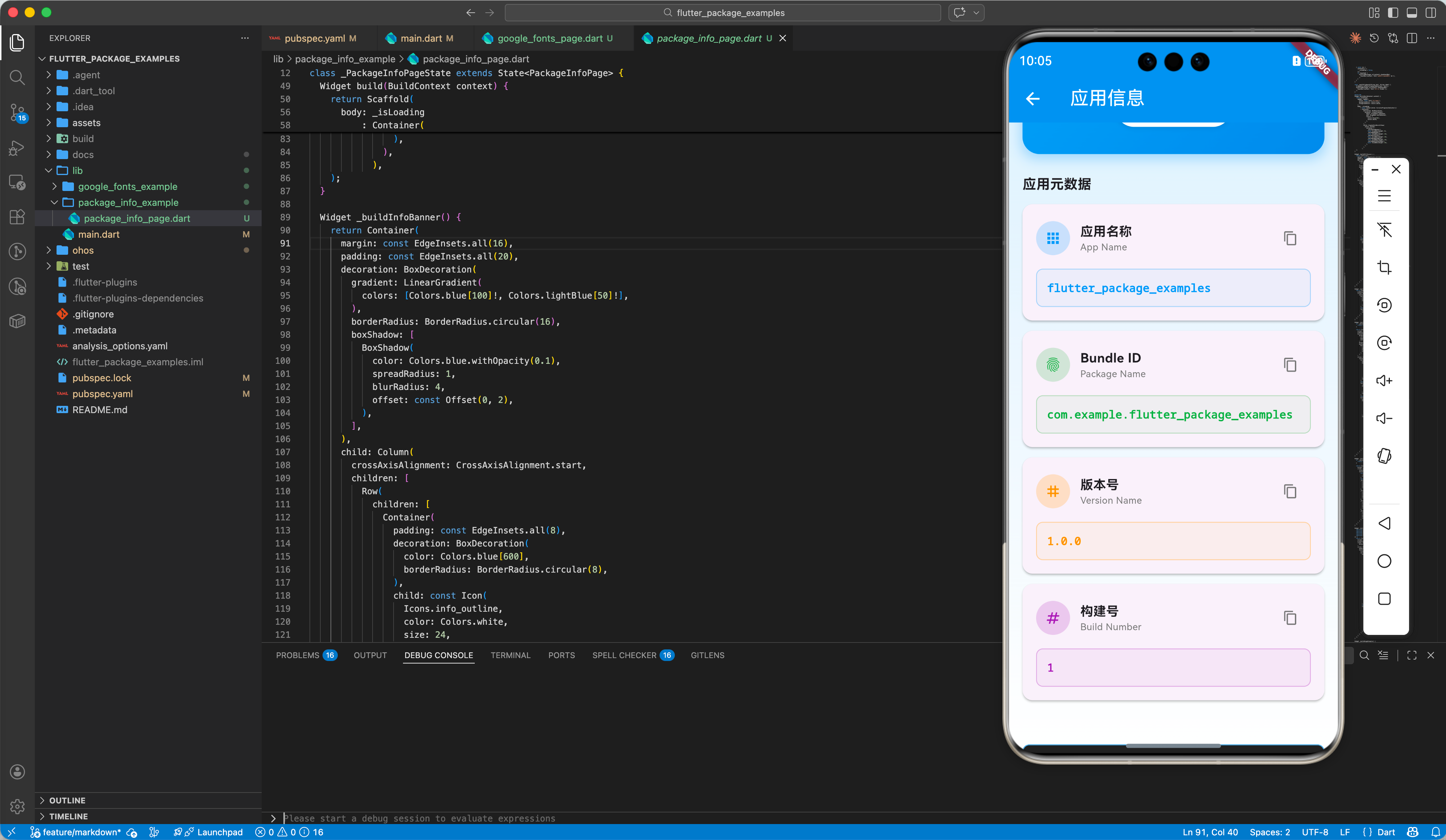
它为 bundleName (在 Android 上是 packageName, 在鸿蒙上是 bundleName)、version (版本名) 和 buildNumber (构建号) 提供了统一的 API,极大地降低了多端分发的复杂度。
二、 集成指南
2.1 添加依赖
在 pubspec.yaml 中增加引用:
dependencies:
  package_info_plus: ^5.0.1
  package_info_plus_ohos: any  # 鸿蒙平台适配包
说明:
package_info_plus: 核心插件,提供跨平台的统一 APIpackage_info_plus_ohos: 鸿蒙平台的原生实现,负责从app.json5和module.json5读取应用元数据
2.2 鸿蒙原生侧确认
package_info_plus 会读取鸿蒙工程中的以下字段:
- App Name: 对应
AppScope/app.json5中的label。 - Package Name: 对应
AppScope/app.json5中的bundleName。 - Version: 对应
AppScope/app.json5中的versionName。 - Build Number: 对应
AppScope/app.json5中的versionCode。
三、 实战代码解析
3.1 异步初始化
由于读取系统信息属于异步操作,我们需要在应用启动之初或特定页面初始化时获取。
import 'package:package_info_plus/package_info_plus.dart';

void _initPackageInfo() async {
  PackageInfo packageInfo = await PackageInfo.fromPlatform();

  String appName = packageInfo.appName;
  String packageName = packageInfo.packageName;
  String version = packageInfo.version;
  String buildNumber = packageInfo.buildNumber;

  print('应用名称: $appName');
  print('鸿蒙 BundleID: $packageName');
  print('版本号: $version');
  print('构建号: $buildNumber');
}
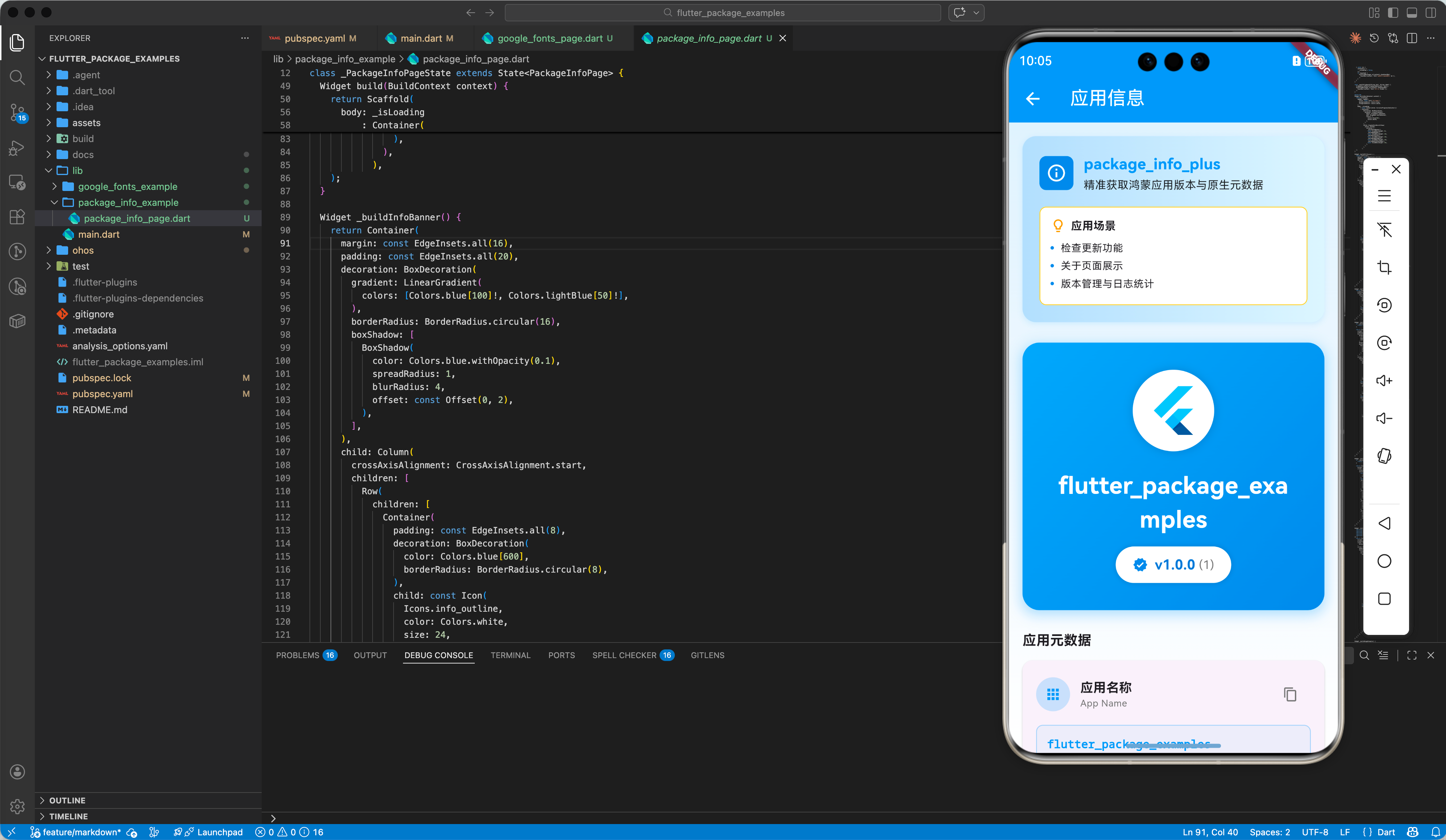
3.2 UI 展示组件
推荐结合 FutureBuilder 使用,避免 UI 阻塞。
Widget buildVersionTile() {
  return FutureBuilder<PackageInfo>(
    future: PackageInfo.fromPlatform(),
    builder: (context, snapshot) {
      if (snapshot.hasData) {
        return ListTile(
          title: const Text('当前版本'),
          subtitle: Text('${snapshot.data!.version}+${snapshot.data!.buildNumber}'),
          trailing: const Icon(Icons.info_outline),
        );
      } else {
        return const SizedBox.shrink();
      }
    },
  );
}
四、 鸿蒙环境下的进阶场景
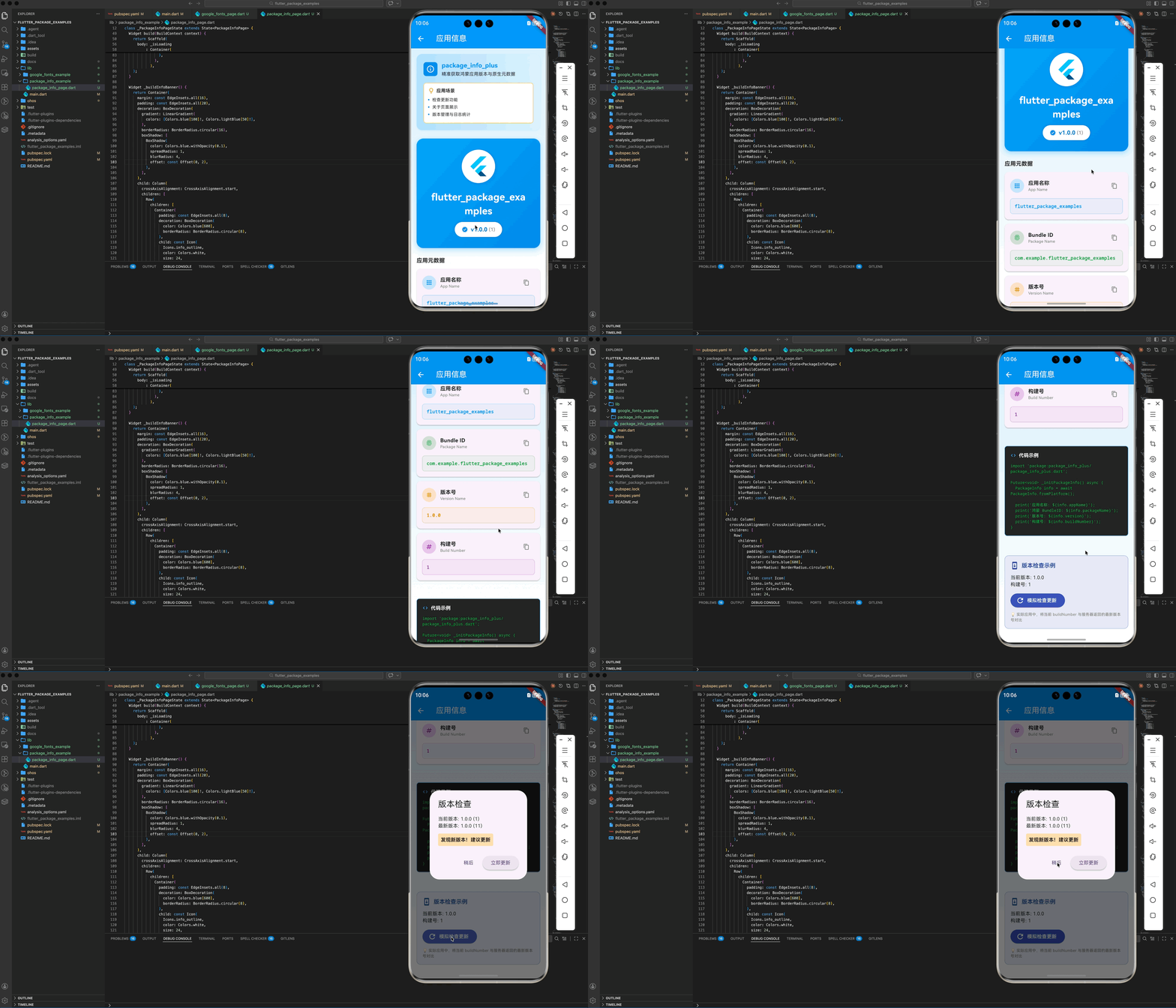
4.1 自动检查更新逻辑
通过 package_info_plus 获取 versionCode (buildNumber),与远程服务器返回的最新的 min_version_code 进行对比,实现强制更新或弹窗提醒。
4.2 适配鸿蒙多版本 SDK
在鸿蒙系统中,API 版本迭代迅速。
- ✅ 建议:在鸿蒙端如果遇到版本号读取为
null,请检查module.json5的权限声明及hvigor构建版本是否对齐。
五、 完整 Demo 示例
import 'package:flutter/material.dart';
import 'package:flutter/services.dart';
import 'package:package_info_plus/package_info_plus.dart';
class PackageInfoPage extends StatefulWidget {
const PackageInfoPage({super.key});
State<PackageInfoPage> createState() => _PackageInfoPageState();
}
class _PackageInfoPageState extends State<PackageInfoPage> {
PackageInfo? _packageInfo;
bool _isLoading = true;
void initState() {
super.initState();
_initPackageInfo();
}
Future<void> _initPackageInfo() async {
try {
final info = await PackageInfo.fromPlatform();
setState(() {
_packageInfo = info;
_isLoading = false;
});
} catch (e) {
setState(() {
_isLoading = false;
});
if (mounted) {
ScaffoldMessenger.of(context).showSnackBar(
SnackBar(content: Text('获取应用信息失败: $e')),
);
}
}
}
void _copyToClipboard(String text, String label) {
Clipboard.setData(ClipboardData(text: text));
ScaffoldMessenger.of(context).showSnackBar(
SnackBar(content: Text('已复制 $label')),
);
}
Widget build(BuildContext context) {
return Scaffold(
appBar: AppBar(
title: const Text('应用信息'),
backgroundColor: Colors.blue,
foregroundColor: Colors.white,
),
body: _isLoading
? const Center(child: CircularProgressIndicator())
: Container(
decoration: BoxDecoration(
gradient: LinearGradient(
begin: Alignment.topCenter,
end: Alignment.bottomCenter,
colors: [
Colors.blue[50]!,
Colors.white,
],
),
),
child: SingleChildScrollView(
child: Column(
children: [
_buildInfoBanner(),
const SizedBox(height: 8),
_buildAppHeader(),
const SizedBox(height: 24),
_buildInfoCards(),
const SizedBox(height: 24),
_buildUsageExample(),
const SizedBox(height: 24),
_buildUpdateCheckDemo(),
const SizedBox(height: 24),
],
),
),
),
);
}
Widget _buildInfoBanner() {
return Container(
margin: const EdgeInsets.all(16),
padding: const EdgeInsets.all(20),
decoration: BoxDecoration(
gradient: LinearGradient(
colors: [Colors.blue[100]!, Colors.lightBlue[50]!],
),
borderRadius: BorderRadius.circular(16),
boxShadow: [
BoxShadow(
color: Colors.blue.withOpacity(0.1),
spreadRadius: 1,
blurRadius: 4,
offset: const Offset(0, 2),
),
],
),
child: Column(
crossAxisAlignment: CrossAxisAlignment.start,
children: [
Row(
children: [
Container(
padding: const EdgeInsets.all(8),
decoration: BoxDecoration(
color: Colors.blue[600],
borderRadius: BorderRadius.circular(8),
),
child: const Icon(
Icons.info_outline,
color: Colors.white,
size: 24,
),
),
const SizedBox(width: 12),
const Expanded(
child: Column(
crossAxisAlignment: CrossAxisAlignment.start,
children: [
Text(
'package_info_plus',
style: TextStyle(
fontWeight: FontWeight.bold,
fontSize: 18,
color: Colors.blue,
),
),
SizedBox(height: 2),
Text(
'精准获取鸿蒙应用版本与原生元数据',
style: TextStyle(fontSize: 13, color: Colors.black87),
),
],
),
),
],
),
const SizedBox(height: 16),
Container(
padding: const EdgeInsets.all(12),
decoration: BoxDecoration(
color: Colors.white,
borderRadius: BorderRadius.circular(8),
border: Border.all(color: Colors.amber[300]!),
),
child: Column(
crossAxisAlignment: CrossAxisAlignment.start,
children: [
Row(
children: [
Icon(Icons.lightbulb_outline,
color: Colors.amber[700], size: 18),
const SizedBox(width: 6),
const Text(
'应用场景',
style:
TextStyle(fontWeight: FontWeight.bold, fontSize: 13),
),
],
),
const SizedBox(height: 8),
_buildScenarioItem('检查更新功能'),
_buildScenarioItem('关于页面展示'),
_buildScenarioItem('版本管理与日志统计'),
],
),
),
],
),
);
}
Widget _buildScenarioItem(String text) {
return Padding(
padding: const EdgeInsets.only(bottom: 4),
child: Row(
children: [
Container(
width: 4,
height: 4,
decoration: BoxDecoration(
color: Colors.blue[600],
shape: BoxShape.circle,
),
),
const SizedBox(width: 8),
Text(
text,
style: const TextStyle(fontSize: 12),
),
],
),
);
}
Widget _buildAppHeader() {
if (_packageInfo == null) {
return const SizedBox.shrink();
}
return Container(
margin: const EdgeInsets.symmetric(horizontal: 16),
padding: const EdgeInsets.all(32),
decoration: BoxDecoration(
gradient: LinearGradient(
colors: [Colors.blue[400]!, Colors.blue[600]!],
begin: Alignment.topLeft,
end: Alignment.bottomRight,
),
borderRadius: BorderRadius.circular(20),
boxShadow: [
BoxShadow(
color: Colors.blue.withOpacity(0.3),
spreadRadius: 2,
blurRadius: 12,
offset: const Offset(0, 4),
),
],
),
child: Column(
children: [
Container(
padding: const EdgeInsets.all(16),
decoration: BoxDecoration(
color: Colors.white,
shape: BoxShape.circle,
boxShadow: [
BoxShadow(
color: Colors.black.withOpacity(0.1),
spreadRadius: 2,
blurRadius: 8,
),
],
),
child: const FlutterLogo(size: 64),
),
const SizedBox(height: 20),
Text(
_packageInfo!.appName,
style: const TextStyle(
fontSize: 28,
fontWeight: FontWeight.bold,
color: Colors.white,
),
textAlign: TextAlign.center,
),
const SizedBox(height: 12),
Container(
padding: const EdgeInsets.symmetric(horizontal: 20, vertical: 10),
decoration: BoxDecoration(
color: Colors.white,
borderRadius: BorderRadius.circular(24),
boxShadow: [
BoxShadow(
color: Colors.black.withOpacity(0.1),
spreadRadius: 1,
blurRadius: 4,
),
],
),
child: Row(
mainAxisSize: MainAxisSize.min,
children: [
Icon(Icons.verified, color: Colors.blue[600], size: 18),
const SizedBox(width: 8),
Text(
'v${_packageInfo!.version}',
style: TextStyle(
fontSize: 16,
fontWeight: FontWeight.bold,
color: Colors.blue[700],
),
),
const SizedBox(width: 4),
Text(
'(${_packageInfo!.buildNumber})',
style: TextStyle(
fontSize: 14,
color: Colors.grey[600],
),
),
],
),
),
],
),
);
}
Widget _buildInfoCards() {
if (_packageInfo == null) {
return const SizedBox.shrink();
}
return Container(
margin: const EdgeInsets.symmetric(horizontal: 16),
child: Column(
crossAxisAlignment: CrossAxisAlignment.start,
children: [
const Text(
'应用元数据',
style: TextStyle(fontWeight: FontWeight.bold, fontSize: 16),
),
const SizedBox(height: 12),
_buildInfoCard(
icon: Icons.apps,
title: '应用名称',
subtitle: 'App Name',
value: _packageInfo!.appName,
color: Colors.blue,
),
_buildInfoCard(
icon: Icons.fingerprint,
title: 'Bundle ID',
subtitle: 'Package Name',
value: _packageInfo!.packageName,
color: Colors.green,
),
_buildInfoCard(
icon: Icons.tag,
title: '版本号',
subtitle: 'Version Name',
value: _packageInfo!.version,
color: Colors.orange,
),
_buildInfoCard(
icon: Icons.numbers,
title: '构建号',
subtitle: 'Build Number',
value: _packageInfo!.buildNumber,
color: Colors.purple,
),
],
),
);
}
Widget _buildInfoCard({
required IconData icon,
required String title,
required String subtitle,
required String value,
required Color color,
}) {
return Card(
margin: const EdgeInsets.only(bottom: 12),
elevation: 2,
shape: RoundedRectangleBorder(
borderRadius: BorderRadius.circular(12),
),
child: Padding(
padding: const EdgeInsets.all(16),
child: Column(
crossAxisAlignment: CrossAxisAlignment.start,
children: [
Row(
children: [
CircleAvatar(
backgroundColor: color.withOpacity(0.2),
child: Icon(icon, color: color, size: 20),
),
const SizedBox(width: 12),
Expanded(
child: Column(
crossAxisAlignment: CrossAxisAlignment.start,
children: [
Text(
title,
style: const TextStyle(
fontWeight: FontWeight.bold,
fontSize: 15,
),
),
Text(
subtitle,
style: TextStyle(
fontSize: 11,
color: Colors.grey[600],
),
),
],
),
),
IconButton(
icon: Icon(Icons.copy, size: 18, color: Colors.grey[600]),
onPressed: () => _copyToClipboard(value, title),
tooltip: '复制',
),
],
),
const SizedBox(height: 12),
Container(
width: double.infinity,
padding: const EdgeInsets.all(12),
decoration: BoxDecoration(
color: color.withOpacity(0.05),
borderRadius: BorderRadius.circular(8),
border: Border.all(color: color.withOpacity(0.3)),
),
child: SelectableText(
value,
style: TextStyle(
fontWeight: FontWeight.w600,
color: color,
fontFamily: 'monospace',
fontSize: 13,
),
),
),
],
),
),
);
}
Widget _buildUsageExample() {
return Container(
margin: const EdgeInsets.all(16),
padding: const EdgeInsets.all(16),
decoration: BoxDecoration(
color: Colors.grey[900],
borderRadius: BorderRadius.circular(8),
border: Border.all(color: Colors.blue[300]!),
),
child: Column(
crossAxisAlignment: CrossAxisAlignment.start,
children: [
Row(
children: [
Icon(Icons.code, color: Colors.blue[300], size: 16),
const SizedBox(width: 8),
const Text(
'代码示例',
style: TextStyle(
color: Colors.white,
fontWeight: FontWeight.bold,
fontSize: 14,
),
),
],
),
const SizedBox(height: 12),
const SelectableText(
'''import 'package:package_info_plus/package_info_plus.dart';
Future<void> _initPackageInfo() async {
PackageInfo info = await PackageInfo.fromPlatform();
print('应用名称: \${info.appName}');
print('鸿蒙 BundleID: \${info.packageName}');
print('版本号: \${info.version}');
print('构建号: \${info.buildNumber}');
}''',
style: TextStyle(
fontSize: 11,
fontFamily: 'monospace',
color: Colors.green,
),
),
],
),
);
}
Widget _buildUpdateCheckDemo() {
if (_packageInfo == null) {
return const SizedBox.shrink();
}
return Container(
margin: const EdgeInsets.all(16),
padding: const EdgeInsets.all(16),
decoration: BoxDecoration(
color: Colors.indigo[50],
borderRadius: BorderRadius.circular(12),
border: Border.all(color: Colors.indigo[200]!),
),
child: Column(
crossAxisAlignment: CrossAxisAlignment.start,
children: [
Row(
children: [
Icon(Icons.system_update, color: Colors.indigo[700]),
const SizedBox(width: 8),
Text(
'版本检查示例',
style: TextStyle(
fontWeight: FontWeight.bold,
fontSize: 16,
color: Colors.indigo[700],
),
),
],
),
const SizedBox(height: 12),
Text(
'当前版本: ${_packageInfo!.version}',
style: const TextStyle(fontSize: 14),
),
Text(
'构建号: ${_packageInfo!.buildNumber}',
style: const TextStyle(fontSize: 14),
),
const SizedBox(height: 12),
ElevatedButton.icon(
onPressed: () {
_simulateUpdateCheck();
},
icon: const Icon(Icons.refresh),
label: const Text('模拟检查更新'),
style: ElevatedButton.styleFrom(
backgroundColor: Colors.indigo,
foregroundColor: Colors.white,
),
),
const SizedBox(height: 8),
Text(
'💡 实际应用中,将当前 buildNumber 与服务器返回的最新版本号对比',
style: TextStyle(fontSize: 11, color: Colors.grey[600]),
),
],
),
);
}
void _simulateUpdateCheck() {
final currentBuild = int.tryParse(_packageInfo!.buildNumber) ?? 0;
final latestBuild = currentBuild + 10; // 模拟服务器返回的最新版本
showDialog(
context: context,
builder: (context) => AlertDialog(
title: const Text('版本检查'),
content: Column(
mainAxisSize: MainAxisSize.min,
crossAxisAlignment: CrossAxisAlignment.start,
children: [
Text('当前版本: ${_packageInfo!.version} ($currentBuild)'),
Text('最新版本: ${_packageInfo!.version} ($latestBuild)'),
const SizedBox(height: 12),
Container(
padding: const EdgeInsets.all(8),
decoration: BoxDecoration(
color: Colors.orange[100],
borderRadius: BorderRadius.circular(4),
),
child: const Text(
'发现新版本!建议更新',
style: TextStyle(fontWeight: FontWeight.bold),
),
),
],
),
actions: [
TextButton(
onPressed: () => Navigator.pop(context),
child: const Text('稍后'),
),
ElevatedButton(
onPressed: () {
Navigator.pop(context);
ScaffoldMessenger.of(context).showSnackBar(
const SnackBar(content: Text('跳转到应用商店...')),
);
},
child: const Text('立即更新'),
),
],
),
);
}
}
六、 总结
package_info_plus 插件让鸿蒙 Flutter 开发者能够:
- 统一元数据获取路径,代码多端通用。
- 为应用升级、日志统计等核心业务提供精准的版本依据。
- 完全兼容鸿蒙的安全访问规范,无侵入性。
🌐 欢迎加入开源鸿蒙跨平台社区:开源鸿蒙跨平台开发者社区

作为“人工智能6S店”的官方数字引擎,为AI开发者与企业提供一个覆盖软硬件全栈、一站式门户。
更多推荐

 0
0 0
0- 0


 已为社区贡献2条内容

所有评论(0)