
Flutter for OpenHarmony 实战: google_fonts 动态字体加载与分发实战
摘要: 本文介绍如何在OpenHarmony系统上使用Flutter的google_fonts插件实现动态字体加载与分发。该插件提供上千种Google字体,无需手动配置字体文件,通过简单API即可调用。文章详细讲解集成步骤,包括添加依赖、网络权限声明等,并演示基础调用和动态主题设置。针对鸿蒙系统的优化,提出离线模式预加载配置、字体平滑度优化及兼容性处理方案。最后通过完整示例展示多种字体的混合排版效
Flutter for OpenHarmony 实战: google_fonts 动态字体加载与分发实战
前言
优秀的排版设计是提升 App 高级感的核心要素。在 Flutter 生态中,google_fonts 允许我们无需手动配置字体文件,即可通过简单的 API 直接使用上千种 Google 字体。
在 HarmonyOS NEXT 全新设计的“鸿蒙黑体”基础上,如何再融入丰富的个性化排版方案?本篇将手把手带你在鸿蒙系统下玩转 google_fonts,解决字体动态下载、离线预置及渲染性能等核心问题。
一、 Google Fonts 的核心优势
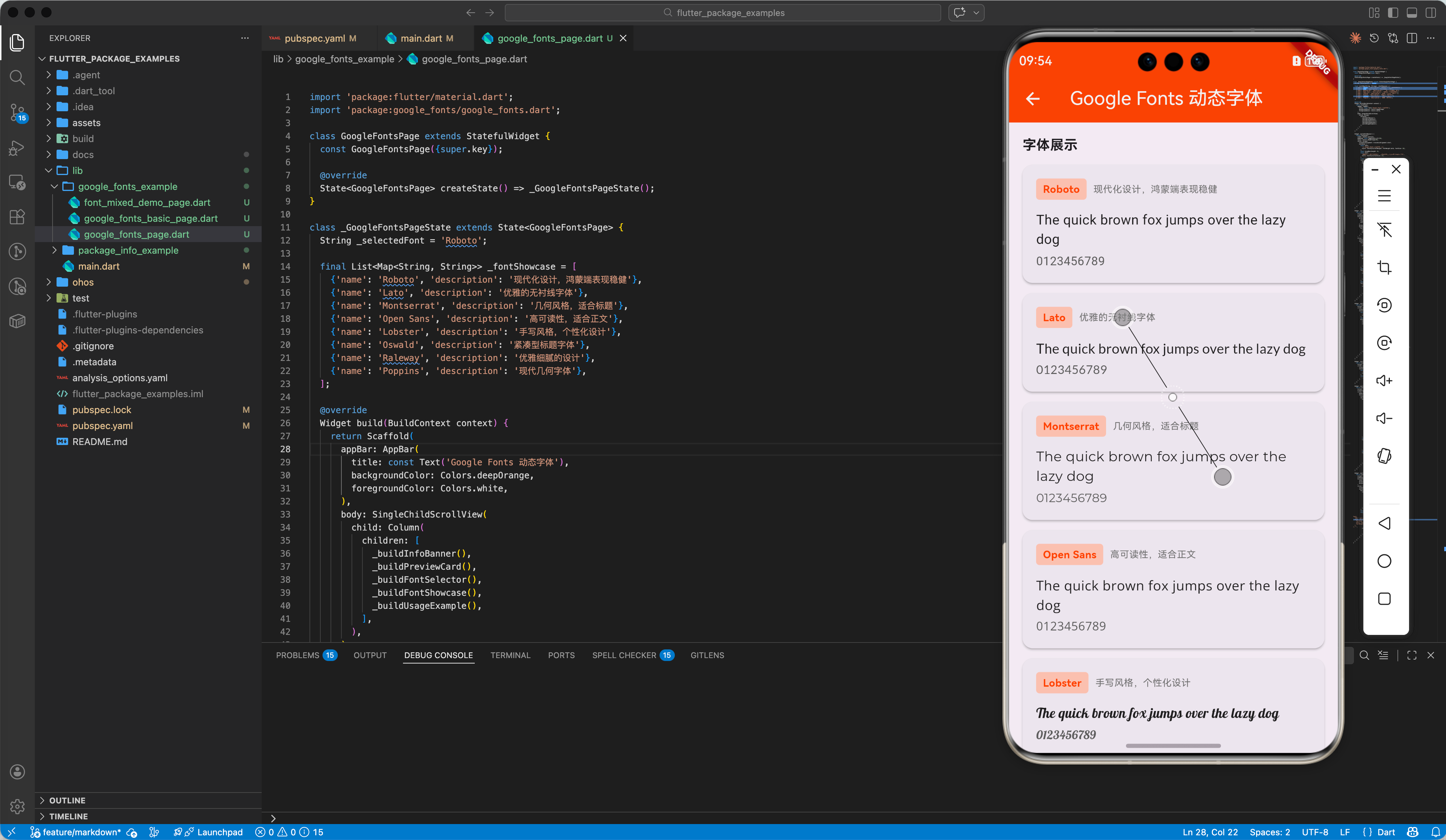
1.1 零门槛字体方案
无需下载 .ttf 或 .otf 并修改 pubspec.yaml,通过一行代码即可调用 Lato, Montserrat, Roboto 等全球知名设计师作品。
1.2 动态加载机制
字体文件在运行时从 Google 的 HTTP 终端下载。
二、 集成步骤
2.1 添加依赖
在 pubspec.yaml 中增加引用:
dependencies:
  flutter:
    sdk: flutter
  google_fonts: ^6.2.1 # 请确保适配 Flutter for OpenHarmony 的版本
2.2 网络权限声明 (重要!)
由于 google_fonts 需要动态下载字体,对于鸿蒙应用,我们需要在 ohos/entry/src/main/module.json5 中确保开启了互联网访问权限:
{
  "module": {
    "requestPermissions": [
      {
        "name": "ohos.permission.INTERNET"
      }
    ]
  }
}
三、 核心用法实战
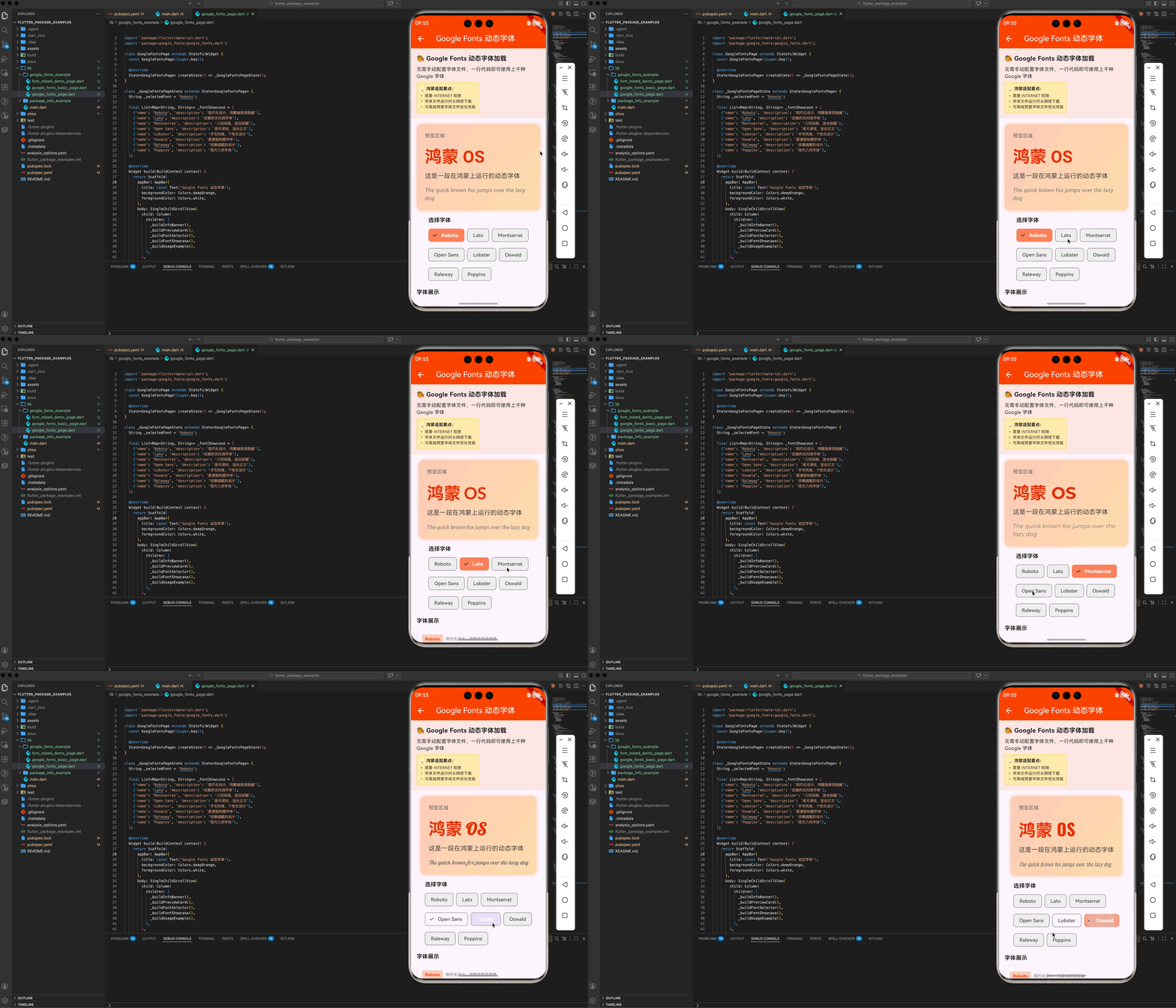
3.1 基础调用
我们可以直接通过字体库名字对应的静态方法来生成 TextStyle。
import 'package:google_fonts/google_fonts.dart';

Text(
  '这是一段在鸿蒙上运行的动态字体',
  style: GoogleFonts.lato(
    textStyle: TextStyle(
      fontSize: 24,
      color: Colors.white,
      fontWeight: FontWeight.w700,
    ),
  ),
),
3.2 动态主题设置
你可以直接将 Google Fonts 设为整个应用的默认字体。
MaterialApp(
  theme: ThemeData(
    textTheme: GoogleFonts.notoSansTextTheme(
      Theme.of(context).textTheme, // 💡 配合鸿蒙原生文本主题,保持字号与规范对齐
    ),
  ),
  home: const MyHome(),
)
四、 离线模式:针对鸿蒙包体积优化
动态下载虽然方便,但在某些对稳定性要求极高(或网络受限)的场景下,我们可能需要“离线使用”。
4.1 预加载配置
- 下载字体的
.ttf文件。 - 放入
assets/google_fonts/。 - 在
pubspec.yaml中配置:
flutter:
  fonts:
    - family: Lato
      fonts:
        - asset: assets/google_fonts/Lato-Regular.ttf
此时 google_fonts 库会自动检测本地 Assets。如果存在该字体,将不再触发网络请求,这是包体积优化实战中是一项关键技巧。
五、 鸿蒙环境下的进阶配置
5.1 字体平滑度优化
在高刷率(120Hz)的鸿蒙屏幕上,字体的微小模糊都可能被放大。
- ✅ 建议:开启
antiAlias属性确保边缘圆润。
5.2 兼容性处理
如果指定的 Google 字体因特殊字符集不支持,它会自动回退到鸿蒙系统的 HarmonyOS Sans。这保证了即使用户在断网状态下,应用也不会出现乱码或空白。
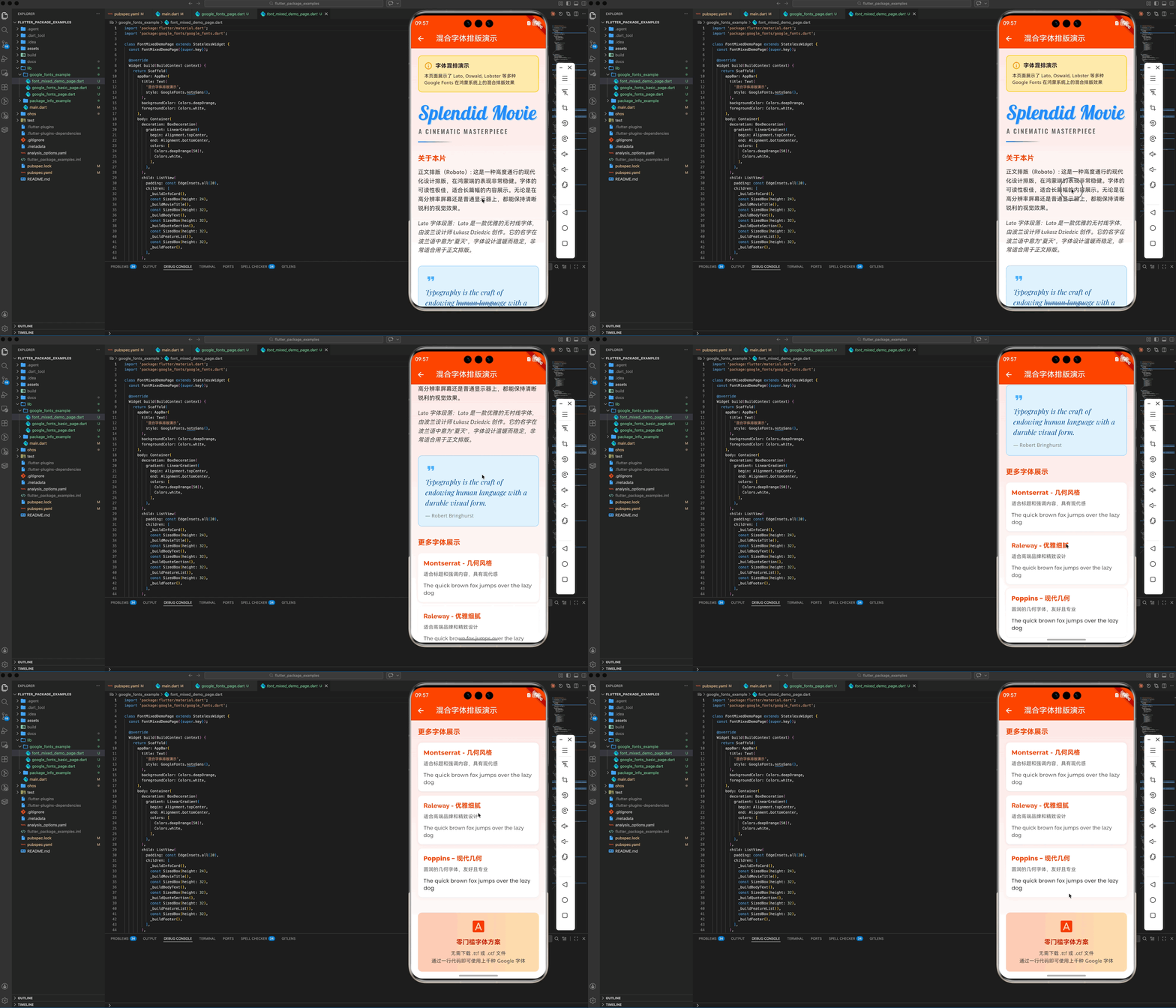
六、 完整示例分析:混合字体动效
import 'package:flutter/material.dart';
import 'package:google_fonts/google_fonts.dart';
class FontMixedDemoPage extends StatelessWidget {
const FontMixedDemoPage({super.key});
Widget build(BuildContext context) {
return Scaffold(
appBar: AppBar(
title: Text(
'混合字体排版演示',
style: GoogleFonts.notoSans(),
),
backgroundColor: Colors.deepOrange,
foregroundColor: Colors.white,
),
body: Container(
decoration: BoxDecoration(
gradient: LinearGradient(
begin: Alignment.topCenter,
end: Alignment.bottomCenter,
colors: [
Colors.deepOrange[50]!,
Colors.white,
],
),
),
child: ListView(
padding: const EdgeInsets.all(20),
children: [
_buildInfoCard(),
const SizedBox(height: 24),
_buildMovieTitle(),
const SizedBox(height: 32),
_buildBodyText(),
const SizedBox(height: 32),
_buildQuoteSection(),
const SizedBox(height: 32),
_buildFeatureList(),
const SizedBox(height: 32),
_buildFooter(),
],
),
),
);
}
Widget _buildInfoCard() {
return Container(
padding: const EdgeInsets.all(16),
decoration: BoxDecoration(
color: Colors.amber[100],
borderRadius: BorderRadius.circular(12),
border: Border.all(color: Colors.amber[300]!, width: 2),
),
child: Column(
crossAxisAlignment: CrossAxisAlignment.start,
children: [
Row(
children: [
const Icon(Icons.info_outline, color: Colors.orange),
const SizedBox(width: 8),
Text(
'字体混排演示',
style: GoogleFonts.notoSans(
fontWeight: FontWeight.bold,
fontSize: 16,
),
),
],
),
const SizedBox(height: 8),
Text(
'本页面展示了 Lato, Oswald, Lobster 等多种 Google Fonts 在鸿蒙系统上的混合排版效果',
style: GoogleFonts.notoSans(fontSize: 13),
),
],
),
);
}
Widget _buildMovieTitle() {
return Column(
crossAxisAlignment: CrossAxisAlignment.start,
children: [
// 使用 Lobster 字体的艺术标题
Text(
'Splendid Movie',
style: GoogleFonts.lobster(
fontSize: 56,
color: Colors.blueAccent,
height: 1.2,
shadows: [
Shadow(
color: Colors.blue.withOpacity(0.3),
offset: const Offset(2, 2),
blurRadius: 4,
),
],
),
),
const SizedBox(height: 8),
// 使用 Oswald 字体的副标题
Text(
'A CINEMATIC MASTERPIECE',
style: GoogleFonts.oswald(
fontSize: 18,
letterSpacing: 3,
color: Colors.grey[700],
fontWeight: FontWeight.w500,
),
),
const SizedBox(height: 16),
Container(
height: 3,
width: 100,
decoration: BoxDecoration(
gradient: LinearGradient(
colors: [Colors.blueAccent, Colors.transparent],
),
),
),
],
);
}
Widget _buildBodyText() {
return Column(
crossAxisAlignment: CrossAxisAlignment.start,
children: [
Text(
'关于本片',
style: GoogleFonts.montserrat(
fontSize: 20,
fontWeight: FontWeight.bold,
color: Colors.deepOrange,
),
),
const SizedBox(height: 12),
// 使用 Roboto 字体的正文
Text(
'正文排版(Roboto): 这是一种高度通行的现代化设计排版,在鸿蒙端的表现非常稳健。字体的可读性极佳,适合长篇幅的内容展示。无论是在高分辨率屏幕还是普通显示器上,都能保持清晰锐利的视觉效果。',
style: GoogleFonts.roboto(
fontSize: 16,
height: 1.6,
fontWeight: FontWeight.w400,
color: Colors.black87,
),
),
const SizedBox(height: 16),
// 使用 Lato 字体的段落
Text(
'Lato 字体段落:Lato 是一款优雅的无衬线字体,由波兰设计师 Łukasz Dziedzic 创作。它的名字在波兰语中意为"夏天",字体设计温暖而稳定,非常适合用于正文排版。',
style: GoogleFonts.lato(
fontSize: 16,
height: 1.6,
fontWeight: FontWeight.w400,
fontStyle: FontStyle.italic,
color: Colors.grey[800],
),
),
],
);
}
Widget _buildQuoteSection() {
return Container(
padding: const EdgeInsets.all(20),
decoration: BoxDecoration(
color: Colors.blue[50],
borderRadius: BorderRadius.circular(12),
border: Border.all(color: Colors.blue[200]!, width: 1),
),
child: Column(
crossAxisAlignment: CrossAxisAlignment.start,
children: [
Icon(Icons.format_quote, color: Colors.blue[300], size: 32),
const SizedBox(height: 8),
Text(
'Typography is the craft of endowing human language with a durable visual form.',
style: GoogleFonts.playfairDisplay(
fontSize: 20,
fontStyle: FontStyle.italic,
color: Colors.blue[900],
height: 1.5,
),
),
const SizedBox(height: 12),
Text(
'— Robert Bringhurst',
style: GoogleFonts.openSans(
fontSize: 14,
color: Colors.grey[600],
),
),
],
),
);
}
Widget _buildFeatureList() {
final features = [
{
'font': 'Montserrat',
'title': 'Montserrat - 几何风格',
'desc': '适合标题和强调内容,具有现代感'
},
{'font': 'Raleway', 'title': 'Raleway - 优雅细腻', 'desc': '适合高端品牌和精致设计'},
{'font': 'Poppins', 'title': 'Poppins - 现代几何', 'desc': '圆润的几何字体,友好且专业'},
];
return Column(
crossAxisAlignment: CrossAxisAlignment.start,
children: [
Text(
'更多字体展示',
style: GoogleFonts.montserrat(
fontSize: 20,
fontWeight: FontWeight.bold,
color: Colors.deepOrange,
),
),
const SizedBox(height: 16),
...features.map((feature) => _buildFeatureCard(
fontName: feature['font']!,
title: feature['title']!,
description: feature['desc']!,
)),
],
);
}
Widget _buildFeatureCard({
required String fontName,
required String title,
required String description,
}) {
return Container(
margin: const EdgeInsets.only(bottom: 12),
padding: const EdgeInsets.all(16),
decoration: BoxDecoration(
color: Colors.white,
borderRadius: BorderRadius.circular(12),
boxShadow: [
BoxShadow(
color: Colors.grey.withOpacity(0.1),
spreadRadius: 1,
blurRadius: 4,
offset: const Offset(0, 2),
),
],
),
child: Column(
crossAxisAlignment: CrossAxisAlignment.start,
children: [
Text(
title,
style: GoogleFonts.getFont(
fontName,
fontSize: 18,
fontWeight: FontWeight.bold,
color: Colors.deepOrange,
),
),
const SizedBox(height: 8),
Text(
description,
style: GoogleFonts.notoSans(
fontSize: 14,
color: Colors.grey[700],
),
),
const SizedBox(height: 12),
Text(
'The quick brown fox jumps over the lazy dog',
style: GoogleFonts.getFont(
fontName,
fontSize: 15,
color: Colors.black87,
),
),
],
),
);
}
Widget _buildFooter() {
return Container(
padding: const EdgeInsets.all(20),
decoration: BoxDecoration(
gradient: LinearGradient(
colors: [Colors.deepOrange[100]!, Colors.orange[100]!],
),
borderRadius: BorderRadius.circular(12),
),
child: Column(
children: [
Icon(Icons.font_download, size: 40, color: Colors.deepOrange[700]),
const SizedBox(height: 12),
Text(
'零门槛字体方案',
style: GoogleFonts.montserrat(
fontSize: 18,
fontWeight: FontWeight.bold,
color: Colors.deepOrange[900],
),
),
const SizedBox(height: 8),
Text(
'无需下载 .ttf 或 .otf 文件\n通过一行代码即可使用上千种 Google 字体',
textAlign: TextAlign.center,
style: GoogleFonts.notoSans(
fontSize: 14,
color: Colors.grey[800],
height: 1.5,
),
),
],
),
);
}
}
七、 总结
google_fonts 在 Flutter for OpenHarmony 中的落地非常顺畅:
- 极大地丰富了 UI 设计语言。
- 通过网络权限和 Assets 备份,解决了多场景可用性问题。
- 性能表现优异,对复杂拉丁字符的排版算法在鸿蒙底层渲染下响应极快。
🌐 欢迎加入开源鸿蒙跨平台社区:开源鸿蒙跨平台开发者社区

作为“人工智能6S店”的官方数字引擎,为AI开发者与企业提供一个覆盖软硬件全栈、一站式门户。
更多推荐
 0
0 0
0- 0


 已为社区贡献2条内容

所有评论(0)