
Flutter for OpenHarmony:flutter_map 瓦片地图实战与地图方案适配指南
markers: [Marker(width: 80,),],在鸿蒙开发初期,选用100% 纯 Dart 实现的插件可以大幅规避原生适配的坑。对于大多数展示型地图场景,配合 OpenStreetMap 是最稳妥的方案。而对于对性能和导航有极高要求的应用,集成HMS Map是必经之路。📦完整代码已上传至 AtomGit🌐欢迎加入开源鸿蒙跨平台社区开源鸿蒙跨平台开发者社区。

Flutter for OpenHarmony:flutter_map 瓦片地图实战与地图方案适配指南
前言
在鸿蒙生态(OpenHarmony Next)中,传统的基于原生 SDK 封装的地图插件往往面临适配周期长、底层依赖复杂等挑战。
flutter_map 是一个基于 Leaflet 方案的纯 Dart 地图插件。由于它不依赖任何原生(Android/iOS)地图 SDK,而是直接操作 Canvas 进行瓦片渲染,这使得它在 OpenHarmony 平台上具有 “天然兼容、性能稳定、零配置” 的巨大优势。
本文你将学到:
flutter_map的集成与核心属性配置- 如何在鸿蒙设备上加载 OpenStreetMap 与自定义瓦片源
- 地图覆盖物(Markers、Polylines)的添加
- OpenHarmony 下主流地图方案(HMS vs 国内三方)的兼容性分析
一、为什么 flutter_map 是鸿蒙开发的首选?
1.1 核心优势对比
| 特性 | google_maps_flutter | huawei_map | flutter_map |
|---|---|---|---|
| 底层实现 | 原生 Google SDK | 原生 HMS SDK | 100% 纯 Dart |
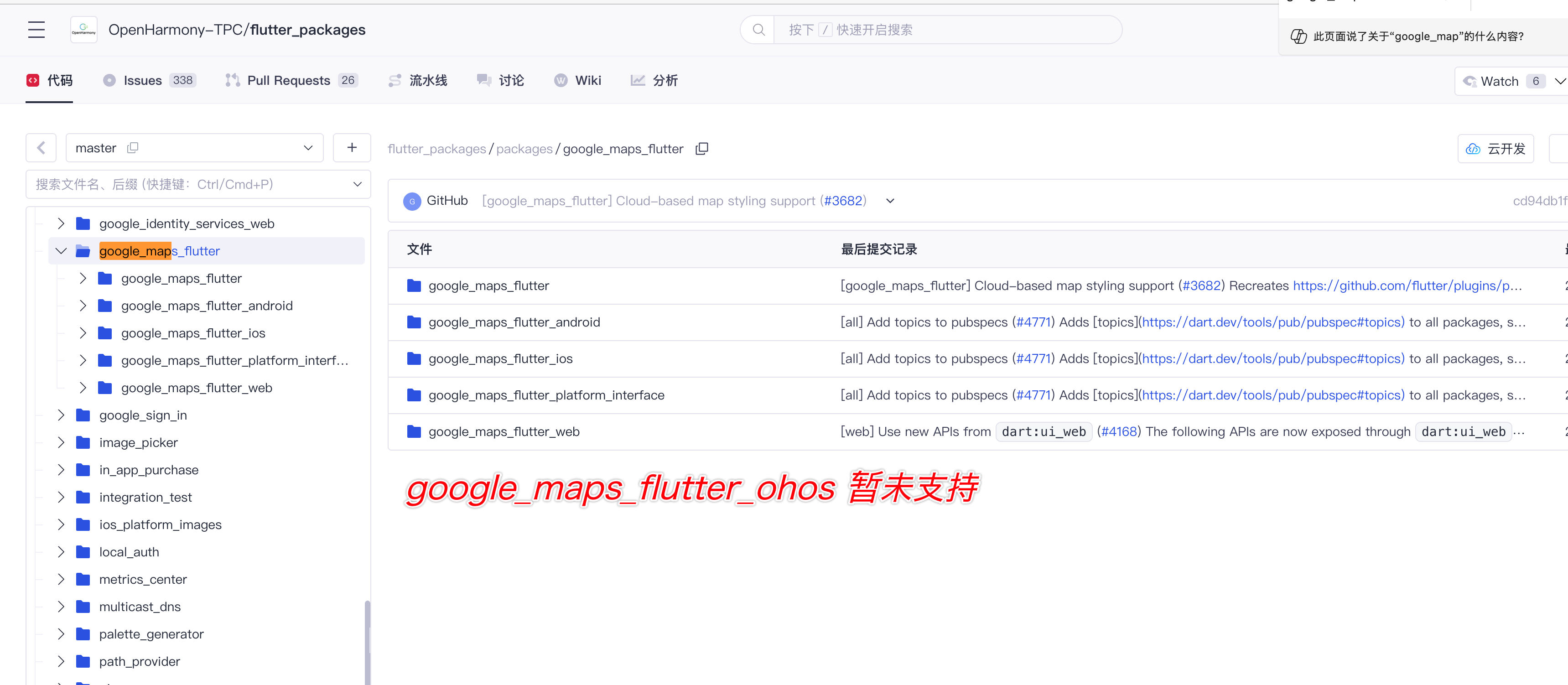
| 鸿蒙兼容性 | ❌ 暂时未兼容 | ✅ 需原生适配 | ✅ 直接运行 |
| 依赖 GMS | 必须 | 不需要 | 不需要 |
| 扩展性 | 受限 | 较强 | 极强 (支持任何瓦片源) |
1.2 兼容包引用规范
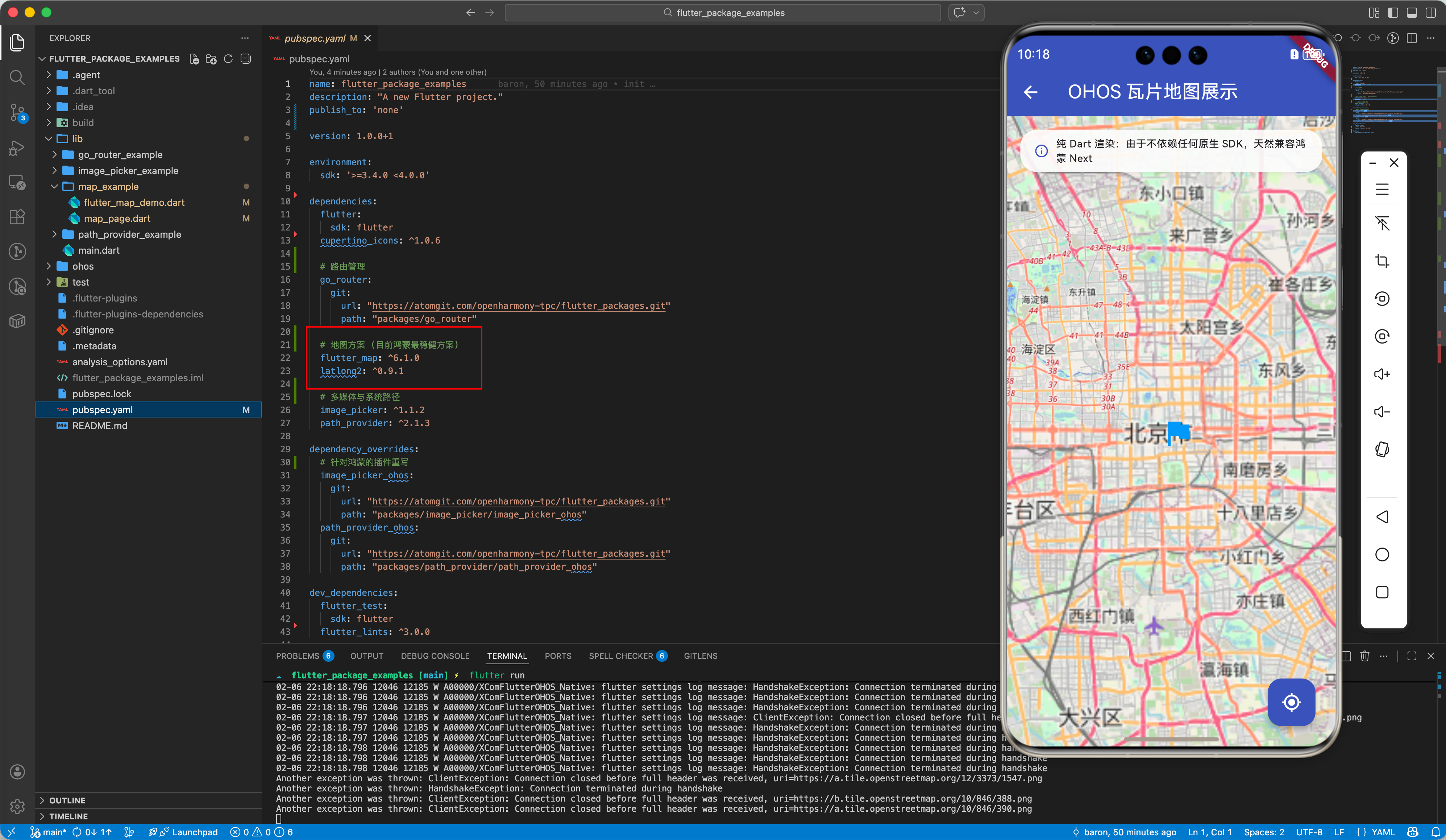
虽然 flutter_map 本身是纯 Dart,但为了确保在 OpenHarmony 项目中所有依赖(如 latlong2 等工具库)的一致性,推荐检查 TPC 兼容包:
dependencies:
  flutter_map: ^6.1.0
  latlong2: ^0.9.1 # 地图坐标处理
二、flutter_map 核心实战
2.1 基础地图展示
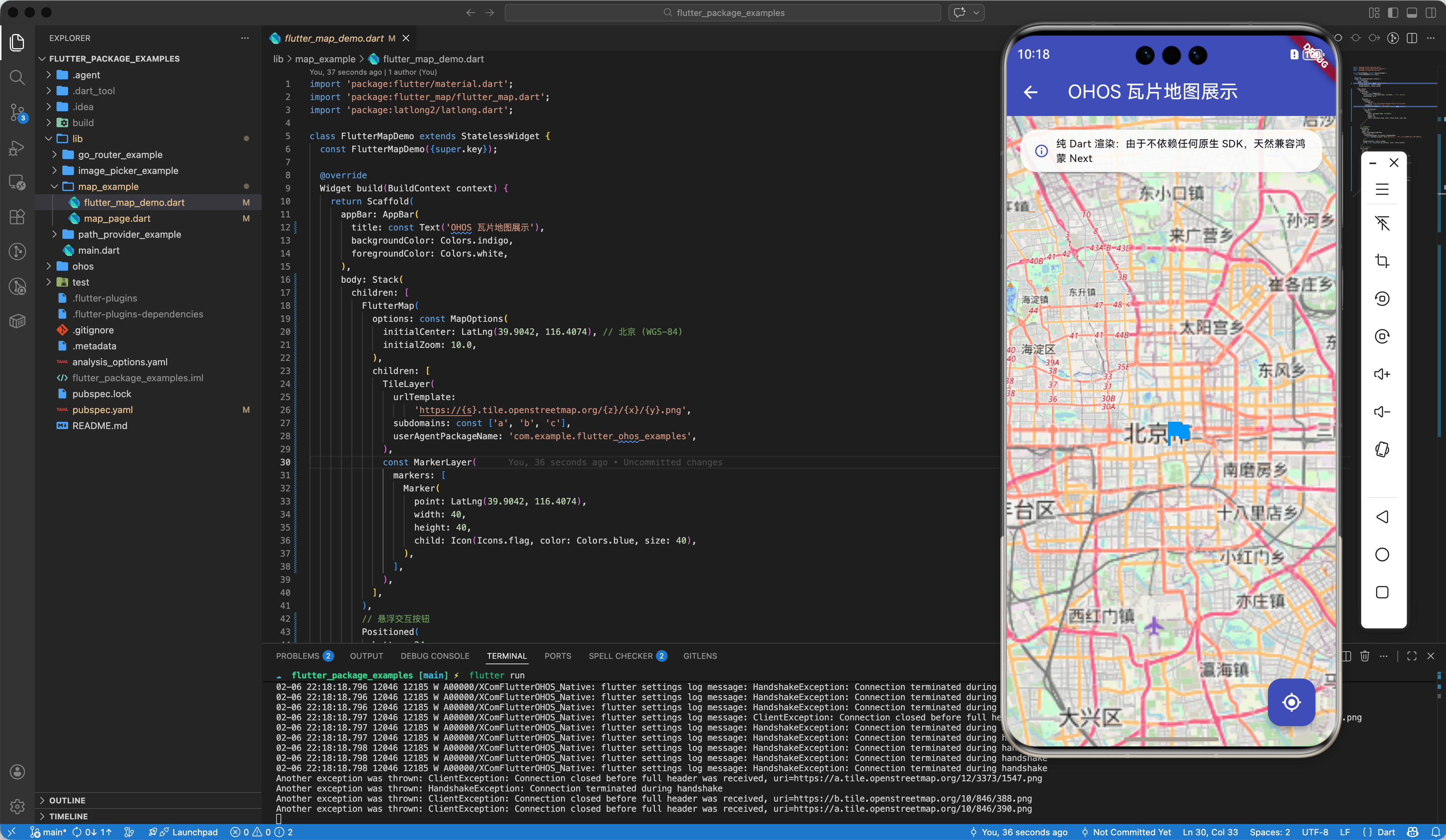
在鸿蒙设备上,你只需要声明 FlutterMap 组件即可:
import 'package:flutter/material.dart';
import 'package:flutter_map/flutter_map.dart';
import 'package:latlong2/latlong2.dart';
class BasicMapPage extends StatelessWidget {
Widget build(BuildContext context) {
return Scaffold(
appBar: AppBar(title: const Text('OHOS 瓦片地图')),
body: FlutterMap(
options: const MapOptions(
initialCenter: LatLng(31.2304, 121.4737), // 上海坐标
initialZoom: 13.0,
),
children: [
TileLayer(
urlTemplate: 'https://tile.openstreetmap.org/{z}/{x}/{y}.png',
userAgentPackageName: 'com.example.app',
),
],
),
);
}
}
2.2 添加自定义覆盖物 (Marker)
MarkerLayer(
  markers: [
    Marker(
      point: LatLng(31.2304, 121.4737),
      width: 80,
      height: 80,
      child: Icon(Icons.location_on, color: Colors.red, size: 40),
    ),
  ],
)
三、OpenHarmony 主流地图方案兼容性分析
如果你需要更高级的功能(如 3D 建筑、导航等),请参考以下适配现状:
3.1 华为地图 (HMS Map Kit) — 方案 A
华为官方专门为鸿蒙系统优化的地图服务。
- 适配现状: 通过
huawei_map插件提供支持。 - 优点: 深度融合 OS,支持同层渲染,性能在所有导航类应用中表现最佳。
- 缺点: 无法在非 HMS 设备(如通用鸿蒙版平板、海外版 Android)上运行。
3.2 国内三方地图 (高德/百度/腾讯) — 方案 B
- 适配现状:
- 目前高德地图已在 OpenHarmony TPC 仓发布了初步适配版本。
- 需要通过
PlatformView调用鸿蒙原生的 Ability 实现。
- 配置参考: 需在项目的
oh-package.json5中加入对应的三方 SDK。
3.3 Google Maps — 方案 C
- 适配现状: 不支持。
- 原因: 鸿蒙系统不具备 GMS 核心,任何依赖
google_maps_flutter的项目在打包至鸿蒙后均会报错。
四、鸿蒙平台适配最佳实践
4.1 离线地图支持
OpenHarmony 设备的网络环境复杂,建议利用 flutter_map 的 fm_cache_manager 或自定义缓存机制实现瓦片文件的本地化存储。
4.2 坐标系转换 (GCJ-02 适配)
在中国境内使用地图时,通常需要处理火星坐标系(GCJ-02)与 WGS-84 的转换。
// 💡 建议:在 UI 展示前通过转换算法(如坐标转换工具类)
// 将高德/百度返回的坐标转为 flutter_map 可用的 WGS-84 坐标。
五、完整示例代码
flutter_map_demo.dart
import 'package:flutter/material.dart';
import 'package:flutter_map/flutter_map.dart';
import 'package:latlong2/latlong.dart';
class FlutterMapDemo extends StatelessWidget {
const FlutterMapDemo({super.key});
Widget build(BuildContext context) {
return Scaffold(
appBar: AppBar(
title: const Text('OHOS 瓦片地图展示'),
backgroundColor: Colors.indigo,
foregroundColor: Colors.white,
),
body: Stack(
children: [
FlutterMap(
options: const MapOptions(
initialCenter: LatLng(39.9042, 116.4074), // 北京 (WGS-84)
initialZoom: 10.0,
),
children: [
TileLayer(
urlTemplate:
'https://{s}.tile.openstreetmap.org/{z}/{x}/{y}.png',
subdomains: const ['a', 'b', 'c'],
userAgentPackageName: 'com.example.flutter_ohos_examples',
),
const MarkerLayer(
markers: [
Marker(
point: LatLng(39.9042, 116.4074),
width: 40,
height: 40,
child: Icon(Icons.flag, color: Colors.blue, size: 40),
),
],
),
],
),
// 悬浮交互按钮
Positioned(
bottom: 24,
right: 24,
child: FloatingActionButton(
onPressed: () {
ScaffoldMessenger.of(context).showSnackBar(
const SnackBar(content: Text('正在演示基于 TPC 镜像同步的纯 Dart 地图引擎')),
);
},
backgroundColor: Colors.indigo,
child: const Icon(Icons.my_location, color: Colors.white),
),
),
// 顶部温馨提示
Positioned(
top: 16,
left: 16,
right: 16,
child: Container(
padding: const EdgeInsets.symmetric(horizontal: 16, vertical: 8),
decoration: BoxDecoration(
color: Colors.white.withOpacity(0.9),
borderRadius: BorderRadius.circular(20),
boxShadow: [
BoxShadow(color: Colors.black.withOpacity(0.1), blurRadius: 4)
],
),
child: const Row(
mainAxisSize: MainAxisSize.min,
children: [
Icon(Icons.info_outline, size: 18, color: Colors.indigo),
SizedBox(width: 8),
Expanded(
child: Text(
'纯 Dart 渲染:由于不依赖任何原生 SDK,天然兼容鸿蒙 Next',
style:
TextStyle(fontSize: 12, fontWeight: FontWeight.w500),
),
),
],
),
),
),
],
),
);
}
}
map_page.dart
import 'package:flutter/material.dart';
import 'flutter_map_demo.dart';
class MapSolutionPage extends StatelessWidget {
const MapSolutionPage({super.key});
Widget build(BuildContext context) {
return Scaffold(
appBar: AppBar(title: const Text('地图方案适配指南')),
body: SingleChildScrollView(
padding: const EdgeInsets.all(16.0),
child: Column(
crossAxisAlignment: CrossAxisAlignment.start,
children: [
_buildStatusHeader(),
const SizedBox(height: 24),
const Text('鸿蒙生态地图方案对比',
style: TextStyle(fontSize: 18, fontWeight: FontWeight.bold)),
const SizedBox(height: 12),
_buildSolutionCard(
context,
title: '首选方案:flutter_map (纯 Dart)',
desc:
'100% 纯 Dart 实现。由于其不依赖任何原生 SDK,而是直接操作 Canvas 渲染,在鸿蒙 Next 上具有“天然兼容、性能稳定”的巨大优势。',
color: Colors.green,
status: '✅ 直接运行',
onTap: () => Navigator.push(context,
MaterialPageRoute(builder: (_) => const FlutterMapDemo())),
),
_buildSolutionCard(
context,
title: '方案 A:华为地图 (HMS Map Kit)',
desc: '华为官方优化。支持 3D 建筑、同层渲染。虽然由于原生依赖需适配,但在鸿蒙系统上性能表现最优。',
color: Colors.orange,
status: '✅ 需原生适配',
onTap: null,
),
_buildSolutionCard(
context,
title: '方案 B:国内三方地图 (高德/百度)',
desc:
'适合对国内数据精准度有极致要求的场景。目前高德已在 TPC 仓发布初步适配版,需通过 PlatformView 调用。',
color: Colors.blue,
status: '🚧 适配进行中',
onTap: null,
),
_buildSolutionCard(
context,
title: '方案 C:Google Maps',
desc: '由于鸿蒙系统底层不具备 GMS 核心,该方案完全无法加载及渲染。',
color: Colors.red,
status: '❌ 不支持',
onTap: null,
),
const SizedBox(height: 20),
_buildBestPracticeSection(),
],
),
),
);
}
Widget _buildStatusHeader() {
return Container(
padding: const EdgeInsets.all(16),
decoration: BoxDecoration(
color: Colors.green.withOpacity(0.1),
borderRadius: BorderRadius.circular(12),
border: Border.all(color: Colors.green.withOpacity(0.3)),
),
child: const Row(
children: [
Icon(Icons.check_circle_outline, color: Colors.green),
SizedBox(width: 12),
Expanded(
child: Text(
'纯 Dart 瓦片地图 (flutter_map) 已完美兼容鸿蒙 Next',
style:
TextStyle(color: Colors.green, fontWeight: FontWeight.bold),
),
),
],
),
);
}
Widget _buildSolutionCard(BuildContext context,
{required String title,
required String desc,
required Color color,
required String status,
VoidCallback? onTap}) {
return Card(
margin: const EdgeInsets.only(bottom: 12),
child: ListTile(
title: Row(
mainAxisAlignment: MainAxisAlignment.spaceBetween,
children: [
Expanded(
child: Text(title,
style: TextStyle(color: color, fontWeight: FontWeight.bold)),
),
const SizedBox(width: 8),
Text(status,
style: const TextStyle(fontSize: 12, color: Colors.grey)),
],
),
subtitle: Padding(
padding: const EdgeInsets.only(top: 8.0),
child: Text(desc),
),
trailing: onTap != null ? const Icon(Icons.chevron_right) : null,
onTap: onTap,
),
);
}
Widget _buildBestPracticeSection() {
return Container(
width: double.infinity,
padding: const EdgeInsets.all(16),
decoration: BoxDecoration(
color: Colors.grey[100], borderRadius: BorderRadius.circular(12)),
child: const Column(
crossAxisAlignment: CrossAxisAlignment.start,
children: [
Text('💡 鸿蒙适配最佳实践', style: TextStyle(fontWeight: FontWeight.bold)),
SizedBox(height: 8),
Text('• 优先使用 WGS-84 坐标系,若使用国内瓦片源请注意 GCJ-02 转换。',
style: TextStyle(fontSize: 13)),
Text('• 考虑使用 FM Cache Manager 对离线瓦片进行缓存优化。',
style: TextStyle(fontSize: 13)),
Text('• 展示类地图场景首选 flutter_map 以规避原生适配成本。',
style: TextStyle(fontSize: 13)),
],
),
);
}
}
六、总结
在鸿蒙开发初期,选用 100% 纯 Dart 实现的插件 可以大幅规避原生适配的坑。对于大多数展示型地图场景,flutter_map 配合 OpenStreetMap 是最稳妥的方案。而对于对性能和导航有极高要求的应用,集成 HMS Map 是必经之路。
📦 完整代码已上传至 AtomGit:flutter_package_examples
🌐 欢迎加入开源鸿蒙跨平台社区:开源鸿蒙跨平台开发者社区

作为“人工智能6S店”的官方数字引擎,为AI开发者与企业提供一个覆盖软硬件全栈、一站式门户。
更多推荐



 5
5 0
0- 0


 已为社区贡献13条内容

所有评论(0)