
Flutter for OpenHarmony 实战:房贷计算器 - 月供计算
在移动开发领域,我们总是面临着选择与适配。今天,你的Flutter应用在Android和iOS上跑得正欢,明天可能就需要考虑一个新的平台:HarmonyOS(鸿蒙)。这不是一道选答题,而是很多团队正在面对的现实。Flutter的优势很明确——写一套代码,就能在两个主要平台上运行,开发体验流畅。而鸿蒙代表的是下一个时代的互联生态,它不仅仅是手机系统,更着眼于未来全场景的体验。
欢迎加入开源鸿蒙跨平台社区: https://openharmonycrossplatform.csdn.net
前言:跨生态开发的新机遇
在移动开发领域,我们总是面临着选择与适配。今天,你的Flutter应用在Android和iOS上跑得正欢,明天可能就需要考虑一个新的平台:HarmonyOS(鸿蒙)。这不是一道选答题,而是很多团队正在面对的现实。
Flutter的优势很明确——写一套代码,就能在两个主要平台上运行,开发体验流畅。而鸿蒙代表的是下一个时代的互联生态,它不仅仅是手机系统,更着眼于未来全场景的体验。将现有的Flutter应用适配到鸿蒙,听起来像是一个“跨界”任务,但它本质上是一次有价值的技术拓展:让产品触达更多用户,也让技术栈覆盖更广。
不过,这条路走起来并不像听起来那么简单。Flutter和鸿蒙,从底层的架构到上层的工具链,都有着各自的设计逻辑。会遇到一些具体的问题:代码如何组织?原有的功能在鸿蒙上如何实现?那些平台特有的能力该怎么调用?更实际的是,从编译打包到上架部署,整个流程都需要重新摸索。
这篇文章想做的,就是把这些我们趟过的路、踩过的坑,清晰地摊开给你看。我们不会只停留在“怎么做”,还会聊到“为什么得这么做”,以及“如果出了问题该往哪想”。这更像是一份实战笔记,源自真实的项目经验,聚焦于那些真正卡住过我们的环节。
无论你是在为一个成熟产品寻找新的落地平台,还是从一开始就希望构建能面向多端的应用,这里的思路和解决方案都能提供直接的参考。理解了两套体系之间的异同,掌握了关键的衔接技术,不仅能完成这次迁移,更能积累起应对未来技术变化的能力。
混合工程结构深度解析
项目目录架构
当Flutter项目集成鸿蒙支持后,典型的项目结构会发生显著变化。以下是经过ohos_flutter插件初始化后的项目结构:
my_flutter_harmony_app/
├── lib/                          # Flutter业务代码(基本不变)
│   ├── main.dart                 # 应用入口
│   ├── home_page.dart           # 首页
│   └── utils/
│       └── platform_utils.dart  # 平台工具类
├── pubspec.yaml                  # Flutter依赖配置
├── ohos/                         # 鸿蒙原生层(核心适配区)
│   ├── entry/                    # 主模块
│   │   └── src/main/
│   │       ├── ets/              # ArkTS代码
│   │       │   ├── MainAbility/
│   │       │   │   ├── MainAbility.ts       # 主Ability
│   │       │   │   └── MainAbilityContext.ts
│   │       │   └── pages/
│   │       │       ├── Index.ets           # 主页面
│   │       │       └── Splash.ets          # 启动页
│   │       ├── resources/        # 鸿蒙资源文件
│   │       │   ├── base/
│   │       │   │   ├── element/  # 字符串等
│   │       │   │   ├── media/    # 图片资源
│   │       │   │   └── profile/  # 配置文件
│   │       │   └── en_US/        # 英文资源
│   │       └── config.json       # 应用核心配置
│   ├── ohos_test/               # 测试模块
│   ├── build-profile.json5      # 构建配置
│   └── oh-package.json5         # 鸿蒙依赖管理
└── README.md
展示效果图片
flutter 实时预览 效果展示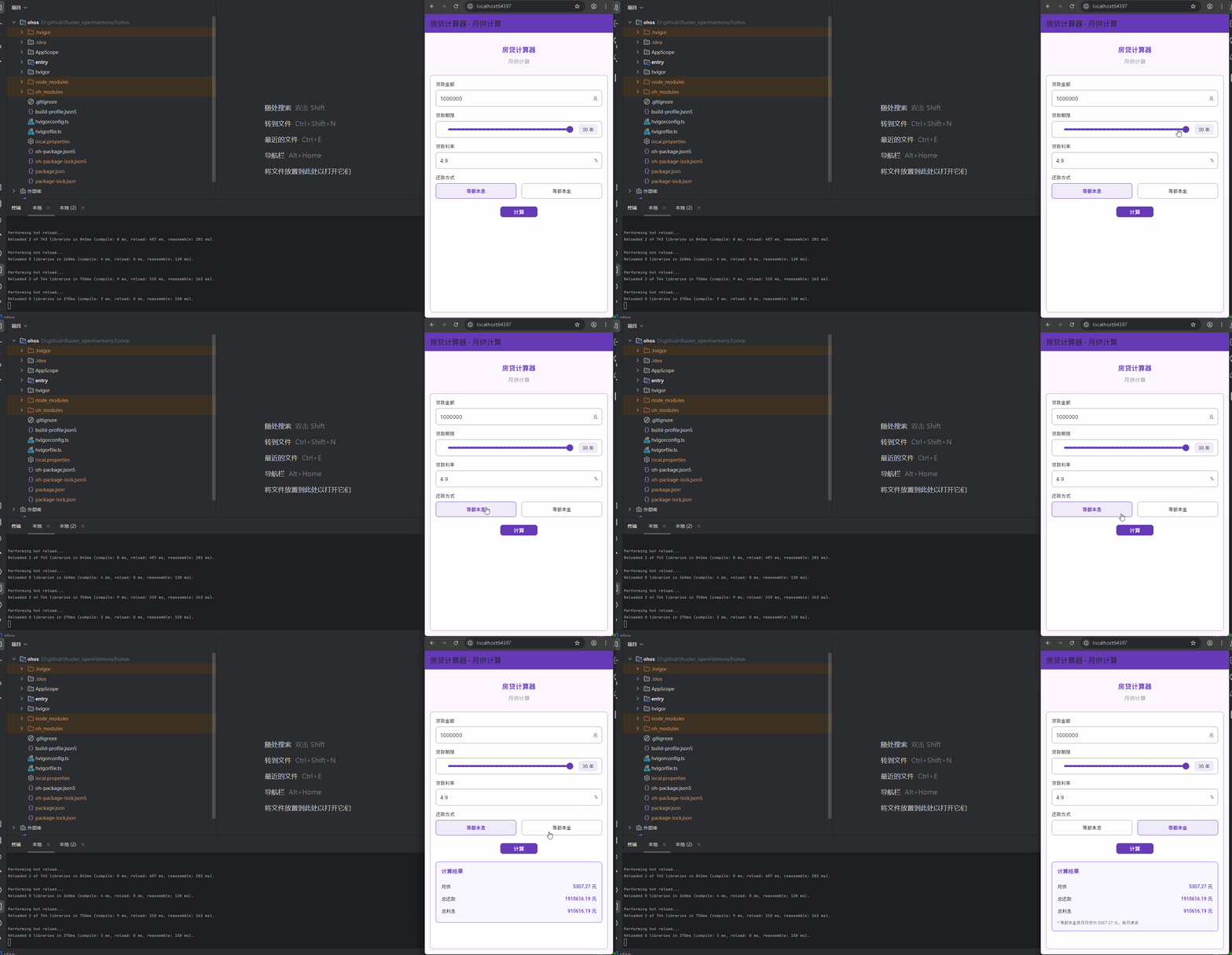
运行到鸿蒙虚拟设备中效果展示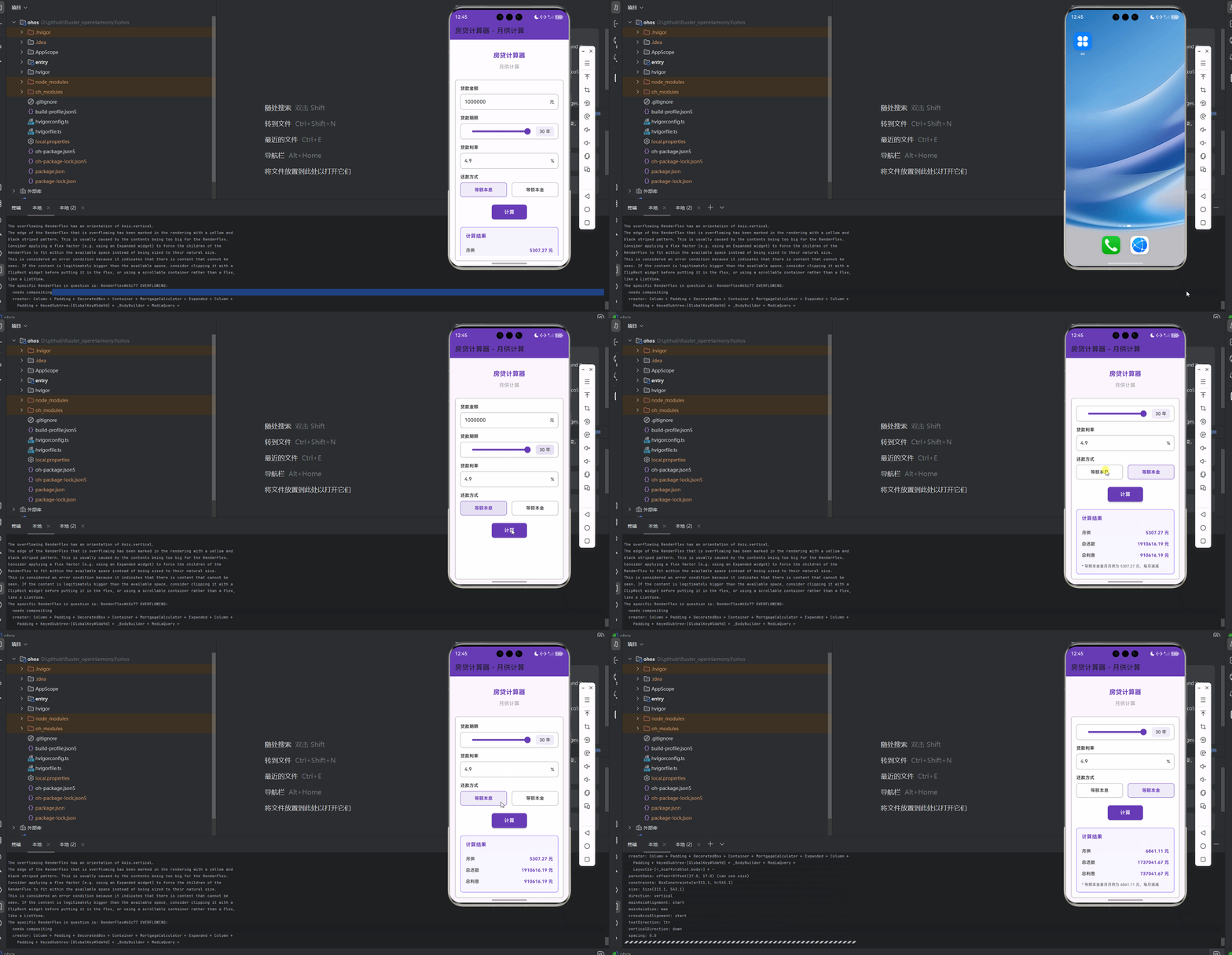
目录
功能代码实现
房贷计算器组件
房贷计算器组件是本次开发的核心功能,实现了灵活的房贷月供计算功能,支持等额本息和等额本金两种还款方式,可直接在页面中使用,无需通过按钮导航。
核心设计
- 支持贷款金额、贷款期限、贷款利率的输入和调整
- 支持等额本息和等额本金两种还款方式的选择
- 实时计算月供、总还款、总利息等结果
- 提供直观的UI界面,包括滑块选择贷款期限
- 支持样式定制,适应不同应用场景
实现细节
数据结构和状态管理
房贷计算器组件使用了清晰的数据结构和状态管理,确保计算结果的准确性和UI的响应性:
class _MortgageCalculatorState extends State<MortgageCalculator> {
  // 贷款金额
  final TextEditingController _loanAmountController = TextEditingController(text: '1000000');
  // 贷款期限(年)
  int _loanTerm = 30;
  // 贷款利率(年利率)
  final TextEditingController _interestRateController = TextEditingController(text: '4.9');
  // 还款方式:0-等额本息,1-等额本金
  int _repaymentType = 0;

  // 计算结果
  double _monthlyPayment = 0.0;
  double _totalPayment = 0.0;
  double _totalInterest = 0.0;
  bool _showResult = false;

  // 计算月供
  void _calculate() {
    final double loanAmount = double.tryParse(_loanAmountController.text) ?? 0;
    final double interestRate = double.tryParse(_interestRateController.text) ?? 0;
    final double monthlyRate = interestRate / 100 / 12;
    final int totalMonths = _loanTerm * 12;

    if (loanAmount <= 0 || interestRate <= 0) {
      setState(() {
        _showResult = false;
      });
      return;
    }

    double monthlyPayment = 0.0;
    double totalPayment = 0.0;

    if (_repaymentType == 0) {
      // 等额本息
      monthlyPayment = loanAmount * monthlyRate * pow(1 + monthlyRate, totalMonths) /
          (pow(1 + monthlyRate, totalMonths) - 1);
      totalPayment = monthlyPayment * totalMonths;
    } else {
      // 等额本金
      final double principalPayment = loanAmount / totalMonths;
      double totalInterest = 0.0;

      for (int i = 0; i < totalMonths; i++) {
        final double remainingPrincipal = loanAmount - principalPayment * i;
        final double interestPayment = remainingPrincipal * monthlyRate;
        totalInterest += interestPayment;
      }

      monthlyPayment = principalPayment + loanAmount * monthlyRate; // 首月月供
      totalPayment = loanAmount + totalInterest;
    }

    setState(() {
      _monthlyPayment = monthlyPayment;
      _totalPayment = totalPayment;
      _totalInterest = totalPayment - loanAmount;
      _showResult = true;
    });
  }

  // 计算幂
  double pow(double base, int exponent) {
    double result = 1.0;
    for (int i = 0; i < exponent; i++) {
      result *= base;
    }
    return result;
  }

  // 其他方法...
}
技术要点:
- 使用TextEditingController管理输入框内容,确保数据的实时性
- 使用int和double类型管理贷款期限和计算结果,确保数据的准确性
- 使用bool类型管理计算结果的显示状态,优化用户体验
- 实现了pow方法用于计算等额本息的月供,确保计算的准确性
UI布局实现
房贷计算器组件的UI布局清晰美观,包括输入区域、选择区域和结果显示区域:
Widget build(BuildContext context) {
return Container(
padding: const EdgeInsets.all(16.0),
decoration: BoxDecoration(
color: widget.backgroundColor,
border: Border.all(color: widget.borderColor),
borderRadius: BorderRadius.circular(widget.borderRadius),
),
child: Column(
crossAxisAlignment: CrossAxisAlignment.start,
children: [
// 贷款金额
_buildInputSection(
label: '贷款金额',
controller: _loanAmountController,
hintText: '请输入贷款金额',
suffix: '元',
),
const SizedBox(height: 16.0),
// 贷款期限
_buildLoanTermSection(),
const SizedBox(height: 16.0),
// 贷款利率
_buildInputSection(
label: '贷款利率',
controller: _interestRateController,
hintText: '请输入年利率',
suffix: '%',
),
const SizedBox(height: 16.0),
// 还款方式
_buildRepaymentTypeSection(),
const SizedBox(height: 24.0),
// 计算按钮
Center(
child: ElevatedButton(
onPressed: _calculate,
style: ElevatedButton.styleFrom(
backgroundColor: widget.primaryColor,
padding: const EdgeInsets.symmetric(horizontal: 40.0, vertical: 12.0),
shape: RoundedRectangleBorder(
borderRadius: BorderRadius.circular(widget.borderRadius),
),
),
child: const Text(
'计算',
style: TextStyle(fontSize: 16.0, color: Colors.white),
),
),
),
const SizedBox(height: 24.0),
// 计算结果
if (_showResult)
_buildResultSection(),
],
),
);
}
技术要点:
- 使用Container和BoxDecoration实现美观的边框和背景效果
- 使用Column和SizedBox实现清晰的垂直布局和间距
- 使用Center和ElevatedButton实现突出的计算按钮
- 使用条件渲染显示计算结果,优化用户体验
输入区域实现
输入区域包括贷款金额和贷款利率的输入,使用TextField实现:
// 构建输入区域
Widget _buildInputSection({
  required String label,
  required TextEditingController controller,
  required String hintText,
  required String suffix,
}) {
  return Column(
    crossAxisAlignment: CrossAxisAlignment.start,
    children: [
      Text(
        label,
        style: TextStyle(
          fontSize: 14.0,
          fontWeight: FontWeight.w500,
          color: widget.textColor,
        ),
      ),
      const SizedBox(height: 8.0),
      Container(
        decoration: BoxDecoration(
          border: Border.all(color: widget.borderColor),
          borderRadius: BorderRadius.circular(widget.borderRadius),
        ),
        child: Row(
          children: [
            Expanded(
              child: TextField(
                controller: controller,
                keyboardType: TextInputType.number,
                decoration: InputDecoration(
                  hintText: hintText,
                  border: InputBorder.none,
                  contentPadding: const EdgeInsets.symmetric(horizontal: 12.0),
                ),
              ),
            ),
            Padding(
              padding: const EdgeInsets.symmetric(horizontal: 12.0),
              child: Text(suffix),
            ),
          ],
        ),
      ),
    ],
  );
}
技术要点:
- 使用TextField实现数字输入,设置keyboardType为TextInputType.number
- 使用Row和Expanded实现输入框和单位的布局
- 使用InputDecoration去除默认边框,实现自定义边框效果
贷款期限选择实现
贷款期限选择使用Slider实现,提供直观的滑块选择方式:
// 构建贷款期限选择区域
Widget _buildLoanTermSection() {
  return Column(
    crossAxisAlignment: CrossAxisAlignment.start,
    children: [
      Text(
        '贷款期限',
        style: TextStyle(
          fontSize: 14.0,
          fontWeight: FontWeight.w500,
          color: widget.textColor,
        ),
      ),
      const SizedBox(height: 8.0),
      Container(
        decoration: BoxDecoration(
          border: Border.all(color: widget.borderColor),
          borderRadius: BorderRadius.circular(widget.borderRadius),
        ),
        padding: const EdgeInsets.symmetric(horizontal: 12.0),
        child: Row(
          children: [
            Expanded(
              child: Slider(
                value: _loanTerm.toDouble(),
                min: 1,
                max: 30,
                divisions: 29,
                label: '$_loanTerm 年',
                onChanged: (value) {
                  setState(() {
                    _loanTerm = value.toInt();
                  });
                },
                activeColor: widget.primaryColor,
                inactiveColor: widget.borderColor,
              ),
            ),
            Container(
              padding: const EdgeInsets.symmetric(horizontal: 12.0, vertical: 6.0),
              decoration: BoxDecoration(
                color: widget.primaryColor.withOpacity(0.1),
                borderRadius: BorderRadius.circular(widget.borderRadius),
              ),
              child: Text('$_loanTerm 年'),
            ),
          ],
        ),
      ),
    ],
  );
}
技术要点:
- 使用Slider实现贷款期限的选择,设置min、max和divisions
- 使用Row和Expanded实现滑块和显示值的布局
- 使用Container和BoxDecoration实现显示值的样式
- 使用setState更新贷款期限值,确保UI的响应性
还款方式选择实现
还款方式选择使用InkWell实现,提供点击交互效果:
// 构建还款方式选择区域
Widget _buildRepaymentTypeSection() {
  return Column(
    crossAxisAlignment: CrossAxisAlignment.start,
    children: [
      Text(
        '还款方式',
        style: TextStyle(
          fontSize: 14.0,
          fontWeight: FontWeight.w500,
          color: widget.textColor,
        ),
      ),
      const SizedBox(height: 8.0),
      Row(
        children: [
          Expanded(
            child: InkWell(
              onTap: () {
                setState(() {
                  _repaymentType = 0;
                });
              },
              child: Container(
                padding: const EdgeInsets.symmetric(vertical: 12.0),
                decoration: BoxDecoration(
                  border: Border.all(
                    color: _repaymentType == 0 ? widget.primaryColor : widget.borderColor,
                  ),
                  borderRadius: BorderRadius.circular(widget.borderRadius),
                  color: _repaymentType == 0
                      ? widget.primaryColor.withOpacity(0.1)
                      : widget.backgroundColor,
                ),
                child: Center(
                  child: Text(
                    '等额本息',
                    style: TextStyle(
                      color: _repaymentType == 0 ? widget.primaryColor : widget.textColor,
                      fontWeight: _repaymentType == 0 ? FontWeight.bold : FontWeight.normal,
                    ),
                  ),
                ),
              ),
            ),
          ),
          const SizedBox(width: 16.0),
          Expanded(
            child: InkWell(
              onTap: () {
                setState(() {
                  _repaymentType = 1;
                });
              },
              child: Container(
                padding: const EdgeInsets.symmetric(vertical: 12.0),
                decoration: BoxDecoration(
                  border: Border.all(
                    color: _repaymentType == 1 ? widget.primaryColor : widget.borderColor,
                  ),
                  borderRadius: BorderRadius.circular(widget.borderRadius),
                  color: _repaymentType == 1
                      ? widget.primaryColor.withOpacity(0.1)
                      : widget.backgroundColor,
                ),
                child: Center(
                  child: Text(
                    '等额本金',
                    style: TextStyle(
                      color: _repaymentType == 1 ? widget.primaryColor : widget.textColor,
                      fontWeight: _repaymentType == 1 ? FontWeight.bold : FontWeight.normal,
                    ),
                  ),
                ),
              ),
            ),
          ),
        ],
      ),
    ],
  );
}
技术要点:
- 使用InkWell实现点击交互效果
- 使用Row和Expanded实现两种还款方式的布局
- 使用Container和BoxDecoration实现选中和未选中状态的样式
- 使用setState更新还款方式值,确保UI的响应性
结果显示实现
结果显示区域使用Container和BoxDecoration实现,显示计算结果:
// 构建结果区域
Widget _buildResultSection() {
  return Container(
    padding: const EdgeInsets.all(16.0),
    decoration: BoxDecoration(
      border: Border.all(color: widget.secondaryColor),
      borderRadius: BorderRadius.circular(widget.borderRadius),
      color: widget.secondaryColor.withOpacity(0.05),
    ),
    child: Column(
      crossAxisAlignment: CrossAxisAlignment.start,
      children: [
        Text(
          '计算结果',
          style: TextStyle(
            fontSize: 16.0,
            fontWeight: FontWeight.bold,
            color: widget.primaryColor,
          ),
        ),
        const SizedBox(height: 16.0),
        _buildResultRow('月供', _monthlyPayment),
        _buildResultRow('总还款', _totalPayment),
        _buildResultRow('总利息', _totalInterest),
        if (_repaymentType == 1)
          Padding(
            padding: const EdgeInsets.only(top: 8.0),
            child: Text(
              '* 等额本金首月月供为 ${_monthlyPayment.toStringAsFixed(2)} 元,每月递减',
              style: TextStyle(
                fontSize: 12.0,
                color: widget.textColor.withOpacity(0.7),
              ),
            ),
          ),
      ],
    ),
  );
}

// 构建结果行
Widget _buildResultRow(String label, double value) {
  return Padding(
    padding: const EdgeInsets.symmetric(vertical: 8.0),
    child: Row(
      mainAxisAlignment: MainAxisAlignment.spaceBetween,
      children: [
        Text(
          label,
          style: TextStyle(fontSize: 14.0, color: widget.textColor),
        ),
        Text(
          '${value.toStringAsFixed(2)} 元',
          style: TextStyle(
            fontSize: 14.0,
            fontWeight: FontWeight.bold,
            color: widget.primaryColor,
          ),
        ),
      ],
    ),
  );
}
技术要点:
- 使用Container和BoxDecoration实现结果区域的样式
- 使用Column和SizedBox实现结果标题和内容的布局
- 使用Row和MainAxisAlignment.spaceBetween实现结果标签和值的布局
- 使用TextStyle.bold突出显示计算结果
- 使用条件渲染显示等额本金的提示信息
首页集成使用
在首页中集成房贷计算器组件,展示完整的房贷计算功能:
class _MyHomePageState extends State<MyHomePage> {
Widget build(BuildContext context) {
return Scaffold(
appBar: AppBar(
title: const Text('房贷计算器 - 月供计算'),
backgroundColor: Colors.deepPurple,
),
body: Padding(
padding: const EdgeInsets.all(16.0),
child: Column(
crossAxisAlignment: CrossAxisAlignment.stretch,
children: <Widget>[
const SizedBox(height: 20),
const Text(
'房贷计算器',
style: TextStyle(
fontSize: 20,
fontWeight: FontWeight.bold,
color: Colors.deepPurple,
),
textAlign: TextAlign.center,
),
const SizedBox(height: 10),
const Text(
'月供计算',
style: TextStyle(
fontSize: 16,
color: Colors.grey,
),
textAlign: TextAlign.center,
),
const SizedBox(height: 30),
// 房贷计算器组件
Expanded(
child: MortgageCalculator(
primaryColor: Colors.deepPurple,
secondaryColor: Colors.deepPurpleAccent,
borderColor: Colors.grey,
backgroundColor: Colors.white,
textColor: Colors.black,
borderRadius: 8.0,
),
),
],
),
),
);
}
}
技术要点:
- 使用Scaffold和AppBar实现页面的基本结构
- 使用Padding和Column实现页面的布局
- 使用Expanded实现房贷计算器组件的自适应高度
- 直接在页面中嵌入MortgageCalculator组件,无需通过按钮导航
使用方法
使用房贷计算器组件非常简单,只需以下步骤:
-
导入组件:
import 'components/mortgage_calculator.dart'; -
添加组件到页面:
MortgageCalculator( primaryColor: Colors.deepPurple, secondaryColor: Colors.deepPurpleAccent, borderColor: Colors.grey, backgroundColor: Colors.white, textColor: Colors.black, borderRadius: 8.0, ); -
使用组件:
- 输入贷款金额、贷款利率
- 使用滑块选择贷款期限
- 选择还款方式(等额本息或等额本金)
- 点击计算按钮查看结果
注意事项
- 输入验证:确保输入的贷款金额和贷款利率为正数,否则计算结果将不显示
- 贷款期限:贷款期限范围为1-30年,可通过滑块调整
- 还款方式:等额本息每月还款额固定,等额本金首月月供最高,每月递减
- 样式定制:可通过构造函数参数定制组件样式,适应不同应用场景
- 性能优化:计算逻辑简单,不会影响应用性能
- 跨平台兼容性:使用Flutter的跨平台组件和API,确保在OpenHarmony等平台上正常运行
开发中容易遇到的问题
在开发房贷计算器组件的过程中,可能会遇到以下问题:
-
计算精度问题
- 问题描述:在计算月供和总还款时,可能会出现精度问题,导致计算结果不准确
- 解决方案:使用double类型进行计算,并在显示时使用toStringAsFixed(2)保留两位小数
-
输入验证问题
- 问题描述:用户可能输入非数字或负数,导致计算错误
- 解决方案:添加输入验证,确保输入的贷款金额和贷款利率为正数
-
UI布局问题
- 问题描述:在不同屏幕尺寸上,UI布局可能会出现问题
- 解决方案:使用Expanded和Flexible实现响应式布局,确保在不同屏幕尺寸上都能正常显示
-
状态管理问题
- 问题描述:在处理组件状态时,可能会出现状态管理混乱的问题
- 解决方案:使用StatefulWidget和setState()管理组件状态,确保状态更新的一致性
-
还款方式切换问题
- 问题描述:在切换还款方式时,计算结果可能不会及时更新
- 解决方案:在切换还款方式时,清空计算结果,提示用户重新计算
-
跨平台兼容性问题
- 问题描述:在不同平台上,组件的显示效果可能会有所不同
- 解决方案:使用Flutter的跨平台组件和API,避免使用平台特定的功能
-
用户体验问题
- 问题描述:用户可能不理解等额本息和等额本金的区别
- 解决方案:添加提示信息,说明两种还款方式的特点和区别
总结开发中用到的技术点
本次开发中用到了以下技术点:
-
组件封装技术
- 将房贷计算功能封装为独立的MortgageCalculator组件,提高代码复用性和可维护性
- 使用构造函数参数实现组件的高度可定制性,支持多种样式配置
- 组件设计遵循单一职责原则,只负责房贷计算功能的实现
-
状态管理技术
- 使用StatefulWidget管理组件状态,包括输入值、选择值和计算结果
- 使用setState()实现状态更新,确保UI与数据保持同步
- 使用TextEditingController管理输入框内容,确保数据的实时性
-
布局设计技术
- 使用Container和BoxDecoration实现美观的边框和背景效果
- 使用Column和Row实现清晰的垂直和水平布局
- 使用SizedBox和Padding实现合理的间距和边距
- 使用Expanded和Flexible实现响应式布局,适配不同屏幕尺寸
-
交互设计技术
- 使用TextField实现数字输入,设置keyboardType为TextInputType.number
- 使用Slider实现贷款期限的选择,提供直观的交互方式
- 使用InkWell实现还款方式的选择,提供点击交互效果
- 使用ElevatedButton实现突出的计算按钮
-
数据处理技术
- 实现了等额本息和等额本金两种还款方式的计算逻辑
- 使用double类型进行计算,确保计算的准确性
- 实现了pow方法用于计算等额本息的月供
- 使用toStringAsFixed(2)格式化计算结果,保留两位小数
-
样式定制技术
- 提供了丰富的样式定制选项,包括颜色、边框、圆角等
- 支持自定义主色、次色、边框色等,满足不同应用场景的需求
- 样式设计遵循Material Design规范,确保视觉一致性
-
响应式设计技术
- 使用Expanded和Flexible实现响应式布局,适配不同屏幕尺寸
- 布局设计考虑了小屏幕设备的显示效果,避免布局溢出
- 使用Slider的divisions属性,确保在不同屏幕尺寸上都能正常显示
-
跨平台兼容性技术
- 使用Flutter的跨平台组件和API,确保在OpenHarmony等平台上正常运行
- 避免使用平台特定的功能,提高代码的可移植性
- 代码结构清晰,遵循Flutter最佳实践,确保跨平台兼容性
-
用户体验优化技术
- 提供了直观的UI界面,包括滑块选择贷款期限
- 实时显示计算结果,优化用户体验
- 添加提示信息,说明等额本金的特点
- 使用条件渲染显示计算结果,避免空结果的显示
-
代码组织技术
- 将组件逻辑与页面逻辑分离,提高代码可读性和可维护性
- 使用清晰的命名和注释,提高代码质量
- 代码结构层次分明,便于理解和维护
- 使用私有方法封装UI构建逻辑,提高代码的可维护性
通过本次开发,我们不仅实现了一个功能完整、交互友好的房贷计算器组件,还积累了丰富的Flutter开发经验,特别是在组件封装、状态管理和跨平台兼容性方面。这些经验对于未来的Flutter for OpenHarmony开发工作将非常有帮助。
欢迎加入开源鸿蒙跨平台社区: https://openharmonycrossplatform.csdn.net

作为“人工智能6S店”的官方数字引擎,为AI开发者与企业提供一个覆盖软硬件全栈、一站式门户。
更多推荐

 9
9 0
0- 0


 已为社区贡献8条内容

所有评论(0)