
基础入门 React Native 鸿蒙跨平台开发:react-native-switch 开关适配
Switch 开关是移动应用中常见的二选一交互组件,用于开启或关闭某个功能、设置选项等。react-native-switch 是一个简单易用的开关组件库,提供丰富的样式配置和交互效果,完全支持鸿蒙系统。使用 react-native-switch 可以快速构建美观的开关控件,大大提升开发效率。库名称当前版本: 1.5.1官方仓库主要功能提供简洁易用的开关组件支持自定义颜色和尺寸支持禁用状态完全兼
欢迎加入开源鸿蒙跨平台社区:https://openharmonycrossplatform.csdn.net
📋 前言
Switch 开关是移动应用中常见的二选一交互组件,用于开启或关闭某个功能、设置选项等。react-native-switch 是一个简单易用的开关组件库,提供丰富的样式配置和交互效果,完全支持鸿蒙系统。使用 react-native-switch 可以快速构建美观的开关控件,大大提升开发效率。
🎯 库简介
基本信息
- 库名称: react-native-switch
- 当前版本: 1.5.1
- 官方仓库: https://github.com/react-native-community/react-native-switch
- 主要功能:
- 提供简洁易用的开关组件
- 支持自定义颜色和尺寸
- 支持禁用状态
- 完全兼容 Android、iOS 和 HarmonyOS
为什么需要这个库?
- 零配置: 纯 JavaScript 实现,无需原生配置
- 轻量级: 代码简洁,体积小
- 易用性: API 简单直观,开箱即用
- 跨平台: 在三端提供一致的体验
- 灵活性: 支持自定义样式和颜色
📦 安装步骤
1. 使用 npm 安装
在项目根目录执行以下命令:
npm install react-native-switch@1.5.1
2. 验证安装
安装完成后,检查 package.json 文件,应该能看到新增的依赖:
{
  "dependencies": {
    "react-native-switch": "^1.5.1",
    // ... 其他依赖
  }
}
🔧 HarmonyOS 平台配置
react-native-switch 是纯 JavaScript 组件,无需任何原生配置。
配置说明
- ✅ 无需 Manual Link: 不需要手动链接原生代码
- ✅ 无需 CMakeLists 配置: 不需要修改 CMakeLists.txt
- ✅ 无需 PackageProvider 配置: 不需要修改 PackageProvider.cpp
- ✅ 无需 ArkTs 配置: 不需要修改任何 ArkTs 文件
- ✅ 即装即用: 安装后直接 import 使用
💻 完整代码示例
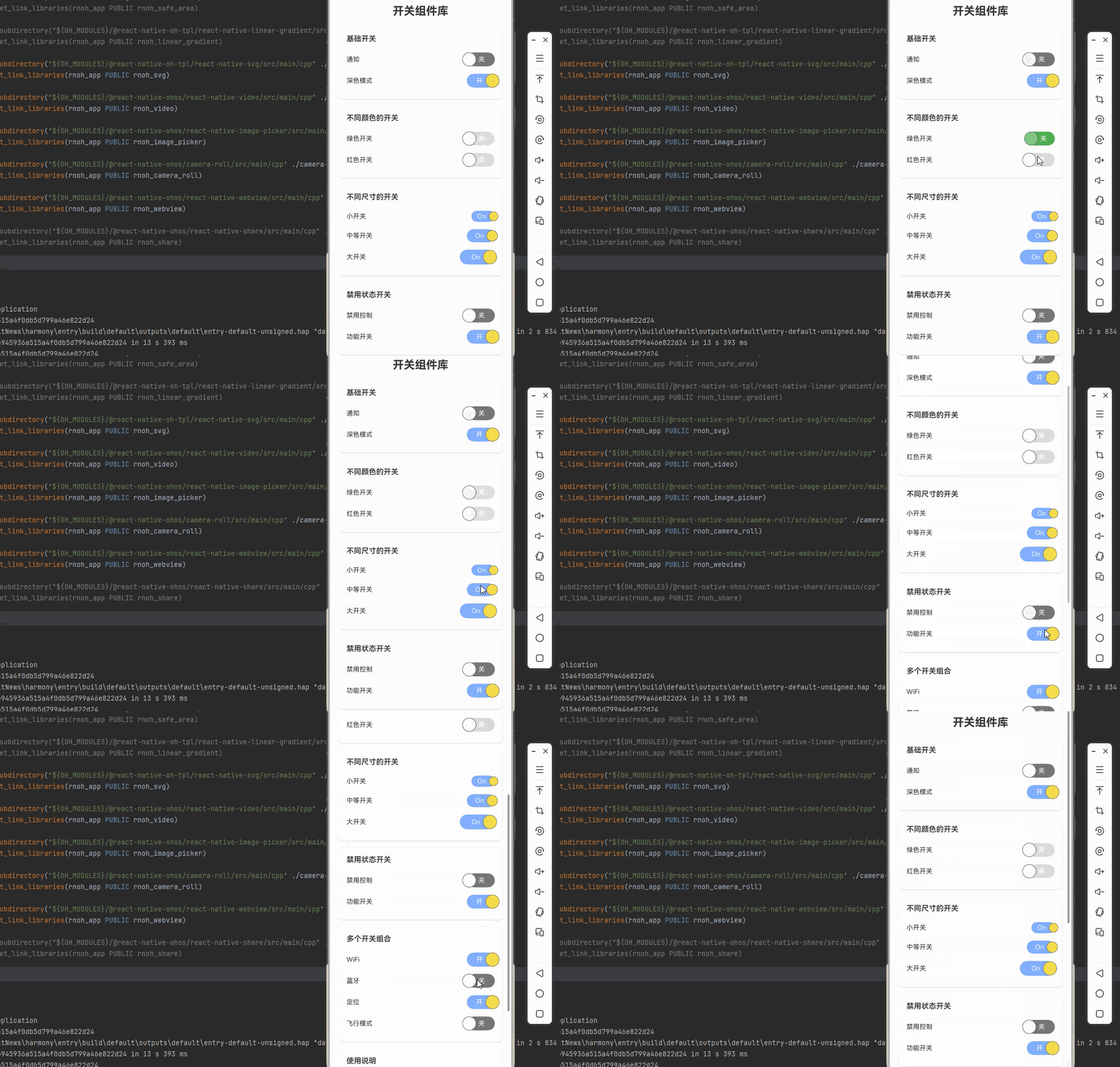
下面是一个完整的示例,展示了 react-native-switch 的各种使用场景:
import React, { useState } from 'react';
import {
  View,
  Text,
  StyleSheet,
  ScrollView,
  SafeAreaView,
} from 'react-native';
import {Switch} from 'react-native-switch';
function SwitchLibraryScreen() {
  const [isEnabled1, setIsEnabled1] = useState(false);
  const [isEnabled2, setIsEnabled2] = useState(true);
  const [isEnabled3, setIsEnabled3] = useState(false);
  const [isEnabled4, setIsEnabled4] = useState(false);
  const [isDisabled, setIsDisabled] = useState(false);

  const toggleSwitch1 = () => setIsEnabled1(previousState => !previousState);
  const toggleSwitch2 = () => setIsEnabled2(previousState => !previousState);
  const toggleSwitch3 = () => setIsEnabled3(previousState => !previousState);
  const toggleSwitch4 = () => setIsEnabled4(previousState => !previousState);
  const toggleDisabled = () => setIsDisabled(previousState => !previousState);

  return (
    <SafeAreaView style={styles.container}>
      <ScrollView style={styles.scrollView}>
        <Text style={styles.pageTitle}>开关组件库</Text>

        {/* 基础开关 */}
        <View style={styles.section}>
          <Text style={styles.sectionTitle}>基础开关</Text>
          <View style={styles.row}>
            <Text style={styles.label}>通知</Text>
            <Switch
              value={isEnabled1}
              onValueChange={toggleSwitch1}
              activeText={'开'}
              inActiveText={'关'}
              backgroundActive={'#81b0ff'}
              backgroundInactive={'#767577'}
              circleActiveColor={'#f5dd4b'}
              circleInActiveColor={'#f4f3f4'}
              renderActiveText={true}
              renderInActiveText={true}
            />
          </View>
          <View style={styles.row}>
            <Text style={styles.label}>深色模式</Text>
            <Switch
              value={isEnabled2}
              onValueChange={toggleSwitch2}
              activeText={'开'}
              inActiveText={'关'}
              backgroundActive={'#81b0ff'}
              backgroundInactive={'#767577'}
              circleActiveColor={'#f5dd4b'}
              circleInActiveColor={'#f4f3f4'}
              renderActiveText={true}
              renderInActiveText={true}
            />
          </View>
        </View>

        {/* 不同颜色的开关 */}
        <View style={styles.section}>
          <Text style={styles.sectionTitle}>不同颜色的开关</Text>
          <View style={styles.row}>
            <Text style={styles.label}>绿色开关</Text>
            <Switch
              value={isEnabled3}
              onValueChange={toggleSwitch3}
              activeText={'开'}
              inActiveText={'关'}
              backgroundActive={'#4caf50'}
              backgroundInactive={'#e0e0e0'}
              circleActiveColor={'#81c784'}
              circleInActiveColor={'#f4f3f4'}
              renderActiveText={true}
              renderInActiveText={true}
            />
          </View>
          <View style={styles.row}>
            <Text style={styles.label}>红色开关</Text>
            <Switch
              value={isEnabled4}
              onValueChange={toggleSwitch4}
              activeText={'开'}
              inActiveText={'关'}
              backgroundActive={'#f44336'}
              backgroundInactive={'#e0e0e0'}
              circleActiveColor={'#e57373'}
              circleInActiveColor={'#f4f3f4'}
              renderActiveText={true}
              renderInActiveText={true}
            />
          </View>
        </View>

        {/* 不同尺寸的开关 */}
        <View style={styles.section}>
          <Text style={styles.sectionTitle}>不同尺寸的开关</Text>
          <View style={styles.row}>
            <Text style={styles.label}>小开关</Text>
            <Switch
              value={true}
              onValueChange={() => {}}
              circleSize={20}
              barHeight={24}
              switchWidthMultiplier={2.5}
              backgroundActive={'#81b0ff'}
              backgroundInactive={'#767577'}
              circleActiveColor={'#f5dd4b'}
              circleInActiveColor={'#f4f3f4'}
            />
          </View>
          <View style={styles.row}>
            <Text style={styles.label}>中等开关</Text>
            <Switch
              value={true}
              onValueChange={() => {}}
              circleSize={24}
              barHeight={28}
              switchWidthMultiplier={2.5}
              backgroundActive={'#81b0ff'}
              backgroundInactive={'#767577'}
              circleActiveColor={'#f5dd4b'}
              circleInActiveColor={'#f4f3f4'}
            />
          </View>
          <View style={styles.row}>
            <Text style={styles.label}>大开关</Text>
            <Switch
              value={true}
              onValueChange={() => {}}
              circleSize={30}
              barHeight={32}
              switchWidthMultiplier={2.5}
              backgroundActive={'#81b0ff'}
              backgroundInactive={'#767577'}
              circleActiveColor={'#f5dd4b'}
              circleInActiveColor={'#f4f3f4'}
            />
          </View>
        </View>

        {/* 禁用状态开关 */}
        <View style={styles.section}>
          <Text style={styles.sectionTitle}>禁用状态开关</Text>
          <View style={styles.row}>
            <Text style={styles.label}>禁用控制</Text>
            <Switch
              value={isDisabled}
              onValueChange={toggleDisabled}
              activeText={'开'}
              inActiveText={'关'}
              backgroundActive={'#81b0ff'}
              backgroundInactive={'#767577'}
              circleActiveColor={'#f5dd4b'}
              circleInActiveColor={'#f4f3f4'}
              renderActiveText={true}
              renderInActiveText={true}
            />
          </View>
          <View style={styles.row}>
            <Text style={styles.label}>功能开关</Text>
            <Switch
              value={true}
              onValueChange={() => {}}
              disabled={isDisabled}
              activeText={'开'}
              inActiveText={'关'}
              backgroundActive={'#81b0ff'}
              backgroundInactive={'#767577'}
              circleActiveColor={'#f5dd4b'}
              circleInActiveColor={'#f4f3f4'}
              renderActiveText={true}
              renderInActiveText={true}
            />
          </View>
        </View>

        {/* 多个开关组合 */}
        <View style={styles.section}>
          <Text style={styles.sectionTitle}>多个开关组合</Text>
          <View style={styles.row}>
            <Text style={styles.label}>WiFi</Text>
            <Switch
              value={true}
              onValueChange={() => {}}
              activeText={'开'}
              inActiveText={'关'}
              backgroundActive={'#81b0ff'}
              backgroundInactive={'#767577'}
              circleActiveColor={'#f5dd4b'}
              circleInActiveColor={'#f4f3f4'}
              renderActiveText={true}
              renderInActiveText={true}
            />
          </View>
          <View style={styles.row}>
            <Text style={styles.label}>蓝牙</Text>
            <Switch
              value={false}
              onValueChange={() => {}}
              activeText={'开'}
              inActiveText={'关'}
              backgroundActive={'#81b0ff'}
              backgroundInactive={'#767577'}
              circleActiveColor={'#f5dd4b'}
              circleInActiveColor={'#f4f3f4'}
              renderActiveText={true}
              renderInActiveText={true}
            />
          </View>
          <View style={styles.row}>
            <Text style={styles.label}>定位</Text>
            <Switch
              value={true}
              onValueChange={() => {}}
              activeText={'开'}
              inActiveText={'关'}
              backgroundActive={'#81b0ff'}
              backgroundInactive={'#767577'}
              circleActiveColor={'#f5dd4b'}
              circleInActiveColor={'#f4f3f4'}
              renderActiveText={true}
              renderInActiveText={true}
            />
          </View>
          <View style={styles.row}>
            <Text style={styles.label}>飞行模式</Text>
            <Switch
              value={false}
              onValueChange={() => {}}
              activeText={'开'}
              inActiveText={'关'}
              backgroundActive={'#81b0ff'}
              backgroundInactive={'#767577'}
              circleActiveColor={'#f5dd4b'}
              circleInActiveColor={'#f4f3f4'}
              renderActiveText={true}
              renderInActiveText={true}
            />
          </View>
        </View>

        {/* 使用说明 */}
        <View style={styles.section}>
          <Text style={styles.sectionTitle}>使用说明</Text>
          <Text style={styles.instructionText}>
            1. react-native-switch 是纯 JavaScript 组件,无需原生配置
          </Text>
          <Text style={styles.instructionText}>
            2. 支持 trackColor 属性自定义轨道颜色
          </Text>
          <Text style={styles.instructionText}>
            3. 支持 thumbColor 属性自定义滑块颜色
          </Text>
          <Text style={styles.instructionText}>
            4. 支持 disabled 属性控制开关禁用状态
          </Text>
          <Text style={styles.instructionText}>
            5. 完全兼容鸿蒙系统,跨平台可用
          </Text>
        </View>
      </ScrollView>
    </SafeAreaView>
  );
}

const styles = StyleSheet.create({
  container: {
    flex: 1,
    backgroundColor: '#f5f5f5',
  },
  scrollView: {
    flex: 1,
    padding: 20,
  },
  pageTitle: {
    fontSize: 24,
    fontWeight: 'bold',
    marginBottom: 20,
    textAlign: 'center',
    color: '#333',
  },
  section: {
    backgroundColor: '#fff',
    borderRadius: 8,
    padding: 16,
    marginBottom: 16,
    shadowColor: '#000',
    shadowOffset: { width: 0, height: 1 },
    shadowOpacity: 0.1,
    shadowRadius: 2,
    elevation: 2,
  },
  sectionTitle: {
    fontSize: 16,
    fontWeight: '600',
    marginBottom: 12,
    color: '#333',
  },
  row: {
    flexDirection: 'row',
    justifyContent: 'space-between',
    alignItems: 'center',
    paddingVertical: 8,
  },
  label: {
    fontSize: 14,
    color: '#333',
  },
  instructionText: {
    fontSize: 14,
    lineHeight: 22,
    marginBottom: 6,
    color: '#666',
  },
});

export default SwitchLibraryScreen;
💻 代码讲解
1. 基础开关
<Switch
  trackColor={{ false: '#767577', true: '#81b0ff' }}
  thumbColor={isEnabled ? '#f5dd4b' : '#f4f3f4'}
  ios_backgroundColor="#3e3e3e"
  onValueChange={toggleSwitch}
  value={isEnabled}
/>
最基础的开关使用方式,通过 value 控制开关状态,onValueChange 处理状态变化。
2. 自定义颜色
<Switch
  trackColor={{ false: '#e0e0e0', true: '#4caf50' }}
  thumbColor={isEnabled ? '#81c784' : '#f4f3f4'}
/>
trackColor: 设置轨道颜色(关闭/开启状态)thumbColor: 设置滑块颜色
3. 不同尺寸
<Switch
  style={styles.smallSwitch}
  onValueChange={() => {}}
  value={true}
/>
通过 transform 样式实现不同尺寸的开关。
4. 禁用状态
<Switch
  disabled={isDisabled}
  onValueChange={() => {}}
  value={true}
/>
通过 disabled 属性控制开关禁用状态。
⚠️ 注意事项与最佳实践
1. 颜色配置
- 使用
trackColor设置轨道颜色 - 使用
thumbColor设置滑块颜色 - 使用
ios_backgroundColor设置 iOS 背景色
2. 状态管理
const [isEnabled, setIsEnabled] = useState(false);
const toggleSwitch = () => setIsEnabled(previousState => !previousState);
推荐使用 useState 管理开关状态。
3. 禁用状态
<Switch
  disabled={true}
  onValueChange={() => {}}
  value={true}
/>
禁用状态下开关不会响应点击事件。
4. 样式定制
const styles = StyleSheet.create({
  largeSwitch: {
    transform: [{ scaleX: 1.2 }, { scaleY: 1.2 }],
  },
});
使用 transform 实现尺寸调整。
5. HarmonyOS 兼容性
react-native-switch 是纯 JavaScript 组件,在 HarmonyOS 上完全兼容,无需任何额外配置。
🧪 测试验证
1. Android 平台测试
npm run android
测试要点:
- 检查开关点击响应
- 验证颜色显示
- 测试禁用状态
2. iOS 平台测试
npm run ios
测试要点:
- 检查开关动画效果
- 验证颜色一致性
- 测试触摸反馈
3. HarmonyOS 平台测试
npm run harmony
测试要点:
- 验证开关渲染
- 测试点击响应
- 检查样式应用
📝 总结
通过集成 react-native-switch,我们为项目添加了一个简单易用的开关组件库。这个库提供了丰富的样式配置、禁用状态支持和跨平台的一致性,可以大大提升开发效率。
关键要点回顾
- ✅ 安装依赖:
npm install react-native-switch@1.5.1 - ✅ 配置平台: 纯 JavaScript 库,无需手动配置
- ✅ 集成代码: 使用 Switch 组件和相关属性
- ✅ 样式定制: 使用 trackColor 和 thumbColor 属性
- ✅ 测试验证: 确保三端表现一致

作为“人工智能6S店”的官方数字引擎,为AI开发者与企业提供一个覆盖软硬件全栈、一站式门户。
更多推荐



 10
10 0
0- 0


 已为社区贡献32条内容

所有评论(0)