
13-14 底部选项卡 flutter on openHarmony
欢迎加入开源鸿蒙跨平台社区: https://openharmonycrossplatform.csdn.net本阶段任务是扩展开源鸿蒙跨平台应用核心功能,通过新增底部选项卡及完善对应页面实现,丰富应用交互维度与服务能力,并完成开源鸿蒙设备运行验证。这是Flutter应用的入口文件,定义了应用的启动和基本配置。路由配置:默认首页是 BottomNavBar (底部导航栏)定义了多个命名路由:这是一
欢迎加入开源鸿蒙跨平台社区: https://openharmonycrossplatform.csdn.net
目录
本阶段任务是扩展开源鸿蒙跨平台应用核心功能,通过新增底部选项卡及完善对应页面实现,丰富应用交互维度与服务能力,并完成开源鸿蒙设备运行验证。
1. lib/main.dart
这是Flutter应用的入口文件,定义了应用的启动和基本配置。
路由配置:
默认首页是 BottomNavBar (底部导航栏)
定义了多个命名路由:
- /home - 首页
- /login - 登录页
- /register - 注册页
- /settings - 设置页
这个文件是应用的骨架,负责初始化应用和配置全局路由。
1.1. 程序实现
// main.dart 服装页面入口
import 'package:flutter/material.dart';
import 'pages/cloth/cloth_list_page.dart';

void main() {
  runApp(const MyApp());
}

class MyApp extends StatelessWidget {
  const MyApp({super.key});

  @override
  Widget build(BuildContext context) {
    return MaterialApp(
      title: '本地服装清单',

      theme: ThemeData(primarySwatch: Colors.blue),
      home: const ClothListPage(), // 首页设置,服装清单页面
      debugShowCheckedModeBanner: false,
    );
  }
}

class MyHomePage extends StatefulWidget {
  const MyHomePage({super.key, required this.title});

  final String title;

  @override
  State<MyHomePage> createState() => _MyHomePageState();
}

class _MyHomePageState extends State<MyHomePage> {
  int _counter = 0;

  void _incrementCounter() {
    setState(() {
      _counter++;
    });
  }

  @override
  Widget build(BuildContext context) {
    return Scaffold(
      appBar: AppBar(
        backgroundColor: Theme.of(context).colorScheme.inversePrimary,
        title: Text(widget.title),
      ),
      body: Center(
        child: Column(
          mainAxisAlignment: MainAxisAlignment.center,
          children: <Widget>[
            const Text(
              'You have pushed the button this many times:',
            ),
            Text(
              '$_counter',
              style: Theme.of(context).textTheme.headlineMedium,
            ),
          ],
        ),
      ),
      floatingActionButton: FloatingActionButton(
        onPressed: _incrementCounter,
        tooltip: 'Increment',
        child: const Icon(Icons.add),
      ),
    );
  }
}
2. lib/components/bottom_nav_bar.dart
这是一个Flutter应用的底部导航栏组件,可以让用户在不同的页面间切换。
包含所有页面的列表,包括:
- HomePage() - 首页
- ClothShowPage() - 服装展示页
- ClothNotePage() - 服装动态页
- WearWhatPage() - 推荐/搜索页
- MinePage() - 我的页面
2.1. 程序实现
// components/              # 公共组件
// 底部导航栏:实现底部导航栏 bottom_nav_bar.dart
import 'package:flutter/material.dart';
// 1. 修复导入路径:去掉空格,用下划线,确保文件名匹配
import '../pages/home/home_page.dart';
import '../pages/cloth_show/cloth_show_page.dart';
import '../pages/cloth_note/cloth_note_page.dart';// 导入动态页面
import '../pages/wear_what/wear_what_page.dart';
import '../pages/mine/mine_page.dart';
// import 'package:flutter_harmonyos/models/cloth_model.dart';

class BottomNavBar extends StatefulWidget {
  const BottomNavBar({super.key});

  @override
  State<BottomNavBar> createState() => _BottomNavBarState();
}

class _BottomNavBarState extends State<BottomNavBar> {
  int _currentIndex = 0; // 默认选中首页
  // 2. 去掉const,避免StatefulWidget构造函数不匹配
  final List<Widget> _pages = [
    const HomePage(),      // 首页    // 如果HomePage构造函数是const,加const;否则去掉
    const ClothShowPage(),  // 服装
    const ClothNotePage(),  // 动态
    const WearWhatPage(),   // 推荐/搜索
    const MinePage(),      // 我的
  ];
  // 3. 优化标签文字:标题+图标+样式全优化
  final List<BottomNavigationBarItem> _navItems = const [
    BottomNavigationBarItem(icon: Icon(Icons.home), label: '首页'),         // 🏠 房子图标
    BottomNavigationBarItem(icon: Icon(Icons.outbox), label: '服装'),    // 🍽️ 食物图标
    BottomNavigationBarItem(icon: Icon(Icons.note_alt), label: '动态'),     // 📝 笔记图标  服装笔记
    BottomNavigationBarItem(icon: Icon(Icons.restaurant), label: '推荐'),   // 🍴 餐厅图标
    BottomNavigationBarItem(icon: Icon(Icons.person), label: '我的'),       // 👤 人物图标
  ];
  void _onTabTapped(int index) {
    setState(() => _currentIndex = index);
  }
  @override
  Widget build(BuildContext context) {
    return Scaffold(
      body: _pages[_currentIndex],
      bottomNavigationBar: BottomNavigationBar(
        items: _navItems,
        currentIndex: _currentIndex,
        onTap: _onTabTapped,
        type: BottomNavigationBarType.fixed,
        selectedItemColor: Colors.blue,
        unselectedItemColor: Colors.grey,
      ),
    );
  }
}
3. lib/pages/home/home_page.dart
这是Flutter应用的首页组件,是应用的主要入口页面,集成了多个子组件并实现了完整的数据加载和交互逻辑。
3.1. 主要功能
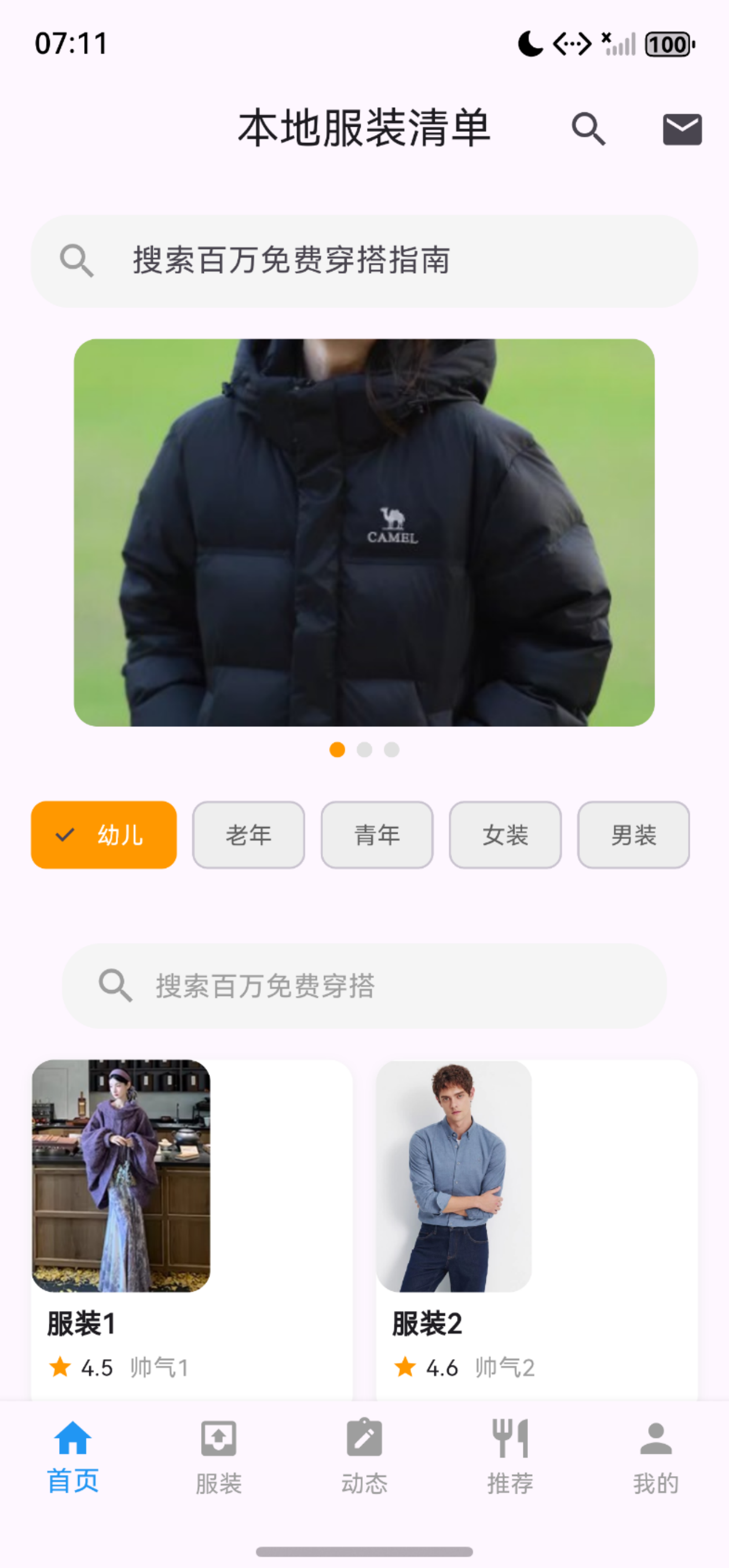
- 实现了应用的首页界面
- 包含搜索栏、轮播图、分类标签和服装卡片网格
- 支持下拉刷新和上拉加载更多功能
3.2. 功能验证
3.3. 程序实现
// pages/                   # 页面目录
// pages/home/home_page.dart   # 首页主页面
// 整合搜索栏、轮播、分类标签、服装卡片:

import 'package:flutter/material.dart';
import 'components/search_bar.dart' as custom;
import 'components/banner_section.dart';
import 'components/category_tab.dart';
import 'components/cloth_card.dart';
import '../../models/cloth_model.dart';
import 'package:flutter_harmonyos/pages/search/search_page.dart';

// 分页常量(可根据需求调整)
const int _pageSize = 4; // 每页加载数量
const int _maxPages = 3; // 最大页数(模拟无更多数据)

class HomePage extends StatefulWidget {
  const HomePage({super.key});

  @override
  State<HomePage> createState() => _HomePageState();
}

class _HomePageState extends State<HomePage> {
  List<ClothModel> _clothList = [];
  bool _isLoading = true; // 初始加载状态
  // 新增:上拉加载相关变量
  final ScrollController _scrollController = ScrollController();
  int _currentPage = 1; // 当前页码
  bool _isLoadingMore = false; // 是否正在加载更多
  bool _hasMoreData = true; // 是否还有更多数据

  // 统一的跳转搜索页方法
  void _navigateToSearchPage() {
    Navigator.push(
      context,
      MaterialPageRoute(builder: (context) => const SearchPage()),
    );
  }

  @override
  void initState() {
    super.initState();
    _loadClothData(_currentPage);
    // 新增:监听滚动事件(上拉加载核心)
    _scrollController.addListener(() {
      // 当滚动到距离底部100px以内,且不在加载中、还有更多数据时,触发加载更多
      if (_scrollController.position.pixels >=
              _scrollController.position.maxScrollExtent - 100 &&
          !_isLoadingMore &&
          _hasMoreData) {
        _loadMore();
      }
    });
  }

  @override
  void dispose() {
    // 新增:销毁滚动控制器,避免内存泄漏
    _scrollController.dispose();
    super.dispose();
  }

  // 修改:支持分页加载数据(传入页码)
  Future<void> _loadClothData(int page) async {
    // 初始加载/刷新时显示加载状态,上拉加载时标记_isLoadingMore
    if (page == 1) {
      setState(() => _isLoading = true);
    } else {
      setState(() => _isLoadingMore = true);
    }

    // 模拟网络请求延迟
    await Future.delayed(const Duration(seconds: 1));

    // 模拟不同页码返回不同测试数据
    final List<String> clothNames = [
      '服装1', '服装2', '服装3', '服装4',
      '服装5', '服装6', '服装7', '服装8',
      '服装9', '服装10', '服装11', '服装12'
    ];
    final List<String> clothSources = [
      '帅气1', '帅气2', '帅气3', '帅气4',
      '帅气5', '帅气6', '帅气7', '帅气8',
      '帅气9', '帅气10', '帅气11', '帅气12'
    ];

    // 计算当前页的起始/结束索引
    final startIndex = (page - 1) * _pageSize;
    final endIndex = startIndex + _pageSize;
    final newItems = <ClothModel>[];

    for (int i = startIndex; i < endIndex && i < clothNames.length; i++) {
      newItems.add(ClothModel(
        name: clothNames[i],
        image: 'assets/images/cloth${(i % 4) + 1}.jpg', // 复用4张图片
        source: clothSources[i],
        score: 4.5 + (i % 4) * 0.1,
      ));
    }

    setState(() {
      if (page == 1) {
        // 第一页/刷新:替换数据
        _clothList = newItems;
        _isLoading = false;
      } else {
        // 非第一页/上拉加载:追加数据
        _clothList.addAll(newItems);
        _isLoadingMore = false;
      }
      // 判断是否还有更多数据
      _hasMoreData = page < _maxPages;
    });
  }

  // 下拉刷新核心方法
  Future<void> _onRefresh() async {
    // 刷新时重置分页状态
    setState(() {
      _currentPage = 1;
      _hasMoreData = true;
    });
    await _loadClothData(1);
    // 刷新完成提示
    if (mounted) {
      ScaffoldMessenger.of(context).showSnackBar(
        const SnackBar(content: Text('数据刷新成功!')),
      );
    }
  }

  // 新增:上拉加载更多方法
  Future<void> _loadMore() async {
    // 避免重复加载
    if (_isLoadingMore || !_hasMoreData) return;
    // 页码+1
    _currentPage++;
    // 加载对应页码数据
    await _loadClothData(_currentPage);
  }

  @override
  Widget build(BuildContext context) {
    return Scaffold(
      appBar: AppBar(
        title: const Text('本地服装清单'),
        centerTitle: true,
        actions: [
          IconButton(
            icon: const Icon(Icons.search),
            onPressed: _navigateToSearchPage,
          ),
          IconButton(icon: const Icon(Icons.mail), onPressed: () {}),
        ],
      ),
      // 下拉刷新
      body: RefreshIndicator(
        onRefresh: _onRefresh,
        color: Colors.blue,
        // 绑定滚动控制器到可滚动组件
        child: _isLoading
            ? const Center(child: CircularProgressIndicator())
            : SingleChildScrollView(
                controller: _scrollController, // 新增:绑定滚动控制器
                padding: const EdgeInsets.all(16),
                physics: const AlwaysScrollableScrollPhysics(),
                child: Column(
                  crossAxisAlignment: CrossAxisAlignment.stretch,
                  children: [
                    GestureDetector(
                      onTap: _navigateToSearchPage,
                      child: custom.SearchBar(),
                    ),
                    const SizedBox(height: 16),
                    const BannerSection(),
                    const SizedBox(height: 16),
                    const CategoryTab(),
                    const SizedBox(height: 16),
                    GestureDetector(
                      onTap: _navigateToSearchPage,
                      child: Container(
                        margin: const EdgeInsets.all(16),
                        padding: const EdgeInsets.symmetric(horizontal: 16, vertical: 10),
                        decoration: BoxDecoration(
                          color: Colors.grey[100],
                          borderRadius: BorderRadius.circular(20),
                        ),
                        child: const Row(
                          children: [
                            Icon(Icons.search, color: Colors.grey),
                            SizedBox(width: 8),
                            Text('搜索百万免费穿搭', style: TextStyle(color: Colors.grey)),
                          ],
                        ),
                      ),
                    ),
                    // 服装卡片网格
                    GridView.builder(
                      shrinkWrap: true,
                      physics: const NeverScrollableScrollPhysics(),
                      gridDelegate: const SliverGridDelegateWithFixedCrossAxisCount(
                        crossAxisCount: 2,
                        crossAxisSpacing: 12,
                        mainAxisSpacing: 16,
                        childAspectRatio: 0.9,
                      ),
                      itemCount: _clothList.length,
                      itemBuilder: (_, index) => ClothCard(cloth: _clothList[index]),
                    ),
                    // 新增:上拉加载提示(加载中/无更多数据)
                    if (_isLoadingMore)
                      const Padding(
                        padding: EdgeInsets.symmetric(vertical: 16),
                        child: Center(child: CircularProgressIndicator()),
                      )
                    else if (!_hasMoreData)
                      const Padding(
                        padding: EdgeInsets.symmetric(vertical: 16),
                        child: Center(
                          child: Text(
                            '已加载全部服装',
                            style: TextStyle(color: Colors.grey, fontSize: 14),
                          ),
                        ),
                      ),
                  ],
                ),
              ),
      ),
    );
  }
}
4. lib/pages/cloth_show/cloth_show_page.dart
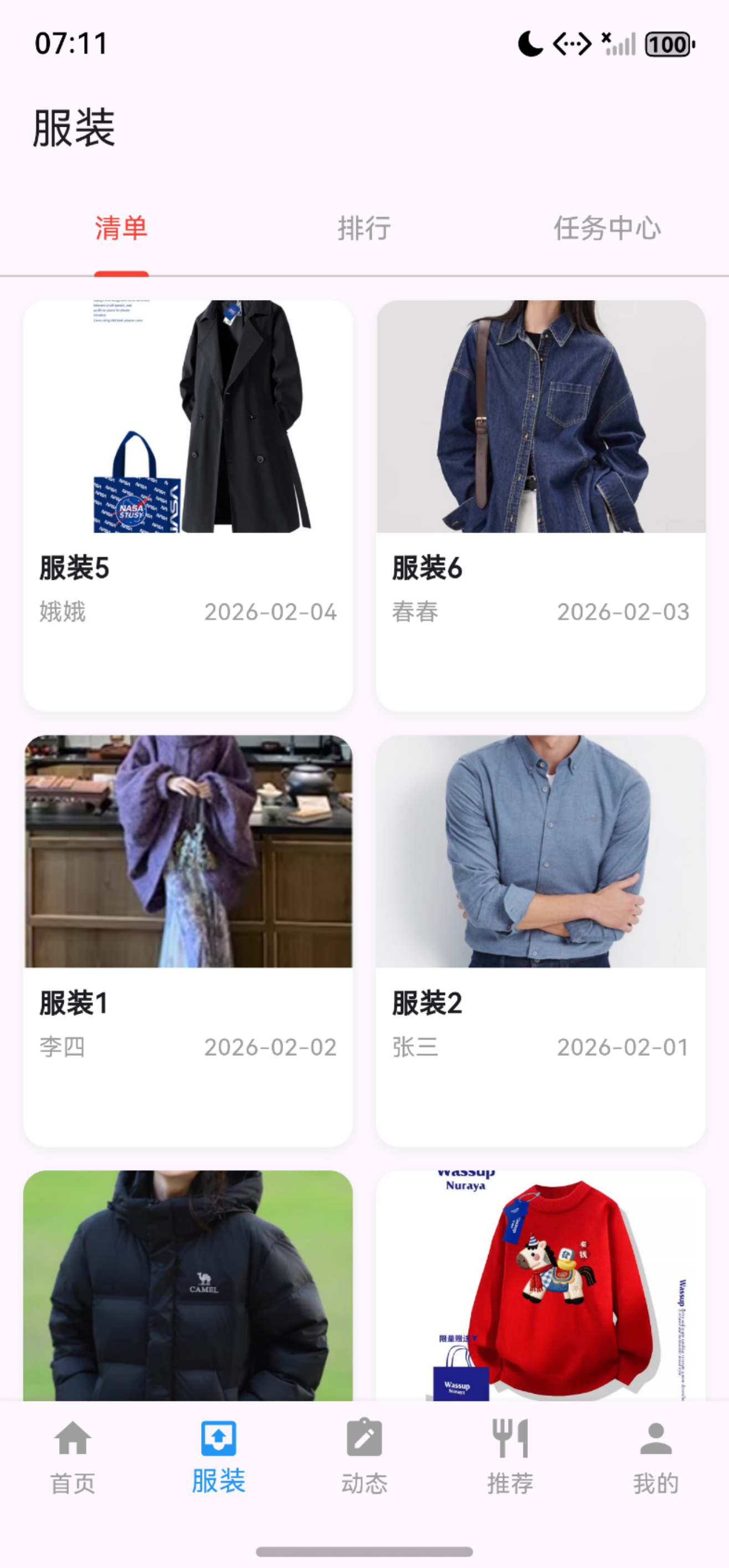
这是一个Flutter的服装展示页面组件,包含顶部Tab导航的服装展示页面,可以在三个子页面之间切换。
4.1. 主要功能
- 清单页 (ClothShowTab) - 展示服装列表
- 排行页 (ClothStarTab) - 展示服装排行
- 任务中心页 (TaskCenterTab) - 展示相关任务
4.2. 功能验证
4.3. 程序实现
// 服装主页面:lib/pages/cloth_show/cloth_show_page.dart
// 作用:作为服装模块根页面,实现顶部 TabBar + TabBarView,切换 3 个子页面。

import 'package:flutter/material.dart';
import 'tab/cloth_show_tab.dart';
import 'tab/cloth_star_tab.dart';
import 'tab/task_center_tab.dart';

class ClothShowPage extends StatefulWidget {
  const ClothShowPage({super.key});
  @override
  State<ClothShowPage> createState() => _ClothShowPageState();
}

class _ClothShowPageState extends State<ClothShowPage> with SingleTickerProviderStateMixin {
  late TabController _tabController;
  // 初始化Tab控制器(绑定3个Tab)
  @override
  void initState() {
    super.initState();
    _tabController = TabController(length: 3, vsync: this); // 3个Tab
  }
  // 销毁控制器,避免内存泄漏
  @override
  void dispose() {
    _tabController.dispose();
    super.dispose();
  }
  @override
  Widget build(BuildContext context) {
    return Scaffold(
      appBar: AppBar(
        title: const Text('服装'),
        bottom: TabBar(    // 顶部TabBar导航栏
          controller: _tabController,
          tabs: const [
            Tab(text: '清单'),
            Tab(text: '排行'),
            Tab(text: '任务中心'),
          ],
          indicatorColor: Colors.red, // 选中指示器颜色
          labelColor: Colors.red,      // 选中文字颜色
          unselectedLabelColor: Colors.grey, // 未选中文字颜色
        ),
      ),
      // 子页面容器(与TabBar联动)
      body: TabBarView(
        controller: _tabController,
        children: const [
          ClothShowTab(),   // 服装-清单页
          ClothStarTab(),   // 服装-排行页
          TaskCenterTab(), // 服装-任务中心页
        ],
      ),
    );
  }
}
5. lib/pages/cloth_note/cloth_note_page.dart
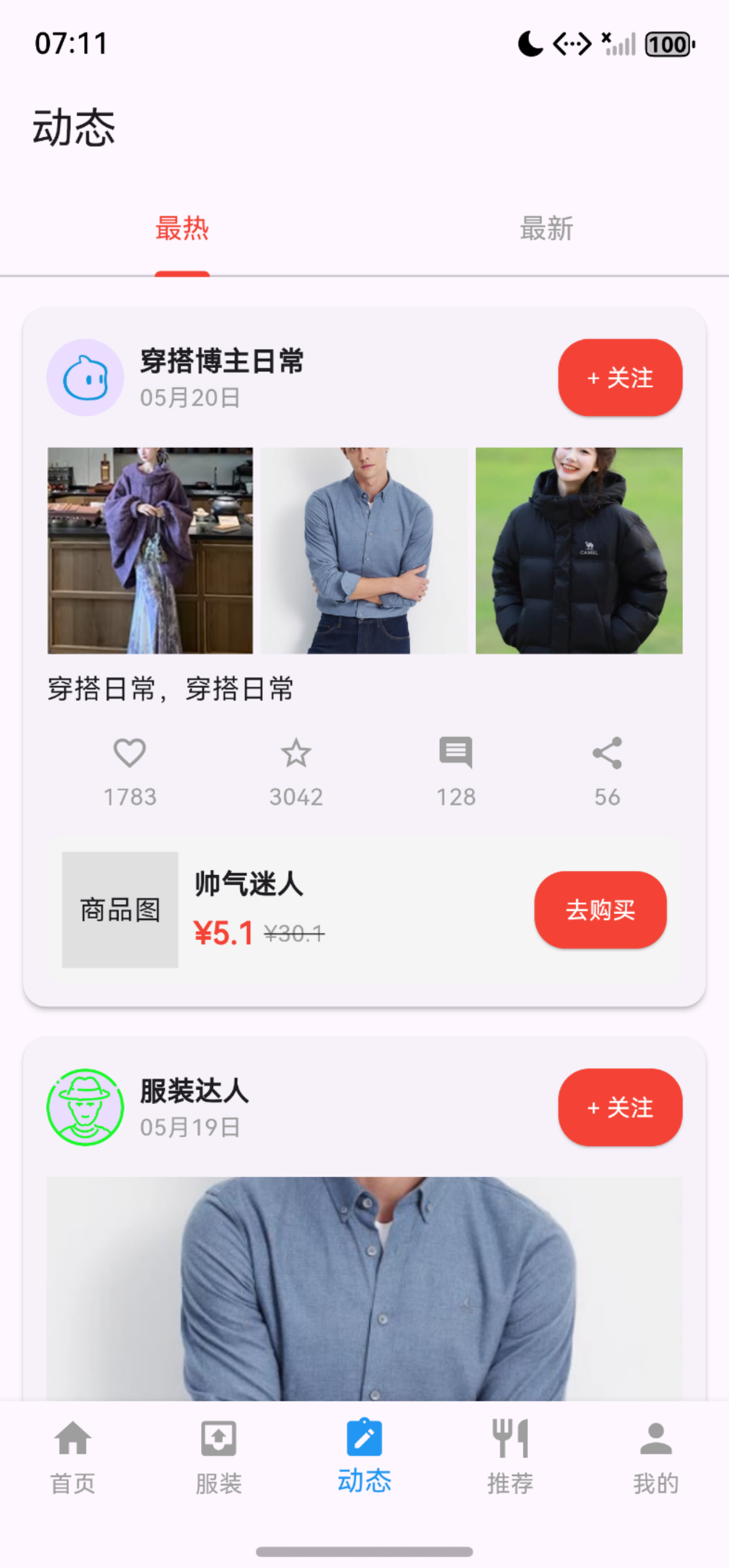
这是一个Flutter的服装动态页面组件,包含顶部Tab导航的服装动态页面,通过两个Tab切换展示不同类型的内容。
5.1. 主要功能
这个页面是服装动态模块的主入口,用户可以查看其他用户分享的穿搭内容,通过Tab切换浏览热门或最新动态。
-
最热动态 (ClothNoteHotTab) - 展示热门穿搭内容
-
最新动态 (ClothNoteNewTab) - 展示最新发布的穿搭内容
5.2. 功能验证
5.3. 程序实现
// cloth_note/           # 动态页面
// lib/pages/cloth_note/cloth_note_page.dart(动态)
import 'package:flutter/material.dart';
import 'package:flutter_harmonyos/pages/cloth_note/tab/cloth_note_hot_tab.dart';//导入最热页面
import 'package:flutter_harmonyos/pages/cloth_note/tab/cloth_note_new_tab.dart';//导入最新页面

class ClothNotePage extends StatefulWidget {
  const ClothNotePage({super.key});

  @override
  State<ClothNotePage> createState() => _ClothNotePageState();
}

class _ClothNotePageState extends State<ClothNotePage> with SingleTickerProviderStateMixin {
  late TabController _tabController;

  @override
  void initState() {
    super.initState();
    // 初始化Tab控制器(2个Tab:最热、最新)
    _tabController = TabController(length: 2, vsync: this);
  }

  @override
  void dispose() {
    // 销毁控制器,避免内存泄漏
    _tabController.dispose();
    super.dispose();
  }

  @override
  Widget build(BuildContext context) {
    return Scaffold(
      appBar: AppBar(
        title: const Text('动态'),
        bottom: TabBar(
          controller: _tabController,
          tabs: const [
            Tab(text: '最热'),
            Tab(text: '最新'),
          ],
          // 样式和服装页面保持一致
          indicatorColor: Colors.red,
          labelColor: Colors.red,
          unselectedLabelColor: Colors.grey,
        ),
      ),
      body: TabBarView(
        controller: _tabController,
        children: const [
          ClothNoteHotTab(),  // 最热Tab
          ClothNoteNewTab(),  // 最新Tab
        ],
      ),
    );
  }
}
6. lib/pages/wear_what/wear_what_page.dart
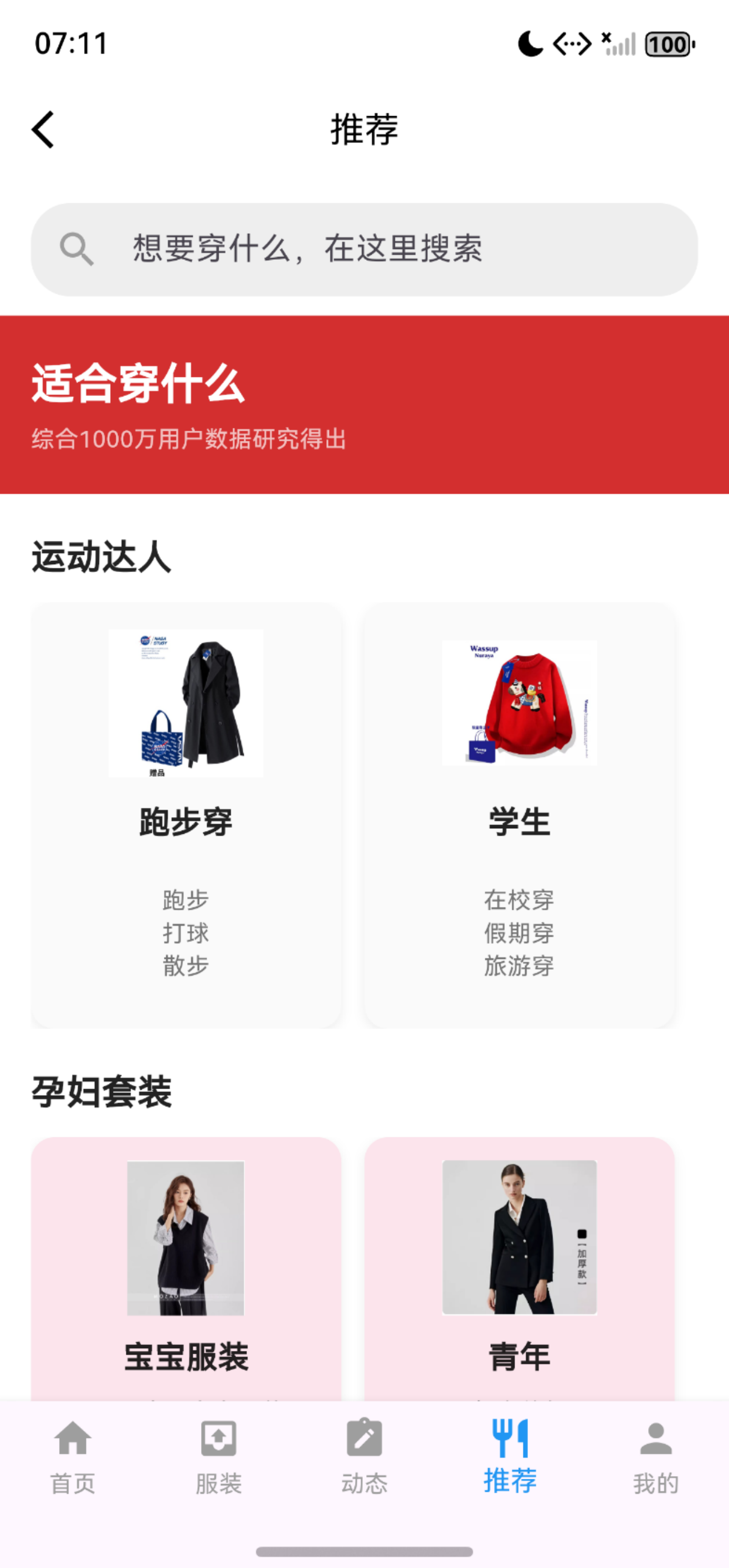
这是一个Flutter的推荐页面组件,这是一个穿搭推荐页面,包含个性化推荐功能。这个页面主要为用户提供个性化的穿搭推荐,特别关注特殊人群(运动爱好者、孕妇)的需求。
6.1. 主要功能
- 搜索框: 灰色背景的圆形搜索框,提示文本"想要穿什么,在这里搜索"
- 运动达人 - 适合运动场合的穿搭推荐
- 孕妇套装 - 针对孕妇的特殊穿搭需求
6.2. 功能验证
6.3. 程序实现
// wear_what/            # 推荐页面主页
// lib/pages/wear_what/wear_what_page.dart(推荐)
import 'package:flutter/material.dart';
import 'components/chronic_disease_card.dart';
import 'components/maternal_baby_card.dart';

// 推荐页面主入口
class WearWhatPage extends StatelessWidget {
  const WearWhatPage({super.key});

  // 推荐页面(WearWhatPage)的build方法中,替换搜索框部分
  @override
  Widget build(BuildContext context) {
    return Scaffold(
      appBar: AppBar(
        // AppBar配置(返回按钮、标题等)
        elevation: 0,
        backgroundColor: Colors.white,
        leading: IconButton(
          icon: const Icon(Icons.arrow_back_ios, color: Colors.black),
          onPressed: () => Navigator.pop(context),
        ),
        title: const Text(
          '推荐',
          style: TextStyle(color: Colors.black, fontSize: 18),
        ),
        centerTitle: true,
      ),
      backgroundColor: Colors.white,
      body: SingleChildScrollView(
        physics: const BouncingScrollPhysics(),
        child: Column(
          crossAxisAlignment: CrossAxisAlignment.start,
          children: [
            _buildHomeStyleSearchBar(),            // 搜索框
            _buildTitleSection(),                  // 红色标题栏
            _buildChronicDiseaseSection(context),  // 慢性病模块
            _buildMaternalBabySection(context),    //母婴研究
            const SizedBox(height: 20),
          ],
        ),
      ),
    );
  }
  // 把首页搜索框的实现方法加到WearWhatPage类中
  Widget _buildHomeStyleSearchBar() {
    return Container(
      margin: const EdgeInsets.symmetric(horizontal: 16, vertical: 10),
      decoration: BoxDecoration(
        color: Colors.grey[200],
        borderRadius: BorderRadius.circular(20),
      ),
      child: const TextField(
        decoration: InputDecoration(
          prefixIcon: Icon(Icons.search, color: Colors.grey),
          hintText: '想要穿什么,在这里搜索',
          border: InputBorder.none,
          contentPadding: EdgeInsets.symmetric(vertical: 12),
        ),
      ),
    );
  }

  // 构建红色标题栏
  Widget _buildTitleSection() {
    return Container(
      width: double.infinity,
      padding: const EdgeInsets.symmetric(horizontal: 16, vertical: 20),
      color: const Color(0xFFD32F2F),
      child: const Column(
        crossAxisAlignment: CrossAxisAlignment.start,
        children: [
          Text(
            '适合穿什么',
            style: TextStyle(
              color: Colors.white,
              fontSize: 22,
              fontWeight: FontWeight.bold,
            ),
          ),
          SizedBox(height: 4),
          Text(
            '综合1000万用户数据研究得出',
            style: TextStyle(
              color: Colors.white70,
              fontSize: 12,
            ),
          ),
        ],
      ),
    );
  }

  // 构建慢性病研究院模块
  Widget _buildChronicDiseaseSection(BuildContext context) {
    return Column(
      crossAxisAlignment: CrossAxisAlignment.start,
      children: [
        const Padding(
          padding: EdgeInsets.only(left: 16, top: 20, bottom: 10),
          child: Text(
            '运动达人',
            style: TextStyle(
              fontSize: 18,
              fontWeight: FontWeight.bold,
              color: Colors.black87,
            ),
          ),
        ),
        ChronicDiseaseCard(),
      ],
    );
  }

  // 构建母婴研究院模块
  Widget _buildMaternalBabySection(BuildContext context) {
    return Column(
      crossAxisAlignment: CrossAxisAlignment.start,
      children: [
        const Padding(
          padding: EdgeInsets.only(left: 16, top: 20, bottom: 10),
          child: Text(
            '孕妇套装',
            style: TextStyle(
              fontSize: 18,
              fontWeight: FontWeight.bold,
              color: Colors.black87,
            ),
          ),
        ),
        MaternalBabyCard(),
      ],
    );
  }
}
7. lib/pages/mine/mine_page.dart
这是用户个人中心页面,展示用户信息和提供个性化功能入口,提供了完整的个人信息展示和个人数据管理功能。
7.1. 主要功能
- 我的收藏 → MyCollectionPage
- 浏览历史 → MyHistoryPage
- 我的发布 → MyPublishPage
- 设置 → SettingsPage
- 帮助与反馈 → FeedbackPage
7.2. 功能验证
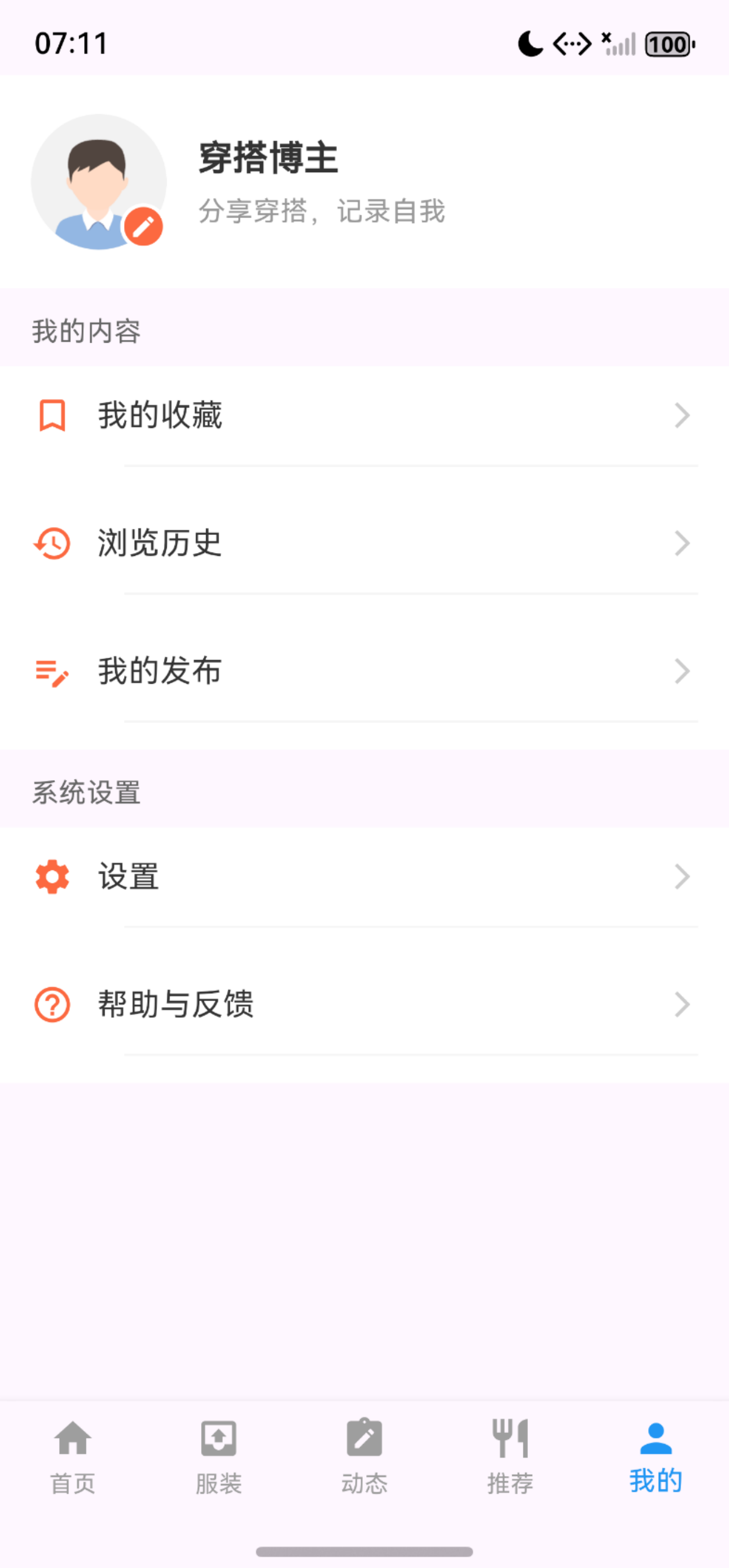
7.3. 程序实现
// lib/pages/mine/mine_page.dart
import 'package:flutter/material.dart';
import 'components/user_info_widget.dart';
import 'components/mine_section_widget.dart';
import 'components/mine_function_item.dart';
// 导入子页面
import 'my_collection_page.dart';
import 'my_history_page.dart';
import 'settings_page.dart';
import 'feedback_page.dart';
import 'my_publish_page.dart';

class MinePage extends StatelessWidget {
  const MinePage({super.key});

  @override
  Widget build(BuildContext context) {
    return Scaffold(
      body: ListView(
        padding: EdgeInsets.only(
          bottom: MediaQuery.of(context).padding.bottom + 50,
        ),
        children: [
          // 1. 顶部用户信息:增加上边距 + 替换成本地头像
          // 增加顶部间距
          Padding(
            padding: const EdgeInsets.only(top: 20), // 可根据需求调整数值(如20/25)
            child: UserInfoWidget(
              userName: '穿搭达人',
              signature: '分享穿搭,记录自我',
              // 替换为本地头像
              avatarUrl: 'assets/images/mine/avatar_default.png',
            ),
          ),

          // 2. 我的内容分组
          const MineSectionWidget(title: '我的内容'),
          Column(
            children: [
              MineFunctionItem(
                icon: Icons.bookmark_border,
                title: '我的收藏',
                onTap: () => Navigator.push(
                  context,
                  MaterialPageRoute(builder: (context) => const MyCollectionPage()),
                ),
              ),
              MineFunctionItem(
                icon: Icons.history,
                title: '浏览历史',
                onTap: () => Navigator.push(
                  context,
                  MaterialPageRoute(builder: (context) => const MyHistoryPage()),
                ),
              ),
              MineFunctionItem(
                icon: Icons.edit_note,
                title: '我的发布',
                onTap: () => Navigator.push(
                  context,
                  MaterialPageRoute(builder: (context) => const MyPublishPage()),
                ),
              ),
            ],
          ),

          // 3. 系统设置分组
          const MineSectionWidget(title: '系统设置'),
          MineFunctionItem(
            icon: Icons.settings,
            title: '设置',
            onTap: () => Navigator.push(
              context,
              MaterialPageRoute(builder: (context) => const SettingsPage()),
            ),
          ),
          MineFunctionItem(
            icon: Icons.help_outline,
            title: '帮助与反馈',
            onTap: () => Navigator.push(
              context,
              MaterialPageRoute(builder: (context) => const FeedbackPage()),
            ),
          ),
        ],
      ),
    );
  }
}

作为“人工智能6S店”的官方数字引擎,为AI开发者与企业提供一个覆盖软硬件全栈、一站式门户。
更多推荐


 12
12 0
0- 0


 已为社区贡献8条内容

所有评论(0)