
【开源鸿蒙跨平台开发先锋训练营】DAY15~DAY19 动效能力全场景集成 + 登录注册模拟实现
本文基于开源鸿蒙跨平台开发先锋训练营实战项目,记录在 Flutter + 鸿蒙技术栈下,完成底部选项卡我的页面中登录 / 注册功能的实现。
【开源鸿蒙跨平台开发先锋训练营】DAY15~DAY19 动效能力全场景集成 + 登录注册模拟实现
📚 目 录
【开源鸿蒙跨平台开发先锋训练营】DAY15~DAY19 动效能力全场景集成 + 登录注册模拟实现
📝 摘 要
本文基于开源鸿蒙跨平台开发先锋训练营实战项目,记录在 Flutter + 鸿蒙技术栈下,完成底部选项卡我的页面中登录 / 注册功能的实现。采用 Hive CE+ SharedPreferences 混合存储方法,结合 GetX 路由管理,封装了通用 UI 组件(带密码切换的输入框、隐私协议勾选框),实现从表单校验、本地存储到状态同步的完整登录注册闭环。同时,对我的页面进行了 UI 适配,并将登录注册入口整合到设置页面。
🔍 1 概述
1.1 开发背景
在开源鸿蒙跨平台开发场景下,我的页面是应用的核心模块之一,需支持登录 / 注册、用户信息展示、功能入口聚合、系统设置等能力。本项目聚焦我的页面与登录、注册功能的模拟实现,兼顾跨平台适配性与用户体验。
1.2 开发目标
✅ 实现底部选项卡导航,支持首页、美食、动态、推荐、我的页面切换;
✅ 实现完整的登录 / 注册功能(表单校验、验证码倒计时、本地存储、状态同步);
✅ 将登录注册入口整合到设置页面,形成账号管理闭环;
✅ 采用鸿蒙适配技术栈,保证跨平台兼容性。
1.3 核心技术栈
📌 Flutter:跨平台 UI 框架;
📌 Hive CE / Hive CE Flutter:本地对象存储;
📌 SharedPreferences:轻量键值对存储(存储 Token 等简单数据) ;
📌 GetX:路由管理与状态管理;
📌 Fluttertoast:轻量提示框组件。
🛠️ 2 开发环境准备
2.1 环境配置
1. 基础环境:
🚀 Flutter环境:安装 Flutter 3.27.5版本,配置flutter-OHOS-1.0.1(鸿蒙适配分支)分支(兼容 OpenHarmony);
📱 鸿蒙环境:安装DevEco Studio 6.0.0 Release,配置 OpenHarmony SDK(API Version 20(6.0.0.47)),创建鸿蒙模拟器;
📂 项目初始化:基于现有flutter_harmonyos工程,调整目录结构,安装依赖。
2. 依赖安装:
通过 pubspec.yaml 声明并安装项目依赖,核心依赖说明如下:
dependencies:
  flutter:
    sdk: flutter
  cupertino_icons: ^1.0.8
  http: ^1.6.0                         # 网络请求核心库(鸿蒙兼容)
  cached_network_image: ^3.4.1         # 图片缓存(解决鸿蒙设备图片重复加载卡顿)
  pull_to_refresh: ^2.0.0              # 下拉刷新(适配鸿蒙触控交互)
  flutter_rating_bar: ^4.0.1           # 美食评分组件(鸿蒙UI适配)
  dio: 5.0.0                           # 网络请求封装
  json_annotation: ^4.9.0              # 数据解析
  infinite_scroll_pagination: 4.0.0    # 专注上拉分页(适配鸿蒙异步逻辑)
  easy_refresh: ^3.4.0                 # 轻量化刷新(适配鸿蒙触控交互)
  carousel_slider: ^5.1.1              # 轮播图组件
  # 存储相关(核心)
  shared_preferences: ^2.5.3           # 用于本地存储历史记录,存Token
  hive_ce: ^2.19.2                     # 存用户信息
  hive_ce_flutter: ^2.3.4              # Hive Flutter适配
  # UI/工具
  fluttertoast: ^8.2.2                 # 提示框(登录/注册结果)
  get: ^4.6.5                          # 轻量状态管理(简化页面跳转)

dev_dependencies:
  flutter_test:
    sdk: flutter
  flutter_lints: ^5.0.0
  json_serializable: ^6.9.5
  build_runner: ^2.4.15        # 代码构建工具
  hive_ce_generator: ^1.9.2      # Hive模型代码生成
2.2 本地资源配置
在 pubspec.yaml 中声明本地图片资源,适配我的页面头像、功能图标等场景:
  assets:
    - assets/images/
    - assets/images/foods/               # 美食卡片图片
    - assets/images/food_show/           # 美食页相关图片
    - assets/images/food_show/dynamic/   # 清单页动态图
    - assets/images/food_show/star/      # 排行页达人头像
    - assets/images/food_show/task/      # 任务中心图标
    # 新增美食笔记(动态)模块的本地资源声明
    - assets/images/food_note/           # 动态模块根资源
    - assets/images/food_note/avatar/    # 用户头像资源
    - assets/images/food_note/dynamic/   # 动态图片资源
    - assets/images/eat_what/            # 推荐页面资源
    - assets/images/mine/                # 我的页面资源
2.3 我的页面目录结构
页面采用组件化 + 分层设计,其中包含注册、登录所需文件,目录清晰、职责明确:
lib/pages/mine/
├── components/          # 通用UI组件
│   ├── auth_input.dart          # 带密码切换的输入框
│   ├── privacy_checkbox.dart    # 隐私协议勾选框
│   ├── user_info_widget.dart    # 用户信息展示组件
│   └── mine_function_item.dart  # 功能条目组件
├── models/              # 数据模型
│   ├── user_model.dart          # 适配Hive的用户信息模型
│   └── mine_function_model.dart # 我的页面功能条目模型
├── login_page.dart      # 登录页
├── register_page.dart   # 注册页
├── mine_page.dart       # 我的页面(主页面)
├── settings_page.dart   # 设置页面
└── my_collection_page.dart # 我的收藏子页面
🧩 3 我的页面功能实现
3.1 主页面入口实现
在 main.dart 中完成全局初始化与路由配置,是整个应用的入口:
// lib/pages/mine/mine_page.dart
import 'package:flutter/material.dart';
import 'components/user_info_widget.dart';
import 'components/mine_section_widget.dart';
import 'components/mine_function_item.dart';
// 导入子页面
import 'my_collection_page.dart';
import 'my_history_page.dart';
import 'settings_page.dart';
import 'feedback_page.dart';
import 'my_publish_page.dart';

class MinePage extends StatelessWidget {
  const MinePage({super.key});

  @override
  Widget build(BuildContext context) {
    return Scaffold(
      body: ListView(
        padding: EdgeInsets.only(
          bottom: MediaQuery.of(context).padding.bottom + 50,
        ),
        children: [
          // 1. 顶部用户信息:增加上边距 + 替换成本地头像
          // 增加顶部间距
          Padding(
            padding: const EdgeInsets.only(top: 20), // 可根据需求调整数值(如20/25)
            child: UserInfoWidget(
              userName: '美食爱好者',
              signature: '分享美食,记录生活',
              // 替换为本地头像
              avatarUrl: 'assets/images/mine/avatar_default.png',
            ),
          ),

          // 2. 我的内容分组
          const MineSectionWidget(title: '我的内容'),
          Column(
            children: [
              MineFunctionItem(
                icon: Icons.bookmark_border,
                title: '我的收藏',
                onTap: () => Navigator.push(
                  context,
                  MaterialPageRoute(builder: (context) => const MyCollectionPage()),
                ),
              ),
              MineFunctionItem(
                icon: Icons.history,
                title: '浏览历史',
                onTap: () => Navigator.push(
                  context,
                  MaterialPageRoute(builder: (context) => const MyHistoryPage()),
                ),
              ),
              MineFunctionItem(
                icon: Icons.edit_note,
                title: '我的发布',
                onTap: () => Navigator.push(
                  context,
                  MaterialPageRoute(builder: (context) => const MyPublishPage()),
                ),
              ),
            ],
          ),

          // 3. 系统设置分组
          const MineSectionWidget(title: '系统设置'),
          MineFunctionItem(
            icon: Icons.settings,
            title: '设置',
            onTap: () => Navigator.push(
              context,
              MaterialPageRoute(builder: (context) => const SettingsPage()),
            ),
          ),
          MineFunctionItem(
            icon: Icons.help_outline,
            title: '帮助与反馈',
            onTap: () => Navigator.push(
              context,
              MaterialPageRoute(builder: (context) => const FeedbackPage()),
            ),
          ),
        ],
      ),
    );
  }
}
3.2 核心组件实现
(1)带密码切换的输入框 auth_input.dart
封装支持手机号 / 密码 / 验证码输入的通用组件,自动处理密码可见性切换:
// auth_input.dart  # 带图标输入框
// lib/pages/mine/components/auth_input.dart
import 'package:flutter/material.dart';

class AuthInput extends StatefulWidget {
  final TextEditingController controller;
  final String hintText;
  final IconData icon;
  final bool isPassword; // 是否是密码框

  const AuthInput({
    super.key,
    required this.controller,
    required this.hintText,
    required this.icon,
    this.isPassword = false,
  });

  @override
  State<AuthInput> createState() => _AuthInputState();
}

class _AuthInputState extends State<AuthInput> {
  // 控制密码可见性
  bool _obscureText = true;

  @override
  Widget build(BuildContext context) {
    return Container(
      margin: const EdgeInsets.symmetric(vertical: 8),
      decoration: BoxDecoration(
        border: Border.all(color: Colors.grey[300]!),
        borderRadius: BorderRadius.circular(8),
      ),
      child: TextField(
        controller: widget.controller,
        // 用状态变量控制密码是否隐藏
        obscureText: widget.isPassword ? _obscureText : false,
        keyboardType: widget.isPassword ? TextInputType.text : TextInputType.phone,
        decoration: InputDecoration(
          prefixIcon: Icon(widget.icon, color: Colors.green),
          hintText: widget.hintText,
          border: InputBorder.none,
          contentPadding: const EdgeInsets.symmetric(vertical: 14),
          // 密码框添加显示/隐藏按钮
          suffixIcon: widget.isPassword
              ? IconButton(
                  icon: Icon(
                    _obscureText ? Icons.visibility_off : Icons.visibility,
                    color: Colors.grey[500],
                  ),
                  // 点击切换密码可见性
                  onPressed: () {
                    setState(() {
                      _obscureText = !_obscureText;
                    });
                  },
                )
              : null,
        ),
      ),
    );
  }
}
(2)隐私协议勾选框 privacy_checkbox.dart
实现富文本展示 + 状态回调,满足隐私合规要求,登录 / 注册页强制校验:
// privacy_checkbox.dart  # 隐私勾选框
// lib/pages/mine/components/privacy_checkbox.dart
import 'package:flutter/material.dart';

class PrivacyCheckbox extends StatefulWidget {
  final Function(bool?) onChanged; // 勾选状态回调

  const PrivacyCheckbox({super.key, required this.onChanged});

  @override
  State<PrivacyCheckbox> createState() => _PrivacyCheckboxState();
}

class _PrivacyCheckboxState extends State<PrivacyCheckbox> {
  bool _isChecked = false;

  @override
  Widget build(BuildContext context) {
    return Row(
      children: [
        Checkbox(
          value: _isChecked,
          onChanged: (value) {
            setState(() => _isChecked = value!);
            widget.onChanged(value);
          },
          activeColor: Colors.green,
        ),
        const Text.rich(
          TextSpan(
            text: '我已阅读并同意',
            style: TextStyle(fontSize: 12, color: Colors.grey),
            children: [
              TextSpan(
                text: '《用户协议》',
                style: TextStyle(color: Colors.green),
              ),
              TextSpan(text: '和'),
              TextSpan(
                text: '《隐私政策》',
                style: TextStyle(color: Colors.green),
              ),
            ],
          ),
        ),
      ],
    );
  }
}
3.3 子页面实现
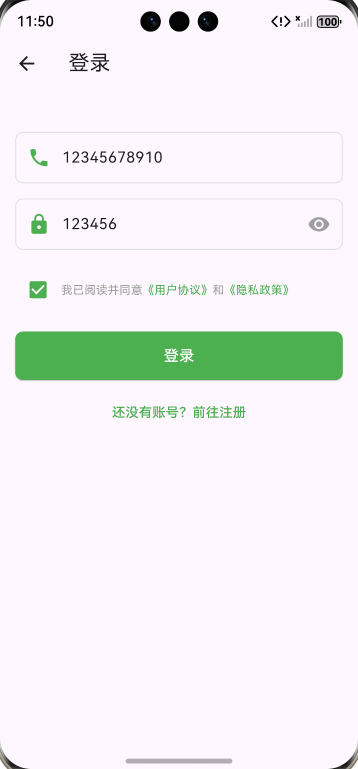
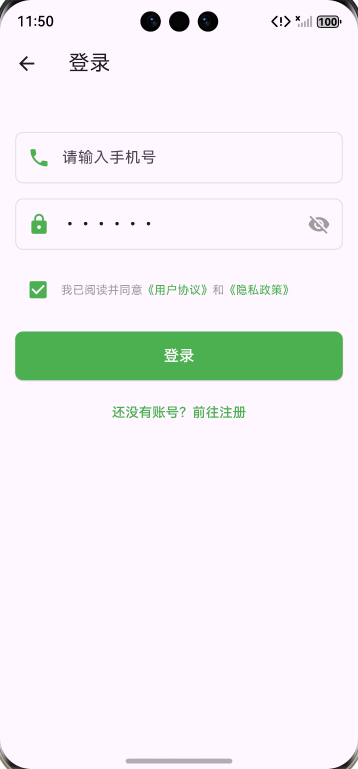
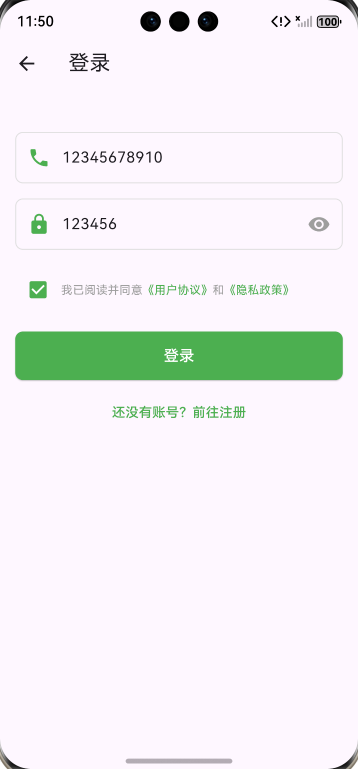
(1)登录页 login_page.dart
完成表单校验、模拟登录、本地存储与路由跳转,核心逻辑:
// login_page.dart      # 登录页
// lib/pages/mine/login_page.dart
import 'package:flutter/material.dart';
import 'package:fluttertoast/fluttertoast.dart';
import 'package:get/get.dart';
import 'components/auth_input.dart';
import 'components/privacy_checkbox.dart';
import 'register_page.dart';
// 导入用户模型(相对路径,根据你的目录结构)
import 'models/user_model.dart';
// 导入存储工具类(相对路径,根据你的目录结构)
import 'package:flutter_harmonyos/utils/storage_util.dart';

class LoginPage extends StatefulWidget {
  const LoginPage({super.key});

  @override
  State<LoginPage> createState() => _LoginPageState();
}

class _LoginPageState extends State<LoginPage> {
  final _phoneController = TextEditingController();
  final _pwdController = TextEditingController();
  bool _isPrivacyAgreed = false;

  // 登录逻辑
void _handleLogin() {
  String phone = _phoneController.text.trim();
  String password = _pwdController.text.trim();

  // 简单校验
  if (phone.isEmpty || phone.length != 11) {
    Fluttertoast.showToast(msg: '请输入正确的手机号');
    return;
  }
  if (password.isEmpty || password.length < 6) {
    Fluttertoast.showToast(msg: '密码长度不能少于6位');
    return;
  }
  if (!_isPrivacyAgreed) {
    Fluttertoast.showToast(msg: '请同意用户协议和隐私政策');
    return;
  }

  // 模拟登录API请求(后续替换为真实接口)
  Future.delayed(const Duration(seconds: 1), () {
    // 用 fromLogin 工厂构造函数创建用户
    UserModel user = UserModel.fromLogin(
      phone: phone,
      token: 'mock_token_${DateTime.now().millisecondsSinceEpoch}',
      userName: '美食用户$phone', // 替换原来的 nickname
    );

    // 存储用户信息
    StorageUtil.saveUser(user);
    Fluttertoast.showToast(msg: '登录成功');

    // 清空路由栈并跳转到首页(替换首页路由)
    Get.offAllNamed('/home');
  });
}

  @override
  Widget build(BuildContext context) {
    return Scaffold(
      appBar: AppBar(title: const Text('登录')),
      body: Padding(
        padding: const EdgeInsets.all(16.0),
        child: Column(
          children: [
            const SizedBox(height: 20),
            // 手机号输入框
            AuthInput(
              controller: _phoneController,
              hintText: '请输入手机号',
              icon: Icons.phone,
            ),
            // 密码输入框
            AuthInput(
              controller: _pwdController,
              hintText: '请输入密码',
              icon: Icons.lock,
              isPassword: true,
            ),
            const SizedBox(height: 10),
            // 隐私勾选框
            PrivacyCheckbox(
              onChanged: (value) => setState(() => _isPrivacyAgreed = value!),
            ),
            const SizedBox(height: 20),
            // 登录按钮
            SizedBox(
              width: double.infinity,
              child: ElevatedButton(
                onPressed: _isPrivacyAgreed ? _handleLogin : null,
                style: ElevatedButton.styleFrom(
                  backgroundColor: Colors.green,
                  padding: const EdgeInsets.symmetric(vertical: 14),
                  shape: RoundedRectangleBorder(
                    borderRadius: BorderRadius.circular(8),
                  ),
                ),
                child: const Text(
                  '登录',
                  style: TextStyle(fontSize: 16, color: Colors.white),
                ),
              ),
            ),
            const SizedBox(height: 10),
            // 前往注册
            TextButton(
              onPressed: () => Get.to(const RegisterPage()),
              child: const Text(
                '还没有账号?前往注册',
                style: TextStyle(color: Colors.green),
              ),
            ),
          ],
        ),
      ),
    );
  }
}
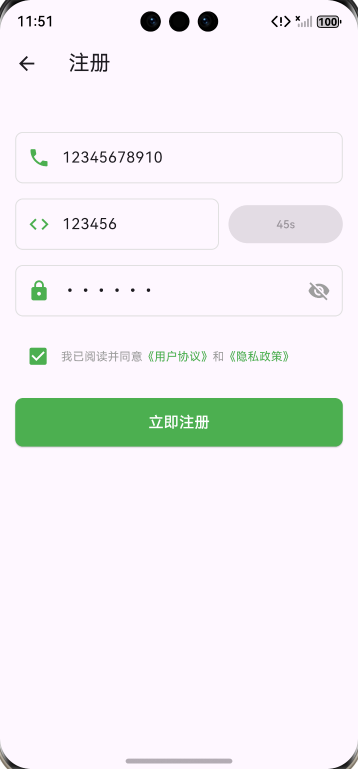
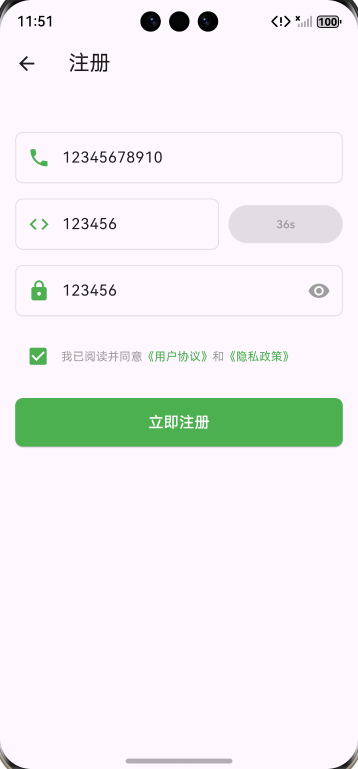
(2)注册页 register_page.dart
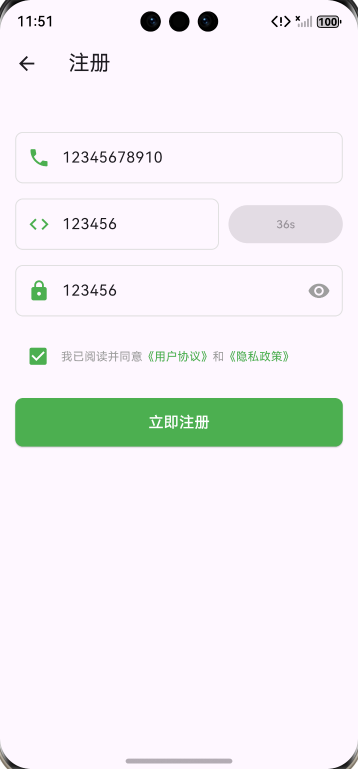
新增验证码 60 秒倒计时功能,复用登录页校验逻辑,流程闭环:
// register_page.dart   # 注册页
// lib/pages/mine/register_page.dart
import 'dart:async'; // 导入Timer所在的dart:async库
import 'package:flutter/material.dart';
import 'package:fluttertoast/fluttertoast.dart';
import 'package:get/get.dart';
import 'components/auth_input.dart';
import 'components/privacy_checkbox.dart';

class RegisterPage extends StatefulWidget {
  const RegisterPage({super.key});

  @override
  State<RegisterPage> createState() => _RegisterPageState();
}

class _RegisterPageState extends State<RegisterPage> {
  final _phoneController = TextEditingController();
  final _codeController = TextEditingController();
  final _pwdController = TextEditingController();
  bool _isPrivacyAgreed = false;
  bool _isCounting = false; // 验证码倒计时
  int _countdown = 60;

  // 获取验证码
  void _getCode() {
    String phone = _phoneController.text.trim();
    if (phone.isEmpty || phone.length != 11) {
      Fluttertoast.showToast(msg: '请输入正确的手机号');
      return;
    }

    // 开始倒计时
    setState(() => _isCounting = true);
    Timer.periodic(const Duration(seconds: 1), (timer) {
      setState(() {
        _countdown--;
        if (_countdown == 0) {
          timer.cancel();
          _isCounting = false;
          _countdown = 60;
        }
      });
    });

    // 模拟获取验证码API请求
    Fluttertoast.showToast(msg: '验证码已发送');
  }

  // 注册逻辑
  void _handleRegister() {
    String phone = _phoneController.text.trim();
    String code = _codeController.text.trim();
    String password = _pwdController.text.trim();

    // 简单校验
    if (phone.isEmpty || phone.length != 11) {
      Fluttertoast.showToast(msg: '请输入正确的手机号');
      return;
    }
    if (code.isEmpty || code.length != 6) {
      Fluttertoast.showToast(msg: '请输入6位验证码');
      return;
    }
    if (password.isEmpty || password.length < 6) {
      Fluttertoast.showToast(msg: '密码长度不能少于6位');
      return;
    }
    if (!_isPrivacyAgreed) {
      Fluttertoast.showToast(msg: '请同意用户协议和隐私政策');
      return;
    }

    // 模拟注册API请求
    Future.delayed(const Duration(seconds: 1), () {
      Fluttertoast.showToast(msg: '注册成功');
      // 存储Token/用户信息(后续对接存储层)
      // 跳转回登录页
      Get.back();
    });
  }

  @override
  Widget build(BuildContext context) {
    return Scaffold(
      appBar: AppBar(title: const Text('注册')),
      body: Padding(
        padding: const EdgeInsets.all(16.0),
        child: Column(
          children: [
            const SizedBox(height: 20),
            // 手机号输入框
            AuthInput(
              controller: _phoneController,
              hintText: '请输入手机号',
              icon: Icons.phone,
            ),
            // 验证码输入框 + 获取验证码按钮
            Row(
              children: [
                Expanded(
                  child: AuthInput(
                    controller: _codeController,
                    hintText: '请输入验证码',
                    icon: Icons.code,
                  ),
                ),
                const SizedBox(width: 10),
                SizedBox(
                  width: 120,
                  child: ElevatedButton(
                    onPressed: _isCounting ? null : _getCode,
                    style: ElevatedButton.styleFrom(
                      backgroundColor: _isCounting ? Colors.grey : Colors.green,
                    ),
                    child: Text(
                      _isCounting ? '${_countdown}s' : '获取验证码',
                      style: const TextStyle(fontSize: 12),
                    ),
                  ),
                ),
              ],
            ),
            // 密码输入框
            AuthInput(
              controller: _pwdController,
              hintText: '请设置密码',
              icon: Icons.lock,
              isPassword: true,
            ),
            const SizedBox(height: 10),
            // 隐私勾选框
            PrivacyCheckbox(
              onChanged: (value) => setState(() => _isPrivacyAgreed = value!),
            ),
            const SizedBox(height: 20),
            // 注册按钮
            SizedBox(
              width: double.infinity,
              child: ElevatedButton(
                onPressed: _handleRegister,
                style: ElevatedButton.styleFrom(
                  backgroundColor: Colors.green,
                  padding: const EdgeInsets.symmetric(vertical: 14),
                  shape: RoundedRectangleBorder(
                    borderRadius: BorderRadius.circular(8),
                  ),
                ),
                child: const Text(
                  '立即注册',
                  style: TextStyle(fontSize: 16, color: Colors.white),
                ),
              ),
            ),
          ],
        ),
      ),
    );
  }
}
(3)我的页面 mine_page.dart
动态渲染登录状态,适配底部安全区,整合功能入口:
// lib/pages/mine/mine_page.dart
import 'package:flutter/material.dart';
import 'components/user_info_widget.dart';
import 'components/mine_section_widget.dart';
import 'components/mine_function_item.dart';
// 导入子页面
import 'my_collection_page.dart';
import 'my_history_page.dart';
import 'settings_page.dart';
import 'feedback_page.dart';
import 'my_publish_page.dart';

class MinePage extends StatelessWidget {
  const MinePage({super.key});

  @override
  Widget build(BuildContext context) {
    return Scaffold(
      body: ListView(
        padding: EdgeInsets.only(
          bottom: MediaQuery.of(context).padding.bottom + 50,
        ),
        children: [
          // 1. 顶部用户信息:增加上边距 + 替换成本地头像
          // 增加顶部间距
          Padding(
            padding: const EdgeInsets.only(top: 20), // 可根据需求调整数值(如20/25)
            child: UserInfoWidget(
              userName: '美食爱好者',
              signature: '分享美食,记录生活',
              // 替换为本地头像
              avatarUrl: 'assets/images/mine/avatar_default.png',
            ),
          ),

          // 2. 我的内容分组
          const MineSectionWidget(title: '我的内容'),
          Column(
            children: [
              MineFunctionItem(
                icon: Icons.bookmark_border,
                title: '我的收藏',
                onTap: () => Navigator.push(
                  context,
                  MaterialPageRoute(builder: (context) => const MyCollectionPage()),
                ),
              ),
              MineFunctionItem(
                icon: Icons.history,
                title: '浏览历史',
                onTap: () => Navigator.push(
                  context,
                  MaterialPageRoute(builder: (context) => const MyHistoryPage()),
                ),
              ),
              MineFunctionItem(
                icon: Icons.edit_note,
                title: '我的发布',
                onTap: () => Navigator.push(
                  context,
                  MaterialPageRoute(builder: (context) => const MyPublishPage()),
                ),
              ),
            ],
          ),

          // 3. 系统设置分组
          const MineSectionWidget(title: '系统设置'),
          MineFunctionItem(
            icon: Icons.settings,
            title: '设置',
            onTap: () => Navigator.push(
              context,
              MaterialPageRoute(builder: (context) => const SettingsPage()),
            ),
          ),
          MineFunctionItem(
            icon: Icons.help_outline,
            title: '帮助与反馈',
            onTap: () => Navigator.push(
              context,
              MaterialPageRoute(builder: (context) => const FeedbackPage()),
            ),
          ),
        ],
      ),
    );
  }
}
(4)设置页面 settings_page.dart
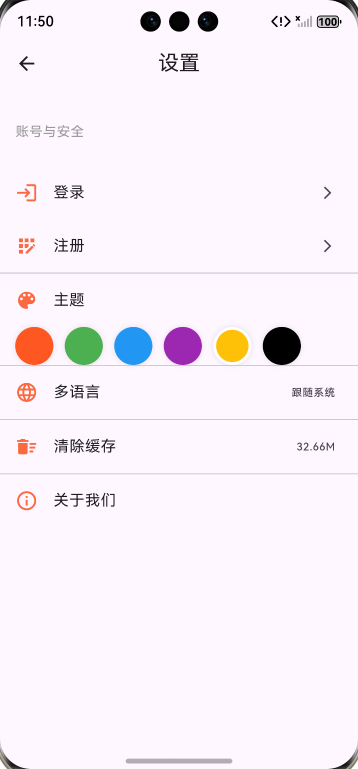
整合账号安全与系统设置,动态渲染登录状态:
// settings_page.dart  # 设置页面
import 'package:flutter/material.dart';
// 导入登录/注册页和存储工具
import 'login_page.dart';
import 'register_page.dart';
import 'package:flutter_harmonyos/utils/storage_util.dart';

class SettingsPage extends StatefulWidget {
  const SettingsPage({super.key});

  @override
  State<SettingsPage> createState() => _SettingsPageState();
}

class _SettingsPageState extends State<SettingsPage> {
  // 登录状态标记
  bool _isLogin = false;

  // 主题颜色选择
  List<Color> themeColors = [
    const Color(0xFFFF5722),
    const Color(0xFF4CAF50),
    const Color(0xFF2196F3),
    const Color(0xFF9C27B0),
    const Color(0xFFFFC107),
    Colors.black,
  ];
  int selectedColorIndex = 4; // 默认选中橙色

  // 检查登录状态
  void _checkLoginStatus() {
    setState(() {
      _isLogin = StorageUtil.isLogin();
    });
  }

  @override
  void initState() {
    super.initState();
    _checkLoginStatus();
  }

  @override
  Widget build(BuildContext context) {
    return Scaffold(
      appBar: AppBar(
        title: const Text('设置'),
        centerTitle: true,
      ),
      body: ListView(
        children: [
          // 账号与安全板块(拆分登录/注册)
          const ListTile(
            title: Text(
              '账号与安全',
              style: TextStyle(fontSize: 14, color: Color(0xFF999999)),
            ),
            contentPadding: EdgeInsets.only(left: 16, top: 16, bottom: 8),
          ),

          // 动态显示:未登录→显示登录+注册;已登录→显示退出登录
          if (!_isLogin)
            Column(
              children: [
                // 登录入口
                ListTile(
                  leading: const Icon(Icons.login, color: Color(0xFFFC6940)),
                  title: const Text('登录'),
                  trailing: const Icon(Icons.arrow_forward_ios, size: 16),
                  onTap: () async {
                    // 跳转到登录页,返回后刷新状态
                    await Navigator.push(
                      context,
                      MaterialPageRoute(builder: (c) => const LoginPage()),
                    );
                    _checkLoginStatus();
                  },
                ),
                // 注册入口(现在用到了register_page.dart,警告消失)
                ListTile(
                  leading: const Icon(Icons.app_registration, color: Color(0xFFFC6940)),
                  title: const Text('注册'),
                  trailing: const Icon(Icons.arrow_forward_ios, size: 16),
                  onTap: () async {
                    // 跳转到注册页,注册成功后返回刷新状态
                    await Navigator.push(
                      context,
                      MaterialPageRoute(builder: (c) => const RegisterPage()),
                    );
                    _checkLoginStatus();
                  },
                ),
              ],
            )
          else
            // 已登录:显示退出登录
            ListTile(
              leading: const Icon(Icons.logout, color: Color(0xFFFC6940)),
              title: const Text('退出登录'),
              trailing: const Icon(Icons.arrow_forward_ios, size: 16),
              onTap: () async {
                // 执行退出登录
                await StorageUtil.clearUser();
                _checkLoginStatus();
                ScaffoldMessenger.of(context).showSnackBar(
                  const SnackBar(content: Text('退出登录成功')),
                );
              },
            ),

          const Divider(height: 1),

          // 主题切换
          const ListTile(
            title: Text('主题'),
            leading: Icon(Icons.color_lens, color: Color(0xFFFC6940)),
          ),
          Padding(
            padding: const EdgeInsets.symmetric(horizontal: 16),
            child: Wrap(
              spacing: 12,
              children: List.generate(themeColors.length, (index) {
                return GestureDetector(
                  onTap: () {
                    setState(() {
                      selectedColorIndex = index;
                    });
                  },
                  child: Container(
                    width: 40,
                    height: 40,
                    decoration: BoxDecoration(
                      color: themeColors[index],
                      borderRadius: BorderRadius.circular(20),
                      border: selectedColorIndex == index
                          ? Border.all(color: Colors.white, width: 3)
                          : null,
                      boxShadow: [
                        BoxShadow(
                          color: Colors.black.withOpacity(0.1),
                          blurRadius: 4,
                        ),
                      ],
                    ),
                  ),
                );
              }),
            ),
          ),
          const Divider(height: 1),

          // 多语言
          ListTile(
            title: const Text('多语言'),
            leading: const Icon(Icons.language, color: Color(0xFFFC6940)),
            trailing: const Text('跟随系统'),
            onTap: () {
              // 多语言选择逻辑
            },
          ),
          const Divider(height: 1),

          // 清除缓存
          ListTile(
            title: const Text('清除缓存'),
            leading: const Icon(Icons.delete_sweep, color: Color(0xFFFC6940)),
            trailing: const Text('32.66M'),
            onTap: () {
              // 清除缓存逻辑
              ScaffoldMessenger.of(context).showSnackBar(
                const SnackBar(content: Text('缓存已清除')),
              );
            },
          ),
          const Divider(height: 1),

          // 关于我们
          ListTile(
            title: const Text('关于我们'),
            leading: const Icon(Icons.info_outline, color: Color(0xFFFC6940)),
            onTap: () {
              // 跳转关于页面
            },
          ),
        ],
      ),
    );
  }
}
3.4 存储工具类
存储工具类 storage_util.dart,采用 Hive CE + SharedPreferences 混合存储方案,封装用户信息与 Token 操作,保证登录状态闭环:
// 开发存储工具类(lib/utils/storage_util.dart)
// lib/utils/storage_util.dart
import 'package:hive_ce_flutter/hive_ce_flutter.dart';
import 'package:shared_preferences/shared_preferences.dart';
// 导入用户模型
import 'package:flutter_harmonyos/pages/mine/models/user_model.dart';

class StorageUtil {
  // SharedPreferences实例(修正:变量名统一为_prefs)
  static SharedPreferences? _prefs;
  // Hive用户存储箱(修正:变量名统一为_userBox)
  static Box<UserModel>? _userBox;

  // 初始化存储(带异常捕获,移除adapters判断)
  static Future<void> init() async {
    try {
      // 初始化Hive社区版
      await Hive.initFlutter();
      // 注册UserModel适配器(hive_ce重复注册会自动忽略,无需判断adapters)
      Hive.registerAdapter(UserModelAdapter());
      // 打开Hive存储箱
      _userBox = await Hive.openBox<UserModel>('user_box');
      // 初始化SharedPreferences
      _prefs = await SharedPreferences.getInstance();
      print("StorageUtil初始化成功");
    } catch (e) {
      print("StorageUtil初始化失败: $e");
    }
  }

  // Token相关
  static Future<void> saveToken(String token) async {
    if (_prefs == null) return;
    await _prefs!.setString('token', token);
  }

  static String? getToken() {
    return _prefs?.getString('token');
  }

  static Future<void> clearToken() async {
    if (_prefs == null) return;
    await _prefs!.remove('token');
  }

  // 用户信息相关
  static Future<void> saveUser(UserModel user) async {
    if (_userBox == null) return;
    await _userBox!.put('current_user', user);
  }

  static UserModel? getCurrentUser() {
    return _userBox?.get('current_user');
  }

  static Future<void> clearUser() async {
    if (_userBox == null) return;
    await _userBox!.delete('current_user');
    await clearToken();
  }

  // 检查是否已登录(带空指针防护)
  static bool isLogin() {
    return _prefs != null && getToken() != null && getToken()!.isNotEmpty;
  }
}
📱 4 运行验证与效果展示
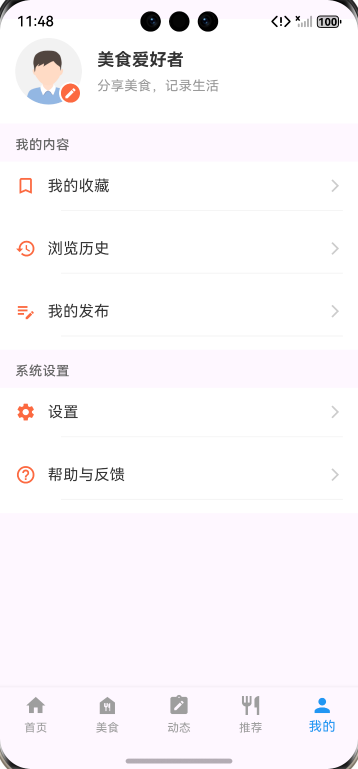
4.1 我的主页面
显示用户头像、昵称、个性签名,展示我的收藏 / 浏览历史 / 我的发布功能列表,底部安全区适配完整,无内容遮挡。
4.2 子页面效果
登录 / 注册页:输入框支持密码可见性切换,隐私协议勾选后按钮可点击,验证码倒计时状态反馈清晰;
设置页面:未登录时显示「登录 / 注册」入口,已登录时显示「退出登录」,主题切换功能支持多颜色选择,交互流畅。
🎯 5 总结与拓展
5.1 总结
本阶段完成了底部选项卡导航、我的页面、登录 / 注册体系的完整实现,核心亮点:
✅ 跨平台适配:采用 Hive CE 等鸿蒙适配依赖,保证在鸿蒙设备上稳定运行;
✅ 组件化开发:封装通用 UI 组件,登录 / 注册页复用率 100%,降低代码冗余;
✅ 状态闭环管理:登录状态动态渲染,退出登录时自动清除存储,保证数据一致性。
5.2 拓展方向
完善登录/注册功能:替换模拟登录 / 注册请求,完善登录/注册功能;
主题切换优化:将主题颜色存储到本地,实现重启应用后主题状态保留;
隐私协议跳转:为《用户协议》《隐私政策》添加跳转链接,完善合规性。
📚 6 参考资料
🔗 参考前文:
https://blog.csdn.net/m0_74451345/article/details/156915775?spm=1001.2014.3001.5502
https://blog.csdn.net/m0_74451345/article/details/157024056?spm=1001.2014.3001.5502
https://blog.csdn.net/m0_74451345/article/details/157032531?spm=1001.2014.3001.5502
https://blog.csdn.net/m0_74451345/article/details/157094159?spm=1001.2014.3001.5502
https://blog.csdn.net/m0_74451345/article/details/157464927?spm=1001.2014.3001.5502
https://blog.csdn.net/m0_74451345/article/details/157505773?spm=1001.2014.3001.5502
https://blog.csdn.net/m0_74451345/article/details/157542849?spm=1001.2014.3001.5502
https://blog.csdn.net/m0_74451345/article/details/157583805?spm=1001.2014.3001.5501
https://blog.csdn.net/m0_74451345/article/details/157657991?spm=1001.2014.3001.5501
🔗 参考三方库:
OpenHarmony兼容的三方库:https://gitcode.com/openharmony-tpc/flutter_packages
🔗 文章中AtomGit开源项目个人仓库链接:
https://atomgit.com/zhangxupeng2025/flutter_HmProject
ℹ️ 博客说明:本文为训练营实战记录,代码可在我的AtomGit个人公开仓库克隆到本地配置后直接运行(部分资源需要本地配置,比如需替换本地图片资源),文中也有许多待优化点,欢迎大家关注交流~
最后,
欢迎加入开源鸿蒙跨平台社区:

作为“人工智能6S店”的官方数字引擎,为AI开发者与企业提供一个覆盖软硬件全栈、一站式门户。
更多推荐



 4
4 0
0- 0


 已为社区贡献10条内容

所有评论(0)