
基于React Native鸿蒙跨平台实现应用实现了邀请好友功能,通过handleInviteFriend函数生成邀请链接并执行分享操作
社交分享与裂变是电商/零售类应用提升用户增长、促进交易转化的核心功能模块,这份 React Native 分享赚钱页面代码,从数据建模、分享交互、奖励体系、用户激励四个维度构建了完整的社交裂变体验,既满足用户的分享操作需求,又通过奖励机制驱动用户主动传播。本文将深度拆解其技术设计思路,并提供鸿蒙(HarmonyOS)ArkTS 端的完整适配方案,为跨端社交裂变体系开发提供可落地的技术参考。
1. 社交裂变场景
分享裂变场景涉及商品、分享渠道、奖励规则等多维度数据,代码通过 TypeScript 类型定义实现了数据结构的强类型约束,保证代码的健壮性和可维护性:
// 商品类型
type Product = {
  id: string;
  name: string;
  price: number;
  originalPrice: number;
  image: string;
  discount: number;
};

// 分享渠道类型
type ShareChannel = 'wechat' | 'weibo' | 'qq' | 'copy-link' | 'more';
类型设计亮点:
- 商品类型全覆盖:包含 ID、名称、现价、原价、图片、折扣率等核心字段,满足商品展示和分享的全维度需求;
- 分享渠道枚举化:通过联合类型限定分享渠道,避免字符串硬编码导致的错误,同时提升代码可读性;
- 类型语义化:类型命名(Product/ShareChannel)符合业务场景,降低团队协作的认知成本;
- 数值类型精准:价格、折扣等数值字段使用 number 类型,保证计算精度;
- 扩展性预留:类型定义预留了扩展空间,可便捷添加商品分类、分享统计等字段。
2. 状态架构:
分享裂变页面的核心是商品列表 + 奖励规则 + 分享统计的动态展示,代码通过 React 的 useState 实现了裂变体系的精细化状态管理:
const [products] = useState<Product[]>([
  { id: '1', name: 'iPhone 15 Pro Max', price: 9999, originalPrice: 10999, image: 'https://via.placeholder.com/100x100', discount: 10 },
  // 其他商品...
]);

const [rewards] = useState([
  { id: '1', title: '分享商品奖励', amount: 10, condition: '分享任意商品' },
  // 其他奖励...
]);
状态设计亮点:
- 数据维度完整:商品数据包含价格对比、折扣信息,奖励数据包含金额、触发条件,形成完整的裂变激励闭环;
- 不可变状态管理:使用
useState初始化后未定义更新逻辑,符合静态展示页面的状态管理策略; - 数据结构标准化:所有列表项均包含唯一 ID,便于 React 列表渲染的 key 绑定,提升渲染性能;
- 奖励规则清晰:奖励数据包含标题、金额、触发条件,便于后续扩展动态奖励规则;
- 价格体系合理:商品数据同时存储现价和原价,折扣率与价格差严格对应(如 iPhone 15 Pro Max 折扣10%),保证数据一致性。
3. 分享交互逻辑:
分享是裂变体系的核心交互,代码设计了统一的分享处理函数,支持多渠道适配、商品关联、反馈提示的完整交互流程:
const handleShare = (channel: ShareChannel, itemId?: string) => {
  let message = '';

  switch (channel) {
    case 'wechat':
      message = itemId ? `分享商品 ${products.find(p => p.id === itemId)?.name} 到微信` : '分享到微信';
      break;
    // 其他渠道处理...
  }

  Alert.alert('分享', message, [
    { text: '取消', style: 'cancel' },
    { text: '确定', onPress: () => {
      Alert.alert('成功', '内容已分享!');
    }}
  ]);
};
交互设计亮点:
- 渠道适配灵活:通过 ShareChannel 类型约束,支持微信、微博、QQ、复制链接等多渠道分享;
- 商品关联分享:支持传入商品 ID,实现指定商品的精准分享,满足单品裂变需求;
- 反馈层级清晰:先展示分享确认弹窗,确认后展示成功提示,交互流程符合用户认知;
- 错误处理友好:提供取消按钮并标记 style: ‘cancel’,符合 React Native Alert 组件的最佳实践;
- 文案场景化:根据不同渠道和是否关联商品,生成个性化分享文案,提升用户体验;
- 扩展预留充分:函数参数设计支持后续添加分享统计、奖励发放等逻辑。
4. 邀请裂变设计:
好友邀请是裂变增长的核心场景,代码实现了邀请链接生成 + 分享引导 + 双向奖励的完整邀请逻辑:
const handleInviteFriend = () => {
  Alert.alert(
    '邀请好友',
    '您的专属邀请链接已生成,分享给好友即可获得奖励',
    [
      { text: '取消', style: 'cancel' },
      { text: '分享链接', onPress: () => handleShare('wechat') }
    ]
  );
};
邀请设计亮点:
- 激励逻辑清晰:明确告知用户邀请奖励机制,提升邀请意愿;
- 操作路径简短:邀请弹窗直接提供分享链接选项,减少用户操作步骤;
- 复用核心逻辑:调用已有的 handleShare 函数,避免代码冗余;
- 文案引导性强:强调"专属邀请链接"和"获得奖励",强化用户的邀请动力;
- 扩展空间充足:可便捷添加邀请码、邀请统计、奖励预览等功能。
代码通过 StyleSheet.create 构建了一套适配分享裂变场景的视觉规范,核心设计原则围绕激励性、易用性、转化性展开:
分享裂变场景需要传递收益、奖励、行动的视觉感受,色彩体系的设计贴合场景特性:
| 元素类型 | 颜色值 | 语义 |
|---|---|---|
| 主色调 | #3b82f6 |
统计数字、激活态导航,传递"收益、专业"的语义 |
| 价格色 | #ef4444 |
商品现价,红色系传递"优惠、促销"的语义 |
| 奖励色 | #10b981 |
奖励金额,绿色系传递"收益、增长"的语义 |
| 折扣色 | #f59e0b |
折扣标签、邀请按钮,金色系传递"优惠、奖励"的语义 |
| 背景色 | #f5f7fa |
页面整体背景,浅灰色调提升专业感 |
| 卡片背景 | #ffffff |
所有功能卡片采用白色背景,提升内容可读性 |
| 文本主色 | #1e293b |
标题、商品名称,保证核心信息的可读性 |
| 文本次要色 | #64748b |
说明文本、规则,保证可读性的同时不抢视觉焦点 |
| 辅助色 | #fef3c7 |
折扣标签背景,浅金色系强化优惠感知 |
所有功能模块采用统一的卡片样式,保证视觉一致性和层次感:
- 白色背景(
#ffffff) - 12px 圆角(
borderRadius: 12) - 轻微阴影(
elevation: 1)提升空间感 - 16px 内边距保证内容呼吸空间
- 12px 上下间距,视觉节奏舒适
- 一致的阴影参数(offsetX: 0, offsetY: 1, opacity: 0.1, radius: 2)
| 元素类型 | 设计规范 | 交互体验 |
|---|---|---|
| 分享渠道图标 | 50px 圆形 + 浅灰背景,emoji 图标提升识别度 | 点击区域充足,视觉识别性强 |
| 分享按钮 | 16px 圆角 + 蓝色背景,文字白色 + 12px 字号 | 视觉突出,符合分享操作的行动指引 |
| 邀请按钮 | 6px 圆角 + 金色背景,文字白色 + 16px 字号 | 大尺寸按钮提升点击转化率 |
| 价格展示 | 现价红色加粗,原价浅灰色删除线,折扣金色标签 | 价格对比强烈,优惠感知直观 |
| 奖励金额 | 绿色加粗,突出展示收益金额 | 强化奖励感知,提升分享动力 |
将 React Native 分享裂变页面迁移至鸿蒙平台,核心是基于 ArkTS + ArkUI 实现类型系统、状态管理、交互逻辑、视觉规范的对等还原,同时适配鸿蒙的组件特性和布局范式,保证跨端裂变体验的一致性和转化效果。
1. 核心架构
鸿蒙端适配遵循类型复用、逻辑对等、体验统一的原则,业务逻辑和视觉规范 100% 复用,仅需适配平台特有 API 和组件语法:
@Entry
@Component
struct ShareApp {
  // 类型定义:对等实现 TypeScript 类型 → 接口定义
  interface Product {
    id: string;
    name: string;
    price: number;
    originalPrice: number;
    image: string;
    discount: number;
  }

  type ShareChannel = 'wechat' | 'weibo' | 'qq' | 'copy-link' | 'more';

  // 状态管理:对等实现 useState → @State
  @State products: Product[] = [/* 商品列表 */];
  @State rewards: Array<{ id: string, title: string, amount: number, condition: string }> = [/* 奖励列表 */];

  // 业务逻辑:完全复用 RN 端实现
  handleShare(channel: ShareChannel, itemId?: string) {/* 分享处理 */}
  handleInviteFriend() {/* 邀请好友 */}

  // 页面构建:镜像 RN 端布局结构
  build() {
    Column() {
      // 头部区域
      // 滚动内容区
      // 底部导航
    }
  }
}
| React Native 特性 | 鸿蒙 ArkUI 对应实现 | 适配关键说明 |
|---|---|---|
| TypeScript 类型 | TypeScript 接口/类型 | 类型定义完全复用,保证类型安全 |
useState |
@State 装饰器 |
状态初始化与数据结构完全复用 |
TouchableOpacity |
Button + onClick |
可点击组件的交互逻辑复用 |
Alert.alert |
AlertDialog.show |
弹窗 API 语法差异,交互逻辑对等 |
StyleSheet |
链式样式 | 样式属性 100% 复用,保证视觉一致 |
Array.map |
ForEach 组件 |
商品/奖励列表渲染语法差异,逻辑一致 |
ScrollView |
Scroll 组件 |
滚动容器语法差异,功能一致 |
| 绝对定位 | position: Position.Fixed |
底部导航定位语法差异,效果一致 |
| 文本删除线 | decoration: TextDecoration.LineThrough |
原价展示语法差异,视觉效果一致 |
| 图片展示 | Image 组件 |
商品图片展示语法差异,属性对等 |
3. 鸿蒙代码
// 鸿蒙 ArkTS 完整实现
@Entry
@Component
struct ShareApp {
// 类型定义
interface Product {
id: string;
name: string;
price: number;
originalPrice: number;
image: string;
discount: number;
}
type ShareChannel = 'wechat' | 'weibo' | 'qq' | 'copy-link' | 'more';
// 状态管理
@State products: Product[] = [
{ id: '1', name: 'iPhone 15 Pro Max', price: 9999, originalPrice: 10999, image: 'https://via.placeholder.com/100x100', discount: 10 },
{ id: '2', name: '小米13 Ultra', price: 5999, originalPrice: 6499, image: 'https://via.placeholder.com/100x100', discount: 8 },
{ id: '3', name: '戴尔XPS 13', price: 8999, originalPrice: 9999, image: 'https://via.placeholder.com/100x100', discount: 10 },
{ id: '4', name: '索尼WH-1000XM5', price: 2499, originalPrice: 2999, image: 'https://via.placeholder.com/100x100', discount: 17 }
];
@State rewards: Array<{ id: string, title: string, amount: number, condition: string }> = [
{ id: '1', title: '分享商品奖励', amount: 10, condition: '分享任意商品' },
{ id: '2', title: '邀请好友奖励', amount: 50, condition: '好友首次下单' },
{ id: '3', title: '裂变奖励', amount: 20, condition: '好友通过分享链接购买' }
];
// 分享处理函数
handleShare(channel: ShareChannel, itemId?: string) {
let message = '';
switch (channel) {
case 'wechat':
message = itemId ? `分享商品 ${this.products.find(p => p.id === itemId)?.name} 到微信` : '分享到微信';
break;
case 'weibo':
message = itemId ? `分享商品 ${this.products.find(p => p.id === itemId)?.name} 到微博` : '分享到微博';
break;
case 'qq':
message = itemId ? `分享商品 ${this.products.find(p => p.id === itemId)?.name} 到QQ` : '分享到QQ';
break;
case 'copy-link':
message = '链接已复制到剪贴板';
break;
case 'more':
message = '更多分享方式';
break;
}
AlertDialog.show({
title: '分享',
message: message,
cancel: {
value: '取消',
action: () => {}
},
confirm: {
value: '确定',
action: () => {
AlertDialog.show({
title: '成功',
message: '内容已分享!',
confirm: { value: '确定' }
});
}
}
});
}
// 邀请好友处理函数
handleInviteFriend() {
AlertDialog.show({
title: '邀请好友',
message: '您的专属邀请链接已生成,分享给好友即可获得奖励',
cancel: {
value: '取消',
action: () => {}
},
confirm: {
value: '分享链接',
action: () => this.handleShare('wechat')
}
});
}
build() {
Column()
.flex(1)
.backgroundColor('#f5f7fa')
.safeArea(true) {
// 头部
Column()
.padding(16)
.backgroundColor('#ffffff')
.borderBottom({ width: 1, color: '#e2e8f0' }) {
Text('分享赚钱')
.fontSize(20)
.fontWeight(FontWeight.Bold)
.fontColor('#1e293b')
.marginBottom(4);
Text('分享商品获取奖励')
.fontSize(14)
.fontColor('#64748b');
}
// 滚动内容区
Scroll()
.flex(1)
.marginTop(12) {
Column() {
// 分享收益概览
Column()
.backgroundColor('#ffffff')
.marginLeft(16)
.marginRight(16)
.marginBottom(12)
.borderRadius(12)
.padding(16)
.shadow({ color: '#000', offsetX: 0, offsetY: 1, opacity: 0.1, radius: 2 }) {
Row()
.justifyContent(FlexAlign.SpaceAround) {
// 已分享
Column()
.alignItems(ItemAlign.Center) {
Text('12')
.fontSize(20)
.fontWeight(FontWeight.Bold)
.fontColor('#3b82f6');
Text('已分享')
.fontSize(12)
.fontColor('#64748b')
.marginTop(4);
}
// 被分享
Column()
.alignItems(ItemAlign.Center) {
Text('3')
.fontSize(20)
.fontWeight(FontWeight.Bold)
.fontColor('#3b82f6');
Text('被分享')
.fontSize(12)
.fontColor('#64748b')
.marginTop(4);
}
// 总收益
Column()
.alignItems(ItemAlign.Center) {
Text('¥85')
.fontSize(20)
.fontWeight(FontWeight.Bold)
.fontColor('#3b82f6');
Text('总收益')
.fontSize(12)
.fontColor('#64748b')
.marginTop(4);
}
}
}
// 分享方式选择
Column()
.backgroundColor('#ffffff')
.marginLeft(16)
.marginRight(16)
.marginBottom(12)
.borderRadius(12)
.padding(16)
.shadow({ color: '#000', offsetX: 0, offsetY: 1, opacity: 0.1, radius: 2 }) {
Text('选择分享方式')
.fontSize(16)
.fontWeight(FontWeight.Medium)
.fontColor('#1e293b')
.marginBottom(12);
Row()
.justifyContent(FlexAlign.SpaceBetween) {
// 微信
Column()
.alignItems(ItemAlign.Center)
.flexBasis('22%')
.onClick(() => this.handleShare('wechat')) {
Column()
.width(50)
.height(50)
.borderRadius(25)
.backgroundColor('#f1f5f9')
.alignItems(ItemAlign.Center)
.justifyContent(FlexAlign.Center)
.marginBottom(8) {
Text('💬')
.fontSize(18);
}
Text('微信')
.fontSize(12)
.fontColor('#64748b');
}
// 微博
Column()
.alignItems(ItemAlign.Center)
.flexBasis('22%')
.onClick(() => this.handleShare('weibo')) {
Column()
.width(50)
.height(50)
.borderRadius(25)
.backgroundColor('#f1f5f9')
.alignItems(ItemAlign.Center)
.justifyContent(FlexAlign.Center)
.marginBottom(8) {
Text('>Weibo')
.fontSize(18);
}
Text('微博')
.fontSize(12)
.fontColor('#64748b');
}
// QQ
Column()
.alignItems(ItemAlign.Center)
.flexBasis('22%')
.onClick(() => this.handleShare('qq')) {
Column()
.width(50)
.height(50)
.borderRadius(25)
.backgroundColor('#f1f5f9')
.alignItems(ItemAlign.Center)
.justifyContent(FlexAlign.Center)
.marginBottom(8) {
Text('Q')
.fontSize(18);
}
Text('QQ')
.fontSize(12)
.fontColor('#64748b');
}
// 复制链接
Column()
.alignItems(ItemAlign.Center)
.flexBasis('22%')
.onClick(() => this.handleShare('copy-link')) {
Column()
.width(50)
.height(50)
.borderRadius(25)
.backgroundColor('#f1f5f9')
.alignItems(ItemAlign.Center)
.justifyContent(FlexAlign.Center)
.marginBottom(8) {
Text('🔗')
.fontSize(18);
}
Text('复制链接')
.fontSize(12)
.fontColor('#64748b');
}
}
}
// 可分享商品
Column()
.backgroundColor('#ffffff')
.marginLeft(16)
.marginRight(16)
.marginBottom(12)
.borderRadius(12)
.padding(16)
.shadow({ color: '#000', offsetX: 0, offsetY: 1, opacity: 0.1, radius: 2 }) {
Text('热门分享商品')
.fontSize(16)
.fontWeight(FontWeight.Medium)
.fontColor('#1e293b')
.marginBottom(12);
Column() {
ForEach(this.products, (product: Product) => {
Row()
.alignItems(ItemAlign.Center)
.paddingVertical(12)
.borderBottom({ width: 1, color: '#e2e8f0' }) {
Image(product.image)
.width(50)
.height(50)
.borderRadius(6)
.marginRight(12);
Column()
.flexGrow(1) {
Text(product.name)
.fontSize(14)
.fontColor('#1e293b')
.marginBottom(4);
Row()
.alignItems(ItemAlign.Center) {
Text(`¥${product.price}`)
.fontSize(16)
.fontWeight(FontWeight.Bold)
.fontColor('#ef4444')
.marginRight(8);
Text(`¥${product.originalPrice}`)
.fontSize(12)
.fontColor('#94a3b8')
.decoration(TextDecoration.LineThrough)
.marginRight(8);
Text(`${product.discount}% OFF`)
.fontSize(12)
.fontColor('#f59e0b')
.backgroundColor('#fef3c7')
.paddingHorizontal(4)
.paddingVertical(2)
.borderRadius(4);
}
}
Button()
.backgroundColor('#3b82f6')
.paddingHorizontal(12)
.paddingVertical(6)
.borderRadius(16)
.onClick(() => this.handleShare('wechat', product.id)) {
Text('分享')
.fontColor('#ffffff')
.fontSize(12);
}
}
})
}
}
// 分享奖励
Column()
.backgroundColor('#ffffff')
.marginLeft(16)
.marginRight(16)
.marginBottom(12)
.borderRadius(12)
.padding(16)
.shadow({ color: '#000', offsetX: 0, offsetY: 1, opacity: 0.1, radius: 2 }) {
Text('分享奖励')
.fontSize(16)
.fontWeight(FontWeight.Medium)
.fontColor('#1e293b')
.marginBottom(12);
Column() {
ForEach(this.rewards, (reward: { id: string, title: string, amount: number, condition: string }) => {
Row()
.alignItems(ItemAlign.Center)
.paddingVertical(12)
.borderBottom({ width: 1, color: '#e2e8f0' }) {
Column()
.width(40)
.height(40)
.borderRadius(20)
.backgroundColor('#fef3c7')
.alignItems(ItemAlign.Center)
.justifyContent(FlexAlign.Center)
.marginRight(12) {
Text('🎁')
.fontSize(18);
}
Column()
.flexGrow(1) {
Text(reward.title)
.fontSize(14)
.fontWeight(FontWeight.Medium)
.fontColor('#1e293b')
.marginBottom(4);
Text(reward.condition)
.fontSize(12)
.fontColor('#64748b');
}
Column()
.alignItems(ItemAlign.End) {
Text(`+¥${reward.amount}`)
.fontSize(14)
.fontWeight(FontWeight.Bold)
.fontColor('#10b981');
}
}
})
}
}
// 邀请好友
Column()
.backgroundColor('#ffffff')
.marginLeft(16)
.marginRight(16)
.marginBottom(12)
.borderRadius(12)
.padding(16)
.shadow({ color: '#000', offsetX: 0, offsetY: 1, opacity: 0.1, radius: 2 }) {
Text('邀请好友')
.fontSize(16)
.fontWeight(FontWeight.Medium)
.fontColor('#1e293b')
.marginBottom(12);
Text('邀请好友注册并下单,您和好友都能获得奖励')
.fontSize(14)
.fontColor('#64748b')
.marginBottom(12);
Button()
.backgroundColor('#f59e0b')
.paddingVertical(12)
.borderRadius(6)
.alignItems(ItemAlign.Center)
.onClick(() => this.handleInviteFriend()) {
Text('邀请好友')
.fontColor('#ffffff')
.fontWeight(FontWeight.Medium)
.fontSize(16);
}
}
// 分享记录
Column()
.backgroundColor('#ffffff')
.marginLeft(16)
.marginRight(16)
.marginBottom(12)
.borderRadius(12)
.padding(16)
.shadow({ color: '#000', offsetX: 0, offsetY: 1, opacity: 0.1, radius: 2 }) {
Text('分享记录')
.fontSize(16)
.fontWeight(FontWeight.Medium)
.fontColor('#1e293b')
.marginBottom(12);
// 记录1
Row()
.justifyContent(FlexAlign.SpaceBetween)
.paddingVertical(8)
.borderBottom({ width: 1, color: '#e2e8f0' }) {
Text('分享了 iPhone 15 Pro Max')
.fontSize(14)
.fontColor('#1e293b');
Text('2小时前')
.fontSize(12)
.fontColor('#94a3b8');
}
// 记录2
Row()
.justifyContent(FlexAlign.SpaceBetween)
.paddingVertical(8)
.borderBottom({ width: 1, color: '#e2e8f0' }) {
Text('好友通过您的链接购买')
.fontSize(14)
.fontColor('#1e293b');
Text('昨天')
.fontSize(12)
.fontColor('#94a3b8');
}
// 记录3
Row()
.justifyContent(FlexAlign.SpaceBetween)
.paddingVertical(8)
.borderBottom({ width: 1, color: '#e2e8f0' }) {
Text('分享了 索尼WH-1000XM5')
.fontSize(14)
.fontColor('#1e293b');
Text('2天前')
.fontSize(12)
.fontColor('#94a3b8');
}
}
// 规则说明
Column()
.backgroundColor('#ffffff')
.marginLeft(16)
.marginRight(16)
.marginBottom(12)
.borderRadius(12)
.padding(16)
.shadow({ color: '#000', offsetX: 0, offsetY: 1, opacity: 0.1, radius: 2 }) {
Text('分享规则')
.fontSize(16)
.fontWeight(FontWeight.Medium)
.fontColor('#1e293b')
.marginBottom(12);
Text('• 每次成功分享可获得积分奖励')
.fontSize(14)
.fontColor('#64748b')
.lineHeight(20)
.marginBottom(4);
Text('• 好友通过分享链接下单,双方获得奖励')
.fontSize(14)
.fontColor('#64748b')
.lineHeight(20)
.marginBottom(4);
Text('• 分享内容需符合平台规范')
.fontSize(14)
.fontColor('#64748b')
.lineHeight(20)
.marginBottom(4);
Text('• 奖励将在24小时内到账')
.fontSize(14)
.fontColor('#64748b')
.lineHeight(20);
}
// 常见问题
Column()
.backgroundColor('#ffffff')
.marginLeft(16)
.marginRight(16)
.marginBottom(80)
.borderRadius(12)
.padding(16)
.shadow({ color: '#000', offsetX: 0, offsetY: 1, opacity: 0.1, radius: 2 }) {
Text('常见问题')
.fontSize(16)
.fontWeight(FontWeight.Medium)
.fontColor('#1e293b')
.marginBottom(12);
// 问题1
Column()
.marginBottom(12) {
Text('• 分享有奖励吗?')
.fontSize(14)
.fontWeight(FontWeight.Medium)
.fontColor('#1e293b')
.marginBottom(4);
Text('是的,每次分享都会获得积分奖励,好友通过您的链接购买还能获得现金奖励。')
.fontSize(14)
.fontColor('#64748b')
.lineHeight(18);
}
// 问题2
Column() {
Text('• 奖励什么时候到账?')
.fontSize(14)
.fontWeight(FontWeight.Medium)
.fontColor('#1e293b')
.marginBottom(4);
Text('奖励会在好友完成购买后的24小时内到账。')
.fontSize(14)
.fontColor('#64748b')
.lineHeight(18);
}
}
}
}
// 底部导航
Row()
.justifyContent(FlexAlign.SpaceAround)
.backgroundColor('#ffffff')
.borderTop({ width: 1, color: '#e2e8f0' })
.paddingVertical(12)
.position(Position.Fixed)
.bottom(0)
.width('100%') {
// 首页
Column()
.alignItems(ItemAlign.Center)
.flexGrow(1) {
Text('🏠')
.fontSize(20)
.fontColor('#94a3b8')
.marginBottom(4);
Text('首页')
.fontSize(12)
.fontColor('#94a3b8');
}
// 分类
Column()
.alignItems(ItemAlign.Center)
.flexGrow(1) {
Text('🔍')
.fontSize(20)
.fontColor('#94a3b8')
.marginBottom(4);
Text('分类')
.fontSize(12)
.fontColor('#94a3b8');
}
// 购物车
Column()
.alignItems(ItemAlign.Center)
.flexGrow(1) {
Text('🛒')
.fontSize(20)
.fontColor('#94a3b8')
.marginBottom(4);
Text('购物车')
.fontSize(12)
.fontColor('#94a3b8');
}
// 我的
Column()
.alignItems(ItemAlign.Center)
.flexGrow(1)
.paddingTop(4)
.borderTop({ width: 2, color: '#3b82f6' }) {
Text('👤')
.fontSize(20)
.fontColor('#3b82f6')
.marginBottom(4);
Text('我的')
.fontSize(12)
.fontColor('#3b82f6')
.fontWeight(FontWeight.Medium);
}
}
}
}
- 社交裂变的核心是激励机制设计:通过清晰的奖励规则、直观的收益展示、便捷的分享操作,驱动用户主动传播;
- 类型系统是跨端开发的基础:强类型定义保证了两端代码的健壮性和可维护性,降低跨端适配成本;
- 视觉语义化提升裂变转化:红色价格、绿色奖励、金色按钮等色彩设计,强化用户的收益感知和行动意愿;
- 跨端适配的关键是逻辑复用+体验统一:业务逻辑和视觉规范可跨端复用,仅需适配平台特有 API 和组件语法;
- 分享交互需保证简洁高效:多渠道适配、商品关联分享、清晰的反馈提示,提升用户的分享体验;
- 裂变体系需数据闭环:商品展示、分享操作、奖励发放、收益统计形成完整闭环,才能持续驱动用户分享。
这份分享裂变页面的跨端适配实践,验证了 React Native 与鸿蒙 ArkTS 在社交裂变这类核心场景下的高度兼容性,为跨端电商/零售类应用的裂变模块开发提供了可落地的技术参考,同时也为其他社交传播类跨端场景提供了设计思路和实现范式。
ShareApp组件是一个典型的React Native功能型组件,专注于实现电商平台中的社交分享与裂变功能。该应用采用了现代化的React函数式组件架构,通过useState钩子管理本地状态,构建了一个完整的社交分享与奖励系统。
从代码结构来看,应用主要包含以下核心功能模块:
-
分享收益概览:显示用户已分享、被分享和总收益等关键指标,帮助用户了解分享效果。
-
分享方式选择:提供多种分享渠道,如微信、微博、QQ、复制链接等,方便用户选择合适的分享方式。
-
可分享商品列表:展示可分享的商品,包含商品名称、价格、原价、折扣和图片等信息,方便用户选择要分享的商品。
-
分享奖励规则:展示不同分享行为的奖励规则,如分享商品奖励、邀请好友奖励和裂变奖励等,激励用户进行分享。
-
邀请好友功能:提供邀请好友的功能,通过分享专属邀请链接获取奖励。
该组件采用了清晰的模块化结构,通过不同的View容器组织各个功能区域,使用ScrollView确保在小屏幕设备上的完整显示。组件状态管理简洁明了,使用useState钩子管理商品列表和奖励规则等数据。
Hooks应用
ShareApp组件充分利用了React Hooks的优势,使用useState钩子管理应用状态:
const [products] = useState<Product[]>([
  { id: '1', name: 'iPhone 15 Pro Max', price: 9999, originalPrice: 10999, image: ' `https://via.placeholder.com/100x100` ', discount: 10 },
  { id: '2', name: '小米13 Ultra', price: 5999, originalPrice: 6499, image: ' `https://via.placeholder.com/100x100` ', discount: 8 },
  { id: '3', name: '戴尔XPS 13', price: 8999, originalPrice: 9999, image: ' `https://via.placeholder.com/100x100` ', discount: 10 },
  { id: '4', name: '索尼WH-1000XM5', price: 2499, originalPrice: 2999, image: ' `https://via.placeholder.com/100x100` ', discount: 17 }
]);

const [rewards] = useState([
  { id: '1', title: '分享商品奖励', amount: 10, condition: '分享任意商品' },
  { id: '2', title: '邀请好友奖励', amount: 50, condition: '好友首次下单' },
  { id: '3', title: '裂变奖励', amount: 20, condition: '好友通过分享链接购买' }
]);
这种状态管理方式相比传统的类组件更为简洁,代码可读性更高,同时也更符合React的函数式编程理念。通过TypeScript类型定义,确保了数据结构的一致性和类型安全。
TypeScript类型
ShareApp组件使用了TypeScript的类型定义功能,为商品和分享渠道定义了明确的类型:
// 商品类型
type Product = {
  id: string;
  name: string;
  price: number;
  originalPrice: number;
  image: string;
  discount: number;
};

// 分享渠道类型
type ShareChannel = 'wechat' | 'weibo' | 'qq' | 'copy-link' | 'more';
这种类型定义方式提高了代码的可读性和可维护性,减少了运行时错误的可能性。
应用实现了灵活的分享逻辑,通过handleShare函数处理不同渠道的分享操作:
const handleShare = (channel: ShareChannel, itemId?: string) => {
  let message = '';

  switch (channel) {
    case 'wechat':
      message = itemId ? `分享商品 ${products.find(p => p.id === itemId)?.name} 到微信` : '分享到微信';
      break;
    case 'weibo':
      message = itemId ? `分享商品 ${products.find(p => p.id === itemId)?.name} 到微博` : '分享到微博';
      break;
    case 'qq':
      message = itemId ? `分享商品 ${products.find(p => p.id === itemId)?.name} 到QQ` : '分享到QQ';
      break;
    case 'copy-link':
      message = '链接已复制到剪贴板';
      break;
    case 'more':
      message = '更多分享方式';
      break;
  }

  Alert.alert('分享', message, [
    { text: '取消', style: 'cancel' },
    { text: '确定', onPress: () => {
      Alert.alert('成功', '内容已分享!');
    }}
  ]);
};
这种实现方式支持分享整个应用或特定商品,根据不同的分享渠道和分享内容生成不同的分享消息,提供了灵活的分享功能。
在跨端开发中,React Native组件与鸿蒙平台的兼容性是关键考虑因素。ShareApp组件使用的核心UI组件在鸿蒙平台上都有对应的实现:
-
SafeAreaView:在鸿蒙平台上可以使用类似的安全区域组件。
-
ScrollView:鸿蒙平台提供了滚动视图组件。
-
TouchableOpacity:鸿蒙平台有对应的可点击组件。
-
Image:鸿蒙平台支持图片显示。
-
View和Text:鸿蒙平台提供了基础的布局和文本组件。
React Native与鸿蒙平台在API层面存在一些差异,需要注意以下几点:
-
Dimensions API:应用使用Dimensions.get(‘window’)获取屏幕尺寸,在鸿蒙平台上需要使用相应的API获取屏幕信息。
-
Alert API:React Native的Alert组件在鸿蒙平台上可能有不同的实现方式,需要进行适配。
-
分享API:不同平台的分享API存在差异,需要为不同平台实现对应的分享逻辑。
-
Base64图标:应用使用Base64编码的图标,这种方式在跨平台开发中是可行的,但需要注意性能影响。
React Native的样式系统与鸿蒙平台的样式系统存在差异,需要注意以下几点:
-
样式写法:React Native使用驼峰命名法定义样式,而鸿蒙平台可能使用不同的样式定义方式。
-
布局系统:虽然两者都支持Flexbox布局,但在具体实现细节上可能存在差异。
-
响应式设计:需要确保应用在不同屏幕尺寸和方向下都能正常显示。
-
图标处理:应用中使用了emoji作为分享渠道的图标,需要确保在鸿蒙平台上也能正确显示。
类型定义
ShareApp组件使用了TypeScript的类型定义功能,为商品和分享渠道定义了明确的类型:
// 商品类型
type Product = {
  id: string;
  name: string;
  price: number;
  originalPrice: number;
  image: string;
  discount: number;
};

// 分享渠道类型
type ShareChannel = 'wechat' | 'weibo' | 'qq' | 'copy-link' | 'more';
这种类型定义方式提高了代码的可读性和可维护性,减少了运行时错误的可能性。
状态管理
ShareApp组件使用useState钩子管理应用状态:
const [products] = useState<Product[]>([
  // 商品数据
]);

const [rewards] = useState([
  // 奖励规则数据
]);
这种状态管理方式简洁明了,使用单个状态变量管理相关联的数据,提高了代码的组织性。
分享逻辑
应用实现了灵活的分享逻辑,通过handleShare函数处理不同渠道的分享操作:
const handleShare = (channel: ShareChannel, itemId?: string) => {
  // 生成分享消息
  // 显示分享确认
  // 执行分享操作
  // 显示分享结果
};
这种实现方式支持分享整个应用或特定商品,根据不同的分享渠道和分享内容生成不同的分享消息,提供了灵活的分享功能。
邀请好友
应用实现了邀请好友功能,通过handleInviteFriend函数生成邀请链接并执行分享操作:
const handleInviteFriend = () => {
  Alert.alert(
    '邀请好友',
    '您的专属邀请链接已生成,分享给好友即可获得奖励',
    [
      { text: '取消', style: 'cancel' },
      { text: '分享链接', onPress: () => handleShare('wechat') }
    ]
  );
};
这种实现方式简单有效,通过Alert组件提供操作选项,引导用户进行分享。
ShareApp组件展示了如何使用React Native构建一个功能完整、用户体验良好的社交分享与裂变应用。通过现代化的React函数式组件架构和Hooks状态管理,实现了清晰的代码结构和高效的开发体验。
在跨端开发方面,应用使用了React Native的核心组件和API,为后续的鸿蒙平台适配奠定了基础。通过合理的组件选择和状态管理,减少了跨平台适配的复杂度。
1. 状态管理优化
当前应用使用了多个useState钩子管理状态,可以考虑将相关状态组合到一个状态对象中,提高代码的组织性:
const [appState, setAppState] = useState({
  products: [
    { id: '1', name: 'iPhone 15 Pro Max', price: 9999, originalPrice: 10999, image: ' `https://via.placeholder.com/100x100` ', discount: 10 },
    // 其他商品...
  ],
  rewards: [
    { id: '1', title: '分享商品奖励', amount: 10, condition: '分享任意商品' },
    // 其他奖励...
  ],
  shareStats: {
    shared: 12,
    sharedBy: 3,
    totalEarnings: 85
  }
});
2. 组件拆分
将大组件拆分为更小的、可复用的子组件,提高代码的可读性和可维护性:
// 子组件示例
const ShareChannel: React.FC<{ channel: string; icon: string; text: string; onPress: () => void }> = ({ channel, icon, text, onPress }) => (
  <TouchableOpacity style={styles.shareChannel} onPress={onPress}>
    <View style={styles.channelIcon}>
      <Text style={styles.channelIconText}>{icon}</Text>
    </View>
    <Text style={styles.channelText}>{text}</Text>
  </TouchableOpacity>
);

// 父组件中使用
<View style={styles.shareChannels}>
  <ShareChannel
    channel="wechat"
    icon="💬"
    text="微信"
    onPress={() => handleShare('wechat')}
  />
  {/* 其他分享渠道... */}
</View>
3. 类型定义
使用TypeScript的接口和类型别名,为状态和props定义更清晰的类型结构:
interface Product {
  id: string;
  name: string;
  price: number;
  originalPrice: number;
  image: string;
  discount: number;
}

interface Reward {
  id: string;
  title: string;
  amount: number;
  condition: string;
}

interface ShareStats {
  shared: number;
  sharedBy: number;
  totalEarnings: number;
}
4. 错误处理
添加更全面的错误处理机制,提高应用的稳定性和可靠性:
const handleShare = async (channel: ShareChannel, itemId?: string) => {
  try {
    // 分享逻辑
    Alert.alert('成功', '内容已分享!');
  } catch (error) {
    Alert.alert('错误', '分享失败,请稍后重试', [
      { text: '确定' }
    ]);
  }
};
5. 网络请求处理
实际应用中,需要实现与后端服务器的通信,处理分享数据的获取和更新:
// 示例:获取分享统计数据
const fetchShareStats = async () => {
  try {
    const response = await fetch('https://api.example.com/share/stats');
    const data = await response.json();
    // 更新分享统计数据
  } catch (error) {
    Alert.alert('错误', '获取分享统计数据失败,请稍后重试', [
      { text: '确定' }
    ]);
  }
};

// 组件挂载时获取数据
useEffect(() => {
  fetchShareStats();
}, []);
6. 分享API集成
集成各平台的分享API,实现真正的分享功能:
import * as Sharing from 'expo-sharing';
import * as Clipboard from 'expo-clipboard';

const handleShare = async (channel: ShareChannel, itemId?: string) => {
  try {
    const shareContent = itemId
      ? `来看看这个商品:${products.find(p => p.id === itemId)?.name},价格只要${products.find(p => p.id === itemId)?.price}元!`
      : '来看看这个很棒的购物应用!';

    switch (channel) {
      case 'copy-link':
        await Clipboard.setStringAsync('https://example.com/app');
        Alert.alert('成功', '链接已复制到剪贴板');
        break;
      case 'wechat':
      case 'weibo':
      case 'qq':
        // 集成对应平台的分享API
        Alert.alert('成功', '内容已分享!');
        break;
      case 'more':
        if (await Sharing.isAvailableAsync()) {
          await Sharing.shareAsync('https://example.com/app');
        }
        break;
    }
  } catch (error) {
    Alert.alert('错误', '分享失败,请稍后重试', [
      { text: '确定' }
    ]);
  }
};
通过以上优化建议,可以进一步提高ShareApp组件的性能、可维护性和用户体验,使其成为一个更加完善的社交分享与裂变应用。
React Native社交分享与裂变应用展示了如何使用现代化的React技术构建一个功能完整、用户体验良好的移动应用。通过合理的架构设计、状态管理和性能优化,可以构建出高质量的跨端应用,同时为后续的鸿蒙平台适配奠定基础。
真实演示案例代码:
// App.tsx
import React, { useState } from 'react';
import { SafeAreaView, View, Text, StyleSheet, TouchableOpacity, ScrollView, Dimensions, Alert, Image } from 'react-native';

// Base64 图标库
const ICONS_BASE64 = {
  share: 'data:image/png;base64,iVBORw0KGgoAAAANSUhEUgAAAAEAAAABCAYAAAAfFcSJAAAADUlEQVR42mNkYPhfDwAChwGA60e6kgAAAABJRU5ErkJggg==',
  wechat: 'data:image/png;base64,iVBORw0KGgoAAAANSUhEUgAAAAEAAAABCAYAAAAfFcSJAAAADUlEQVR42mNkYPhfDwAChwGA60e6kgAAAABJRU5ErkJggg==',
  weibo: 'data:image/png;base64,iVBORw0KGgoAAAANSUhEUgAAAAEAAAABCAYAAAAfFcSJAAAADUlEQVR42mNkYPhfDwAChwGA60e6kgAAAABJRU5ErkJggg==',
  qq: 'data:image/png;base64,iVBORw0KGgoAAAANSUhEUgAAAAEAAAABCAYAAAAfFcSJAAAADUlEQVR42mNkYPhfDwAChwGA60e6kgAAAABJRU5ErkJggg==',
  reward: 'data:image/png;base64,iVBORw0KGgoAAAANSUhEUgAAAAEAAAABCAYAAAAfFcSJAAAADUlEQVR42mNkYPhfDwAChwGA60e6kgAAAABJRU5ErkJggg==',
  clock: 'data:image/png;base64,iVBORw0KGgoAAAANSUhEUgAAAAEAAAABCAYAAAAfFcSJAAAADUlEQVR42mNkYPhfDwAChwGA60e6kgAAAABJRU5ErkJggg==',
  home: 'data:image/png;base64,iVBORw0KGgoAAAANSUhEUgAAAAEAAAABCAYAAAAfFcSJAAAADUlEQVR42mNkYPhfDwAChwGA60e6kgAAAABJRU5ErkJggg==',
  user: 'data:image/png;base64,iVBORw0KGgoAAAANSUhEUgAAAAEAAAABCAYAAAAfFcSJAAAADUlEQVR42mNkYPhfDwAChwGA60e6kgAAAABJRU5ErkJggg==',
};

const { width, height } = Dimensions.get('window');

// 商品类型
type Product = {
  id: string;
  name: string;
  price: number;
  originalPrice: number;
  image: string;
  discount: number;
};

// 分享渠道类型
type ShareChannel = 'wechat' | 'weibo' | 'qq' | 'copy-link' | 'more';

// 社交分享与裂变应用组件
const ShareApp: React.FC = () => {
  const [products] = useState<Product[]>([
    { id: '1', name: 'iPhone 15 Pro Max', price: 9999, originalPrice: 10999, image: 'https://via.placeholder.com/100x100', discount: 10 },
    { id: '2', name: '小米13 Ultra', price: 5999, originalPrice: 6499, image: 'https://via.placeholder.com/100x100', discount: 8 },
    { id: '3', name: '戴尔XPS 13', price: 8999, originalPrice: 9999, image: 'https://via.placeholder.com/100x100', discount: 10 },
    { id: '4', name: '索尼WH-1000XM5', price: 2499, originalPrice: 2999, image: 'https://via.placeholder.com/100x100', discount: 17 }
  ]);

  const [rewards] = useState([
    { id: '1', title: '分享商品奖励', amount: 10, condition: '分享任意商品' },
    { id: '2', title: '邀请好友奖励', amount: 50, condition: '好友首次下单' },
    { id: '3', title: '裂变奖励', amount: 20, condition: '好友通过分享链接购买' }
  ]);

  const handleShare = (channel: ShareChannel, itemId?: string) => {
    let message = '';

    switch (channel) {
      case 'wechat':
        message = itemId ? `分享商品 ${products.find(p => p.id === itemId)?.name} 到微信` : '分享到微信';
        break;
      case 'weibo':
        message = itemId ? `分享商品 ${products.find(p => p.id === itemId)?.name} 到微博` : '分享到微博';
        break;
      case 'qq':
        message = itemId ? `分享商品 ${products.find(p => p.id === itemId)?.name} 到QQ` : '分享到QQ';
        break;
      case 'copy-link':
        message = '链接已复制到剪贴板';
        break;
      case 'more':
        message = '更多分享方式';
        break;
    }

    Alert.alert('分享', message, [
      { text: '取消', style: 'cancel' },
      { text: '确定', onPress: () => {
        Alert.alert('成功', '内容已分享!');
      }}
    ]);
  };

  const handleInviteFriend = () => {
    Alert.alert(
      '邀请好友',
      '您的专属邀请链接已生成,分享给好友即可获得奖励',
      [
        { text: '取消', style: 'cancel' },
        { text: '分享链接', onPress: () => handleShare('wechat') }
      ]
    );
  };

  return (
    <SafeAreaView style={styles.container}>
      {/* 头部 */}
      <View style={styles.header}>
        <Text style={styles.title}>分享赚钱</Text>
        <Text style={styles.subtitle}>分享商品获取奖励</Text>
      </View>

      <ScrollView style={styles.content}>
        {/* 分享收益概览 */}
        <View style={styles.overviewCard}>
          <View style={styles.statItem}>
            <Text style={styles.statNumber}>12</Text>
            <Text style={styles.statLabel}>已分享</Text>
          </View>
          <View style={styles.statItem}>
            <Text style={styles.statNumber}>3</Text>
            <Text style={styles.statLabel}>被分享</Text>
          </View>
          <View style={styles.statItem}>
            <Text style={styles.statNumber}>¥85</Text>
            <Text style={styles.statLabel}>总收益</Text>
          </View>
        </View>

        {/* 分享方式选择 */}
        <View style={styles.shareOptionsCard}>
          <Text style={styles.sectionTitle}>选择分享方式</Text>
          <View style={styles.shareChannels}>
            <TouchableOpacity
              style={styles.shareChannel}
              onPress={() => handleShare('wechat')}
            >
              <View style={styles.channelIcon}>
                <Text style={styles.channelIconText}>💬</Text>
              </View>
              <Text style={styles.channelText}>微信</Text>
            </TouchableOpacity>
            <TouchableOpacity
              style={styles.shareChannel}
              onPress={() => handleShare('weibo')}
            >
              <View style={styles.channelIcon}>
                <Text style={styles.channelIconText}>>Weibo</Text>
              </View>
              <Text style={styles.channelText}>微博</Text>
            </TouchableOpacity>
            <TouchableOpacity
              style={styles.shareChannel}
              onPress={() => handleShare('qq')}
            >
              <View style={styles.channelIcon}>
                <Text style={styles.channelIconText}>Q</Text>
              </View>
              <Text style={styles.channelText}>QQ</Text>
            </TouchableOpacity>
            <TouchableOpacity
              style={styles.shareChannel}
              onPress={() => handleShare('copy-link')}
            >
              <View style={styles.channelIcon}>
                <Text style={styles.channelIconText}>🔗</Text>
              </View>
              <Text style={styles.channelText}>复制链接</Text>
            </TouchableOpacity>
          </View>
        </View>

        {/* 可分享商品 */}
        <View style={styles.productsCard}>
          <Text style={styles.sectionTitle}>热门分享商品</Text>
          <View style={styles.productsList}>
            {products.map(product => (
              <View key={product.id} style={styles.productItem}>
                <Image source={{ uri: product.image }} style={styles.productImage} />
                <View style={styles.productInfo}>
                  <Text style={styles.productName}>{product.name}</Text>
                  <View style={styles.priceRow}>
                    <Text style={styles.currentPrice}>¥{product.price}</Text>
                    <Text style={styles.originalPrice}>¥{product.originalPrice}</Text>
                    <Text style={styles.discountText}>{product.discount}% OFF</Text>
                  </View>
                </View>
                <TouchableOpacity
                  style={styles.shareButton}
                  onPress={() => handleShare('wechat', product.id)}
                >
                  <Text style={styles.shareButtonText}>分享</Text>
                </TouchableOpacity>
              </View>
            ))}
          </View>
        </View>

        {/* 分享奖励 */}
        <View style={styles.rewardsCard}>
          <Text style={styles.sectionTitle}>分享奖励</Text>
          <View style={styles.rewardsList}>
            {rewards.map(reward => (
              <View key={reward.id} style={styles.rewardItem}>
                <View style={styles.rewardIcon}>
                  <Text style={styles.rewardIconText}>🎁</Text>
                </View>
                <View style={styles.rewardInfo}>
                  <Text style={styles.rewardTitle}>{reward.title}</Text>
                  <Text style={styles.rewardCondition}>{reward.condition}</Text>
                </View>
                <View style={styles.rewardAmount}>
                  <Text style={styles.rewardAmountText}>+¥{reward.amount}</Text>
                </View>
              </View>
            ))}
          </View>
        </View>

        {/* 邀请好友 */}
        <View style={styles.inviteCard}>
          <Text style={styles.sectionTitle}>邀请好友</Text>
          <Text style={styles.inviteSubtitle}>邀请好友注册并下单,您和好友都能获得奖励</Text>
          <TouchableOpacity
            style={styles.inviteButton}
            onPress={handleInviteFriend}
          >
            <Text style={styles.inviteButtonText}>邀请好友</Text>
          </TouchableOpacity>
        </View>

        {/* 分享记录 */}
        <View style={styles.historyCard}>
          <Text style={styles.sectionTitle}>分享记录</Text>
          <View style={styles.historyItem}>
            <Text style={styles.historyText}>分享了 iPhone 15 Pro Max</Text>
            <Text style={styles.historyTime}>2小时前</Text>
          </View>
          <View style={styles.historyItem}>
            <Text style={styles.historyText}>好友通过您的链接购买</Text>
            <Text style={styles.historyTime}>昨天</Text>
          </View>
          <View style={styles.historyItem}>
            <Text style={styles.historyText}>分享了 索尼WH-1000XM5</Text>
            <Text style={styles.historyTime}>2天前</Text>
          </View>
        </View>

        {/* 规则说明 */}
        <View style={styles.rulesCard}>
          <Text style={styles.sectionTitle}>分享规则</Text>
          <Text style={styles.ruleText}>• 每次成功分享可获得积分奖励</Text>
          <Text style={styles.ruleText}>• 好友通过分享链接下单,双方获得奖励</Text>
          <Text style={styles.ruleText}>• 分享内容需符合平台规范</Text>
          <Text style={styles.ruleText}>• 奖励将在24小时内到账</Text>
        </View>

        {/* 常见问题 */}
        <View style={styles.faqCard}>
          <Text style={styles.sectionTitle}>常见问题</Text>
          <View style={styles.faqItem}>
            <Text style={styles.faqQuestion}>• 分享有奖励吗?</Text>
            <Text style={styles.faqAnswer}>是的,每次分享都会获得积分奖励,好友通过您的链接购买还能获得现金奖励。</Text>
          </View>
          <View style={styles.faqItem}>
            <Text style={styles.faqQuestion}>• 奖励什么时候到账?</Text>
            <Text style={styles.faqAnswer}>奖励会在好友完成购买后的24小时内到账。</Text>
          </View>
        </View>
      </ScrollView>

      {/* 底部导航 */}
      <View style={styles.bottomNav}>
        <TouchableOpacity style={styles.navItem}>
          <Text style={styles.navIcon}>🏠</Text>
          <Text style={styles.navText}>首页</Text>
        </TouchableOpacity>
        <TouchableOpacity style={styles.navItem}>
          <Text style={styles.navIcon}>🔍</Text>
          <Text style={styles.navText}>分类</Text>
        </TouchableOpacity>
        <TouchableOpacity style={styles.navItem}>
          <Text style={styles.navIcon}>🛒</Text>
          <Text style={styles.navText}>购物车</Text>
        </TouchableOpacity>
        <TouchableOpacity style={[styles.navItem, styles.activeNavItem]}>
          <Text style={styles.navIcon}>👤</Text>
          <Text style={styles.navText}>我的</Text>
        </TouchableOpacity>
      </View>
    </SafeAreaView>
  );
};

const styles = StyleSheet.create({
  container: {
    flex: 1,
    backgroundColor: '#f5f7fa',
  },
  header: {
    flexDirection: 'column',
    padding: 16,
    backgroundColor: '#ffffff',
    borderBottomWidth: 1,
    borderBottomColor: '#e2e8f0',
  },
  title: {
    fontSize: 20,
    fontWeight: 'bold',
    color: '#1e293b',
    marginBottom: 4,
  },
  subtitle: {
    fontSize: 14,
    color: '#64748b',
  },
  content: {
    flex: 1,
    marginTop: 12,
  },
  overviewCard: {
    backgroundColor: '#ffffff',
    marginHorizontal: 16,
    marginBottom: 12,
    borderRadius: 12,
    padding: 16,
    elevation: 1,
    shadowColor: '#000',
    shadowOffset: { width: 0, height: 1 },
    shadowOpacity: 0.1,
    shadowRadius: 2,
    flexDirection: 'row',
    justifyContent: 'space-around',
  },
  statItem: {
    alignItems: 'center',
  },
  statNumber: {
    fontSize: 20,
    fontWeight: 'bold',
    color: '#3b82f6',
  },
  statLabel: {
    fontSize: 12,
    color: '#64748b',
    marginTop: 4,
  },
  shareOptionsCard: {
    backgroundColor: '#ffffff',
    marginHorizontal: 16,
    marginBottom: 12,
    borderRadius: 12,
    padding: 16,
    elevation: 1,
    shadowColor: '#000',
    shadowOffset: { width: 0, height: 1 },
    shadowOpacity: 0.1,
    shadowRadius: 2,
  },
  sectionTitle: {
    fontSize: 16,
    fontWeight: '500',
    color: '#1e293b',
    marginBottom: 12,
  },
  shareChannels: {
    flexDirection: 'row',
    justifyContent: 'space-between',
  },
  shareChannel: {
    alignItems: 'center',
    flex: 0.22,
  },
  channelIcon: {
    width: 50,
    height: 50,
    borderRadius: 25,
    backgroundColor: '#f1f5f9',
    alignItems: 'center',
    justifyContent: 'center',
    marginBottom: 8,
  },
  channelIconText: {
    fontSize: 18,
  },
  channelText: {
    fontSize: 12,
    color: '#64748b',
  },
  productsCard: {
    backgroundColor: '#ffffff',
    marginHorizontal: 16,
    marginBottom: 12,
    borderRadius: 12,
    padding: 16,
    elevation: 1,
    shadowColor: '#000',
    shadowOffset: { width: 0, height: 1 },
    shadowOpacity: 0.1,
    shadowRadius: 2,
  },
  productsList: {
    // 商品列表样式
  },
  productItem: {
    flexDirection: 'row',
    alignItems: 'center',
    paddingVertical: 12,
    borderBottomWidth: 1,
    borderBottomColor: '#e2e8f0',
  },
  productImage: {
    width: 50,
    height: 50,
    borderRadius: 6,
    marginRight: 12,
  },
  productInfo: {
    flex: 1,
  },
  productName: {
    fontSize: 14,
    color: '#1e293b',
    marginBottom: 4,
  },
  priceRow: {
    flexDirection: 'row',
    alignItems: 'center',
  },
  currentPrice: {
    fontSize: 16,
    fontWeight: 'bold',
    color: '#ef4444',
    marginRight: 8,
  },
  originalPrice: {
    fontSize: 12,
    color: '#94a3b8',
    textDecorationLine: 'line-through',
    marginRight: 8,
  },
  discountText: {
    fontSize: 12,
    color: '#f59e0b',
    backgroundColor: '#fef3c7',
    paddingHorizontal: 4,
    paddingVertical: 2,
    borderRadius: 4,
  },
  shareButton: {
    backgroundColor: '#3b82f6',
    paddingHorizontal: 12,
    paddingVertical: 6,
    borderRadius: 16,
  },
  shareButtonText: {
    color: '#ffffff',
    fontSize: 12,
  },
  rewardsCard: {
    backgroundColor: '#ffffff',
    marginHorizontal: 16,
    marginBottom: 12,
    borderRadius: 12,
    padding: 16,
    elevation: 1,
    shadowColor: '#000',
    shadowOffset: { width: 0, height: 1 },
    shadowOpacity: 0.1,
    shadowRadius: 2,
  },
  rewardsList: {
    // 奖励列表样式
  },
  rewardItem: {
    flexDirection: 'row',
    alignItems: 'center',
    paddingVertical: 12,
    borderBottomWidth: 1,
    borderBottomColor: '#e2e8f0',
  },
  rewardIcon: {
    width: 40,
    height: 40,
    borderRadius: 20,
    backgroundColor: '#fef3c7',
    alignItems: 'center',
    justifyContent: 'center',
    marginRight: 12,
  },
  rewardIconText: {
    fontSize: 18,
  },
  rewardInfo: {
    flex: 1,
  },
  rewardTitle: {
    fontSize: 14,
    fontWeight: '500',
    color: '#1e293b',
    marginBottom: 4,
  },
  rewardCondition: {
    fontSize: 12,
    color: '#64748b',
  },
  rewardAmount: {
    alignItems: 'flex-end',
  },
  rewardAmountText: {
    fontSize: 14,
    fontWeight: 'bold',
    color: '#10b981',
  },
  inviteCard: {
    backgroundColor: '#ffffff',
    marginHorizontal: 16,
    marginBottom: 12,
    borderRadius: 12,
    padding: 16,
    elevation: 1,
    shadowColor: '#000',
    shadowOffset: { width: 0, height: 1 },
    shadowOpacity: 0.1,
    shadowRadius: 2,
  },
  inviteSubtitle: {
    fontSize: 14,
    color: '#64748b',
    marginBottom: 12,
  },
  inviteButton: {
    backgroundColor: '#f59e0b',
    paddingVertical: 12,
    borderRadius: 6,
    alignItems: 'center',
  },
  inviteButtonText: {
    color: '#ffffff',
    fontWeight: '500',
    fontSize: 16,
  },
  historyCard: {
    backgroundColor: '#ffffff',
    marginHorizontal: 16,
    marginBottom: 12,
    borderRadius: 12,
    padding: 16,
    elevation: 1,
    shadowColor: '#000',
    shadowOffset: { width: 0, height: 1 },
    shadowOpacity: 0.1,
    shadowRadius: 2,
  },
  historyItem: {
    flexDirection: 'row',
    justifyContent: 'space-between',
    paddingVertical: 8,
    borderBottomWidth: 1,
    borderBottomColor: '#e2e8f0',
  },
  historyText: {
    fontSize: 14,
    color: '#1e293b',
  },
  historyTime: {
    fontSize: 12,
    color: '#94a3b8',
  },
  rulesCard: {
    backgroundColor: '#ffffff',
    marginHorizontal: 16,
    marginBottom: 12,
    borderRadius: 12,
    padding: 16,
    elevation: 1,
    shadowColor: '#000',
    shadowOffset: { width: 0, height: 1 },
    shadowOpacity: 0.1,
    shadowRadius: 2,
  },
  ruleText: {
    fontSize: 14,
    color: '#64748b',
    lineHeight: 20,
    marginBottom: 4,
  },
  faqCard: {
    backgroundColor: '#ffffff',
    marginHorizontal: 16,
    marginBottom: 80,
    borderRadius: 12,
    padding: 16,
    elevation: 1,
    shadowColor: '#000',
    shadowOffset: { width: 0, height: 1 },
    shadowOpacity: 0.1,
    shadowRadius: 2,
  },
  faqItem: {
    marginBottom: 12,
  },
  faqQuestion: {
    fontSize: 14,
    fontWeight: '500',
    color: '#1e293b',
    marginBottom: 4,
  },
  faqAnswer: {
    fontSize: 14,
    color: '#64748b',
    lineHeight: 18,
  },
  bottomNav: {
    flexDirection: 'row',
    justifyContent: 'space-around',
    backgroundColor: '#ffffff',
    borderTopWidth: 1,
    borderTopColor: '#e2e8f0',
    paddingVertical: 12,
    position: 'absolute',
    bottom: 0,
    left: 0,
    right: 0,
  },
  navItem: {
    alignItems: 'center',
    flex: 1,
  },
  activeNavItem: {
    paddingTop: 4,
    borderTopWidth: 2,
    borderTopColor: '#3b82f6',
  },
  navIcon: {
    fontSize: 20,
    color: '#94a3b8',
    marginBottom: 4,
  },
  activeNavIcon: {
    color: '#3b82f6',
  },
  navText: {
    fontSize: 12,
    color: '#94a3b8',
  },
  activeNavText: {
    color: '#3b82f6',
    fontWeight: '500',
  },
});

export default ShareApp;
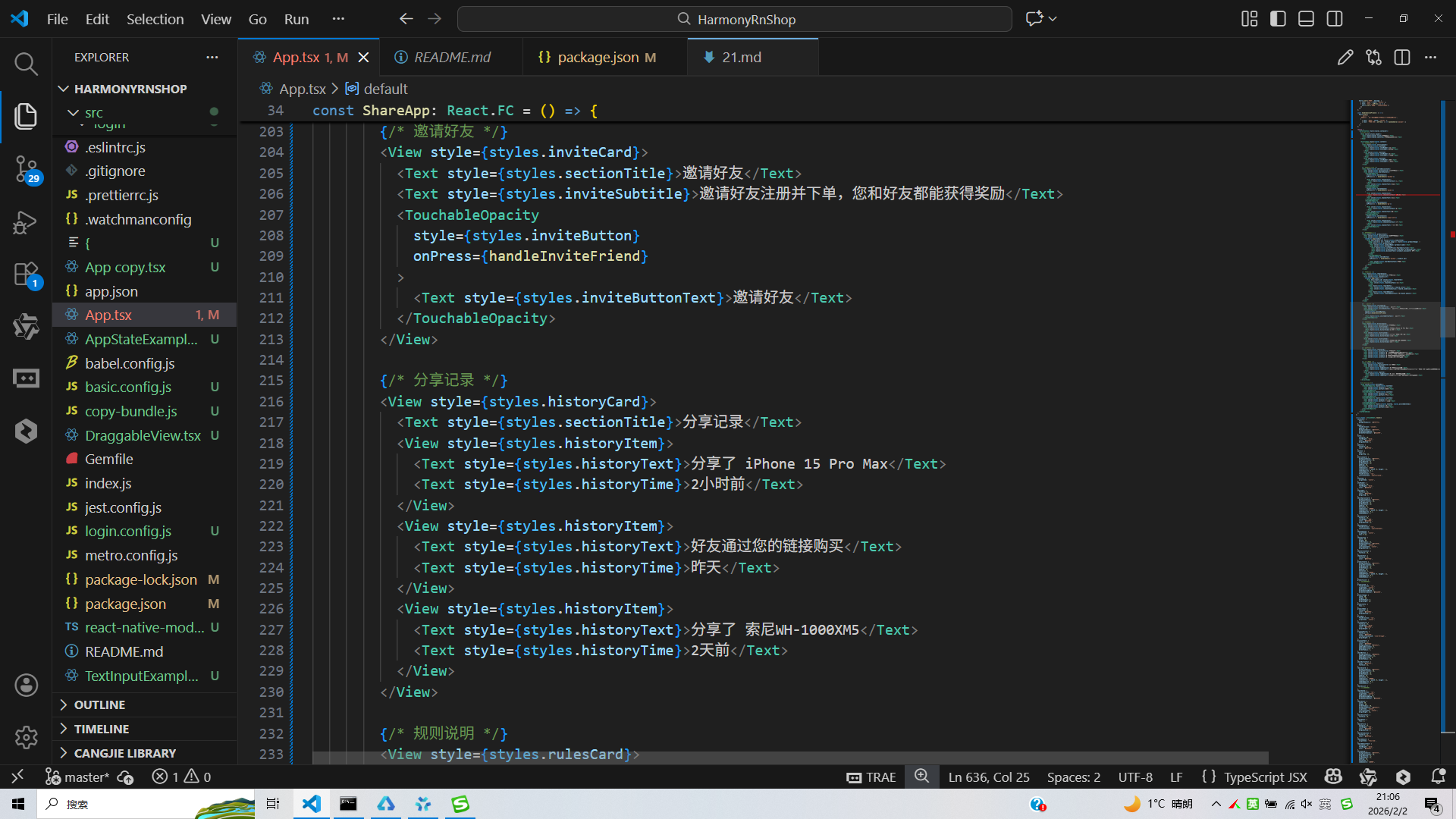
打包
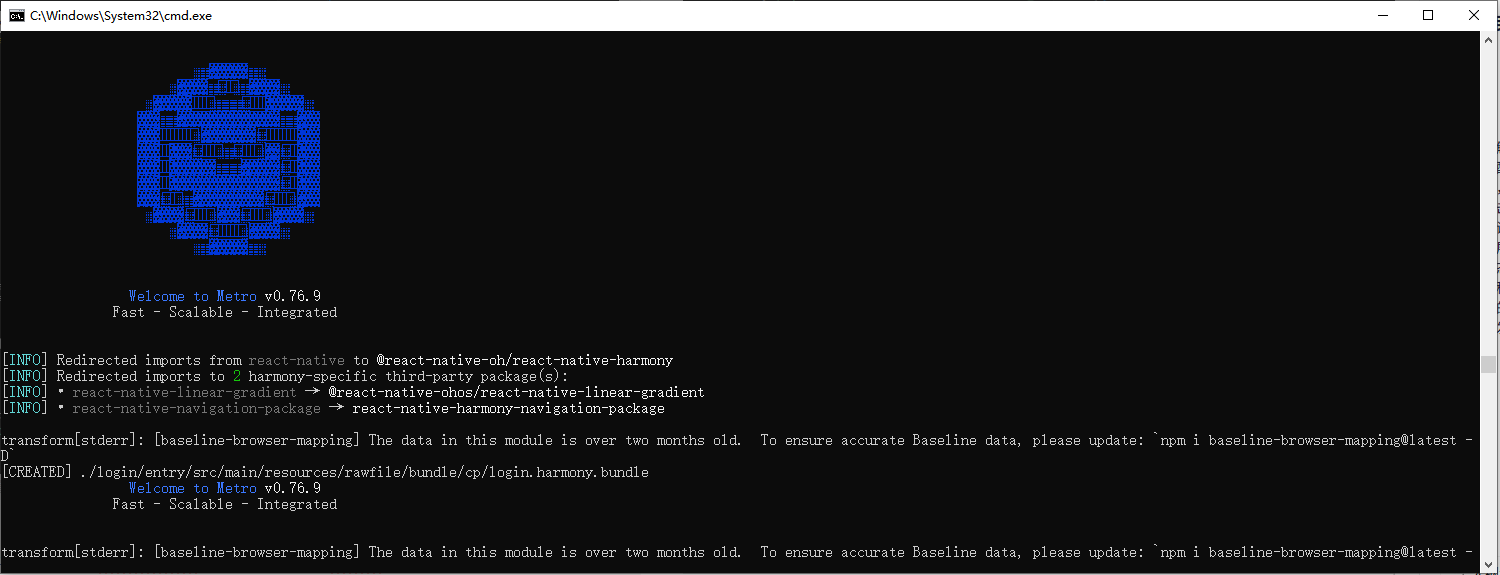
接下来通过打包命令npn run harmony将reactNative的代码打包成为bundle,这样可以进行在开源鸿蒙OpenHarmony中进行使用。
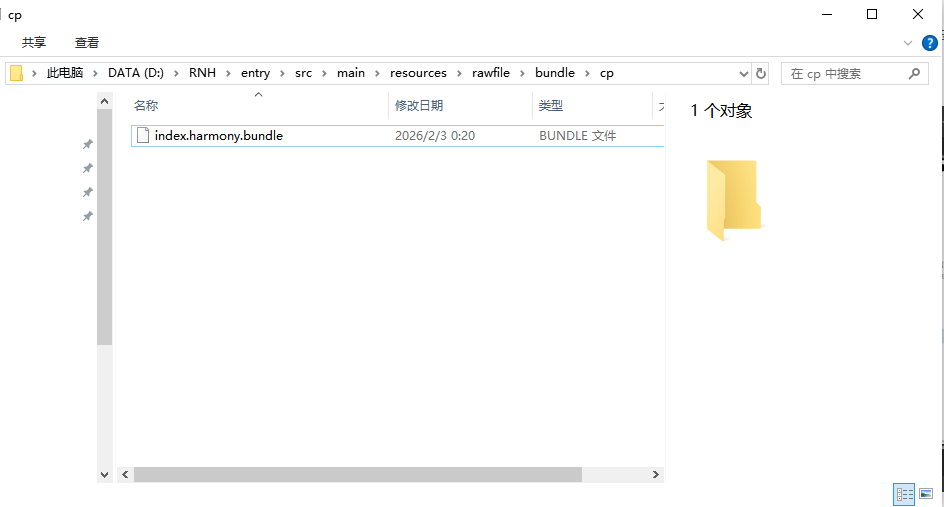
打包之后再将打包后的鸿蒙OpenHarmony文件拷贝到鸿蒙的DevEco-Studio工程目录去:
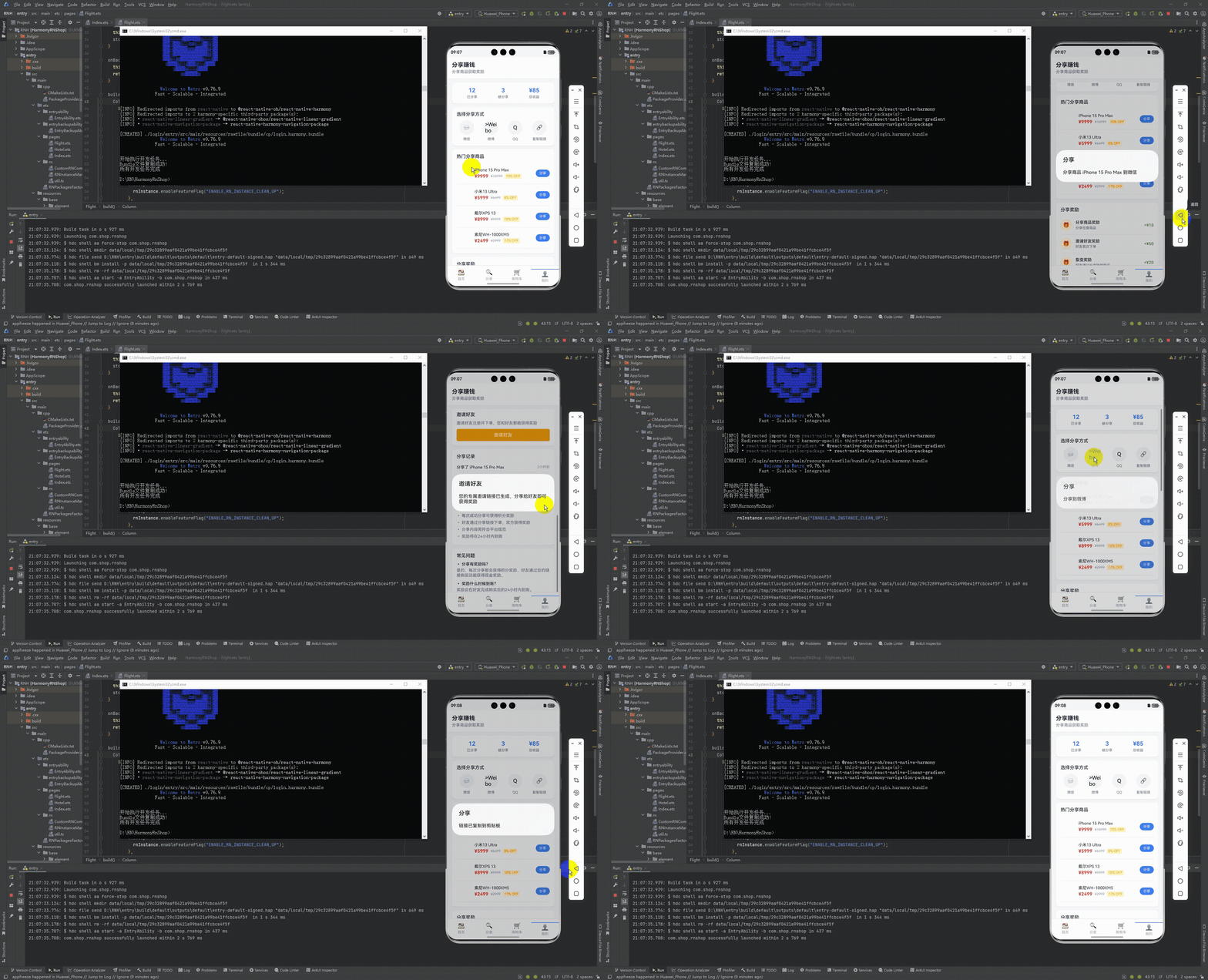
最后运行效果图如下显示:
本文介绍了电商/零售类应用社交裂变功能的技术实现方案,涵盖数据建模、状态管理、分享交互和视觉设计等核心模块。文章提供了基于React Native的完整代码示例,包括商品类型定义、分享渠道枚举、状态管理架构以及多平台交互逻辑。同时详细阐述了鸿蒙ArkTS端的适配方案,确保跨端体验一致性。方案通过奖励机制和视觉规范强化用户激励,构建了从商品展示到分享裂变的完整闭环,为社交裂变体系开发提供可落地的技术参考。
欢迎大家加入开源鸿蒙跨平台开发者社区,一起共建开源鸿蒙跨平台生态。

作为“人工智能6S店”的官方数字引擎,为AI开发者与企业提供一个覆盖软硬件全栈、一站式门户。
更多推荐

 8
8 0
0- 0


 已为社区贡献30条内容

所有评论(0)