
【HarmonyOS】开源鸿蒙跨平台训练营DAY9:实现分类数据获取与页面渲染
前言分类数据是电商应用的核心功能模块。本文将系统讲解如何在 Flutter/HarmonyOS 项目中实现分类数据的获取与展示,涵盖从 API 接口定义到 UI 渲染的完整开发流程。数据模型:采用工厂模式实现 JSON 到对象的自动化转换网络请求:通过 API 封装层统一处理业务状态码UI 呈现:利用横向滚动列表展示分类数据容错机制:涵盖空安全校验、类型转换保护及状态更新处理遵循标准化的七步开发流
一、前言
前言
分类数据是电商应用的核心功能模块。本文将系统讲解如何在 Flutter/HarmonyOS 项目中实现分类数据的获取与展示,涵盖从 API 接口定义到 UI 渲染的完整开发流程。
二、实现流程
采用标准的七步开发流程:
(1)定义常量数据、基础地址、超时时间、业务状态、请求地址
(2)封装网络请求工具,基础地址,拦截器
(3)请求工具进一步解构,处理http状态和业务状态
(4)类工厂转化动态类型到对象类型
(5)封装请求API调用工厂函数
(6)更新页面组件接收参数
(7)初始化数据更新状态
2.1 分类接口说明
接口路径:https://meikou-api.itheima.net/home/category/head
返回数据结构示例:
{
  "code": "1",
  "result": [
    {
      "id": "1181622001",
      "name": "气质女装",
      "picture": "https://yjy-teach-oss.oss-cn-beijing.aliyuncs.com/meikou/c1/qznz.png",
      "children": [
        {
          "id": "1191110001",
          "name": "半裙",
          "picture": "https://yjy-teach-oss.oss-cn-beijing.aliyuncs.com/meikou/c2/qznz_bq.png"
        }
      ]
    }
  ]
}
三、代码实现
3.1 定义接口常量
文件:lib/constants/index.dart
// 存放请求地址接口的常量
class HttpConstants {
  // 轮播图接口
  static const String BANNER_LIST = "/home/banner";

  // 分类列表接口
  static const String CATEGORY_LIST = "/home/category/head";
}
3.2 数据模型构建
实现文件:lib/viewmodels/home.dart
// 每一个分类具体类型
class CategoryItem {
  String id;
  String name;
  String picture;
  List<CategoryItem>? children;

  CategoryItem({
    required this.id,
    required this.name,
    required this.picture,
    this.children,
  });

  // 工厂函数:从JSON创建对象
  factory CategoryItem.formJSON(Map<String, dynamic> json) {
    return CategoryItem(
      id: json["id"] ?? "",
      name: json["name"] ?? "",
      picture: json["picture"] ?? "",
      children: json["children"] == null
          ? null
          : (json["children"] as List)
              .map((item) => CategoryItem.formJSON(item as Map<String, dynamic>))
              .toList(),
    );
  }
}
核心要点:
通过 factory 关键字定义工厂函数
采用空安全操作符 ?? 设置默认值
使用递归方式处理嵌套的 children 结构
3.3 API 调用封装
文件:lib/api/home.dart
/// 获取分类列表数据
Future<List<CategoryItem>> getCategoryListAPI() async {
  // 发起请求并转换数据
  final result = ((await dioRequest.get(HttpConstants.CATEGORY_LIST)) as List)
      .map((item) {
    return CategoryItem.formJSON(item as Map<String, dynamic>);
  }).toList();
  return result;
}
3.4分类组件更新
文件路径:lib/components/Home/HmCategory.dart
import 'package:flutter/material.dart';
import 'package:harmonyos_day_four/viewmodels/home.dart';
class HmCategory extends StatefulWidget {
// 分类列表
final List<CategoryItem> categoryList;
const HmCategory({super.key, required this.categoryList});
State<HmCategory> createState() => _HmCategoryState();
}
class _HmCategoryState extends State<HmCategory> {
Widget build(BuildContext context) {
return SizedBox(
height: 100,
child: ListView.builder(
scrollDirection: Axis.horizontal,
itemCount: widget.categoryList.length,
itemBuilder: (BuildContext context, int index) {
final categoryItem = widget.categoryList[index];
return Container(
alignment: Alignment.center,
width: 80,
height: 100,
decoration: BoxDecoration(
color: const Color.fromARGB(255, 231, 232, 234),
borderRadius: BorderRadius.circular(40),
),
margin: const EdgeInsets.symmetric(horizontal: 10),
child: Column(
mainAxisAlignment: MainAxisAlignment.center,
children: [
Image.network(categoryItem.picture, width: 40, height: 40),
Text(categoryItem.name,
style: const TextStyle(color: Colors.black)),
],
),
);
}),
);
}
}
3.5 首页数据获取
文件路径:lib/pages/home/index.dart
class _HomeViewState extends State<HomeView> {
// 分类列表
List<CategoryItem> _categoryList = [];
// 轮播图列表
List<BannerItem> _bannerList = [];
void initState() {
super.initState();
_getBannederList();
_getCategoryList(); // 获取分类数据
}
// 获取分类列表
void _getCategoryList() async {
try {
_categoryList = await getCategoryListAPI();
setState(() {});
} catch (e) {
print('获取分类数据失败: $e');
}
}
// 在滚动视图中使用
List<Widget> _getScrollChildren() {
return [
SliverToBoxAdapter(child: HmSlider(bannerList: _bannerList)),
const SliverToBoxAdapter(child: SizedBox(height: 10)),
SliverToBoxAdapter(child: HmCategory(categoryList: _categoryList)), // 分类组件
// ...
];
}
}
四、遇到问题及解决方法
问题1:空安全类型转换错误 报错信息: type ‘Null’ is not a subtype of type ‘String’
原因分析: API返回数据中某些字段可能为null,直接访问json[“id”]会导致类型不匹配。
解决方案: 使用空安全操作符提供默认值
// 错误示例
id: json["id"]

// 正确写法
id: json["id"] ?? ""
问题2:嵌套children数组解析失败 报错信息: type ‘List’ is not a subtype of type ‘List’
原因分析: JSON解析后的children字段是List类型,需要显式转换为目标类型。
解决方案: 使用map方法进行类型转换
children: json["children"] == null
    ? null
    : (json["children"] as List)
        .map((item) => CategoryItem.formJSON(item as Map<String, dynamic>))
        .toList(),
问题3:UI显示异常 现象描述: 分类数据加载完成后,界面未自动更新。
原因分析: 异步获取数据后未调用setState方法触发界面重绘。
解决方案: 在setState回调中更新数据
void _getCategoryList() async {
  try {
    _categoryList = await getCategoryListAPI();
    setState(() {});  // 触发UI更新
  } catch (e) {
    print('获取分类数据失败: $e');
  }
}
问题4:组件参数传递错误 报错信息: The named parameter ‘categoryList’ is required but wasn’t provided
原因分析: HmCategory组件声明了必需参数categoryList,但调用时未传入。
解决方案: 调用组件时传递必要参数
// 错误调用
const SliverToBoxAdapter(child: HmCategory()),

// 正确调用
SliverToBoxAdapter(child: HmCategory(categoryList: _categoryList)),
五、效果展示
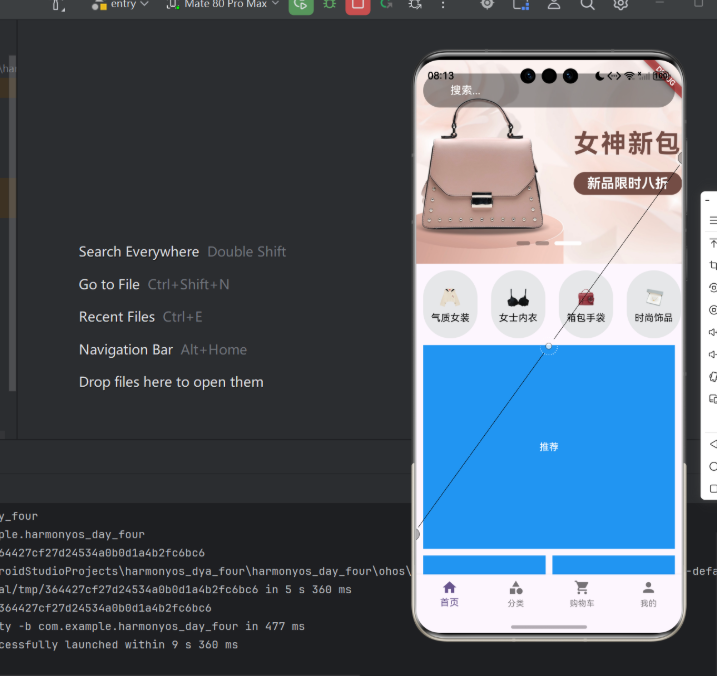
分类列表采用横向滚动布局,每个分类项包含以下元素:
- 圆角灰色背景容器
- 网络来源的分类图标
- 黑色文字标注的分类名称
┌────────────────────────────────────────────────────────────┐
│ ┌─────┐ ┌─────┐ ┌─────┐ ┌─────┐ ┌─────┐ │
│ │ 图标 │ │ 图标 │ │ 图标 │ │ 图标 │ │ 图标 │ … │
│ │名称 │ │名称 │ │名称 │ │名称 │ │名称 │ │
│ └─────┘ └─────┘ └─────┘ └─────┘ └─────┘ │
│ ← 横向滚动 → │
└────────────────────────────────────────────────────────────┘
六、总结
本文系统阐述了 Flutter/HarmonyOS 电商应用中分类数据的获取与渲染实现方案,包含以下关键环节:
- 数据模型:采用工厂模式实现 JSON 到对象的自动化转换
- 网络请求:通过 API 封装层统一处理业务状态码
- UI 呈现:利用横向滚动列表展示分类数据
- 容错机制:涵盖空安全校验、类型转换保护及状态更新处理
遵循标准化的七步开发流程,开发者可高效完成同类数据获取与展示功能的实现。
欢迎加入开源鸿蒙跨平台社区: 添加链接描述

作为“人工智能6S店”的官方数字引擎,为AI开发者与企业提供一个覆盖软硬件全栈、一站式门户。
更多推荐

 4
4 0
0- 0


 已为社区贡献5条内容

所有评论(0)