
基于React Native鸿蒙跨平台知识问答游戏,应用实现了一个倒计时功能,为每个题目限制 15 秒的答题时间
本文探讨了一个基于React Native的知识问答游戏实现方案,重点分析了其架构设计和技术实现。该应用采用组件化架构,分为主应用组件、游戏状态管理、题目渲染、结果展示和排行榜等模块。通过useState管理游戏状态、答题记录等关键数据,并实现了完整的游戏流程控制,包括倒计时功能和答题记录系统。文章还讨论了TypeScript类型定义的优势,以及该应用在教育、娱乐和企业培训等场景的应用价值。最后提
在移动应用开发中,知识问答游戏是一种受欢迎的应用类型,它不仅能娱乐用户,还能帮助用户知识。本文将深入分析一个功能完备的 React Native 知识问答游戏实现,探讨其架构设计、状态管理、游戏逻辑以及跨端兼容性策略。
组件化架构设计
该实现采用了清晰的组件化架构,主要包含以下部分:
- 主应用组件 (
KnowledgeQuizApp) - 负责整体布局和状态管理 - 游戏状态管理 - 管理游戏的不同状态(菜单、游戏中、结果、排行榜)
- 题目渲染 - 渲染当前题目和选项
- 结果展示 - 展示游戏结果和得分
- 排行榜 - 展示玩家排名
这种架构设计使得代码结构清晰,易于维护和扩展。主应用组件负责管理全局状态和业务逻辑,而各个功能部分负责具体的 UI 渲染,实现了关注点分离。
状态管理
KnowledgeQuizApp 组件使用 useState 钩子管理多个关键状态:
const [currentQuestionIndex, setCurrentQuestionIndex] = useState<number>(0);
const [selectedOption, setSelectedOption] = useState<number | null>(null);
const [score, setScore] = useState<number>(0);
const [timeLeft, setTimeLeft] = useState<number>(15);
const [gameState, setGameState] = useState<'menu' | 'playing' | 'result' | 'leaderboard'>('menu');
const [answerRecords, setAnswerRecords] = useState<AnswerRecord[]>([]);
这种状态管理方式简洁高效,通过状态更新触发组件重新渲染,实现了游戏的各种功能。使用 TypeScript 联合类型确保了 gameState 和 difficulty 的取值只能是预定义的几个选项之一,提高了代码的类型安全性。
游戏流程控制
应用实现了完整的游戏流程控制:
- 开始游戏 - 重置所有状态,进入游戏状态
- 选择答案 - 记录选择,判断正误,计算得分
- 下一题 - 切换到下一题或结束游戏
- 游戏结束 - 展示游戏结果
这种流程控制使得游戏逻辑清晰,用户体验流畅。
倒计时功能
应用实现了一个倒计时功能,为每个题目限制 15 秒的答题时间:
React.useEffect(() => {
  let timer: NodeJS.Timeout;
  if (gameState === 'playing' && timeLeft > 0 && selectedOption === null) {
    timer = setTimeout(() => {
      setTimeLeft(timeLeft - 1);
    }, 1000);
  } else if (timeLeft === 0 && selectedOption === null) {
    // 时间到了但没选,算错误
    selectOption(-1); // -1 表示未作答
  }
  return () => clearTimeout(timer);
}, [timeLeft, gameState, selectedOption]);
这种实现方式使用了 useEffect 钩子和 setTimeout 函数,确保了倒计时的准确性和可靠性。在组件卸载时,通过返回清理函数清除定时器,避免了内存泄漏。
答题记录
应用实现了详细的答题记录功能,记录每个题目的答题情况:
- 选中的选项
- 是否正确
- 答题所用时间
- 获得的分数
这种记录功能使得游戏结果更加详细,用户可以了解自己的答题情况,提高学习效果。
类型定义
该实现使用 TypeScript 定义了三个核心数据类型:
- Question - 题目类型,包含题目文本、选项、正确答案、分类、难度和分值
- AnswerRecord - 答题记录类型,包含题目 ID、选中选项、是否正确、答题时间和得分
- LeaderboardEntry - 排行榜条目类型,包含玩家名称、总得分、游戏次数和胜率
这些类型定义使得数据结构更加清晰,提高了代码的可读性和可维护性,同时也提供了类型安全保障。
数据组织
应用数据按照功能模块进行组织:
- questions - 题目列表
- answerRecords - 答题记录列表
- leaderboard - 排行榜列表
这种数据组织方式使得数据管理更加清晰,易于扩展和维护。
游戏状态管理
应用实现了四种游戏状态:
- menu - 游戏菜单,显示游戏标题和开始按钮
- playing - 游戏中,显示当前题目、选项和倒计时
- result - 游戏结果,显示得分和答题情况
- leaderboard - 排行榜,显示玩家排名
这种状态管理使得用户界面根据游戏进度动态变化,提供了良好的用户体验。
React Native 与鸿蒙跨端考虑
在设计跨端知识问答游戏时,需要特别关注以下几个方面:
- 组件 API 兼容性 - 确保使用的 React Native 组件在鸿蒙系统上有对应实现
- 样式系统差异 - 不同平台对样式的支持程度不同,需要确保样式在两端都能正常显示
- 定时器实现 - 不同平台的定时器实现可能存在差异
- 图标系统 - 确保图标在不同平台上都能正常显示
- 触摸事件处理 - 不同平台的触摸事件机制可能存在差异
类型
使用 TypeScript 类型定义确保了代码的类型安全:
type Question = {
  id: string;
  text: string;
  options: string[];
  correctAnswer: number;
  category: string;
  difficulty: '简单' | '中等' | '困难';
  points: number;
};

type AnswerRecord = {
  id: string;
  questionId: string;
  selectedOption: number | null;
  isCorrect: boolean;
  timeTaken: number; // 秒
  pointsScored: number;
};

type LeaderboardEntry = {
  id: string;
  playerName: string;
  totalScore: number;
  gamesPlayed: number;
  winRate: number;
};
类型定义不仅提高了代码的可读性,也减少了运行时错误的可能性,对于团队协作尤为重要。
教育应用
该实现特别适合作为教育应用,包含以下功能:
- 知识测验 - 通过问答形式测试用户的知识水平
- 学习反馈 - 提供详细的答题反馈,帮助用户学习
- 进度跟踪 - 记录用户的答题情况,跟踪学习进度
- 排行榜 - 激发用户的学习积极性
娱乐应用
对于娱乐应用,该实现可以用于:
- ** trivia游戏** - 提供各种有趣的 trivia 题目
- 智力竞赛 - 组织智力竞赛活动
- 社交游戏 - 支持多人对战和分享成绩
- 主题游戏 - 根据不同主题提供相应的题目
企业培训
对于企业培训,该实现可以用于:
- 员工培训 - 通过问答形式测试员工的培训效果
- 知识考核 - 定期考核员工的专业知识
- 合规测试 - 测试员工对公司政策和法规的了解
- 技能评估 - 评估员工的技能水平
当前实现使用 useEffect 和 setTimeout 实现倒计时,可以考虑使用 useRef 优化定时器:
// 优化前
React.useEffect(() => {
  let timer: NodeJS.Timeout;
  if (gameState === 'playing' && timeLeft > 0 && selectedOption === null) {
    timer = setTimeout(() => {
      setTimeLeft(timeLeft - 1);
    }, 1000);
  } else if (timeLeft === 0 && selectedOption === null) {
    selectOption(-1);
  }
  return () => clearTimeout(timer);
}, [timeLeft, gameState, selectedOption]);

// 优化后
const timerRef = useRef<NodeJS.Timeout | null>(null);

React.useEffect(() => {
  if (gameState === 'playing' && selectedOption === null) {
    if (timeLeft > 0) {
      timerRef.current = setTimeout(() => {
        setTimeLeft(prev => prev - 1);
      }, 1000);
    } else {
      selectOption(-1);
    }
  }
  return () => {
    if (timerRef.current) {
      clearTimeout(timerRef.current);
      timerRef.current = null;
    }
  };
}, [timeLeft, gameState, selectedOption]);
2. 状态管理
当前实现使用多个 useState 钩子管理状态,可以考虑使用 useReducer 或状态管理库来管理复杂状态:
// 优化前
const [currentQuestionIndex, setCurrentQuestionIndex] = useState<number>(0);
const [selectedOption, setSelectedOption] = useState<number | null>(null);
const [score, setScore] = useState<number>(0);
const [timeLeft, setTimeLeft] = useState<number>(15);
const [gameState, setGameState] = useState<'menu' | 'playing' | 'result' | 'leaderboard'>('menu');
const [answerRecords, setAnswerRecords] = useState<AnswerRecord[]>([]);

// 优化后
type GameState = {
  currentQuestionIndex: number;
  selectedOption: number | null;
  score: number;
  timeLeft: number;
  gameState: 'menu' | 'playing' | 'result' | 'leaderboard';
  answerRecords: AnswerRecord[];
};

type GameAction =
  | { type: 'START_GAME' }
  | { type: 'SELECT_OPTION'; payload: number }
  | { type: 'NEXT_QUESTION' }
  | { type: 'DECREMENT_TIME' }
  | { type: 'SHOW_RESULT' }
  | { type: 'SHOW_LEADERBOARD' };

const initialState: GameState = {
  currentQuestionIndex: 0,
  selectedOption: null,
  score: 0,
  timeLeft: 15,
  gameState: 'menu',
  answerRecords: []
};

const gameReducer = (state: GameState, action: GameAction): GameState => {
  switch (action.type) {
    case 'START_GAME':
      return {
        ...initialState,
        gameState: 'playing'
      };
    case 'SELECT_OPTION':
      // 处理选择答案的逻辑
      return state;
    case 'NEXT_QUESTION':
      // 处理下一题的逻辑
      return state;
    case 'DECREMENT_TIME':
      return {
        ...state,
        timeLeft: state.timeLeft - 1
      };
    case 'SHOW_RESULT':
      return {
        ...state,
        gameState: 'result'
      };
    case 'SHOW_LEADERBOARD':
      return {
        ...state,
        gameState: 'leaderboard'
      };
    default:
      return state;
  }
};

const [state, dispatch] = useReducer(gameReducer, initialState);
3. 动画
可以为游戏添加动画效果,提升用户体验:
import { Animated } from 'react-native';

const KnowledgeQuizApp = () => {
  const fadeAnim = useRef(new Animated.Value(0)).current;
  const scaleAnim = useRef(new Animated.Value(0.8)).current;

  const startGame = () => {
    // 动画效果
    Animated.parallel([
      Animated.timing(fadeAnim, {
        toValue: 1,
        duration: 500,
        useNativeDriver: true
      }),
      Animated.spring(scaleAnim, {
        toValue: 1,
        friction: 3,
        tension: 40,
        useNativeDriver: true
      })
    ]).start();

    // 其他游戏开始逻辑
  };

  return (
    <SafeAreaView style={styles.container}>
      {/* 游戏菜单 */}
      {gameState === 'menu' && (
        <Animated.View style={[styles.menuContainer, { opacity: fadeAnim, transform: [{ scale: scaleAnim }] }]}>
          {/* 菜单内容 */}
        </Animated.View>
      )}

      {/* 其他游戏状态 */}
    </SafeAreaView>
  );
};
4. 音效集成
可以为游戏添加音效,提升用户体验:
import { Audio } from 'expo-av';

const KnowledgeQuizApp = () => {
  const [correctSound, setCorrectSound] = useState<Audio.Sound | null>(null);
  const [wrongSound, setWrongSound] = useState<Audio.Sound | null>(null);

  useEffect(() => {
    const loadSounds = async () => {
      try {
        const { sound: correct } = await Audio.Sound.createAsync(
          require('./assets/sounds/correct.mp3')
        );
        setCorrectSound(correct);

        const { sound: wrong } = await Audio.Sound.createAsync(
          require('./assets/sounds/wrong.mp3')
        );
        setWrongSound(wrong);
      } catch (error) {
        console.error('Error loading sounds:', error);
      }
    };

    loadSounds();

    return () => {
      if (correctSound) correctSound.unloadAsync();
      if (wrongSound) wrongSound.unloadAsync();
    };
  }, []);

  const selectOption = (optionIndex: number) => {
    // 其他逻辑

    // 播放音效
    if (isCorrect && correctSound) {
      correctSound.replayAsync();
    } else if (!isCorrect && wrongSound) {
      wrongSound.replayAsync();
    }
  };

  // 其他游戏逻辑
};
本文深入分析了一个功能完备的 React Native 知识问答游戏实现,从架构设计、状态管理、游戏逻辑到跨端兼容性都进行了详细探讨。该实现不仅功能完整,而且代码结构清晰,具有良好的可扩展性和可维护性。
基于 React Native 开发的知识问答游戏应用的核心技术实现逻辑,同时掌握将其适配到鸿蒙(HarmonyOS)平台的关键要点。该应用是典型的交互式游戏类应用,融合了状态驱动的多场景切换、倒计时逻辑、答题交互、结果统计、排行榜展示等游戏类应用核心特性,是从 React Native 向鸿蒙跨端迁移的典型复杂场景案例。
该知识问答游戏应用的核心价值在于多状态场景管理、实时交互逻辑与数据驱动的游戏流程控制,完全符合移动端交互式游戏应用的开发最佳实践,其技术架构涵盖了游戏类应用的全核心场景。
1. 类型系统
应用采用 TypeScript 强类型设计,构建了完整的游戏数据模型体系,为跨端适配提供了标准化的数据基础:
- 核心类型定义:
// 题目类型 - 覆盖答题场景全维度属性 type Question = { id: string; text: string; options: string[]; correctAnswer: number; category: string; difficulty: '简单' | '中等' | '困难'; points: number; }; // 答题记录类型 - 完整记录答题行为和结果 type AnswerRecord = { id: string; questionId: string; selectedOption: number | null; isCorrect: boolean; timeTaken: number; // 秒 pointsScored: number; }; // 排行榜类型 - 玩家成绩统计 type LeaderboardEntry = { id: string; playerName: string; totalScore: number; gamesPlayed: number; winRate: number; }; - 数据模型设计亮点:
- 场景化属性设计:
Question类型包含分类、难度、分值等游戏核心属性,满足答题场景的全维度需求; - 行为记录完整性:
AnswerRecord完整记录答题行为(选中选项、耗时、得分),为结果统计提供数据支撑; - 强类型约束:
difficulty使用联合类型限制取值范围,避免运行时数据错误; - 标准化标识:所有类型均包含
id字段,保证数据唯一性和可追踪性;
- 场景化属性设计:
- 类型设计价值:
- 强类型约束使跨端迁移时数据层可 100% 复用,仅需适配视图层渲染逻辑;
- 标准化的数据结构为游戏逻辑(答题判断、得分计算、结果统计)提供了精准的数据支撑;
- 类型定义清晰区分了不同场景的数据边界,降低了跨端适配的认知成本。
2. 状态管理
应用采用 React Hooks 实现复杂的游戏状态管理,通过多状态协同控制游戏全流程,是交互式应用的典型状态管理范式:
- 核心状态设计:
// 当前题目索引 - 控制答题进度 const [currentQuestionIndex, setCurrentQuestionIndex] = useState<number>(0); // 选中的选项 - 答题交互核心状态 const [selectedOption, setSelectedOption] = useState<number | null>(null); // 当前得分 - 游戏核心数据 const [score, setScore] = useState<number>(0); // 剩余时间 - 倒计时控制 const [timeLeft, setTimeLeft] = useState<number>(15); // 游戏状态 - 多场景切换核心 const [gameState, setGameState] = useState<'menu' | 'playing' | 'result' | 'leaderboard'>('menu'); // 答题记录 - 完整记录答题过程 const [answerRecords, setAnswerRecords] = useState<AnswerRecord[]>([]); - 核心游戏逻辑:
(1)答题交互逻辑
const selectOption = (optionIndex: number) => {
  if (selectedOption !== null) return; // 防止重复选择

  setSelectedOption(optionIndex);

  const currentQuestion = questions[currentQuestionIndex];
  const isCorrect = optionIndex === currentQuestion.correctAnswer;
  const pointsScored = isCorrect ? currentQuestion.points : 0;

  // 记录答题情况
  const newRecord: AnswerRecord = {
    id: `${currentQuestionIndex}-${Date.now()}`,
    questionId: currentQuestion.id,
    selectedOption: optionIndex,
    isCorrect,
    timeTaken: 15 - timeLeft,
    pointsScored
  };

  setAnswerRecords([...answerRecords, newRecord]);
  setScore(score + pointsScored);

  // 显示正确答案后自动下一题
  setTimeout(() => {
    nextQuestion();
  }, 1500);
};
(2)倒计时逻辑
React.useEffect(() => { let timer: NodeJS.Timeout; if (gameState === 'playing' && timeLeft > 0 && selectedOption === null) { timer = setTimeout(() => { setTimeLeft(timeLeft - 1); }, 1000); } else if (timeLeft === 0 && selectedOption === null) { // 时间到了但没选,算错误 selectOption(-1); // -1 表示未作答 } return () => clearTimeout(timer); }, [timeLeft, gameState, selectedOption]); - 状态管理亮点:
- 单一数据源:
gameState作为核心状态,统一控制菜单、答题、结果、排行榜四个场景的切换; - 状态协同:
timeLeft、selectedOption、currentQuestionIndex等状态协同工作,精准控制答题流程; - 副作用管理:使用
useEffect管理倒计时定时器,通过清理函数避免内存泄漏; - 不可变更新:答题记录采用数组展开方式更新,保证状态不可变性;
- 防重复操作:
selectOption中增加防重复选择逻辑,提升交互稳定性; - 自动流程控制:答题后自动跳转到下一题,无需用户额外操作,提升游戏流畅度。
- 单一数据源:
3. 多场景渲染
应用实现了游戏类应用的多场景渲染体系,通过条件渲染实现不同游戏状态的界面切换,同时提供丰富的交互反馈:
- 多场景渲染逻辑:
{gameState === 'menu' && renderMenu()} {gameState === 'playing' && renderGame()} {gameState === 'result' && renderResult()} {gameState === 'leaderboard' && renderLeaderboard()}- 场景封装:将不同场景的渲染逻辑封装为独立函数,代码结构清晰,便于跨端适配;
- 条件渲染:基于
gameState状态精准控制场景切换,无冗余渲染;
- 交互反馈设计:
<TouchableOpacity style={[ styles.optionButton, selectedOption === index && styles.selectedOption, selectedOption !== null && index === currentQuestion.correctAnswer && styles.correctOption, selectedOption !== null && selectedOption === index && selectedOption !== currentQuestion.correctAnswer && styles.wrongOption ]} onPress={() => selectOption(index)} disabled={selectedOption !== null} > <Text style={styles.optionText}>{String.fromCharCode(65 + index)}. {option}</Text> </TouchableOpacity>- 多维度视觉反馈:选中状态、正确答案、错误答案分别对应不同样式,反馈清晰;
- 交互禁用:答题后禁用选项按钮,防止重复操作;
- 动态文本生成:使用
String.fromCharCode(65 + index)自动生成选项字母(A/B/C/D);
- 结果统计逻辑:
const correctAnswers = answerRecords.filter(record => record.isCorrect).length; const accuracy = Math.round((correctAnswers / questions.length) * 100);- 基于答题记录的动态统计,为结果页面提供精准的成绩分析;
- 分级反馈:根据正确率提供不同的评价文本(优秀/良好/还需努力)。
4. 样式系统
应用的样式系统遵循游戏类应用的设计规范,注重视觉层次感和交互反馈的视觉表达:
- 场景化样式体系:
- 菜单场景:大标题、按钮化设计、统计卡片,突出游戏入口和核心信息;
- 答题场景:倒计时醒目、题目卡片化、选项按钮化,聚焦答题核心;
- 结果场景:大数字展示得分、正确率,分级色彩反馈,突出游戏成果;
- 排行榜场景:列表化展示、排名视觉差异化,突出竞争感;
- 交互反馈样式:
- 选中选项:
#dbeafe背景色 +#3b82f6边框; - 正确答案:
#d1fae5背景色 +#10b981边框; - 错误答案:
#fee2e2背景色 +#ef4444边框; - 色彩体系符合用户认知习惯,反馈直观;
- 选中选项:
- 响应式设计:
- 使用
Dimensions.get('window')获取屏幕尺寸,为响应式布局预留扩展空间; - 百分比和固定尺寸结合,保证在不同设备上的布局一致性;
- 流式布局:分类标签使用
flexWrap: 'wrap'实现自动换行,适配不同屏幕宽度。
- 使用
将该 React Native 知识问答游戏应用适配到鸿蒙平台,核心是将 React Native 的状态管理、多场景渲染、定时器逻辑、交互反馈映射到鸿蒙 ArkTS + ArkUI 生态,以下是完整的适配方案和关键技术点。
1. 技术栈与核心API映射
鸿蒙端采用 ArkTS 语言 + ArkUI 组件库(Stage模型),与 React Native 的核心 API 映射关系如下:
| React Native 核心API | 鸿蒙 ArkTS 对应实现 | 适配关键说明 |
|---|---|---|
useState |
@State/@Link |
状态声明语法替换,逻辑一致 |
useEffect (定时器) |
setInterval + clearInterval |
定时器逻辑重构 |
SafeAreaView |
SafeArea 组件 + safeArea(true) |
安全区域适配 |
View |
Column/Row/Stack |
基础布局组件替换 |
Text |
Text 组件 |
属性基本兼容,样式语法调整 |
TouchableOpacity |
Button + stateEffect(false) |
可点击组件替换,去除默认效果 |
ScrollView |
Scroll 组件 |
滚动容器替换 |
FlatList |
List + ForEach |
列表渲染适配 |
StyleSheet.create |
@Styles/@Extend + 内联样式 |
样式体系重构 |
Alert.alert |
AlertDialog |
弹窗交互替换 |
setTimeout/clearTimeout |
setTimeout + clearTimeout |
语法兼容,逻辑复用 |
String.fromCharCode |
String.fromCharCode |
API 兼容,直接复用 |
| 条件渲染(&&) | if 语句 |
条件渲染语法适配 |
| 数组 filter/map | filter + ForEach |
数组操作适配 |
2. 鸿蒙端
// index.ets - 鸿蒙端入口文件
@Entry
@Component
struct KnowledgeQuizApp {
  // 核心状态 - 对应 React Native 的 useState
  @State currentQuestionIndex: number = 0;
  @State selectedOption: number | null = null;
  @State score: number = 0;
  @State timeLeft: number = 15;
  @State gameState: 'menu' | 'playing' | 'result' | 'leaderboard' = 'menu';
  @State answerRecords: AnswerRecord[] = [];

  // 定时器引用 - 用于清理
  private timerId: number | null = null;
  private timeoutId: number | null = null;

  // 类型定义(完全复用 React Native 的类型)
  type Question = {
    id: string;
    text: string;
    options: string[];
    correctAnswer: number;
    category: string;
    difficulty: '简单' | '中等' | '困难';
    points: number;
  };

  type AnswerRecord = {
    id: string;
    questionId: string;
    selectedOption: number | null;
    isCorrect: boolean;
    timeTaken: number;
    pointsScored: number;
  };

  type LeaderboardEntry = {
    id: string;
    playerName: string;
    totalScore: number;
    gamesPlayed: number;
    winRate: number;
  };

  // 示例题目数据(完全复用)
  private questions: Question[] = [/* 题目数据 */];

  // 排行榜数据(完全复用)
  private leaderboard: LeaderboardEntry[] = [/* 排行榜数据 */];

  // 通用样式封装 - 替代 React Native 的 StyleSheet
  @Styles
  cardShadow() {
    .shadow({ radius: 2, color: '#000', opacity: 0.1, offsetX: 0, offsetY: 1 });
  }

  // 生命周期 - 组件销毁时清理定时器
  aboutToDisappear() {
    if (this.timerId !== null) {
      clearInterval(this.timerId);
    }
    if (this.timeoutId !== null) {
      clearTimeout(this.timeoutId);
    }
  }

  build() {
    Column({ space: 0 }) {
      // 头部组件
      this.Header();

      // 不同游戏状态渲染
      if (this.gameState === 'menu') {
        this.renderMenu();
      } else if (this.gameState === 'playing') {
        this.renderGame();
      } else if (this.gameState === 'result') {
        this.renderResult();
      } else if (this.gameState === 'leaderboard') {
        this.renderLeaderboard();
      }

      // 底部导航
      this.BottomNav();
    }
    .width('100%')
    .height('100%')
    .backgroundColor('#f8fafc')
    .safeArea(true); // 对应 React Native 的 SafeAreaView
  }
}
3. 核心游戏逻辑适配实现
(1)核心游戏方法适配
// 开始游戏
private startGame() {
  this.currentQuestionIndex = 0;
  this.selectedOption = null;
  this.score = 0;
  this.timeLeft = 15;
  this.answerRecords = [];
  this.gameState = 'playing';

  // 启动倒计时
  this.startTimer();
}

// 启动倒计时 - 替代 React Native 的 useEffect 定时器
private startTimer() {
  // 先清理之前的定时器
  if (this.timerId !== null) {
    clearInterval(this.timerId);
  }

  this.timerId = setInterval(() => {
    if (this.gameState === 'playing' && this.timeLeft > 0 && this.selectedOption === null) {
      this.timeLeft -= 1;

      // 时间到了但没选,算错误
      if (this.timeLeft === 0 && this.selectedOption === null) {
        this.selectOption(-1);
      }
    }
  }, 1000);
}

// 选择答案
private selectOption(optionIndex: number) {
  if (this.selectedOption !== null) return; // 防止重复选择

  this.selectedOption = optionIndex;

  const currentQuestion = this.questions[this.currentQuestionIndex];
  const isCorrect = optionIndex === currentQuestion.correctAnswer && optionIndex !== -1;
  const pointsScored = isCorrect ? currentQuestion.points : 0;

  // 记录答题情况
  const newRecord: AnswerRecord = {
    id: `${this.currentQuestionIndex}-${Date.now()}`,
    questionId: currentQuestion.id,
    selectedOption: optionIndex === -1 ? null : optionIndex,
    isCorrect,
    timeTaken: 15 - this.timeLeft,
    pointsScored
  };

  this.answerRecords = [...this.answerRecords, newRecord];
  this.score += pointsScored;

  // 显示正确答案后自动下一题
  this.timeoutId = setTimeout(() => {
    this.nextQuestion();
  }, 1500);
}

// 下一题
private nextQuestion() {
  // 清理当前定时器
  if (this.timerId !== null) {
    clearInterval(this.timerId);
  }

  if (this.currentQuestionIndex < this.questions.length - 1) {
    this.currentQuestionIndex += 1;
    this.selectedOption = null;
    this.timeLeft = 15;

    // 重启定时器
    this.startTimer();
  } else {
    // 游戏结束
    this.gameState = 'result';
  }
}
(2)多场景渲染适配
// 游戏菜单界面
@Builder
renderMenu() {
  Scroll() {
    Column({ space: 0 }) {
      Column({ space: 8 }) {
        Text('知识问答游戏')
          .fontSize(28)
          .fontWeight(FontWeight.Bold)
          .fontColor('#1e293b')
          .textAlign(TextAlign.Center);

        Text('挑战你的知识储备,赢取积分排名')
          .fontSize(16)
          .fontColor('#64748b')
          .textAlign(TextAlign.Center)
          .marginBottom(40);

        // 开始游戏按钮
        Button('开始游戏')
          .fontSize(18)
          .fontWeight(FontWeight.Bold)
          .fontColor('#ffffff')
          .backgroundColor('#3b82f6')
          .paddingVertical(16)
          .borderRadius(12)
          .width('100%')
          .stateEffect(false)
          .marginBottom(16)
          .onClick(() => this.startGame());

        // 排行榜按钮
        Button('排行榜')
          .fontSize(16)
          .fontWeight(FontWeight.Medium)
          .fontColor('#3b82f6')
          .backgroundColor('#f1f5f9')
          .paddingVertical(16)
          .borderRadius(12)
          .width('100%')
          .stateEffect(false)
          .marginBottom(30)
          .onClick(() => this.gameState = 'leaderboard');

        // 统计数据
        Row({ space: 0 }) {
          // 题目数量
          this.renderStatItem(`${this.questions.length}`, '题目数量');
          // 每题限时
          this.renderStatItem('15s', '每题限时');
          // 知识点
          this.renderStatItem('120+', '知识点');
        }
        .justifyContent(FlexAlign.SpaceAround)
        .marginBottom(40)
        .width('100%');

        // 知识分类
        Column({ space: 16 }) {
          Text('知识分类')
            .fontSize(18)
            .fontWeight(FontWeight.Bold)
            .fontColor('#1e293b')
            .width('100%');

          // 分类标签流式布局
          Flex({ wrap: FlexWrap.Wrap, justifyContent: FlexAlign.SpaceBetween, gap: 8 }) {
            this.renderCategoryItem('🌍 地理');
            this.renderCategoryItem('📚 文学');
            this.renderCategoryItem('🔬 科学');
            this.renderCategoryItem('🌌 天文');
            this.renderCategoryItem('🎨 艺术');
            this.renderCategoryItem('🏛️ 历史');
          }
          .width('100%');
        }
        .marginTop(20)
        .width('100%');
      }
      .width('100%')
      .justifyContent(FlexAlign.Center)
      .flex(1);
    }
    .padding(16)
    .width('100%')
    .flex(1);
  }
  .flex(1)
  .width('100%');
}

// 游戏进行中界面
@Builder
renderGame() {
  // 当前题目
  const currentQuestion = this.questions[this.currentQuestionIndex];

  Scroll() {
    Column({ space: 20 }) {
      // 游戏头部(题目计数和得分)
      Row() {
        Text(`第 ${this.currentQuestionIndex + 1}/${this.questions.length} 题`)
          .fontSize(16)
          .fontColor('#64748b');

        Text(`得分: ${this.score}`)
          .fontSize(18)
          .fontWeight(FontWeight.Bold)
          .fontColor('#1e293b');
      }
      .justifyContent(FlexAlign.SpaceBetween)
      .width('100%');

      // 倒计时
      Column() {
        Text(`${this.timeLeft} 秒`)
          .fontSize(24)
          .fontWeight(FontWeight.Bold)
          .fontColor('#ef4444');
      }
      .alignItems(Alignment.Center)
      .width('100%');

      // 题目卡片
      Column({ space: 8 }) {
        // 分类标签
        Text(currentQuestion.category)
          .fontSize(12)
          .fontColor('#ffffff')
          .backgroundColor('#3b82f6')
          .padding({ left: 8, right: 8, top: 4, bottom: 4 })
          .borderRadius(12)
          .alignSelf(ItemAlign.Start);

        // 难度标签
        Text(currentQuestion.difficulty)
          .fontSize(12)
          .fontColor('#ffffff')
          .backgroundColor('#10b981')
          .padding({ left: 8, right: 8, top: 4, bottom: 4 })
          .borderRadius(12)
          .alignSelf(ItemAlign.Start)
          .marginBottom(12);

        // 题目文本
        Text(currentQuestion.text)
          .fontSize(18)
          .fontWeight(FontWeight.Medium)
          .fontColor('#1e293b')
          .lineHeight(26)
          .width('100%');
      }
      .backgroundColor('#ffffff')
      .borderRadius(12)
      .padding(20)
      .cardShadow()
      .width('100%');

      // 选项容器
      Column({ space: 12 }) {
        ForEach(currentQuestion.options, (option, index) => {
          // 计算选项样式
          let bgColor = '#f1f5f9';
          let borderColor = 'transparent';
          let borderWidth = 0;

          if (this.selectedOption === index) {
            bgColor = '#dbeafe';
            borderColor = '#3b82f6';
            borderWidth = 2;
          }

          if (this.selectedOption !== null && index === currentQuestion.correctAnswer) {
            bgColor = '#d1fae5';
            borderColor = '#10b981';
            borderWidth = 2;
          }

          if (this.selectedOption !== null && this.selectedOption === index && this.selectedOption !== currentQuestion.correctAnswer) {
            bgColor = '#fee2e2';
            borderColor = '#ef4444';
            borderWidth = 2;
          }

          // 选项按钮
          Button(`${String.fromCharCode(65 + index)}. ${option}`)
            .fontSize(16)
            .fontColor('#1e293b')
            .backgroundColor(bgColor)
            .border({ width: borderWidth, color: borderColor })
            .borderRadius(12)
            .padding(16)
            .width('100%')
            .stateEffect(false)
            .enabled(this.selectedOption === null)
            .onClick(() => this.selectOption(index));
        });
      }
      .width('100%');

      // 反馈信息
      if (this.selectedOption !== null) {
        Column({ space: 8 }) {
          Text(this.selectedOption === currentQuestion.correctAnswer ? '回答正确!' : '回答错误!')
            .fontSize(18)
            .fontWeight(FontWeight.Bold)
            .width('100%')
            .textAlign(TextAlign.Center);

          if (this.selectedOption !== currentQuestion.correctAnswer) {
            Text(`正确答案是: ${String.fromCharCode(65 + currentQuestion.correctAnswer)}. ${currentQuestion.options[currentQuestion.correctAnswer]}`)
              .fontSize(16)
              .fontColor('#1e293b')
              .width('100%')
              .textAlign(TextAlign.Center);
          }
        }
        .backgroundColor('#ffffff')
        .borderRadius(12)
        .padding(16)
        .cardShadow()
        .width('100%');
      }
    }
    .padding(16)
    .width('100%')
    .flex(1);
  }
  .flex(1)
  .width('100%');
}

// 游戏结果界面
@Builder
renderResult() {
  const correctAnswers = this.answerRecords.filter(record => record.isCorrect).length;
  const accuracy = Math.round((correctAnswers / this.questions.length) * 100);

  Scroll() {
    Column({ space: 30 }) {
      Text('游戏结束')
        .fontSize(32)
        .fontWeight(FontWeight.Bold)
        .fontColor('#1e293b')
        .textAlign(TextAlign.Center)
        .width('100%');

      // 结果统计
      Row({ space: 0 }) {
        // 总得分
        this.renderResultStatItem(`${this.score}`, '总得分');
        // 正确率
        this.renderResultStatItem(`${accuracy}%`, '正确率');
        // 总题数
        this.renderResultStatItem(`${this.questions.length}`, '总题数');
      }
      .justifyContent(FlexAlign.SpaceAround)
      .width('100%');

      // 表现评价
      Column() {
        let performanceText = '';
        let performanceColor = '';

        if (accuracy >= 80) {
          performanceText = '优秀表现!';
          performanceColor = '#10b981';
        } else if (accuracy >= 60) {
          performanceText = '良好表现';
          performanceColor = '#f59e0b';
        } else {
          performanceText = '还需努力';
          performanceColor = '#ef4444';
        }

        Text(performanceText)
          .fontSize(20)
          .fontWeight(FontWeight.Bold)
          .fontColor(performanceColor);
      }
      .alignItems(Alignment.Center)
      .width('100%');

      // 再玩一次按钮
      Button('再玩一次')
        .fontSize(18)
        .fontWeight(FontWeight.Bold)
        .fontColor('#ffffff')
        .backgroundColor('#3b82f6')
        .paddingVertical(16)
        .borderRadius(12)
        .width('100%')
        .stateEffect(false)
        .onClick(() => this.startGame());

      // 返回主菜单按钮
      Button('返回主菜单')
        .fontSize(16)
        .fontWeight(FontWeight.Medium)
        .fontColor('#3b82f6')
        .backgroundColor('#f1f5f9')
        .paddingVertical(16)
        .borderRadius(12)
        .width('100%')
        .stateEffect(false)
        .onClick(() => this.gameState = 'menu');
    }
    .padding(16)
    .justifyContent(FlexAlign.Center)
    .width('100%')
    .flex(1);
  }
  .flex(1)
  .width('100%');
}

// 排行榜界面
@Builder
renderLeaderboard() {
  Scroll() {
    Column({ space: 20 }) {
      Text('排行榜')
        .fontSize(24)
        .fontWeight(FontWeight.Bold)
        .fontColor('#1e293b')
        .textAlign(TextAlign.Center)
        .width('100%');

      // 排行榜列表
      List() {
        ForEach(this.leaderboard, (item, index) => {
          ListItem() {
            Row({ space: 0 }) {
              // 排名
              Row({ space: 8 }) {
                Text(`${index + 1}`)
                  .fontSize(18)
                  .fontWeight(FontWeight.Bold)
                  .fontColor('#64748b');

                if (index < 3) {
                  Text(index === 0 ? '🥇' : index === 1 ? '🥈' : '🥉')
                    .fontSize(20);
                }
              }
              .width(60)
              .alignItems(Alignment.Center);

              // 玩家名称
              Text(item.playerName)
                .fontSize(16)
                .fontWeight(FontWeight.Medium)
                .fontColor('#1e293b')
                .flex(1);

              // 得分
              Column({ space: 0 }) {
                Text(`${item.totalScore}`)
                  .fontSize(18)
                  .fontWeight(FontWeight.Bold)
                  .fontColor('#3b82f6');

                Text(`(${item.gamesPlayed}局)`)
                  .fontSize(12)
                  .fontColor('#64748b');
              }
              .alignItems(Alignment.End);
            }
            .backgroundColor(index === 0 ? '#fffbeb' : '#ffffff')
            .border({
              width: index === 0 ? 1 : 0,
              color: '#fbbf24'
            })
            .borderRadius(12)
            .padding(16)
            .width('100%');
          }
        });
      }
      .width('100%');

      // 返回主菜单按钮
      Button('返回主菜单')
        .fontSize(16)
        .fontWeight(FontWeight.Medium)
        .fontColor('#3b82f6')
        .backgroundColor('#f1f5f9')
        .paddingVertical(16)
        .borderRadius(12)
        .width('100%')
        .stateEffect(false)
        .onClick(() => this.gameState = 'menu');
    }
    .padding(16)
    .width('100%')
    .flex(1);
  }
  .flex(1)
  .width('100%');
}

// 辅助构建方法
@Builder
renderStatItem(value: string, label: string) {
  Column({ space: 4 }) {
    Text(value)
      .fontSize(24)
      .fontWeight(FontWeight.Bold)
      .fontColor('#3b82f6');

    Text(label)
      .fontSize(14)
      .fontColor('#64748b');
  }
  .alignItems(Alignment.Center);
}

@Builder
renderResultStatItem(value: string, label: string) {
  Column({ space: 4 }) {
    Text(value)
      .fontSize(32)
      .fontWeight(FontWeight.Bold)
      .fontColor('#3b82f6');

    Text(label)
      .fontSize(16)
      .fontColor('#64748b');
  }
  .alignItems(Alignment.Center);
}

@Builder
renderCategoryItem(text: string) {
  Text(text)
    .fontSize(14)
    .fontColor('#0369a1')
    .backgroundColor('#e0f2fe')
    .padding({ left: 12, right: 12, top: 8, bottom: 8 })
    .borderRadius(20);
}
(3)头部与底部导航适配
// 头部组件
@Builder
Header() {
  Row() {
    Text('知识问答游戏')
      .fontSize(18)
      .fontWeight(FontWeight.Bold)
      .fontColor('#1e293b');

    // 设置按钮
    Button('⚙️')
      .fontSize(20)
      .fontColor('#64748b')
      .backgroundColor(Color.Transparent)
      .stateEffect(false)
      .onClick(() => {
        AlertDialog.show({
          title: '设置',
          message: '游戏设置选项',
          confirm: { value: '确定' }
        });
      });
  }
  .justifyContent(FlexAlign.SpaceBetween)
  .alignItems(Alignment.Center)
  .padding(20)
  .backgroundColor('#ffffff')
  .borderBottom({ width: 1, color: '#e2e8f0' })
  .width('100%');
}

// 底部导航
@Builder
BottomNav() {
  Row({ space: 0 }) {
    // 首页
    Button() {
      Column({ space: 4 }) {
        Text('🏠')
          .fontSize(20)
          .fontColor('#94a3b8');
        Text('首页')
          .fontSize(12)
          .fontColor('#94a3b8');
      }
    }
    .backgroundColor(Color.Transparent)
    .flex(1)
    .stateEffect(false)
    .onClick(() => this.gameState !== 'menu' && (this.gameState = 'menu'));

    // 排行
    Button() {
      Column({ space: 4 }) {
        Text('🏆')
          .fontSize(20)
          .fontColor('#94a3b8');
        Text('排行')
          .fontSize(12)
          .fontColor('#94a3b8');
      }
    }
    .backgroundColor(Color.Transparent)
    .flex(1)
    .stateEffect(false)
    .onClick(() => this.gameState = 'leaderboard');

    // 分享
    Button() {
      Column({ space: 4 }) {
        Text('📤')
          .fontSize(20)
          .fontColor('#94a3b8');
        Text('分享')
          .fontSize(12)
          .fontColor('#94a3b8');
      }
    }
    .backgroundColor(Color.Transparent)
    .flex(1)
    .stateEffect(false)
    .onClick(() => {
      AlertDialog.show({
        title: '分享',
        message: '分享游戏成绩',
        confirm: { value: '确定' }
      });
    });

    // 我的
    Button() {
      Column({ space: 4 }) {
        Text('👤')
          .fontSize(20)
          .fontColor('#94a3b8');
        Text('我的')
          .fontSize(12)
          .fontColor('#94a3b8');
      }
    }
    .backgroundColor(Color.Transparent)
    .flex(1)
    .stateEffect(false)
    .onClick(() => {
      AlertDialog.show({
        title: '我的',
        message: '个人中心',
        confirm: { value: '确定' }
      });
    });
  }
  .backgroundColor('#ffffff')
  .borderTop({ width: 1, color: '#e2e8f0' })
  .paddingVertical(12)
  .justifyContent(FlexAlign.SpaceAround)
  .width('100%');
}
(1)定时器逻辑
React Native 的 useEffect 定时器转换为鸿蒙的 setInterval + 生命周期管理:
// React Native
React.useEffect(() => {
  let timer: NodeJS.Timeout;
  if (gameState === 'playing' && timeLeft > 0 && selectedOption === null) {
    timer = setTimeout(() => {
      setTimeLeft(timeLeft - 1);
    }, 1000);
  }
  return () => clearTimeout(timer);
}, [timeLeft, gameState, selectedOption]);

// 鸿蒙
private startTimer() {
  // 先清理之前的定时器
  if (this.timerId !== null) {
    clearInterval(this.timerId);
  }

  this.timerId = setInterval(() => {
    if (this.gameState === 'playing' && this.timeLeft > 0 && this.selectedOption === null) {
      this.timeLeft -= 1;

      // 时间到了但没选,算错误
      if (this.timeLeft === 0 && this.selectedOption === null) {
        this.selectOption(-1);
      }
    }
  }, 1000);
}

// 组件销毁时清理
aboutToDisappear() {
  if (this.timerId !== null) {
    clearInterval(this.timerId);
  }
}
(2)多状态
React Native 的条件样式数组转换为鸿蒙的条件变量计算:
// React Native
style={[
  styles.optionButton,
  selectedOption === index && styles.selectedOption,
  selectedOption !== null && index === currentQuestion.correctAnswer && styles.correctOption,
  selectedOption !== null && selectedOption === index && selectedOption !== currentQuestion.correctAnswer && styles.wrongOption
]}

// 鸿蒙
let bgColor = '#f1f5f9';
let borderColor = 'transparent';
let borderWidth = 0;

if (this.selectedOption === index) {
  bgColor = '#dbeafe';
  borderColor = '#3b82f6';
  borderWidth = 2;
}

if (this.selectedOption !== null && index === currentQuestion.correctAnswer) {
  bgColor = '#d1fae5';
  borderColor = '#10b981';
  borderWidth = 2;
}

if (this.selectedOption !== null && this.selectedOption === index && this.selectedOption !== currentQuestion.correctAnswer) {
  bgColor = '#fee2e2';
  borderColor = '#ef4444';
  borderWidth = 2;
}

Button()
  .backgroundColor(bgColor)
  .border({ width: borderWidth, color: borderColor });
(3)多场景
React Native 的条件渲染(&&)转换为鸿蒙的 if 语句:
// React Native
{gameState === 'menu' && renderMenu()}
{gameState === 'playing' && renderGame()}
{gameState === 'result' && renderResult()}
{gameState === 'leaderboard' && renderLeaderboard()}

// 鸿蒙
if (this.gameState === 'menu') {
  this.renderMenu();
} else if (this.gameState === 'playing') {
  this.renderGame();
} else if (this.gameState === 'result') {
  this.renderResult();
} else if (this.gameState === 'leaderboard') {
  this.renderLeaderboard();
}
(4)按钮禁用
React Native 的 disabled 属性转换为鸿蒙的 enabled 方法:
// React Native
<TouchableOpacity
  disabled={selectedOption !== null}
>

// 鸿蒙
Button()
  .enabled(this.selectedOption === null);
真实演示案例代码:
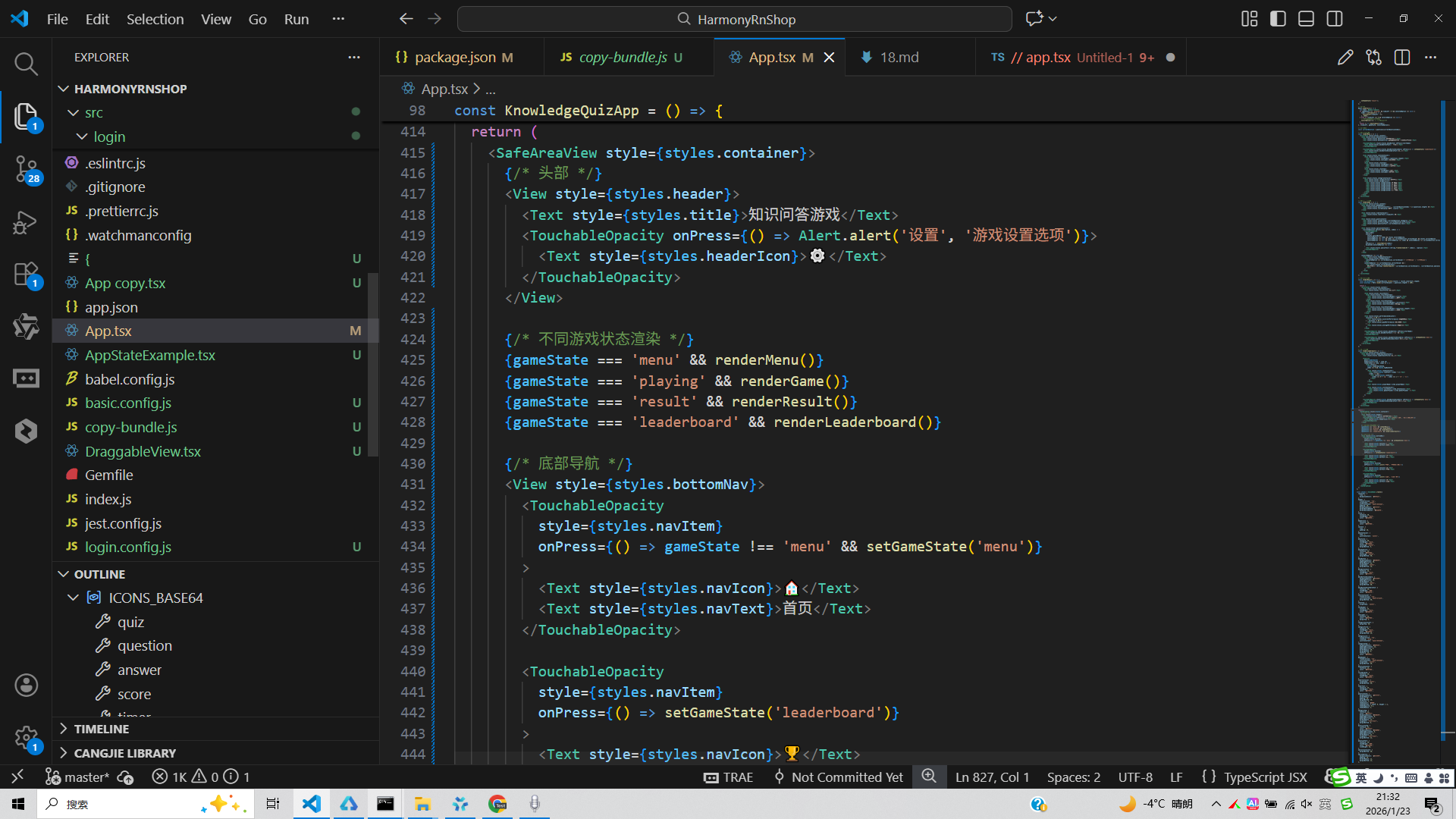
// app.tsx
import React, { useState } from 'react';
import { SafeAreaView, View, Text, StyleSheet, TouchableOpacity, ScrollView, Dimensions, Alert, FlatList } from 'react-native';

// Base64 图标库
const ICONS_BASE64 = {
  quiz: 'data:image/png;base64,iVBORw0KGgoAAAANSUhEUgAAAAEAAAABCAYAAAAfFcSJAAAADUlEQVR42mNkYPhfDwAChwGA60e6kgAAAABJRU5ErkJggg==',
  question: 'data:image/png;base64,iVBORw0KGgoAAAANSUhEUgAAAAEAAAABCAYAAAAfFcSJAAAADUlEQVR42mNkYPhfDwAChwGA60e6kgAAAABJRU5ErkJggg==',
  answer: 'data:image/png;base64,iVBORw0KGgoAAAANSUhEUgAAAAEAAAABCAYAAAAfFcSJAAAADUlEQVR42mNkYPhfDwAChwGA60e6kgAAAABJRU5ErkJggg==',
  score: 'data:image/png;base64,iVBORw0KGgoAAAANSUhEUgAAAAEAAAABCAYAAAAfFcSJAAAADUlEQVR42mNkYPhfDwAChwGA60e6kgAAAABJRU5ErkJggg==',
  timer: 'data:image/png;base64,iVBORw0KGgoAAAANSUhEUgAAAAEAAAABCAYAAAAfFcSJAAAADUlEQVR42mNkYPhfDwAChwGA60e6kgAAAABJRU5ErkJggg==',
  leaderboard: 'data:image/png;base64,iVBORw0KGgoAAAANSUhEUgAAAAEAAAABCAYAAAAfFcSJAAAADUlEQVR42mNkYPhfDwAChwGA60e6kgAAAABJRU5ErkJggg==',
  trophy: 'data:image/png;base64,iVBORw0KGgoAAAANSUhEUgAAAAEAAAABCAYAAAAfFcSJAAAADUlEQVR42mNkYPhfDwAChwGA60e6kgAAAABJRU5ErkJggg==',
  settings: 'data:image/png;base64,iVBORw0KGgoAAAANSUhEUgAAAAEAAAABCAYAAAAfFcSJAAAADUlEQVR42mNkYPhfDwAChwGA60e6kgAAAABJRU5ErkJggg==',
};

const { width, height } = Dimensions.get('window');

// 问题类型
type Question = {
  id: string;
  text: string;
  options: string[];
  correctAnswer: number;
  category: string;
  difficulty: '简单' | '中等' | '困难';
  points: number;
};

// 答题记录类型
type AnswerRecord = {
  id: string;
  questionId: string;
  selectedOption: number | null;
  isCorrect: boolean;
  timeTaken: number; // 秒
  pointsScored: number;
};

// 排行榜类型
type LeaderboardEntry = {
  id: string;
  playerName: string;
  totalScore: number;
  gamesPlayed: number;
  winRate: number;
};

const KnowledgeQuizApp = () => {
  const [currentQuestionIndex, setCurrentQuestionIndex] = useState<number>(0);
  const [selectedOption, setSelectedOption] = useState<number | null>(null);
  const [score, setScore] = useState<number>(0);
  const [timeLeft, setTimeLeft] = useState<number>(15); // 每题15秒
  const [gameState, setGameState] = useState<'menu' | 'playing' | 'result' | 'leaderboard'>('menu'); // 游戏状态
  const [answerRecords, setAnswerRecords] = useState<AnswerRecord[]>([]);

  // 示例题目数据
  const questions: Question[] = [
    {
      id: '1',
      text: '世界上最大的海洋是哪个?',
      options: ['大西洋', '印度洋', '太平洋', '北冰洋'],
      correctAnswer: 2,
      category: '地理',
      difficulty: '简单',
      points: 10
    },
    {
      id: '2',
      text: '中国的首都是哪里?',
      options: ['上海', '广州', '北京', '深圳'],
      correctAnswer: 2,
      category: '地理',
      difficulty: '简单',
      points: 10
    },
    {
      id: '3',
      text: '下列哪位是《哈利·波特》系列小说的作者?',
      options: ['J.R.R. 托尔金', 'J.K. 罗琳', '乔治·R.R. 马丁', '丹·布朗'],
      correctAnswer: 1,
      category: '文学',
      difficulty: '中等',
      points: 20
    },
    {
      id: '4',
      text: '人体最大的器官是什么?',
      options: ['肝脏', '大脑', '皮肤', '心脏'],
      correctAnswer: 2,
      category: '科学',
      difficulty: '中等',
      points: 20
    },
    {
      id: '5',
      text: '太阳系中最大的行星是哪个?',
      options: ['地球', '火星', '木星', '土星'],
      correctAnswer: 2,
      category: '天文',
      difficulty: '中等',
      points: 20
    }
  ];

  const [leaderboard] = useState<LeaderboardEntry[]>([
    { id: '1', playerName: '玩家A', totalScore: 120, gamesPlayed: 5, winRate: 80 },
    { id: '2', playerName: '玩家B', totalScore: 100, gamesPlayed: 4, winRate: 75 },
    { id: '3', playerName: '玩家C', totalScore: 90, gamesPlayed: 6, winRate: 70 },
    { id: '4', playerName: '玩家D', totalScore: 80, gamesPlayed: 3, winRate: 90 },
    { id: '5', playerName: '玩家E', totalScore: 70, gamesPlayed: 7, winRate: 65 },
  ]);

  // 开始游戏
  const startGame = () => {
    setCurrentQuestionIndex(0);
    setSelectedOption(null);
    setScore(0);
    setTimeLeft(15);
    setAnswerRecords([]);
    setGameState('playing');
  };

  // 选择答案
  const selectOption = (optionIndex: number) => {
    if (selectedOption !== null) return; // 防止重复选择

    setSelectedOption(optionIndex);

    const currentQuestion = questions[currentQuestionIndex];
    const isCorrect = optionIndex === currentQuestion.correctAnswer;
    const pointsScored = isCorrect ? currentQuestion.points : 0;

    // 记录答题情况
    const newRecord: AnswerRecord = {
      id: `${currentQuestionIndex}-${Date.now()}`,
      questionId: currentQuestion.id,
      selectedOption: optionIndex,
      isCorrect,
      timeTaken: 15 - timeLeft,
      pointsScored
    };

    setAnswerRecords([...answerRecords, newRecord]);
    setScore(score + pointsScored);

    // 显示正确答案后自动下一题
    setTimeout(() => {
      nextQuestion();
    }, 1500);
  };

  // 下一题
  const nextQuestion = () => {
    if (currentQuestionIndex < questions.length - 1) {
      setCurrentQuestionIndex(currentQuestionIndex + 1);
      setSelectedOption(null);
      setTimeLeft(15);
    } else {
      // 游戏结束
      setGameState('result');
    }
  };

  // 倒计时
  React.useEffect(() => {
    let timer: NodeJS.Timeout;
    if (gameState === 'playing' && timeLeft > 0 && selectedOption === null) {
      timer = setTimeout(() => {
        setTimeLeft(timeLeft - 1);
      }, 1000);
    } else if (timeLeft === 0 && selectedOption === null) {
      // 时间到了但没选,算错误
      selectOption(-1); // -1 表示未作答
    }
    return () => clearTimeout(timer);
  }, [timeLeft, gameState, selectedOption]);

  // 当前题目
  const currentQuestion = questions[currentQuestionIndex];

  // 游戏菜单界面
  const renderMenu = () => (
    <ScrollView style={styles.content}>
      <View style={styles.menuContainer}>
        <Text style={styles.menuTitle}>知识问答游戏</Text>
        <Text style={styles.menuSubtitle}>挑战你的知识储备,赢取积分排名</Text>

        <TouchableOpacity style={styles.menuButton} onPress={startGame}>
          <Text style={styles.menuButtonText}>开始游戏</Text>
        </TouchableOpacity>

        <TouchableOpacity style={styles.menuButtonSecondary} onPress={() => setGameState('leaderboard')}>
          <Text style={styles.menuButtonSecondaryText}>排行榜</Text>
        </TouchableOpacity>

        <View style={styles.statsContainer}>
          <View style={styles.statItem}>
            <Text style={styles.statNumber}>{questions.length}</Text>
            <Text style={styles.statLabel}>题目数量</Text>
          </View>
          <View style={styles.statItem}>
            <Text style={styles.statNumber}>15s</Text>
            <Text style={styles.statLabel}>每题限时</Text>
          </View>
          <View style={styles.statItem}>
            <Text style={styles.statNumber}>120+</Text>
            <Text style={styles.statLabel}>知识点</Text>
          </View>
        </View>

        <View style={styles.categoryContainer}>
          <Text style={styles.categoryTitle}>知识分类</Text>
          <View style={styles.categoryList}>
            <Text style={styles.categoryItem}>🌍 地理</Text>
            <Text style={styles.categoryItem}>📚 文学</Text>
            <Text style={styles.categoryItem}>🔬 科学</Text>
            <Text style={styles.categoryItem}>🌌 天文</Text>
            <Text style={styles.categoryItem}>🎨 艺术</Text>
            <Text style={styles.categoryItem}>🏛️ 历史</Text>
          </View>
        </View>
      </View>
    </ScrollView>
  );

  // 游戏进行中界面
  const renderGame = () => (
    <ScrollView style={styles.content}>
      <View style={styles.gameHeader}>
        <Text style={styles.questionCounter}>第 {currentQuestionIndex + 1}/{questions.length} 题</Text>
        <Text style={styles.scoreDisplay}>得分: {score}</Text>
      </View>

      <View style={styles.timerContainer}>
        <Text style={styles.timerText}>{timeLeft} 秒</Text>
      </View>

      <View style={styles.questionCard}>
        <Text style={styles.categoryTag}>{currentQuestion.category}</Text>
        <Text style={styles.difficultyTag}>{currentQuestion.difficulty}</Text>
        <Text style={styles.questionText}>{currentQuestion.text}</Text>
      </View>

      <View style={styles.optionsContainer}>
        {currentQuestion.options.map((option, index) => (
          <TouchableOpacity
            key={index}
            style={[
              styles.optionButton,
              selectedOption === index && styles.selectedOption,
              selectedOption !== null && index === currentQuestion.correctAnswer && styles.correctOption,
              selectedOption !== null && selectedOption === index && selectedOption !== currentQuestion.correctAnswer && styles.wrongOption
            ]}
            onPress={() => selectOption(index)}
            disabled={selectedOption !== null}
          >
            <Text style={styles.optionText}>{String.fromCharCode(65 + index)}. {option}</Text>
          </TouchableOpacity>
        ))}
      </View>

      {selectedOption !== null && (
        <View style={styles.feedbackContainer}>
          <Text style={styles.feedbackText}>
            {selectedOption === currentQuestion.correctAnswer ? '回答正确!' : '回答错误!'}
          </Text>
          {selectedOption !== currentQuestion.correctAnswer && (
            <Text style={styles.correctAnswerText}>
              正确答案是: {String.fromCharCode(65 + currentQuestion.correctAnswer)}. {currentQuestion.options[currentQuestion.correctAnswer]}
            </Text>
          )}
        </View>
      )}
    </ScrollView>
  );

  // 游戏结果界面
  const renderResult = () => {
    const correctAnswers = answerRecords.filter(record => record.isCorrect).length;
    const accuracy = Math.round((correctAnswers / questions.length) * 100);

    return (
      <ScrollView style={styles.content}>
        <View style={styles.resultContainer}>
          <Text style={styles.resultTitle}>游戏结束</Text>

          <View style={styles.resultStats}>
            <View style={styles.resultStatItem}>
              <Text style={styles.resultStatNumber}>{score}</Text>
              <Text style={styles.resultStatLabel}>总得分</Text>
            </View>
            <View style={styles.resultStatItem}>
              <Text style={styles.resultStatNumber}>{accuracy}%</Text>
              <Text style={styles.resultStatLabel}>正确率</Text>
            </View>
            <View style={styles.resultStatItem}>
              <Text style={styles.resultStatNumber}>{questions.length}</Text>
              <Text style={styles.resultStatLabel}>总题数</Text>
            </View>
          </View>

          <View style={styles.performanceIndicator}>
            {accuracy >= 80 ? (
              <Text style={styles.excellentPerformance}>优秀表现!</Text>
            ) : accuracy >= 60 ? (
              <Text style={styles.goodPerformance}>良好表现</Text>
            ) : (
              <Text style={styles.averagePerformance}>还需努力</Text>
            )}
          </View>

          <TouchableOpacity style={styles.menuButton} onPress={startGame}>
            <Text style={styles.menuButtonText}>再玩一次</Text>
          </TouchableOpacity>

          <TouchableOpacity style={styles.menuButtonSecondary} onPress={() => setGameState('menu')}>
            <Text style={styles.menuButtonSecondaryText}>返回主菜单</Text>
          </TouchableOpacity>
        </View>
      </ScrollView>
    );
  };

  // 排行榜界面
  const renderLeaderboard = () => (
    <ScrollView style={styles.content}>
      <View style={styles.leaderboardContainer}>
        <Text style={styles.leaderboardTitle}>排行榜</Text>

        <FlatList
          data={leaderboard}
          keyExtractor={item => item.id}
          renderItem={({ item, index }) => (
            <View style={[
              styles.leaderboardItem,
              index === 0 && styles.topRankItem
            ]}>
              <View style={styles.rankContainer}>
                <Text style={styles.rankText}>{index + 1}</Text>
                {index < 3 && (
                  <Text style={styles.rankIcon}>
                    {index === 0 ? '🥇' : index === 1 ? '🥈' : '🥉'}
                  </Text>
                )}
              </View>

              <Text style={styles.playerName}>{item.playerName}</Text>

              <View style={styles.scoreContainer}>
                <Text style={styles.scoreText}>{item.totalScore}</Text>
                <Text style={styles.gamesPlayed}>({item.gamesPlayed}局)</Text>
              </View>
            </View>
          )}
        />

        <TouchableOpacity style={styles.menuButtonSecondary} onPress={() => setGameState('menu')}>
          <Text style={styles.menuButtonSecondaryText}>返回主菜单</Text>
        </TouchableOpacity>
      </View>
    </ScrollView>
  );

  return (
    <SafeAreaView style={styles.container}>
      {/* 头部 */}
      <View style={styles.header}>
        <Text style={styles.title}>知识问答游戏</Text>
        <TouchableOpacity onPress={() => Alert.alert('设置', '游戏设置选项')}>
          <Text style={styles.headerIcon}>⚙️</Text>
        </TouchableOpacity>
      </View>

      {/* 不同游戏状态渲染 */}
      {gameState === 'menu' && renderMenu()}
      {gameState === 'playing' && renderGame()}
      {gameState === 'result' && renderResult()}
      {gameState === 'leaderboard' && renderLeaderboard()}

      {/* 底部导航 */}
      <View style={styles.bottomNav}>
        <TouchableOpacity
          style={styles.navItem}
          onPress={() => gameState !== 'menu' && setGameState('menu')}
        >
          <Text style={styles.navIcon}>🏠</Text>
          <Text style={styles.navText}>首页</Text>
        </TouchableOpacity>

        <TouchableOpacity
          style={styles.navItem}
          onPress={() => setGameState('leaderboard')}
        >
          <Text style={styles.navIcon}>🏆</Text>
          <Text style={styles.navText}>排行</Text>
        </TouchableOpacity>

        <TouchableOpacity
          style={styles.navItem}
          onPress={() => Alert.alert('分享', '分享游戏成绩')}
        >
          <Text style={styles.navIcon}>📤</Text>
          <Text style={styles.navText}>分享</Text>
        </TouchableOpacity>

        <TouchableOpacity
          style={styles.navItem}
          onPress={() => Alert.alert('我的', '个人中心')}
        >
          <Text style={styles.navIcon}>👤</Text>
          <Text style={styles.navText}>我的</Text>
        </TouchableOpacity>
      </View>
    </SafeAreaView>
  );
};

const styles = StyleSheet.create({
  container: {
    flex: 1,
    backgroundColor: '#f8fafc',
  },
  header: {
    flexDirection: 'row',
    alignItems: 'center',
    justifyContent: 'space-between',
    padding: 20,
    backgroundColor: '#ffffff',
    borderBottomWidth: 1,
    borderBottomColor: '#e2e8f0',
  },
  title: {
    fontSize: 18,
    fontWeight: 'bold',
    color: '#1e293b',
  },
  headerIcon: {
    fontSize: 20,
    color: '#64748b',
  },
  content: {
    flex: 1,
    padding: 16,
  },
  menuContainer: {
    flex: 1,
    justifyContent: 'center',
  },
  menuTitle: {
    fontSize: 28,
    fontWeight: 'bold',
    color: '#1e293b',
    textAlign: 'center',
    marginBottom: 8,
  },
  menuSubtitle: {
    fontSize: 16,
    color: '#64748b',
    textAlign: 'center',
    marginBottom: 40,
  },
  menuButton: {
    backgroundColor: '#3b82f6',
    paddingVertical: 16,
    borderRadius: 12,
    alignItems: 'center',
    marginBottom: 16,
  },
  menuButtonText: {
    fontSize: 18,
    fontWeight: 'bold',
    color: '#ffffff',
  },
  menuButtonSecondary: {
    backgroundColor: '#f1f5f9',
    paddingVertical: 16,
    borderRadius: 12,
    alignItems: 'center',
    marginBottom: 30,
  },
  menuButtonSecondaryText: {
    fontSize: 16,
    fontWeight: '500',
    color: '#3b82f6',
  },
  statsContainer: {
    flexDirection: 'row',
    justifyContent: 'space-around',
    marginBottom: 40,
  },
  statItem: {
    alignItems: 'center',
  },
  statNumber: {
    fontSize: 24,
    fontWeight: 'bold',
    color: '#3b82f6',
  },
  statLabel: {
    fontSize: 14,
    color: '#64748b',
    marginTop: 4,
  },
  categoryContainer: {
    marginTop: 20,
  },
  categoryTitle: {
    fontSize: 18,
    fontWeight: 'bold',
    color: '#1e293b',
    marginBottom: 16,
  },
  categoryList: {
    flexDirection: 'row',
    flexWrap: 'wrap',
    justifyContent: 'space-between',
  },
  categoryItem: {
    backgroundColor: '#e0f2fe',
    paddingHorizontal: 12,
    paddingVertical: 8,
    borderRadius: 20,
    marginBottom: 8,
    fontSize: 14,
    color: '#0369a1',
  },
  gameHeader: {
    flexDirection: 'row',
    justifyContent: 'space-between',
    alignItems: 'center',
    marginBottom: 20,
  },
  questionCounter: {
    fontSize: 16,
    color: '#64748b',
  },
  scoreDisplay: {
    fontSize: 18,
    fontWeight: 'bold',
    color: '#1e293b',
  },
  timerContainer: {
    alignItems: 'center',
    marginBottom: 20,
  },
  timerText: {
    fontSize: 24,
    fontWeight: 'bold',
    color: '#ef4444',
  },
  questionCard: {
    backgroundColor: '#ffffff',
    borderRadius: 12,
    padding: 20,
    marginBottom: 20,
    elevation: 1,
    shadowColor: '#000',
    shadowOffset: { width: 0, height: 1 },
    shadowOpacity: 0.1,
    shadowRadius: 2,
  },
  categoryTag: {
    fontSize: 12,
    color: '#ffffff',
    backgroundColor: '#3b82f6',
    paddingHorizontal: 8,
    paddingVertical: 4,
    borderRadius: 12,
    alignSelf: 'flex-start',
    marginBottom: 8,
  },
  difficultyTag: {
    fontSize: 12,
    color: '#ffffff',
    backgroundColor: '#10b981',
    paddingHorizontal: 8,
    paddingVertical: 4,
    borderRadius: 12,
    alignSelf: 'flex-start',
    marginBottom: 12,
  },
  questionText: {
    fontSize: 18,
    fontWeight: '500',
    color: '#1e293b',
    lineHeight: 26,
  },
  optionsContainer: {
    marginBottom: 20,
  },
  optionButton: {
    backgroundColor: '#f1f5f9',
    padding: 16,
    borderRadius: 12,
    marginBottom: 12,
  },
  selectedOption: {
    backgroundColor: '#dbeafe',
    borderWidth: 2,
    borderColor: '#3b82f6',
  },
  correctOption: {
    backgroundColor: '#d1fae5',
    borderWidth: 2,
    borderColor: '#10b981',
  },
  wrongOption: {
    backgroundColor: '#fee2e2',
    borderWidth: 2,
    borderColor: '#ef4444',
  },
  optionText: {
    fontSize: 16,
    color: '#1e293b',
  },
  feedbackContainer: {
    backgroundColor: '#ffffff',
    borderRadius: 12,
    padding: 16,
    alignItems: 'center',
    marginBottom: 20,
    elevation: 1,
    shadowColor: '#000',
    shadowOffset: { width: 0, height: 1 },
    shadowOpacity: 0.1,
    shadowRadius: 2,
  },
  feedbackText: {
    fontSize: 18,
    fontWeight: 'bold',
    marginBottom: 8,
  },
  correctAnswerText: {
    fontSize: 16,
    color: '#1e293b',
    textAlign: 'center',
  },
  resultContainer: {
    flex: 1,
    justifyContent: 'center',
  },
  resultTitle: {
    fontSize: 32,
    fontWeight: 'bold',
    color: '#1e293b',
    textAlign: 'center',
    marginBottom: 30,
  },
  resultStats: {
    flexDirection: 'row',
    justifyContent: 'space-around',
    marginBottom: 30,
  },
  resultStatItem: {
    alignItems: 'center',
  },
  resultStatNumber: {
    fontSize: 32,
    fontWeight: 'bold',
    color: '#3b82f6',
  },
  resultStatLabel: {
    fontSize: 16,
    color: '#64748b',
    marginTop: 4,
  },
  performanceIndicator: {
    alignItems: 'center',
    marginBottom: 30,
  },
  excellentPerformance: {
    fontSize: 20,
    fontWeight: 'bold',
    color: '#10b981',
  },
  goodPerformance: {
    fontSize: 20,
    fontWeight: 'bold',
    color: '#f59e0b',
  },
  averagePerformance: {
    fontSize: 20,
    fontWeight: 'bold',
    color: '#ef4444',
  },
  leaderboardContainer: {},
  leaderboardTitle: {
    fontSize: 24,
    fontWeight: 'bold',
    color: '#1e293b',
    marginBottom: 20,
    textAlign: 'center',
  },
  leaderboardItem: {
    backgroundColor: '#ffffff',
    borderRadius: 12,
    padding: 16,
    flexDirection: 'row',
    alignItems: 'center',
    justifyContent: 'space-between',
    marginBottom: 12,
    elevation: 1,
    shadowColor: '#000',
    shadowOffset: { width: 0, height: 1 },
    shadowOpacity: 0.1,
    shadowRadius: 2,
  },
  topRankItem: {
    backgroundColor: '#fffbeb',
    borderWidth: 1,
    borderColor: '#fbbf24',
  },
  rankContainer: {
    flexDirection: 'row',
    alignItems: 'center',
    width: 60,
  },
  rankText: {
    fontSize: 18,
    fontWeight: 'bold',
    color: '#64748b',
    marginRight: 8,
  },
  rankIcon: {
    fontSize: 20,
  },
  playerName: {
    fontSize: 16,
    fontWeight: '500',
    color: '#1e293b',
    flex: 1,
  },
  scoreContainer: {
    alignItems: 'flex-end',
  },
  scoreText: {
    fontSize: 18,
    fontWeight: 'bold',
    color: '#3b82f6',
  },
  gamesPlayed: {
    fontSize: 12,
    color: '#64748b',
  },
  bottomNav: {
    flexDirection: 'row',
    justifyContent: 'space-around',
    backgroundColor: '#ffffff',
    borderTopWidth: 1,
    borderTopColor: '#e2e8f0',
    paddingVertical: 12,
  },
  navItem: {
    alignItems: 'center',
    flex: 1,
  },
  navIcon: {
    fontSize: 20,
    color: '#94a3b8',
    marginBottom: 4,
  },
  navText: {
    fontSize: 12,
    color: '#94a3b8',
  },
});

export default KnowledgeQuizApp;
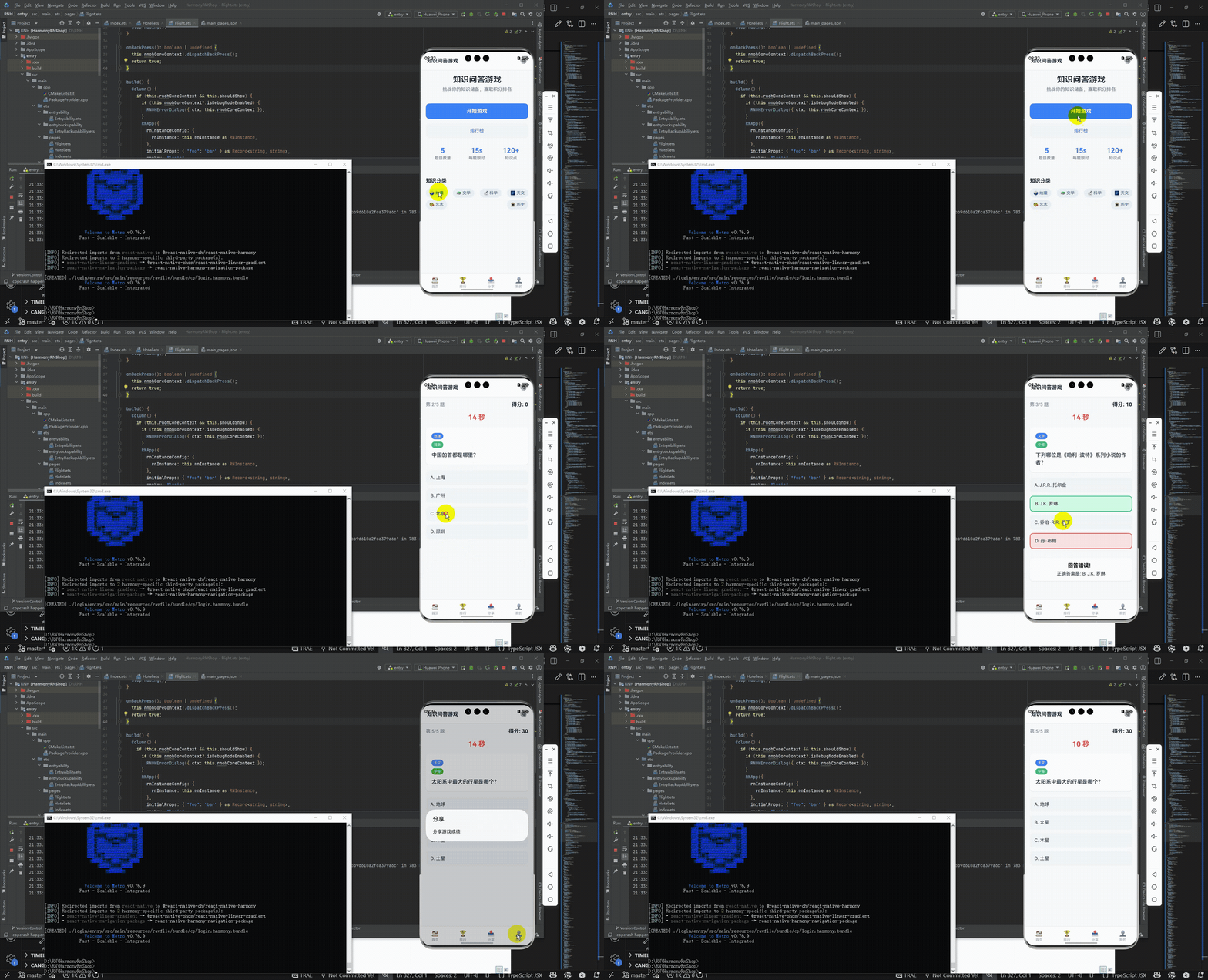
打包
接下来通过打包命令npn run harmony将reactNative的代码打包成为bundle,这样可以进行在开源鸿蒙OpenHarmony中进行使用。

打包之后再将打包后的鸿蒙OpenHarmony文件拷贝到鸿蒙的DevEco-Studio工程目录去:

最后运行效果图如下显示:
本文探讨了一个基于React Native的知识问答游戏实现方案,重点分析了其架构设计和技术实现。该应用采用组件化架构,分为主应用组件、游戏状态管理、题目渲染、结果展示和排行榜等模块。通过useState管理游戏状态、答题记录等关键数据,并实现了完整的游戏流程控制,包括倒计时功能和答题记录系统。文章还讨论了TypeScript类型定义的优势,以及该应用在教育、娱乐和企业培训等场景的应用价值。最后提出了使用useRef优化定时器和使用useReducer管理复杂状态的技术优化建议。
欢迎大家加入开源鸿蒙跨平台开发者社区,一起共建开源鸿蒙跨平台生态。

作为“人工智能6S店”的官方数字引擎,为AI开发者与企业提供一个覆盖软硬件全栈、一站式门户。
更多推荐

 5
5 0
0- 0


 已为社区贡献14条内容

所有评论(0)