
Flutter 框架跨平台鸿蒙开发 ——StaggeredAnimation交错动画详解
StaggeredAnimation(交错动画)是指多个动画按照时间顺序依次执行的动画效果。通过使用Interval曲线限制每个动画的执行时间范围,可以让动画按照预定顺序依次执行,创造出有节奏感的视觉效果。
StaggeredAnimation交错动画详解
StaggeredAnimation(交错动画)是指多个动画按照时间顺序依次执行的动画效果。通过使用Interval曲线限制每个动画的执行时间范围,可以让动画按照预定顺序依次执行,创造出有节奏感的视觉效果。
一、交错动画的概念
交错动画的核心是让多个动画在不同时间点启动和完成,形成有节奏的序列效果。这种效果比同时变化的动画更加生动,能够引导用户注意力,增强界面的层次感。
应用价值:
- 创造视觉层次感,让界面更立体
- 产生节奏感,避免动画平淡
- 引导用户注意力沿特定路径移动
- 减少认知负荷,逐步呈现信息
二、Interval曲线工作原理
Interval曲线将动画执行时间限制在父动画的特定范围内。它接受begin和end两个参数(0.0-1.0),表示相对于父动画的时间比例。
计算公式:
子进度 = 父进度 − begin end − begin \text{子进度} = \frac{\text{父进度} - \text{begin}}{\text{end} - \text{begin}} 子进度=end−begin父进度−begin
当父进度在begin和end之间时,子动画通过线性插值计算进度。
三、交错动画实现方法
实现交错动画需要单个AnimationController配合多个Interval:
_controller = AnimationController(
  duration: const Duration(seconds: 3),
  vsync: this,
);

// 缩放: 0-25%时间
_scaleAnimation = Tween<double>(begin: 0.5, end: 1.2).animate(
  CurvedAnimation(
    parent: _controller,
    curve: const Interval(0.0, 0.25, curve: Curves.easeOut),
  ),
);

// 旋转: 25%-50%时间
_rotationAnimation = Tween<double>(begin: 0, end: 3.14159).animate(
  CurvedAnimation(
    parent: _controller,
    curve: const Interval(0.25, 0.5, curve: Curves.easeOut),
  ),
);

// 颜色: 50%-75%时间
_colorAnimation = ColorTween(begin: Colors.blue, end: Colors.orange).animate(
  CurvedAnimation(
    parent: _controller,
    curve: const Interval(0.5, 0.75, curve: Curves.easeOut),
  ),
);

// 圆角: 75%-100%时间
_radiusAnimation = Tween<double>(begin: 0, end: 50).animate(
  CurvedAnimation(
    parent: _controller,
    curve: const Interval(0.75, 1.0, curve: Curves.easeOut),
  ),
);
四、Interval参数配置策略
| 配置方式 | begin/end设置 | 效果 | 适用场景 |
|---|---|---|---|
| 平均分配 | (0,0.25), (0.25,0.5)… | 均匀节奏 | 同等重要元素 |
| 非均匀分配 | (0,0.3), (0.3,0.5), (0.5,1) | 强调重点 | 有主次之分 |
| 有间隔 | (0,0.2), (0.3,0.5) | 节奏感强 | 需要停顿 |
| 无间隔 | (0,0.25), (0.25,0.5) | 流畅自然 | 连贯过渡 |
五、交错动画的节奏控制
动画节奏影响用户体验。过快的节奏会让用户来不及看清,过慢的节奏会让用户感觉拖沓。
节奏控制要点:
- 每个动画200-500ms为宜
- 重要动画可稍长,次要动画可稍短
- 总时长控制在3秒内
- 使用缓动曲线增强自然感
节奏配置示例:
// 总时长3秒,分4个动画,每个动画450ms,间隔300ms
_controller = AnimationController(
  duration: const Duration(seconds: 3),
  vsync: this,
);

// 第一个动画: 0-15% (450ms)
_anim1 = Tween<double>(begin: 0, end: 100).animate(
  CurvedAnimation(
    parent: _controller,
    curve: const Interval(0.0, 0.15, curve: Curves.easeOut),
  ),
);

// 间隔: 15%-25% (300ms)

// 第二个动画: 25%-40% (450ms)
_anim2 = Tween<double>(begin: 0, end: 100).animate(
  CurvedAnimation(
    parent: _controller,
    curve: const Interval(0.25, 0.40, curve: Curves.easeOut),
  ),
);

// 间隔: 40%-50% (300ms)

// 第三个动画: 50%-65% (450ms)
_anim3 = Tween<double>(begin: 0, end: 100).animate(
  CurvedAnimation(
    parent: _controller,
    curve: const Interval(0.50, 0.65, curve: Curves.easeOut),
  ),
);

// 间隔: 65%-75% (300ms)

// 第四个动画: 75%-90% (450ms)
_anim4 = Tween<double>(begin: 0, end: 100).animate(
  CurvedAnimation(
    parent: _controller,
    curve: const Interval(0.75, 0.90, curve: Curves.easeOut),
  ),
);
六、多层交错动画
通过嵌套Interval可以实现更复杂的多层交错。例如,第一层控制整体,第二层控制细节,形成层次丰富的动画序列。
实现方式:
- 使用多个AnimationController嵌套
- 通过监听器协调不同层级的动画
- 使用Future等待前一层完成
多层交错示例:
class MultiLayerStaggeredAnimation extends StatefulWidget {
_MultiLayerStaggeredAnimationState createState() => _MultiLayerStaggeredAnimationState();
}
class _MultiLayerStaggeredAnimationState extends State<MultiLayerStaggeredAnimation>
with TickerProviderStateMixin {
// 第一层:整体动画
late AnimationController _layer1Controller;
late Animation<double> _layer1Animation;
// 第二层:细节动画
late AnimationController _layer2Controller;
late List<Animation<double>> _layer2Animations;
void initState() {
super.initState();
// 第一层:控制整体显示
_layer1Controller = AnimationController(
duration: const Duration(seconds: 2),
vsync: this,
);
_layer1Animation = Tween<double>(begin: 0, end: 1).animate(
CurvedAnimation(
parent: _layer1Controller,
curve: Curves.easeInOut,
),
);
// 第二层:控制细节元素
_layer2Controller = AnimationController(
duration: const Duration(seconds: 1),
vsync: this,
);
// 创建多个细节动画
_layer2Animations = List.generate(5, (index) {
return Tween<double>(begin: 0, end: 1).animate(
CurvedAnimation(
parent: _layer2Controller,
curve: Interval(
index * 0.2, // 每个动画延迟启动
(index + 1) * 0.2 + 0.1, // 每个动画占20%+10%
curve: Curves.easeOut,
),
),
);
});
// 启动第一层动画
_layer1Controller.forward();
// 第一层完成后启动第二层
_layer1Animation.addStatusListener((status) {
if (status == AnimationStatus.completed) {
_layer2Controller.forward();
}
});
}
void dispose() {
_layer1Controller.dispose();
_layer2Controller.dispose();
super.dispose();
}
Widget build(BuildContext context) {
return AnimatedBuilder(
animation: _layer1Animation,
builder: (context, child) {
return Opacity(
opacity: _layer1Animation.value,
child: Transform.scale(
scale: 0.5 + _layer1Animation.value * 0.5,
child: Column(
children: List.generate(5, (index) {
return AnimatedBuilder(
animation: _layer2Animations[index],
builder: (context, child) {
return Transform.translate(
offset: Offset(
100 * (1 - _layer2Animations[index].value),
0,
),
child: Opacity(
opacity: _layer2Animations[index].value,
child: child,
),
);
},
child: Container(
margin: const EdgeInsets.all(10),
width: 200,
height: 50,
color: Colors.blue,
child: Center(
child: Text('项目 ${index + 1}'),
),
),
);
}),
),
),
);
},
);
}
}
七、性能优化考虑
交错动画虽然效果好,但也需要注意性能:
优化建议:
- 合理设置总时长,避免过长
- 减少同时运行的动画数量
- 使用AnimatedBuilder局部重建
- 避免在动画中创建新对象
性能优化的具体实现
使用AnimatedBuilder避免不必要的重建:
// ❌ 不好: 在setState中重建整个UI
_controller.addListener(() {
setState(() {}); // 整个build方法都会执行
});
Widget build(BuildContext context) {
return Column(
children: [
// 很多静态Widget也会重建
StaticWidget1(),
StaticWidget2(),
// 动画Widget
AnimatedWidget(_anim1.value),
AnimatedWidget(_anim2.value),
],
);
}
// ✅ 好: 使用AnimatedBuilder局部重建
class StaggeredAnimationOptimized extends StatefulWidget {
_StaggeredAnimationOptimizedState createState() => _StaggeredAnimationOptimizedState();
}
class _StaggeredAnimationOptimizedState extends State<StaggeredAnimationOptimized>
with TickerProviderStateMixin {
late AnimationController _controller;
late List<Animation<double>> _animations;
void initState() {
super.initState();
_controller = AnimationController(
duration: const Duration(seconds: 2),
vsync: this,
);
// 创建4个交错动画
_animations = List.generate(4, (index) {
return Tween<double>(begin: 0, end: 1).animate(
CurvedAnimation(
parent: _controller,
curve: Interval(
index * 0.25,
(index + 1) * 0.25,
curve: Curves.easeOut,
),
),
);
});
}
void dispose() {
_controller.dispose();
super.dispose();
}
Widget build(BuildContext context) {
return Scaffold(
appBar: AppBar(title: const Text('优化后的交错动画')),
body: Column(
children: [
// 静态Widget,不会重建
const HeaderWidget(),
const SizedBox(height: 20),
// 使用AnimatedBuilder包装动画区域
AnimatedBuilder(
animation: Listenable.merge(_animations),
builder: (context, child) {
return Column(
children: _animations.map((anim) {
return AnimatedWidget(animation: anim.value);
}).toList(),
);
},
),
// 静态Widget,不会重建
const SizedBox(height: 20),
const FooterWidget(),
],
),
);
}
}
避免在动画中创建新对象:
// ❌ 不好: 每次都创建新的Decoration
AnimatedBuilder(
  animation: _animation,
  builder: (context, child) {
    return Container(
      decoration: BoxDecoration(  // 每次都创建新对象
        color: Color.lerp(Colors.blue, Colors.red, _animation.value),
        borderRadius: BorderRadius.circular(_animation.value * 50),
      ),
      child: child,
    );
  },
)

// ✅ 好: 使用Tween或预计算
final _colorTween = ColorTween(begin: Colors.blue, end: Colors.red);
final _radiusTween = Tween<double>(begin: 0, end: 50);

AnimatedBuilder(
  animation: _animation,
  builder: (context, child) {
    return Container(
      decoration: BoxDecoration(
        color: _colorTween.evaluate(_animation),
        borderRadius: BorderRadius.circular(_radiusTween.evaluate(_animation)),
      ),
      child: child,
    );
  },
)
优化动画数量和重叠:
class OptimizedStaggeredAnimation extends StatefulWidget {
_OptimizedStaggeredAnimationState createState() => _OptimizedStaggeredAnimationState();
}
class _OptimizedStaggeredAnimationState extends State<OptimizedStaggeredAnimation>
with TickerProviderStateMixin {
late AnimationController _controller;
late List<Animation<double>> _animations;
void initState() {
super.initState();
_controller = AnimationController(
duration: const Duration(seconds: 2),
vsync: this,
);
// 只创建3个动画,而不是更多
_animations = List.generate(3, (index) {
return Tween<double>(begin: 0, end: 1).animate(
CurvedAnimation(
parent: _controller,
curve: Interval(
index * 0.3, // 有10%的重叠,创造流畅过渡
(index + 1) * 0.3 + 0.1,
curve: Curves.easeOut,
),
),
);
});
}
void dispose() {
_controller.dispose();
super.dispose();
}
void _startAnimation() {
_controller.forward();
}
void _resetAnimation() {
_controller.reset();
}
Widget build(BuildContext context) {
return Column(
children: [
AnimatedBuilder(
animation: Listenable.merge(_animations),
builder: (context, child) {
return Column(
children: _animations.asMap().entries.map((entry) {
final index = entry.key;
final anim = entry.value;
return Transform.translate(
offset: Offset(0, anim.value * 20),
child: Opacity(
opacity: anim.value,
child: Container(
margin: const EdgeInsets.all(10),
width: 200,
height: 60,
decoration: BoxDecoration(
color: [Colors.blue, Colors.green, Colors.orange][index],
borderRadius: BorderRadius.circular(10),
),
child: Center(
child: Text(
'动画元素 ${index + 1}',
style: const TextStyle(color: Colors.white, fontSize: 18),
),
),
),
),
);
}).toList(),
);
},
),
const SizedBox(height: 40),
Row(
mainAxisAlignment: MainAxisAlignment.center,
children: [
ElevatedButton(
onPressed: _startAnimation,
child: const Text('开始动画'),
),
const SizedBox(width: 20),
ElevatedButton(
onPressed: _resetAnimation,
child: const Text('重置'),
),
],
),
],
);
}
}
性能监控和调试:
class StaggeredAnimationWithProfiling extends StatefulWidget {
_StaggeredAnimationWithProfilingState createState() => _StaggeredAnimationWithProfilingState();
}
class _StaggeredAnimationWithProfilingState extends State<StaggeredAnimationWithProfiling>
with TickerProviderStateMixin {
late AnimationController _controller;
late List<Animation<double>> _animations;
int _frameCount = 0;
final Stopwatch _stopwatch = Stopwatch();
double _fps = 0.0;
void initState() {
super.initState();
_controller = AnimationController(
duration: const Duration(seconds: 2),
vsync: this,
);
_animations = List.generate(4, (index) {
return Tween<double>(begin: 0, end: 1).animate(
CurvedAnimation(
parent: _controller,
curve: Interval(
index * 0.25,
(index + 1) * 0.25,
curve: Curves.easeOut,
),
),
);
});
// 监控帧率
_controller.addListener(_updateFPS);
}
void _updateFPS() {
_frameCount++;
if (!_stopwatch.isRunning) {
_stopwatch.start();
}
if (_stopwatch.elapsedMilliseconds >= 1000) {
setState(() {
_fps = _frameCount.toDouble();
_frameCount = 0;
_stopwatch.reset();
_stopwatch.start();
});
}
}
void dispose() {
_controller.removeListener(_updateFPS);
_controller.dispose();
super.dispose();
}
Widget build(BuildContext context) {
return Column(
children: [
Container(
padding: const EdgeInsets.all(10),
color: Colors.grey[200],
child: Text(
'FPS: ${_fps.toStringAsFixed(1)}',
style: const TextStyle(fontSize: 16, fontWeight: FontWeight.bold),
),
),
AnimatedBuilder(
animation: Listenable.merge(_animations),
builder: (context, child) {
return Column(
children: _animations.map((anim) {
return Container(
margin: const EdgeInsets.all(10),
width: anim.value * 200,
height: 50,
decoration: BoxDecoration(
color: Colors.blue,
borderRadius: BorderRadius.circular(10),
),
);
}).toList(),
);
},
),
],
);
}
}
八、常见问题与解决
问题1: 动画重叠导致混乱
解决: 确保Interval范围不重叠,或有意设置重叠产生特殊效果
问题2: 动画节奏不协调
解决: 调整Interval范围和duration,使用预览测试效果
问题3: 动画完成时卡顿
解决: 确保所有动画在同一时间完成,使用repeat统一循环
九、示例案例:四属性交错动画
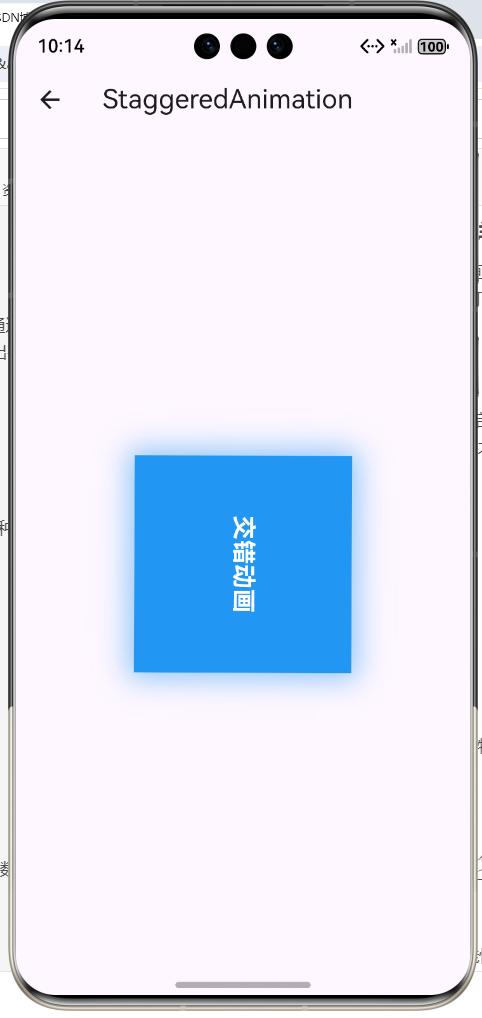
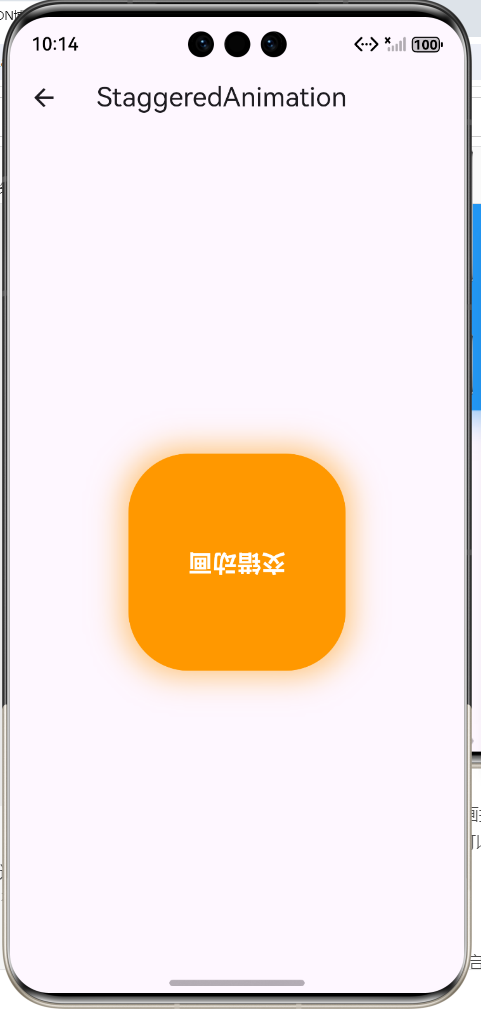
本示例演示了交错动画的实现,四个动画属性(缩放、旋转、颜色、圆角)按时间顺序依次执行。
import 'package:flutter/material.dart';
class StaggeredAnimationDemo extends StatefulWidget {
const StaggeredAnimationDemo({super.key});
State<StaggeredAnimationDemo> createState() =>
_StaggeredAnimationDemoState();
}
class _StaggeredAnimationDemoState extends State<StaggeredAnimationDemo>
with SingleTickerProviderStateMixin {
late AnimationController _controller;
late Animation<double> _scaleAnimation;
late Animation<double> _rotationAnimation;
late Animation<Color> _colorAnimation;
late Animation<double> _radiusAnimation;
void initState() {
super.initState();
_controller = AnimationController(
duration: const Duration(seconds: 3),
vsync: this,
);
_scaleAnimation = Tween<double>(begin: 0.5, end: 1.2).animate(
CurvedAnimation(
parent: _controller,
curve: const Interval(0.0, 0.25, curve: Curves.easeOut),
),
);
_rotationAnimation = Tween<double>(begin: 0, end: 3.14159).animate(
CurvedAnimation(
parent: _controller,
curve: const Interval(0.25, 0.5, curve: Curves.easeOut),
),
);
_colorAnimation = ColorTween(begin: Colors.blue, end: Colors.orange).animate(
CurvedAnimation(
parent: _controller,
curve: const Interval(0.5, 0.75, curve: Curves.easeOut),
),
);
_radiusAnimation = Tween<double>(begin: 0, end: 50).animate(
CurvedAnimation(
parent: _controller,
curve: const Interval(0.75, 1.0, curve: Curves.easeOut),
),
);
_controller.repeat();
}
void dispose() {
_controller.dispose();
super.dispose();
}
Widget build(BuildContext context) {
return Scaffold(
appBar: AppBar(
title: const Text('StaggeredAnimation'),
),
body: Center(
child: AnimatedBuilder(
animation: _controller,
builder: (context, child) {
return Transform.rotate(
angle: _rotationAnimation.value,
child: Container(
width: 150 * _scaleAnimation.value,
height: 150 * _scaleAnimation.value,
decoration: BoxDecoration(
color: _colorAnimation.value,
borderRadius: BorderRadius.circular(_radiusAnimation.value),
boxShadow: [
BoxShadow(
color: _colorAnimation.value!.withOpacity(0.5),
blurRadius: 20,
spreadRadius: 5,
),
],
),
child: const Center(
child: Text(
'交错动画',
style: TextStyle(
color: Colors.white,
fontSize: 20,
fontWeight: FontWeight.bold,
),
),
),
),
);
},
),
),
);
}
}
示例说明:
- 总时长3秒,分为4个阶段
- 第一阶段(0-25%): 容器从0.5倍缩放到1.2倍
- 第二阶段(25%-50%): 容器旋转180度
- 第三阶段(50%-75%): 颜色从蓝色渐变到橙色
- 第四阶段(75%-100%): 圆角从0渐变到50
四个动画按顺序依次执行,形成流畅的交错效果。
欢迎加入开源鸿蒙跨平台社区:https://openharmonycrossplatform.csdn.net

作为“人工智能6S店”的官方数字引擎,为AI开发者与企业提供一个覆盖软硬件全栈、一站式门户。
更多推荐

 6
6 0
0- 0



 已为社区贡献22条内容

所有评论(0)