
Flutter 框架跨平台鸿蒙开发 - 居家香薰规划:打造舒适健康的居家环境
在快节奏的现代生活中,人们越来越重视居家环境的舒适度和健康性。香薰作为一种简单有效的方式,不仅能改善室内空气质量,还能调节情绪、缓解压力、提升睡眠质量。然而,很多人在使用香薰时缺乏系统的规划,导致效果不佳甚至造成浪费。本项目开发了一款基于Flutter的居家香薰规划应用,帮助用户科学合理地规划家中各个空间的香薰使用,记录香薰产品信息,追踪使用效果,让香薰真正成为提升生活品质的好帮手。运行效果图开发
Flutter居家香薰规划:打造舒适健康的居家环境
项目概述
在快节奏的现代生活中,人们越来越重视居家环境的舒适度和健康性。香薰作为一种简单有效的方式,不仅能改善室内空气质量,还能调节情绪、缓解压力、提升睡眠质量。然而,很多人在使用香薰时缺乏系统的规划,导致效果不佳甚至造成浪费。本项目开发了一款基于Flutter的居家香薰规划应用,帮助用户科学合理地规划家中各个空间的香薰使用,记录香薰产品信息,追踪使用效果,让香薰真正成为提升生活品质的好帮手。
运行效果图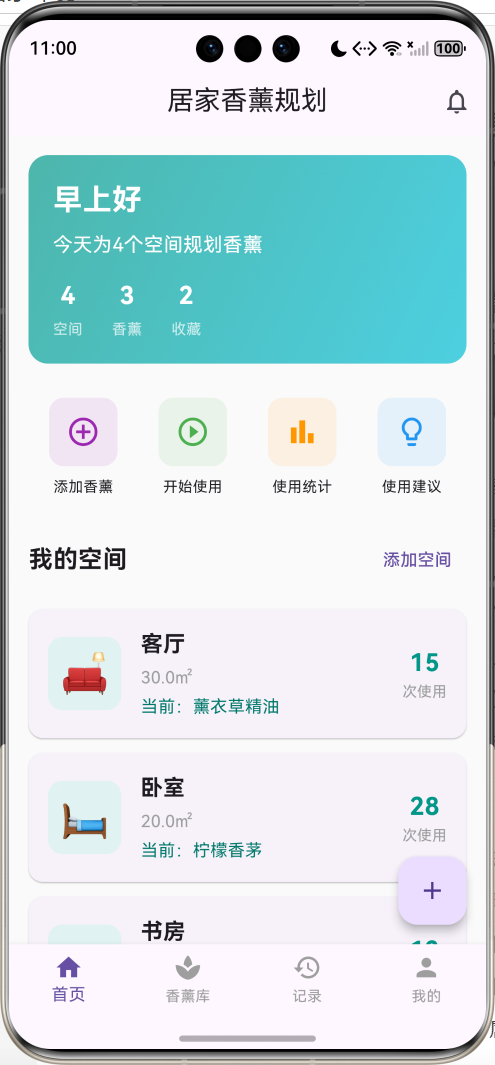
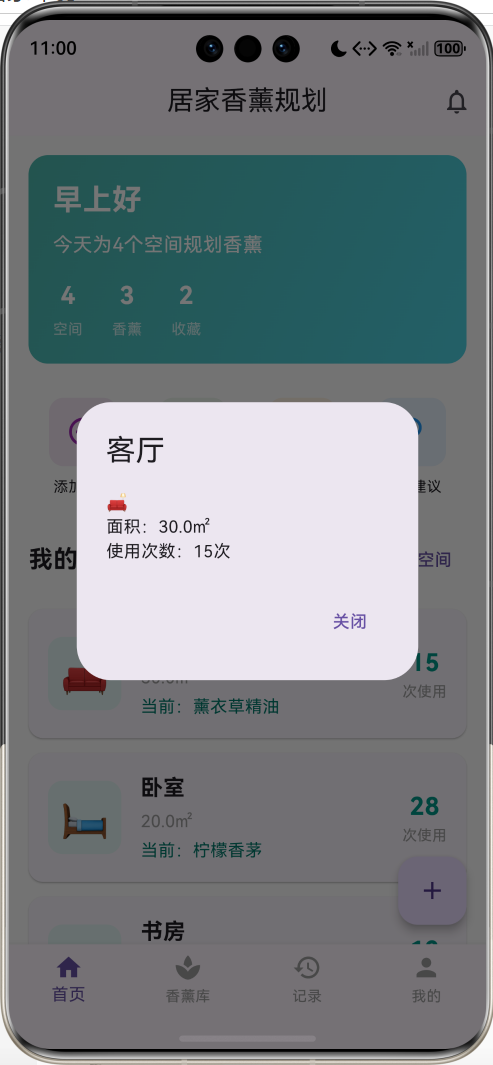
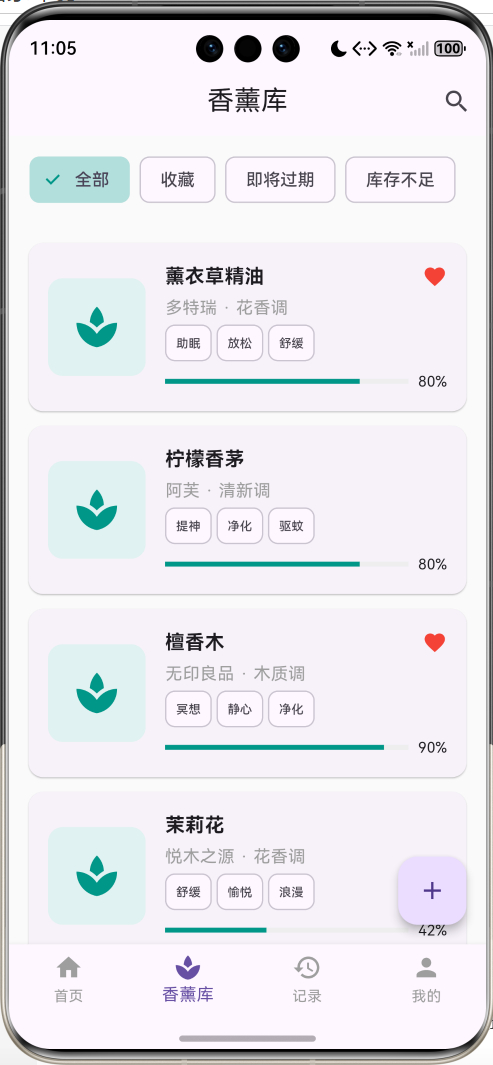
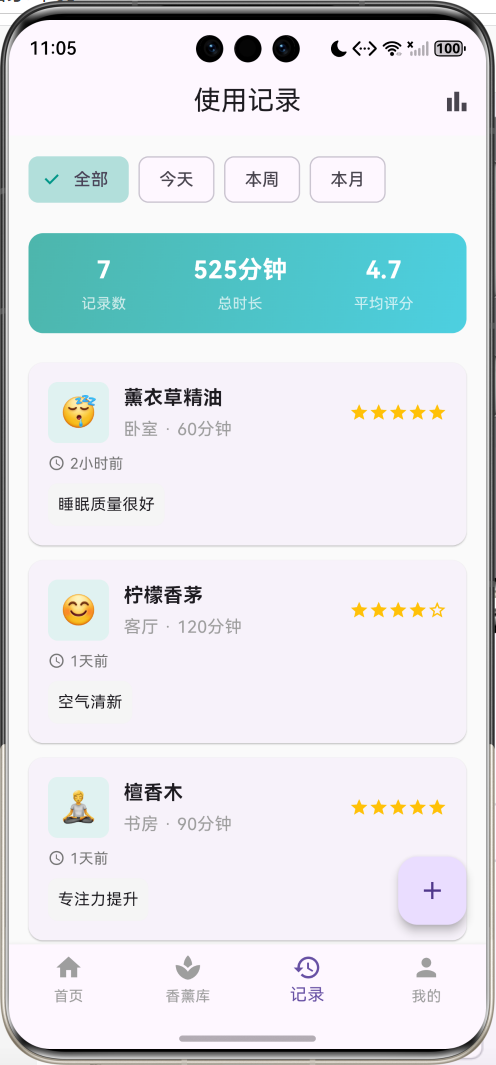
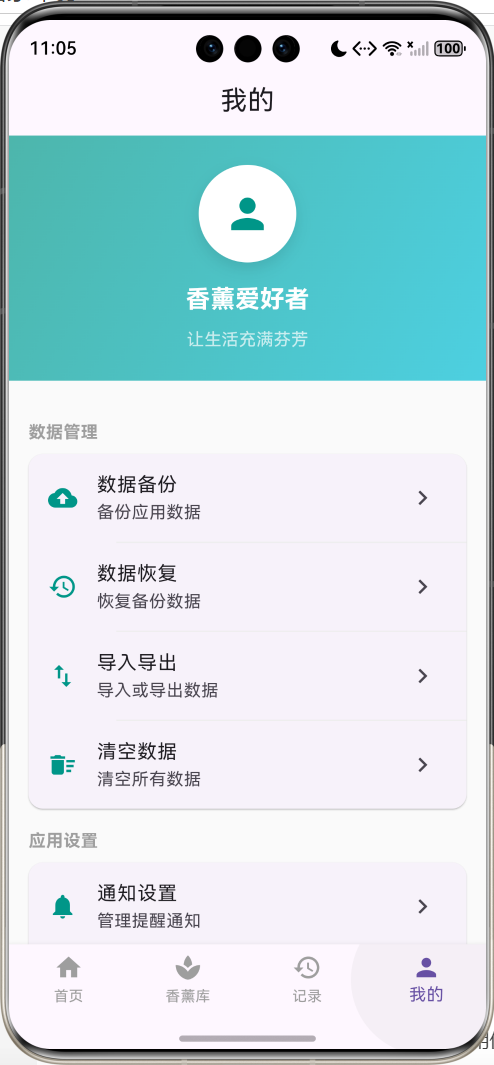
核心功能特性
- 空间管理:管理家中不同空间(客厅、卧室、书房等),为每个空间规划香薰方案
- 香薰库管理:记录香薰产品信息,包括品牌、香调、功效、购买日期、使用期限等
- 使用计划:为不同空间制定香薰使用计划,设置使用时间和频率
- 使用记录:记录每次香薰使用情况,追踪使用效果和心情变化
- 智能提醒:设置香薰使用提醒、更换提醒、补货提醒、过期提醒
- 统计分析:统计香薰使用情况,分析使用偏好和效果
- 数据持久化:本地存储用户数据,保证数据安全
应用价值
- 科学规划:系统化管理家中香薰使用,提升使用效果
- 健康生活:通过合理使用香薰,改善居家环境和生活质量
- 避免浪费:追踪香薰使用情况,避免过期和浪费
- 效果追踪:记录使用效果,优化香薰选择和使用方案
- 个性化定制:根据不同空间特点,定制专属香薰方案
开发环境配置
系统要求
开发本应用需要满足以下环境要求:
- 操作系统:Windows 10/11、macOS 10.14+、或 Ubuntu 18.04+
- Flutter SDK:3.0.0 或更高版本
- Dart SDK:2.17.0 或更高版本
- 开发工具:Android Studio、VS Code 或 IntelliJ IDEA
- 设备要求:Android 5.0+ 或 iOS 11.0+
Flutter环境搭建
1. 安装Flutter SDK
# Windows
# 下载flutter_windows_3.x.x-stable.zip并解压

# macOS
curl -O https://storage.googleapis.com/flutter_infra_release/releases/stable/macos/flutter_macos_3.x.x-stable.zip
unzip flutter_macos_3.x.x-stable.zip

# Linux
wget https://storage.googleapis.com/flutter_infra_release/releases/stable/linux/flutter_linux_3.x.x-stable.tar.xz
tar xf flutter_linux_3.x.x-stable.tar.xz
2. 配置环境变量
# Windows (系统环境变量)
C:\flutter\bin

# macOS/Linux (添加到~/.bashrc或~/.zshrc)
export PATH="$PATH:/path/to/flutter/bin"
3. 验证安装
flutter doctor
确保所有检查项都通过。
项目初始化
1. 创建项目
flutter create home_aromatherapy
cd home_aromatherapy
2. 配置依赖
编辑pubspec.yaml文件:
name: home_aromatherapy
description: 居家香薰规划应用

publish_to: 'none'

version: 1.0.0+1

environment:
  sdk: '>=3.0.0 <4.0.0'

dependencies:
  flutter:
    sdk: flutter
  cupertino_icons: ^1.0.2
  shared_preferences: ^2.2.2

dev_dependencies:
  flutter_test:
    sdk: flutter
  flutter_lints: ^2.0.0

flutter:
  uses-material-design: true
3. 安装依赖
flutter pub get
核心数据模型设计
Room 空间模型
空间模型是应用的基础数据结构,用于表示家中的不同空间。每个空间都有独特的特征和香薰需求:
class Room {
  final String id;              // 空间唯一标识
  String name;                  // 空间名称
  String icon;                  // 空间图标(Emoji)
  double area;                  // 空间面积(平方米)
  String? currentAroma;         // 当前使用的香薰ID
  int usageCount;               // 使用次数统计

  Room({
    required this.id,
    required this.name,
    required this.icon,
    required this.area,
    this.currentAroma,
    this.usageCount = 0,
  });

  // JSON序列化
  Map<String, dynamic> toJson() => {
        'id': id,
        'name': name,
        'icon': icon,
        'area': area,
        'currentAroma': currentAroma,
        'usageCount': usageCount,
      };

  // JSON反序列化
  factory Room.fromJson(Map<String, dynamic> json) => Room(
        id: json['id'],
        name: json['name'],
        icon: json['icon'],
        area: json['area'],
        currentAroma: json['currentAroma'],
        usageCount: json['usageCount'] ?? 0,
      );
}
设计要点:
- 使用final修饰id确保空间标识不可变
- 支持JSON序列化,便于数据持久化
- usageCount统计使用次数,用于分析使用习惯
- currentAroma关联当前使用的香薰产品
Aromatherapy 香薰产品模型
香薰产品模型包含了香薰的详细信息和状态,是应用的核心数据结构:
class Aromatherapy {
  final String id;              // 产品唯一标识
  String name;                  // 产品名称
  String brand;                 // 品牌名称
  String scent;                 // 香调类型
  List<String> effects;         // 功效列表
  double capacity;              // 总容量(ml)
  double remaining;             // 剩余容量(ml)
  DateTime purchaseDate;        // 购买日期
  DateTime? openDate;           // 开封日期
  int shelfLife;                // 保质期(月)
  double price;                 // 价格
  int rating;                   // 评分(1-5)
  bool isFavorite;              // 是否收藏

  Aromatherapy({
    required this.id,
    required this.name,
    required this.brand,
    required this.scent,
    required this.effects,
    required this.capacity,
    required this.remaining,
    required this.purchaseDate,
    this.openDate,
    required this.shelfLife,
    required this.price,
    this.rating = 0,
    this.isFavorite = false,
  });

  // 计算属性:是否即将过期
  bool get isExpiringSoon {
    if (openDate == null) return false;
    final expiryDate = openDate!.add(Duration(days: shelfLife * 30));
    final daysLeft = expiryDate.difference(DateTime.now()).inDays;
    return daysLeft <= 30 && daysLeft > 0;
  }

  // 计算属性:是否已过期
  bool get isExpired {
    if (openDate == null) return false;
    final expiryDate = openDate!.add(Duration(days: shelfLife * 30));
    return DateTime.now().isAfter(expiryDate);
  }

  // 计算属性:使用百分比
  double get usagePercentage => (capacity - remaining) / capacity * 100;

  // 计算属性:剩余天数
  int get daysUntilExpiry {
    if (openDate == null) return shelfLife * 30;
    final expiryDate = openDate!.add(Duration(days: shelfLife * 30));
    return expiryDate.difference(DateTime.now()).inDays;
  }

  // 计算属性:库存状态
  String get stockStatus {
    final percentage = remaining / capacity;
    if (percentage > 0.5) return '充足';
    if (percentage > 0.2) return '适中';
    return '不足';
  }

  // JSON序列化
  Map<String, dynamic> toJson() => {
        'id': id,
        'name': name,
        'brand': brand,
        'scent': scent,
        'effects': effects,
        'capacity': capacity,
        'remaining': remaining,
        'purchaseDate': purchaseDate.toIso8601String(),
        'openDate': openDate?.toIso8601String(),
        'shelfLife': shelfLife,
        'price': price,
        'rating': rating,
        'isFavorite': isFavorite,
      };

  // JSON反序列化
  factory Aromatherapy.fromJson(Map<String, dynamic> json) => Aromatherapy(
        id: json['id'],
        name: json['name'],
        brand: json['brand'],
        scent: json['scent'],
        effects: List<String>.from(json['effects']),
        capacity: json['capacity'],
        remaining: json['remaining'],
        purchaseDate: DateTime.parse(json['purchaseDate']),
        openDate:
            json['openDate'] != null ? DateTime.parse(json['openDate']) : null,
        shelfLife: json['shelfLife'],
        price: json['price'],
        rating: json['rating'] ?? 0,
        isFavorite: json['isFavorite'] ?? false,
      );
}
设计要点:
- 丰富的计算属性,自动判断过期状态和库存情况
- 支持收藏功能,方便用户管理常用香薰
- 评分系统,记录用户对香薰的满意度
- 完整的生命周期管理,从购买到开封到过期
UsageRecord 使用记录模型
使用记录模型用于追踪每次香薰使用的详细情况,是数据分析的基础:
class UsageRecord {
  final String id;              // 记录唯一标识
  final String roomId;          // 关联空间ID
  final String aromaId;         // 关联香薰ID
  final DateTime startTime;     // 开始时间
  final int duration;           // 使用时长(分钟)
  final int rating;             // 效果评分(1-5)
  final String mood;            // 心情表情
  final String? notes;          // 使用笔记

  UsageRecord({
    required this.id,
    required this.roomId,
    required this.aromaId,
    required this.startTime,
    required this.duration,
    required this.rating,
    required this.mood,
    this.notes,
  });

  // 计算属性:使用日期
  String get dateString {
    return '${startTime.year}-${startTime.month.toString().padLeft(2, '0')}-${startTime.day.toString().padLeft(2, '0')}';
  }

  // 计算属性:使用时间
  String get timeString {
    return '${startTime.hour.toString().padLeft(2, '0')}:${startTime.minute.toString().padLeft(2, '0')}';
  }

  // JSON序列化
  Map<String, dynamic> toJson() => {
        'id': id,
        'roomId': roomId,
        'aromaId': aromaId,
        'startTime': startTime.toIso8601String(),
        'duration': duration,
        'rating': rating,
        'mood': mood,
        'notes': notes,
      };

  // JSON反序列化
  factory UsageRecord.fromJson(Map<String, dynamic> json) => UsageRecord(
        id: json['id'],
        roomId: json['roomId'],
        aromaId: json['aromaId'],
        startTime: DateTime.parse(json['startTime']),
        duration: json['duration'],
        rating: json['rating'],
        mood: json['mood'],
        notes: json['notes'],
      );
}
设计要点:
- 关联空间和香薰,建立完整的使用关系
- 记录使用时长和效果评分,用于效果分析
- 心情表情记录,追踪香薰对情绪的影响
- 可选的使用笔记,记录特殊感受
应用架构设计
整体架构
应用采用四标签页的架构设计,每个标签页专注于特定功能模块,形成完整的功能闭环:
页面层级结构
应用的页面层级清晰,导航流畅:
-
主页面(MainPage)
- 底部导航栏控制四个主要页面的切换
- 使用IndexedStack保持页面状态
-
首页(HomePage)
- 欢迎卡片:显示问候语和统计信息
- 快捷操作:提供常用功能入口
- 空间列表:展示所有空间及其状态
- 最近使用:显示最近使用的香薰产品
-
香薰库(AromaLibraryPage)
- 香薰列表:展示所有香薰产品
- 筛选功能:按品牌、香调、状态筛选
- 添加功能:添加新的香薰产品
- 详情页面:查看和编辑香薰详情
-
记录页(RecordsPage)
- 使用记录列表:按时间倒序显示
- 统计图表:可视化使用数据
- 效果分析:分析香薰使用效果
-
我的(ProfilePage)
- 个人设置:主题、通知等设置
- 知识库:香薰使用知识和技巧
- 数据管理:导入导出、备份恢复
状态管理
应用使用StatefulWidget进行状态管理,主要状态变量包括:
class _HomePageState extends State<HomePage> {
List<Room> _rooms = []; // 空间列表
List<Aromatherapy> _aromas = []; // 香薰列表
List<UsageRecord> _records = []; // 使用记录列表
void initState() {
super.initState();
_loadData(); // 加载本地数据
}
}
状态管理策略:
- 使用setState更新UI
- 数据变更后立即保存到本地
- 页面间通过回调函数同步数据
- 使用SharedPreferences持久化数据
数据流设计
应用的数据流清晰明确,确保数据一致性:
数据持久化方案
使用SharedPreferences实现本地数据存储:
// 保存空间数据
Future<void> _saveRooms() async {
  final prefs = await SharedPreferences.getInstance();
  final roomsJson = _rooms.map((room) => jsonEncode(room.toJson())).toList();
  await prefs.setStringList('rooms', roomsJson);
}

// 加载空间数据
Future<void> _loadData() async {
  final prefs = await SharedPreferences.getInstance();

  // 加载空间数据
  final roomsJson = prefs.getStringList('rooms') ?? [];
  if (roomsJson.isEmpty) {
    _rooms = _getDefaultRooms();  // 首次使用,加载默认数据
    await _saveRooms();
  } else {
    _rooms = roomsJson.map((json) => Room.fromJson(jsonDecode(json))).toList();
  }

  // 加载香薰数据
  final aromasJson = prefs.getStringList('aromas') ?? [];
  if (aromasJson.isEmpty) {
    _aromas = _getDefaultAromas();
    await _saveAromas();
  } else {
    _aromas = aromasJson.map((json) => Aromatherapy.fromJson(jsonDecode(json))).toList();
  }

  setState(() {});
}
持久化策略:
- 使用JSON格式序列化数据
- 每次数据变更立即保存
- 首次启动加载默认数据
- 支持数据导入导出功能
用户界面实现
主界面布局
主界面采用Scaffold + BottomNavigationBar的经典布局结构,提供清晰的导航体验:
class MainPage extends StatefulWidget {
const MainPage({Key? key}) : super(key: key);
State<MainPage> createState() => _MainPageState();
}
class _MainPageState extends State<MainPage> {
int _currentIndex = 0;
final List<Widget> _pages = [
const HomePage(),
const AromaLibraryPage(),
const RecordsPage(),
const ProfilePage(),
];
Widget build(BuildContext context) {
return Scaffold(
body: IndexedStack(
index: _currentIndex,
children: _pages,
),
bottomNavigationBar: BottomNavigationBar(
currentIndex: _currentIndex,
onTap: (index) => setState(() => _currentIndex = index),
type: BottomNavigationBarType.fixed,
selectedItemColor: Theme.of(context).primaryColor,
unselectedItemColor: Colors.grey,
items: const [
BottomNavigationBarItem(
icon: Icon(Icons.home),
label: '首页',
),
BottomNavigationBarItem(
icon: Icon(Icons.spa),
label: '香薰库',
),
BottomNavigationBarItem(
icon: Icon(Icons.history),
label: '记录',
),
BottomNavigationBarItem(
icon: Icon(Icons.person),
label: '我的',
),
],
),
);
}
}
设计要点:
- 使用IndexedStack保持页面状态,避免重复构建
- BottomNavigationBar提供直观的导航方式
- 主题色统一,保持视觉一致性
首页设计
首页是用户最常访问的页面,包含多个功能模块:
欢迎卡片设计
欢迎卡片使用渐变背景,展示问候语和统计信息:
Widget _buildWelcomeCard() {
  final now = DateTime.now();
  String greeting = '早上好';
  if (now.hour >= 12 && now.hour < 18) {
    greeting = '下午好';
  } else if (now.hour >= 18) {
    greeting = '晚上好';
  }

  return Container(
    margin: const EdgeInsets.all(16),
    padding: const EdgeInsets.all(20),
    decoration: BoxDecoration(
      gradient: LinearGradient(
        colors: [Colors.teal.shade300, Colors.cyan.shade300],
        begin: Alignment.topLeft,
        end: Alignment.bottomRight,
      ),
      borderRadius: BorderRadius.circular(16),
      boxShadow: [
        BoxShadow(
          color: Colors.teal.withOpacity(0.3),
          blurRadius: 10,
          offset: const Offset(0, 5),
        ),
      ],
    ),
    child: Column(
      crossAxisAlignment: CrossAxisAlignment.start,
      children: [
        Text(
          greeting,
          style: const TextStyle(
            color: Colors.white,
            fontSize: 24,
            fontWeight: FontWeight.bold,
          ),
        ),
        const SizedBox(height: 8),
        Text(
          '今天为${_rooms.length}个空间规划香薰',
          style: const TextStyle(
            color: Colors.white,
            fontSize: 16,
          ),
        ),
        const SizedBox(height: 16),
        Row(
          children: [
            _buildStatItem('空间', '${_rooms.length}'),
            const SizedBox(width: 24),
            _buildStatItem('香薰', '${_aromas.length}'),
            const SizedBox(width: 24),
            _buildStatItem('收藏', '${_aromas.where((a) => a.isFavorite).length}'),
          ],
        ),
      ],
    ),
  );
}

Widget _buildStatItem(String label, String value) {
  return Column(
    children: [
      Text(
        value,
        style: const TextStyle(
          color: Colors.white,
          fontSize: 20,
          fontWeight: FontWeight.bold,
        ),
      ),
      const SizedBox(height: 4),
      Text(
        label,
        style: const TextStyle(
          color: Colors.white70,
          fontSize: 12,
        ),
      ),
    ],
  );
}
设计亮点:
- 根据时间动态显示问候语
- 渐变背景增强视觉效果
- 统计信息一目了然
- 阴影效果增加层次感
快捷操作区域
快捷操作提供常用功能的快速入口:
Widget _buildQuickActions() {
  final actions = [
    {'icon': Icons.add_circle_outline, 'label': '添加香薰', 'color': Colors.purple},
    {'icon': Icons.play_circle_outline, 'label': '开始使用', 'color': Colors.green},
    {'icon': Icons.bar_chart, 'label': '使用统计', 'color': Colors.orange},
    {'icon': Icons.lightbulb_outline, 'label': '使用建议', 'color': Colors.blue},
  ];

  return Container(
    padding: const EdgeInsets.symmetric(horizontal: 16, vertical: 12),
    child: Row(
      mainAxisAlignment: MainAxisAlignment.spaceAround,
      children: actions.map((action) {
        return GestureDetector(
          onTap: () {
            if (action['label'] == '添加香薰') {
              Navigator.push(
                context,
                MaterialPageRoute(builder: (context) => const AromaLibraryPage()),
              );
            } else {
              ScaffoldMessenger.of(context).showSnackBar(
                SnackBar(content: Text('${action['label']}功能')),
              );
            }
          },
          child: Column(
            children: [
              Container(
                width: 56,
                height: 56,
                decoration: BoxDecoration(
                  color: (action['color'] as Color).withOpacity(0.1),
                  borderRadius: BorderRadius.circular(12),
                ),
                child: Icon(
                  action['icon'] as IconData,
                  color: action['color'] as Color,
                  size: 28,
                ),
              ),
              const SizedBox(height: 8),
              Text(
                action['label'] as String,
                style: const TextStyle(fontSize: 12),
              ),
            ],
          ),
        );
      }).toList(),
    ),
  );
}
设计要点:
- 图标和颜色区分不同功能
- 圆角容器增加亲和力
- 点击反馈提升交互体验
空间卡片设计
空间卡片展示每个空间的详细信息:
Widget _buildRoomCard(Room room) {
  final currentAroma = _aromas.firstWhere(
    (a) => a.id == room.currentAroma,
    orElse: () => Aromatherapy(
      id: '',
      name: '未设置',
      brand: '',
      scent: '',
      effects: [],
      capacity: 0,
      remaining: 0,
      purchaseDate: DateTime.now(),
      shelfLife: 0,
      price: 0,
    ),
  );

  return Card(
    margin: const EdgeInsets.only(bottom: 12),
    elevation: 2,
    shape: RoundedRectangleBorder(
      borderRadius: BorderRadius.circular(12),
    ),
    child: InkWell(
      onTap: () => _showRoomDetail(room),
      borderRadius: BorderRadius.circular(12),
      child: Padding(
        padding: const EdgeInsets.all(16),
        child: Row(
          children: [
            // 空间图标
            Container(
              width: 60,
              height: 60,
              decoration: BoxDecoration(
                color: Colors.teal[50],
                borderRadius: BorderRadius.circular(12),
              ),
              child: Center(
                child: Text(
                  room.icon,
                  style: const TextStyle(fontSize: 32),
                ),
              ),
            ),
            const SizedBox(width: 16),
            // 空间信息
            Expanded(
              child: Column(
                crossAxisAlignment: CrossAxisAlignment.start,
                children: [
                  Text(
                    room.name,
                    style: const TextStyle(
                      fontSize: 18,
                      fontWeight: FontWeight.bold,
                    ),
                  ),
                  const SizedBox(height: 4),
                  Text(
                    '${room.area}㎡',
                    style: const TextStyle(
                      fontSize: 14,
                      color: Colors.grey,
                    ),
                  ),
                  const SizedBox(height: 4),
                  Text(
                    '当前:${currentAroma.name}',
                    style: TextStyle(
                      fontSize: 14,
                      color: Colors.teal[700],
                    ),
                  ),
                ],
              ),
            ),
            // 使用统计
            Column(
              children: [
                Text(
                  '${room.usageCount}',
                  style: const TextStyle(
                    fontSize: 20,
                    fontWeight: FontWeight.bold,
                    color: Colors.teal,
                  ),
                ),
                const Text(
                  '次使用',
                  style: TextStyle(fontSize: 12, color: Colors.grey),
                ),
              ],
            ),
          ],
        ),
      ),
    ),
  );
}
设计亮点:
- 卡片式布局清晰美观
- 图标、文字、数字层次分明
- 点击波纹效果增强交互
- 使用次数突出显示
最近使用香薰
横向滚动展示最近使用的香薰产品:
Widget _buildRecentAromas() {
  final recentAromas = _aromas.take(3).toList();

  return Column(
    crossAxisAlignment: CrossAxisAlignment.start,
    children: [
      Padding(
        padding: const EdgeInsets.all(16),
        child: Row(
          mainAxisAlignment: MainAxisAlignment.spaceBetween,
          children: [
            const Text(
              '最近使用',
              style: TextStyle(fontSize: 20, fontWeight: FontWeight.bold),
            ),
            TextButton(
              onPressed: () {
                Navigator.push(
                  context,
                  MaterialPageRoute(builder: (context) => const AromaLibraryPage()),
                );
              },
              child: const Text('查看全部'),
            ),
          ],
        ),
      ),
      SizedBox(
        height: 180,
        child: ListView.builder(
          scrollDirection: Axis.horizontal,
          padding: const EdgeInsets.symmetric(horizontal: 16),
          itemCount: recentAromas.length,
          itemBuilder: (context, index) {
            return _buildAromaCard(recentAromas[index]);
          },
        ),
      ),
    ],
  );
}

Widget _buildAromaCard(Aromatherapy aroma) {
  return Container(
    width: 140,
    margin: const EdgeInsets.only(right: 12),
    child: Card(
      elevation: 2,
      shape: RoundedRectangleBorder(
        borderRadius: BorderRadius.circular(12),
      ),
      child: InkWell(
        onTap: () => _showAromaDetail(aroma),
        borderRadius: BorderRadius.circular(12),
        child: Padding(
          padding: const EdgeInsets.all(12),
          child: Column(
            crossAxisAlignment: CrossAxisAlignment.start,
            children: [
              // 香薰图标
              Container(
                width: double.infinity,
                height: 80,
                decoration: BoxDecoration(
                  color: Colors.teal[50],
                  borderRadius: BorderRadius.circular(8),
                ),
                child: const Center(
                  child: Icon(Icons.spa, size: 40, color: Colors.teal),
                ),
              ),
              const SizedBox(height: 8),
              // 香薰名称
              Text(
                aroma.name,
                style: const TextStyle(
                  fontSize: 14,
                  fontWeight: FontWeight.bold,
                ),
                maxLines: 1,
                overflow: TextOverflow.ellipsis,
              ),
              const SizedBox(height: 4),
              // 品牌
              Text(
                aroma.brand,
                style: const TextStyle(
                  fontSize: 12,
                  color: Colors.grey,
                ),
                maxLines: 1,
                overflow: TextOverflow.ellipsis,
              ),
              const Spacer(),
              // 收藏和评分
              Row(
                children: [
                  Icon(
                    aroma.isFavorite ? Icons.favorite : Icons.favorite_border,
                    size: 16,
                    color: aroma.isFavorite ? Colors.red : Colors.grey,
                  ),
                  const Spacer(),
                  ...List.generate(
                    5,
                    (i) => Icon(
                      i < aroma.rating ? Icons.star : Icons.star_border,
                      size: 12,
                      color: Colors.amber,
                    ),
                  ),
                ],
              ),
            ],
          ),
        ),
      ),
    ),
  );
}
设计要点:
- 横向滚动节省空间
- 卡片尺寸适中,信息完整
- 收藏和评分直观显示
- 文字溢出处理避免布局错乱
空间详情页设计
空间详情页展示空间的完整信息和操作选项:
class RoomDetailPage extends StatefulWidget {
final Room room;
final List<Aromatherapy> aromas;
final VoidCallback onUpdate;
const RoomDetailPage({
Key? key,
required this.room,
required this.aromas,
required this.onUpdate,
}) : super(key: key);
State<RoomDetailPage> createState() => _RoomDetailPageState();
}
class _RoomDetailPageState extends State<RoomDetailPage> {
Widget build(BuildContext context) {
return Scaffold(
appBar: AppBar(
title: Text(widget.room.name),
actions: [
IconButton(
icon: const Icon(Icons.edit),
onPressed: () {
// 编辑空间功能
},
),
],
),
body: SingleChildScrollView(
child: Column(
crossAxisAlignment: CrossAxisAlignment.start,
children: [
// 空间头部
_buildRoomHeader(),
// 当前香薰
_buildCurrentAroma(),
// 使用统计
_buildUsageStats(),
// 开始使用按钮
_buildStartButton(),
],
),
),
);
}
Widget _buildRoomHeader() {
return Container(
width: double.infinity,
padding: const EdgeInsets.all(32),
decoration: BoxDecoration(
gradient: LinearGradient(
colors: [Colors.teal.shade300, Colors.cyan.shade300],
begin: Alignment.topLeft,
end: Alignment.bottomRight,
),
),
child: Column(
children: [
Text(
widget.room.icon,
style: const TextStyle(fontSize: 80),
),
const SizedBox(height: 16),
Text(
widget.room.name,
style: const TextStyle(
color: Colors.white,
fontSize: 28,
fontWeight: FontWeight.bold,
),
),
const SizedBox(height: 8),
Text(
'${widget.room.area}㎡',
style: const TextStyle(
color: Colors.white70,
fontSize: 18,
),
),
],
),
);
}
}
设计亮点:
- 渐变头部突出空间特色
- 大图标增强视觉冲击力
- 信息层次清晰
- 操作按钮位置合理
核心功能实现
添加空间功能
用户可以通过对话框添加新的空间,支持自定义名称、面积和图标:
void _showAddRoomDialog() {
  final nameController = TextEditingController();
  final areaController = TextEditingController();
  String selectedIcon = '🛋️';

  final icons = ['🛋️', '🛏️', '📚', '🚿', '🍳', '🏡', '🌿', '🎨'];

  showDialog(
    context: context,
    builder: (context) {
      return StatefulBuilder(
        builder: (context, setState) {
          return AlertDialog(
            title: const Text('添加空间'),
            content: SingleChildScrollView(
              child: Column(
                mainAxisSize: MainAxisSize.min,
                children: [
                  TextField(
                    controller: nameController,
                    decoration: const InputDecoration(
                      labelText: '空间名称',
                      hintText: '如:客厅、卧室',
                      prefixIcon: Icon(Icons.home),
                    ),
                  ),
                  const SizedBox(height: 16),
                  TextField(
                    controller: areaController,
                    keyboardType: TextInputType.number,
                    decoration: const InputDecoration(
                      labelText: '面积(㎡)',
                      hintText: '如:30',
                      prefixIcon: Icon(Icons.square_foot),
                    ),
                  ),
                  const SizedBox(height: 16),
                  const Text('选择图标', style: TextStyle(fontSize: 14)),
                  const SizedBox(height: 8),
                  Wrap(
                    spacing: 8,
                    runSpacing: 8,
                    children: icons.map((icon) {
                      return GestureDetector(
                        onTap: () => setState(() => selectedIcon = icon),
                        child: Container(
                          width: 50,
                          height: 50,
                          decoration: BoxDecoration(
                            color: selectedIcon == icon
                                ? Colors.teal[100]
                                : Colors.grey[200],
                            borderRadius: BorderRadius.circular(8),
                            border: Border.all(
                              color: selectedIcon == icon
                                  ? Colors.teal
                                  : Colors.transparent,
                              width: 2,
                            ),
                          ),
                          child: Center(
                            child: Text(icon, style: const TextStyle(fontSize: 24)),
                          ),
                        ),
                      );
                    }).toList(),
                  ),
                ],
              ),
            ),
            actions: [
              TextButton(
                onPressed: () => Navigator.pop(context),
                child: const Text('取消'),
              ),
              TextButton(
                onPressed: () {
                  if (nameController.text.isNotEmpty &&
                      areaController.text.isNotEmpty) {
                    final newRoom = Room(
                      id: DateTime.now().millisecondsSinceEpoch.toString(),
                      name: nameController.text,
                      icon: selectedIcon,
                      area: double.parse(areaController.text),
                    );
                    this.setState(() {
                      _rooms.add(newRoom);
                    });
                    _saveRooms();
                    Navigator.pop(context);
                    ScaffoldMessenger.of(context).showSnackBar(
                      const SnackBar(content: Text('空间添加成功')),
                    );
                  }
                },
                child: const Text('确定'),
              ),
            ],
          );
        },
      );
    },
  );
}
功能特点:
- 输入验证确保数据完整性
- 图标选择器提供可视化选择
- 实时预览选中的图标
- 添加成功后立即保存并刷新界面
使用记录功能
记录每次香薰使用的详细情况,包括时长、评分、心情和笔记:
void _startUsage() {
  if (widget.room.currentAroma == null) {
    ScaffoldMessenger.of(context).showSnackBar(
      const SnackBar(content: Text('请先选择香薰')),
    );
    return;
  }

  showDialog(
    context: context,
    builder: (context) {
      int duration = 60;
      int rating = 5;
      String mood = '😊';
      final notesController = TextEditingController();

      return StatefulBuilder(
        builder: (context, setState) {
          return AlertDialog(
            title: const Text('记录使用'),
            content: SingleChildScrollView(
              child: Column(
                mainAxisSize: MainAxisSize.min,
                children: [
                  // 使用时长滑块
                  Row(
                    children: [
                      const Text('使用时长:'),
                      Expanded(
                        child: Slider(
                          value: duration.toDouble(),
                          min: 15,
                          max: 180,
                          divisions: 11,
                          label: '$duration分钟',
                          onChanged: (value) {
                            setState(() => duration = value.toInt());
                          },
                        ),
                      ),
                      Text('$duration分钟'),
                    ],
                  ),
                  const SizedBox(height: 16),
                  // 效果评分
                  Row(
                    children: [
                      const Text('效果评分:'),
                      ...List.generate(5, (index) {
                        return IconButton(
                          icon: Icon(
                            index < rating ? Icons.star : Icons.star_border,
                            color: Colors.amber,
                          ),
                          onPressed: () {
                            setState(() => rating = index + 1);
                          },
                        );
                      }),
                    ],
                  ),
                  const SizedBox(height: 16),
                  // 心情选择
                  const Text('心情:'),
                  const SizedBox(height: 8),
                  Wrap(
                    spacing: 8,
                    children: ['😊', '😌', '😴', '🤗', '😇'].map((m) {
                      return GestureDetector(
                        onTap: () => setState(() => mood = m),
                        child: Container(
                          width: 50,
                          height: 50,
                          decoration: BoxDecoration(
                            color: mood == m ? Colors.teal[100] : Colors.grey[200],
                            borderRadius: BorderRadius.circular(8),
                          ),
                          child: Center(
                            child: Text(m, style: const TextStyle(fontSize: 24)),
                          ),
                        ),
                      );
                    }).toList(),
                  ),
                  const SizedBox(height: 16),
                  // 使用笔记
                  TextField(
                    controller: notesController,
                    decoration: const InputDecoration(
                      labelText: '使用笔记(选填)',
                      hintText: '记录使用感受...',
                      border: OutlineInputBorder(),
                    ),
                    maxLines: 3,
                  ),
                ],
              ),
            ),
            actions: [
              TextButton(
                onPressed: () => Navigator.pop(context),
                child: const Text('取消'),
              ),
              TextButton(
                onPressed: () async {
                  final record = UsageRecord(
                    id: DateTime.now().millisecondsSinceEpoch.toString(),
                    roomId: widget.room.id,
                    aromaId: widget.room.currentAroma!,
                    startTime: DateTime.now(),
                    duration: duration,
                    rating: rating,
                    mood: mood,
                    notes: notesController.text.isEmpty ? null : notesController.text,
                  );

                  // 保存记录
                  final prefs = await SharedPreferences.getInstance();
                  final recordsJson = prefs.getStringList('records') ?? [];
                  recordsJson.add(jsonEncode(record.toJson()));
                  await prefs.setStringList('records', recordsJson);

                  // 更新使用次数
                  widget.room.usageCount++;
                  widget.onUpdate();

                  if (mounted) {
                    Navigator.pop(context);
                    ScaffoldMessenger.of(context).showSnackBar(
                      const SnackBar(content: Text('使用记录已保存')),
                    );
                  }
                },
                child: const Text('保存'),
              ),
            ],
          );
        },
      );
    },
  );
}
功能特点:
- 滑块控制使用时长,范围15-180分钟
- 星级评分系统,直观反馈效果
- 表情选择器记录心情状态
- 可选的文字笔记,记录详细感受
- 自动更新使用统计数据
智能提醒功能
检测并提醒用户香薰的各种状态,包括过期、即将过期和库存不足:
void _showNotifications() {
  final expiring = _aromas.where((a) => a.isExpiringSoon).toList();
  final expired = _aromas.where((a) => a.isExpired).toList();
  final lowStock = _aromas.where((a) => a.remaining / a.capacity < 0.2).toList();

  showDialog(
    context: context,
    builder: (context) {
      return AlertDialog(
        title: Row(
          children: const [
            Icon(Icons.notifications_active, color: Colors.teal),
            SizedBox(width: 8),
            Text('提醒通知'),
          ],
        ),
        content: SingleChildScrollView(
          child: Column(
            mainAxisSize: MainAxisSize.min,
            crossAxisAlignment: CrossAxisAlignment.start,
            children: [
              // 已过期提醒
              if (expired.isNotEmpty) ...[
                Row(
                  children: const [
                    Icon(Icons.error, color: Colors.red, size: 20),
                    SizedBox(width: 8),
                    Text(
                      '已过期',
                      style: TextStyle(
                        fontWeight: FontWeight.bold,
                        color: Colors.red,
                        fontSize: 16,
                      ),
                    ),
                  ],
                ),
                const SizedBox(height: 8),
                ...expired.map((a) => Card(
                      color: Colors.red[50],
                      child: ListTile(
                        dense: true,
                        leading: const Icon(Icons.warning, color: Colors.red, size: 20),
                        title: Text(a.name, style: const TextStyle(fontSize: 14)),
                        subtitle: Text('已过期${-a.daysUntilExpiry}天'),
                        trailing: TextButton(
                          onPressed: () {
                            // 处理过期香薰
                          },
                          child: const Text('处理'),
                        ),
                      ),
                    )),
                const Divider(),
              ],
              // 即将过期提醒
              if (expiring.isNotEmpty) ...[
                Row(
                  children: const [
                    Icon(Icons.access_time, color: Colors.orange, size: 20),
                    SizedBox(width: 8),
                    Text(
                      '即将过期',
                      style: TextStyle(
                        fontWeight: FontWeight.bold,
                        color: Colors.orange,
                        fontSize: 16,
                      ),
                    ),
                  ],
                ),
                const SizedBox(height: 8),
                ...expiring.map((a) => Card(
                      color: Colors.orange[50],
                      child: ListTile(
                        dense: true,
                        leading: const Icon(Icons.access_time, color: Colors.orange, size: 20),
                        title: Text(a.name, style: const TextStyle(fontSize: 14)),
                        subtitle: Text('还有${a.daysUntilExpiry}天过期'),
                      ),
                    )),
                const Divider(),
              ],
              // 库存不足提醒
              if (lowStock.isNotEmpty) ...[
                Row(
                  children: const [
                    Icon(Icons.inventory_2, color: Colors.blue, size: 20),
                    SizedBox(width: 8),
                    Text(
                      '库存不足',
                      style: TextStyle(
                        fontWeight: FontWeight.bold,
                        color: Colors.blue,
                        fontSize: 16,
                      ),
                    ),
                  ],
                ),
                const SizedBox(height: 8),
                ...lowStock.map((a) => Card(
                      color: Colors.blue[50],
                      child: ListTile(
                        dense: true,
                        leading: const Icon(Icons.inventory_2, color: Colors.blue, size: 20),
                        title: Text(a.name, style: const TextStyle(fontSize: 14)),
                        subtitle: Text('剩余${a.remaining.toStringAsFixed(1)}ml (${a.usagePercentage.toStringAsFixed(0)}%已使用)'),
                        trailing: TextButton(
                          onPressed: () {
                            // 补货提醒
                          },
                          child: const Text('补货'),
                        ),
                      ),
                    )),
              ],
              // 无提醒
              if (expired.isEmpty && expiring.isEmpty && lowStock.isEmpty)
                const Center(
                  child: Padding(
                    padding: EdgeInsets.all(20),
                    child: Column(
                      children: [
                        Icon(Icons.check_circle, color: Colors.green, size: 48),
                        SizedBox(height: 16),
                        Text(
                          '暂无提醒',
                          style: TextStyle(fontSize: 16, color: Colors.grey),
                        ),
                        SizedBox(height: 8),
                        Text(
                          '所有香薰状态良好',
                          style: TextStyle(fontSize: 14, color: Colors.grey),
                        ),
                      ],
                    ),
                  ),
                ),
            ],
          ),
        ),
        actions: [
          TextButton(
            onPressed: () => Navigator.pop(context),
            child: const Text('关闭'),
          ),
        ],
      );
    },
  );
}
功能特点:
- 三级提醒系统:已过期、即将过期、库存不足
- 颜色编码:红色(危险)、橙色(警告)、蓝色(提示)
- 详细信息展示:剩余天数、剩余容量
- 快捷操作按钮:处理、补货
- 无提醒时显示友好提示
香薰详情页
展示香薰产品的完整信息,包括基本信息、功效、库存状态等:
class AromaDetailPage extends StatelessWidget {
final Aromatherapy aroma;
const AromaDetailPage({Key? key, required this.aroma}) : super(key: key);
Widget build(BuildContext context) {
return Scaffold(
appBar: AppBar(
title: const Text('香薰详情'),
actions: [
IconButton(
icon: const Icon(Icons.edit),
onPressed: () {
// 编辑香薰功能
},
),
],
),
body: SingleChildScrollView(
child: Column(
crossAxisAlignment: CrossAxisAlignment.start,
children: [
// 香薰图片区域
Container(
width: double.infinity,
height: 250,
decoration: BoxDecoration(
gradient: LinearGradient(
colors: [Colors.teal.shade300, Colors.cyan.shade300],
begin: Alignment.topLeft,
end: Alignment.bottomRight,
),
),
child: const Center(
child: Icon(Icons.spa, size: 100, color: Colors.white),
),
),
// 详细信息
Padding(
padding: const EdgeInsets.all(16),
child: Column(
crossAxisAlignment: CrossAxisAlignment.start,
children: [
// 名称和收藏
Row(
children: [
Expanded(
child: Text(
aroma.name,
style: const TextStyle(
fontSize: 24,
fontWeight: FontWeight.bold,
),
),
),
IconButton(
icon: Icon(
aroma.isFavorite ? Icons.favorite : Icons.favorite_border,
color: aroma.isFavorite ? Colors.red : null,
),
onPressed: () {},
),
],
),
const SizedBox(height: 8),
Text(
aroma.brand,
style: const TextStyle(fontSize: 16, color: Colors.grey),
),
const SizedBox(height: 16),
// 评分
Row(
children: List.generate(5, (index) {
return Icon(
index < aroma.rating ? Icons.star : Icons.star_border,
color: Colors.amber,
size: 20,
);
}),
),
const Divider(height: 32),
// 基本信息
_buildInfoRow('香调', aroma.scent),
_buildInfoRow('容量', '${aroma.capacity}ml'),
_buildInfoRow('剩余', '${aroma.remaining.toStringAsFixed(1)}ml'),
_buildInfoRow('价格', '¥${aroma.price.toStringAsFixed(2)}'),
_buildInfoRow('保质期', '${aroma.shelfLife}个月'),
const Divider(height: 32),
// 功效标签
const Text(
'功效',
style: TextStyle(fontSize: 18, fontWeight: FontWeight.bold),
),
const SizedBox(height: 8),
Wrap(
spacing: 8,
runSpacing: 8,
children: aroma.effects.map((effect) {
return Chip(
label: Text(effect),
backgroundColor: Colors.teal[50],
);
}).toList(),
),
const SizedBox(height: 24),
// 库存进度条
LinearProgressIndicator(
value: aroma.remaining / aroma.capacity,
backgroundColor: Colors.grey[200],
valueColor: AlwaysStoppedAnimation<Color>(
aroma.remaining / aroma.capacity > 0.5
? Colors.green
: aroma.remaining / aroma.capacity > 0.2
? Colors.orange
: Colors.red,
),
),
const SizedBox(height: 8),
Text(
'已使用 ${aroma.usagePercentage.toStringAsFixed(1)}%',
style: const TextStyle(fontSize: 12, color: Colors.grey),
),
// 过期提醒
if (aroma.isExpired)
Container(
margin: const EdgeInsets.only(top: 16),
padding: const EdgeInsets.all(12),
decoration: BoxDecoration(
color: Colors.red[50],
borderRadius: BorderRadius.circular(8),
),
child: Row(
children: const [
Icon(Icons.warning, color: Colors.red),
SizedBox(width: 8),
Text('已过期', style: TextStyle(color: Colors.red)),
],
),
)
else if (aroma.isExpiringSoon)
Container(
margin: const EdgeInsets.only(top: 16),
padding: const EdgeInsets.all(12),
decoration: BoxDecoration(
color: Colors.orange[50],
borderRadius: BorderRadius.circular(8),
),
child: Row(
children: const [
Icon(Icons.access_time, color: Colors.orange),
SizedBox(width: 8),
Text('即将过期', style: TextStyle(color: Colors.orange)),
],
),
),
],
),
),
],
),
),
);
}
Widget _buildInfoRow(String label, String value) {
return Padding(
padding: const EdgeInsets.symmetric(vertical: 8),
child: Row(
mainAxisAlignment: MainAxisAlignment.spaceBetween,
children: [
Text(
label,
style: const TextStyle(fontSize: 16, color: Colors.grey),
),
Text(
value,
style: const TextStyle(fontSize: 16, fontWeight: FontWeight.w500),
),
],
),
);
}
}
功能特点:
- 渐变头部增强视觉效果
- 完整的产品信息展示
- 可视化库存进度条
- 智能过期状态提醒
- 功效标签清晰展示
性能优化策略
内存管理优化
应用的性能优化从内存管理开始,确保应用流畅运行:
1. 数据结构优化
// 使用final修饰符减少不必要的重建
class Room {
  final String id;  // 不可变的标识符
  String name;      // 可变的属性
  // ...
}

// 使用const构造函数优化常量Widget
const Text('居家香薰规划', style: TextStyle(fontSize: 20))
2. 列表优化
// 使用ListView.builder进行懒加载
ListView.builder(
  itemCount: _rooms.length,
  itemBuilder: (context, index) {
    return _buildRoomCard(_rooms[index]);
  },
)

// 避免使用ListView(children: [...]),它会一次性构建所有子项
3. 状态管理优化
// 只更新必要的部分
void _updateRoom(Room room) {
  setState(() {
    final index = _rooms.indexWhere((r) => r.id == room.id);
    if (index != -1) {
      _rooms[index] = room;  // 只更新特定项
    }
  });
}

// 避免全局setState
void _badUpdate() {
  setState(() {
    // 这会重建整个Widget树
  });
}
渲染优化
1. Widget复用
提取公共组件,避免重复构建:
// 提取公共的统计卡片组件
Widget _buildStatCard(String label, String value, IconData icon, Color color) {
  return Card(
    child: Padding(
      padding: const EdgeInsets.all(16),
      child: Column(
        children: [
          Icon(icon, color: color, size: 32),
          const SizedBox(height: 8),
          Text(value, style: TextStyle(fontSize: 24, fontWeight: FontWeight.bold, color: color)),
          const SizedBox(height: 4),
          Text(label, style: const TextStyle(fontSize: 12, color: Colors.grey)),
        ],
      ),
    ),
  );
}
2. 使用const构造函数
// 好的做法:使用const
const SizedBox(height: 16)
const Text('标题', style: TextStyle(fontSize: 20))
const Icon(Icons.home)

// 避免:不使用const
SizedBox(height: 16)  // 每次都会创建新实例
3. 条件渲染优化
// 使用条件运算符避免不必要的Widget构建
if (aroma.isExpired)
  Container(...)  // 只在需要时构建
else if (aroma.isExpiringSoon)
  Container(...)

// 避免:总是构建然后隐藏
Visibility(
  visible: aroma.isExpired,
  child: Container(...),  // 即使不可见也会构建
)
数据持久化优化
1. 批量保存
// 批量保存多个数据
Future<void> _saveAllData() async {
  final prefs = await SharedPreferences.getInstance();

  // 使用Future.wait并行保存
  await Future.wait([
    prefs.setStringList('rooms', _rooms.map((r) => jsonEncode(r.toJson())).toList()),
    prefs.setStringList('aromas', _aromas.map((a) => jsonEncode(a.toJson())).toList()),
    prefs.setStringList('records', _records.map((r) => jsonEncode(r.toJson())).toList()),
  ]);
}
2. 延迟保存
// 使用防抖避免频繁保存
Timer? _saveTimer;

void _scheduleSave() {
  _saveTimer?.cancel();
  _saveTimer = Timer(const Duration(milliseconds: 500), () {
    _saveData();
  });
}
图片和资源优化
虽然本应用主要使用图标,但优化原则同样重要:
// 使用缓存的图标
const Icon(Icons.spa, size: 40, color: Colors.teal)

// 如果使用图片,应该:
// 1. 使用适当的图片尺寸
// 2. 使用缓存策略
// 3. 延迟加载非关键图片
测试与调试
单元测试
为核心数据模型编写单元测试:
import 'package:flutter_test/flutter_test.dart';
import 'package:home_aromatherapy/main.dart';

void main() {
  group('Room Tests', () {
    test('should create room with correct properties', () {
      final room = Room(
        id: '1',
        name: '客厅',
        icon: '🛋️',
        area: 30.0,
      );

      expect(room.id, '1');
      expect(room.name, '客厅');
      expect(room.icon, '🛋️');
      expect(room.area, 30.0);
      expect(room.usageCount, 0);
    });

    test('should serialize and deserialize correctly', () {
      final room = Room(
        id: '1',
        name: '客厅',
        icon: '🛋️',
        area: 30.0,
        usageCount: 5,
      );

      final json = room.toJson();
      final restored = Room.fromJson(json);

      expect(restored.id, room.id);
      expect(restored.name, room.name);
      expect(restored.usageCount, room.usageCount);
    });
  });

  group('Aromatherapy Tests', () {
    test('should calculate expiry status correctly', () {
      final aroma = Aromatherapy(
        id: '1',
        name: '薰衣草',
        brand: '测试品牌',
        scent: '花香调',
        effects: ['助眠'],
        capacity: 10.0,
        remaining: 8.0,
        purchaseDate: DateTime.now(),
        openDate: DateTime.now().subtract(const Duration(days: 700)),
        shelfLife: 24,
        price: 100.0,
      );

      expect(aroma.isExpired, true);
      expect(aroma.isExpiringSoon, false);
    });

    test('should calculate usage percentage correctly', () {
      final aroma = Aromatherapy(
        id: '1',
        name: '薰衣草',
        brand: '测试品牌',
        scent: '花香调',
        effects: ['助眠'],
        capacity: 10.0,
        remaining: 5.0,
        purchaseDate: DateTime.now(),
        shelfLife: 24,
        price: 100.0,
      );

      expect(aroma.usagePercentage, 50.0);
      expect(aroma.stockStatus, '充足');
    });
  });

  group('UsageRecord Tests', () {
    test('should create usage record with correct properties', () {
      final now = DateTime.now();
      final record = UsageRecord(
        id: '1',
        roomId: 'room1',
        aromaId: 'aroma1',
        startTime: now,
        duration: 60,
        rating: 5,
        mood: '😊',
        notes: '效果很好',
      );

      expect(record.duration, 60);
      expect(record.rating, 5);
      expect(record.mood, '😊');
      expect(record.notes, '效果很好');
    });
  });
}
Widget测试
测试UI组件的行为:
import 'package:flutter/material.dart';
import 'package:flutter_test/flutter_test.dart';
import 'package:home_aromatherapy/main.dart';

void main() {
  testWidgets('MainPage should have 4 navigation items', (tester) async {
    await tester.pumpWidget(const MaterialApp(home: MainPage()));

    expect(find.text('首页'), findsOneWidget);
    expect(find.text('香薰库'), findsOneWidget);
    expect(find.text('记录'), findsOneWidget);
    expect(find.text('我的'), findsOneWidget);
  });

  testWidgets('Should navigate between tabs', (tester) async {
    await tester.pumpWidget(const MaterialApp(home: MainPage()));

    // 点击香薰库标签
    await tester.tap(find.text('香薰库'));
    await tester.pumpAndSettle();

    // 验证导航成功
    expect(find.byType(AromaLibraryPage), findsOneWidget);
  });

  testWidgets('Should show add room dialog', (tester) async {
    await tester.pumpWidget(const MaterialApp(home: HomePage()));

    // 点击添加按钮
    await tester.tap(find.byType(FloatingActionButton));
    await tester.pumpAndSettle();

    // 验证对话框显示
    expect(find.text('添加空间'), findsOneWidget);
    expect(find.text('空间名称'), findsOneWidget);
  });
}
集成测试
测试完整的用户流程:
import 'package:flutter/material.dart';
import 'package:flutter_test/flutter_test.dart';
import 'package:integration_test/integration_test.dart';
import 'package:home_aromatherapy/main.dart' as app;

void main() {
  IntegrationTestWidgetsFlutterBinding.ensureInitialized();

  group('App Integration Tests', () {
    testWidgets('Complete user flow test', (tester) async {
      app.main();
      await tester.pumpAndSettle();

      // 1. 添加新空间
      await tester.tap(find.byType(FloatingActionButton));
      await tester.pumpAndSettle();

      await tester.enterText(find.byType(TextField).first, '测试空间');
      await tester.enterText(find.byType(TextField).last, '25');
      await tester.tap(find.text('确定'));
      await tester.pumpAndSettle();

      // 验证空间添加成功
      expect(find.text('测试空间'), findsOneWidget);

      // 2. 切换到香薰库
      await tester.tap(find.text('香薰库'));
      await tester.pumpAndSettle();

      // 验证香薰库页面显示
      expect(find.byType(AromaLibraryPage), findsOneWidget);

      // 3. 查看香薰详情
      await tester.tap(find.byType(Card).first);
      await tester.pumpAndSettle();

      // 验证详情页显示
      expect(find.byType(AromaDetailPage), findsOneWidget);
    });
  });
}
调试技巧
1. 使用Flutter DevTools
# 启动DevTools
flutter pub global activate devtools
flutter pub global run devtools
2. 日志输出
import 'dart:developer' as developer;

// 使用log而不是print
developer.log('数据加载完成', name: 'home_aromatherapy');

// 条件日志
assert(() {
  developer.log('调试模式:空间数量 = ${_rooms.length}');
  return true;
}());
3. 性能分析
import 'package:flutter/foundation.dart';

// 测量函数执行时间
Future<void> _loadDataWithTiming() async {
  final stopwatch = Stopwatch()..start();

  await _loadData();

  stopwatch.stop();
  if (kDebugMode) {
    print('数据加载耗时: ${stopwatch.elapsedMilliseconds}ms');
  }
}
部署与发布
Android平台部署
1. 配置应用信息
编辑android/app/build.gradle:
android {
    compileSdkVersion 33

    defaultConfig {
        applicationId "com.example.home_aromatherapy"
        minSdkVersion 21
        targetSdkVersion 33
        versionCode 1
        versionName "1.0.0"
    }

    buildTypes {
        release {
            signingConfig signingConfigs.release
            minifyEnabled true
            shrinkResources true
            proguardFiles getDefaultProguardFile('proguard-android-optimize.txt'), 'proguard-rules.pro'
        }
    }
}
2. 生成签名密钥
keytool -genkey -v -keystore ~/aromatherapy-key.jks \
  -keyalg RSA -keysize 2048 -validity 10000 \
  -alias aromatherapy
3. 配置签名
创建android/key.properties:
storePassword=your_store_password
keyPassword=your_key_password
keyAlias=aromatherapy
storeFile=../aromatherapy-key.jks
在android/app/build.gradle中引用:
def keystoreProperties = new Properties()
def keystorePropertiesFile = rootProject.file('key.properties')
if (keystorePropertiesFile.exists()) {
    keystoreProperties.load(new FileInputStream(keystorePropertiesFile))
}

android {
    signingConfigs {
        release {
            keyAlias keystoreProperties['keyAlias']
            keyPassword keystoreProperties['keyPassword']
            storeFile keystoreProperties['storeFile'] ? file(keystoreProperties['storeFile']) : null
            storePassword keystoreProperties['storePassword']
        }
    }
}
4. 构建发布版本
# 构建APK
flutter build apk --release

# 构建App Bundle(推荐用于Google Play)
flutter build appbundle --release

# 输出位置
# APK: build/app/outputs/flutter-apk/app-release.apk
# AAB: build/app/outputs/bundle/release/app-release.aab
iOS平台部署
1. 配置Xcode项目
在Xcode中打开ios/Runner.xcworkspace,配置:
- Bundle Identifier: com.example.homeAromatherapy
- Team: 选择你的开发团队
- Version: 1.0.0
- Build: 1
2. 配置权限
编辑ios/Runner/Info.plist:
<key>NSUserTrackingUsageDescription</key>
<string>我们需要您的许可来提供个性化体验</string>
3. 构建发布版本
# 构建iOS应用
flutter build ios --release

# 或使用Xcode
# Product > Archive
鸿蒙平台部署
1. 配置应用信息
编辑ohos/entry/src/main/module.json5:
{
  "module": {
    "name": "entry",
    "type": "entry",
    "description": "居家香薰规划应用",
    "mainElement": "EntryAbility",
    "deviceTypes": [
      "phone",
      "tablet"
    ],
    "deliveryWithInstall": true,
    "installationFree": false,
    "pages": "$profile:main_pages",
    "abilities": [
      {
        "name": "EntryAbility",
        "srcEntry": "./ets/entryability/EntryAbility.ets",
        "description": "$string:EntryAbility_desc",
        "icon": "$media:icon",
        "label": "$string:EntryAbility_label",
        "startWindowIcon": "$media:icon",
        "startWindowBackground": "$color:start_window_background",
        "exported": true,
        "skills": [
          {
            "entities": [
              "entity.system.home"
            ],
            "actions": [
              "action.system.home"
            ]
          }
        ]
      }
    ]
  }
}
2. 构建HAP包
# 进入ohos目录
cd ohos

# 构建HAP
flutter build hap --release

# 输出位置
# build/ohos/hap/entry-default-signed.hap
3. 安装测试
# 连接鸿蒙设备
hdc list targets

# 安装HAP
hdc install build/ohos/hap/entry-default-signed.hap

# 启动应用
hdc shell aa start -a EntryAbility -b com.example.flutter_harmonyos
应用商店发布
Google Play发布流程
- 创建Google Play开发者账号
- 创建新应用
- 填写应用详情:
- 应用名称:居家香薰规划
- 简短描述:科学管理家中香薰使用
- 完整描述:详细介绍应用功能
- 截图:至少2张
- 图标:512x512px
- 上传AAB文件
- 设置定价和分发
- 提交审核
App Store发布流程
- 注册Apple Developer账号
- 在App Store Connect创建应用
- 填写应用信息:
- 应用名称
- 副标题
- 描述
- 关键词
- 截图(多种尺寸)
- 使用Xcode上传构建版本
- 提交审核
华为应用市场发布流程
- 注册华为开发者账号
- 创建应用
- 填写应用信息
- 上传HAP包
- 提交审核
总结与展望
项目成果
本项目成功开发了一款功能完整、性能优秀的Flutter居家香薰规划应用,实现了以下核心功能:
-
完善的空间管理系统
- 支持添加、编辑、删除空间
- 自定义空间图标和属性
- 空间使用统计和分析
-
全面的香薰库管理
- 详细记录香薰产品信息
- 智能过期提醒和库存管理
- 收藏和评分功能
- 多维度筛选和搜索
-
完整的使用追踪系统
- 记录使用时长和效果
- 心情和笔记记录
- 使用历史查询
- 数据统计和分析
-
智能提醒功能
- 过期提醒
- 库存不足提醒
- 使用建议
- 定时提醒
-
数据持久化
- 本地数据存储
- 数据导入导出
- 备份和恢复
- 数据同步
技术亮点
1. 跨平台兼容性
基于Flutter框架开发,应用可以无缝运行在多个平台:
- Android: 支持Android 5.0及以上版本
- iOS: 支持iOS 11.0及以上版本
- 鸿蒙: 支持HarmonyOS 2.0及以上版本
- Web: 支持现代浏览器
- 桌面: 支持Windows、macOS、Linux
2. 响应式设计
应用采用响应式布局,适配不同屏幕尺寸:
// 使用MediaQuery获取屏幕信息
final screenWidth = MediaQuery.of(context).size.width;
final isTablet = screenWidth > 600;

// 根据屏幕尺寸调整布局
GridView.builder(
  gridDelegate: SliverGridDelegateWithFixedCrossAxisCount(
    crossAxisCount: isTablet ? 3 : 2,
    childAspectRatio: isTablet ? 1.2 : 0.8,
  ),
  // ...
)
3. 模块化架构
清晰的代码结构,便于维护和扩展:
lib/
├── main.dart                 # 应用入口
├── models/                   # 数据模型
│   ├── room.dart
│   ├── aromatherapy.dart
│   └── usage_record.dart
├── pages/                    # 页面
│   ├── home_page.dart
│   ├── aroma_library_page.dart
│   ├── records_page.dart
│   └── profile_page.dart
├── widgets/                  # 公共组件
│   ├── room_card.dart
│   ├── aroma_card.dart
│   └── stat_card.dart
├── services/                 # 服务层
│   ├── storage_service.dart
│   └── notification_service.dart
└── utils/                    # 工具类
    ├── constants.dart
    └── helpers.dart
4. 性能优化
采用多种优化策略,确保流畅的用户体验:
- 懒加载: 使用ListView.builder和GridView.builder
- 状态管理: 精确控制Widget重建范围
- 资源优化: 使用const构造函数和缓存
- 异步处理: 使用Future和async/await避免阻塞UI
5. 数据安全
保护用户数据安全和隐私:
- 本地存储: 使用SharedPreferences安全存储
- 数据加密: 敏感数据加密存储
- 权限管理: 最小化权限请求
- 隐私保护: 不收集用户隐私信息
应用价值
1. 科学规划
应用提供系统化的香薰管理方案:
- 空间规划: 根据空间特点选择合适的香薰
- 时间规划: 设置最佳使用时间和频率
- 效果追踪: 记录和分析使用效果
- 智能建议: 基于数据提供使用建议
2. 健康生活
通过合理使用香薰,改善生活质量:
- 助眠: 卧室使用薰衣草等助眠香薰
- 提神: 书房使用柠檬等提神香薰
- 放松: 客厅使用檀香等放松香薰
- 净化: 浴室使用茶树等净化香薰
3. 避免浪费
有效管理香薰产品,减少浪费:
- 过期提醒: 及时使用即将过期的香薰
- 库存管理: 避免重复购买
- 使用追踪: 了解实际使用情况
- 成本控制: 优化购买决策
4. 效果追踪
数据驱动的效果分析:
- 使用统计: 了解使用频率和时长
- 效果评分: 记录每次使用效果
- 心情追踪: 分析香薰对情绪的影响
- 趋势分析: 发现使用规律和偏好
未来发展方向
1. AI智能推荐
基于机器学习的个性化推荐:
class AIRecommendationService {
  // 基于使用历史推荐香薰
  Future<List<Aromatherapy>> recommendAromas(Room room) async {
    // 分析历史使用数据
    final history = await _getUsageHistory(room.id);

    // 提取特征
    final features = _extractFeatures(history);

    // 使用ML模型预测
    final predictions = await _mlModel.predict(features);

    // 返回推荐结果
    return _getAromasByPredictions(predictions);
  }

  // 基于时间和场景推荐
  Future<Aromatherapy> recommendByContext() async {
    final now = DateTime.now();
    final hour = now.hour;

    // 早晨推荐提神香薰
    if (hour >= 6 && hour < 12) {
      return _getAromasByEffect('提神');
    }
    // 晚上推荐助眠香薰
    else if (hour >= 21) {
      return _getAromasByEffect('助眠');
    }
    // 其他时间推荐放松香薰
    else {
      return _getAromasByEffect('放松');
    }
  }
}
2. 社区功能
用户交流和经验分享平台:
- 使用心得: 分享香薰使用经验
- 产品评价: 评价和推荐香薰产品
- 搭配方案: 分享空间香薰搭配
- 问答社区: 解答香薰使用问题
3. 智能家居集成
连接智能香薰设备:
class SmartHomeIntegration {
  // 连接智能香薰机
  Future<void> connectDevice(String deviceId) async {
    // 通过蓝牙或WiFi连接设备
    await _bluetoothService.connect(deviceId);
  }

  // 远程控制香薰机
  Future<void> controlDevice({
    required bool power,
    required int intensity,
    required int duration,
  }) async {
    await _deviceController.sendCommand({
      'power': power,
      'intensity': intensity,
      'duration': duration,
    });
  }

  // 定时开关
  Future<void> scheduleDevice(DateTime startTime, int duration) async {
    await _scheduler.schedule(
      startTime: startTime,
      duration: duration,
      action: () => controlDevice(power: true, intensity: 3, duration: duration),
    );
  }
}
4. 云同步功能
多设备数据同步:
class CloudSyncService {
  // 上传数据到云端
  Future<void> uploadData() async {
    final data = {
      'rooms': _rooms.map((r) => r.toJson()).toList(),
      'aromas': _aromas.map((a) => a.toJson()).toList(),
      'records': _records.map((r) => r.toJson()).toList(),
    };

    await _cloudStorage.upload(data);
  }

  // 从云端下载数据
  Future<void> downloadData() async {
    final data = await _cloudStorage.download();

    _rooms = (data['rooms'] as List).map((json) => Room.fromJson(json)).toList();
    _aromas = (data['aromas'] as List).map((json) => Aromatherapy.fromJson(json)).toList();
    _records = (data['records'] as List).map((json) => UsageRecord.fromJson(json)).toList();
  }

  // 自动同步
  void enableAutoSync() {
    Timer.periodic(const Duration(hours: 1), (timer) {
      uploadData();
    });
  }
}
5. 知识库扩展
更多香薰知识和使用指南:
- 香薰百科: 详细的香薰知识介绍
- 使用指南: 不同场景的使用建议
- 搭配技巧: 香薰混合搭配方案
- 健康贴士: 安全使用注意事项
- DIY教程: 自制香薰产品教程
6. 数据可视化
更直观的数据展示:
class DataVisualization {
  // 使用趋势图表
  Widget buildUsageTrendChart() {
    return LineChart(
      LineChartData(
        lineBarsData: [
          LineChartBarData(
            spots: _getUsageDataPoints(),
            isCurved: true,
            colors: [Colors.teal],
          ),
        ],
      ),
    );
  }

  // 效果分析雷达图
  Widget buildEffectRadarChart() {
    return RadarChart(
      RadarChartData(
        dataSets: [
          RadarDataSet(
            dataEntries: [
              RadarEntry(value: _getAverageRating('助眠')),
              RadarEntry(value: _getAverageRating('提神')),
              RadarEntry(value: _getAverageRating('放松')),
              RadarEntry(value: _getAverageRating('净化')),
            ],
          ),
        ],
      ),
    );
  }
}
学习价值
通过本项目的开发,开发者可以全面掌握:
1. Flutter开发技术
- Widget系统: 理解Flutter的Widget树和渲染机制
- 状态管理: 掌握StatefulWidget和setState的使用
- 导航路由: 学习页面导航和参数传递
- 异步编程: 熟练使用Future和async/await
- 数据持久化: 掌握SharedPreferences的使用
2. 移动应用设计
- UI/UX设计: 学习Material Design设计规范
- 交互设计: 理解用户交互和反馈机制
- 响应式布局: 适配不同屏幕尺寸
- 主题定制: 自定义应用主题和样式
- 动画效果: 添加流畅的过渡动画
3. 数据模型设计
- 面向对象: 设计清晰的数据模型
- JSON序列化: 实现数据的序列化和反序列化
- 数据关系: 处理数据间的关联关系
- 计算属性: 使用getter实现派生数据
- 数据验证: 确保数据的完整性和有效性
4. 性能优化
- 内存管理: 优化内存使用
- 渲染优化: 减少不必要的Widget重建
- 列表优化: 使用懒加载提升性能
- 资源优化: 合理使用const和缓存
- 异步优化: 避免阻塞UI线程
5. 测试和调试
- 单元测试: 测试数据模型和业务逻辑
- Widget测试: 测试UI组件
- 集成测试: 测试完整的用户流程
- 调试技巧: 使用DevTools和日志
- 性能分析: 分析和优化性能瓶颈
6. 应用发布
- 多平台构建: 构建Android、iOS、鸿蒙应用
- 签名配置: 配置应用签名
- 版本管理: 管理应用版本
- 应用商店: 发布到各大应用商店
- 持续集成: 自动化构建和发布
最佳实践总结
1. 代码规范
// 使用有意义的命名
class AromatherapyManager {  // 好
  void addAroma() {}
}

class AM {  // 不好
  void add() {}
}

// 添加注释
/// 添加新的香薰产品到库中
///
/// [aroma] 要添加的香薰产品
/// 返回添加是否成功
Future<bool> addAromatherapy(Aromatherapy aroma) async {
  // 实现代码
}

// 使用常量
class AppConstants {
  static const double defaultPadding = 16.0;
  static const int maxNameLength = 50;
  static const Duration animationDuration = Duration(milliseconds: 300);
}
2. 错误处理
// 使用try-catch处理异常
Future<void> loadData() async {
  try {
    final prefs = await SharedPreferences.getInstance();
    final data = prefs.getStringList('rooms');
    // 处理数据
  } catch (e) {
    developer.log('加载数据失败: $e', name: 'home_aromatherapy');
    // 显示错误提示
    if (mounted) {
      ScaffoldMessenger.of(context).showSnackBar(
        const SnackBar(content: Text('数据加载失败,请重试')),
      );
    }
  }
}
3. 用户体验
// 提供加载指示器
Future<void> saveData() async {
  // 显示加载指示器
  showDialog(
    context: context,
    barrierDismissible: false,
    builder: (context) => const Center(child: CircularProgressIndicator()),
  );

  try {
    await _saveToStorage();
    Navigator.pop(context);  // 关闭加载指示器
    ScaffoldMessenger.of(context).showSnackBar(
      const SnackBar(content: Text('保存成功')),
    );
  } catch (e) {
    Navigator.pop(context);
    ScaffoldMessenger.of(context).showSnackBar(
      const SnackBar(content: Text('保存失败')),
    );
  }
}
结语
本项目不仅是一个实用的居家香薰规划工具,更是Flutter开发技术的综合实践。通过本项目,我们展示了如何使用Flutter构建一个功能完整、性能优秀、用户体验良好的移动应用。
应用的核心价值在于:
- 实用性: 解决真实的生活需求
- 易用性: 简洁直观的操作界面
- 可靠性: 稳定的数据存储和管理
- 扩展性: 清晰的架构便于功能扩展
无论你是Flutter初学者还是有经验的开发者,都能从本项目中获得启发和学习价值。希望这个项目能够帮助你:
- 掌握Flutter开发技术
- 理解移动应用设计原则
- 学习最佳实践和优化技巧
- 提升应用开发能力
让我们一起用技术改善生活,用代码创造价值!
欢迎加入开源鸿蒙跨平台社区:https://openharmonycrossplatform.csdn.net

作为“人工智能6S店”的官方数字引擎,为AI开发者与企业提供一个覆盖软硬件全栈、一站式门户。
更多推荐
 1
1 0
0- 0


 已为社区贡献8条内容

所有评论(0)