
Flutter 框架跨平台鸿蒙开发 - 手账便签纸收藏应用开发教程
数据模型设计:便签纸信息、使用记录、统计数据的合理建模UI界面开发:Material Design 3风格的现代化界面功能实现交互设计:网格/列表切换、搜索筛选、详情展示性能优化:虚拟滚动、状态管理、内存优化扩展功能:数据持久化、图片管理、数据导出这款应用不仅功能完整,而且代码结构清晰,易于维护和扩展。欢迎加入开源鸿蒙跨平台社区:https://openharmonycrossplatform.c
Flutter手账便签纸收藏应用开发教程
项目概述
本教程将带你开发一个功能完整的Flutter手账便签纸收藏应用。这款应用专为手账爱好者设计,提供便签纸收藏管理、分类整理、使用记录和个性化展示功能,让用户能够系统地管理自己的便签纸收藏品。
运行效果图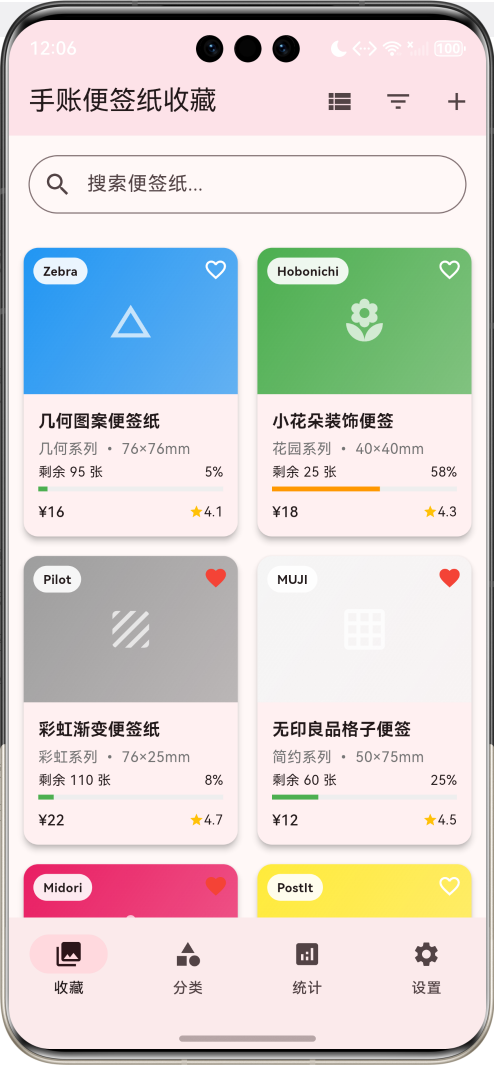
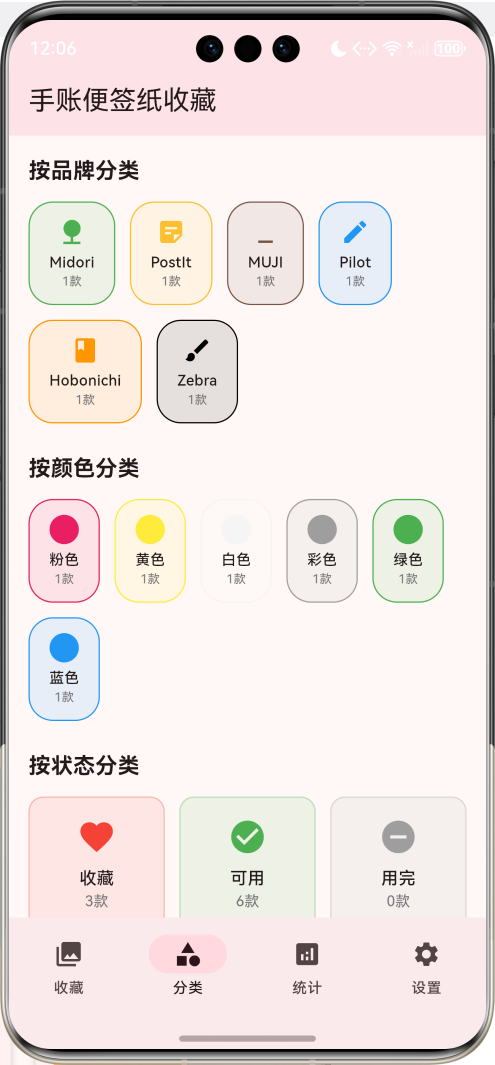
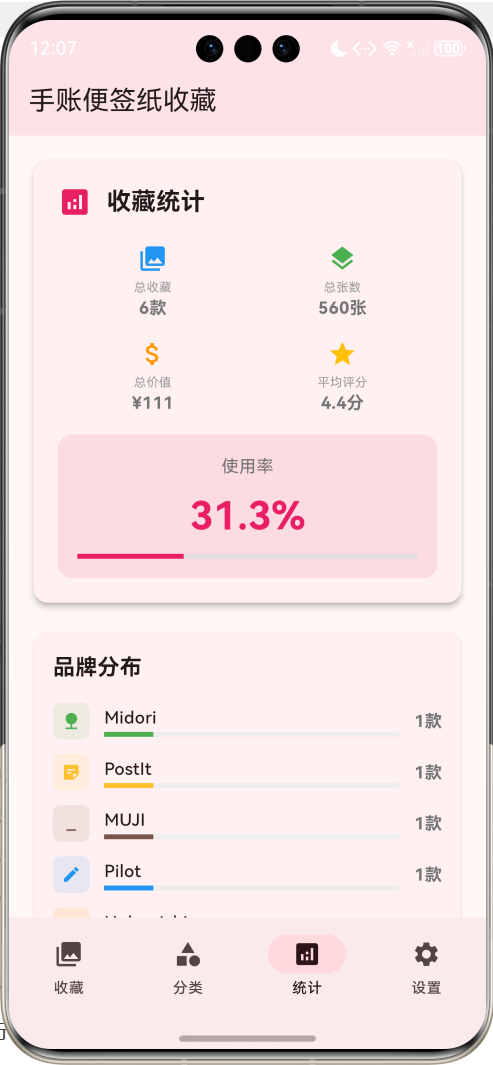
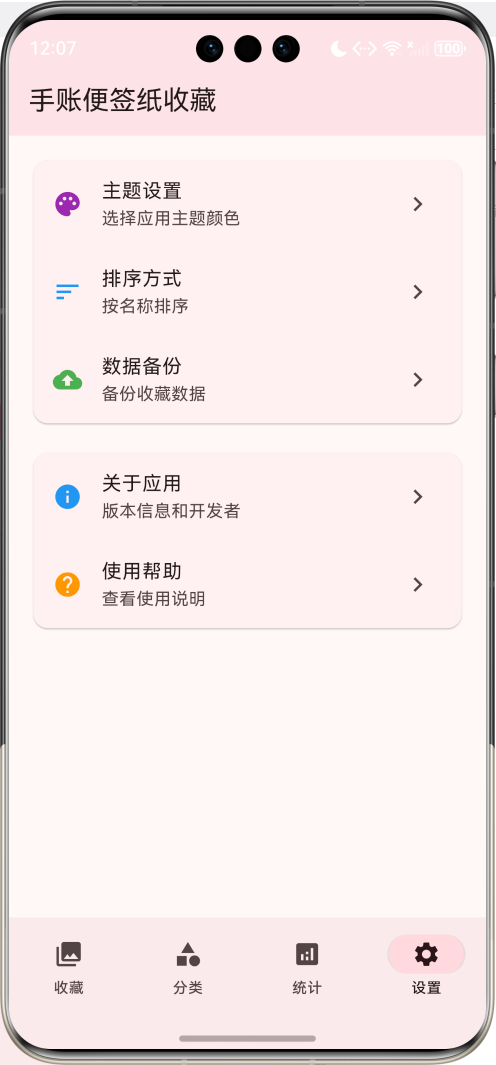
应用特色
- 便签纸档案管理:详细记录便签纸的品牌、系列、尺寸、材质等信息
- 智能分类系统:按品牌、系列、颜色、用途等多维度分类管理
- 使用记录追踪:记录每张便签纸的使用情况和剩余数量
- 收藏展示功能:精美的网格布局展示收藏的便签纸
- 搜索筛选功能:支持按名称、品牌、标签等多条件搜索
- 统计分析功能:收藏数量、使用统计、价值评估等数据分析
- 个性化设置:主题颜色、显示方式、排序规则等可自定义
技术栈
- 框架:Flutter 3.x
- 语言:Dart
- UI组件:Material Design 3
- 状态管理:StatefulWidget
- 动画:AnimationController + Tween
- 数据存储:内存存储(可扩展为本地数据库)
项目结构设计
核心数据模型
1. 便签纸模型(StickyNote)
class StickyNote {
  final String id;              // 唯一标识
  final String name;            // 便签纸名称
  final String brand;           // 品牌
  final String series;          // 系列
  final String size;            // 尺寸
  final String color;           // 颜色
  final String material;        // 材质
  final String pattern;         // 图案/花纹
  final double price;           // 价格
  final DateTime purchaseDate;  // 购买日期
  final String purchasePlace;   // 购买地点
  final int totalSheets;        // 总张数
  final int usedSheets;         // 已使用张数
  final List<String> tags;      // 标签
  final String notes;           // 备注
  final List<String> photos;    // 照片
  final String condition;       // 保存状态
  bool isFavorite;             // 是否收藏
  double rating;               // 评分
}
2. 使用记录模型(UsageRecord)
class UsageRecord {
  final String id;
  final String stickyNoteId;
  final DateTime usageDate;
  final int sheetsUsed;
  final String purpose;
  final String project;
  final String notes;
  final List<String> photos;
}
3. 分类枚举
enum NoteCategory {
  memo,         // 便签
  decoration,   // 装饰
  index,        // 索引
  bookmark,     // 书签
  label,        // 标签
  special,      // 特殊用途
}

enum NoteBrand {
  postit,       // 3M便利贴
  midori,       // Midori
  hobonichi,    // Hobonichi
  muji,         // 无印良品
  pilot,        // 百乐
  zebra,        // 斑马
  other,        // 其他
}

enum NoteCondition {
  mint,         // 全新
  excellent,    // 极佳
  good,         // 良好
  fair,         // 一般
  poor,         // 较差
}
页面架构
应用采用底部导航栏设计,包含四个主要页面:
- 收藏页面:展示所有便签纸收藏,支持网格和列表视图
- 分类页面:按不同维度分类展示便签纸
- 统计页面:收藏统计、使用分析、价值评估等
- 设置页面:个性化设置和应用配置
详细实现步骤
第一步:项目初始化
创建新的Flutter项目:
flutter create sticky_note_collection
cd sticky_note_collection
第二步:主应用结构
class MyApp extends StatelessWidget {
const MyApp({super.key});
Widget build(BuildContext context) {
return MaterialApp(
title: '手账便签纸收藏',
theme: ThemeData(
colorScheme: ColorScheme.fromSeed(seedColor: Colors.pink),
useMaterial3: true,
),
home: const StickyNoteHomePage(),
);
}
}
第三步:数据初始化
创建示例便签纸数据:
void _initializeStickyNotes() {
  _stickyNotes = [
    StickyNote(
      id: '1',
      name: '樱花系列便签纸',
      brand: 'Midori',
      series: '樱花季限定',
      size: '76×76mm',
      color: '粉色',
      material: '和纸',
      pattern: '樱花花瓣',
      price: 28.0,
      purchaseDate: DateTime.now().subtract(const Duration(days: 30)),
      purchasePlace: '日本东京',
      totalSheets: 100,
      usedSheets: 25,
      tags: ['樱花', '限定', '和纸', '装饰'],
      notes: '2024年春季限定款,图案精美',
      photos: [],
      condition: '极佳',
      isFavorite: true,
      rating: 4.8,
    ),
    // 更多便签纸数据...
  ];
}
第四步:收藏展示页面
便签纸卡片组件
Widget _buildStickyNoteCard(StickyNote note) {
  final remainingSheets = note.totalSheets - note.usedSheets;
  final usagePercentage = note.totalSheets > 0
      ? note.usedSheets / note.totalSheets
      : 0.0;

  return Card(
    elevation: 4,
    margin: const EdgeInsets.all(8),
    child: InkWell(
      onTap: () => _showNoteDetail(note),
      child: Column(
        crossAxisAlignment: CrossAxisAlignment.start,
        children: [
          // 便签纸图片区域
          Container(
            height: 120,
            width: double.infinity,
            decoration: BoxDecoration(
              gradient: LinearGradient(
                colors: [
                  _getColorFromName(note.color),
                  _getColorFromName(note.color).withOpacity(0.7),
                ],
                begin: Alignment.topLeft,
                end: Alignment.bottomRight,
              ),
              borderRadius: const BorderRadius.vertical(top: Radius.circular(12)),
            ),
            child: Stack(
              children: [
                // 品牌标识
                Positioned(
                  top: 8,
                  left: 8,
                  child: Container(
                    padding: const EdgeInsets.symmetric(horizontal: 8, vertical: 4),
                    decoration: BoxDecoration(
                      color: Colors.white.withOpacity(0.9),
                      borderRadius: BorderRadius.circular(12),
                    ),
                    child: Text(
                      note.brand,
                      style: const TextStyle(fontSize: 10, fontWeight: FontWeight.bold),
                    ),
                  ),
                ),
                // 收藏标识
                Positioned(
                  top: 8,
                  right: 8,
                  child: Icon(
                    note.isFavorite ? Icons.favorite : Icons.favorite_border,
                    color: note.isFavorite ? Colors.red : Colors.white,
                    size: 20,
                  ),
                ),
                // 图案装饰
                Center(
                  child: Icon(
                    _getPatternIcon(note.pattern),
                    size: 40,
                    color: Colors.white.withOpacity(0.7),
                  ),
                ),
              ],
            ),
          ),

          // 便签纸信息
          Padding(
            padding: const EdgeInsets.all(12),
            child: Column(
              crossAxisAlignment: CrossAxisAlignment.start,
              children: [
                Text(
                  note.name,
                  style: const TextStyle(fontSize: 14, fontWeight: FontWeight.bold),
                  maxLines: 2,
                  overflow: TextOverflow.ellipsis,
                ),
                const SizedBox(height: 4),
                Text(
                  '${note.series} • ${note.size}',
                  style: TextStyle(fontSize: 12, color: Colors.grey.shade600),
                ),
                const SizedBox(height: 8),

                // 使用进度条
                Column(
                  crossAxisAlignment: CrossAxisAlignment.start,
                  children: [
                    Row(
                      mainAxisAlignment: MainAxisAlignment.spaceBetween,
                      children: [
                        Text('剩余 $remainingSheets 张', style: const TextStyle(fontSize: 11)),
                        Text('${(usagePercentage * 100).toInt()}%', style: const TextStyle(fontSize: 11)),
                      ],
                    ),
                    const SizedBox(height: 4),
                    LinearProgressIndicator(
                      value: usagePercentage,
                      backgroundColor: Colors.grey.shade200,
                      valueColor: AlwaysStoppedAnimation<Color>(
                        usagePercentage > 0.8 ? Colors.red :
                        usagePercentage > 0.5 ? Colors.orange : Colors.green,
                      ),
                    ),
                  ],
                ),

                const SizedBox(height: 8),
                Row(
                  mainAxisAlignment: MainAxisAlignment.spaceBetween,
                  children: [
                    Text('¥${note.price.toStringAsFixed(0)}',
                         style: const TextStyle(fontSize: 12, fontWeight: FontWeight.w500)),
                    Row(
                      children: [
                        Icon(Icons.star, size: 12, color: Colors.amber),
                        Text('${note.rating.toStringAsFixed(1)}',
                             style: const TextStyle(fontSize: 11)),
                      ],
                    ),
                  ],
                ),
              ],
            ),
          ),
        ],
      ),
    ),
  );
}
网格和列表视图切换
Widget _buildCollectionPage() {
  return Column(
    children: [
      // 顶部工具栏
      Container(
        padding: const EdgeInsets.all(16),
        child: Row(
          children: [
            Expanded(
              child: TextField(
                decoration: InputDecoration(
                  hintText: '搜索便签纸...',
                  prefixIcon: const Icon(Icons.search),
                  border: OutlineInputBorder(borderRadius: BorderRadius.circular(25)),
                  contentPadding: const EdgeInsets.symmetric(horizontal: 16),
                ),
                onChanged: (value) {
                  setState(() {
                    _searchQuery = value;
                  });
                  _filterNotes();
                },
              ),
            ),
            const SizedBox(width: 12),
            IconButton(
              icon: Icon(_isGridView ? Icons.view_list : Icons.grid_view),
              onPressed: () {
                setState(() {
                  _isGridView = !_isGridView;
                });
              },
            ),
            IconButton(
              icon: const Icon(Icons.filter_list),
              onPressed: _showFilterDialog,
            ),
          ],
        ),
      ),

      // 便签纸展示区域
      Expanded(
        child: _filteredNotes.isEmpty
            ? _buildEmptyState()
            : _isGridView
                ? GridView.builder(
                    padding: const EdgeInsets.all(8),
                    gridDelegate: const SliverGridDelegateWithFixedCrossAxisCount(
                      crossAxisCount: 2,
                      childAspectRatio: 0.75,
                      crossAxisSpacing: 8,
                      mainAxisSpacing: 8,
                    ),
                    itemCount: _filteredNotes.length,
                    itemBuilder: (context, index) => _buildStickyNoteCard(_filteredNotes[index]),
                  )
                : ListView.builder(
                    padding: const EdgeInsets.all(16),
                    itemCount: _filteredNotes.length,
                    itemBuilder: (context, index) => _buildStickyNoteListItem(_filteredNotes[index]),
                  ),
      ),
    ],
  );
}
第五步:分类管理功能
分类页面实现
Widget _buildCategoryPage() {
  return SingleChildScrollView(
    padding: const EdgeInsets.all(16),
    child: Column(
      crossAxisAlignment: CrossAxisAlignment.start,
      children: [
        const Text('按品牌分类', style: TextStyle(fontSize: 18, fontWeight: FontWeight.bold)),
        const SizedBox(height: 12),
        _buildBrandCategories(),

        const SizedBox(height: 24),
        const Text('按颜色分类', style: TextStyle(fontSize: 18, fontWeight: FontWeight.bold)),
        const SizedBox(height: 12),
        _buildColorCategories(),

        const SizedBox(height: 24),
        const Text('按用途分类', style: TextStyle(fontSize: 18, fontWeight: FontWeight.bold)),
        const SizedBox(height: 12),
        _buildPurposeCategories(),
      ],
    ),
  );
}

Widget _buildBrandCategories() {
  final brandStats = <String, int>{};
  for (final note in _stickyNotes) {
    brandStats[note.brand] = (brandStats[note.brand] ?? 0) + 1;
  }

  return Wrap(
    spacing: 12,
    runSpacing: 12,
    children: brandStats.entries.map((entry) {
      return InkWell(
        onTap: () => _filterByBrand(entry.key),
        child: Container(
          padding: const EdgeInsets.symmetric(horizontal: 16, vertical: 12),
          decoration: BoxDecoration(
            color: _getBrandColor(entry.key).withOpacity(0.1),
            borderRadius: BorderRadius.circular(20),
            border: Border.all(color: _getBrandColor(entry.key)),
          ),
          child: Column(
            children: [
              Icon(_getBrandIcon(entry.key), color: _getBrandColor(entry.key), size: 24),
              const SizedBox(height: 4),
              Text(entry.key, style: const TextStyle(fontSize: 12, fontWeight: FontWeight.w500)),
              Text('${entry.value}款', style: TextStyle(fontSize: 10, color: Colors.grey.shade600)),
            ],
          ),
        ),
      );
    }).toList(),
  );
}
第六步:使用记录功能
使用记录管理
void _addUsageRecord(StickyNote note, int sheetsUsed, String purpose) {
  final record = UsageRecord(
    id: DateTime.now().millisecondsSinceEpoch.toString(),
    stickyNoteId: note.id,
    usageDate: DateTime.now(),
    sheetsUsed: sheetsUsed,
    purpose: purpose,
    project: '',
    notes: '',
    photos: [],
  );

  setState(() {
    _usageRecords.add(record);

    // 更新便签纸的使用数量
    final index = _stickyNotes.indexWhere((n) => n.id == note.id);
    if (index != -1) {
      _stickyNotes[index] = StickyNote(
        id: note.id,
        name: note.name,
        brand: note.brand,
        series: note.series,
        size: note.size,
        color: note.color,
        material: note.material,
        pattern: note.pattern,
        price: note.price,
        purchaseDate: note.purchaseDate,
        purchasePlace: note.purchasePlace,
        totalSheets: note.totalSheets,
        usedSheets: note.usedSheets + sheetsUsed,
        tags: note.tags,
        notes: note.notes,
        photos: note.photos,
        condition: note.condition,
        isFavorite: note.isFavorite,
        rating: note.rating,
      );
    }
  });

  _filterNotes();
  _calculateStats();
}

void _showUsageDialog(StickyNote note) {
  final sheetsController = TextEditingController();
  final purposeController = TextEditingController();

  showDialog(
    context: context,
    builder: (context) => AlertDialog(
      title: Text('记录使用 - ${note.name}'),
      content: Column(
        mainAxisSize: MainAxisSize.min,
        children: [
          TextField(
            controller: sheetsController,
            keyboardType: TextInputType.number,
            decoration: const InputDecoration(
              labelText: '使用张数',
              hintText: '请输入使用的张数',
            ),
          ),
          const SizedBox(height: 16),
          TextField(
            controller: purposeController,
            decoration: const InputDecoration(
              labelText: '使用用途',
              hintText: '如:手账装饰、便签记录等',
            ),
          ),
        ],
      ),
      actions: [
        TextButton(
          onPressed: () => Navigator.pop(context),
          child: const Text('取消'),
        ),
        ElevatedButton(
          onPressed: () {
            final sheets = int.tryParse(sheetsController.text) ?? 0;
            if (sheets > 0 && sheets <= (note.totalSheets - note.usedSheets)) {
              _addUsageRecord(note, sheets, purposeController.text);
              Navigator.pop(context);
              ScaffoldMessenger.of(context).showSnackBar(
                const SnackBar(content: Text('使用记录已添加')),
              );
            } else {
              ScaffoldMessenger.of(context).showSnackBar(
                const SnackBar(content: Text('请输入有效的使用张数')),
              );
            }
          },
          child: const Text('确认'),
        ),
      ],
    ),
  );
}
第七步:统计分析功能
统计数据计算
class CollectionStats {
  final int totalNotes;
  final int totalSheets;
  final int usedSheets;
  final double totalValue;
  final double averageRating;
  final Map<String, int> brandDistribution;
  final Map<String, int> colorDistribution;
  final List<StickyNote> favoriteNotes;
  final List<StickyNote> recentlyUsed;
  final double usageRate;

  CollectionStats({
    required this.totalNotes,
    required this.totalSheets,
    required this.usedSheets,
    required this.totalValue,
    required this.averageRating,
    required this.brandDistribution,
    required this.colorDistribution,
    required this.favoriteNotes,
    required this.recentlyUsed,
    required this.usageRate,
  });
}

void _calculateStats() {
  final totalNotes = _stickyNotes.length;
  final totalSheets = _stickyNotes.fold<int>(0, (sum, note) => sum + note.totalSheets);
  final usedSheets = _stickyNotes.fold<int>(0, (sum, note) => sum + note.usedSheets);
  final totalValue = _stickyNotes.fold<double>(0, (sum, note) => sum + note.price);

  final ratingsWithValue = _stickyNotes.where((note) => note.rating > 0).toList();
  final averageRating = ratingsWithValue.isNotEmpty
      ? ratingsWithValue.fold<double>(0, (sum, note) => sum + note.rating) / ratingsWithValue.length
      : 0.0;

  final brandDistribution = <String, int>{};
  final colorDistribution = <String, int>{};

  for (final note in _stickyNotes) {
    brandDistribution[note.brand] = (brandDistribution[note.brand] ?? 0) + 1;
    colorDistribution[note.color] = (colorDistribution[note.color] ?? 0) + 1;
  }

  final favoriteNotes = _stickyNotes.where((note) => note.isFavorite).toList();

  // 根据最近使用记录排序
  final recentlyUsed = _stickyNotes.where((note) => note.usedSheets > 0).toList()
    ..sort((a, b) => b.usedSheets.compareTo(a.usedSheets));

  final usageRate = totalSheets > 0 ? usedSheets / totalSheets : 0.0;

  _stats = CollectionStats(
    totalNotes: totalNotes,
    totalSheets: totalSheets,
    usedSheets: usedSheets,
    totalValue: totalValue,
    averageRating: averageRating,
    brandDistribution: brandDistribution,
    colorDistribution: colorDistribution,
    favoriteNotes: favoriteNotes,
    recentlyUsed: recentlyUsed.take(5).toList(),
    usageRate: usageRate,
  );
}
统计页面展示
Widget _buildStatsPage() {
  if (_stats == null) return const Center(child: CircularProgressIndicator());

  return SingleChildScrollView(
    padding: const EdgeInsets.all(16),
    child: Column(
      children: [
        // 总体统计卡片
        Card(
          elevation: 4,
          child: Padding(
            padding: const EdgeInsets.all(20),
            child: Column(
              children: [
                const Row(
                  children: [
                    Icon(Icons.analytics, color: Colors.pink, size: 28),
                    SizedBox(width: 12),
                    Text('收藏统计', style: TextStyle(fontSize: 20, fontWeight: FontWeight.bold)),
                  ],
                ),
                const SizedBox(height: 20),
                Row(
                  children: [
                    Expanded(child: _buildStatItem('总收藏', '${_stats!.totalNotes}款', Icons.collections, Colors.blue)),
                    Expanded(child: _buildStatItem('总张数', '${_stats!.totalSheets}张', Icons.layers, Colors.green)),
                  ],
                ),
                const SizedBox(height: 16),
                Row(
                  children: [
                    Expanded(child: _buildStatItem('总价值', '¥${_stats!.totalValue.toStringAsFixed(0)}', Icons.attach_money, Colors.orange)),
                    Expanded(child: _buildStatItem('平均评分', '${_stats!.averageRating.toStringAsFixed(1)}分', Icons.star, Colors.amber)),
                  ],
                ),
                const SizedBox(height: 16),
                Container(
                  width: double.infinity,
                  padding: const EdgeInsets.all(16),
                  decoration: BoxDecoration(
                    color: Colors.pink.withOpacity(0.1),
                    borderRadius: BorderRadius.circular(12),
                  ),
                  child: Column(
                    children: [
                      Text('使用率', style: TextStyle(fontSize: 14, color: Colors.grey.shade600)),
                      const SizedBox(height: 8),
                      Text('${(_stats!.usageRate * 100).toStringAsFixed(1)}%',
                           style: const TextStyle(fontSize: 32, fontWeight: FontWeight.bold, color: Colors.pink)),
                      const SizedBox(height: 8),
                      LinearProgressIndicator(
                        value: _stats!.usageRate,
                        backgroundColor: Colors.grey.shade300,
                        valueColor: const AlwaysStoppedAnimation<Color>(Colors.pink),
                      ),
                    ],
                  ),
                ),
              ],
            ),
          ),
        ),

        const SizedBox(height: 16),

        // 品牌分布图表
        Card(
          child: Padding(
            padding: const EdgeInsets.all(16),
            child: Column(
              crossAxisAlignment: CrossAxisAlignment.start,
              children: [
                const Text('品牌分布', style: TextStyle(fontSize: 18, fontWeight: FontWeight.bold)),
                const SizedBox(height: 16),
                ..._stats!.brandDistribution.entries.map((entry) => Padding(
                  padding: const EdgeInsets.only(bottom: 12),
                  child: Row(
                    children: [
                      Container(
                        width: 30,
                        height: 30,
                        decoration: BoxDecoration(
                          color: _getBrandColor(entry.key).withOpacity(0.1),
                          borderRadius: BorderRadius.circular(6),
                        ),
                        child: Icon(_getBrandIcon(entry.key), size: 16, color: _getBrandColor(entry.key)),
                      ),
                      const SizedBox(width: 12),
                      Expanded(
                        child: Column(
                          crossAxisAlignment: CrossAxisAlignment.start,
                          children: [
                            Text(entry.key, style: const TextStyle(fontWeight: FontWeight.w500)),
                            const SizedBox(height: 2),
                            LinearProgressIndicator(
                              value: _stats!.totalNotes > 0 ? entry.value / _stats!.totalNotes : 0,
                              backgroundColor: Colors.grey.shade200,
                              valueColor: AlwaysStoppedAnimation<Color>(_getBrandColor(entry.key)),
                            ),
                          ],
                        ),
                      ),
                      const SizedBox(width: 12),
                      Text('${entry.value}款', style: TextStyle(fontSize: 14, fontWeight: FontWeight.bold, color: Colors.grey.shade600)),
                    ],
                  ),
                )),
              ],
            ),
          ),
        ),
      ],
    ),
  );
}

Widget _buildStatItem(String label, String value, IconData icon, Color color) {
  return Column(
    children: [
      Icon(icon, color: color, size: 24),
      const SizedBox(height: 4),
      Text(label, style: const TextStyle(fontSize: 10, color: Colors.grey)),
      Text(value, style: TextStyle(fontSize: 14, fontWeight: FontWeight.bold, color: Colors.grey.shade600)),
    ],
  );
}
第八步:便签纸详情页面
class StickyNoteDetailPage extends StatefulWidget {
final StickyNote note;
final Function(StickyNote) onUpdate;
const StickyNoteDetailPage({
super.key,
required this.note,
required this.onUpdate,
});
State<StickyNoteDetailPage> createState() => _StickyNoteDetailPageState();
}
class _StickyNoteDetailPageState extends State<StickyNoteDetailPage> {
late StickyNote _note;
void initState() {
super.initState();
_note = widget.note;
}
Widget build(BuildContext context) {
final remainingSheets = _note.totalSheets - _note.usedSheets;
final usagePercentage = _note.totalSheets > 0 ? _note.usedSheets / _note.totalSheets : 0.0;
return Scaffold(
appBar: AppBar(
title: Text(_note.name),
actions: [
IconButton(
icon: Icon(_note.isFavorite ? Icons.favorite : Icons.favorite_border),
onPressed: _toggleFavorite,
),
IconButton(
icon: const Icon(Icons.edit),
onPressed: _editNote,
),
],
),
body: SingleChildScrollView(
padding: const EdgeInsets.all(16),
child: Column(
crossAxisAlignment: CrossAxisAlignment.start,
children: [
// 便签纸展示区域
Container(
width: double.infinity,
height: 200,
decoration: BoxDecoration(
gradient: LinearGradient(
colors: [
_getColorFromName(_note.color),
_getColorFromName(_note.color).withOpacity(0.7),
],
begin: Alignment.topLeft,
end: Alignment.bottomRight,
),
borderRadius: BorderRadius.circular(16),
boxShadow: [
BoxShadow(
color: Colors.black.withOpacity(0.1),
blurRadius: 10,
spreadRadius: 2,
),
],
),
child: Center(
child: Column(
mainAxisAlignment: MainAxisAlignment.center,
children: [
Icon(_getPatternIcon(_note.pattern), size: 60, color: Colors.white.withOpacity(0.8)),
const SizedBox(height: 8),
Text(_note.pattern, style: const TextStyle(color: Colors.white, fontSize: 16, fontWeight: FontWeight.bold)),
],
),
),
),
const SizedBox(height: 24),
// 基本信息
_buildInfoSection('基本信息', [
_buildInfoRow('品牌', _note.brand, Icons.business),
_buildInfoRow('系列', _note.series, Icons.category),
_buildInfoRow('尺寸', _note.size, Icons.straighten),
_buildInfoRow('材质', _note.material, Icons.texture),
_buildInfoRow('颜色', _note.color, Icons.palette),
]),
const SizedBox(height: 16),
// 购买信息
_buildInfoSection('购买信息', [
_buildInfoRow('价格', '¥${_note.price.toStringAsFixed(2)}', Icons.attach_money),
_buildInfoRow('购买日期', _formatDate(_note.purchaseDate), Icons.calendar_today),
_buildInfoRow('购买地点', _note.purchasePlace, Icons.location_on),
]),
const SizedBox(height: 16),
// 使用情况
_buildInfoSection('使用情况', [
_buildUsageInfo(),
]),
const SizedBox(height: 16),
// 标签
if (_note.tags.isNotEmpty) ...[
_buildInfoSection('标签', [
Wrap(
spacing: 8,
runSpacing: 8,
children: _note.tags.map((tag) => Chip(
label: Text(tag, style: const TextStyle(fontSize: 12)),
backgroundColor: Colors.pink.withOpacity(0.1),
)).toList(),
),
]),
const SizedBox(height: 16),
],
// 备注
if (_note.notes.isNotEmpty) ...[
_buildInfoSection('备注', [
Text(_note.notes, style: TextStyle(color: Colors.grey.shade700)),
]),
const SizedBox(height: 16),
],
// 操作按钮
Row(
children: [
Expanded(
child: ElevatedButton.icon(
onPressed: remainingSheets > 0 ? _recordUsage : null,
icon: const Icon(Icons.remove),
label: const Text('记录使用'),
),
),
const SizedBox(width: 12),
Expanded(
child: OutlinedButton.icon(
onPressed: _viewUsageHistory,
icon: const Icon(Icons.history),
label: const Text('使用历史'),
),
),
],
),
],
),
),
);
}
Widget _buildInfoSection(String title, List<Widget> children) {
return Card(
child: Padding(
padding: const EdgeInsets.all(16),
child: Column(
crossAxisAlignment: CrossAxisAlignment.start,
children: [
Text(title, style: const TextStyle(fontSize: 16, fontWeight: FontWeight.bold)),
const SizedBox(height: 12),
...children,
],
),
),
);
}
Widget _buildInfoRow(String label, String value, IconData icon) {
return Padding(
padding: const EdgeInsets.only(bottom: 8),
child: Row(
children: [
Icon(icon, size: 16, color: Colors.grey.shade600),
const SizedBox(width: 8),
Text('$label: ', style: TextStyle(color: Colors.grey.shade600)),
Expanded(child: Text(value, style: const TextStyle(fontWeight: FontWeight.w500))),
],
),
);
}
Widget _buildUsageInfo() {
final remainingSheets = _note.totalSheets - _note.usedSheets;
final usagePercentage = _note.totalSheets > 0 ? _note.usedSheets / _note.totalSheets : 0.0;
return Column(
crossAxisAlignment: CrossAxisAlignment.start,
children: [
Row(
mainAxisAlignment: MainAxisAlignment.spaceBetween,
children: [
Text('总张数: ${_note.totalSheets}张'),
Text('已使用: ${_note.usedSheets}张'),
],
),
const SizedBox(height: 8),
Row(
mainAxisAlignment: MainAxisAlignment.spaceBetween,
children: [
Text('剩余: $remainingSheets张', style: TextStyle(
color: remainingSheets == 0 ? Colors.red : Colors.green,
fontWeight: FontWeight.w500,
)),
Text('${(usagePercentage * 100).toInt()}%', style: const TextStyle(fontWeight: FontWeight.w500)),
],
),
const SizedBox(height: 8),
LinearProgressIndicator(
value: usagePercentage,
backgroundColor: Colors.grey.shade200,
valueColor: AlwaysStoppedAnimation<Color>(
usagePercentage > 0.8 ? Colors.red :
usagePercentage > 0.5 ? Colors.orange : Colors.green,
),
),
],
);
}
void _toggleFavorite() {
setState(() {
_note = StickyNote(
id: _note.id,
name: _note.name,
brand: _note.brand,
series: _note.series,
size: _note.size,
color: _note.color,
material: _note.material,
pattern: _note.pattern,
price: _note.price,
purchaseDate: _note.purchaseDate,
purchasePlace: _note.purchasePlace,
totalSheets: _note.totalSheets,
usedSheets: _note.usedSheets,
tags: _note.tags,
notes: _note.notes,
photos: _note.photos,
condition: _note.condition,
isFavorite: !_note.isFavorite,
rating: _note.rating,
);
});
widget.onUpdate(_note);
}
void _editNote() {
// 编辑便签纸信息
Navigator.push(
context,
MaterialApp.route(
builder: (context) => EditStickyNotePage(
note: _note,
onSave: (updatedNote) {
setState(() {
_note = updatedNote;
});
widget.onUpdate(updatedNote);
},
),
),
);
}
void _recordUsage() {
// 记录使用
}
void _viewUsageHistory() {
// 查看使用历史
}
String _formatDate(DateTime date) {
return '${date.year}-${date.month.toString().padLeft(2, '0')}-${date.day.toString().padLeft(2, '0')}';
}
}
核心功能详解
1. 颜色系统
根据便签纸颜色名称返回对应的Color对象:
Color _getColorFromName(String colorName) {
  switch (colorName.toLowerCase()) {
    case '粉色': return Colors.pink;
    case '蓝色': return Colors.blue;
    case '绿色': return Colors.green;
    case '黄色': return Colors.yellow;
    case '紫色': return Colors.purple;
    case '橙色': return Colors.orange;
    case '红色': return Colors.red;
    case '白色': return Colors.grey.shade100;
    case '黑色': return Colors.grey.shade800;
    default: return Colors.grey;
  }
}
2. 品牌图标系统
为不同品牌设置专属图标和颜色:
IconData _getBrandIcon(String brand) {
  switch (brand.toLowerCase()) {
    case 'midori': return Icons.nature;
    case 'hobonichi': return Icons.book;
    case 'muji': return Icons.minimize;
    case 'postit': return Icons.sticky_note_2;
    case 'pilot': return Icons.edit;
    case 'zebra': return Icons.brush;
    default: return Icons.note;
  }
}

Color _getBrandColor(String brand) {
  switch (brand.toLowerCase()) {
    case 'midori': return Colors.green;
    case 'hobonichi': return Colors.orange;
    case 'muji': return Colors.brown;
    case 'postit': return Colors.yellow.shade700;
    case 'pilot': return Colors.blue;
    case 'zebra': return Colors.black;
    default: return Colors.grey;
  }
}
3. 图案图标系统
根据便签纸图案显示相应图标:
IconData _getPatternIcon(String pattern) {
  switch (pattern.toLowerCase()) {
    case '樱花花瓣': return Icons.local_florist;
    case '格子': return Icons.grid_on;
    case '条纹': return Icons.horizontal_rule;
    case '圆点': return Icons.fiber_manual_record;
    case '星星': return Icons.star;
    case '爱心': return Icons.favorite;
    case '纯色': return Icons.crop_square;
    default: return Icons.texture;
  }
}
4. 搜索和筛选算法
实现多维度搜索功能:
void _filterNotes() {
  setState(() {
    _filteredNotes = _stickyNotes.where((note) {
      bool matchesSearch = _searchQuery.isEmpty ||
          note.name.toLowerCase().contains(_searchQuery.toLowerCase()) ||
          note.brand.toLowerCase().contains(_searchQuery.toLowerCase()) ||
          note.series.toLowerCase().contains(_searchQuery.toLowerCase()) ||
          note.tags.any((tag) => tag.toLowerCase().contains(_searchQuery.toLowerCase()));

      bool matchesBrand = _selectedBrand == null || note.brand == _selectedBrand;
      bool matchesColor = _selectedColor == null || note.color == _selectedColor;
      bool matchesFavorite = !_showFavoritesOnly || note.isFavorite;
      bool matchesAvailable = !_showAvailableOnly || (note.totalSheets - note.usedSheets) > 0;

      return matchesSearch && matchesBrand && matchesColor && matchesFavorite && matchesAvailable;
    }).toList();

    // 排序
    switch (_sortBy) {
      case SortBy.name:
        _filteredNotes.sort((a, b) => a.name.compareTo(b.name));
        break;
      case SortBy.brand:
        _filteredNotes.sort((a, b) => a.brand.compareTo(b.brand));
        break;
      case SortBy.price:
        _filteredNotes.sort((a, b) => b.price.compareTo(a.price));
        break;
      case SortBy.purchaseDate:
        _filteredNotes.sort((a, b) => b.purchaseDate.compareTo(a.purchaseDate));
        break;
      case SortBy.usage:
        _filteredNotes.sort((a, b) => b.usedSheets.compareTo(a.usedSheets));
        break;
    }
  });
}
性能优化
1. 列表优化
使用ListView.builder和GridView.builder实现虚拟滚动:
GridView.builder(
  padding: const EdgeInsets.all(8),
  gridDelegate: const SliverGridDelegateWithFixedCrossAxisCount(
    crossAxisCount: 2,
    childAspectRatio: 0.75,
    crossAxisSpacing: 8,
    mainAxisSpacing: 8,
  ),
  itemCount: _filteredNotes.length,
  itemBuilder: (context, index) => _buildStickyNoteCard(_filteredNotes[index]),
)
2. 状态管理优化
合理使用setState,避免不必要的重建:
void _updateNote(StickyNote updatedNote) {
  setState(() {
    final index = _stickyNotes.indexWhere((note) => note.id == updatedNote.id);
    if (index != -1) {
      _stickyNotes[index] = updatedNote;
    }
  });
  _filterNotes();
  _calculateStats();
}
3. 内存管理
及时释放资源:
void dispose() {
_searchController.dispose();
super.dispose();
}
扩展功能
1. 数据持久化
可以集成sqflite插件实现本地数据库存储:
dependencies:
  flutter:
    sdk: flutter
  sqflite: ^2.3.0
  path: ^1.8.3
2. 图片管理
使用image_picker插件实现照片拍摄和选择:
dependencies:
  image_picker: ^1.0.4
3. 数据导出
集成csv插件实现数据导出功能:
dependencies:
  csv: ^5.0.2
  path_provider: ^2.1.1
总结
本教程详细介绍了Flutter手账便签纸收藏应用的完整开发过程,涵盖了:
- 数据模型设计:便签纸信息、使用记录、统计数据的合理建模
- UI界面开发:Material Design 3风格的现代化界面
- 功能实现:收藏管理、分类展示、使用记录、统计分析
- 交互设计:网格/列表切换、搜索筛选、详情展示
- 性能优化:虚拟滚动、状态管理、内存优化
- 扩展功能:数据持久化、图片管理、数据导出
这款应用不仅功能完整,而且代码结构清晰,易于维护和扩展。通过本教程的学习,你可以掌握Flutter应用开发的核心技能,为后续开发更复杂的收藏管理类应用打下坚实基础。
欢迎加入开源鸿蒙跨平台社区:https://openharmonycrossplatform.csdn.net

作为“人工智能6S店”的官方数字引擎,为AI开发者与企业提供一个覆盖软硬件全栈、一站式门户。
更多推荐

 8
8 0
0- 0


 已为社区贡献30条内容

所有评论(0)