
Flutter 框架跨平台鸿蒙开发 - 附近手作工具店查询应用开发教程
本教程将带你开发一个功能完整的Flutter附近手作工具店查询应用。这款应用专为手工爱好者设计,提供便捷的工具店查找、工具分类浏览、价格对比、预约服务等功能,让手作爱好者能够轻松找到所需的工具和材料。运行效果图2. 工具分类枚举3. 预约记录模型(Reservation)4. 用户评价模型(Review)页面架构应用采用底部导航栏设计,包含五个主要页面:创建新的Flutter项目并添加必要依赖:第
Flutter附近手作工具店查询应用开发教程
项目概述
本教程将带你开发一个功能完整的Flutter附近手作工具店查询应用。这款应用专为手工爱好者设计,提供便捷的工具店查找、工具分类浏览、价格对比、预约服务等功能,让手作爱好者能够轻松找到所需的工具和材料。
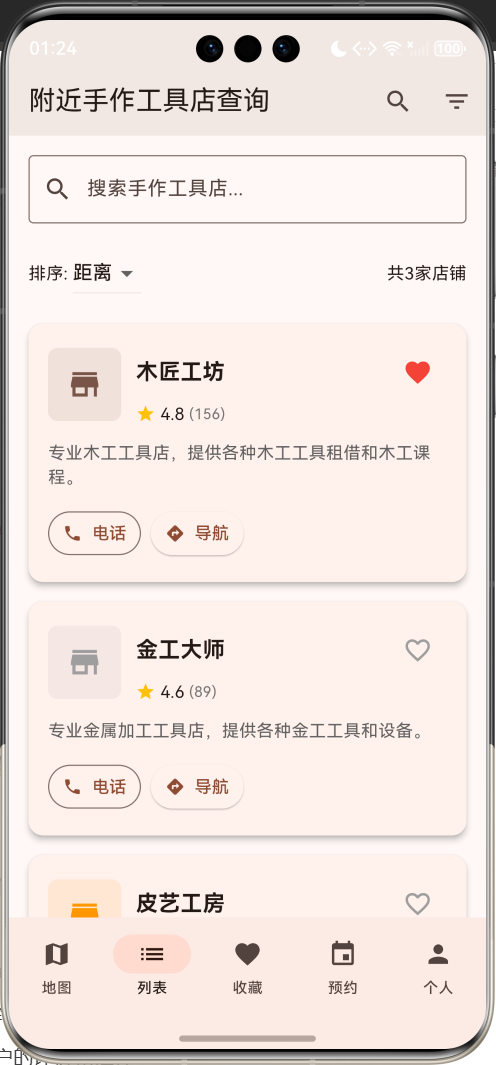
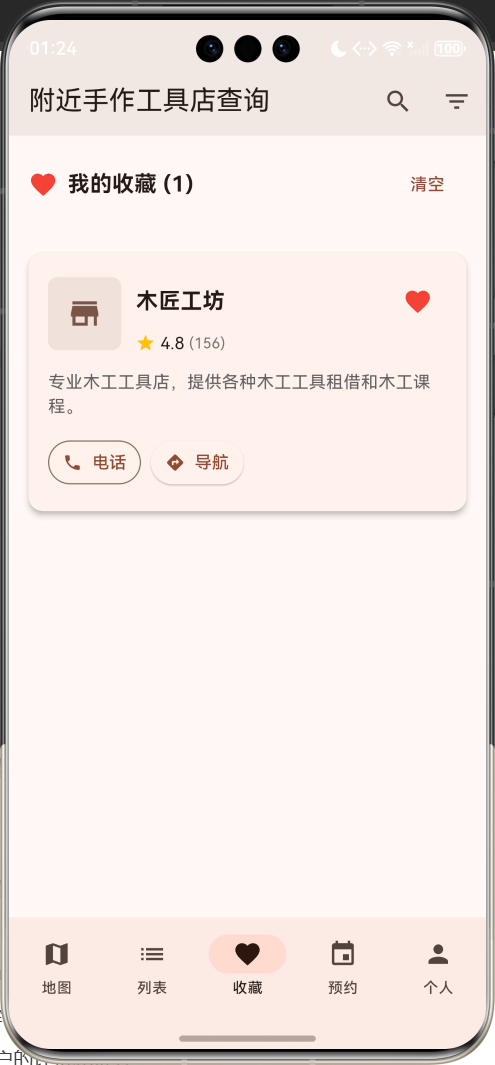
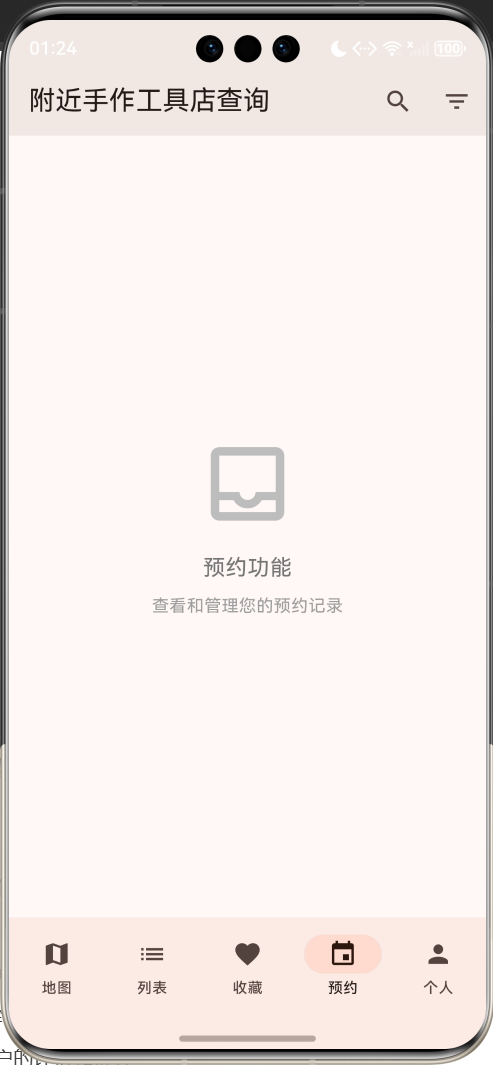
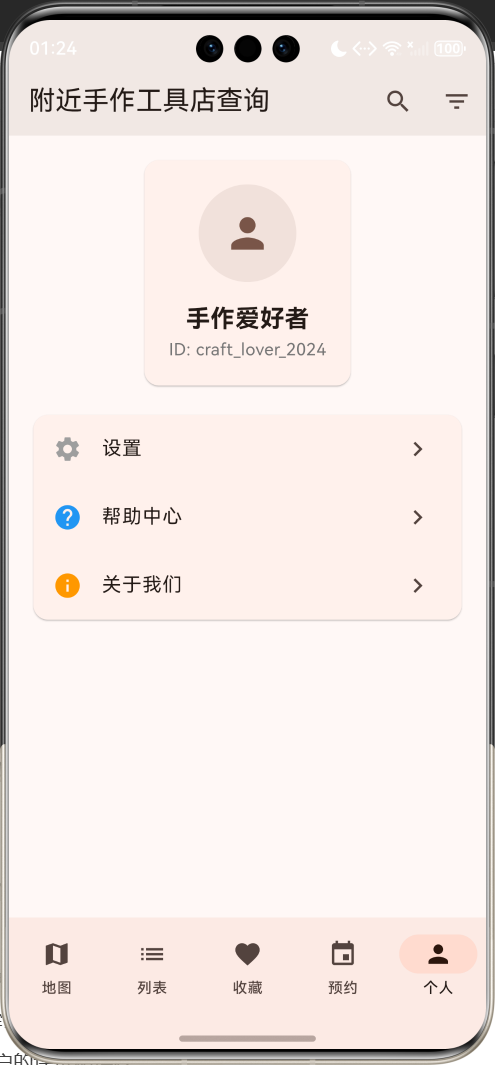
运行效果图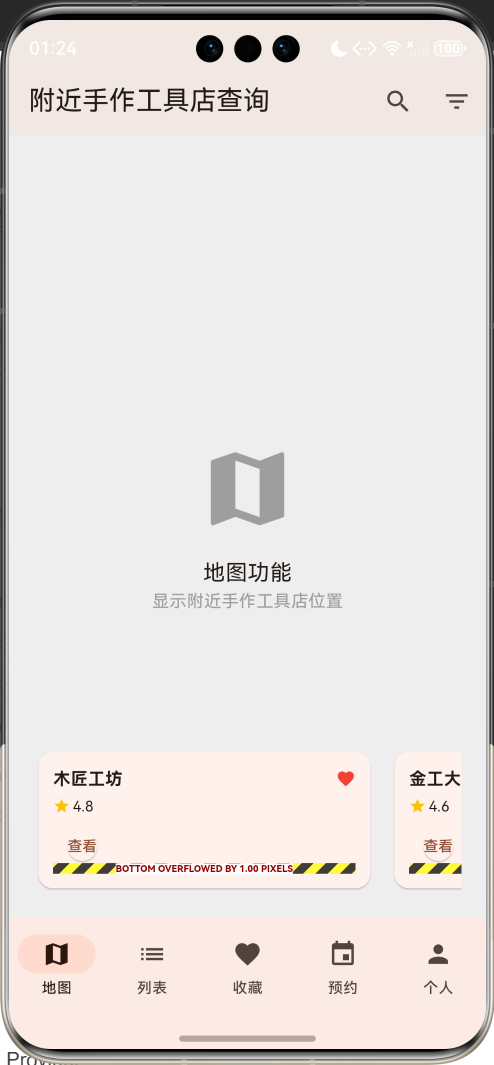
应用特色
- 智能定位系统:基于GPS定位,自动查找附近的手作工具店
- 丰富的工具分类:涵盖木工、金工、皮具、陶艺、编织等多种手作类型
- 详细店铺信息:包含营业时间、联系方式、工具库存、价格信息
- 预约服务功能:支持在线预约工具租借、课程报名、工作室使用
- 用户评价系统:查看其他用户的评价和推荐
- 收藏管理:收藏常用店铺,方便下次查找
- 路线导航:一键导航到目标店铺
- 价格对比:同类工具价格对比,帮助用户选择性价比最高的选项
技术栈
- 框架:Flutter 3.x
- 语言:Dart
- UI组件:Material Design 3
- 状态管理:StatefulWidget + Provider
- 地图服务:Google Maps / 高德地图
- 定位服务:Geolocator
- 数据存储:SQLite + SharedPreferences
- 网络请求:HTTP + Dio
项目结构设计
核心数据模型
1. 手作工具店模型(CraftToolShop)
class CraftToolShop {
  final String id;              // 唯一标识
  final String name;            // 店铺名称
  final String address;         // 详细地址
  final double latitude;        // 纬度
  final double longitude;       // 经度
  final String phone;           // 联系电话
  final String description;     // 店铺描述
  final List<String> categories; // 工具分类
  final Map<String, double> prices; // 工具价格
  final double rating;          // 评分
  final int reviewCount;        // 评价数量
  final String operatingHours;  // 营业时间
  final List<String> services;  // 提供的服务
  final List<String> images;    // 店铺图片
  final DateTime lastUpdated;   // 最后更新时间
  bool isFavorite;             // 是否收藏
  final String ownerName;       // 店主姓名
  final List<String> specialties; // 特色服务
  final bool hasRental;         // 是否提供租借服务
  final bool hasWorkshop;       // 是否有工作室
  final bool hasClasses;        // 是否提供课程
}
2. 工具分类枚举
enum CraftCategory {
  woodworking,    // 木工
  metalworking,   // 金工
  leathercraft,   // 皮具
  pottery,        // 陶艺
  knitting,       // 编织
  jewelry,        // 首饰制作
  painting,       // 绘画
  sewing,         // 缝纫
  glasswork,      // 玻璃工艺
  papercraft,     // 纸艺
}
3. 预约记录模型(Reservation)
class Reservation {
  final String id;
  final String shopId;
  final String userId;
  final String serviceType;     // 服务类型:租借、课程、工作室
  final DateTime reservationTime;
  final DateTime startTime;
  final DateTime endTime;
  final double totalPrice;
  final ReservationStatus status;
  final String notes;
  final List<String> toolsReserved;
  final DateTime createdAt;
}

enum ReservationStatus {
  pending,      // 待确认
  confirmed,    // 已确认
  inProgress,   // 进行中
  completed,    // 已完成
  cancelled,    // 已取消
}
4. 用户评价模型(Review)
class Review {
  final String id;
  final String shopId;
  final String userId;
  final String userName;
  final double rating;
  final String content;
  final DateTime createTime;
  final List<String> images;
  final String serviceType;
  final bool isRecommended;
  final int helpfulCount;
  final List<String> tags;
}
页面架构
应用采用底部导航栏设计,包含五个主要页面:
- 地图页面:显示附近手作工具店的地理位置
- 列表页面:以列表形式展示店铺信息,支持筛选和排序
- 收藏页面:管理收藏的店铺
- 预约页面:查看和管理预约记录
- 个人页面:用户信息、设置和应用功能
详细实现步骤
第一步:项目初始化
创建新的Flutter项目并添加必要依赖:
flutter create craft_tool_shop_finder
cd craft_tool_shop_finder
# pubspec.yaml
dependencies:
  flutter:
    sdk: flutter
  cupertino_icons: ^1.0.2
  google_maps_flutter: ^2.5.0
  geolocator: ^10.1.0
  permission_handler: ^11.0.1
  http: ^1.1.0
  sqflite: ^2.3.0
  shared_preferences: ^2.2.2
  provider: ^6.1.1
  cached_network_image: ^3.3.0
  url_launcher: ^6.2.1
  image_picker: ^1.0.4

dev_dependencies:
  flutter_test:
    sdk: flutter
  flutter_lints: ^3.0.0
第二步:主应用结构
class MyApp extends StatelessWidget {
const MyApp({super.key});
Widget build(BuildContext context) {
return MaterialApp(
title: 'Flutter附近手作工具店查询',
theme: ThemeData(
colorScheme: ColorScheme.fromSeed(seedColor: Colors.brown),
useMaterial3: true,
),
home: const CraftToolShopHomePage(),
debugShowCheckedModeBanner: false,
);
}
}
第三步:数据初始化
创建示例手作工具店数据:
void _initializeShops() {
  _craftShops = [
    CraftToolShop(
      id: '1',
      name: '木匠工坊',
      address: '北京市朝阳区工体北路8号',
      latitude: 39.9289,
      longitude: 116.4203,
      phone: '010-12345678',
      description: '专业木工工具店,提供各种木工工具租借和木工课程。',
      categories: ['木工工具', '手工锯', '刨子', '凿子'],
      prices: {
        '手工锯': 15.0,
        '木工刨': 25.0,
        '凿子套装': 35.0,
        '砂纸': 5.0,
      },
      rating: 4.8,
      reviewCount: 156,
      operatingHours: '09:00-18:00',
      services: ['工具租借', '木工课程', '定制服务'],
      images: ['assets/images/woodshop1.jpg', 'assets/images/woodshop2.jpg'],
      lastUpdated: DateTime.now().subtract(const Duration(hours: 2)),
      isFavorite: true,
      ownerName: '张师傅',
      specialties: ['榫卯工艺', '实木家具制作'],
      hasRental: true,
      hasWorkshop: true,
      hasClasses: true,
    ),
    // 更多店铺数据...
  ];
}
第四步:地图页面实现
Google Maps集成
class MapPage extends StatefulWidget {
const MapPage({super.key});
State<MapPage> createState() => _MapPageState();
}
class _MapPageState extends State<MapPage> {
GoogleMapController? _mapController;
Position? _currentPosition;
Set<Marker> _markers = {};
List<CraftToolShop> _nearbyShops = [];
void initState() {
super.initState();
_getCurrentLocation();
_loadNearbyShops();
}
Future<void> _getCurrentLocation() async {
try {
LocationPermission permission = await Geolocator.checkPermission();
if (permission == LocationPermission.denied) {
permission = await Geolocator.requestPermission();
}
if (permission == LocationPermission.whileInUse ||
permission == LocationPermission.always) {
Position position = await Geolocator.getCurrentPosition(
desiredAccuracy: LocationAccuracy.high,
);
setState(() {
_currentPosition = position;
});
_updateMapLocation(position);
}
} catch (e) {
print('获取位置失败: $e');
}
}
void _updateMapLocation(Position position) {
if (_mapController != null) {
_mapController!.animateCamera(
CameraUpdate.newLatLng(
LatLng(position.latitude, position.longitude),
),
);
}
}
void _loadNearbyShops() {
// 模拟加载附近店铺数据
setState(() {
_nearbyShops = _craftShops.where((shop) {
if (_currentPosition == null) return true;
double distance = Geolocator.distanceBetween(
_currentPosition!.latitude,
_currentPosition!.longitude,
shop.latitude,
shop.longitude,
);
return distance <= 5000; // 5公里范围内
}).toList();
_updateMarkers();
});
}
void _updateMarkers() {
Set<Marker> markers = {};
// 添加当前位置标记
if (_currentPosition != null) {
markers.add(
Marker(
markerId: const MarkerId('current_location'),
position: LatLng(_currentPosition!.latitude, _currentPosition!.longitude),
icon: BitmapDescriptor.defaultMarkerWithHue(BitmapDescriptor.hueBlue),
infoWindow: const InfoWindow(title: '我的位置'),
),
);
}
// 添加店铺标记
for (var shop in _nearbyShops) {
markers.add(
Marker(
markerId: MarkerId(shop.id),
position: LatLng(shop.latitude, shop.longitude),
icon: BitmapDescriptor.defaultMarkerWithHue(
_getCategoryColor(shop.categories.first),
),
infoWindow: InfoWindow(
title: shop.name,
snippet: '${shop.rating}⭐ • ${shop.categories.join(', ')}',
onTap: () => _showShopDetail(shop),
),
),
);
}
setState(() {
_markers = markers;
});
}
Widget build(BuildContext context) {
return Scaffold(
body: Stack(
children: [
GoogleMap(
onMapCreated: (GoogleMapController controller) {
_mapController = controller;
if (_currentPosition != null) {
_updateMapLocation(_currentPosition!);
}
},
initialCameraPosition: CameraPosition(
target: _currentPosition != null
? LatLng(_currentPosition!.latitude, _currentPosition!.longitude)
: const LatLng(39.9042, 116.4074), // 默认北京
zoom: 14.0,
),
markers: _markers,
myLocationEnabled: true,
myLocationButtonEnabled: false,
zoomControlsEnabled: false,
),
// 搜索栏
Positioned(
top: MediaQuery.of(context).padding.top + 10,
left: 16,
right: 16,
child: _buildSearchBar(),
),
// 筛选按钮
Positioned(
top: MediaQuery.of(context).padding.top + 70,
right: 16,
child: _buildFilterButton(),
),
// 我的位置按钮
Positioned(
bottom: 100,
right: 16,
child: FloatingActionButton(
mini: true,
onPressed: _getCurrentLocation,
child: const Icon(Icons.my_location),
),
),
// 底部店铺列表
Positioned(
bottom: 0,
left: 0,
right: 0,
child: _buildBottomShopList(),
),
],
),
);
}
Widget _buildSearchBar() {
return Card(
elevation: 4,
child: TextField(
decoration: const InputDecoration(
hintText: '搜索手作工具店...',
prefixIcon: Icon(Icons.search),
border: InputBorder.none,
contentPadding: EdgeInsets.symmetric(horizontal: 16, vertical: 12),
),
onSubmitted: _performSearch,
),
);
}
Widget _buildFilterButton() {
return FloatingActionButton(
mini: true,
onPressed: _showFilterDialog,
child: const Icon(Icons.filter_list),
);
}
Widget _buildBottomShopList() {
return Container(
height: 120,
child: ListView.builder(
scrollDirection: Axis.horizontal,
padding: const EdgeInsets.symmetric(horizontal: 16),
itemCount: _nearbyShops.length,
itemBuilder: (context, index) {
final shop = _nearbyShops[index];
return Container(
width: 280,
margin: const EdgeInsets.only(right: 12, bottom: 16),
child: _buildShopCard(shop),
);
},
),
);
}
}
第五步:店铺列表页面
店铺卡片组件
Widget _buildShopCard(CraftToolShop shop) {
  final distance = _currentPosition != null
      ? Geolocator.distanceBetween(
          _currentPosition!.latitude,
          _currentPosition!.longitude,
          shop.latitude,
          shop.longitude,
        ) / 1000 // 转换为公里
      : 0.0;

  return Card(
    elevation: 4,
    margin: const EdgeInsets.only(bottom: 16),
    child: InkWell(
      onTap: () => _showShopDetail(shop),
      borderRadius: BorderRadius.circular(12),
      child: Padding(
        padding: const EdgeInsets.all(16),
        child: Column(
          crossAxisAlignment: CrossAxisAlignment.start,
          children: [
            // 店铺头部信息
            Row(
              children: [
                // 店铺图片
                ClipRRect(
                  borderRadius: BorderRadius.circular(8),
                  child: Container(
                    width: 60,
                    height: 60,
                    color: _getCategoryColor(shop.categories.first).withOpacity(0.1),
                    child: shop.images.isNotEmpty
                        ? CachedNetworkImage(
                            imageUrl: shop.images.first,
                            fit: BoxFit.cover,
                            placeholder: (context, url) => const Center(
                              child: CircularProgressIndicator(),
                            ),
                            errorWidget: (context, url, error) => Icon(
                              Icons.store,
                              color: _getCategoryColor(shop.categories.first),
                              size: 30,
                            ),
                          )
                        : Icon(
                            Icons.store,
                            color: _getCategoryColor(shop.categories.first),
                            size: 30,
                          ),
                  ),
                ),

                const SizedBox(width: 12),

                // 店铺基本信息
                Expanded(
                  child: Column(
                    crossAxisAlignment: CrossAxisAlignment.start,
                    children: [
                      Row(
                        children: [
                          Expanded(
                            child: Text(
                              shop.name,
                              style: const TextStyle(
                                fontSize: 18,
                                fontWeight: FontWeight.bold,
                              ),
                            ),
                          ),
                          IconButton(
                            icon: Icon(
                              shop.isFavorite ? Icons.favorite : Icons.favorite_border,
                              color: shop.isFavorite ? Colors.red : Colors.grey,
                            ),
                            onPressed: () => _toggleFavorite(shop),
                          ),
                        ],
                      ),

                      Row(
                        children: [
                          Icon(Icons.star, color: Colors.amber, size: 16),
                          const SizedBox(width: 4),
                          Text('${shop.rating.toStringAsFixed(1)}'),
                          Text(' (${shop.reviewCount})',
                               style: TextStyle(color: Colors.grey.shade600, fontSize: 12)),
                          const SizedBox(width: 12),
                          Icon(Icons.location_on, color: Colors.grey.shade600, size: 16),
                          const SizedBox(width: 4),
                          Text('${distance.toStringAsFixed(1)}km',
                               style: TextStyle(color: Colors.grey.shade600, fontSize: 12)),
                        ],
                      ),
                    ],
                  ),
                ),
              ],
            ),

            const SizedBox(height: 12),

            // 店铺描述
            Text(
              shop.description,
              style: TextStyle(color: Colors.grey.shade700),
              maxLines: 2,
              overflow: TextOverflow.ellipsis,
            ),

            const SizedBox(height: 12),

            // 工具分类标签
            Wrap(
              spacing: 8,
              runSpacing: 4,
              children: shop.categories.take(3).map((category) => Container(
                padding: const EdgeInsets.symmetric(horizontal: 8, vertical: 4),
                decoration: BoxDecoration(
                  color: _getCategoryColor(category).withOpacity(0.1),
                  borderRadius: BorderRadius.circular(12),
                ),
                child: Text(
                  category,
                  style: TextStyle(
                    fontSize: 12,
                    color: _getCategoryColor(category),
                    fontWeight: FontWeight.w500,
                  ),
                ),
              )).toList(),
            ),

            const SizedBox(height: 12),

            // 服务标签和操作按钮
            Row(
              children: [
                // 服务标签
                if (shop.hasRental)
                  Container(
                    padding: const EdgeInsets.symmetric(horizontal: 6, vertical: 2),
                    decoration: BoxDecoration(
                      color: Colors.green.withOpacity(0.1),
                      borderRadius: BorderRadius.circular(8),
                    ),
                    child: const Text('租借', style: TextStyle(fontSize: 10, color: Colors.green)),
                  ),
                if (shop.hasWorkshop) ...[
                  const SizedBox(width: 4),
                  Container(
                    padding: const EdgeInsets.symmetric(horizontal: 6, vertical: 2),
                    decoration: BoxDecoration(
                      color: Colors.blue.withOpacity(0.1),
                      borderRadius: BorderRadius.circular(8),
                    ),
                    child: const Text('工作室', style: TextStyle(fontSize: 10, color: Colors.blue)),
                  ),
                ],
                if (shop.hasClasses) ...[
                  const SizedBox(width: 4),
                  Container(
                    padding: const EdgeInsets.symmetric(horizontal: 6, vertical: 2),
                    decoration: BoxDecoration(
                      color: Colors.purple.withOpacity(0.1),
                      borderRadius: BorderRadius.circular(8),
                    ),
                    child: const Text('课程', style: TextStyle(fontSize: 10, color: Colors.purple)),
                  ),
                ],

                const Spacer(),

                // 操作按钮
                Row(
                  children: [
                    OutlinedButton.icon(
                      onPressed: () => _makeCall(shop.phone),
                      icon: const Icon(Icons.phone, size: 16),
                      label: const Text('电话'),
                      style: OutlinedButton.styleFrom(
                        padding: const EdgeInsets.symmetric(horizontal: 12, vertical: 8),
                        minimumSize: Size.zero,
                      ),
                    ),
                    const SizedBox(width: 8),
                    ElevatedButton.icon(
                      onPressed: () => _navigateToShop(shop),
                      icon: const Icon(Icons.directions, size: 16),
                      label: const Text('导航'),
                      style: ElevatedButton.styleFrom(
                        padding: const EdgeInsets.symmetric(horizontal: 12, vertical: 8),
                        minimumSize: Size.zero,
                      ),
                    ),
                  ],
                ),
              ],
            ),
          ],
        ),
      ),
    ),
  );
}
第六步:店铺详情页面
class ShopDetailPage extends StatefulWidget {
final CraftToolShop shop;
const ShopDetailPage({super.key, required this.shop});
State<ShopDetailPage> createState() => _ShopDetailPageState();
}
class _ShopDetailPageState extends State<ShopDetailPage>
with TickerProviderStateMixin {
late TabController _tabController;
List<Review> _reviews = [];
bool _isLoading = false;
void initState() {
super.initState();
_tabController = TabController(length: 4, vsync: this);
_loadReviews();
}
void dispose() {
_tabController.dispose();
super.dispose();
}
void _loadReviews() {
setState(() {
_isLoading = true;
});
// 模拟加载评价数据
Future.delayed(const Duration(seconds: 1), () {
setState(() {
_reviews = _generateSampleReviews();
_isLoading = false;
});
});
}
Widget build(BuildContext context) {
return Scaffold(
body: CustomScrollView(
slivers: [
// 店铺图片轮播
SliverAppBar(
expandedHeight: 250,
pinned: true,
flexibleSpace: FlexibleSpaceBar(
background: widget.shop.images.isNotEmpty
? PageView.builder(
itemCount: widget.shop.images.length,
itemBuilder: (context, index) {
return CachedNetworkImage(
imageUrl: widget.shop.images[index],
fit: BoxFit.cover,
placeholder: (context, url) => Container(
color: Colors.grey.shade200,
child: const Center(child: CircularProgressIndicator()),
),
errorWidget: (context, url, error) => Container(
color: Colors.grey.shade200,
child: const Icon(Icons.store, size: 80),
),
);
},
)
: Container(
color: _getCategoryColor(widget.shop.categories.first).withOpacity(0.3),
child: const Center(
child: Icon(Icons.store, size: 80, color: Colors.white),
),
),
),
actions: [
IconButton(
icon: Icon(
widget.shop.isFavorite ? Icons.favorite : Icons.favorite_border,
color: widget.shop.isFavorite ? Colors.red : Colors.white,
),
onPressed: () => _toggleFavorite(widget.shop),
),
IconButton(
icon: const Icon(Icons.share),
onPressed: _shareShop,
),
],
),
// 店铺基本信息
SliverToBoxAdapter(
child: Padding(
padding: const EdgeInsets.all(16),
child: Column(
crossAxisAlignment: CrossAxisAlignment.start,
children: [
// 店铺名称和评分
Row(
children: [
Expanded(
child: Text(
widget.shop.name,
style: const TextStyle(
fontSize: 24,
fontWeight: FontWeight.bold,
),
),
),
Container(
padding: const EdgeInsets.symmetric(horizontal: 12, vertical: 6),
decoration: BoxDecoration(
color: Colors.amber.withOpacity(0.1),
borderRadius: BorderRadius.circular(16),
),
child: Row(
mainAxisSize: MainAxisSize.min,
children: [
const Icon(Icons.star, color: Colors.amber, size: 16),
const SizedBox(width: 4),
Text(
widget.shop.rating.toStringAsFixed(1),
style: const TextStyle(fontWeight: FontWeight.bold),
),
],
),
),
],
),
const SizedBox(height: 8),
// 地址和距离
Row(
children: [
Icon(Icons.location_on, color: Colors.grey.shade600, size: 16),
const SizedBox(width: 4),
Expanded(
child: Text(
widget.shop.address,
style: TextStyle(color: Colors.grey.shade600),
),
),
],
),
const SizedBox(height: 16),
// 快速操作按钮
Row(
children: [
Expanded(
child: ElevatedButton.icon(
onPressed: () => _makeCall(widget.shop.phone),
icon: const Icon(Icons.phone),
label: const Text('拨打电话'),
),
),
const SizedBox(width: 12),
Expanded(
child: OutlinedButton.icon(
onPressed: () => _navigateToShop(widget.shop),
icon: const Icon(Icons.directions),
label: const Text('导航'),
),
),
],
),
const SizedBox(height: 16),
// 服务特色标签
Wrap(
spacing: 8,
runSpacing: 8,
children: [
if (widget.shop.hasRental)
_buildServiceChip('工具租借', Icons.build, Colors.green),
if (widget.shop.hasWorkshop)
_buildServiceChip('工作室', Icons.workspaces, Colors.blue),
if (widget.shop.hasClasses)
_buildServiceChip('手作课程', Icons.school, Colors.purple),
..._buildSpecialtyChips(),
],
),
],
),
),
),
// Tab栏
SliverPersistentHeader(
pinned: true,
delegate: _SliverTabBarDelegate(
TabBar(
controller: _tabController,
tabs: const [
Tab(text: '工具价格'),
Tab(text: '服务介绍'),
Tab(text: '用户评价'),
Tab(text: '预约服务'),
],
),
),
),
// Tab内容
SliverFillRemaining(
child: TabBarView(
controller: _tabController,
children: [
_buildToolPricesTab(),
_buildServicesTab(),
_buildReviewsTab(),
_buildReservationTab(),
],
),
),
],
),
);
}
Widget _buildServiceChip(String label, IconData icon, Color color) {
return Container(
padding: const EdgeInsets.symmetric(horizontal: 12, vertical: 8),
decoration: BoxDecoration(
color: color.withOpacity(0.1),
borderRadius: BorderRadius.circular(20),
border: Border.all(color: color.withOpacity(0.3)),
),
child: Row(
mainAxisSize: MainAxisSize.min,
children: [
Icon(icon, size: 16, color: color),
const SizedBox(width: 6),
Text(
label,
style: TextStyle(color: color, fontWeight: FontWeight.w500),
),
],
),
);
}
List<Widget> _buildSpecialtyChips() {
return widget.shop.specialties.map((specialty) => Container(
padding: const EdgeInsets.symmetric(horizontal: 12, vertical: 8),
decoration: BoxDecoration(
color: Colors.orange.withOpacity(0.1),
borderRadius: BorderRadius.circular(20),
),
child: Text(
specialty,
style: const TextStyle(color: Colors.orange, fontWeight: FontWeight.w500),
),
)).toList();
}
Widget _buildToolPricesTab() {
return ListView(
padding: const EdgeInsets.all(16),
children: [
const Text(
'工具价格表',
style: TextStyle(fontSize: 18, fontWeight: FontWeight.bold),
),
const SizedBox(height: 16),
...widget.shop.prices.entries.map((entry) => Card(
child: ListTile(
leading: Container(
width: 40,
height: 40,
decoration: BoxDecoration(
color: _getCategoryColor(widget.shop.categories.first).withOpacity(0.1),
borderRadius: BorderRadius.circular(8),
),
child: Icon(
_getToolIcon(entry.key),
color: _getCategoryColor(widget.shop.categories.first),
),
),
title: Text(entry.key),
subtitle: Text('租借价格 • 按天计算'),
trailing: Text(
'¥${entry.value.toStringAsFixed(0)}/天',
style: const TextStyle(
fontSize: 16,
fontWeight: FontWeight.bold,
color: Colors.green,
),
),
),
)),
],
);
}
Widget _buildServicesTab() {
return ListView(
padding: const EdgeInsets.all(16),
children: [
const Text(
'服务介绍',
style: TextStyle(fontSize: 18, fontWeight: FontWeight.bold),
),
const SizedBox(height: 16),
Text(
widget.shop.description,
style: const TextStyle(fontSize: 16, height: 1.5),
),
const SizedBox(height: 24),
const Text(
'营业时间',
style: TextStyle(fontSize: 16, fontWeight: FontWeight.bold),
),
const SizedBox(height: 8),
Card(
child: ListTile(
leading: const Icon(Icons.access_time, color: Colors.blue),
title: Text(widget.shop.operatingHours),
subtitle: const Text('建议提前电话预约'),
),
),
const SizedBox(height: 16),
const Text(
'提供服务',
style: TextStyle(fontSize: 16, fontWeight: FontWeight.bold),
),
const SizedBox(height: 8),
...widget.shop.services.map((service) => Card(
child: ListTile(
leading: Icon(
_getServiceIcon(service),
color: Colors.green,
),
title: Text(service),
subtitle: Text(_getServiceDescription(service)),
),
)),
],
);
}
Widget _buildReviewsTab() {
if (_isLoading) {
return const Center(child: CircularProgressIndicator());
}
return ListView(
padding: const EdgeInsets.all(16),
children: [
// 评分概览
Card(
child: Padding(
padding: const EdgeInsets.all(16),
child: Row(
children: [
Column(
children: [
Text(
widget.shop.rating.toStringAsFixed(1),
style: const TextStyle(fontSize: 32, fontWeight: FontWeight.bold),
),
Row(
children: List.generate(5, (index) => Icon(
index < widget.shop.rating.floor()
? Icons.star
: Icons.star_border,
color: Colors.amber,
size: 16,
)),
),
Text('${widget.shop.reviewCount}条评价'),
],
),
const SizedBox(width: 24),
Expanded(
child: Column(
children: [
_buildRatingBar('5星', 0.6),
_buildRatingBar('4星', 0.3),
_buildRatingBar('3星', 0.1),
_buildRatingBar('2星', 0.0),
_buildRatingBar('1星', 0.0),
],
),
),
],
),
),
),
const SizedBox(height: 16),
// 评价列表
..._reviews.map((review) => _buildReviewCard(review)),
],
);
}
Widget _buildReservationTab() {
return Padding(
padding: const EdgeInsets.all(16),
child: Column(
crossAxisAlignment: CrossAxisAlignment.start,
children: [
const Text(
'预约服务',
style: TextStyle(fontSize: 18, fontWeight: FontWeight.bold),
),
const SizedBox(height: 16),
if (widget.shop.hasRental)
Card(
child: ListTile(
leading: const Icon(Icons.build, color: Colors.green),
title: const Text('工具租借'),
subtitle: const Text('按天计费,支持长期租借'),
trailing: const Icon(Icons.chevron_right),
onTap: () => _showReservationDialog('工具租借'),
),
),
if (widget.shop.hasWorkshop)
Card(
child: ListTile(
leading: const Icon(Icons.workspaces, color: Colors.blue),
title: const Text('工作室预约'),
subtitle: const Text('提供专业工作空间'),
trailing: const Icon(Icons.chevron_right),
onTap: () => _showReservationDialog('工作室'),
),
),
if (widget.shop.hasClasses)
Card(
child: ListTile(
leading: const Icon(Icons.school, color: Colors.purple),
title: const Text('手作课程'),
subtitle: const Text('专业老师指导教学'),
trailing: const Icon(Icons.chevron_right),
onTap: () => _showReservationDialog('课程'),
),
),
],
),
);
}
}
第七步:预约功能实现
class ReservationDialog extends StatefulWidget {
final CraftToolShop shop;
final String serviceType;
const ReservationDialog({
super.key,
required this.shop,
required this.serviceType,
});
State<ReservationDialog> createState() => _ReservationDialogState();
}
class _ReservationDialogState extends State<ReservationDialog> {
DateTime _selectedDate = DateTime.now().add(const Duration(days: 1));
TimeOfDay _selectedTime = const TimeOfDay(hour: 9, minute: 0);
int _duration = 1; // 小时
List<String> _selectedTools = [];
final TextEditingController _notesController = TextEditingController();
Widget build(BuildContext context) {
return Dialog(
child: Container(
width: double.maxFinite,
height: MediaQuery.of(context).size.height * 0.8,
padding: const EdgeInsets.all(16),
child: Column(
crossAxisAlignment: CrossAxisAlignment.start,
children: [
// 标题
Row(
children: [
Text(
'预约${widget.serviceType}',
style: const TextStyle(fontSize: 20, fontWeight: FontWeight.bold),
),
const Spacer(),
IconButton(
icon: const Icon(Icons.close),
onPressed: () => Navigator.pop(context),
),
],
),
const SizedBox(height: 16),
Expanded(
child: SingleChildScrollView(
child: Column(
crossAxisAlignment: CrossAxisAlignment.start,
children: [
// 日期选择
const Text('选择日期', style: TextStyle(fontSize: 16, fontWeight: FontWeight.w500)),
const SizedBox(height: 8),
InkWell(
onTap: _selectDate,
child: Container(
width: double.infinity,
padding: const EdgeInsets.all(12),
decoration: BoxDecoration(
border: Border.all(color: Colors.grey.shade300),
borderRadius: BorderRadius.circular(8),
),
child: Row(
children: [
const Icon(Icons.calendar_today, size: 20),
const SizedBox(width: 8),
Text(_formatDate(_selectedDate)),
],
),
),
),
const SizedBox(height: 16),
// 时间选择
const Text('选择时间', style: TextStyle(fontSize: 16, fontWeight: FontWeight.w500)),
const SizedBox(height: 8),
InkWell(
onTap: _selectTime,
child: Container(
width: double.infinity,
padding: const EdgeInsets.all(12),
decoration: BoxDecoration(
border: Border.all(color: Colors.grey.shade300),
borderRadius: BorderRadius.circular(8),
),
child: Row(
children: [
const Icon(Icons.access_time, size: 20),
const SizedBox(width: 8),
Text(_selectedTime.format(context)),
],
),
),
),
const SizedBox(height: 16),
// 时长选择
const Text('使用时长', style: TextStyle(fontSize: 16, fontWeight: FontWeight.w500)),
const SizedBox(height: 8),
Row(
children: [
Expanded(
child: Slider(
value: _duration.toDouble(),
min: 1,
max: 8,
divisions: 7,
label: '${_duration}小时',
onChanged: (value) {
setState(() {
_duration = value.round();
});
},
),
),
Text('${_duration}小时'),
],
),
const SizedBox(height: 16),
// 工具选择(仅工具租借)
if (widget.serviceType == '工具租借') ...[
const Text('选择工具', style: TextStyle(fontSize: 16, fontWeight: FontWeight.w500)),
const SizedBox(height: 8),
...widget.shop.prices.keys.map((tool) => CheckboxListTile(
title: Text(tool),
subtitle: Text('¥${widget.shop.prices[tool]!.toStringAsFixed(0)}/天'),
value: _selectedTools.contains(tool),
onChanged: (bool? value) {
setState(() {
if (value == true) {
_selectedTools.add(tool);
} else {
_selectedTools.remove(tool);
}
});
},
)),
const SizedBox(height: 16),
],
// 备注
const Text('备注信息', style: TextStyle(fontSize: 16, fontWeight: FontWeight.w500)),
const SizedBox(height: 8),
TextField(
controller: _notesController,
maxLines: 3,
decoration: const InputDecoration(
hintText: '请输入特殊需求或备注信息...',
border: OutlineInputBorder(),
),
),
const SizedBox(height: 16),
// 价格预览
Container(
width: double.infinity,
padding: const EdgeInsets.all(16),
decoration: BoxDecoration(
color: Colors.blue.withOpacity(0.1),
borderRadius: BorderRadius.circular(8),
),
child: Column(
crossAxisAlignment: CrossAxisAlignment.start,
children: [
const Text('预约详情', style: TextStyle(fontWeight: FontWeight.bold)),
const SizedBox(height: 8),
Text('服务类型: ${widget.serviceType}'),
Text('预约时间: ${_formatDate(_selectedDate)} ${_selectedTime.format(context)}'),
Text('使用时长: ${_duration}小时'),
if (_selectedTools.isNotEmpty)
Text('选择工具: ${_selectedTools.join(', ')}'),
const SizedBox(height: 8),
Text(
'预计费用: ¥${_calculateTotalPrice().toStringAsFixed(2)}',
style: const TextStyle(
fontSize: 16,
fontWeight: FontWeight.bold,
color: Colors.green,
),
),
],
),
),
],
),
),
),
const SizedBox(height: 16),
// 确认按钮
SizedBox(
width: double.infinity,
child: ElevatedButton(
onPressed: _submitReservation,
child: const Text('确认预约'),
),
),
],
),
),
);
}
Future<void> _selectDate() async {
final DateTime? picked = await showDatePicker(
context: context,
initialDate: _selectedDate,
firstDate: DateTime.now(),
lastDate: DateTime.now().add(const Duration(days: 30)),
);
if (picked != null && picked != _selectedDate) {
setState(() {
_selectedDate = picked;
});
}
}
Future<void> _selectTime() async {
final TimeOfDay? picked = await showTimePicker(
context: context,
initialTime: _selectedTime,
);
if (picked != null && picked != _selectedTime) {
setState(() {
_selectedTime = picked;
});
}
}
double _calculateTotalPrice() {
double basePrice = 0;
switch (widget.serviceType) {
case '工具租借':
basePrice = _selectedTools.fold(0, (sum, tool) =>
sum + (widget.shop.prices[tool] ?? 0));
break;
case '工作室':
basePrice = 50.0; // 工作室基础价格
break;
case '课程':
basePrice = 100.0; // 课程基础价格
break;
}
return basePrice * _duration;
}
void _submitReservation() {
final reservation = Reservation(
id: DateTime.now().millisecondsSinceEpoch.toString(),
shopId: widget.shop.id,
userId: 'current_user',
serviceType: widget.serviceType,
reservationTime: DateTime.now(),
startTime: DateTime(
_selectedDate.year,
_selectedDate.month,
_selectedDate.day,
_selectedTime.hour,
_selectedTime.minute,
),
endTime: DateTime(
_selectedDate.year,
_selectedDate.month,
_selectedDate.day,
_selectedTime.hour + _duration,
_selectedTime.minute,
),
totalPrice: _calculateTotalPrice(),
status: ReservationStatus.pending,
notes: _notesController.text,
toolsReserved: _selectedTools,
createdAt: DateTime.now(),
);
// 保存预约记录
_saveReservation(reservation);
Navigator.pop(context);
ScaffoldMessenger.of(context).showSnackBar(
SnackBar(
content: Text('预约提交成功!预约号:${reservation.id.substring(0, 8)}'),
backgroundColor: Colors.green,
),
);
}
void _saveReservation(Reservation reservation) {
// 这里应该保存到数据库或发送到服务器
print('保存预约记录: ${reservation.id}');
}
String _formatDate(DateTime date) {
return '${date.year}-${date.month.toString().padLeft(2, '0')}-${date.day.toString().padLeft(2, '0')}';
}
}
第八步:收藏和个人页面
收藏页面
Widget _buildFavoritePage() {
  final favoriteShops = _craftShops.where((shop) => shop.isFavorite).toList();

  return Column(
    children: [
      if (favoriteShops.isNotEmpty) ...[
        Container(
          padding: const EdgeInsets.all(16),
          child: Row(
            children: [
              const Icon(Icons.favorite, color: Colors.red),
              const SizedBox(width: 8),
              Text(
                '我的收藏 (${favoriteShops.length})',
                style: const TextStyle(fontSize: 18, fontWeight: FontWeight.bold),
              ),
              const Spacer(),
              TextButton(
                onPressed: _clearAllFavorites,
                child: const Text('清空'),
              ),
            ],
          ),
        ),
      ],
      Expanded(
        child: favoriteShops.isEmpty
            ? _buildEmptyState('暂无收藏', '收藏常用工具店,方便下次查找')
            : ListView.builder(
                padding: const EdgeInsets.all(16),
                itemCount: favoriteShops.length,
                itemBuilder: (context, index) => _buildShopCard(favoriteShops[index]),
              ),
      ),
    ],
  );
}

Widget _buildEmptyState(String title, String subtitle) {
  return Center(
    child: Column(
      mainAxisAlignment: MainAxisAlignment.center,
      children: [
        Icon(Icons.inbox_outlined, size: 80, color: Colors.grey.shade400),
        const SizedBox(height: 16),
        Text(title, style: TextStyle(fontSize: 18, color: Colors.grey.shade600)),
        const SizedBox(height: 8),
        Text(subtitle, style: TextStyle(fontSize: 14, color: Colors.grey.shade500)),
      ],
    ),
  );
}
个人页面
Widget _buildProfilePage() {
  return SingleChildScrollView(
    padding: const EdgeInsets.all(16),
    child: Column(
      children: [
        // 用户信息卡片
        Card(
          child: Padding(
            padding: const EdgeInsets.all(20),
            child: Column(
              children: [
                CircleAvatar(
                  radius: 40,
                  backgroundColor: Colors.brown.withOpacity(0.1),
                  child: const Icon(Icons.person, size: 40, color: Colors.brown),
                ),
                const SizedBox(height: 16),
                const Text('手作爱好者', style: TextStyle(fontSize: 20, fontWeight: FontWeight.bold)),
                Text('ID: craft_lover_2024', style: TextStyle(color: Colors.grey.shade600)),
              ],
            ),
          ),
        ),

        const SizedBox(height: 16),

        // 统计信息
        Card(
          child: Padding(
            padding: const EdgeInsets.all(16),
            child: Column(
              crossAxisAlignment: CrossAxisAlignment.start,
              children: [
                const Text('使用统计', style: TextStyle(fontSize: 18, fontWeight: FontWeight.bold)),
                const SizedBox(height: 16),
                Row(
                  children: [
                    Expanded(
                      child: _buildStatCard('收藏店铺', '${_favoriteShops.length}', Icons.favorite, Colors.red),
                    ),
                    const SizedBox(width: 12),
                    Expanded(
                      child: _buildStatCard('预约次数', '12', Icons.event, Colors.blue),
                    ),
                  ],
                ),
                const SizedBox(height: 12),
                Row(
                  children: [
                    Expanded(
                      child: _buildStatCard('评价数量', '8', Icons.rate_review, Colors.orange),
                    ),
                    const SizedBox(width: 12),
                    Expanded(
                      child: _buildStatCard('访问店铺', '25', Icons.store, Colors.green),
                    ),
                  ],
                ),
              ],
            ),
          ),
        ),

        const SizedBox(height: 16),

        // 功能菜单
        Card(
          child: Column(
            children: [
              ListTile(
                leading: const Icon(Icons.event, color: Colors.blue),
                title: const Text('我的预约'),
                trailing: const Icon(Icons.chevron_right),
                onTap: _showMyReservations,
              ),
              ListTile(
                leading: const Icon(Icons.rate_review, color: Colors.orange),
                title: const Text('我的评价'),
                trailing: const Icon(Icons.chevron_right),
                onTap: _showMyReviews,
              ),
              ListTile(
                leading: const Icon(Icons.history, color: Colors.purple),
                title: const Text('浏览历史'),
                trailing: const Icon(Icons.chevron_right),
                onTap: _showBrowsingHistory,
              ),
              ListTile(
                leading: const Icon(Icons.settings, color: Colors.grey),
                title: const Text('设置'),
                trailing: const Icon(Icons.chevron_right),
                onTap: _showSettings,
              ),
            ],
          ),
        ),

        const SizedBox(height: 16),

        // 其他功能
        Card(
          child: Column(
            children: [
              ListTile(
                leading: const Icon(Icons.help, color: Colors.blue),
                title: const Text('帮助中心'),
                trailing: const Icon(Icons.chevron_right),
                onTap: _showHelp,
              ),
              ListTile(
                leading: const Icon(Icons.feedback, color: Colors.green),
                title: const Text('意见反馈'),
                trailing: const Icon(Icons.chevron_right),
                onTap: _showFeedback,
              ),
              ListTile(
                leading: const Icon(Icons.info, color: Colors.orange),
                title: const Text('关于我们'),
                trailing: const Icon(Icons.chevron_right),
                onTap: _showAbout,
              ),
            ],
          ),
        ),
      ],
    ),
  );
}

Widget _buildStatCard(String title, String value, IconData icon, Color color) {
  return Container(
    padding: const EdgeInsets.all(16),
    decoration: BoxDecoration(
      color: color.withOpacity(0.1),
      borderRadius: BorderRadius.circular(12),
    ),
    child: Column(
      children: [
        Icon(icon, color: color, size: 24),
        const SizedBox(height: 8),
        Text(
          value,
          style: TextStyle(fontSize: 20, fontWeight: FontWeight.bold, color: color),
        ),
        const SizedBox(height: 4),
        Text(
          title,
          style: TextStyle(fontSize: 12, color: Colors.grey.shade600),
          textAlign: TextAlign.center,
        ),
      ],
    ),
  );
}
第九步:工具方法和辅助功能
颜色和图标管理
Color _getCategoryColor(String category) {
  switch (category) {
    case '木工工具': return Colors.brown;
    case '金工工具': return Colors.grey;
    case '皮具工具': return Colors.orange;
    case '陶艺工具': return Colors.red;
    case '编织工具': return Colors.pink;
    case '首饰工具': return Colors.purple;
    case '绘画工具': return Colors.blue;
    case '缝纫工具': return Colors.green;
    case '玻璃工具': return Colors.cyan;
    case '纸艺工具': return Colors.yellow;
    default: return Colors.grey;
  }
}

IconData _getToolIcon(String toolName) {
  if (toolName.contains('锯')) return Icons.construction;
  if (toolName.contains('刨')) return Icons.build;
  if (toolName.contains('凿')) return Icons.handyman;
  if (toolName.contains('砂纸')) return Icons.texture;
  if (toolName.contains('钳')) return Icons.plumbing;
  if (toolName.contains('锤')) return Icons.hardware;
  if (toolName.contains('针')) return Icons.push_pin;
  if (toolName.contains('剪')) return Icons.content_cut;
  return Icons.build_circle;
}

IconData _getServiceIcon(String service) {
  switch (service) {
    case '工具租借': return Icons.build;
    case '木工课程': return Icons.school;
    case '定制服务': return Icons.design_services;
    case '维修服务': return Icons.build_circle;
    case '材料销售': return Icons.shopping_cart;
    default: return Icons.miscellaneous_services;
  }
}

String _getServiceDescription(String service) {
  switch (service) {
    case '工具租借': return '提供各类专业工具短期租借服务';
    case '木工课程': return '专业老师指导,从入门到精通';
    case '定制服务': return '根据需求定制专属手工作品';
    case '维修服务': return '工具维修保养,延长使用寿命';
    case '材料销售': return '优质原材料,品种齐全';
    default: return '专业手作服务';
  }
}
位置和导航功能
void _navigateToShop(CraftToolShop shop) async {
  final url = 'https://maps.google.com/?q=${shop.latitude},${shop.longitude}';
  if (await canLaunchUrl(Uri.parse(url))) {
    await launchUrl(Uri.parse(url));
  } else {
    ScaffoldMessenger.of(context).showSnackBar(
      const SnackBar(content: Text('无法打开地图应用')),
    );
  }
}

void _makeCall(String phoneNumber) async {
  final url = 'tel:$phoneNumber';
  if (await canLaunchUrl(Uri.parse(url))) {
    await launchUrl(Uri.parse(url));
  } else {
    ScaffoldMessenger.of(context).showSnackBar(
      const SnackBar(content: Text('无法拨打电话')),
    );
  }
}

double _calculateDistance(double lat1, double lon1, double lat2, double lon2) {
  return Geolocator.distanceBetween(lat1, lon1, lat2, lon2) / 1000; // 转换为公里
}
搜索和筛选功能
void _performSearch(String query) {
  setState(() {
    _searchQuery = query;
    _filterShops();
  });
}

void _filterShops() {
  setState(() {
    _filteredShops = _craftShops.where((shop) {
      bool matchesSearch = _searchQuery.isEmpty ||
          shop.name.toLowerCase().contains(_searchQuery.toLowerCase()) ||
          shop.description.toLowerCase().contains(_searchQuery.toLowerCase()) ||
          shop.categories.any((category) =>
              category.toLowerCase().contains(_searchQuery.toLowerCase()));

      bool matchesCategory = _selectedCategory == null ||
          shop.categories.contains(_selectedCategory);

      bool matchesDistance = _maxDistance == null ||
          (_currentPosition != null &&
              _calculateDistance(
                _currentPosition!.latitude,
                _currentPosition!.longitude,
                shop.latitude,
                shop.longitude,
              ) <= _maxDistance!);

      bool matchesRating = shop.rating >= _minRating;

      bool matchesServices = _selectedServices.isEmpty ||
          _selectedServices.every((service) => shop.services.contains(service));

      return matchesSearch && matchesCategory && matchesDistance &&
             matchesRating && matchesServices;
    }).toList();

    // 排序
    _sortShops();
  });
}

void _sortShops() {
  switch (_sortBy) {
    case 'distance':
      if (_currentPosition != null) {
        _filteredShops.sort((a, b) {
          double distanceA = _calculateDistance(
            _currentPosition!.latitude,
            _currentPosition!.longitude,
            a.latitude,
            a.longitude,
          );
          double distanceB = _calculateDistance(
            _currentPosition!.latitude,
            _currentPosition!.longitude,
            b.latitude,
            b.longitude,
          );
          return distanceA.compareTo(distanceB);
        });
      }
      break;
    case 'rating':
      _filteredShops.sort((a, b) => b.rating.compareTo(a.rating));
      break;
    case 'name':
      _filteredShops.sort((a, b) => a.name.compareTo(b.name));
      break;
    case 'reviews':
      _filteredShops.sort((a, b) => b.reviewCount.compareTo(a.reviewCount));
      break;
  }
}

void _showFilterDialog() {
  showDialog(
    context: context,
    builder: (context) => AlertDialog(
      title: const Text('筛选条件'),
      content: SizedBox(
        width: double.maxFinite,
        child: Column(
          mainAxisSize: MainAxisSize.min,
          crossAxisAlignment: CrossAxisAlignment.start,
          children: [
            // 分类筛选
            const Text('工具分类', style: TextStyle(fontWeight: FontWeight.bold)),
            const SizedBox(height: 8),
            Wrap(
              spacing: 8,
              children: _allCategories.map((category) => FilterChip(
                label: Text(category),
                selected: _selectedCategory == category,
                onSelected: (selected) {
                  setState(() {
                    _selectedCategory = selected ? category : null;
                  });
                },
              )).toList(),
            ),

            const SizedBox(height: 16),

            // 距离筛选
            const Text('最大距离', style: TextStyle(fontWeight: FontWeight.bold)),
            const SizedBox(height: 8),
            Slider(
              value: _maxDistance ?? 10.0,
              min: 1.0,
              max: 20.0,
              divisions: 19,
              label: '${(_maxDistance ?? 10.0).toStringAsFixed(0)}km',
              onChanged: (value) {
                setState(() {
                  _maxDistance = value;
                });
              },
            ),

            const SizedBox(height: 16),

            // 评分筛选
            const Text('最低评分', style: TextStyle(fontWeight: FontWeight.bold)),
            const SizedBox(height: 8),
            Row(
              children: List.generate(5, (index) => GestureDetector(
                onTap: () {
                  setState(() {
                    _minRating = (index + 1).toDouble();
                  });
                },
                child: Icon(
                  Icons.star,
                  color: index < _minRating ? Colors.amber : Colors.grey,
                ),
              )),
            ),

            const SizedBox(height: 16),

            // 服务筛选
            const Text('提供服务', style: TextStyle(fontWeight: FontWeight.bold)),
            const SizedBox(height: 8),
            ...['工具租借', '手作课程', '工作室', '定制服务'].map((service) =>
              CheckboxListTile(
                title: Text(service),
                value: _selectedServices.contains(service),
                onChanged: (bool? value) {
                  setState(() {
                    if (value == true) {
                      _selectedServices.add(service);
                    } else {
                      _selectedServices.remove(service);
                    }
                  });
                },
                dense: true,
                contentPadding: EdgeInsets.zero,
              ),
            ),
          ],
        ),
      ),
      actions: [
        TextButton(
          onPressed: () {
            setState(() {
              _selectedCategory = null;
              _maxDistance = null;
              _minRating = 0.0;
              _selectedServices.clear();
            });
            Navigator.pop(context);
            _filterShops();
          },
          child: const Text('重置'),
        ),
        ElevatedButton(
          onPressed: () {
            Navigator.pop(context);
            _filterShops();
          },
          child: const Text('应用'),
        ),
      ],
    ),
  );
}
第十步:数据持久化
SQLite数据库实现
class DatabaseHelper {
  static final DatabaseHelper _instance = DatabaseHelper._internal();
  factory DatabaseHelper() => _instance;
  DatabaseHelper._internal();

  static Database? _database;

  Future<Database> get database async {
    if (_database != null) return _database!;
    _database = await _initDatabase();
    return _database!;
  }

  Future<Database> _initDatabase() async {
    String path = join(await getDatabasesPath(), 'craft_shops.db');
    return await openDatabase(
      path,
      version: 1,
      onCreate: _onCreate,
    );
  }

  Future<void> _onCreate(Database db, int version) async {
    await db.execute('''
      CREATE TABLE craft_shops(
        id TEXT PRIMARY KEY,
        name TEXT NOT NULL,
        address TEXT NOT NULL,
        latitude REAL NOT NULL,
        longitude REAL NOT NULL,
        phone TEXT NOT NULL,
        description TEXT NOT NULL,
        categories TEXT NOT NULL,
        prices TEXT NOT NULL,
        rating REAL NOT NULL,
        review_count INTEGER NOT NULL,
        operating_hours TEXT NOT NULL,
        services TEXT NOT NULL,
        images TEXT NOT NULL,
        is_favorite INTEGER NOT NULL DEFAULT 0,
        owner_name TEXT NOT NULL,
        specialties TEXT NOT NULL,
        has_rental INTEGER NOT NULL DEFAULT 0,
        has_workshop INTEGER NOT NULL DEFAULT 0,
        has_classes INTEGER NOT NULL DEFAULT 0,
        last_updated TEXT NOT NULL
      )
    ''');

    await db.execute('''
      CREATE TABLE reservations(
        id TEXT PRIMARY KEY,
        shop_id TEXT NOT NULL,
        user_id TEXT NOT NULL,
        service_type TEXT NOT NULL,
        reservation_time TEXT NOT NULL,
        start_time TEXT NOT NULL,
        end_time TEXT NOT NULL,
        total_price REAL NOT NULL,
        status TEXT NOT NULL,
        notes TEXT NOT NULL,
        tools_reserved TEXT NOT NULL,
        created_at TEXT NOT NULL,
        FOREIGN KEY (shop_id) REFERENCES craft_shops (id)
      )
    ''');

    await db.execute('''
      CREATE TABLE reviews(
        id TEXT PRIMARY KEY,
        shop_id TEXT NOT NULL,
        user_id TEXT NOT NULL,
        user_name TEXT NOT NULL,
        rating REAL NOT NULL,
        content TEXT NOT NULL,
        create_time TEXT NOT NULL,
        images TEXT NOT NULL,
        service_type TEXT NOT NULL,
        is_recommended INTEGER NOT NULL DEFAULT 0,
        helpful_count INTEGER NOT NULL DEFAULT 0,
        tags TEXT NOT NULL,
        FOREIGN KEY (shop_id) REFERENCES craft_shops (id)
      )
    ''');
  }

  // 插入店铺
  Future<int> insertShop(CraftToolShop shop) async {
    final db = await database;
    return await db.insert('craft_shops', _shopToMap(shop));
  }

  // 查询所有店铺
  Future<List<CraftToolShop>> getAllShops() async {
    final db = await database;
    final List<Map<String, dynamic>> maps = await db.query('craft_shops');
    return List.generate(maps.length, (i) => _mapToShop(maps[i]));
  }

  // 更新收藏状态
  Future<int> updateFavoriteStatus(String id, bool isFavorite) async {
    final db = await database;
    return await db.update(
      'craft_shops',
      {'is_favorite': isFavorite ? 1 : 0},
      where: 'id = ?',
      whereArgs: [id],
    );
  }

  // 插入预约记录
  Future<int> insertReservation(Reservation reservation) async {
    final db = await database;
    return await db.insert('reservations', _reservationToMap(reservation));
  }

  // 查询用户预约记录
  Future<List<Reservation>> getUserReservations(String userId) async {
    final db = await database;
    final List<Map<String, dynamic>> maps = await db.query(
      'reservations',
      where: 'user_id = ?',
      whereArgs: [userId],
      orderBy: 'created_at DESC',
    );
    return List.generate(maps.length, (i) => _mapToReservation(maps[i]));
  }

  Map<String, dynamic> _shopToMap(CraftToolShop shop) {
    return {
      'id': shop.id,
      'name': shop.name,
      'address': shop.address,
      'latitude': shop.latitude,
      'longitude': shop.longitude,
      'phone': shop.phone,
      'description': shop.description,
      'categories': shop.categories.join(','),
      'prices': jsonEncode(shop.prices),
      'rating': shop.rating,
      'review_count': shop.reviewCount,
      'operating_hours': shop.operatingHours,
      'services': shop.services.join(','),
      'images': shop.images.join(','),
      'is_favorite': shop.isFavorite ? 1 : 0,
      'owner_name': shop.ownerName,
      'specialties': shop.specialties.join(','),
      'has_rental': shop.hasRental ? 1 : 0,
      'has_workshop': shop.hasWorkshop ? 1 : 0,
      'has_classes': shop.hasClasses ? 1 : 0,
      'last_updated': shop.lastUpdated.toIso8601String(),
    };
  }

  CraftToolShop _mapToShop(Map<String, dynamic> map) {
    return CraftToolShop(
      id: map['id'],
      name: map['name'],
      address: map['address'],
      latitude: map['latitude'],
      longitude: map['longitude'],
      phone: map['phone'],
      description: map['description'],
      categories: map['categories'].split(','),
      prices: Map<String, double>.from(jsonDecode(map['prices'])),
      rating: map['rating'],
      reviewCount: map['review_count'],
      operatingHours: map['operating_hours'],
      services: map['services'].split(','),
      images: map['images'].split(','),
      isFavorite: map['is_favorite'] == 1,
      ownerName: map['owner_name'],
      specialties: map['specialties'].split(','),
      hasRental: map['has_rental'] == 1,
      hasWorkshop: map['has_workshop'] == 1,
      hasClasses: map['has_classes'] == 1,
      lastUpdated: DateTime.parse(map['last_updated']),
    );
  }
}
SharedPreferences设置管理
class PreferencesManager {
  static const String _keySearchHistory = 'search_history';
  static const String _keyDefaultRadius = 'default_radius';
  static const String _keyNotificationEnabled = 'notification_enabled';
  static const String _keyThemeMode = 'theme_mode';

  // 保存搜索历史
  static Future<void> saveSearchHistory(List<String> history) async {
    final prefs = await SharedPreferences.getInstance();
    await prefs.setStringList(_keySearchHistory, history);
  }

  // 获取搜索历史
  static Future<List<String>> getSearchHistory() async {
    final prefs = await SharedPreferences.getInstance();
    return prefs.getStringList(_keySearchHistory) ?? [];
  }

  // 保存默认搜索半径
  static Future<void> saveDefaultRadius(double radius) async {
    final prefs = await SharedPreferences.getInstance();
    await prefs.setDouble(_keyDefaultRadius, radius);
  }

  // 获取默认搜索半径
  static Future<double> getDefaultRadius() async {
    final prefs = await SharedPreferences.getInstance();
    return prefs.getDouble(_keyDefaultRadius) ?? 5.0;
  }

  // 保存通知设置
  static Future<void> saveNotificationEnabled(bool enabled) async {
    final prefs = await SharedPreferences.getInstance();
    await prefs.setBool(_keyNotificationEnabled, enabled);
  }

  // 获取通知设置
  static Future<bool> getNotificationEnabled() async {
    final prefs = await SharedPreferences.getInstance();
    return prefs.getBool(_keyNotificationEnabled) ?? true;
  }
}
核心功能详解
1. 地理位置服务
应用的核心功能之一是基于地理位置的店铺查找。通过集成Geolocator插件,实现精准定位和距离计算:
class LocationService {
  static Future<Position?> getCurrentPosition() async {
    bool serviceEnabled;
    LocationPermission permission;

    // 检查位置服务是否启用
    serviceEnabled = await Geolocator.isLocationServiceEnabled();
    if (!serviceEnabled) {
      return null;
    }

    // 检查位置权限
    permission = await Geolocator.checkPermission();
    if (permission == LocationPermission.denied) {
      permission = await Geolocator.requestPermission();
      if (permission == LocationPermission.denied) {
        return null;
      }
    }

    if (permission == LocationPermission.deniedForever) {
      return null;
    }

    // 获取当前位置
    return await Geolocator.getCurrentPosition(
      desiredAccuracy: LocationAccuracy.high,
    );
  }

  static double calculateDistance(
    double startLatitude,
    double startLongitude,
    double endLatitude,
    double endLongitude,
  ) {
    return Geolocator.distanceBetween(
      startLatitude,
      startLongitude,
      endLatitude,
      endLongitude,
    );
  }

  static Stream<Position> getPositionStream() {
    return Geolocator.getPositionStream(
      locationSettings: const LocationSettings(
        accuracy: LocationAccuracy.high,
        distanceFilter: 10,
      ),
    );
  }
}
2. 地图集成
Google Maps的集成为用户提供直观的地理信息展示:
class MapWidget extends StatefulWidget {
final List<CraftToolShop> shops;
final Position? currentPosition;
final Function(CraftToolShop) onShopSelected;
const MapWidget({
super.key,
required this.shops,
this.currentPosition,
required this.onShopSelected,
});
State<MapWidget> createState() => _MapWidgetState();
}
class _MapWidgetState extends State<MapWidget> {
GoogleMapController? _controller;
Set<Marker> _markers = {};
void initState() {
super.initState();
_updateMarkers();
}
void _updateMarkers() {
Set<Marker> markers = {};
// 添加当前位置标记
if (widget.currentPosition != null) {
markers.add(
Marker(
markerId: const MarkerId('current_location'),
position: LatLng(
widget.currentPosition!.latitude,
widget.currentPosition!.longitude,
),
icon: BitmapDescriptor.defaultMarkerWithHue(BitmapDescriptor.hueBlue),
infoWindow: const InfoWindow(title: '我的位置'),
),
);
}
// 添加店铺标记
for (var shop in widget.shops) {
markers.add(
Marker(
markerId: MarkerId(shop.id),
position: LatLng(shop.latitude, shop.longitude),
icon: BitmapDescriptor.defaultMarkerWithHue(
_getCategoryHue(shop.categories.first),
),
infoWindow: InfoWindow(
title: shop.name,
snippet: '${shop.rating}⭐ • ${shop.categories.join(', ')}',
onTap: () => widget.onShopSelected(shop),
),
onTap: () => widget.onShopSelected(shop),
),
);
}
setState(() {
_markers = markers;
});
}
double _getCategoryHue(String category) {
switch (category) {
case '木工工具': return BitmapDescriptor.hueBrown;
case '金工工具': return BitmapDescriptor.hueGrey;
case '皮具工具': return BitmapDescriptor.hueOrange;
case '陶艺工具': return BitmapDescriptor.hueRed;
case '编织工具': return BitmapDescriptor.hueMagenta;
default: return BitmapDescriptor.hueRed;
}
}
Widget build(BuildContext context) {
return GoogleMap(
onMapCreated: (GoogleMapController controller) {
_controller = controller;
},
initialCameraPosition: CameraPosition(
target: widget.currentPosition != null
? LatLng(
widget.currentPosition!.latitude,
widget.currentPosition!.longitude,
)
: const LatLng(39.9042, 116.4074),
zoom: 14.0,
),
markers: _markers,
myLocationEnabled: true,
myLocationButtonEnabled: false,
zoomControlsEnabled: false,
mapToolbarEnabled: false,
);
}
}
3. 智能搜索算法
实现多维度搜索,提供精准的搜索结果:
class SearchEngine {
  static List<CraftToolShop> search(
    List<CraftToolShop> shops,
    String query,
    SearchFilters filters,
  ) {
    if (query.isEmpty && filters.isEmpty) {
      return shops;
    }

    List<CraftToolShop> results = shops.where((shop) {
      return _matchesQuery(shop, query) && _matchesFilters(shop, filters);
    }).toList();

    // 按相关性排序
    results.sort((a, b) => _calculateRelevance(b, query, filters)
        .compareTo(_calculateRelevance(a, query, filters)));

    return results;
  }

  static bool _matchesQuery(CraftToolShop shop, String query) {
    if (query.isEmpty) return true;

    final lowerQuery = query.toLowerCase();
    return shop.name.toLowerCase().contains(lowerQuery) ||
        shop.description.toLowerCase().contains(lowerQuery) ||
        shop.categories.any((cat) => cat.toLowerCase().contains(lowerQuery)) ||
        shop.services.any((service) => service.toLowerCase().contains(lowerQuery)) ||
        shop.specialties.any((spec) => spec.toLowerCase().contains(lowerQuery));
  }

  static bool _matchesFilters(CraftToolShop shop, SearchFilters filters) {
    if (filters.categories.isNotEmpty &&
        !filters.categories.any((cat) => shop.categories.contains(cat))) {
      return false;
    }

    if (filters.minRating > 0 && shop.rating < filters.minRating) {
      return false;
    }

    if (filters.maxDistance > 0 &&
        filters.userPosition != null &&
        _calculateDistance(shop, filters.userPosition!) > filters.maxDistance) {
      return false;
    }

    if (filters.services.isNotEmpty &&
        !filters.services.every((service) => shop.services.contains(service))) {
      return false;
    }

    if (filters.hasRental && !shop.hasRental) return false;
    if (filters.hasWorkshop && !shop.hasWorkshop) return false;
    if (filters.hasClasses && !shop.hasClasses) return false;

    return true;
  }

  static double _calculateRelevance(
    CraftToolShop shop,
    String query,
    SearchFilters filters,
  ) {
    double relevance = 0.0;

    // 名称匹配权重最高
    if (shop.name.toLowerCase().contains(query.toLowerCase())) {
      relevance += 10.0;
    }

    // 分类匹配
    if (shop.categories.any((cat) => cat.toLowerCase().contains(query.toLowerCase()))) {
      relevance += 8.0;
    }

    // 描述匹配
    if (shop.description.toLowerCase().contains(query.toLowerCase())) {
      relevance += 5.0;
    }

    // 评分权重
    relevance += shop.rating * 2.0;

    // 评价数量权重
    relevance += (shop.reviewCount / 100.0);

    // 距离权重(距离越近权重越高)
    if (filters.userPosition != null) {
      double distance = _calculateDistance(shop, filters.userPosition!);
      relevance += (10.0 - distance); // 假设10km为最大搜索范围
    }

    return relevance;
  }

  static double _calculateDistance(CraftToolShop shop, Position userPosition) {
    return Geolocator.distanceBetween(
      userPosition.latitude,
      userPosition.longitude,
      shop.latitude,
      shop.longitude,
    ) / 1000; // 转换为公里
  }
}

class SearchFilters {
  final List<String> categories;
  final double minRating;
  final double maxDistance;
  final Position? userPosition;
  final List<String> services;
  final bool hasRental;
  final bool hasWorkshop;
  final bool hasClasses;

  SearchFilters({
    this.categories = const [],
    this.minRating = 0.0,
    this.maxDistance = 0.0,
    this.userPosition,
    this.services = const [],
    this.hasRental = false,
    this.hasWorkshop = false,
    this.hasClasses = false,
  });

  bool get isEmpty =>
      categories.isEmpty &&
      minRating == 0.0 &&
      maxDistance == 0.0 &&
      services.isEmpty &&
      !hasRental &&
      !hasWorkshop &&
      !hasClasses;
}
4. 预约系统
完整的预约管理系统,支持多种服务类型:
class ReservationManager {
  static final List<Reservation> _reservations = [];

  static Future<String> createReservation(Reservation reservation) async {
    // 检查时间冲突
    if (await _hasTimeConflict(reservation)) {
      throw Exception('该时间段已被预约');
    }

    // 保存到数据库
    await DatabaseHelper().insertReservation(reservation);
    _reservations.add(reservation);

    // 发送确认通知
    await _sendConfirmationNotification(reservation);

    return reservation.id;
  }

  static Future<bool> _hasTimeConflict(Reservation newReservation) async {
    final existingReservations = await DatabaseHelper()
        .getShopReservations(newReservation.shopId, newReservation.startTime);

    return existingReservations.any((existing) =>
        existing.status != ReservationStatus.cancelled &&
        _timeRangesOverlap(
          existing.startTime,
          existing.endTime,
          newReservation.startTime,
          newReservation.endTime,
        ));
  }

  static bool _timeRangesOverlap(
    DateTime start1,
    DateTime end1,
    DateTime start2,
    DateTime end2,
  ) {
    return start1.isBefore(end2) && start2.isBefore(end1);
  }

  static Future<void> _sendConfirmationNotification(Reservation reservation) async {
    // 这里可以集成推送通知服务
    print('预约确认通知已发送: ${reservation.id}');
  }

  static Future<List<Reservation>> getUserReservations(String userId) async {
    return await DatabaseHelper().getUserReservations(userId);
  }

  static Future<void> cancelReservation(String reservationId, String reason) async {
    final index = _reservations.indexWhere((r) => r.id == reservationId);
    if (index != -1) {
      final reservation = _reservations[index];
      final updatedReservation = Reservation(
        id: reservation.id,
        shopId: reservation.shopId,
        userId: reservation.userId,
        serviceType: reservation.serviceType,
        reservationTime: reservation.reservationTime,
        startTime: reservation.startTime,
        endTime: reservation.endTime,
        totalPrice: reservation.totalPrice,
        status: ReservationStatus.cancelled,
        notes: '${reservation.notes}\n取消原因: $reason',
        toolsReserved: reservation.toolsReserved,
        createdAt: reservation.createdAt,
      );

      await DatabaseHelper().updateReservation(updatedReservation);
      _reservations[index] = updatedReservation;
    }
  }

  static List<DateTime> getAvailableTimeSlots(
    String shopId,
    DateTime date,
    int durationHours,
  ) {
    final List<DateTime> availableSlots = [];
    final startHour = 9; // 营业开始时间
    final endHour = 18; // 营业结束时间

    for (int hour = startHour; hour <= endHour - durationHours; hour++) {
      final slotStart = DateTime(date.year, date.month, date.day, hour);
      final slotEnd = slotStart.add(Duration(hours: durationHours));

      // 检查是否与现有预约冲突
      final hasConflict = _reservations.any((reservation) =>
          reservation.shopId == shopId &&
          reservation.status != ReservationStatus.cancelled &&
          _timeRangesOverlap(
            reservation.startTime,
            reservation.endTime,
            slotStart,
            slotEnd,
          ));

      if (!hasConflict) {
        availableSlots.add(slotStart);
      }
    }

    return availableSlots;
  }
}
性能优化
1. 列表优化
使用ListView.builder实现虚拟滚动,提高大数据量下的性能:
class OptimizedShopList extends StatelessWidget {
final List<CraftToolShop> shops;
final Function(CraftToolShop) onShopTap;
const OptimizedShopList({
super.key,
required this.shops,
required this.onShopTap,
});
Widget build(BuildContext context) {
return ListView.builder(
itemCount: shops.length,
itemExtent: 200, // 固定高度提高性能
cacheExtent: 1000, // 缓存范围
itemBuilder: (context, index) {
if (index >= shops.length) return null;
return ShopListItem(
shop: shops[index],
onTap: () => onShopTap(shops[index]),
);
},
);
}
}
2. 图片缓存
使用cached_network_image插件实现图片缓存:
class CachedShopImage extends StatelessWidget {
final String imageUrl;
final double width;
final double height;
const CachedShopImage({
super.key,
required this.imageUrl,
required this.width,
required this.height,
});
Widget build(BuildContext context) {
return CachedNetworkImage(
imageUrl: imageUrl,
width: width,
height: height,
fit: BoxFit.cover,
placeholder: (context, url) => Container(
width: width,
height: height,
color: Colors.grey.shade200,
child: const Center(
child: CircularProgressIndicator(),
),
),
errorWidget: (context, url, error) => Container(
width: width,
height: height,
color: Colors.grey.shade200,
child: const Icon(Icons.error),
),
memCacheWidth: width.toInt(),
memCacheHeight: height.toInt(),
);
}
}
3. 状态管理优化
合理使用setState,避免不必要的重建:
class ShopListState extends State<ShopListWidget> {
  List<CraftToolShop> _shops = [];
  List<CraftToolShop> _filteredShops = [];
  String _searchQuery = '';
  bool _isLoading = false;

  void _updateSearch(String query) {
    if (_searchQuery == query) return; // 避免重复搜索

    setState(() {
      _searchQuery = query;
      _filteredShops = _filterShops(_shops, query);
    });
  }

  List<CraftToolShop> _filterShops(List<CraftToolShop> shops, String query) {
    if (query.isEmpty) return shops;

    return shops.where((shop) =>
        shop.name.toLowerCase().contains(query.toLowerCase()) ||
        shop.description.toLowerCase().contains(query.toLowerCase())
    ).toList();
  }

  void _toggleFavorite(CraftToolShop shop) {
    final index = _shops.indexWhere((s) => s.id == shop.id);
    if (index != -1) {
      setState(() {
        _shops[index].isFavorite = !_shops[index].isFavorite;
      });

      // 异步保存到数据库
      DatabaseHelper().updateFavoriteStatus(shop.id, shop.isFavorite);
    }
  }
}
扩展功能
1. 推送通知
集成Firebase Cloud Messaging实现推送通知:
class NotificationService {
  static final FirebaseMessaging _messaging = FirebaseMessaging.instance;

  static Future<void> initialize() async {
    // 请求通知权限
    NotificationSettings settings = await _messaging.requestPermission(
      alert: true,
      badge: true,
      sound: true,
    );

    if (settings.authorizationStatus == AuthorizationStatus.authorized) {
      print('用户已授权通知');
    }

    // 获取FCM token
    String? token = await _messaging.getToken();
    print('FCM Token: $token');

    // 监听前台消息
    FirebaseMessaging.onMessage.listen((RemoteMessage message) {
      _showLocalNotification(message);
    });

    // 监听后台消息点击
    FirebaseMessaging.onMessageOpenedApp.listen((RemoteMessage message) {
      _handleNotificationTap(message);
    });
  }

  static void _showLocalNotification(RemoteMessage message) {
    // 显示本地通知
  }

  static void _handleNotificationTap(RemoteMessage message) {
    // 处理通知点击事件
  }

  static Future<void> subscribeToTopic(String topic) async {
    await _messaging.subscribeToTopic(topic);
  }

  static Future<void> unsubscribeFromTopic(String topic) async {
    await _messaging.unsubscribeFromTopic(topic);
  }
}
2. 社交分享
集成分享功能,让用户可以分享店铺信息:
class ShareService {
  static Future<void> shareShop(CraftToolShop shop) async {
    final String text = '''
${shop.name}
${shop.description}
地址: ${shop.address}
评分: ${shop.rating}⭐ (${shop.reviewCount}条评价)
电话: ${shop.phone}
    ''';

    await Share.share(
      text,
      subject: '推荐一家手作工具店',
    );
  }

  static Future<void> shareShopWithImage(CraftToolShop shop) async {
    if (shop.images.isNotEmpty) {
      final response = await http.get(Uri.parse(shop.images.first));
      final bytes = response.bodyBytes;
      final temp = await getTemporaryDirectory();
      final path = '${temp.path}/shop_image.jpg';
      File(path).writeAsBytesSync(bytes);

      await Share.shareFiles(
        [path],
        text: '推荐一家手作工具店: ${shop.name}',
      );
    }
  }
}
3. 离线支持
实现离线数据缓存,提升用户体验:
class OfflineManager {
  static const String _cacheKey = 'cached_shops';
  static const String _lastUpdateKey = 'last_update';

  static Future<void> cacheShops(List<CraftToolShop> shops) async {
    final prefs = await SharedPreferences.getInstance();
    final shopsJson = shops.map((shop) => shop.toJson()).toList();
    await prefs.setString(_cacheKey, jsonEncode(shopsJson));
    await prefs.setString(_lastUpdateKey, DateTime.now().toIso8601String());
  }

  static Future<List<CraftToolShop>?> getCachedShops() async {
    final prefs = await SharedPreferences.getInstance();
    final cachedData = prefs.getString(_cacheKey);

    if (cachedData != null) {
      final List<dynamic> shopsJson = jsonDecode(cachedData);
      return shopsJson.map((json) => CraftToolShop.fromJson(json)).toList();
    }

    return null;
  }

  static Future<bool> isCacheValid() async {
    final prefs = await SharedPreferences.getInstance();
    final lastUpdateStr = prefs.getString(_lastUpdateKey);

    if (lastUpdateStr != null) {
      final lastUpdate = DateTime.parse(lastUpdateStr);
      final now = DateTime.now();
      return now.difference(lastUpdate).inHours < 24; // 24小时内有效
    }

    return false;
  }

  static Future<List<CraftToolShop>> getShops() async {
    // 优先使用缓存数据
    if (await isCacheValid()) {
      final cachedShops = await getCachedShops();
      if (cachedShops != null) {
        return cachedShops;
      }
    }

    // 从网络获取数据
    try {
      final shops = await ApiService.fetchShops();
      await cacheShops(shops);
      return shops;
    } catch (e) {
      // 网络失败时使用缓存数据
      final cachedShops = await getCachedShops();
      return cachedShops ?? [];
    }
  }
}
测试策略
1. 单元测试
测试核心业务逻辑和工具方法:
// test/services/location_service_test.dart
import 'package:flutter_test/flutter_test.dart';
import 'package:craft_tool_shop_finder/services/location_service.dart';

void main() {
  group('LocationService', () {
    test('should calculate distance correctly', () {
      // 北京天安门到故宫的距离约1公里
      double distance = LocationService.calculateDistance(
        39.9042, 116.4074, // 天安门
        39.9163, 116.4074, // 故宫
      );

      expect(distance, closeTo(1000, 100)); // 允许100米误差
    });

    test('should return null when location service is disabled', () async {
      // 模拟位置服务未启用的情况
      // 这里需要使用mock来模拟Geolocator的行为
    });
  });
}

// test/services/search_engine_test.dart
import 'package:flutter_test/flutter_test.dart';
import 'package:craft_tool_shop_finder/services/search_engine.dart';
import 'package:craft_tool_shop_finder/models/craft_tool_shop.dart';

void main() {
  group('SearchEngine', () {
    late List<CraftToolShop> testShops;

    setUp(() {
      testShops = [
        CraftToolShop(
          id: '1',
          name: '木匠工坊',
          description: '专业木工工具店',
          categories: ['木工工具'],
          rating: 4.5,
          reviewCount: 100,
          // ... 其他必需字段
        ),
        CraftToolShop(
          id: '2',
          name: '金工大师',
          description: '金属加工工具专家',
          categories: ['金工工具'],
          rating: 4.2,
          reviewCount: 80,
          // ... 其他必需字段
        ),
      ];
    });

    test('should return all shops when query is empty', () {
      final results = SearchEngine.search(testShops, '', SearchFilters());
      expect(results.length, equals(2));
    });

    test('should filter shops by name', () {
      final results = SearchEngine.search(testShops, '木匠', SearchFilters());
      expect(results.length, equals(1));
      expect(results.first.name, equals('木匠工坊'));
    });

    test('should filter shops by category', () {
      final filters = SearchFilters(categories: ['金工工具']);
      final results = SearchEngine.search(testShops, '', filters);
      expect(results.length, equals(1));
      expect(results.first.name, equals('金工大师'));
    });

    test('should sort by rating when no query provided', () {
      final results = SearchEngine.search(testShops, '', SearchFilters());
      expect(results.first.rating, greaterThanOrEqualTo(results.last.rating));
    });
  });
}
2. Widget测试
测试UI组件的行为和交互:
// test/widgets/shop_card_test.dart
import 'package:flutter/material.dart';
import 'package:flutter_test/flutter_test.dart';
import 'package:craft_tool_shop_finder/widgets/shop_card.dart';
import 'package:craft_tool_shop_finder/models/craft_tool_shop.dart';

void main() {
  group('ShopCard', () {
    late CraftToolShop testShop;

    setUp(() {
      testShop = CraftToolShop(
        id: '1',
        name: '测试工具店',
        description: '这是一个测试店铺',
        address: '测试地址',
        latitude: 39.9042,
        longitude: 116.4074,
        phone: '123-456-7890',
        categories: ['木工工具'],
        prices: {'锯子': 15.0},
        rating: 4.5,
        reviewCount: 100,
        operatingHours: '09:00-18:00',
        services: ['工具租借'],
        images: [],
        lastUpdated: DateTime.now(),
        isFavorite: false,
        ownerName: '测试老板',
        specialties: ['榫卯工艺'],
        hasRental: true,
        hasWorkshop: false,
        hasClasses: false,
      );
    });

    testWidgets('should display shop name and rating', (tester) async {
      await tester.pumpWidget(
        MaterialApp(
          home: Scaffold(
            body: ShopCard(
              shop: testShop,
              onTap: () {},
              onFavoriteToggle: () {},
            ),
          ),
        ),
      );

      expect(find.text('测试工具店'), findsOneWidget);
      expect(find.text('4.5'), findsOneWidget);
    });

    testWidgets('should show favorite icon when shop is favorite', (tester) async {
      testShop.isFavorite = true;

      await tester.pumpWidget(
        MaterialApp(
          home: Scaffold(
            body: ShopCard(
              shop: testShop,
              onTap: () {},
              onFavoriteToggle: () {},
            ),
          ),
        ),
      );

      expect(find.byIcon(Icons.favorite), findsOneWidget);
    });

    testWidgets('should call onTap when card is tapped', (tester) async {
      bool tapped = false;

      await tester.pumpWidget(
        MaterialApp(
          home: Scaffold(
            body: ShopCard(
              shop: testShop,
              onTap: () => tapped = true,
              onFavoriteToggle: () {},
            ),
          ),
        ),
      );

      await tester.tap(find.byType(ShopCard));
      expect(tapped, isTrue);
    });

    testWidgets('should call onFavoriteToggle when favorite button is tapped', (tester) async {
      bool favoriteToggled = false;

      await tester.pumpWidget(
        MaterialApp(
          home: Scaffold(
            body: ShopCard(
              shop: testShop,
              onTap: () {},
              onFavoriteToggle: () => favoriteToggled = true,
            ),
          ),
        ),
      );

      await tester.tap(find.byIcon(Icons.favorite_border));
      expect(favoriteToggled, isTrue);
    });
  });
}

// test/widgets/search_bar_test.dart
import 'package:flutter/material.dart';
import 'package:flutter_test/flutter_test.dart';
import 'package:craft_tool_shop_finder/widgets/search_bar.dart';

void main() {
  group('SearchBar', () {
    testWidgets('should call onSearch when text is submitted', (tester) async {
      String searchQuery = '';

      await tester.pumpWidget(
        MaterialApp(
          home: Scaffold(
            body: CustomSearchBar(
              onSearch: (query) => searchQuery = query,
            ),
          ),
        ),
      );

      await tester.enterText(find.byType(TextField), '木工工具');
      await tester.testTextInput.receiveAction(TextInputAction.search);

      expect(searchQuery, equals('木工工具'));
    });

    testWidgets('should show search suggestions', (tester) async {
      await tester.pumpWidget(
        MaterialApp(
          home: Scaffold(
            body: CustomSearchBar(
              suggestions: ['木工工具', '金工工具', '皮具工具'],
              onSearch: (query) {},
            ),
          ),
        ),
      );

      await tester.tap(find.byType(TextField));
      await tester.pump();

      expect(find.text('木工工具'), findsOneWidget);
      expect(find.text('金工工具'), findsOneWidget);
      expect(find.text('皮具工具'), findsOneWidget);
    });
  });
}
3. 集成测试
测试完整的用户流程:
// integration_test/app_test.dart
import 'package:flutter/material.dart';
import 'package:flutter_test/flutter_test.dart';
import 'package:integration_test/integration_test.dart';
import 'package:craft_tool_shop_finder/main.dart' as app;

void main() {
  IntegrationTestWidgetsFlutterBinding.ensureInitialized();

  group('App Integration Tests', () {
    testWidgets('should navigate through all tabs', (tester) async {
      app.main();
      await tester.pumpAndSettle();

      // 验证初始页面
      expect(find.text('附近手作工具店查询'), findsOneWidget);

      // 点击列表标签
      await tester.tap(find.text('列表'));
      await tester.pumpAndSettle();
      expect(find.byType(ListView), findsOneWidget);

      // 点击收藏标签
      await tester.tap(find.text('收藏'));
      await tester.pumpAndSettle();
      expect(find.text('我的收藏'), findsOneWidget);

      // 点击预约标签
      await tester.tap(find.text('预约'));
      await tester.pumpAndSettle();
      expect(find.text('我的预约'), findsOneWidget);

      // 点击个人标签
      await tester.tap(find.text('个人'));
      await tester.pumpAndSettle();
      expect(find.text('手作爱好者'), findsOneWidget);
    });

    testWidgets('should search and filter shops', (tester) async {
      app.main();
      await tester.pumpAndSettle();

      // 点击搜索框
      await tester.tap(find.byType(TextField));
      await tester.pumpAndSettle();

      // 输入搜索内容
      await tester.enterText(find.byType(TextField), '木工');
      await tester.testTextInput.receiveAction(TextInputAction.search);
      await tester.pumpAndSettle();

      // 验证搜索结果
      expect(find.textContaining('木工'), findsWidgets);
    });

    testWidgets('should add and remove favorites', (tester) async {
      app.main();
      await tester.pumpAndSettle();

      // 切换到列表页面
      await tester.tap(find.text('列表'));
      await tester.pumpAndSettle();

      // 点击第一个店铺的收藏按钮
      await tester.tap(find.byIcon(Icons.favorite_border).first);
      await tester.pumpAndSettle();

      // 验证收藏状态改变
      expect(find.byIcon(Icons.favorite), findsOneWidget);

      // 切换到收藏页面
      await tester.tap(find.text('收藏'));
      await tester.pumpAndSettle();

      // 验证店铺出现在收藏列表中
      expect(find.byType(Card), findsWidgets);
    });

    testWidgets('should open shop detail and make reservation', (tester) async {
      app.main();
      await tester.pumpAndSettle();

      // 切换到列表页面
      await tester.tap(find.text('列表'));
      await tester.pumpAndSettle();

      // 点击第一个店铺
      await tester.tap(find.byType(Card).first);
      await tester.pumpAndSettle();

      // 验证店铺详情页面
      expect(find.text('预约服务'), findsOneWidget);

      // 点击预约服务标签
      await tester.tap(find.text('预约服务'));
      await tester.pumpAndSettle();

      // 点击工具租借
      await tester.tap(find.text('工具租借'));
      await tester.pumpAndSettle();

      // 验证预约对话框
      expect(find.text('预约工具租借'), findsOneWidget);
    });
  });
}
项目部署和发布
1. 构建配置
Android配置
// android/app/build.gradle
android {
    compileSdkVersion 34

    defaultConfig {
        applicationId "com.example.craft_tool_shop_finder"
        minSdkVersion 21
        targetSdkVersion 34
        versionCode 1
        versionName "1.0.0"

        // 添加Google Maps API密钥
        manifestPlaceholders = [
            'com.google.android.geo.API_KEY': 'YOUR_GOOGLE_MAPS_API_KEY'
        ]
    }

    buildTypes {
        release {
            signingConfig signingConfigs.release
            minifyEnabled true
            proguardFiles getDefaultProguardFile('proguard-android.txt'), 'proguard-rules.pro'
        }
    }
}
<!-- android/app/src/main/AndroidManifest.xml -->
<manifest xmlns:android="http://schemas.android.com/apk/res/android">
    <!-- 位置权限 -->
    <uses-permission android:name="android.permission.ACCESS_FINE_LOCATION" />
    <uses-permission android:name="android.permission.ACCESS_COARSE_LOCATION" />
    <uses-permission android:name="android.permission.INTERNET" />
    <uses-permission android:name="android.permission.CALL_PHONE" />

    <application
        android:label="附近手作工具店查询"
        android:name="${applicationName}"
        android:icon="@mipmap/ic_launcher">

        <!-- Google Maps API密钥 -->
        <meta-data
            android:name="com.google.android.geo.API_KEY"
            android:value="${com.google.android.geo.API_KEY}" />

        <activity
            android:name=".MainActivity"
            android:exported="true"
            android:launchMode="singleTop"
            android:theme="@style/LaunchTheme"
            android:configChanges="orientation|keyboardHidden|keyboard|screenSize|smallestScreenSize|locale|layoutDirection|fontScale|screenLayout|density|uiMode"
            android:hardwareAccelerated="true"
            android:windowSoftInputMode="adjustResize">

            <meta-data
              android:name="io.flutter.embedding.android.NormalTheme"
              android:resource="@style/NormalTheme" />

            <intent-filter android:autoVerify="true">
                <action android:name="android.intent.action.MAIN"/>
                <category android:name="android.intent.category.LAUNCHER"/>
            </intent-filter>
        </activity>

        <meta-data
            android:name="flutterEmbedding"
            android:value="2" />
    </application>
</manifest>
iOS配置
<!-- ios/Runner/Info.plist -->
<dict>
    <key>CFBundleDisplayName</key>
    <string>附近手作工具店查询</string>
    <key>CFBundleVersion</key>
    <string>1.0.0</string>

    <!-- 位置权限描述 -->
    <key>NSLocationWhenInUseUsageDescription</key>
    <string>此应用需要访问您的位置来查找附近的手作工具店</string>
    <key>NSLocationAlwaysAndWhenInUseUsageDescription</key>
    <string>此应用需要访问您的位置来查找附近的手作工具店</string>

    <!-- 电话权限描述 -->
    <key>NSPhoneCallUsageDescription</key>
    <string>此应用需要拨打电话权限来联系店铺</string>

    <!-- 相机权限描述 -->
    <key>NSCameraUsageDescription</key>
    <string>此应用需要访问相机来拍摄照片</string>

    <!-- 相册权限描述 -->
    <key>NSPhotoLibraryUsageDescription</key>
    <string>此应用需要访问相册来选择图片</string>
</dict>
2. 应用图标和启动页
图标生成配置
# pubspec.yaml
dev_dependencies:
  flutter_launcher_icons: ^0.13.1

flutter_icons:
  android: true
  ios: true
  image_path: "assets/icon/app_icon.png"
  adaptive_icon_background: "#8D6E63"
  adaptive_icon_foreground: "assets/icon/app_icon_foreground.png"

  # 不同尺寸的图标
  android_icons:
    - size: 36
      path: "assets/icon/android_36.png"
    - size: 48
      path: "assets/icon/android_48.png"
    - size: 72
      path: "assets/icon/android_72.png"
    - size: 96
      path: "assets/icon/android_96.png"
    - size: 144
      path: "assets/icon/android_144.png"
    - size: 192
      path: "assets/icon/android_192.png"
启动页配置
# pubspec.yaml
dev_dependencies:
  flutter_native_splash: ^2.3.2

flutter_native_splash:
  color: "#8D6E63"
  image: "assets/splash/splash_logo.png"

  android_12:
    image: "assets/splash/splash_logo_android12.png"
    color: "#8D6E63"

  ios:
    image: "assets/splash/splash_logo_ios.png"
    color: "#8D6E63"
3. 代码混淆和优化
ProGuard规则
# android/app/proguard-rules.pro

# Flutter相关
-keep class io.flutter.app.** { *; }
-keep class io.flutter.plugin.**  { *; }
-keep class io.flutter.util.**  { *; }
-keep class io.flutter.view.**  { *; }
-keep class io.flutter.**  { *; }
-keep class io.flutter.plugins.**  { *; }

# Google Maps
-keep class com.google.android.gms.maps.** { *; }
-keep interface com.google.android.gms.maps.** { *; }

# Geolocator
-keep class com.baseflow.geolocator.** { *; }

# 数据模型类
-keep class com.example.craft_tool_shop_finder.models.** { *; }

# 防止混淆导致的问题
-dontwarn io.flutter.embedding.**
-dontwarn com.google.android.gms.**
构建脚本
#!/bin/bash
# build.sh

echo "开始构建Flutter应用..."

# 清理项目
flutter clean
flutter pub get

# 生成图标和启动页
flutter pub run flutter_launcher_icons:main
flutter pub run flutter_native_splash:create

# 运行测试
echo "运行测试..."
flutter test

# 构建Android APK
echo "构建Android APK..."
flutter build apk --release --obfuscate --split-debug-info=build/debug-info

# 构建Android App Bundle
echo "构建Android App Bundle..."
flutter build appbundle --release --obfuscate --split-debug-info=build/debug-info

# 构建iOS (仅在macOS上)
if [[ "$OSTYPE" == "darwin"* ]]; then
    echo "构建iOS..."
    flutter build ios --release --obfuscate --split-debug-info=build/debug-info
fi

echo "构建完成!"
4. 应用商店发布
Google Play Store发布清单
-
应用信息
- 应用名称:附近手作工具店查询
- 简短描述:找到附近的手作工具店,预约服务,享受手工乐趣
- 完整描述:详细介绍应用功能和特色
-
图形资源
- 应用图标:512x512px
- 功能图片:1024x500px
- 手机截图:至少2张,最多8张
- 平板截图:至少1张(可选)
-
应用分类
- 类别:工具
- 标签:手工、工具、地图、预约
-
内容分级
- 目标年龄:所有年龄
- 内容描述:无敏感内容
App Store发布清单
-
应用信息
- 显示名称:附近手作工具店查询
- 副标题:手作工具店查找与预约
- 关键词:手工,工具,地图,预约,手作
-
应用预览和截图
- iPhone截图:至少3张,最多10张
- iPad截图:至少1张(如果支持)
- 应用预览视频:30秒以内
-
应用审核信息
- 联系信息:开发者邮箱和电话
- 审核备注:说明应用功能和测试账号
总结
本教程详细介绍了Flutter附近手作工具店查询应用的完整开发过程,涵盖了:
- 项目架构设计:合理的数据模型和页面结构设计
- 核心功能实现:地图集成、位置服务、搜索筛选、预约系统
- UI界面开发:Material Design 3风格的现代化界面
- 性能优化:列表优化、图片缓存、状态管理优化
- 数据持久化:SQLite数据库和SharedPreferences的使用
- 扩展功能:推送通知、社交分享、离线支持
- 测试策略:单元测试、Widget测试、集成测试
- 部署发布:构建配置、应用商店发布流程
这款应用不仅功能完整,而且代码结构清晰,易于维护和扩展。通过本教程的学习,你可以掌握Flutter应用开发的高级技能,包括地图集成、位置服务、复杂UI设计等核心技术,为开发更复杂的位置服务类应用打下坚实基础。
应用的核心价值在于为手作爱好者提供便捷的工具店查找和预约服务,通过智能定位、详细筛选、用户评价等功能,帮助用户快速找到合适的手作工具店,提升手工制作的体验和效率。
欢迎加入开源鸿蒙跨平台社区:https://openharmonycrossplatform.csdn.net

作为“人工智能6S店”的官方数字引擎,为AI开发者与企业提供一个覆盖软硬件全栈、一站式门户。
更多推荐
 7
7 0
0- 0


 已为社区贡献5条内容

所有评论(0)